A Simple, Reliable Document OCR API for PDFs & Scanned Docs
Table of Contents
Introduction: What is a Document OCR API?
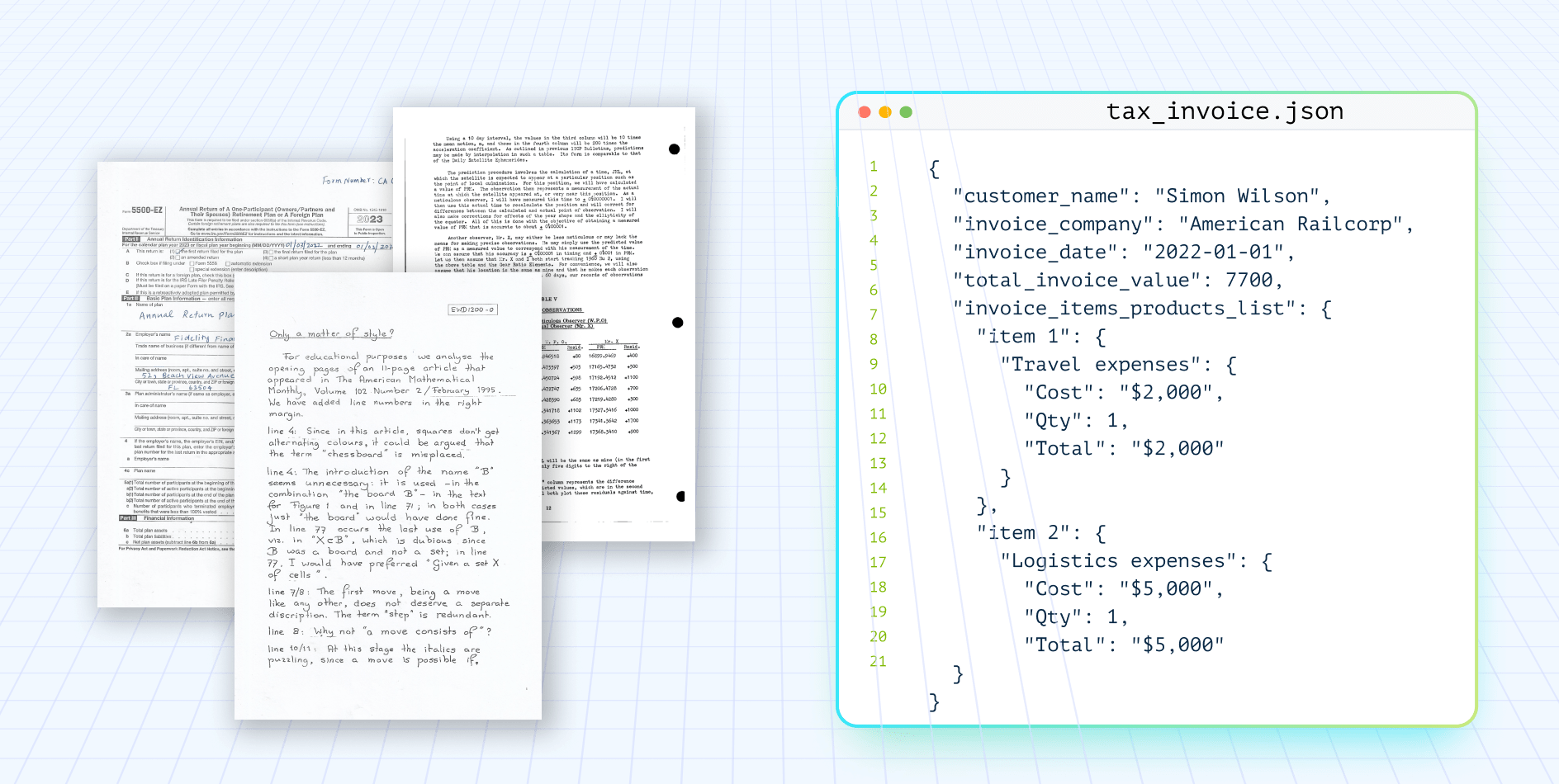
A document OCR API is a programmatic interface that converts scanned PDFs, images, handwritten forms, and complex layouts into structured, machine-readable text — enabling developers to automate data extraction at scale without manual preprocessing.
For teams building LLM pipelines, RAG systems, or document automation workflows, the OCR API is the critical first mile: it determines whether downstream models receive clean, layout-preserved input or noisy, unstructured text that degrades every subsequent step. A robust document OCR API matters because downstream extraction accuracy is only as good as the input it receives.
When tables are flattened, columns are merged, or spatial context is lost, even the most advanced LLMs produce unreliable outputs — making the OCR layer the single highest-leverage point in any document processing pipeline. When evaluating an OCR API, developers should prioritize layout preservation, multi-language support, handwriting recognition, and the ability to handle degraded or noisy scans without manual intervention.
Beyond extraction quality, a well-designed API should offer simple RESTful endpoints, clear status polling, structured JSON responses, and straightforward authentication — so integration takes minutes, not days.
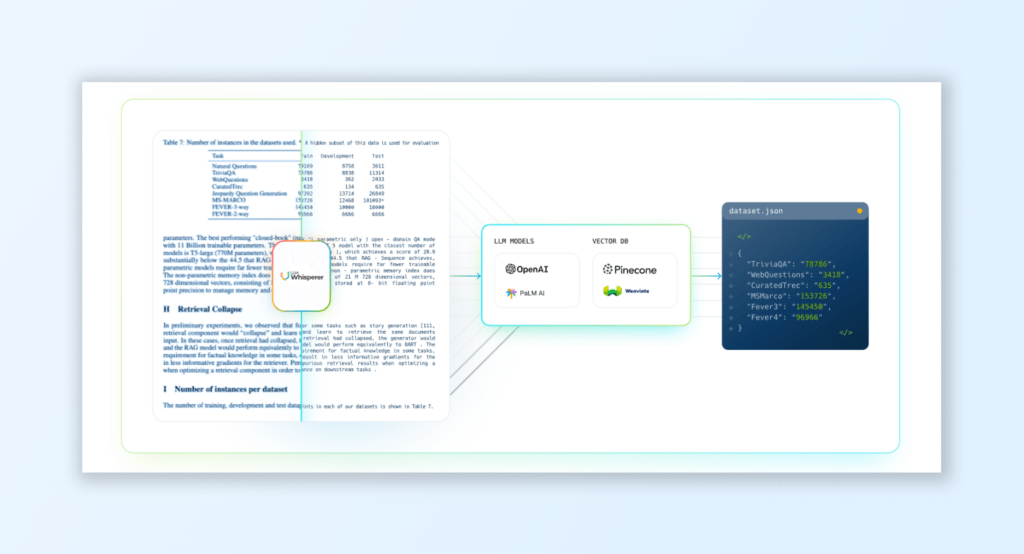
LLMWhisperer is a document OCR API built specifically for modern AI-powered document processing. It preserves document structure across scanned PDFs, handwritten forms, multi-column layouts, and complex tables, returning output that is immediately usable by OpenAI, Claude, or any downstream LLM — with no template setup, no retraining, and no post-processing cleanup required.
This article walks through why document OCR APIs have become essential infrastructure, how LLMWhisperer compares to traditional engines like Tesseract, the pre-processing techniques that make it effective, and two hands-on examples — one using the Playground and one using the API directly in Postman.
TL;DR
If you wish to skip directly to the solution section, where you can see how LLMWhisperer OCR API handles document types of any complexity — document scans, images, PDFs with complex tables, checkboxes, and handwriting etc, click here.
Test LLMWhisperer Document OCR API for free — Instant results, no signup required
If you want to skip straight to the tool, see how LLMWhisperer document OCR API handles documents of any complexity — scanned PDFs, handwritten receipts, poorly photographed images, multi-column layouts, and multi-language documents.
See it in action on the Playground — bring your toughest document and watch it work.
Brief Introduction to LLMWhisperer and Its Document OCR API Capabilities
Overview of LLMWhisperer
LLMWhisperer is an advanced text parser that prepares complex documents, including scanned PDFs, images, and tables, for downstream processing by large language models (LLMs). It focuses on converting unstructured or semi-structured data into organized, actionable formats like JSON. LLMWhisperer shines in handling intricate layouts, noisy scans, and handwritten text, enabling organizations to streamline document parsing workflows.
LLMWhisperer is not powered by AI or LLMs for the OCR process. Instead, it enhances OCR outputs by applying intelligent parsing mechanisms that make the data more comprehensible for LLMs and other systems.
LLMWhisperer: The best document OCR API for AI workflows
Modern Document OCR API: Key Features and Capabilities
Structured Data Extraction
LLMWhisperer excels at extracting structured text from scanned or image-based documents. It identifies key elements such as text zones, tables, and annotations, organizing them into usable formats.
Complex Layout Handling
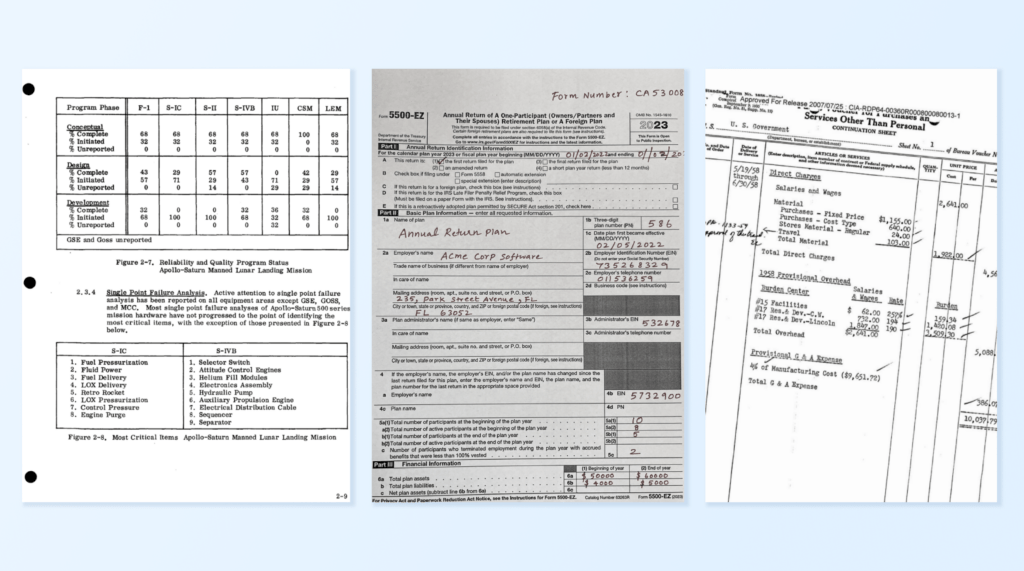
It preserves the structure of intricate document layouts, such as multi-column designs, nested tables, and checkboxes. This ensures accurate parsing while maintaining the context of the original document. Example: Processing a multi-page bank statement with overlapping tables and transaction details without losing alignment or context.
Pre-Processing for Noisy or Low-Quality Scans
LLMWhisperer improves the quality of noisy scans by applying filters, de-skewing, and contrast adjustments. This pre-processing enhances the accuracy of OCR outputs. Example: Extracting policyholder details from a faded, watermarked insurance document with precision.
Multilingual Document Parsing
It supports multiple languages, allowing global enterprises to parse documents containing diverse scripts and mixed-language content. Example: Parsing an international invoice containing English, German, and French sections.
OCR reader API that talks to your systems
Available as an API, LLMWhisperer integrates effortlessly into existing workflows, enabling organizations to preprocess documents on the fly. This flexibility ensures scalability and adaptability across various document types.
Get started with LLMWhisperer: Best Document OCR API for AI Document Worklfows
Why choose LLMWhisperer for the document OCR API?
Adaptability Across Document Types: LLMWhisperer handles printed, handwritten, and mixed-layout documents, making it ideal for businesses that process diverse data sources.
Ease of Integration: Its API-based architecture allows seamless integration into existing systems, ensuring smooth data processing pipelines without overhauling infrastructure.
Foundational Parsing for LLMs: By enhancing and structuring OCR outputs, LLMWhisperer maximizes the potential of LLMs, ensuring accurate and context-aware insights from complex document data.
With its robust capabilities, LLMWhisperer transforms how businesses process scanned documents and prepare data for AI-driven applications, delivering efficiency, accuracy, and scalability.
How Does LLMWhisperer Stack Up Against Other OCR APIs?
Understanding the gap between traditional and modern OCR is one thing — choosing the right tool for your stack is another.
To help developers evaluate the best OCR API for their use case, we put five leading solutions head-to-head:
Pre-Processing with LLMWhisperer: How It Helps Scanned PDF/Image OCR
Pre-processing is a critical step in ensuring accurate and efficient Optical Character Recognition (OCR) for scanned PDFs and image-based documents. LLMWhisperer stands out as a powerful text parser by employing advanced pre-processing techniques to address common challenges such as noisy scans, complex layouts, and unstructured formats. These enhancements not only improve OCR accuracy but also prepare the extracted data for seamless downstream analysis.
Key Pre-Processing Techniques in LLMWhisperer
Noise Removal Noise, such as smudges, watermarks, stains, or digital artifacts, can significantly impact OCR performance. LLMWhisperer’s noise removal techniques enhance document clarity, ensuring that irrelevant marks do not interfere with text recognition.
How It Works:
Filters out unwanted artifacts, such as background patterns or faint text shadows.
Enhances text contrast for better recognition of faint or degraded text.
Layout Preservation Many scanned PDFs and image-based documents have complex layouts, including multi-column text, tables, or overlapping sections. LLMWhisperer preserves the original structure of these documents during pre-processing, enabling accurate text parsing without distorting the context or relationships between data points.
How It Works:
Recognizes document zones (headers, footers, tables, and text blocks) and maintains their spatial arrangement.
Prepares tabular data and column-based layouts for structured extraction.
Format Optimization Scanned documents often suffer from issues like skewed alignment, uneven text spacing, or non-standard formats. LLMWhisperer applies format optimization techniques to align and structure the content for maximum OCR accuracy.
How It Works:
De-skewing: Corrects tilted or misaligned pages, ensuring text is horizontal for proper segmentation.
Standardization: Adjusts inconsistent spacing, line breaks, and margins to create a uniform layout.
Pre-OCR Splitting: Breaks large blocks of text into manageable segments for more precise recognition.
Live coding session on data extraction from a scanned PDF form with LLMWhisperer
You can also watch this live coding webinar where we explore all the challenges involved in scanned PDF parsing. We’ll also compare the capabilities of different PDF parsing tools to help you understand their strengths and limitations.
Benefits of LLMWhisperer’s Pre-Processing Techniques
Enhanced OCR Accuracy Pre-processing directly improves the quality of the input data, enabling OCR engines to identify characters, words, and layouts more precisely.
Impact: Reduces errors caused by poor scan quality, such as misreading “O” as “0” or skipping faded text.
Preservation of Document Context Maintaining the document’s original layout ensures that the relationships between data points remain intact, which is crucial for downstream analysis.
Impact: Data extracted from tables, forms, and columns is contextually accurate and ready for further processing.
Support for Diverse Document Types LLMWhisperer’s pre-processing techniques work seamlessly across a variety of documents, including handwritten forms, scanned PDFs, and image-based text.
Impact: Expands the range of documents that businesses can process automatically, minimizing the need for manual intervention.
Improved Downstream Analysis Pre-processed and structured data ensures smooth integration with analytics platforms, databases, or AI models, enabling real-time insights and decision-making.
Impact: Eliminates the need for manual corrections or additional formatting steps.
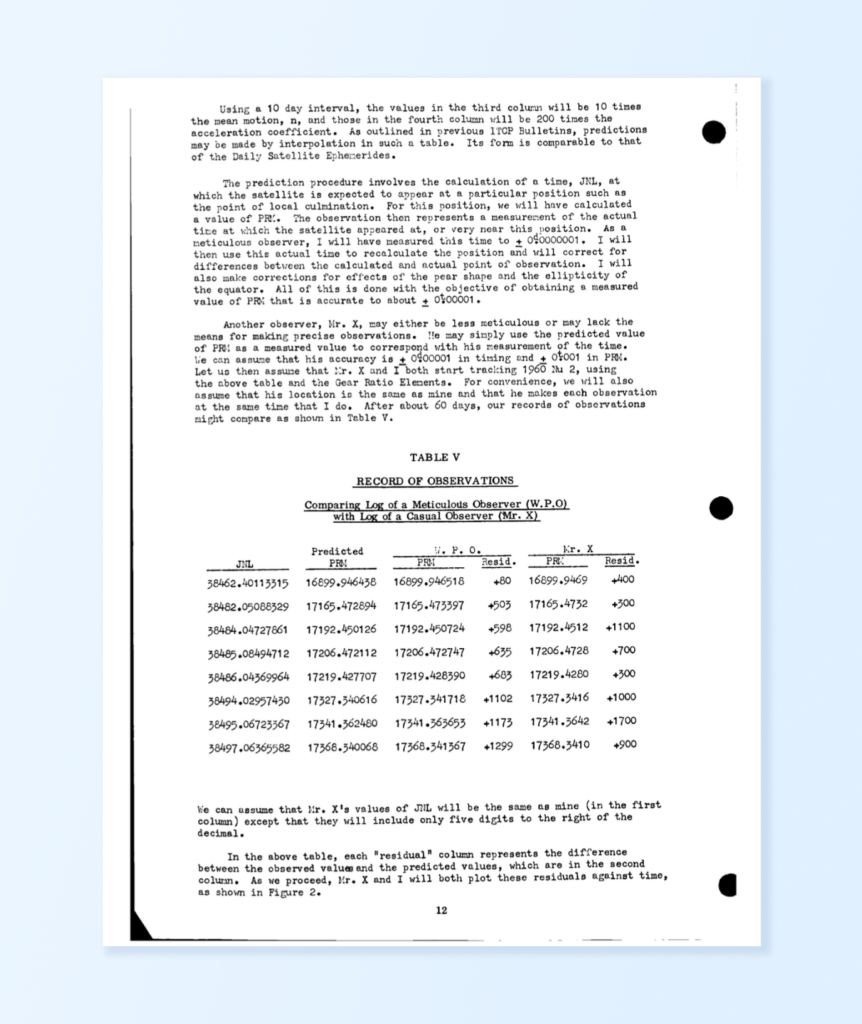
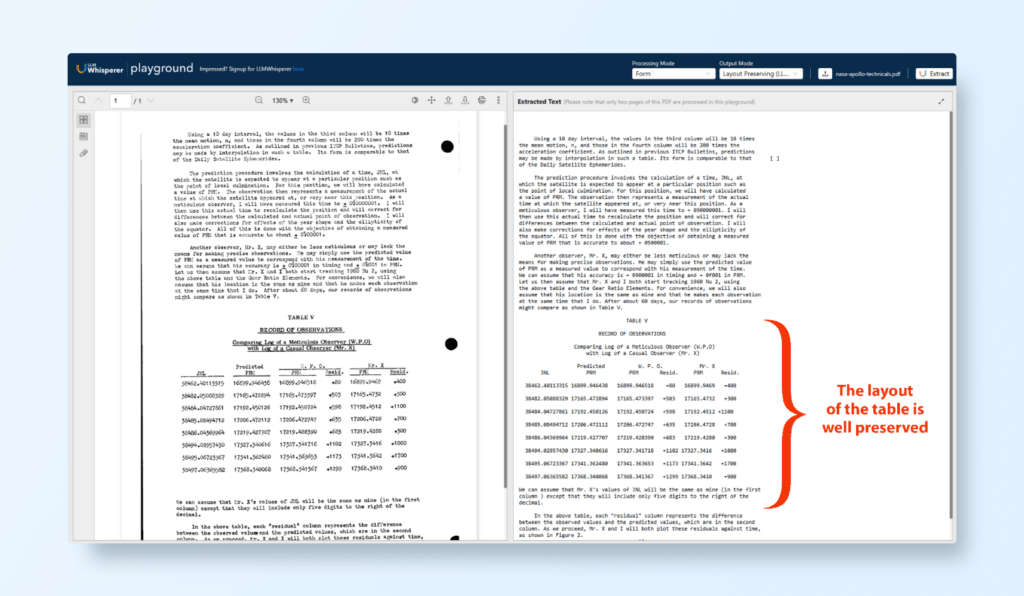
Let’s take the example of processing a scanned document, such as a page from the Apollo Space Mission Manual. Using LLMWhisperer, this process becomes seamless and efficient:
Noise Removal LLMWhisperer eliminates age-related degradation like faded text, stains, or handwritten annotations in the margins, ensuring the document is clean and readable for OCR extraction.
Layout Preservation The structured format of the manual, including diagrams, tables, and text, is preserved. This ensures that critical information such as captions, headers, and content flows remain in their original context.
Format Optimization Any misaligned text or uneven spacing caused by outdated scanning methods is corrected. This results in a clear, professionally aligned document ready for accurate data parsing.
Why LLMWhisperer’s Pre-Processing Is Essential
LLMWhisperer’s robust pre-processing ensures that OCR systems perform optimally, even under challenging conditions like noisy, low-quality scans or complex layouts. By preserving the integrity of the document while enhancing its quality, LLMWhisperer enables businesses to unlock valuable insights from scanned PDFs and image-based text with unparalleled accuracy and efficiency.
Two Practical Examples Using LLMWhisperer
LLMWhisperer is a powerful tool for extracting text and structured data from scanned documents and images. Below, we showcase two practical examples to demonstrate its capabilities:
Example 1: Using LLMWhisperer Playground to Extract Text from the Apollo Space Mission Manual
The Apollo Space Mission Manual is a historical document with a mix of structured tables, illustrations, and descriptive text. By using the LLMWhisperer Playground, we can see how effectively it processes such a complex document.
Upload the Document Drag and drop a scanned Apollo Space Mission Manual page or upload the file manually.
Initiate Processing Once uploaded, click the Process Document button. LLMWhisperer begins analyzing the document.
Observe the Magic In just seconds, the extracted text and data appear on your screen.
Preserved Layout: LLMWhisperer retains the document’s original structure, keeping sections like headers, tables, and diagrams intact.
Clean Text Extraction: Even faded or poorly scanned text is accurately recognized and digitized.
Tables and Diagrams: Complex tables are extracted precisely, with rows and columns preserved in a structured format, ready for downstream processing.
Benefits Demonstrated
Effortlessly handles scanned documents with mixed content.
Ensures no loss of context or structure, making the document ready for archival or analysis.
Whether digitizing scanned data or processing technical manuals, LLMWhisperer Playground shows how easily it bridges the gap between scanned documents and machine-readable data.
Get started with LLMWhisperer: Best Document OCR API for AI Document Worklfows
Example 2: Using LLMWhisperer Document OCR API in Postman to Extract Text from a Handwritten Scanned Image (PNG)
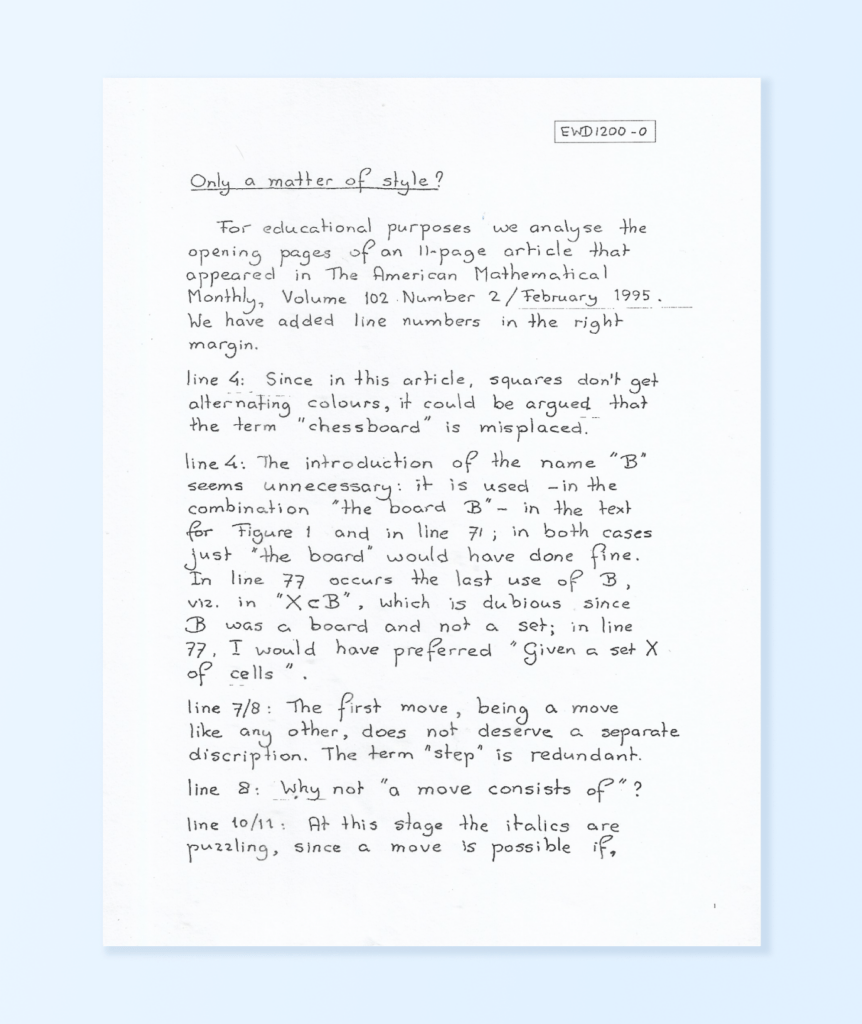
For this example, let’s demonstrate the capabilities of the LLMWhisperer API to process a handwritten scanned image (e.g., a PNG file of notes or forms).
Step-by-Step OCR API Workflow Using Postman
Sign Up and Get Document OCR API Key
Extract text from documents (PDFs, images, etc.) using a simple three-step async workflow: upload, poll status, retrieve text.
Visit the LLMWhisperer signup page and create an account. Retrieve your API key from the account dashboard. Base URL:https://llmwhisperer-api.us-central.unstract.com/api/v2
Authentication
All requests require your API key in the unstract-key header:
unstract-key: <YOUR_API_KEY>
Step 1 — Upload Document | POST /whisper
Submit a document for OCR processing. Send the file as raw binary data. The response includes a whisper_hash you’ll use in the next two steps.
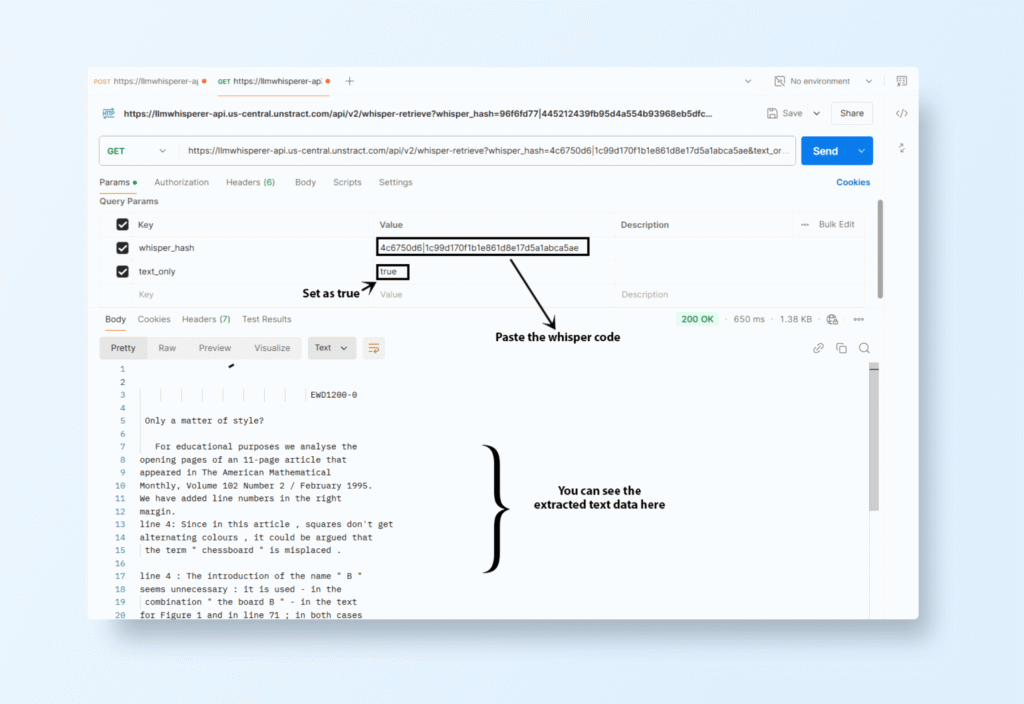
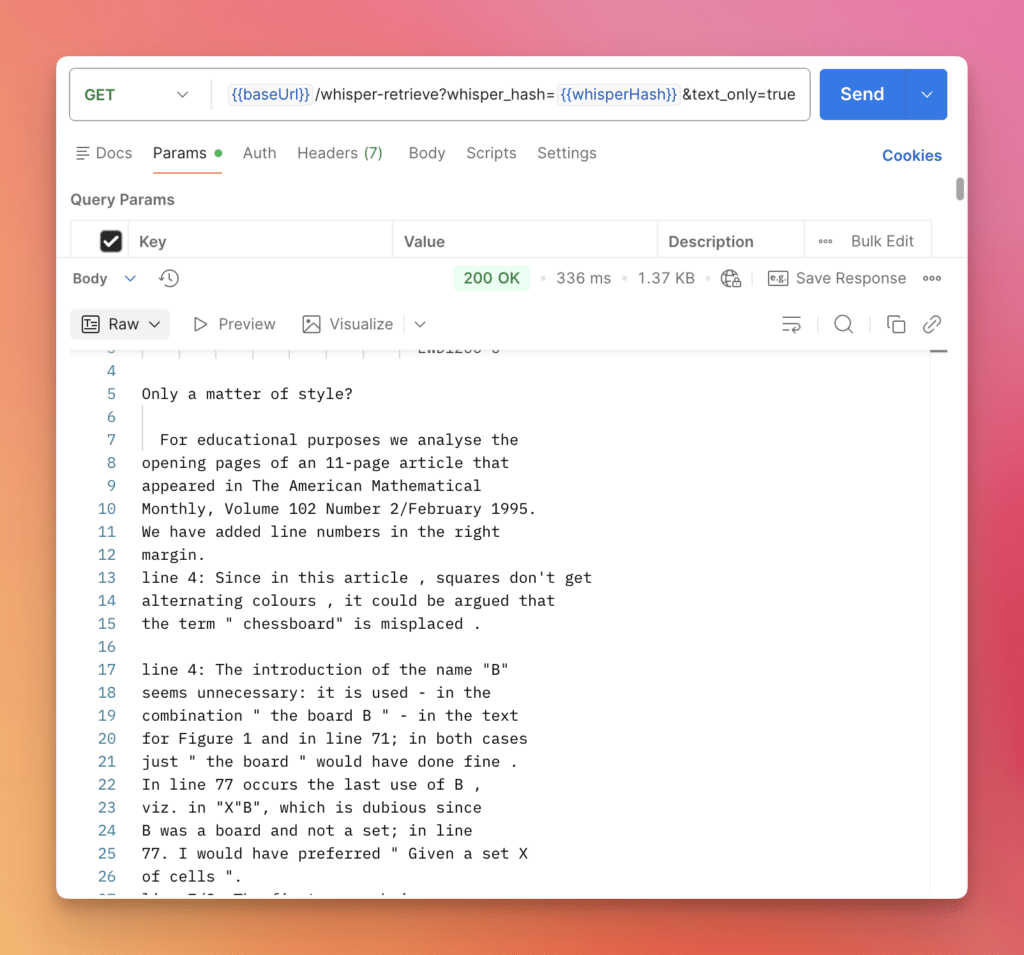
Step 3 — Retrieve Extracted Text | GET /whisper-retrieve
Once the document is fully processed, fetch the OCR-extracted content.
Query Parameters:
whisper_hash (required, string) — The hash returned from Step 1
text_only (optional, boolean) — When true, returns just the plain text. When false or omitted, returns the full JSON response with text, metadata, and confidence scores.
result_text — The full extracted text with spatial formatting preserved. Tables, columns, and whitespace are maintained so the output closely mirrors the original document layout. Page breaks are indicated by <<<\f.
metadata — Per-page structural analysis of the document, keyed by page number. Each page entry includes:
font_info — Average and standard deviation of character height/width across the page, useful for detecting font consistency or mixed-font documents.
potential_subtitles — An array of detected headings and section labels with their position in the text and approximate section length. Helpful for programmatically parsing document structure.
line_count, line_start, line_end — Line indexing for the page.
line_metadata — An array with one entry per line of extracted text. Each entry is a four-element array: [x_position, y_position, line_height, page_width]. Zero-valued entries represent blank/separator lines. This is useful for reconstructing exact spatial positions of text on the page.
confidence_metadata — An array with one entry per line. Most lines return empty arrays (high-confidence extractions). When the OCR engine is less certain about a word, it flags it here with the text, its character offset in the line, pixel width, and a confidence score between 0 and 1. This lets you identify and handle low-confidence regions programmatically.
whisper_metadata — Summary stats about the extraction job itself: processing mode used (e.g. "form"), total/requested/processed page counts, and average processing time per page.
Retrieve your current billing cycle usage, quota limits, and page counts broken down by processing mode. Useful for monitoring consumption and avoiding overages.
monthly_quota — Total pages allowed per billing cycle.
current_page_count — Total pages processed this cycle across all modes.
current_page_count_native_text / low_cost / high_quality / form — Page counts broken down by the four processing modes, so you can see which modes are consuming your quota.
daily_quota — Daily page limit. A value of -1 means no daily cap is enforced.
overage_page_count — Pages processed beyond your monthly quota.
today_page_count — Pages processed so far today.
File formats supported by LLMWhisperer OCR API:
Word Processing
DOCX – Microsoft Word Open XML
DOC – Microsoft Word
ODT – OpenDocument Text
Presentation
PPTX – Microsoft PowerPoint Open XML
PPT – Microsoft PowerPoint
ODP – OpenDocument Presentation
Image
BMP – Bitmap Image
GIF – Graphics Interchange Format
JPEG / JPG – Joint Photographic Experts Group
PNG – Portable Network Graphics
TIF / TIFF – Tagged Image File Format
WEBP – Web Picture Format
Spreadsheet
XLSX – Microsoft Excel Open XML
XLS – Microsoft Excel
ODS – OpenDocument Spreadsheet
Document & Plain Text
PDF – Portable Document Format
TXT – Plain Text
CSV – Comma-Separated Values
JSON – JavaScript Object Notation
TSV – Tab-Separated Values
XML – eXtensible Markup Language
HTML – HyperText Markup Language
LLMWhisperer OCR API Pricing & Deployment Options
LLMWhisperer is built with flexibility and scalability at its core, offering transparent, usage-based pricing that adapts to your operational needs, whether you’re an agile startup or a large-scale enterprise.
Usage-Based Pricing
Pricing is calculated primarily based on the number of pages processed, with further granularity based on the selected mode of extraction:
native_text – Ideal for extracting embedded text from digital PDFs.
low_cost – Optimized for affordability with lightweight image-based extraction.
high_quality – Designed for high-accuracy extraction from complex or noisy scans.
form – Specialized mode for structured form-like documents with layout preservation.
This tiered approach ensures you’re only paying for the level of fidelity and compute you need and nothing more. Full pricing details here.
LLMWhisperer also supports tagging-based usage tracking, allowing you to monitor resource consumption across different projects, teams, or clients.
On-Premise Deployment
For enterprises with sensitive data, strict regulatory environments, or air-gapped infrastructures, LLMWhisperer provides full support for on-premise deployments.
Key benefits include:
Full control over your data and document flow
Alignment with internal compliance and security policies
Seamless integration into internal pipelines and legacy systems
Ability to run the full stack behind firewalls or within private cloud environments
Deployment can be containerized and orchestrated with Kubernetes, ensuring scalability, monitoring, and update management remain enterprise-grade.
Operational Transparency
LLMWhisperer includes powerful Usage Metrics and Usage Stats APIs to give your team visibility into:
Total pages processed by mode, team, or project
Historical breakdowns by date for budget tracking
Bottlenecks or unexpected usage spikes
Exportable reports for billing and audits
With built-in observability and forecasting tools, you can maintain cost predictability, enforce quotas, and align usage with procurement policies.
Why LLMWhisperer OCR API Is the Best Choice for Both Developers and LLM-Powered Solutions
LLMWhisperer is purpose-built for the LLM-native era, bridging the gap between complex, real-world documents and clean, structured, LLM-ready outputs.
Unlike traditional OCR tools that require heavy pre-processing, format normalization, or template-based logic, LLMWhisperer removes the friction.
You can feed it PDFs, scans, spreadsheets, or even degraded images, without worrying about layout quirks, noise, or inconsistent structure.
It intelligently handles messy inputs like handwritten forms, multi-column reports, or skewed pages while preserving both layout and semantic meaning when needed.
With powerful APIs, intuitive defaults, and deep customization options, it strikes the perfect balance between ease of use and technical depth.
Designed for developers and backed by a team focused on modern AI-first workflows, LLMWhisperer evolves rapidly to meet the growing demands of LLM-based applications.
Its standout strengths include:
Extensive file support: PDFs, DOCX, XLSX, images, scans, and more.
Minimal code, fast results: Just upload and extract.
Structured output: Layout-preserving text that is ready for pipelines.
On-prem or cloud: Flexible deployment for any scale or sensitivity.
Whether you’re building internal tools, AI assistants, or document automation pipelines, LLMWhisperer gives you everything you need to go from raw input to actionable intelligence fast.
Head-to-Head: Five Document OCR APIs Tested on Real Documents
In this blog post, We tested five leading OCR APIs — Tesseract, PaddleOCR, Azure Document Intelligence, Amazon Textract, and LLMWhisperer — to see how they stack up on accuracy, layout handling, multi-language support, and ease of integration.
Feature
Tesseract
PaddleOCR
Azure Document Intelligence
Amazon Textract
LLMWhisperer
Accuracy
High
Very High
Very High
Extremely High
Superior
Language Support
100+
80+
Multi-language
Multi-language
Multi-language
Complex Layouts Handling
Moderate
High
Very High
Very High
Superior
Structured Data Extraction
Low
Moderate
Very High
Extremely High
Superior
Deployment Flexibility
High (Local)
High (Local)
High (Cloud)
High (Cloud)
High (Cloud)
Ease of Use
Moderate
Easy
Easy
Moderate
Easy
Cost
Free
Free
Paid
Paid
Paid
Custom Training
Yes
Yes
Yes
No
Yes
Integration
Moderate
High
High
High
High
Security and Compliance
N/A
N/A
High
High
High
Introduction to Unstract: AI-Powered Unstructured Data Extraction
Unstract is a transformative platform designed to simplify the processing of unstructured documents by converting them into actionable, structured data. As a powerful companion to LLMWhisperer, Unstract leverages advanced AI and LLMs to refine and organize outputs from diverse document types such as invoices, tax forms, resumes, and handwritten notes. Its robust capabilities eliminate the complexities of manual data extraction, enabling seamless workflows across industries.
Unstract is an open-source no-code LLM platform to launch APIs and ETL pipelines to structure unstructured documents. Get started with this quick guide.
How Unstract Complements LLMWhisperer
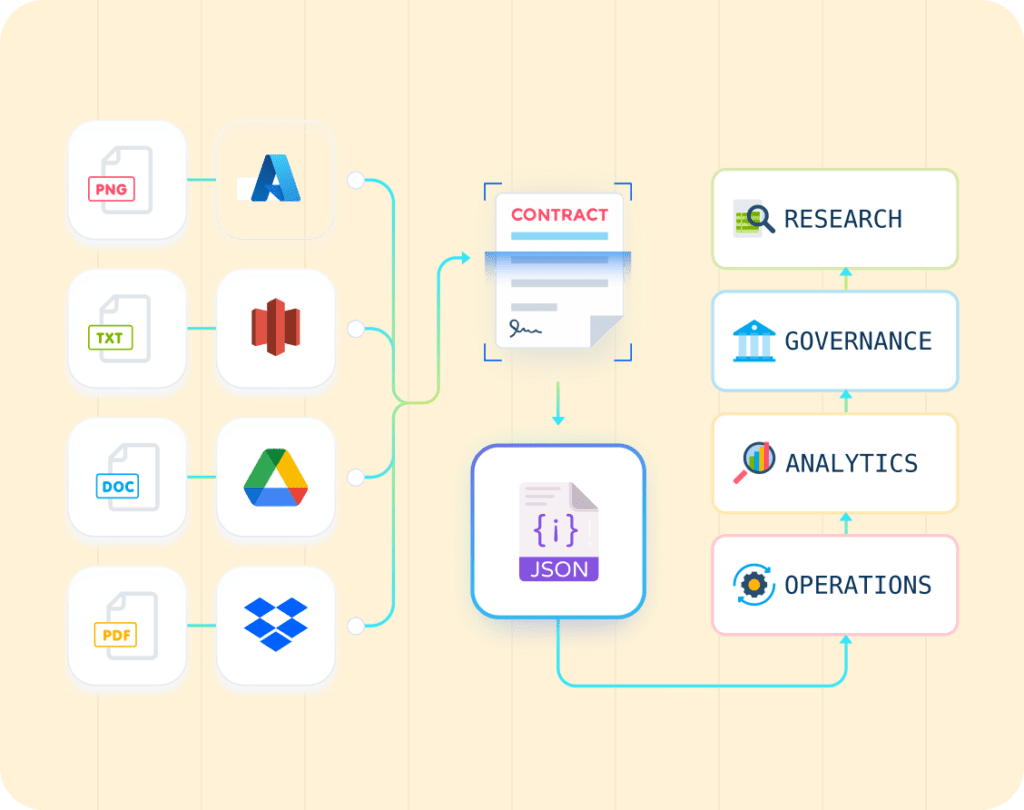
LLMWhisperer excels at extracting text and context from scanned PDFs, images, and other unstructured files. Unstract builds upon this foundation by further structuring and enhancing the extracted data, ensuring it is ready for use in downstream applications such as analytics, compliance, or CRM integration.
Seamless Integration: Outputs from LLMWhisperer are fed into Unstract for advanced processing, including context-aware data structuring and organization.
AI-Driven Refinement: While LLMWhisperer parses data, Unstract employs AI and LLMs to interpret relationships between document elements, preserving context and ensuring accuracy.
Adaptability to Document Variability: Unstract accommodates various layouts, designs, and content formats without requiring constant reconfiguration, making it highly efficient for dynamic workflows.
Key Features of Unstract
Dynamic Data Structuring
Unstract converts unstructured data, such as raw outputs from LLMWhisperer, into structured formats like JSON, CSV, or databases.
It uses machine learning algorithms to detect patterns, relationships, and hierarchies within documents.
Example: For a scanned tax form, Unstract organizes extracted fields such as “Employer Name,” “Tax Year,” and “Form ID” into structured JSON, ready for integration with financial systems.
No Need for Constant Retraining
Unlike traditional systems, Unstract adapts to changes in document formats and layouts without requiring retraining or remodelling.
This flexibility reduces maintenance overhead and ensures consistent performance even as documents evolve.
Example: A recruitment agency can process resumes with varying designs and fonts without modifying the tool each time a new style is encountered.
Multi-Format Document Support
Unstract handles outputs from diverse sources, including handwritten forms, scanned PDFs, and image-based data.
It manages complex layouts like multi-column formats, tables, or embedded diagrams.
Example: In an insurance claims process, Unstract can handle scanned accident reports, structured forms, and handwritten notes simultaneously, delivering consistent results.
AI-Enhanced Context Understanding
Unstract uses AI to understand the context of the extracted data, ensuring that important relationships—like linking totals to invoice numbers or matching candidates’ skills to job descriptions—are preserved.
The AI/LLM Advantage for Document Processing
Unstract integrates with powerful AI/LLMs to enhance its processing capabilities:
Contextual Awareness: AI algorithms allow Unstract to interpret nuanced relationships between extracted fields, ensuring greater accuracy.
Scalable Automation: Whether processing thousands of resumes or extracting data from a batch of handwritten tax forms, Unstract scales effortlessly to meet enterprise demands.
Minimal Human Intervention: With intelligent pre-configuration and adaptability, Unstract reduces the need for manual oversight, improving operational efficiency.
Why Choose Unstract for Document Processing Automation?
Efficiency and Speed: Automates time-consuming tasks like manual data entry and document parsing, delivering results in minutes.
Reliability Across Formats: Adapts to document changes without requiring constant reprogramming or updates.
Seamless Workflow Integration: Outputs can be directly integrated into downstream systems, such as ERPs, CRMs, or analytics platforms.
By complementing the text parsing capabilities of LLMWhisperer with advanced data structuring powered by AI, Unstract transforms the way organizations handle unstructured data. Its adaptability and intelligence make it an indispensable tool for any business seeking to optimize document processing workflows.
Data Extraction from a Scanned Handwritten Tax Form Using Unstract
Extracting structured data from scanned handwritten tax forms is a crucial step in automating tax reporting and compliance workflows. Using Unstract’s Prompt Studio, organizations can tailor prompts to extract critical information such as the taxpayer’s name, total assets, and employer details. Here’s a detailed guide to setting up Unstract to process a scanned handwritten tax form, complete with API integration via Postman.
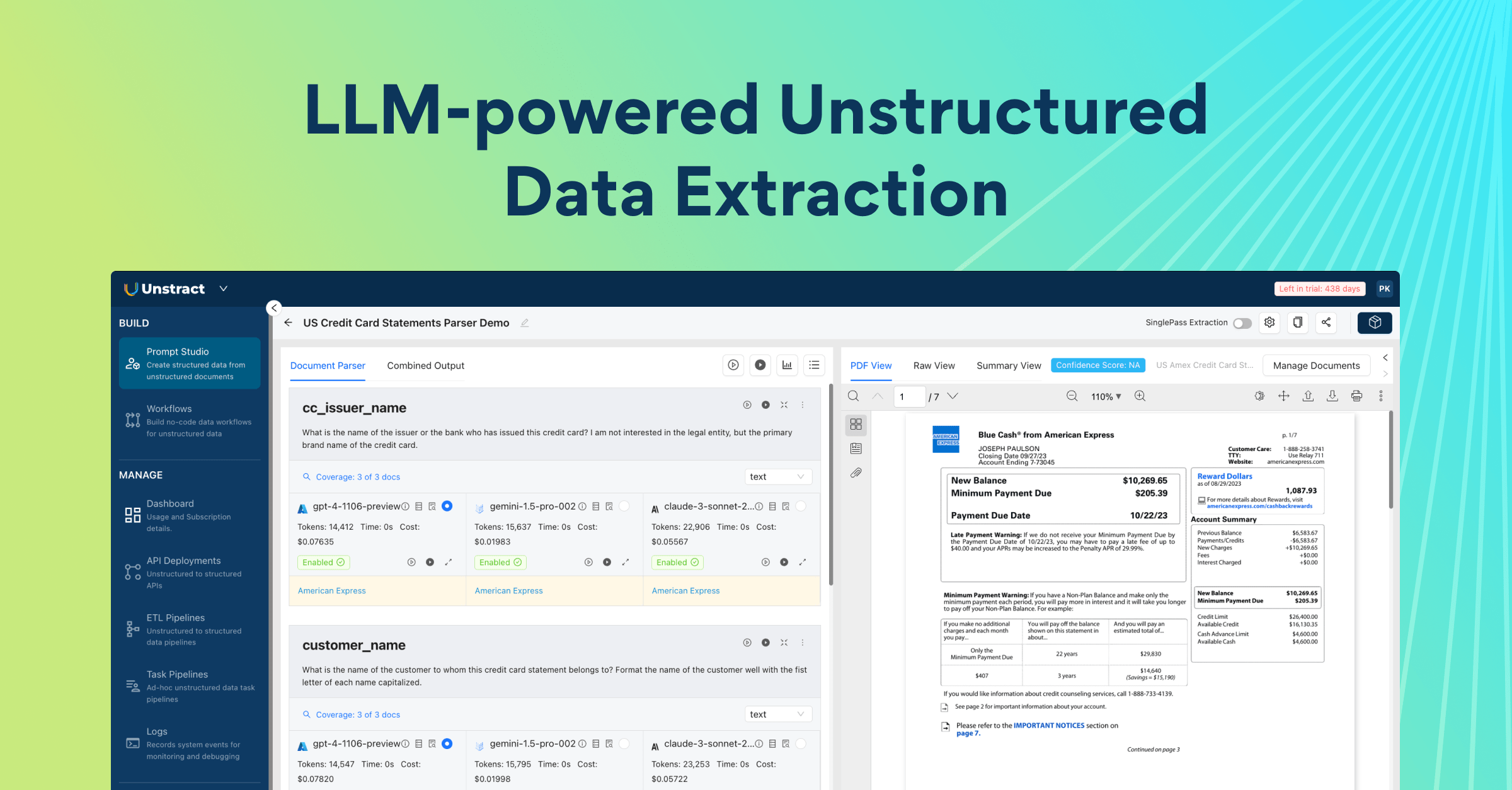
Step 1: Setting Up the Project in Prompt Studio
Access Prompt Studio
Log into your Unstract account and navigate to the Prompt Studio page from the dashboard.
Click New Project to create a project tailored for tax form processing.
Provide details:
Tool Name: “Tax Form OCR Tool”
Description: “Extracts critical fields such as taxpayer details and financial information from tax forms.”
Upload the Handwritten Tax Form
Go to the Manage Documents section and click Upload Files.
Upload the scanned tax form PDF provided.
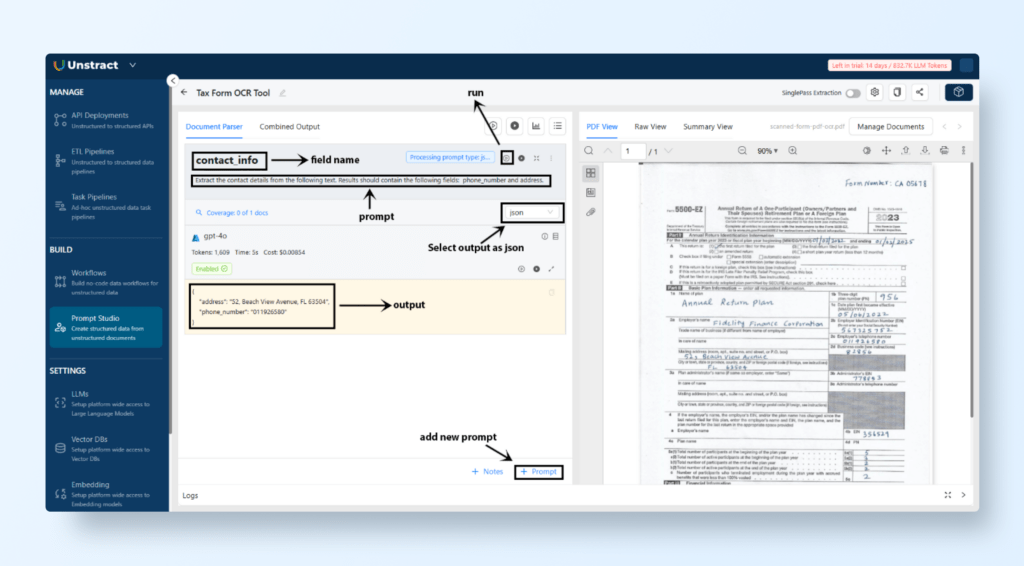
Write Tailored Prompts for Key Data Fields: Craft prompts to extract specific fields from the tax form. Here are examples:
Set the output type as ‘json’.
Field Name: contact_info
Prompt Text: “Extract the contact details from the following text. Results should contain the following fields: phone_number and address.”
We can add more prompts per the requirements to extract the desired info.
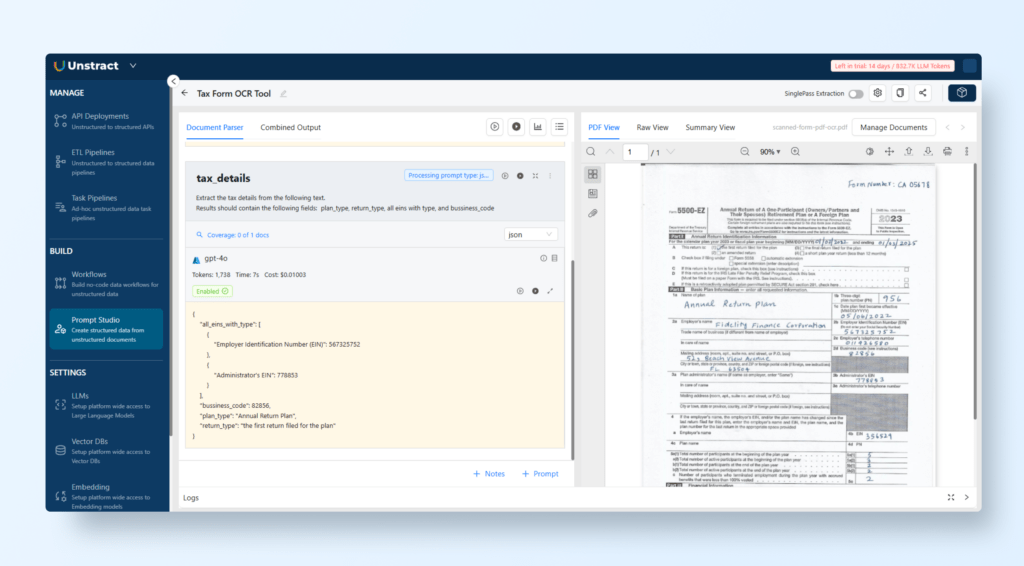
Let’s extract the Tax Details.
Field Name: tax_details
Prompt Text: ” Extract the tax details from the following text. Results should contain the following fields: plan_type, return_type, all eins with type, and bussiness_code.”
Below is the output:
{
  "all_eins_with_type": [
    {
      "Employer Identification Number (EIN)": 567325752
    },
    {
      "Administrator's EIN": 778853
    }
  ],
  "bussiness_code": 82856,
  "plan_type": "Annual Return Plan",
  "return_type": "the first return filed for the plan"
}
Run and Test Prompts
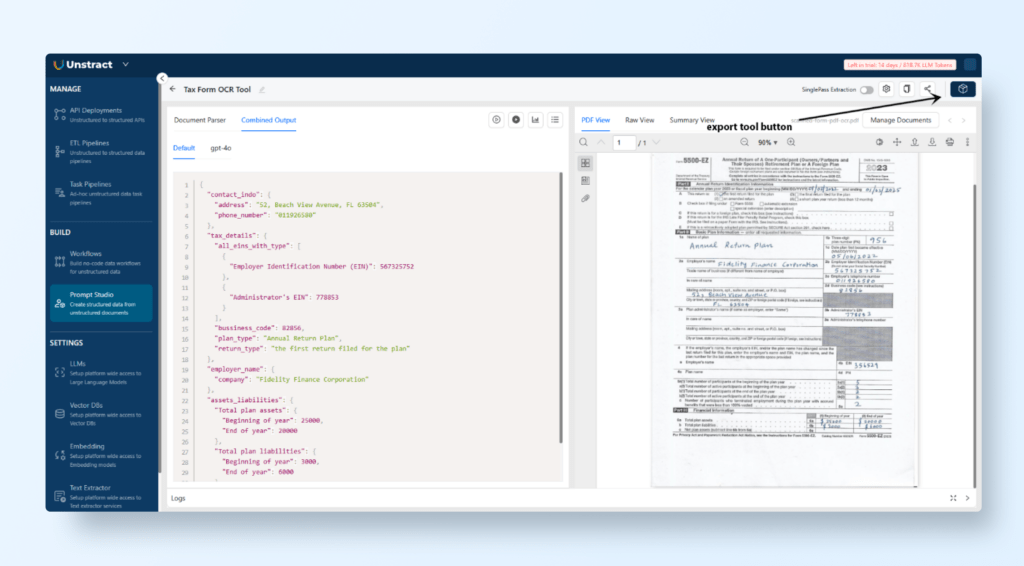
After creating the prompts, click Run to execute them and check the extracted data.
Verify the output in the Combined Output tab, which displays the results in structured JSON format.
Step 2: Export and Deploy the Tool as an API
Export as Tool
Once the prompts have been validated, click on Export as Tool to convert the project into a usable tool.
Assign a name like “Handwritten Tax Form Parser API.”
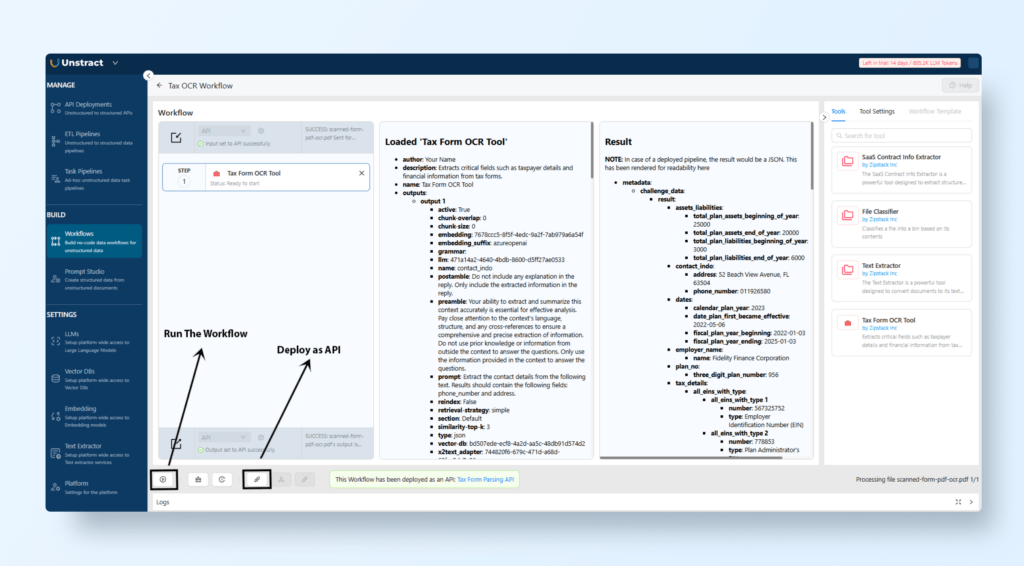
Create a Workflow
Navigate to Build → Workflows and click New Workflow.
Drag and drop the exported tool into the workflow area.
Define:
Input: Accept file uploads (PDFs).
Output: Return extracted data in JSON format.
Test the Workflow
Run the workflow
Upload the document
Click on continue
You will see the output on the screen of the loaded tool and the result of the tool.
Deploy as an API
Go to Manage → API Deployments and click + API Deployment.
Provide a name, such as “Tax Form Parsing API.”
Retrieve the API URL and generate an API key for integration.
Step 3: Testing the API via Postman
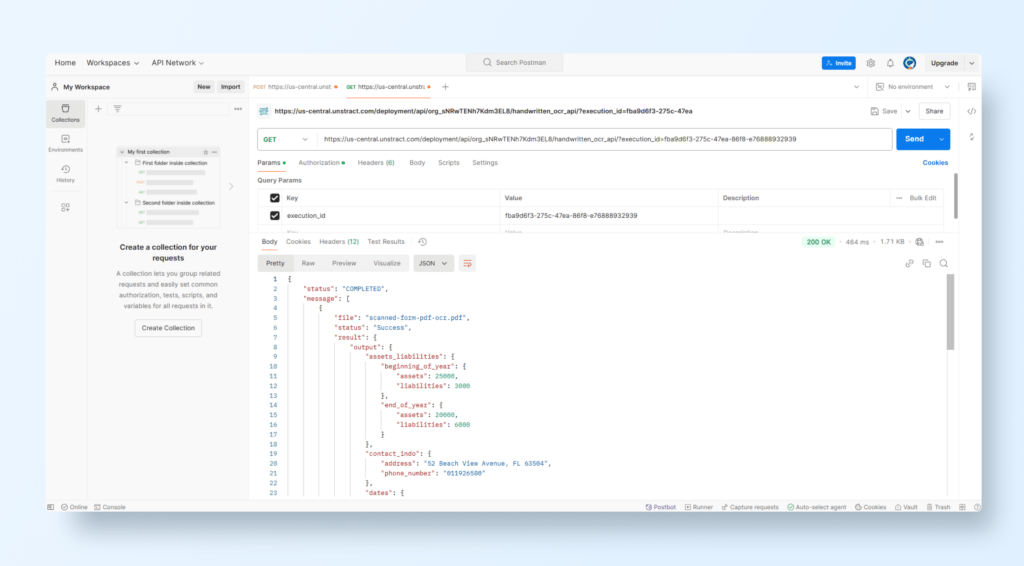
Configure POST Request
Open Postman and create a POST Request.
API URL: Paste the deployment URL from Unstract.
Authorization:
Go to the Headers tab.
Add:
Key: Authorization
Value: unstract-key YOUR_API_KEY (replace with the generated API key).
Body:
Switch to the Body tab.
Select form-data format.
Add:
Key: files
Type: File
Value: Upload the scanned tax form.
Send the Request
Click Send.
Below is the output
View JSON Output
Below is the JSON output of the uploaded handwritten tax form.
Key Advantages of Using Unstract for Tax Form Processing
Efficiency: Automates the extraction of detailed data fields without manual effort.
Scalability: Handles multiple tax forms simultaneously with high accuracy.
Integration Ready: Outputs are available in structured JSON and can be integrated with tax software or databases.
Flexibility: Prompts can be customized for other financial forms or compliance documents.
By leveraging Unstract and its seamless integration with LLMWhisperer, organizations can extract meaningful data from even the most complex handwritten tax forms with unparalleled ease and precision.
LLMWhisperer Document OCR API: Conclusion
The synergy between LLMWhisperer and Unstract represents a groundbreaking approach to transforming unstructured documents into actionable data. LLMWhisperer, with its robust text parsing capabilities, serves as a reliable pre-processing layer, ensuring that even the most complex or degraded scanned documents are converted into structured text.
Unstract complements this by leveraging advanced AI and LLM-powered workflows to extract, organize, and present the data in meaningful formats such as JSON, empowering businesses to streamline processes and make data-driven decisions.
OCR APIs, such as those offered by LLMWhisperer, are revolutionizing how organizations handle document-heavy workflows.
If you want to take LLMWhisperer OCR API for a test drive quickly, you can check out our free playground.
By automating data extraction, these tools eliminate manual inefficiencies, reduce human error, and enhance scalability across industries. Whether dealing with handwritten tax forms, complex tables, or multi-language documents, the ability to seamlessly integrate OCR APIs into existing systems enables businesses to unlock the value hidden within their unstructured data repositories.
In an era driven by digital transformation, the integration of solutions like LLMWhisperer and Unstract into business workflows underscores the potential of technology to simplify, accelerate, and optimize operations.
Sign up for our free trial of Unstract if you want to try it out quickly. More information here.
As document processing demands grow, these tools pave the way for a future where unstructured data is no longer a bottleneck but a competitive advantage, enabling enterprises to operate with precision and agility in a fast-paced digital landscape.
Get started with LLMWhisperer: Best OCR API for AI Document Worklfows
Discover how LLMWhisperer, Unstract’s dedicated OCR API, prepares documents for peak LLM performance and sets standards for LLM-ready outputs.
What makes LLMWhisperer the best OCR API for AI-native document processing?
LLMWhisperer is the best OCR API because it goes beyond raw text extraction — it preserves layout, tables, checkboxes, and handwriting. Unlike traditional ocr api tools, it delivers structured, LLM-ready output without pre-processing.
How does the LLMWhisperer document OCR API handle complex layouts like multi-column reports?
The document ocr api uses layout-preserving modes to retain spatial relationships, column boundaries, and nested tables. This ensures that financial reports, research papers, and forms are extracted with structure intact.
Can I use LLMWhisperer as an invoice OCR API to extract line items and totals?
Yes — as an invoice ocr api, LLMWhisperer extracts vendor names, dates, line items, quantities, prices, and totals from scanned or digital invoices. It supports both form and layout_preserving modes for maximum accuracy.
What output formats and customization options does this OCR API offer?
This ocr api supports text for plain extraction and layout_preserving for structure-rich output. You can also enable line numbers, vertical/horizontal markers, and adjust filters like median_filter_size or gaussian_blur_radius for noisy scans.
How do I get started with the best OCR API for AI workflows?
Sign up for a free LLMWhisperer account, generate an API key, and use the Python SDK or REST API. With a few lines of code, you can send any document (PDF, image, XLSX) and receive structured, LLM-ready output — no pre-processing required.
UNSTRACT
AI Driven Document Processing
The platform purpose-built for LLM-powered unstructured data extraction. Try Playground for free. No sign-up required.
Engineer by trade, creator at heart, I blend Python, ML, and LLMs to push the boundaries of AI—combining deep learning and prompt engineering with a passion for storytelling. As an author of books and articles on tech, I love making complex ideas accessible and unlocking new possibilities at the intersection of code and creativity.