Automate Accounts Payable OCR: And Where Most OCR Tools Fall Short
Table of Contents
Why Accounts Payable OCR Still Falls Short
Accounts payable looks like a structured business process from the outside. An invoice arrives, someone verifies it, the data is entered into an ERP, approvals are collected, and the payment is released.
The difficult part is what happens between receiving the document and having reliable data available for those downstream steps.
AP teams rarely deal with one clean invoice format. Documents arrive as digital PDFs, scanned copies, email attachments, photographs, spreadsheets, and multi-page statements. One supplier may send a perfectly generated PDF, while another sends a tilted scan with faded text. Line items may span multiple pages.
Purchase order numbers can appear in different locations. Remittance documents may contain dense tables, while vendor forms can include checkboxes, handwritten entries, and spreadsheet-style structures.
This is where traditional OCR often falls short.
Basic OCR is good at answering a relatively simple question: What text appears on this page?
Accounts payable automation needs an answer to a much harder question: What does this information mean, where does it belong, and can another system safely act on it?
Consider an invoice containing an invoice number, PO number, subtotal, tax, total amount, and twenty line items. Recognizing those characters correctly is useful, but it is not enough.
The system also needs to understand which number is the invoice total, which identifier belongs to the purchase order, and which quantity, description, unit price, and amount belong to the same line item.
Once the original layout is flattened or relationships between fields are lost, downstream extraction becomes less reliable.
That explains why some OCR systems appear impressive in controlled demos but struggle with real AP workloads. Clean sample documents do not represent the variety of invoices, remittances, vendor statements, purchase orders, and scanned forms that finance teams actually receive.
Modern accounts payable OCR therefore needs to do more than convert pixels into text. It needs to preserve document structure well enough for the next layer to extract accounting data accurately and consistently.
A more useful way to think about accounts payable OCR software is as the document-understanding layer at the beginning of the AP automation pipeline. Its job is not merely to read a document, but to provide a reliable representation of that document so fields, tables, and relationships can be extracted, validated, and passed into accounting systems.
And that distinction becomes important very quickly: an OCR mistake does not stay inside OCR. It can become a matching failure, an exception, an incorrect ERP entry, or a delayed payment later in the process.
Test LLMWhisperer Accounts Payable OCR API for free — Instant Results, No Signup Required
If you want to skip straight to the tool, see how LLMWhisperer OCR API handles accounts payable documents of any complexity — scanned PDFs, handwritten receipts, poorly photographed invoices, multi-column layouts, and multi-language invoices.
Try LLMWhisperer Accounts Payable OCR for free on the Playground. No signup required.
Accounts payable OCR is the use of optical character recognition and document parsing technologies to convert invoices and other AP documents into machine-readable information that accounting systems can process.
At its most basic level, OCR recognizes text inside documents. For example, it can turn an image containing: Invoice Number: INV-2026-441 into machine-readable text.
But production-grade OCR for accounts payable usually involves more than that single step.
There are three related processes are:
OCR
OCR recognizes characters and converts visual text from a scan, image, or PDF into machine-readable text. If an invoice contains the value PO-10042, OCR should be able to recognize that value correctly.
Document parsing
Document parsing adds structure to that recognized text. Instead of treating everything as one continuous block, the parser tries to retain information such as reading order, sections, columns, tables, labels, values, and other layout relationships.
That matters because the same number can mean very different things depending on where it appears.
10,000.00 could be:
an invoice total,
a subtotal,
a purchase order value,
a line-item amount,
or an outstanding balance.
Its position and surrounding context help determine which one it is.
Structured data extraction
The final layer converts the parsed document into fields that another application can use.
For example:
This is the point where document content becomes useful to an AP workflow. Instead of receiving pages of OCR text, the ERP or automation system receives predictable fields with defined meanings.
In a modern AP pipeline, these layers work together:
Document → OCR → Layout-aware parsing → Structured field extraction
This distinction is important when evaluating accounts payable OCR software. Two products may both claim to extract text accurately, while producing very different results once they encounter multi-column invoices, complex line-item tables, low-quality scans, or handwritten fields.
Get started with LLMWhisperer: Best Accounts Payable OCR API
What documents does AP OCR process?
Invoices are the obvious example, but accounts payable operations depend on several related document types.
Invoices contain vendor details, invoice numbers, dates, PO references, taxes, totals, payment terms, and line items.
Purchase orders provide the authorized products, quantities, prices, vendor information, and purchasing references used later for matching.
Vendor statements may contain multiple invoices, credits, opening balances, payments, and outstanding amounts in dense tables.
Credit memos introduce negative amounts, references to previous invoices, adjusted quantities, or account credits that must be interpreted correctly.
Remittance advice can contain payment references and several invoice-to-payment relationships within the same document.
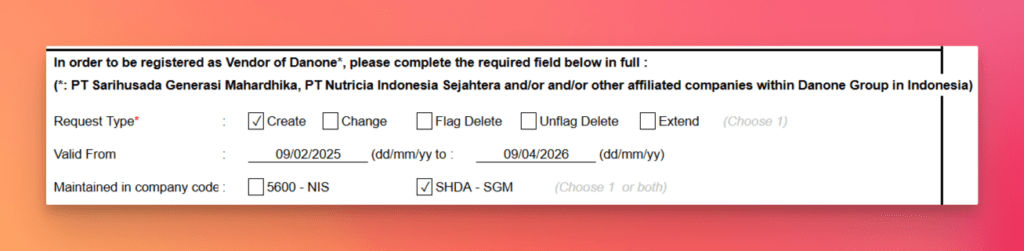
Vendor request forms may contain addresses, tax information, banking details, checkboxes, signatures, and other onboarding data. Some may arrive as spreadsheets rather than conventional PDFs.
The challenge is therefore not simply recognizing text across all these files. The real requirement is producing consistent, structured information from documents that often have very different layouts and levels of quality.
That is the job AP OCR needs to perform before the rest of the automation can be trusted.
Where OCR Fits in Accounts Payable Automation
OCR is an important part of AP automation, but it is only one part.
A typical accounts payable workflow can be simplified into six stages:
Each stage depends on the quality of the data produced by the stage before it.
Receive
The process begins when AP documents enter the organization.
Invoices and supporting documents may arrive through:
email attachments,
direct uploads,
scanners,
shared storage,
supplier portals,
or connected business systems.
At this stage, the system needs to accept the different formats suppliers actually use rather than assuming every document will be a clean digital PDF.
Extract
This is where OCR for accounts payable enters the workflow.
The document is converted into machine-readable content, its layout is interpreted, and relevant information is extracted into structured fields.
For an invoice, that might include:
vendor name,
invoice number,
invoice date,
PO number,
currency,
subtotal,
taxes,
total amount,
payment terms,
and line items.
This stage establishes the data that the rest of the AP process will work with.
Validate
Extracted data should not immediately be treated as correct simply because OCR returned a value.
The next step is validation.
A system may check whether required fields exist, whether totals are internally consistent, whether the vendor is known, and whether extracted references correspond to records already available in accounting or procurement systems.
For PO-based invoices, this is also where matching becomes important. The extracted purchase order number can be checked against purchasing data, and goods receipt information can be used to confirm whether the order was actually received.
The OCR layer provides the document data; validation determines whether that data can be trusted.
Approve
Once the document passes the required checks, it moves through the organization’s approval process.
Approval rules may depend on factors such as:
invoice amount,
department,
vendor,
purchase order status,
cost center,
or exceptions identified during validation.
Documents that cannot be verified confidently can be routed for review rather than proceeding automatically.
Post
After approval, the structured invoice information can be posted into the accounting or ERP system.
At this point, the destination system does not need the original document to understand the transaction. It needs reliable structured fields that can populate the appropriate financial records.
Pay
Once the required validation, matching, approval, and ERP posting steps have been completed, the invoice can move toward payment according to the organization’s payment controls and terms.
But the quality of that entire workflow depends heavily on the extraction stage.
If the PO number is read incorrectly, matching can fail. If a table is parsed incorrectly, line-item reconciliation can break. If the total amount is associated with the wrong label, an exception may be created or incorrect information may reach the ERP.
That is why OCR accounts payable automation should not be treated as an isolated document-reading task. It sits close to the beginning of the process, and errors introduced there can travel through every subsequent stage.
Reliable accounts payable automation therefore starts with more than accurate character recognition. It starts with OCR that preserves enough of the original document structure for extraction, validation, and downstream systems to work with the right data.
Challenges in Accounts Payable Document OCR
Accounts payable documents may look structured to a person, but they are difficult for OCR systems because meaning depends on both text and layout. Invoices, statements, remittances, and vendor forms all organize information differently, and traditional OCR can recognize the words while still losing the relationships between them.
Vendor-Specific Invoice Layouts
There is no universal invoice format. One supplier may place the PO number at the top, while another may include it inside a reference section or table. Template-based systems often become difficult to maintain as supplier formats increase.
Modern OCR for accounts payable needs to identify fields based on context rather than fixed coordinates.
Complex Tables and Line Items
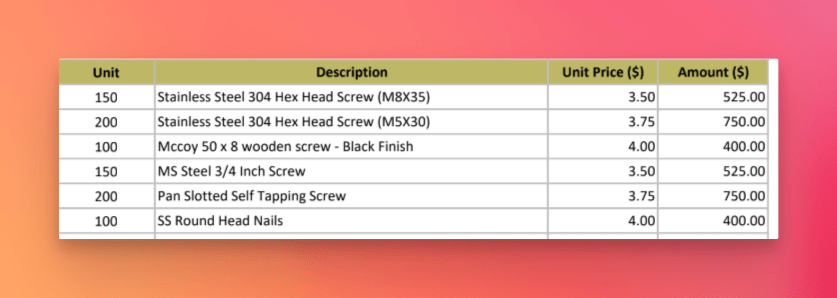
Invoice tables contain quantities, descriptions, prices, taxes, and totals that must remain aligned correctly.
If OCR flattens the table or merges columns, every number may be recognized correctly while still being assigned to the wrong line item. Multi-page tables and wrapped descriptions make this even harder.
Low-Quality Scans and Handwriting
AP teams also receive skewed scans, photographs, faded documents, and low-resolution images. These inputs can cause missing characters, broken reading order, and poor table alignment.
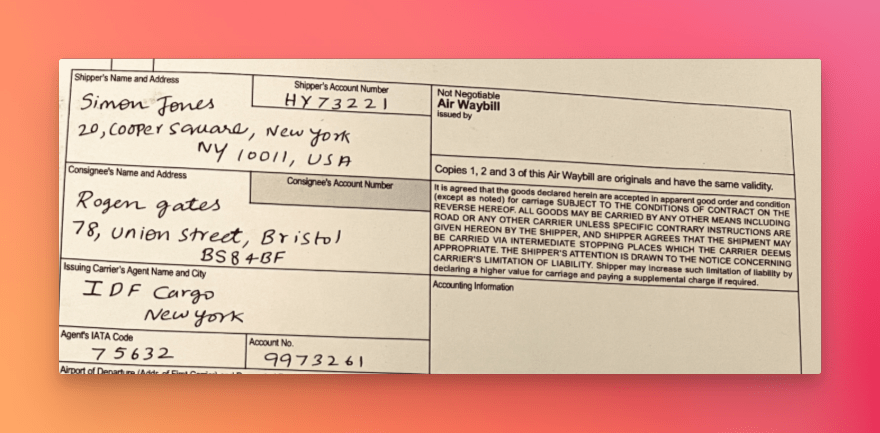
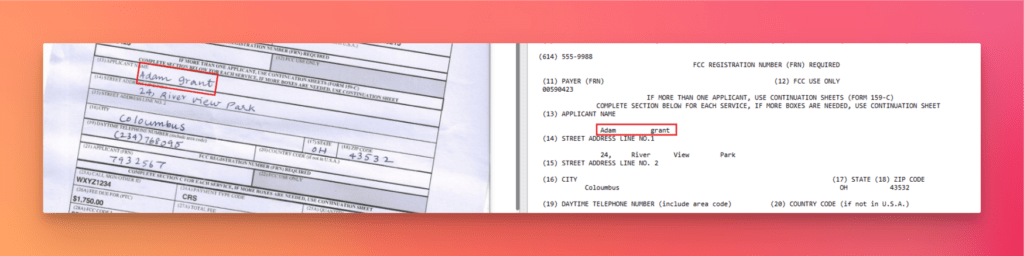
Handwritten approvals, corrections, account codes, or notes introduce another challenge because systems designed mainly for printed text may not capture them reliably.
Forms, Checkboxes, and Spreadsheets
Vendor forms can contain checkboxes and radio buttons where the selected state matters as much as the text itself. Extracting the labels without identifying which option was selected is not enough.
Similarly, spreadsheet-based vendor forms depend heavily on row and column relationships. Flattening them into plain text can separate values from the headers that give them meaning.
Multi-Page Documents and Missing References
Vendor statements and remittance advice may contain dozens of invoices, credits, balances, and payments spread across several pages. OCR needs to maintain continuity as tables and sections continue from one page to another.
PO references can also vary between vendors—or be missing entirely. One invoice may use PO Number, another Purchase Ref, while another contains no purchase reference at all.
Across these cases, the core challenge is the same: accounts payable OCR software must preserve structure, not simply recognize characters. Once labels, values, rows, or sections become disconnected, downstream extraction becomes far less reliable.
Document Extraction at the Cutting Edge: LLMs vs. LLMWhisperer OCR for Accounts Payable
LLMs have become operational powerhouses in accounts payable, extracting rich data from invoices, purchase orders, and vendor forms. But even the best models struggle with scanned invoices, faded faxes, handwritten annotations, and multi-column line-item tables—garbage in, garbage out.
Discover how LLMWhisperer, Unstract’s dedicated accounts payable OCR service, cleans, structures, and preserves layouts before they reach the LLM—ensuring peak extraction accuracy for vendor details, invoice numbers, line items, and totals.
See why LLMWhisperer sets the standard for LLM-ready AP data and eliminates the manual review bottlenecks that plague traditional OCR pipelines.
Why OCR Accuracy Matters in Accounts Payable Automation
OCR errors in AP do not remain isolated inside a document. The extracted information is often used for matching, approvals, ERP posting, and eventually payment.
That makes practical accuracy much more important than simply recognizing most of the characters on a page.
Incorrect Totals and Taxes
An invoice may contain a subtotal, tax amount, discount, and final total close together.
Even if all four numbers are recognized correctly, automation can still fail if OCR loses which value belongs to which label. A correctly recognized number mapped to the wrong field is still incorrect accounting data.
Wrong Vendor or Payment Information
Vendor records may contain company names, tax identifiers, addresses, and banking information. Extraction errors in these fields can trigger verification failures or create serious downstream payment issues.
Failed Matching and Payment Delays
PO numbers are often used to connect invoices with purchasing records. If the PO reference is read incorrectly, a valid invoice may fail to match its corresponding purchase order or goods receipt information.
Invoice-number errors can also interfere with duplicate detection, while missing or uncertain values push otherwise valid invoices into manual review.
More Exceptions and Greater Audit Risk
Every unreliable field increases the chance that someone needs to reopen the document, verify the source value, correct the extraction, and restart the workflow.
At scale, those exceptions can erase much of the efficiency AP automation is supposed to provide.
Traceability matters as well. Finance teams may need to confirm where an extracted value came from in the original document. Preserving layout and spatial relationships makes that validation much easier.
For this reason, the best OCR software for accounts payable should not be judged on character recognition alone. It should preserve the context and field relationships needed to turn document content into trustworthy accounting data.
How Accounts Payable OCR Works — Step by Step
A production AP workflow involves more than running an invoice through an OCR engine. The document must pass through several stages before its contents become reliable accounting data.
Each stage solves a different part of the problem.
Step 1 — Document Capture and Ingestion
The process begins when invoices and supporting documents enter the AP system through:
email,
direct uploads,
scanners,
APIs,
shared storage,
or connected business systems.
The files themselves may be digital PDFs, scanned PDFs, photographs, images, spreadsheets, or other business documents.
The goal at this stage is simple: bring different document sources and formats into a consistent processing workflow. The system cannot assume that every supplier will provide the same file type or document quality.
Once the document is ingested, OCR and document understanding can begin.
Step 2 — Layout Extraction and Text Recognition
This is the core OCR stage.
For scans and image-based documents, the system first converts visible text into machine-readable content. But recognizing characters alone is not enough.
A useful OCR result should keep these relationships intact rather than returning the values in an arbitrary order.
This becomes even more important with line-item tables, vendor statements, remittance advice, and multi-column forms. If structure is lost at this stage, downstream extraction becomes much harder.
Step 3 — Field-Level Data Extraction Against a Schema
Once the document has been converted into a structured representation, the next step is to extract the fields the AP workflow actually needs.
The schema defines the expected output so that the system returns predictable fields instead of an entire page of OCR text.
This is also where LLMs become useful.
Different suppliers may use different labels for the same field:
Invoice Number

Invoice No.

Invoice #

Inv. Ref.
A fixed location-based rule may treat these differently. An LLM can use context to understand that they represent the same business concept and map them to a common field such as invoice_number.
The same approach applies to vendor names, PO references, payment terms, taxes, totals, and line items.
OCR provides the document representation; the LLM interprets it and converts it into structured accounting data.
Step 4 — Validation, Matching, and Exception Handling
Structured extraction does not mean every value should be trusted automatically.
Before the data is used for accounting actions, the workflow may validate:
required fields,
date formats,
subtotal, tax, and total consistency,
vendor records,
PO references,
and purchasing or goods receipt information.
For example, an extracted PO number can be checked against an ERP or procurement system.
If the expected records are found, the invoice can continue through the workflow. If information is missing, inconsistent, or uncertain, the document can be sent for human review or exception handling.
This stage separates extraction from trust.
OCR and LLMs determine what the document appears to contain. Validation checks whether that information is consistent with the organization’s actual business data.
Step 5 — ERP Posting and Payment Release
After extraction, validation, matching, and required approvals are complete, the structured information can be sent to the accounting or ERP system.
By this point, the invoice has been transformed into machine-readable accounting data such as:
The ERP can then use this information for posting and downstream payment processing.
Payment should only proceed after the required validation, matching, and approval checks are complete.
The full process therefore becomes:
Document → OCR and layout extraction → Structured data → Validation and matching → Approval → ERP → Payment
This is why accounts payable OCR should be treated as the beginning of the automation chain, not the final result. When the early stages preserve document structure correctly, downstream AP automation becomes far more reliable and requires fewer manual exceptions.
LLMWhisperer: Layout-Preserving OCR Built for AP Documents
The challenges discussed above point to a simple requirement: accounts payable OCR needs to preserve more than text. AP documents depend heavily on tables, labels, field positions, form elements, and reading order, all of which affect how accurately the extracted content can be understood downstream.
This is where LLMWhisperer fits into the document processing pipeline.
What Is LLMWhisperer?
LLMWhisperer is Unstract’s OCR and document parsing technology for converting complex documents into machine-readable text while retaining their structural layout. Its layout-preserving mode is specifically designed to prepare document content for downstream LLM processing rather than returning only a flattened text stream.
For OCR accounts payable workflows, this distinction matters because extracted text is usually not the final output. It becomes the input for the next stage, where an LLM or extraction system identifies fields such as invoice numbers, vendor information, purchase order references, totals, taxes, and line items.
Preserving the original document structure gives that downstream layer more context to work with. Labels remain closer to their values, tables retain their row and column relationships, and document sections remain easier to interpret.
In other words, LLMWhisperer acts as the OCR foundation:
AP document → Layout-preserved OCR → LLM extraction → Structured data
This makes it suited to accounts payable OCR software pipelines where OCR output ultimately needs to support structured extraction, validation, and automation.
What LLMWhisperer Does Differently
LLMWhisperer focuses on retaining the document structure that conventional OCR can lose during text extraction.
Layout Preservation
Its layout_preserving output mode maintains the structural arrangement of extracted text instead of reducing the document to an unstructured text block. The API also provides controls for preserving horizontal and vertical lines when document structure depends on them.
This is particularly important for OCR for accounts payable, where the relationship between labels, values, columns, and sections often determines what a field actually means.
No Document-Specific Templates
LLMWhisperer is designed to work across different document designs and formats without requiring prior training or a dedicated template for each layout. Unstract describes its document processing approach as document-agnostic, which reduces dependence on coordinate-based extraction rules.
Tables and Structured Rows
LLMWhisperer provides a dedicated table-processing mode for documents containing dense tabular structures. It is designed to retain table layout and cell grouping so rows and columns remain usable by downstream systems.
This capability is particularly relevant to invoices, statements, spreadsheets, and other table-heavy AP documents.
Scanned and Low-Fidelity Documents
Different processing modes are available for native documents, clean scans, and more challenging scanned inputs. The high-quality mode is intended for medium- or low-quality scans and other difficult OCR inputs, while the platform also supports rotation and skew compensation.
Handwritten Content
The high-quality processing mode includes handwriting support, allowing printed and handwritten content to be processed within the same document workflow.
Forms, Checkboxes, and Radio Buttons
LLMWhisperer includes a form-processing mode designed for structured forms, including checkboxes and radio buttons. Rather than extracting only the surrounding labels, it retains information needed to interpret form selections in context.
Bounding Boxes and Spatial Context
LLMWhisperer can retain line-level metadata containing bounding-box coordinates for extracted text. This spatial information can be used to locate extracted content in the original document and support highlighting or review interfaces.
Together, these capabilities make the OCR output more useful for the stages that follow: structured extraction, validation, human review, and AP automation.
LLMWhisperer vs. Traditional OCR Tools
The main difference is not simply whether the text can be recognized. It is how much useful document structure survives after recognition.
Capability
Traditional OCR
LLMWhisperer
Output structure
Often returns flattened text
Supports layout-preserved output
Template dependence
Frequently relies on templates or fixed extraction rules
Designed to work across document layouts without document-specific templates
Table extraction
Rows and columns can lose alignment
Dedicated table mode preserves tabular structure
Scan quality tolerance
Often requires additional preprocessing for difficult scans
Supports dedicated modes for low-quality and challenging scanned documents
Handwriting
Support varies and may require separate processing
Handwriting supported in high-quality and form-oriented processing modes
Forms
Form elements may require additional logic
Supports checkboxes, radio buttons, and structured form layouts
Spatial context
Often limited to recognized text
Bounding-box metadata can retain source position
LLM readiness
Output may need restructuring before downstream use
Layout-preserving output is designed for LLM consumption
For AP teams, this is an important distinction. Good accounts payable OCR is not just about getting characters off a page. The useful output is one that retains enough of the document’s original organization for the next system to understand what those characters represent.
That is the role LLMWhisperer plays in the larger AP automation stack: preserving document context before structured extraction and business validation begin.
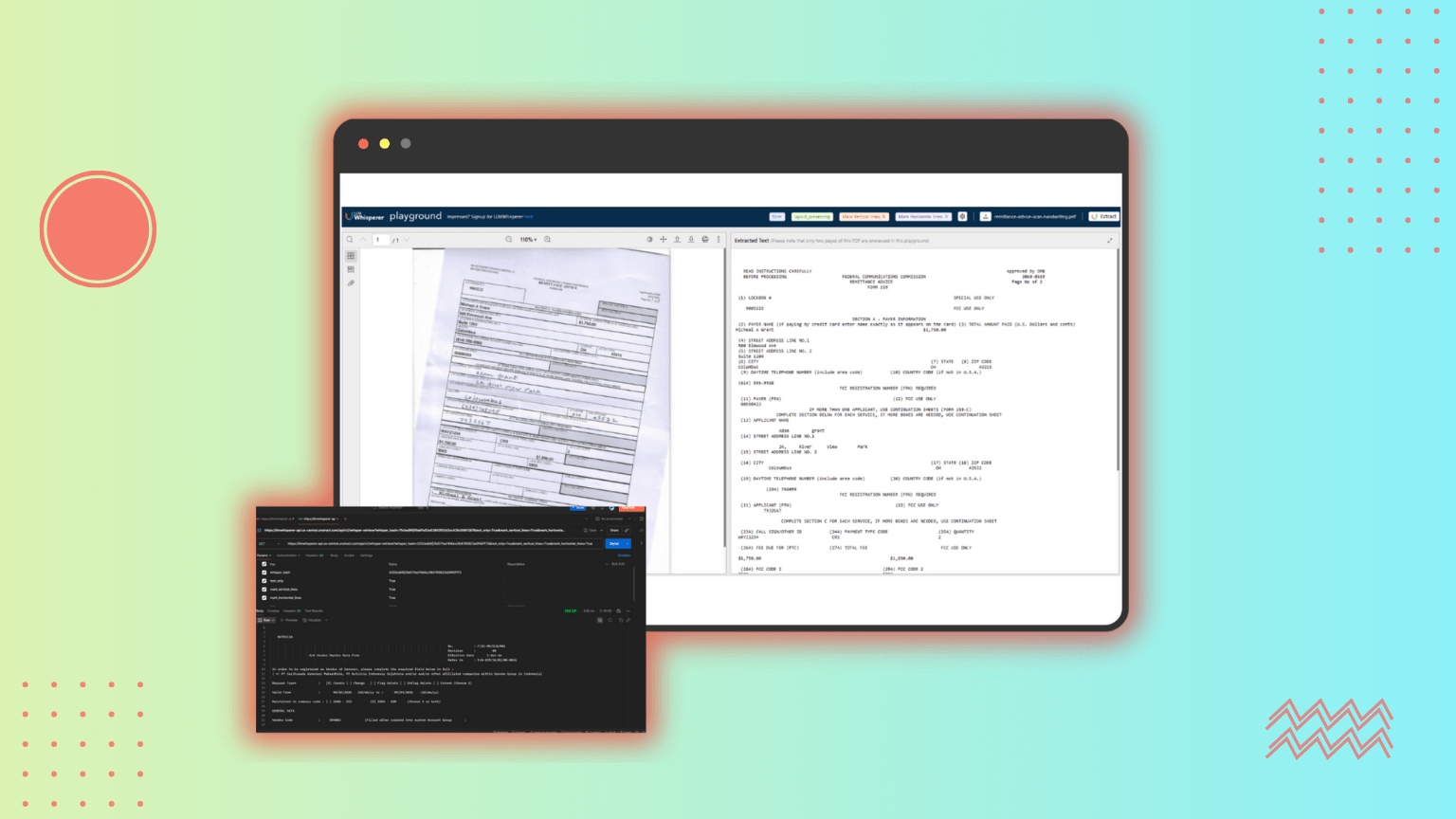
LLMWhisperer Accounts Payable OCR Demo: Poorly Scanned Remittance Form
To see how LLMWhisperer handles a difficult AP document, I tested the supplied remittance form in the LLMWhisperer Playground.
This is not a clean OCR sample. The document is an older scan with poor image quality and is misaligned by roughly 30–40 degrees. It also combines multiple fields, tables, and payment references within the same page.
Despite these issues, LLMWhisperer extracts the text while keeping the original document structure recognizable. Labels remain associated with their values, and tabular information retains its alignment instead of collapsing into a flat stream of text. This is exactly what the layout_preserving output mode is designed to do—retain document structure so the result is more useful for downstream LLM processing.
For accounts payable OCR, this matters because the output can later be used to identify and validate payment references, amounts, and other AP fields without first trying to reconstruct a fragmented OCR response.
API Demo: Vendor Request Spreadsheet via Postman
The same document parsing capability can also be accessed through the LLMWhisperer API.
For this test, I used the vendor request CSV file and sent it through Postman.
Create a new POST request using: https://llmwhisperer-api.us-central.unstract.com/api/v2/whisper
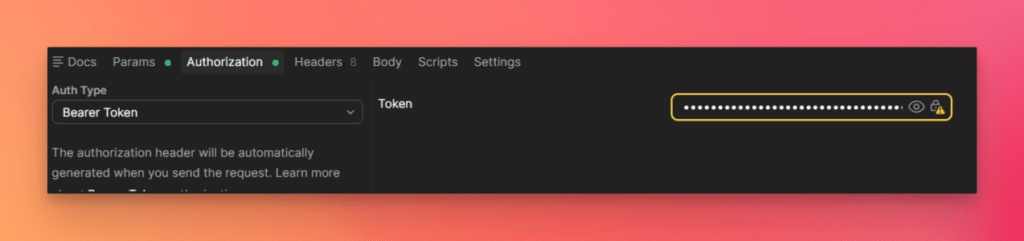
Add the LLMWhisperer API key using the unstract-key request header and send the file contents in the request body. The current v2 Extraction API processes the document asynchronously and returns a whisper_hash. That hash can then be used to check processing status and retrieve the final extracted output.
LLMWhisperer supports CSV as well as Excel formats such as XLS and XLSX.
For spreadsheet-based AP documents, preserving row and column relationships is important. Vendor details that belong to one record need to remain associated with the correct headers rather than becoming an unordered block of text.
This makes spreadsheet extraction useful for workflows such as vendor onboarding and vendor master-data automation, where structured information needs to move reliably into downstream business systems.
Seven LLMWhisperer Features That Matter Most for Accounts Payable OCR
Several LLMWhisperer capabilities are particularly relevant when evaluating accounts payable OCR software.
1. Layout Preservation
LLMWhisperer preserves reading order and document structure, helping keep labels, values, sections, and columns connected. This provides a stronger input for downstream AP extraction than flat OCR text.
2. Table Extraction
A dedicated table-processing mode helps retain rows, columns, and tabular relationships. For AP workflows, this is important for invoice line items, taxes, totals, statements, and other table-heavy documents.
3. Scanned Document Extraction
LLMWhisperer can process scanned and image-based documents rather than relying only on digitally generated PDFs. This allows the same OCR for accounts payable pipeline to handle scanned invoices, remittances, and other AP records.
4. Handwriting Recognition
Its high-quality processing mode supports handwritten content, helping retain handwritten information that may appear alongside printed document fields.
5. Form Element Extraction
The form-processing mode supports structured forms containing elements such as checkboxes and radio buttons, making selected options available to downstream extraction workflows.
6. Low-Fidelity Tolerance
Dedicated processing modes for more difficult scanned inputs help reduce the amount of preprocessing required before OCR, particularly when documents are skewed, noisy, or otherwise low quality.
7. Bounding Boxes
LLMWhisperer provides line metadata with bounding-box information that can be used to locate extracted text in the source document. This supports source highlighting, human-review interfaces, and greater traceability during AP validation.
Together, these capabilities address a broader requirement for accounts payable OCR: extracting text while retaining enough of the original document context for reliable structured extraction, validation, and automation.
Deployment and Enterprise Considerations
For production accounts payable OCR, deployment choice often depends on how much control an organization needs over its documents and infrastructure.
LLMWhisperer Cloud
LLMWhisperer Cloud provides the fastest way to get started because the infrastructure is managed for you. Teams can use the OCR API without maintaining their own deployment, making it suitable for development, testing, and scalable document-processing workloads.
Self-Hosted and On-Premise OCR API
Organizations handling sensitive invoice, vendor, banking, or financial data may prefer a self-hosted or on-premise deployment.
This provides greater control over:
document data,
infrastructure,
deployment environment,
and organizational security requirements.
The self-hosted option is particularly relevant when data residency, privacy, or internal compliance policies require document processing to remain within the organization’s environment.
LLMWhisperer also supports real-world document formats including PDFs, scanned and photographed images, spreadsheets, forms, and documents containing complex tables.
Usage can be monitored from the application, while its openly presented pricing model makes processing costs easier to understand as usage grows.
Building an AP Document Extraction Pipeline With Unstract
Once OCR has converted the document into usable text, Unstract can take the next step: extracting the accounting fields required by the workflow and returning them as structured data.
For this walkthrough, I used a real purchase order in the original Prompt Studio.
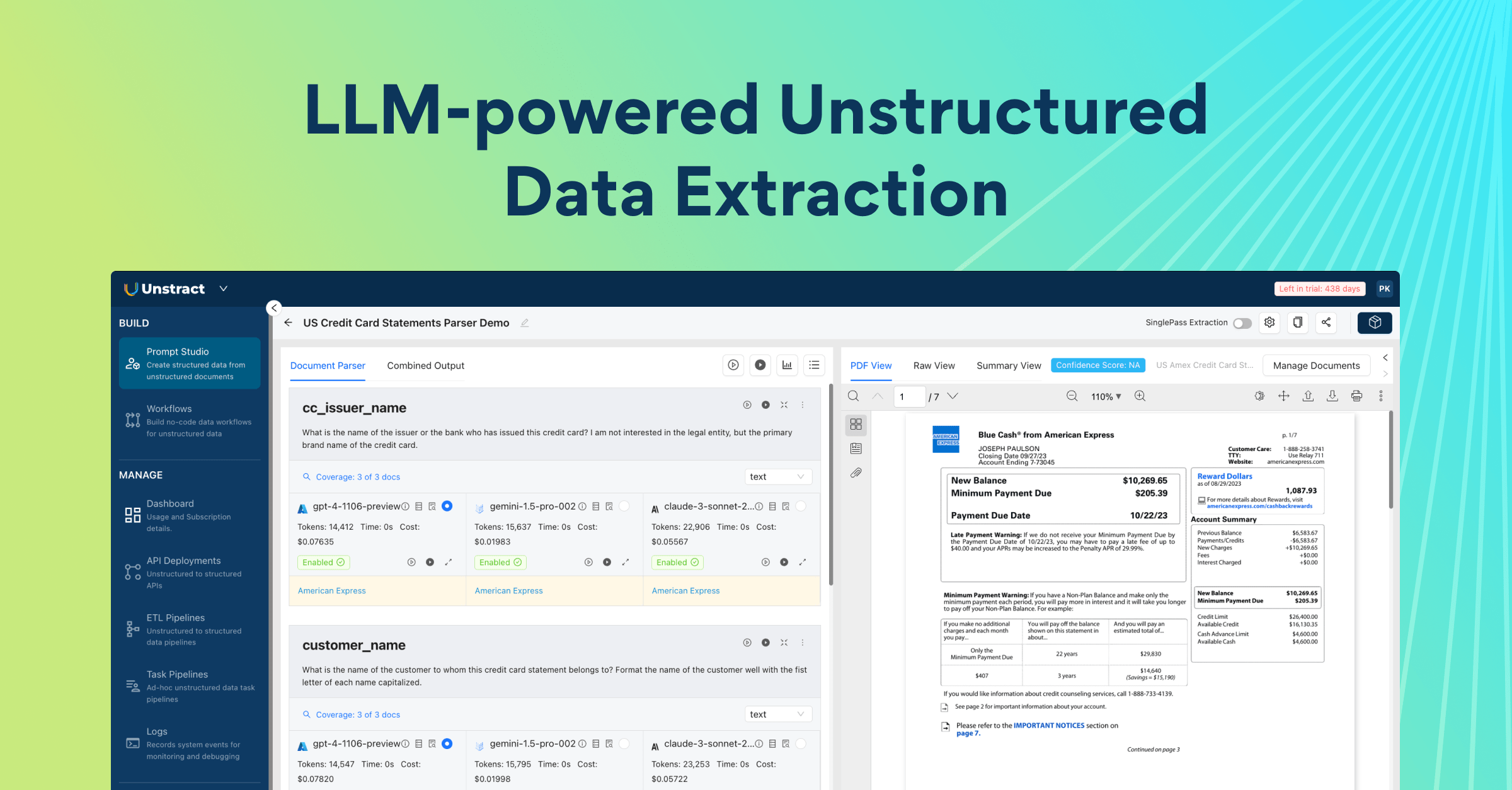
Prompt Studio Overview
Prompt Studio lets you view the source document and extraction setup side by side. In the interface shown above:
Field name — defines the name of the field being extracted.
Prompt — contains the instruction describing what information should be extracted.
Selected LLM — shows the LLM connector being used for that prompt.
Output format — defines how the extracted result should be returned, such as JSON.
Run all prompts — executes extraction for all configured prompts in the project.
Add Prompt — creates another extraction field and prompt.
Manage Documents — lets you add or remove test documents from the project.
Deploy as API — converts the completed Prompt Studio project into an API deployment.
Response area — displays the structured extraction result returned by the selected LLM.
You can also add additional prompts, manage the test documents, run all configured prompts together, and inspect the extracted response directly within the same interface.
Users are not locked to a single model provider; the appropriate LLM connector can be selected for the extraction workflow.
In the purchase order project, for example, one of the fields is party_details, with the prompt: Extract all Customer, Bill To, and Deliver To information exactly as shown in the purchase order.
Running the extraction returns the corresponding information as structured JSON while the original purchase order remains visible alongside the result.
Define the Extraction Structure and Test It
For the purchase order used in this test, I organized the required information into structured groups including:
party_details
line_item_details
date_details
company_order_details
payment_approval_details
The prompts then extract the relevant information for each group.
For example, the payment_approval_details field is used to extract the financial and approval information from the purchase order. The resulting structured output was:
The final result follows a consistent JSON structure, making it suitable for downstream AP workflows rather than requiring another layer to parse free-form OCR text.
Deploy the Project as a REST API
Once the extraction works as expected, the Prompt Studio project can be deployed directly as an API.
From the project, click Deploy as API. After deployment, open the API deployments page and copy:
the deployed API endpoint,
and the API key.
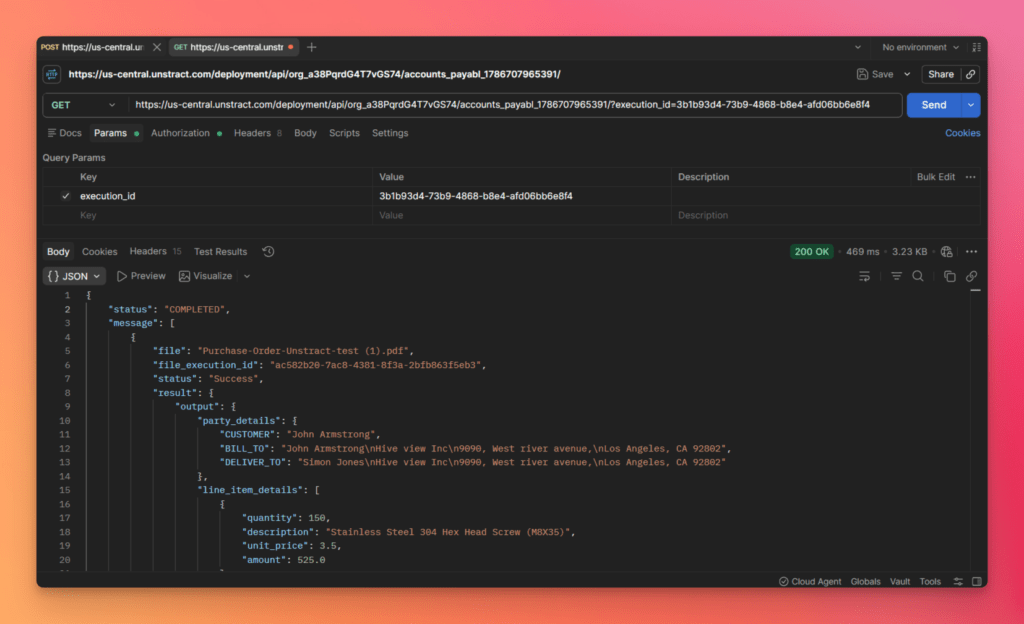
For this test, I used the deployed endpoint in Postman:
At this point, the extraction is no longer limited to Prompt Studio. Any authorized downstream application can send a document to the deployed API and receive the same structured output for further validation, matching, or AP processing.
Three-Way AP Match With a Post-Processing Webhook
Extracting invoice data is only part of an AP workflow. Before an invoice moves toward approval or payment, key values often need to be checked against existing business records.
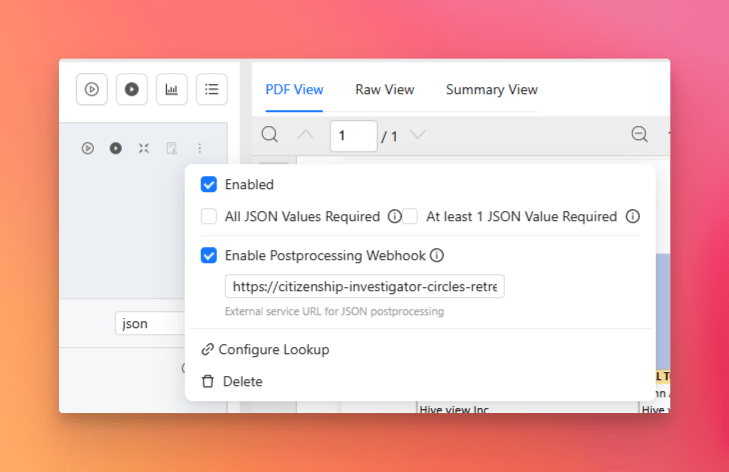
Unstract supports this through a post-processing webhook, which can take the structured output from Prompt Studio, validate it against external systems, and return the verified result.
How the Three-Way Match Works
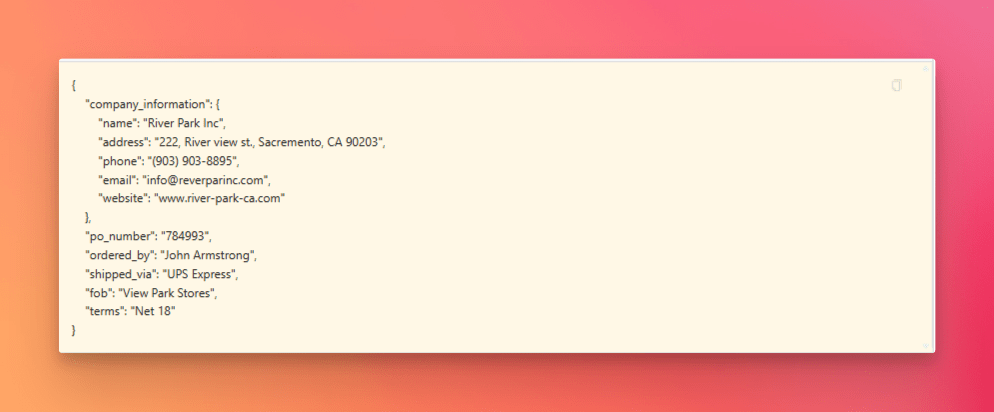
For this example, Prompt Studio extracts the purchase order number from the invoice:
The extracted PO number is then passed to the post-processing webhook, which performs two checks:
PO validation: Does 784993 exist in the purchase order data maintained by the ERP or procurement system?
GRN validation: Has the corresponding order been received according to the Goods Receipt Note data?
The webhook returns both validation results to Unstract along with the originally extracted PO number.
This extends accounts payable OCR beyond document extraction. The information captured from the invoice can be checked against trusted business data before it is allowed to move further downstream.
Accounts Payable Workflow: Three-Way Match Flow
The complete flow looks like this:
The invoice provides the unstructured source, while the purchase order and goods receipt records provide the structured data used for validation.
If both checks succeed, the order can be marked as available for the next stage. If either validation fails, the result can instead be routed into an exception or human-review workflow.
Final Verified Output
In our test, PO 784993 was successfully matched against both purchase order and goods receipt information.
The final result returned to Prompt Studio was:
Here:
po_match: true confirms that the purchase order was found.
grn_match: true confirms that the corresponding goods receipt was found.
order_available: true indicates that both required checks succeeded.
From here, the verified result can continue into approval, ERP posting, or another downstream AP process rather than relying on the OCR output alone.
In production, these validation checks would typically be performed through APIs connected to the organization’s ERP or procurement systems.
Where Most Accounts Payable OCR Tools Fall Short
The biggest weakness in many accounts payable OCR tools is that they stop at text recognition.
They may read most of the characters correctly, but AP automation needs more than that. It needs document structure, field relationships, validation, and reliable integration with downstream systems.
Common limitations include:
Text without layout understanding — labels, values, and table relationships can become disconnected.
Template dependence — systems may require separate rules or layouts for different vendors.
Weak table and spreadsheet handling — line items, totals, and column relationships can break during extraction.
Poor low-quality document support — skewed scans, photographs, faded documents, and handwriting often require extra preprocessing.
No built-in validation or matching — extracted values still need to be checked against ERP, PO, or GRN data.
Limited source traceability — without bounding boxes or spatial metadata, reviewing where a value came from becomes harder.
More integration work — teams may need additional engineering to expose extraction through APIs or connect it with AP systems.
This is why evaluating accounts payable OCR software only by OCR accuracy can be misleading. The more useful question is whether the tool can preserve enough context to support the complete AP workflow.
How to Evaluate OCR Software for Accounts Payable
When comparing OCR for accounts payable, it helps to evaluate the full document-processing lifecycle rather than a single accuracy number.
Key criteria include:
Layout and Table Fidelity
Check whether labels, values, columns, and line items remain correctly associated after extraction.
Accuracy Across Real AP Documents
Test invoices, remittance advice, statements, and vendor documents rather than relying only on clean sample PDFs.
Support for Difficult Inputs
The system should handle scans, photographed documents, handwriting, spreadsheets, forms, checkboxes, and other common AP formats.
Schema-Based Structured Output
Look for predictable JSON or another defined structure that downstream systems can consume without additional parsing.
Bounding Boxes and Review Support
Spatial metadata makes it easier to highlight source values, build review interfaces, and maintain traceability.
REST API Availability
A production system should make extraction accessible to ERP, workflow, and automation applications.
Deployment Flexibility
Cloud deployment may simplify setup, while self-hosted or on-premise options can provide greater control over sensitive financial data.
Validation and Matching Support
Strong AP automation should make it possible to validate extracted values against business systems and support workflows such as PO and GRN matching.
Total Maintenance Effort
The best OCR software for accounts payable should reduce template maintenance, preprocessing, exception handling, and custom integration work over time.
The goal is not simply to find the tool that reads the most text. It is to find the one that produces reliable data with the least operational friction.
Accounts Payable OCR: What’s next?
Accounts payable OCR is no longer just about converting scanned documents into text.
Reliable AP automation requires several layers working together: document structure must be preserved, relevant fields must be extracted into a predictable schema, the results must be validated, and verified data must be delivered into downstream accounting systems.
LLMWhisperer provides the OCR and layout-preserving foundation for handling real-world AP documents, including scans, forms, tables, and other difficult inputs.
Unstract builds on that foundation by adding structured extraction, Prompt Studio workflows, API deployment, and post-processing validation such as the three-way match demonstrated in this article.
That is the real difference between basic OCR and production-ready AP automation: the final goal is not readable text, but trustworthy accounting data that can safely move through the rest of the payable process.
Accounts Payable OCR: FAQs
1. How does accounts payable OCR differ from general-purpose OCR for AP document processing? Accounts payable OCR goes beyond character recognition to preserve layout, tables, and field relationships, making it suitable for downstream extraction. This ensures that invoice totals, PO numbers, and line items remain correctly associated, which is essential for reliable validation and ERP posting.
2. What are the main challenges when integrating accounts payable OCR software into an existing AP automation pipeline? Common challenges include handling vendor-specific layouts, multi-page tables, low-quality scans, and handwritten fields. Accounts payable OCR software that relies on templates can become difficult to maintain as supplier formats grow, while layout-preserving OCR adapts to new formats without per-vendor configuration.
3. Why is layout preservation more important than character accuracy for OCR for accounts payable? Character accuracy alone does not prevent column bleed or label-value misalignment. OCR for accounts payable needs to preserve reading order, table rows, columns, and field relationships so that the extracted data can be validated against POs, matched against goods receipts, and posted to ERPs without manual correction.
4. How can I test accounts payable OCR API performance on my own documents before deploying? You can test the accounts payable OCR API through the LLMWhisperer Playground or via the REST API using Postman. The V2 API returns a whisper_hash for asynchronous processing, and you can poll the status endpoint to retrieve structured layout-preserved text from your own invoices and purchase orders.
5. How does accounts payable OCR integrate with three-way matching workflows in an automated AP pipeline? Accounts payable OCR extracts the PO number, invoice total, and line items from the invoice document. That extracted data is then passed to a post‑processing webhook that validates it against purchase order and goods receipt data — enabling automated three-way matching without manual intervention.
Engineer by trade, creator at heart, I blend Python, ML, and LLMs to push the boundaries of AI—combining deep learning and prompt engineering with a passion for storytelling. As an author of books and articles on tech, I love making complex ideas accessible and unlocking new possibilities at the intersection of code and creativity.