LLMWhisperer: A Modern PaddleOCR Alternative for AI Document Workflows
Table of Contents
PaddleOCR is one of the best pieces of open-source software in the document processing world. It reads text off an image with great accuracy, it runs on a laptop CPU, it costs nothing, and the Apache 2.0 licence means nobody from legal is going to stop you shipping it. And yet most teams that adopt it hit the same wall somewhere further down the pipeline.
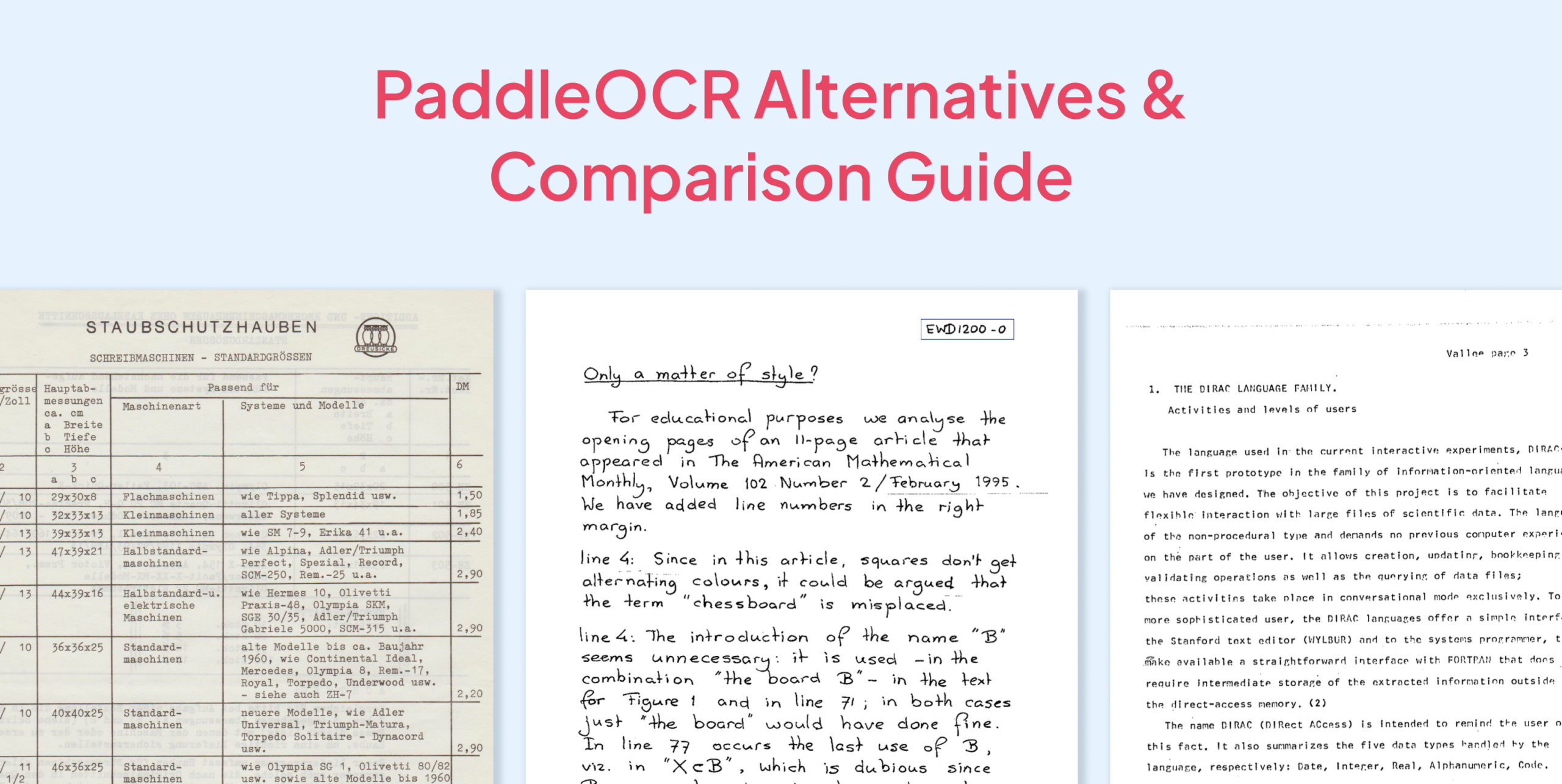
The wall, almost always, is the same one. PaddleOCR is an optical character recognition engine, and it is superb at optical character recognition. What most teams actually need, once they get past the prototype, is document understanding: knowing that $1,750.00 is the amount paid on an FCC remittance, that the VISA box was ticked and MASTERCARD was not, and that the scrawl in the applicant block is a name rather than a page header. Those are different problems, and PaddleOCR only solves the first one.
This article does three things. It sets up PaddleOCR and runs it against three genuinely difficult document types: handwriting, complex tables and forms with checkboxes. It compares PaddleOCR with Tesseract, Docling, EasyOCR, Mistral OCR and LLMWhisperer on the dimensions that decide whether a pipeline survives production.
What PaddleOCR is, and what it isn’t
PaddleOCR is a document AI toolkit from Baidu’s PaddlePaddle team. It is not a single model but a family of them, and understanding which piece you are using matters enormously for the results you get.
PP-OCRv5 and PP-OCRv6 are the text-detection-plus-recognition models, the core OCR engine. PP-OCRv5 made the project’s reputation: a two-stage pipeline with as few as 5 million parameters in its mobile variant that, according to the PaddleOCR team’s own paper, matches billion-parameter vision-language models on standard OCR benchmarks while offering better text localisation and far fewer hallucinations. PP-OCRv6, released in June 2026, with small and medium tiers (1.5M to 34.5M parameters) which improved recognition and detection accuracy over PP-OCRv5’s server model and covers 50 languages in a single model.
PP-StructureV3 is the layout analysis pipeline. It sits on top of the OCR models and adds region detection, table structure recognition, formula parsing and Markdown export.
PaddleOCR-VL is the newest addition: a 0.9B-parameter vision-language model for document parsing across 109 languages.
The distinction matters because “I used PaddleOCR and the table came out as gibberish” and “I used PaddleOCR and the table came out as clean Markdown” are both true statements, they just describe different pipelines. Most people reaching for from paddleocr import PaddleOCR are using the first one.
Stop wrestling with complex documents — See how LLMWhisperer parses them
The layout-preserved text that feeds our agent pipeline comes from LLMWhisperer. Try it on your own messy PDFs — bank statements, rent rolls, multi-header tables, cross-page rows — No signup required.
Try LLMWhisperer for free on the Playground. No signup required.
Installation is two steps: the PaddlePaddle deep learning framework, then the paddleocr package itself. (For a longer walkthrough with GPU variants and the older 2.x API, see Unstract’s OCR software comparison, which includes a PaddleOCR setup section.)
# 1. Install the PaddlePaddle framework (CPU build)
python -m pip install paddlepaddle

# For CUDA 12.6 GPUs, use the GPU index instead:
# python -m pip install paddlepaddle-gpu \
#   -i https://www.paddlepaddle.org.cn/packages/stable/cu126/

# 2. Install PaddleOCR
python -m pip install paddleocr
The core paddleocr package needs Python 3.8 or later. Models are not bundled, they download on first use into ~/.paddlex/official_models/, which means your first run needs network access and takes noticeably longer than subsequent ones.
Basic text extraction:
from pathlib import Path
import pypdfium2 as pdfium
from paddleocr import PaddleOCR

# File Paths
PDF_PATH = Path("fixtures/handwritten-remittance.pdf")
PAGE_IMAGE = Path("handwritten-remittance-p1.png")

# Render the first page of the PDF to a PNG
pdf = pdfium.PdfDocument(PDF_PATH)
page = pdf[0]
bitmap = page.render(scale=2)  # 2x ≈ 144 DPI
pil_image = bitmap.to_pil()
pil_image.save(PAGE_IMAGE)
pdf.close()

# Setup Paddle OCR
ocr = PaddleOCR(
    use_doc_orientation_classify=False,
    use_doc_unwarping=False,
    use_textline_orientation=False,
    enable_mkldnn=False,
)

# Perform OCR
result = ocr.predict(input=str(PAGE_IMAGE))

# Print results
for res in result:
    res.print()
One practical note from our own install. On a plain x86 CPU box running paddlepaddle 3.3.1 and paddleocr3.7.0, the default configuration crashed inside PaddlePaddle’s oneDNN kernel path:
NotImplementedError: (Unimplemented) ConvertPirAttribute2RuntimeAttribute not support
[pir::ArrayAttribute<pir::DoubleAttribute>]
(at .../new_executor/instruction/onednn/onednn_instruction.cc:116)
The fix is to pass enable_mkldnn=False when constructing the pipeline (as you can see in the code snippet above). It is a one-line workaround, but it is emblematic of PaddleOCR’s biggest non-accuracy cost: you are not installing a library, you are installing a deep learning framework, and framework-level incompatibilities are yours to debug.
What PaddleOCR is genuinely good at
Raw character accuracy on printed text. It is close to the top of the open-source field, and in our own testing it was very good on clean printed content.
Precise text localisation. Every recognised string comes with a tight quadrilateral bounding box. Vision-language OCR models are frequently vaguer here, and if you need to highlight source text in a review UI, precise boxes matter.
Low hallucination risk. This is structural, not incidental. A detect-then-recognise pipeline can only emit characters it found pixels for. It cannot invent a plausible-looking invoice number, which generative models demonstrably can.
Speed and hardware modesty. PaddleOCR publishes PP-OCRv6_medium at 1.40 seconds per page on an Intel Xeon CPU with OpenVINO, and 0.13 seconds on an A100. The tiny tier runs a page in under a second on an Apple M4.
Multilingual coverage. 50 languages in one PP-OCRv6 model, 109 via PaddleOCR-VL.
Cost. Apache 2.0, self-hosted, no per-page fee.
Where PaddleOCR runs out of road
No form-element understanding. There is no built-in checkbox or radio button detector. The maintainers’ own guidance on this is to add the ☑ (U+2611) and ☐ (U+2610) glyphs to the recognition dictionary and retrain the model on your own labelled data. That is a research project, not a configuration flag.
Output is a list of boxes, not a document. The default pipeline hands you rec_texts, rec_scores and rec_polys. Turning that into “row 3, column 5” is code you write and maintain.
Layout fidelity is your problem. Column relationships, reading order across multi-column pages and the visual association between a label and the value beside it are not preserved unless you reconstruct them from coordinates.
Handwriting is improved but inconsistent. PP-OCRv5 specifically targeted complex Chinese and English handwriting and reports a 13-percentage-point end-to-end gain over PP-OCRv4 on internal complex evaluation sets. That is real progress, but it starts from a low base, and messy real-world cursive still remains hard even on PP-OCRv6.
Dependency weight and framework friction. PaddlePaddle is a large dependency with its own release cadence and its own bugs, as the oneDNN crash above illustrates.
Documentation gaps. Large parts of the ecosystem’s issue tracker and some documentation are Chinese-first.
What PaddleOCR is genuinely good at
Raw character accuracy on printed text. It is close to the top of the open-source field, and in our own testing it was very good on clean printed content.
Precise text localisation. Every recognised string comes with a tight quadrilateral bounding box. Vision-language OCR models are frequently vaguer here, and if you need to highlight source text in a review UI, precise boxes matter.
Low hallucination risk. This is structural, not incidental. A detect-then-recognise pipeline can only emit characters it found pixels for. It cannot invent a plausible-looking invoice number, which generative models demonstrably can.
Speed and hardware modesty. PaddleOCR publishes PP-OCRv6_medium at 1.40 seconds per page on an Intel Xeon CPU with OpenVINO, and 0.13 seconds on an A100. The tiny tier runs a page in under a second on an Apple M4.
Multilingual coverage. 50 languages in one PP-OCRv6 model, 109 via PaddleOCR-VL.
Cost. Apache 2.0, self-hosted, no per-page fee.
Where PaddleOCR runs out of road
No form-element understanding. There is no built-in checkbox or radio button detector. The maintainers’ own guidance on this is to add the ☑ (U+2611) and ☐ (U+2610) glyphs to the recognition dictionary and retrain the model on your own labelled data. That is a research project, not a configuration flag.
Output is a list of boxes, not a document. The default pipeline hands you rec_texts, rec_scores and rec_polys. Turning that into “row 3, column 5” is code you write and maintain.
Layout fidelity is your problem. Column relationships, reading order across multi-column pages and the visual association between a label and the value beside it are not preserved unless you reconstruct them from coordinates.
Handwriting is improved but inconsistent. PP-OCRv5 specifically targeted complex Chinese and English handwriting and reports a 13-percentage-point end-to-end gain over PP-OCRv4 on internal complex evaluation sets. That is real progress, but it starts from a low base, and messy real-world cursive still remains hard even on PP-OCRv6.
Dependency weight and framework friction. PaddlePaddle is a large dependency with its own release cadence and its own bugs, as the oneDNN crash above illustrates.
Documentation gaps. Large parts of the ecosystem’s issue tracker and some documentation are Chinese-first.
How to turn complex document tables into usable data with AI
Catch the recorded webinar to dive into Unstract’s advanced table extraction capabilities. We walk through the All Table Extractor API—a ready-to-use, semantic + layout-aware solution that ensures precision, consistency, and context, even across the most complex document tables.
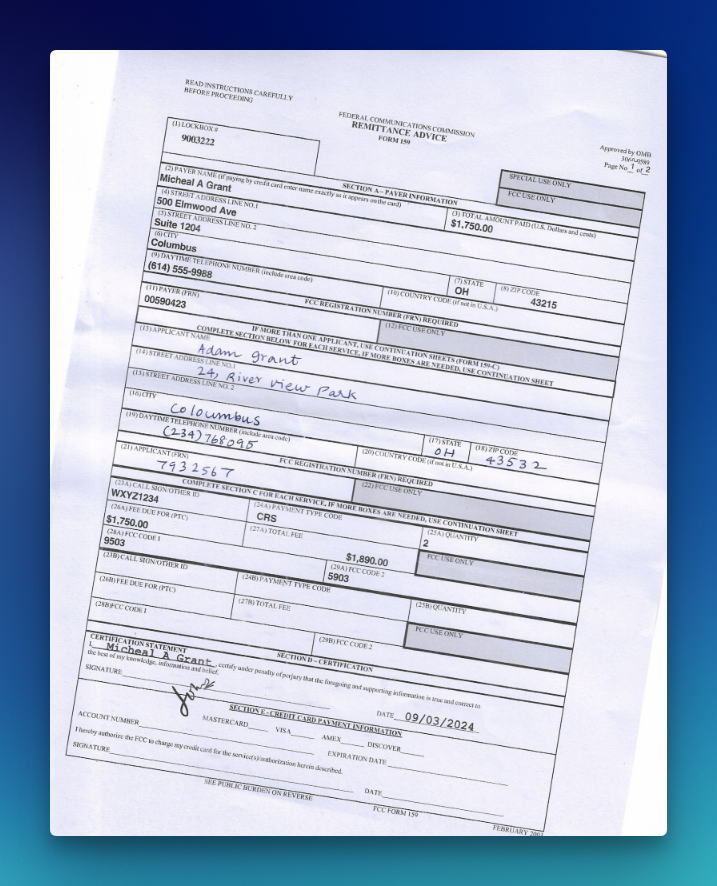
PaddleOCR Performance Test 1: Handwritten documents – FCC Form 159 remittance
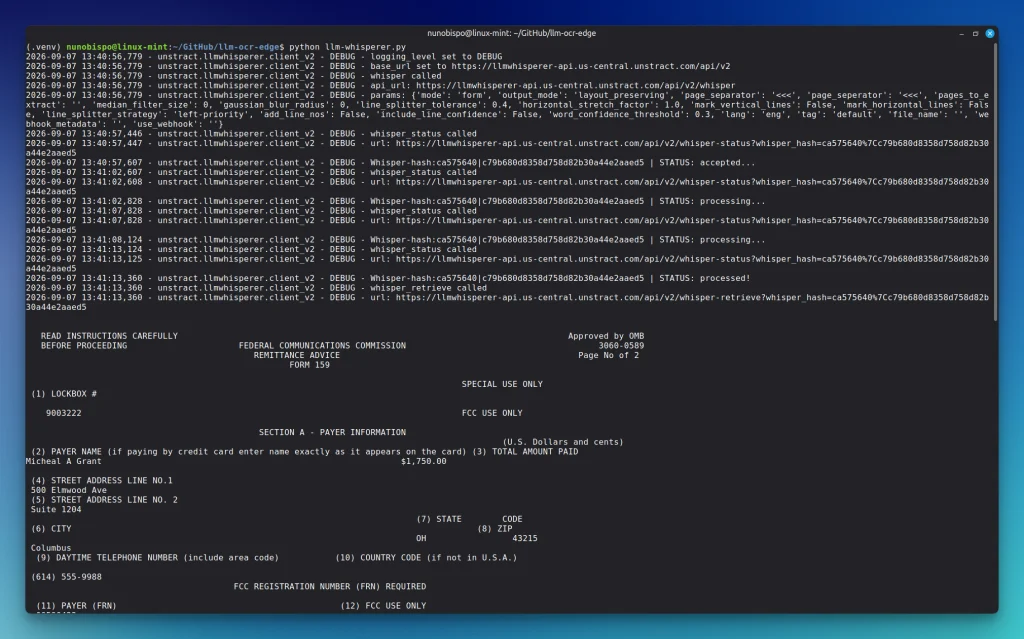
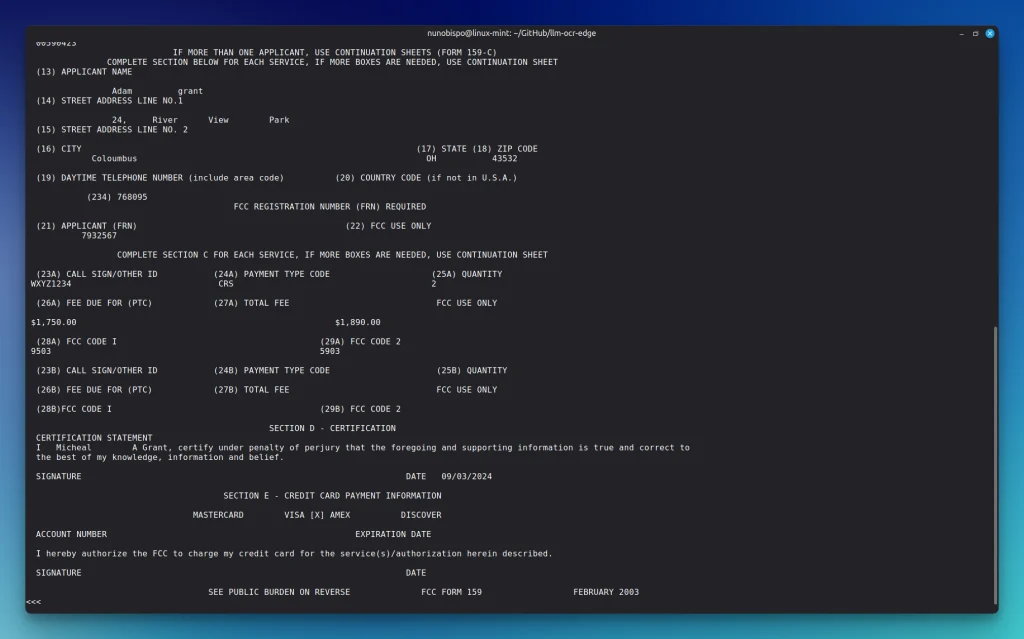
The challenge. A skewed scan of a federal remittance advice. Printed payer fields, a handwritten applicant block in blue ink, a signature and a date.The job is not just reading the scrawl. It is keeping “Adam Grant” attached to field 13, the date attached to the signature line.
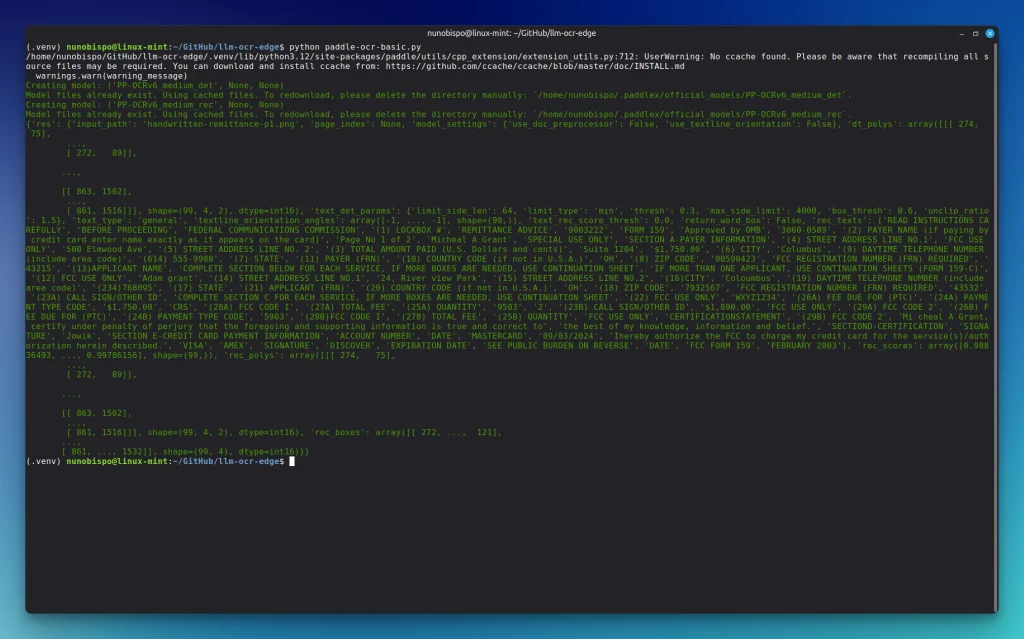
This is the result:
Quality assessment: PaddleOCR returned 99 text regions at a mean confidence of 0.987 in 31.6 seconds. Printed payer fields are essentially perfect: Micheal A Grant, 500 Elmwood Ave, $1,750.00, FRN 00590423. Several handwritten values are also readable: Adam grant, 24, River view Park, Coloumbus.
Then the structure falls apart.
Association is gone.'(13)APPLICANT NAME' and ‘Adam grant‘ are two unrelated boxes. So are the street, city, phone and FRN. A downstream parser has to re-bind them with geometry.
The signature is wrong, and the date floats away. The handwritten signature came back as ‘Jowik‘ at confidence 0.625. The date 09/03/2024 was recognised and emitted next to ‘MASTERCARD‘, not next to ‘SIGNATURE‘. The certification line itself garbled the printed name into ‘Mi chea1 A Grant'.
Character accuracy on this page is high. You still cannot tell who signed and when.
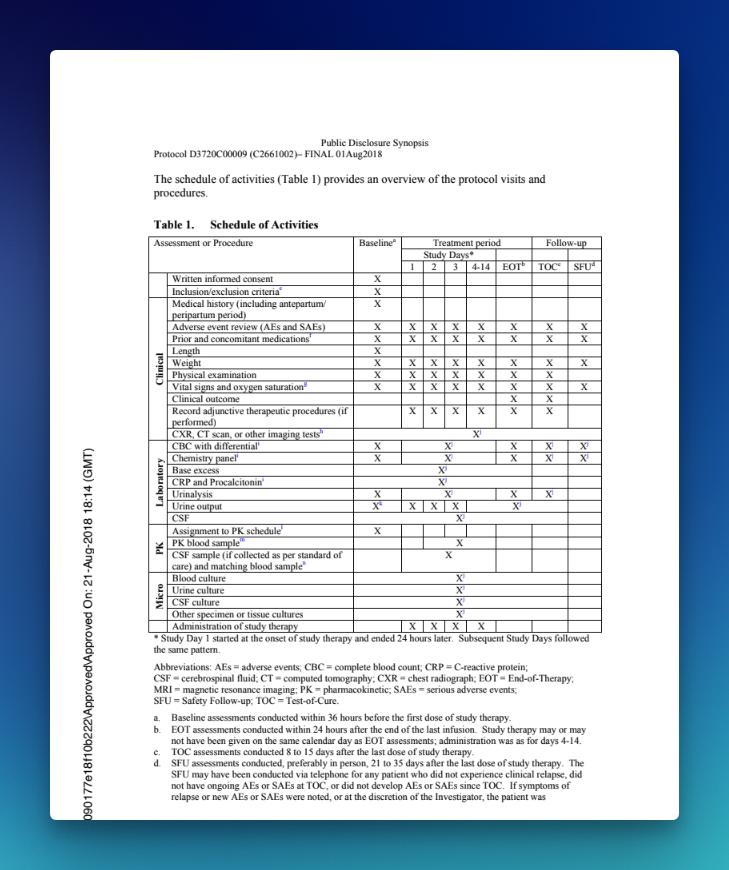
PaddleOCR Performance Test 2: Complex tables – Pfizer clinical Schedule of Activities
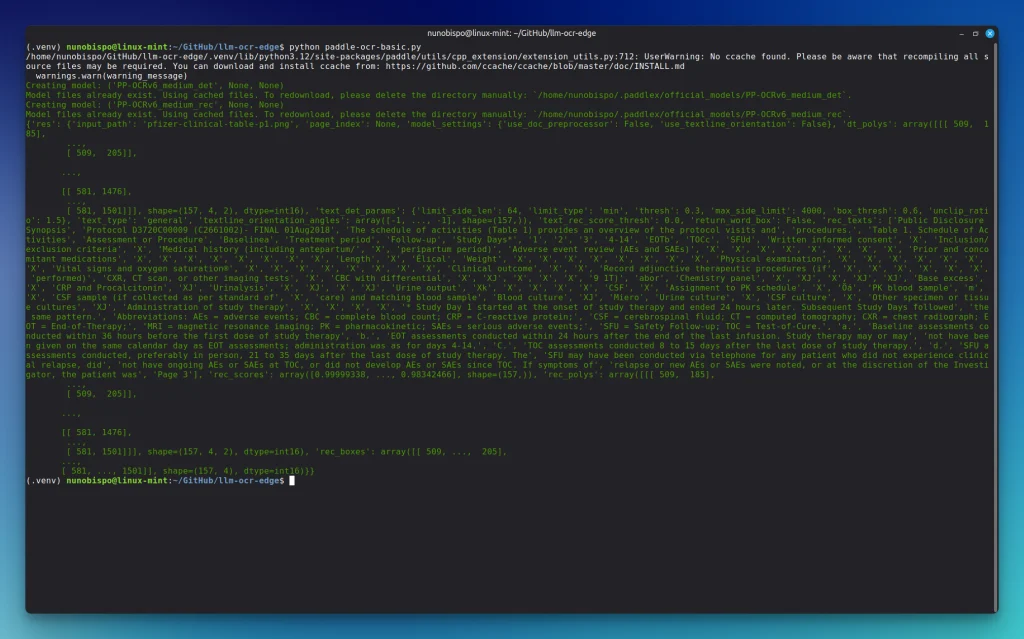
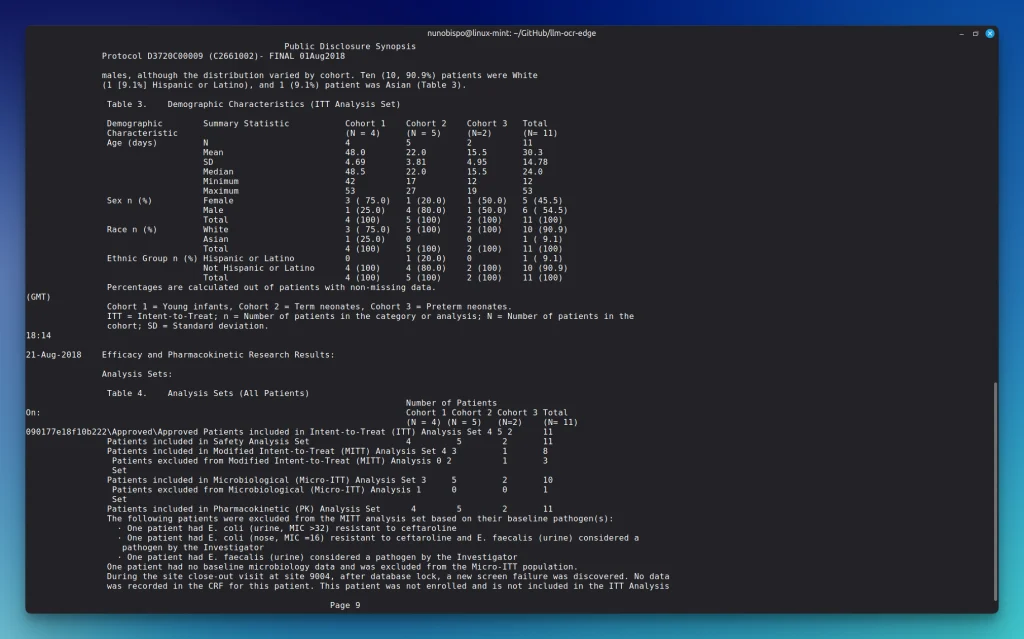
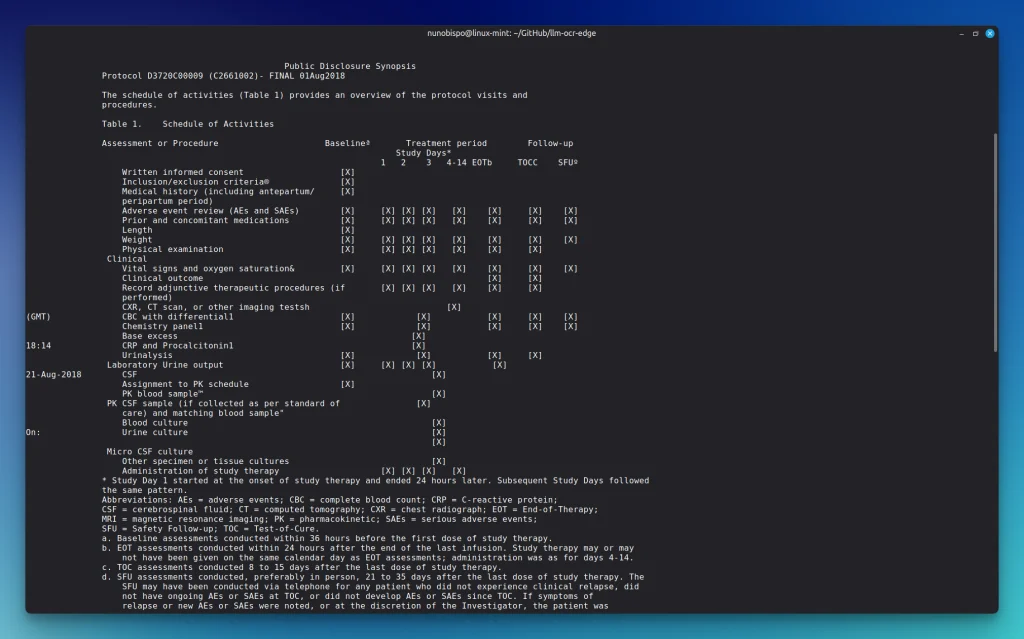
The challenge. Table 1 from a public disclosure synopsis: nested headers (Baseline / Treatment period / Follow-up, then Study Days 1, 2, 3, 4–14, EOT, TOC, SFU), vertical category labels, and a grid of X marks with superscript footnotes.
This is the result:
Quality assessment:157 regions, mean confidence 0.960 in 40.7 seconds. Procedure names are mostly right. The X marks are recognised as the character X. Superscripts come back as Baselinea, EOT{b, TOCc, SFUd .
The grid is not a grid. After ‘Adverse event review (AEs and SAEs)‘ the output is eight consecutive ‘X’ strings. There is no column index, no visit label, no way to know that the first X is Baseline and the last is SFU. ‘Length‘ is followed by a single X, which is correct by accident of counting; until a neighboring row has a different number of visits and any slice-into-N reconstruction silently shifts.
PaddleOCR Performance Test 3: Forms – OSHA Form 300
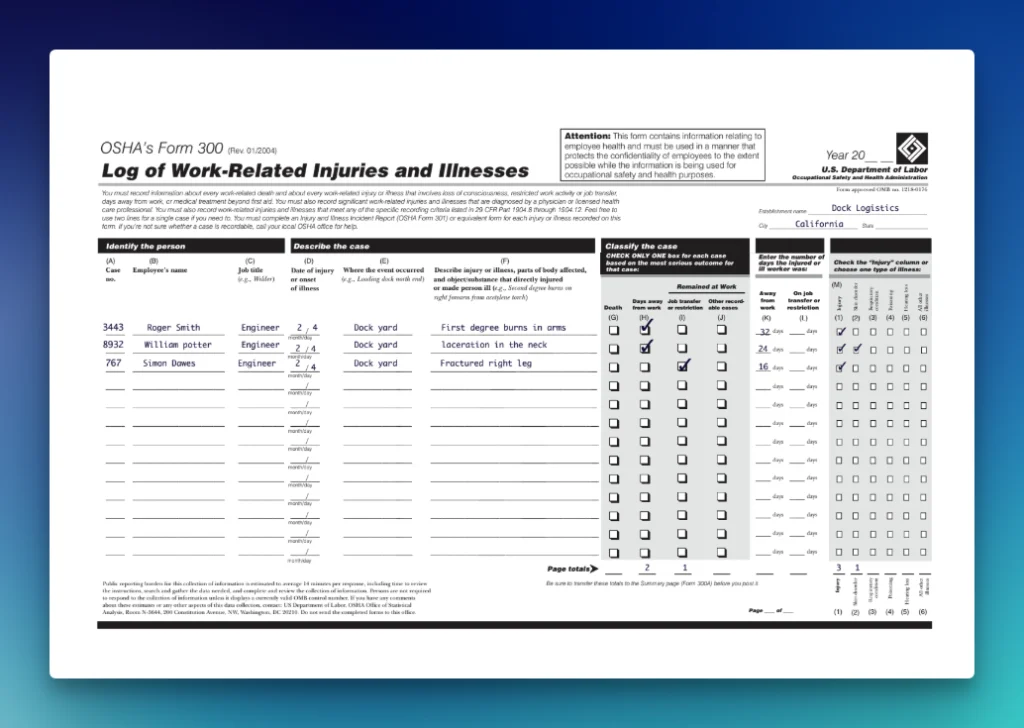
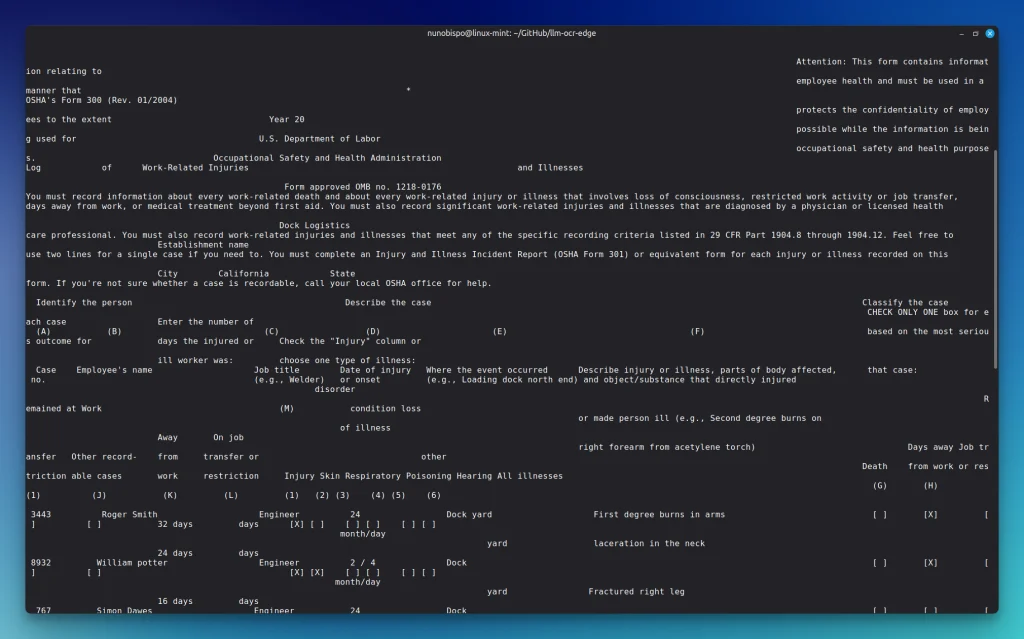
The challenge. OSHA’s Form 300 is a landscape log where the payload is the ticks: for each case, exactly one of Death / Days away / Job transfer / Other, plus a type-of-illness row. Three employees are filled in.
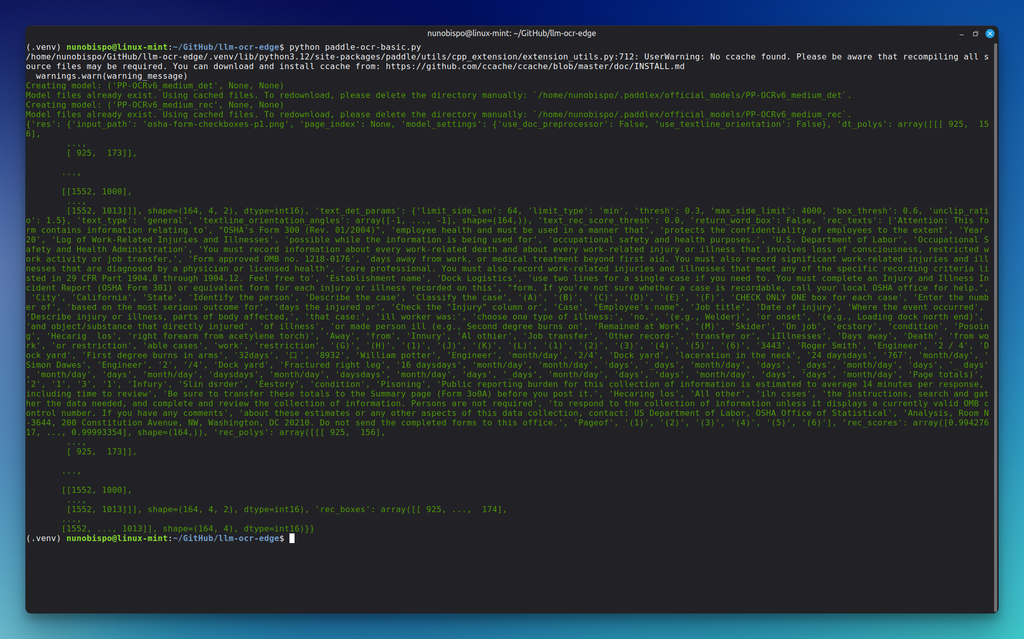
This is the result:
Quality assessment:155 regions, mean confidence 0.983 in 44.6 seconds. Names, case numbers and injury descriptions are there: Roger Smith, first degree burns; William potter, laceration in the neck; Simon Dawes, fractured right leg.
Zero checkbox states survived. There is no [X], no ☑, no marker of any kind in columns G–J or M. You cannot tell that Roger and William were days-away cases and Simon was a job-transfer case. You cannot tell that William was ticked for both Injury and Skin disorder.
Dates and day-counts degrade in the usual OCR ways: Roger’s 2/4 split into ‘2‘ and ‘4‘; ‘32days‘, '24 daysdays‘, ‘16 daysdays‘. Page totals arrived as four unbound digits '2' '1' '3' '1'. Header cells on the illness row came back as 'Skin sder', 'csory', 'Poisoing', 'Hecaing ls'.
The honest summary: PaddleOCR read the people and the injuries correctly, but could not tell you how the form was filled in.
Turn your complex PDF tables into structured data with Unstract
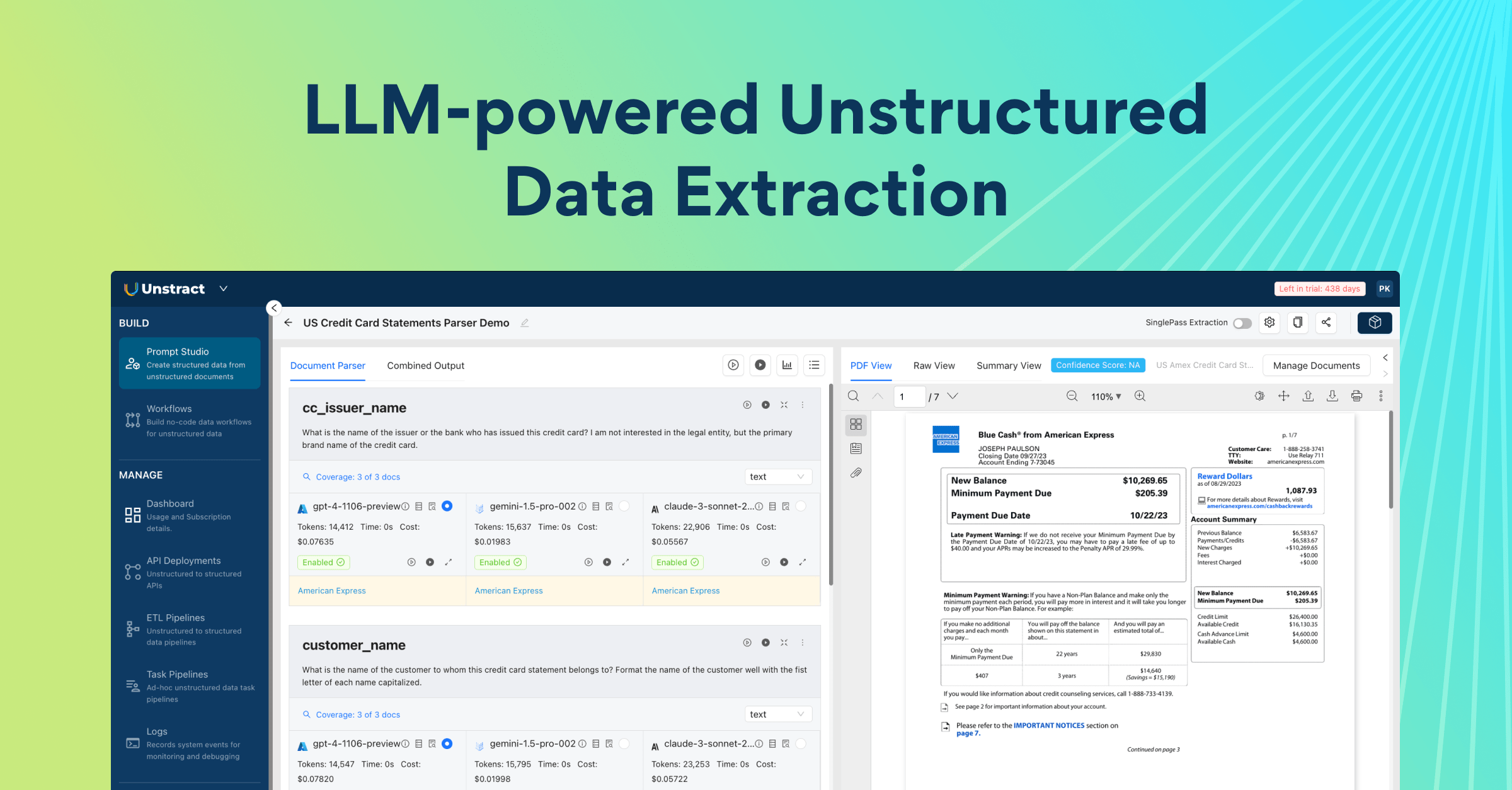
Unstract uses LLMs to extract clean, structured JSON from any document — PDFs, scans, images, tables of any layout. Define what you want using natural language, deploy as an API or ETL pipeline, and get data your systems can actually use.
Try Unstract for free on the Playground. No signup required.
LLMWhisperer takes a different position on the problem.
It is not trying to be a better character recogniser than PaddleOCR, for instance, on the remittance scan PaddleOCR already posted a 0.987 mean confidence.
LLMWhisperer is trying to solve the part PaddleOCR leaves to you: turning a page into text that preserves everything a downstream LLM needs to reason about it.
The mechanism is layout_preserving output mode. Instead of a list of boxes and coordinates, you get text laid out the way the page was: columns still side by side, labels still to the left of their values, table rows still rows. And in form mode, checkboxes and radio buttons are rendered inline as [X] and [ ].
We ran the v2 API against the same three PDFs, all in form mode with layout_preserving output (the mode built for checkboxes, radios and tables).
Getting started takes a couple of lines:
pip install llmwhisperer-client

from unstract.llmwhisperer import LLMWhispererClientV2

client = LLMWhispererClientV2(api_key="your_api_key")

result = client.whisper(
    file_path="osha-form-checkboxes.pdf",
    mode="form",                      # checkbox, radio and table detection
    output_mode="layout_preserving",  # keep the spatial structure
    wait_for_completion=True,
    wait_timeout=300,
)

print(result["extraction"]["result_text"])
Four processing modes map to four document realities: native_text for digital PDFs with a text layer, low_cost for clean scans, high_quality for degraded scans, handwriting and smartphone photos, and form for anything with checkboxes, radio buttons or tables.
Handwritten remittance
The thing to look at is not just whether the handwritten characters were read correctly, it is where they ended up.
PaddleOCR put ‘Adam grant' in a box of its own and the signature date next to MASTERCARD. LLMWhisperer kept the applicant block under field 13, put DATE 09/03/2024 on the SIGNATURE line. An LLM does not have to guess.
form mode on this page also picked up the printed payer fields in their original two-column layout: Micheal A Grant opposite $1,750.00, Columbus / OH / 43215 still sitting together.
Pfizer Schedule of Activities
PaddleOCR’s default pipeline turned “Adverse event review” into a label plus eight orphan X strings. The LLMWhisperer capture keeps those X’s in the visit columns.
Length is Baseline-only: one mark, then a gap. Weight is marked across the visit schedule. Nothing has to be counted and sliced. A missing cell stays a gap, which is the whole difference between a correct visit calendar and a shifted one.
OSHA 300
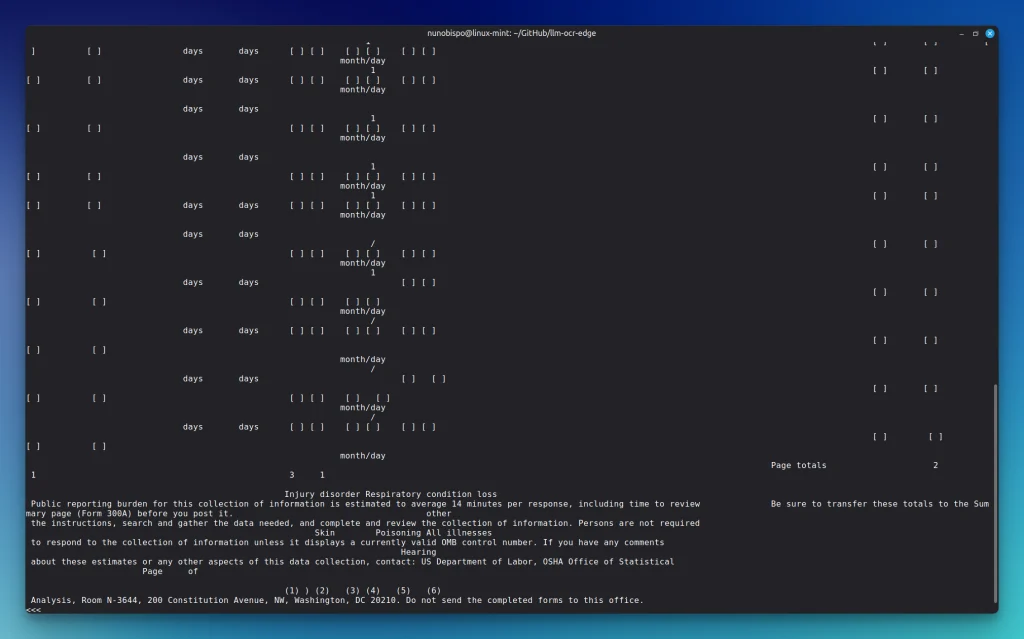
This is the clearest difference of the three. OSHA Form 300’s payload is the ticks.
Roger and William are days-away cases ([X] in column H). Simon is a job-transfer case ([X] in column I). William is ticked for both Injury and Skin disorder.
Page totals 2 / 1 / 3 / 1 sit under those columns. PaddleOCR had the names and none of the states.
PaddleOCR vs LLMWhisperer: head-to-head numbers
PaddleOCR on CPU (PP-OCRv6_medium) versus LLMWhisperer v2 (form mode, layout_preserving). Times are wall-clock for that environment.
Document
Pages
PaddleOCR
LLMWhisperer
FCC Form 159 remittance (handwriting)
1
99 regions, 0.987, 31.6s: signature Jowik, no VISA state
90 lines, 10.6s: applicant under field 13, VISA [X], date on SIGNATURE
OSHA Form 300 (checkboxes)
1
155 regions, 0.983, 44.6s: 0 checkbox states
75 lines, 10.6s: [X] per classify-the-case and illness column
Pfizer Schedule of Activities (table)
2
157 regions on p1, 0.960, 40.7s: unbound Xs
125 lines, 10.5s: [X] grid under visit columns
PaddleOCR’s mean confidence never dropped below 0.96. The failures that matter, the checkbox state, column identity, handwritten field binding: do not show up in that number.
PaddleOCR vs Other OCR Alternatives
With those two live runs in mind, here is how they compare against other six tools across the wider landscape. The extraction-quality table first, since that is what determines whether a pipeline works at all.
PaddleOCR and LLMWhisperer rows below are from the live runs on our fixtures. Cells for Tesseract, EasyOCR, Docling and Mistral OCR summarize documented capabilities and published benchmarks.
Extraction quality
Handwritten text
Table extraction
Form fields (checkbox / radio)
Layout fidelity
LLMWhisperer
Strong on our remittance scan: form + layout_preserving keeps handwritten values bound to their printed labels
Strong on our Pfizer table: visit-column relationships preserved in the text output
Yes on our OSHA 300: checkboxes rendered as [X] / [ ] inline
Strong: layout_preserving mode reproduces spatial structure as text
Tesseract
Typically weak on cursive; independent 2026 handwriting benchmarks report roughly ~45% accuracy
Typically poor: tables tend to collapse into sequential text with no row/column association
None built in
Typically poor: flat text; multi-column pages often produce garbled reading order
EasyOCR
Typically weak on messy hands; independent testing around ~62% on neat handprinting
None: no table structure recognition; cannot detect borderless tables
None built in
None: no layout analysis; returns isolated text snippets
PaddleOCR
High character accuracy on our FCC remittance scan (0.987 mean); handwritten values unbound from field numbers; signature misread
None on our OSHA 300 run: ticked boxes arrive as bare labels
Coordinates only; you reconstruct layout yourself
Docling
Inherits its OCR engine: delegates to Tesseract, EasyOCR, RapidOCR or Surya, so handwriting quality tracks whichever backend you plug in
Strong on typed tables: TableFormer reports >91% TEDS on FinTabNet in accurate mode
None built in
Very good on typed docs: reading order, hierarchy and provenance in DoclingDocument
Mistral OCR
Generally strong among hosted LLM-based OCR APIs
Generally good Markdown tables with bounding boxes and block types
Partial: form elements are often detected but state is not consistently rendered
Generally good block classification and coordinates; can flatten on noisy scans
Setup, cost and operational risk
Setup complexity
Cost
Hallucination risk
Multilingual
LLMWhisperer
Very low: pip install llmwhisperer-client, one API call
Free 100 pages/day; then $1 / $5 / $10 / $15 per 1,000 pages by mode
None: deterministic OCR and layout reconstruction, not a generative model
All Unicode in native-text mode; 300+ in high-quality modes
Tesseract
Low: system package, ~10 MB models
Free (Apache 2.0)
None: non-generative
100+ languages
EasyOCR
Very low: one pip install, ~500 MB models
Free (Apache 2.0)
None: non-generative
80+ languages
PaddleOCR
Moderate to high: PaddlePaddle framework, model downloads, occasional framework-level incompatibilities
Free (Apache 2.0), self-hosted
Very low: detect-then-recognise cannot invent text
50 in one PP-OCRv6 model; 109 via PaddleOCR-VL
Docling
Moderate: Python library, several models, heavier still on the VLM pipeline
Free, open source
Low on the standard pipeline; the VLM pipeline can enter repetitive generation loops
Depends on the chosen OCR backend
Mistral OCR
Very low: hosted API
$4 / 1,000 pages; $2 via Batch API; $5 for Document AI
Present: generative architecture; confidence scores help but do not eliminate it
170 languages
Which one should you actually use?
Stay on PaddleOCR when you need to read text off images at high accuracy and low cost, you are working with printed content (signage, receipts, IDs, screenshots, product labels), you need tight bounding boxes, or heavily multilingual documents, or you have hard requirements to run entirely on your own hardware with no per-page cost. PaddleOCR is excellent at this, and if it is what you need, none of the alternatives in this article will do it better for free.
Use Tesseract when you need something small, boring and battle-tested for clean printed text, and you value a tiny footprint and a 100-language install over accuracy on anything difficult.
Use EasyOCR when you want working OCR in five minutes for a prototype or a scene-text problem. Be aware that upstream development has slowed considerably and the issue tracker auto-closes items older than six months: pin the version that works for you.
Use Docling when your documents are structurally complex but typed: research papers, financial reports, technical manuals, Office files. TableFormer is the best open-source table structure recogniser available and the DoclingDocument output carries real provenance. Just remember that its OCR is delegated, so its handwriting performance is whichever engine you plugged in, and it has no more idea what a checkbox is than PaddleOCR does.
Use Mistral OCR when you want a hosted, high-accuracy general parser with bounding boxes and confidence scores, you are processing at volume and your documents are varied enough that a general model beats a specialised pipeline. Budget for validation on outputs where a plausible-but-wrong value would be expensive.
Use LLMWhisperer when the documents are the messy ones and the output is going to an LLM. Concretely: forms with checkboxes and radio buttons whose state you have to get right; scanned and handwritten documents where values must stay bound to their labels; tables where a shifted column is a wrong number rather than a formatting complaint; and any pipeline where a hallucinated value would be worse than a missing one.
Production document pipelines fail at the structural layer far more often than the character layer. Pick your tool for the layer where your problem actually lives.
Try it on your own documents. LLMWhisperer’s free tier processes 100 pages a day on every mode, with no credit card: enough to run your three worst documents through form mode and compare the output side by side with what your current pipeline produces. Get started with LLMWhisperer →
LLMWhisperer: PaddleOCR Alternative for LLM based Workflows — FAQs
1. If PaddleOCR is accurate and free, why do teams go looking for a PaddleOCR alternative? Because accuracy on characters isn’t where they get stuck. Teams adopt it successfully, then hit the point where the business question is which box was ticked, which column a number belongs to, and whose signature is whose — and that’s a different problem from reading text.
2. What did the test actually measure? Three deliberately difficult documents — a skewed handwritten FCC Form 159 remittance, the Pfizer clinical Schedule of Activities table, and OSHA Form 300 — run through both platforms. PaddleOCR’s mean confidence stayed above 0.96 on all three. What it lost was meaning.
3. Can you give a concrete example of what gets lost? On OSHA Form 300, PaddleOCR read Roger Smith, William Potter and Simon Dawes correctly, and described their injuries correctly. It could not tell you that Roger and William were days-away cases and Simon was a job-transfer case — which is precisely what the form exists to record.
4. What does that cost operationally? Everything that depended on the ticks has to be checked by a person. On the FCC remittance, the signature date was recognised accurately but attached to MASTERCARD rather than SIGNATURE, so no downstream system can establish who signed or when without someone reading the page.
5. How does the Paddle OCR vs. LLMWhisperer time comparison come out? LLMWhisperer was faster on all three in the author’s environment — 10.6s against 31.6s on the remittance, 10.6s against 44.6s on OSHA 300, and 10.5s against 40.7s on the Pfizer table. Worth reading with care, since the two are doing different amounts of work per page.
6. When should a team stay on PaddleOCR? When the job genuinely is reading text off images at high accuracy — clean printed content, high volume, self-hosted, no per-page fee. PaddleOCR is excellent at that. The decision point is whether anything downstream needs the structure of the page, or just the characters on it.
Nuno Bispo is a Senior Software Engineer with more than 15 years of experience in software development.
He has worked in various industries such as insurance, banking, and airlines, where he focused on building software using low-code platforms.
Currently, Nuno works as an Integration Architect for a major multinational corporation.
He has a degree in Computer Engineering.