AI-Powered Legal Document Data Extraction with Unstract
Table of Contents
Legal documents are some of the hardest business documents to process reliably.
A single transaction may involve 100+ page credit agreements, lease contracts with nested clause structures, master service agreements, purchase agreements, or CLO indentures running well beyond 200 pages.
Inside those documents are the details legal teams actually care about—parties, dates, obligations, covenants, termination rights, governing law, liability clauses, payment terms, and dozens of other provisions that may be buried across pages of dense legal language.
Traditionally, turning that information into structured data has required a considerable amount of setup. Teams build templates, define extraction rules, create schemas, write prompts, test them against sample documents, and then repeat the process whenever a new document variation causes the extraction to fail.
But what if most of that setup disappeared?
What if you could take a collection of credit agreements, lease contracts, MSAs, CLO indentures, or purchase agreements and let an AI agent build the schema, generate the extraction logic, and help validate the results automatically?
That is the direction modern legal document data extraction is moving toward.
And the simplest way to understand what Unstract is trying to achieve is through one idea:
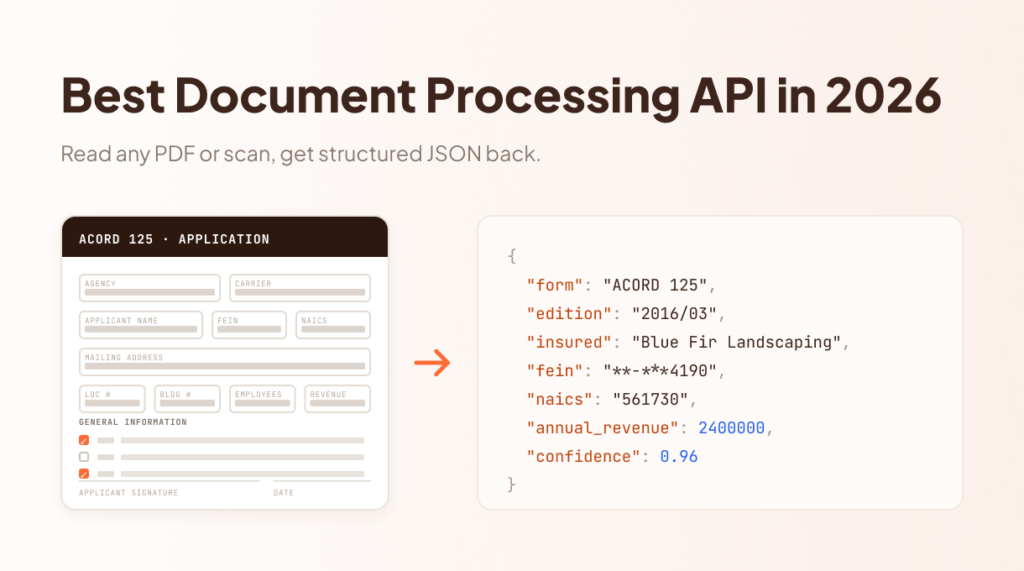
Legal document in → structured legal data out.
Once an extraction project is deployed, a legal document can be sent to a single API endpoint and returned as structured data that downstream systems can work with. Instead of receiving another block of OCR text, the output can contain clearly organized fields such as borrower and lender details, agreement dates, facility amounts, maturity dates, governing law, financial covenants, change-of-control provisions, termination terms, and other contract-specific information.
A credit agreement can move from hundreds of pages of unstructured legal text into a clear, structured, and actionable output.
That shift—from long, unstructured legal documents to consistent, machine-readable data—is the core promise of intelligent document processing for legal workflows.
With Unstract, the goal is not simply to read legal documents faster. It is to reduce the manual work required to build and maintain the extraction system itself, so legal data can move more easily into contract management systems, compliance workflows, internal applications, analytics pipelines, and other downstream processes.
The real promise is simple: turn complex legal documents into structured, usable data without making teams build the entire extraction pipeline by hand.
See Legal Document Extraction in Action With Unstract
Before getting into how the platform works, it is easier to start with the outcome.
I sent a legal agreement to a deployed Unstract API endpoint. Instead of returning hundreds of lines of raw text, the API returned structured fields that can be used directly by another application, database, or legal workflow.
Here is a shortened version of the actual response:
This is the practical value of legal document data extraction. Information that would normally need to be located and copied manually is returned as predictable, machine-readable fields.
In this example, Unstract identified details such as:
the client and service provider
document title and exhibit number
effective date and initial term
client and provider locations
Statement of Work and SLA references
engagement lead
principal accounting officer
company ticker symbol
description of the services covered by the agreement
provider specialization
For a legal operations or engineering team, the important part is not simply that these values were found. It is that they were returned according to a structured schema.
That means a downstream application does not have to search through the agreement again to determine which text represents the effective date, which organization is the provider, or where the Statement of Work is referenced.
Calling the Legal Document Extraction API
Once the extraction workflow is deployed, a document can be submitted using a standard API request.
For the application calling the endpoint, much of the document-processing complexity is hidden behind that API.
The system receives the document, converts it into an AI-readable representation, applies the extraction configuration, and returns the requested legal information in a consistent structure.
This API-first approach is particularly useful when legal document extraction needs to become part of a larger system. The returned JSON can be sent to a contract management platform, stored in a database, used for compliance checks, passed into analytics pipelines, or consumed by another application without requiring someone to manually review the source document first.
But the API is only the final interface. Several components inside Unstract work together to produce that structured result.
How to turn complex legal contracts into usable data with AI
A governing law clause nobody had time to verify across 200 pages.
Contracts hold your business’s most consequential data — and this recorded webinar shows how Unstract extracts it: layout-preserved parsing, agents that generate the schema and prompt, and field-level accuracy scoring.
Parties, dates, payment terms, and risk clauses come out structured, traceable, and template-free.
Unstract brings the document-processing lifecycle together rather than treating OCR, extraction, evaluation, workflow orchestration, and deployment as isolated tasks.
At a high level, the stack includes five important components.
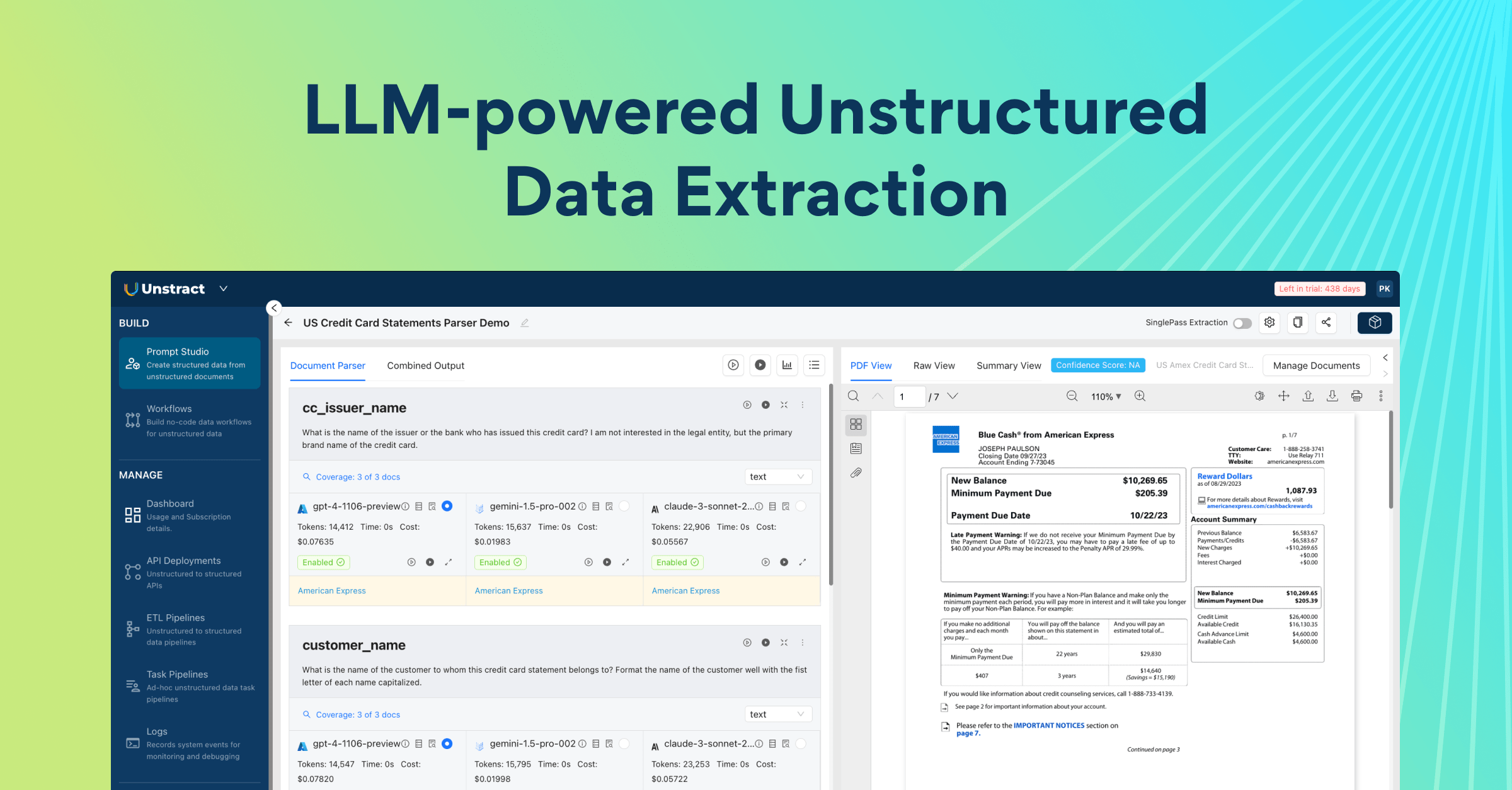
Agentic Prompt Studio
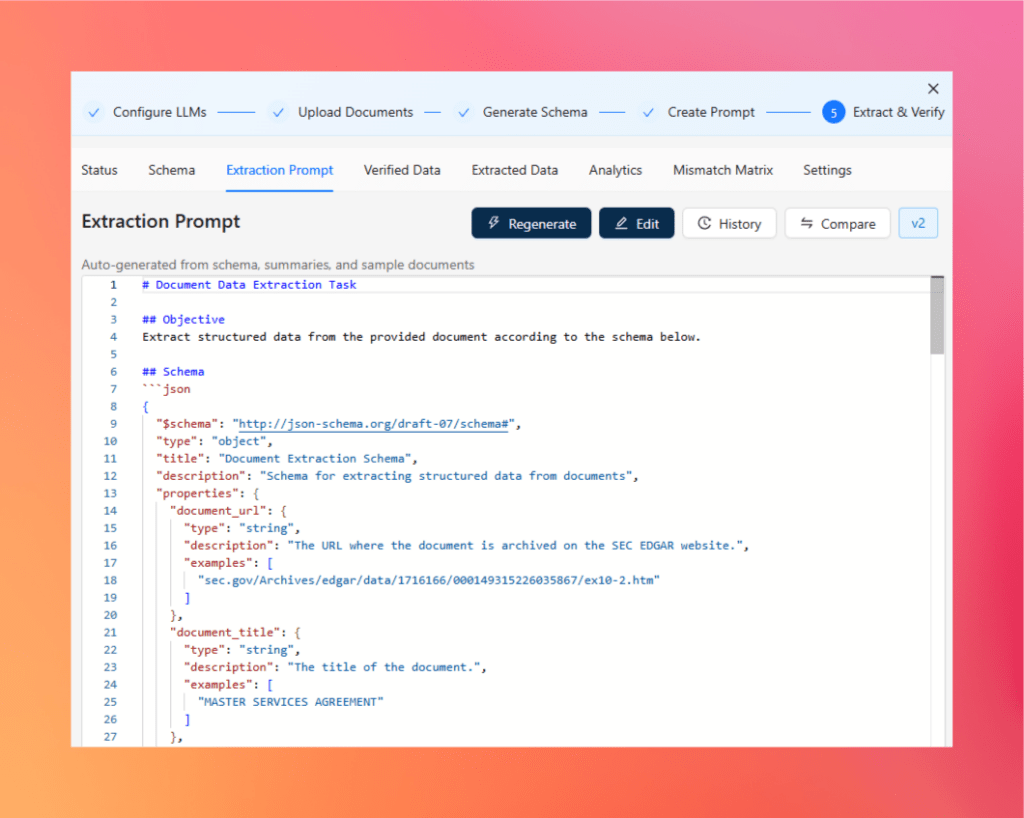
Agentic Prompt Studio is where the extraction project is created and evaluated.
Instead of requiring the user to manually design the entire extraction setup, agents help automate key steps such as:
understanding the uploaded documents
generating a schema
creating extraction prompts
running structured extraction
comparing extracted data against verified data
calculating accuracy
identifying mismatches
For legal documents, this is particularly useful because a schema may contain dozens of fields ranging from agreement metadata to clauses, dates, obligations, financial terms, and nested structures.
The aim is to reduce the amount of schema design and prompt engineering needed before extraction becomes usable.
Getting Started With Unstract: Best AI-Powered Legal Doucment Data Extractor
LLMWhisperer
Before an LLM can extract contractual information reliably, it needs a strong representation of the original document.
That is the role of LLMWhisperer.
It acts as the document parsing and OCR layer, converting PDFs and scanned documents into layout-preserved text suitable for downstream AI processing.
Instead of reducing a complex agreement to an unstructured text dump, the goal is to retain enough of that original organization for the extraction layer to understand the document correctly.
We will look at this in more detail later using an actual legal document in the LLMWhisperer Playground.
Get started with LLMWhisperer: Best OCR for Legal Document Data Extraction
Workflow Builder
Once an extraction project is ready, Workflow Builder turns it into an operational document-processing pipeline.
A workflow can define how documents enter Unstract, which extraction tool processes them, and where the resulting data should go.
For the legal extraction example, this effectively becomes:
API input → legal extraction tool → structured output → API response
The same model can later be extended when documents need to move into other enterprise systems or more complex processing flows.
Stop rebuilding extraction rules every time a legal contract changes.
Credit agreements, leases, and MSAs bury the fields you need inside dense prose and clause hierarchies like Section 1.01(a)(i)(A). Unstract reads the document, generates the schema and prompt automatically, and ties every extracted value back to its source clause—so you know which ones to trust before they reach production.
Try Unstract for free on the Playground. No signup required.
The API layer exposes that workflow to external systems.
Instead of requiring users to open the Unstract interface whenever a new agreement arrives, another application can submit the document programmatically.
This is what transforms AI legal document analysis from an interactive experiment into reusable infrastructure.
A contract platform, internal legal tool, document repository, or custom Python service can call the endpoint and work directly with the returned structured data.
ETL
Extraction is only useful when the resulting data can move somewhere useful.
Unstract’s ETL capabilities support document-processing pipelines where extracted information needs to flow between source systems, processing stages, and downstream destinations.
For example, extracted contract data could ultimately be:
stored in a database
moved into a data warehouse
supplied to compliance workflows
indexed for analytics
passed to another enterprise application
This is where document extraction becomes part of a larger automation architecture rather than remaining an isolated AI task.
How the Pieces Work Together
Taken together, the stack looks roughly like this:
The result is what we saw at the beginning of this section: a legal document enters the system, while clean fields such as parties, dates, terms, references, and agreement-specific information come back as structured JSON.
That is the real shift behind modern AI document intelligence for legal workflows. The goal is no longer simply to digitize a contract or make its text searchable. It is to turn the information inside that contract into structured data that software can immediately act on.
In the next section, we will go behind that API response and build the extraction project itself using Agentic Prompt Studio—from the original legal documents all the way through schema generation, prompt creation, extraction, verified data, accuracy scoring, and mismatch analysis.
Agentic Prompt Studio: From Legal Documents to an Automated Extraction System
Getting structured data from a legal document is only one part of the problem. The harder part is building an extraction system that can produce the same structured output reliably across similar agreements.
Traditionally, this involves manually studying sample documents, deciding which fields matter, designing a schema, writing extraction prompts, testing the results, and repeatedly adjusting the configuration when something fails.
Agentic Prompt Studio reduces much of this setup by using specialized agents to help generate the schema, build the extraction prompt, and evaluate extraction quality.
For this walkthrough, I used the same Master Services Agreement shown in the previous section. The document contains fields such as the client and provider names, effective date, initial term, Statement of Work reference, SLA reference, engagement lead, and services description.
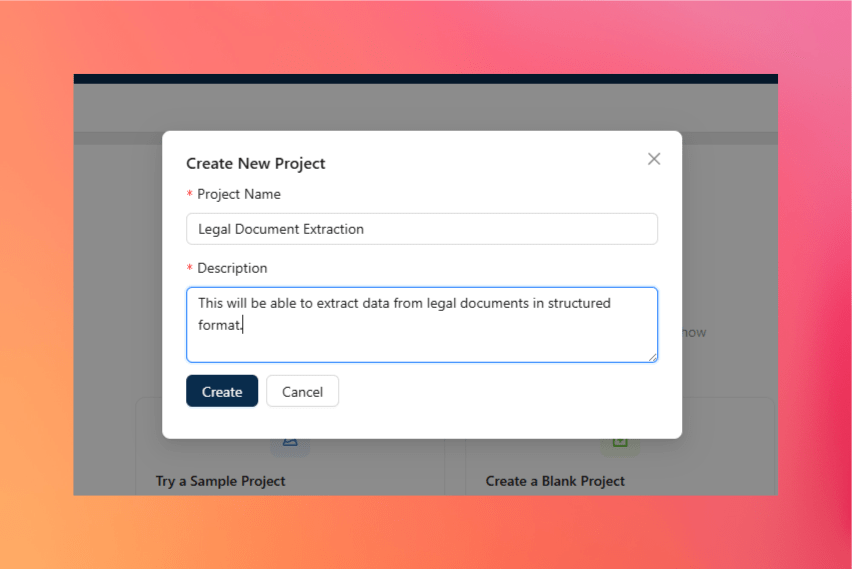
Step 1 — Create a New Agentic Prompt Studio Project
Start by opening Agentic Prompt Studio from the Unstract sidebar and creating a new project.
Click New Project
Enter the project name and required details
Create the project
Open the project workspace
The project becomes the central place for managing the documents, generated schema, extraction prompt, verified data, extraction results, and evaluation metrics.
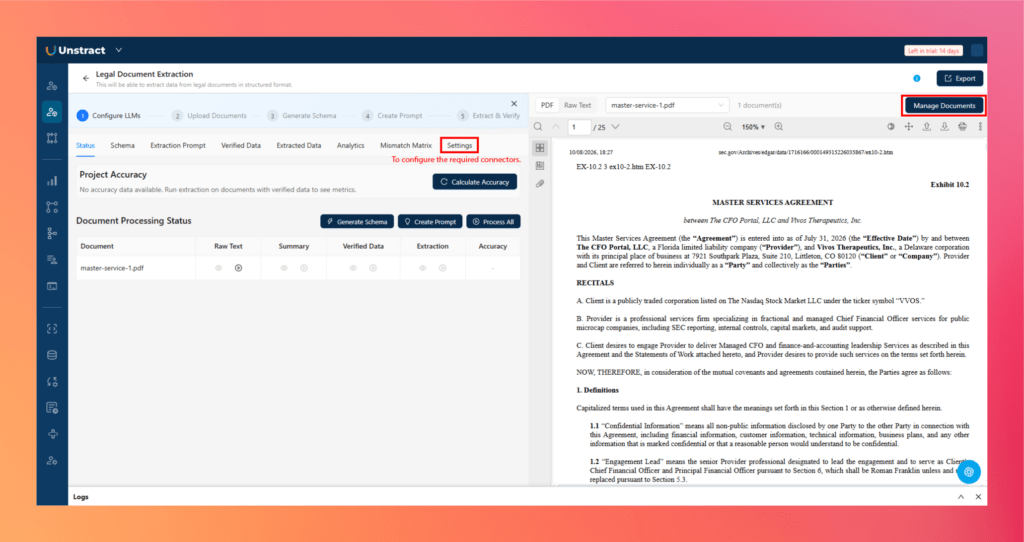
Step 2 — Upload the Legal Documents
Next, add the sample legal documents that represent the type of agreement you want to process.
Click Manage Documents
Upload the Master Services Agreement and other documents of the same nature
Confirm that the uploaded documents appear in the project
Using multiple examples of the same document class helps the system understand variations between agreements while identifying the fields that should remain consistent.
For this project, those fields can include values such as client_name, provider_name, effective_date, initial_term, and services_description.
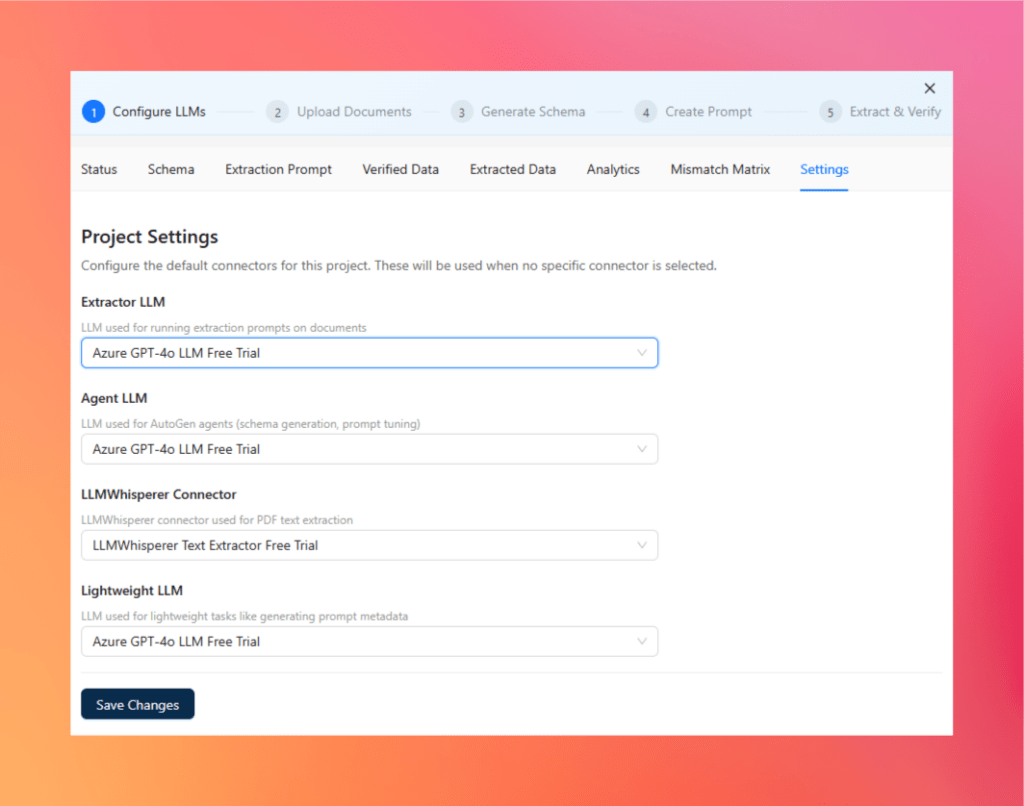
Step 3 — Configure the Required Connectors
Before processing the documents, configure the LLM and document parsing connectors from the project settings.
Open the Settings tab
Configure the Extractor LLM
Configure the Agent LLM
Select the LLMWhisperer Connector
Configure the Lightweight LLM, where required
Save the project settings
These connectors perform different roles. LLMWhisperer prepares the document content, the Agent LLM supports schema and prompt generation, and the Extractor LLM performs the final structured extraction.
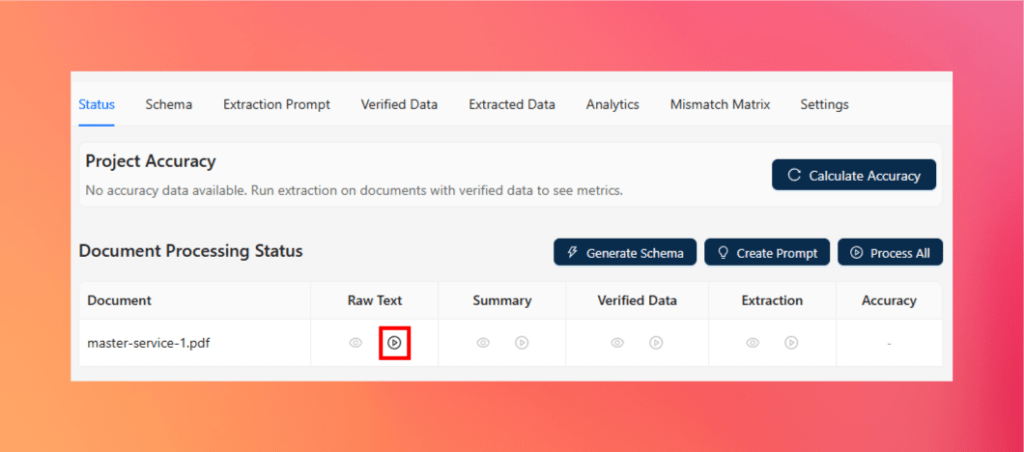
Step 4 — Generate Raw Text
The first processing step is generating a machine-readable representation of each legal document.
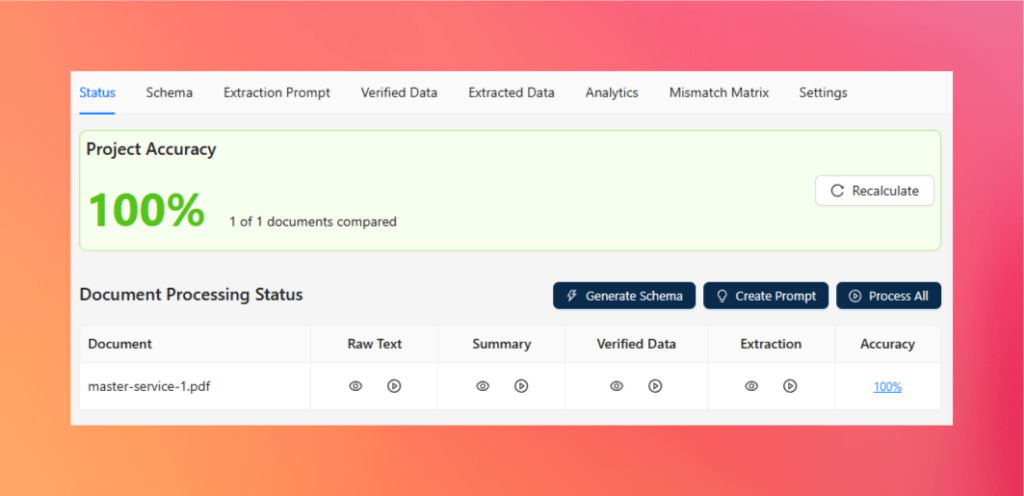
Open the Status tab
Trigger Raw Text generation for the uploaded documents
Wait for processing to complete
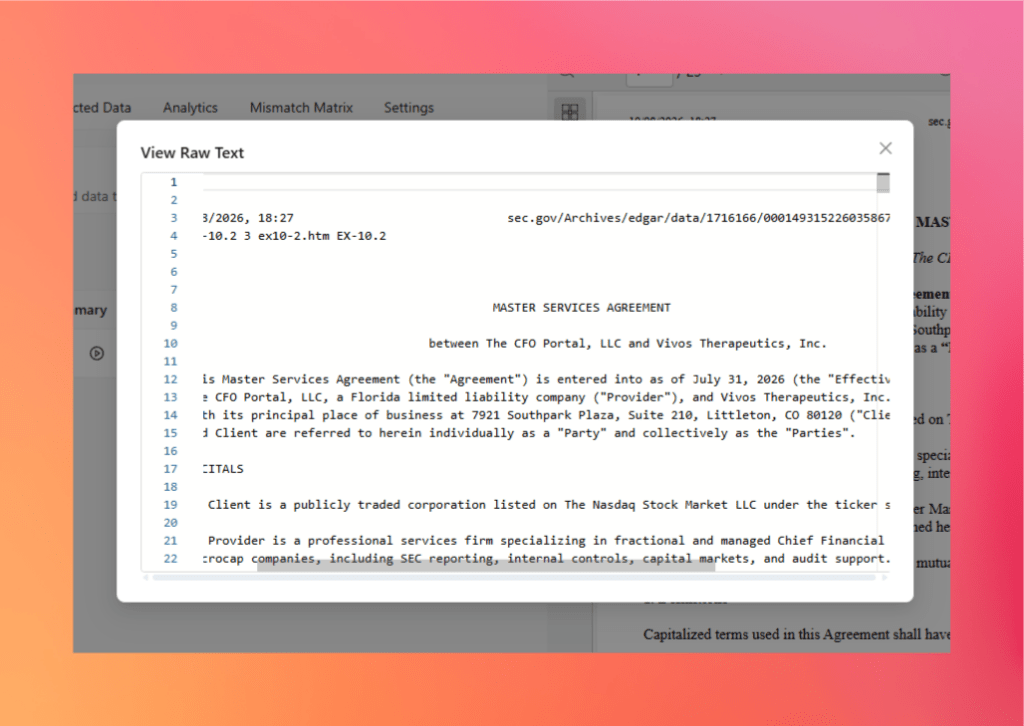
Use the preview option to inspect the extracted content
LLMWhisperer generates the underlying text while retaining important layout relationships from the original document.
For legal agreements, this is particularly useful because information may be spread across headings, numbered sections, exhibits, tables, and signature blocks rather than appearing as a simple sequence of paragraphs.
The raw text becomes the foundation for all subsequent agentic processing.
Step 5 — Generate Document Summaries
Once the raw text is available, Agentic Prompt Studio summarizes each document.
Trigger Summary generation from the Status tab
Generate a summary for each uploaded agreement
Review the generated summaries where needed
The summaries provide a condensed representation of the information and structures present in each document.
They help the agentic pipeline recognize:
important entities and fields
recurring sections
document-specific information
common patterns across agreements
potential nested or repeating structures
These summaries are then used during automatic schema generation.
Step 6 — Automatically Generate the Schema
Instead of manually deciding every JSON field, Agentic Prompt Studio can generate the extraction schema from the uploaded documents.
Click Generate Schema
Select the appropriate generation option and LLM connector
Start schema generation
Review the generated schema in the Schema tab
Edit individual fields if required
Behind this process, specialized agents work together to build a consistent schema.
Summarizer Agent
The Summarizer Agent analyzes each document independently and identifies potential fields, their meanings, data types, examples, and relationships.
For the Master Services Agreement, it may identify fields such as:
client_name
provider_name
effective_date
initial_term
sow_reference
sla_reference
engagement_lead
Uniformer Agent
The Uniformer Agent reconciles differences across documents.
For example, one agreement might use Effective Date, while another uses Agreement Date for a similar concept. The agent helps normalize these variations into a consistent field structure.
Finalizer Agent
The Finalizer Agent converts the unified field representation into the final JSON Schema, including field names, data types, descriptions, arrays, nested objects, and other structural requirements.
This removes much of the manual schema-design work that would otherwise be required before extraction could begin.
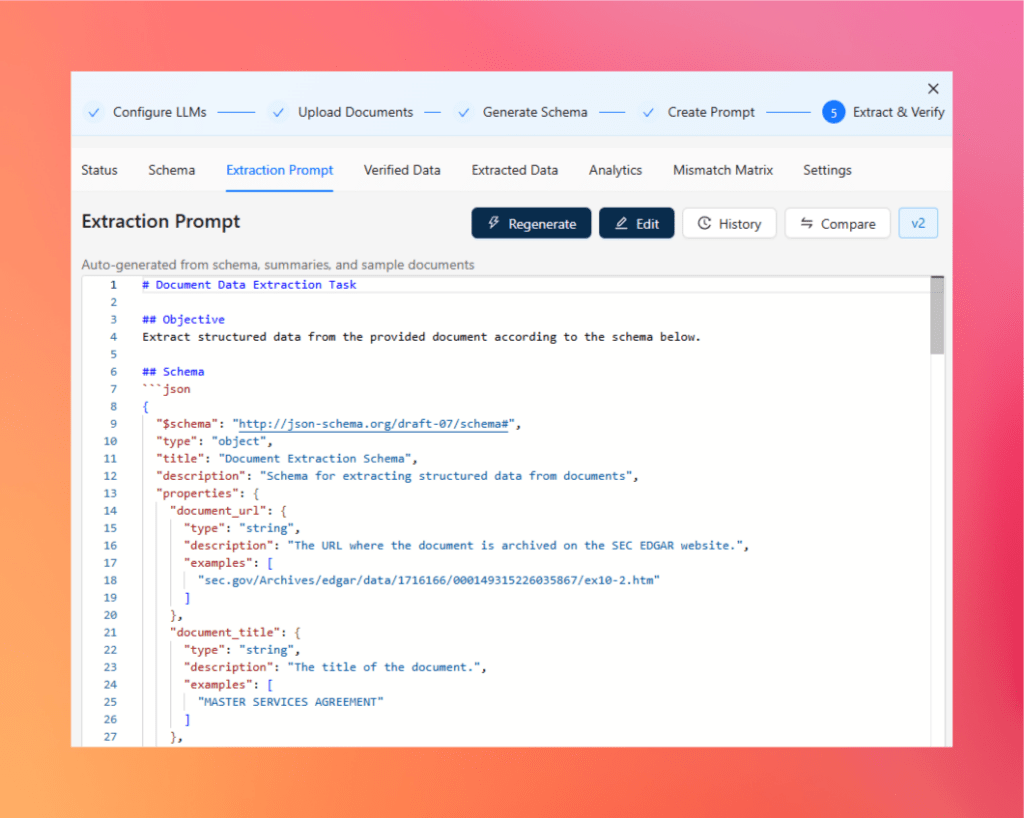
Step 7 — Automatically Generate the Extraction Prompt
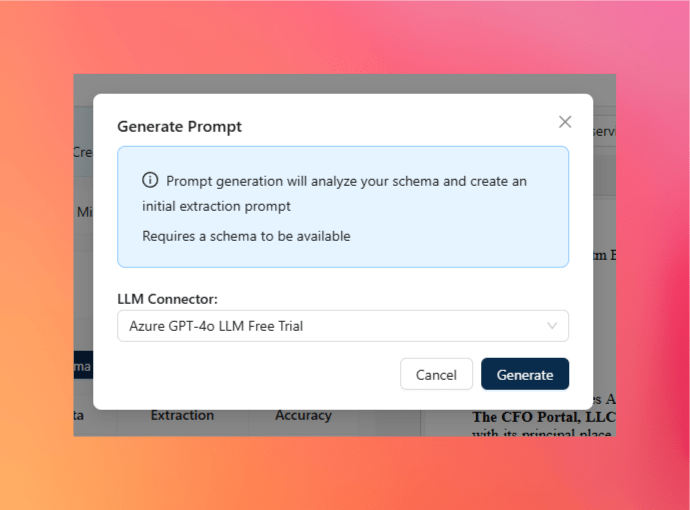
Once the schema is ready, Agentic Prompt Studio can create the extraction prompt automatically.
Click Create Prompt
Select the required LLM connector
Start prompt generation
Review the generated prompt in the Extraction Prompt tab
Another set of agents handles this stage.
PatternMinerAgent
The PatternMinerAgent studies the sample documents to identify useful extraction patterns, including:
labels
section names
formatting conventions
locations of relevant fields
relationships between values
recurring document structures
PromptArchitectAgent
The PromptArchitectAgent combines these patterns with the generated schema and document summaries to create the extraction instructions.
The resulting prompt defines how fields should be identified and how the final structured output should be returned.
CriticDryRunner
Before the prompt is finalized, the CriticDryRunner evaluates it against the expected extraction behavior.
It checks areas such as:
schema compliance
JSON formatting
ambiguous instructions
missing extraction guidance
potential document variations
The prompt can then be refined before being used for the actual extraction.
This turns prompt engineering from a largely manual process into an agent-assisted workflow.
Step 8 — Generate Verified Data
The next step is establishing a trusted reference against which extraction results can be measured.
Generate Verified Data for each document
Open the Verified Data tab
Review the generated field values against the source document
Correct any values where necessary
Verified data acts as the known-correct baseline for evaluation.
For example, the verified output for the Master Services Agreement may confirm values such as:
client_name: Vivos Therapeutics, Inc.
provider_name: The CFO Portal, LLC
effective_date: July 31, 2026
initial_term: 12
Having this baseline allows the platform to measure extraction quality objectively rather than relying on visual inspection alone.
Step 9 — Run the Structured Extraction
With the schema and prompt prepared, run extraction across the uploaded documents.
Trigger Extraction from the Status tab
Wait for each document to finish processing
Open the extracted results
Review the result in Data View
Switch to JSON View to inspect the complete structured output
The extracted result follows the schema generated earlier, making the output consistent across similar legal agreements.
This is the stage where the original legal document becomes structured information that can later be exposed through an API.
Step 10 — Compare Extracted Data With Verified Data
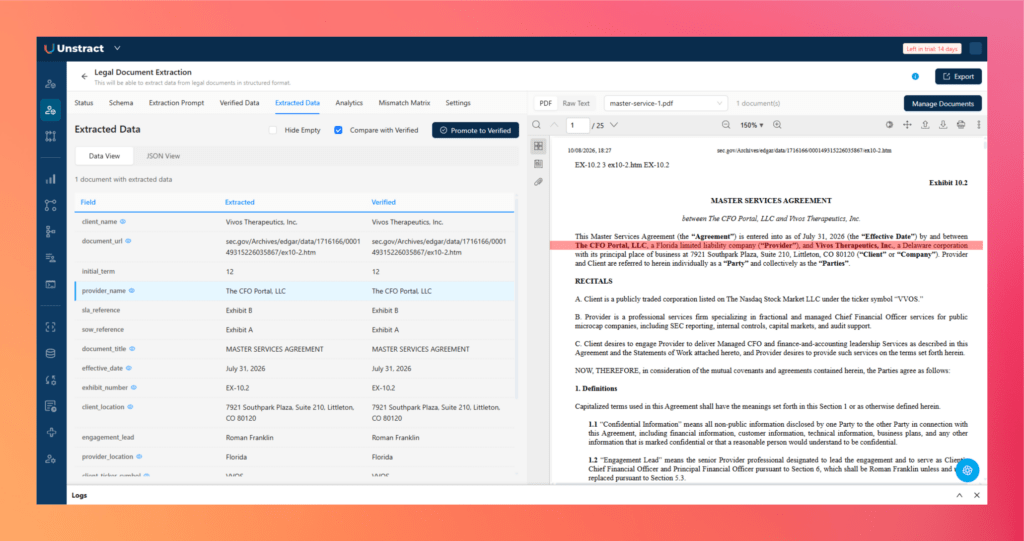
Agentic Prompt Studio can directly compare the extracted result against the verified baseline.
Open the Extracted Data section
Enable Compare with Verified
Review matching and mismatching fields
Inspect individual differences in Data View or JSON View
Instead of manually checking every extracted value, the comparison highlights the fields that require attention.
For a large legal extraction schema, this can significantly reduce the effort required to evaluate whether a prompt or schema change has actually improved the system.
Step 11 — Review Accuracy Scores
Once verified and extracted data are available, Agentic Prompt Studio calculates extraction accuracy.
Review the overall project accuracy
Check accuracy for individual documents
Identify fields responsible for extraction failures
Compare accuracy after prompt or schema changes
This creates a measurable feedback loop.
Rather than making a prompt modification and assuming that it improves extraction, teams can see how the change affects accuracy across the legal document set.
This is especially important when moving from a proof of concept to a production legal document processing workflow.
Step 12 — Inspect the Analytics Dashboard
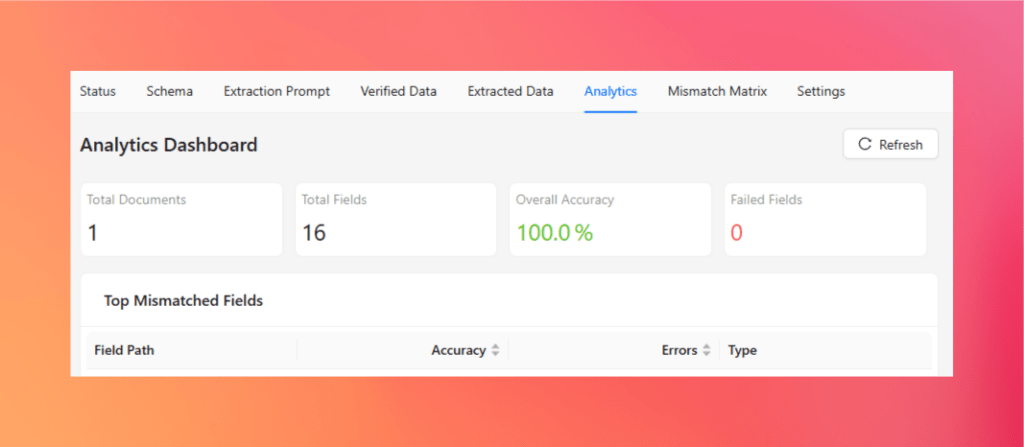
The Analytics tab provides a broader view of extraction performance.
Open Analytics
Review the number of processed documents
Check the number of evaluated fields
Review overall extraction accuracy
Identify failed or low-performing fields
Use these results to target further improvements
This makes it easier to identify whether extraction problems are concentrated around a particular field or occur across several agreements.
Instead of repeatedly changing the entire prompt, teams can focus on the parts of the extraction configuration that actually need attention.
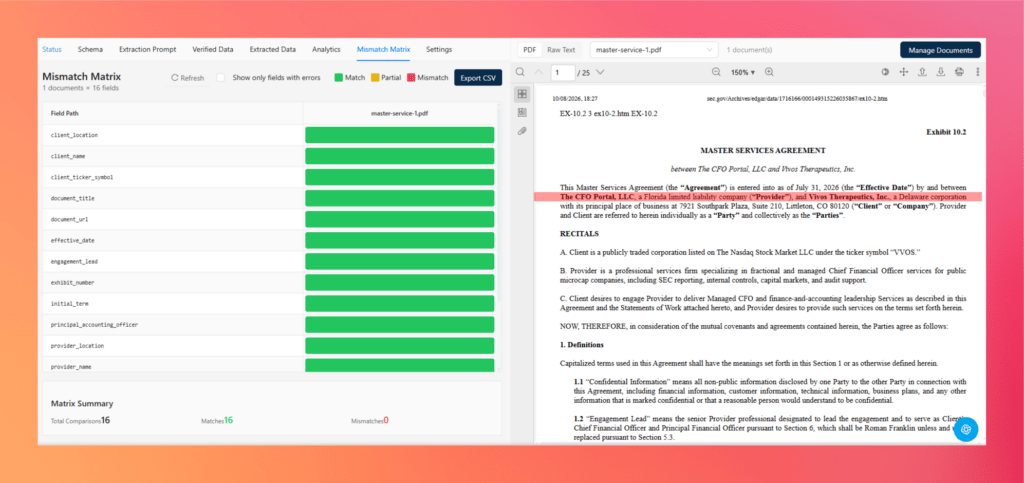
Step 13 — Inspect the Mismatch Matrix
The Mismatch Matrix provides a field-by-field view of extraction performance across the uploaded documents.
Open the Mismatch Matrix
Review fields across each document
Use the color-coded results to identify matches and mismatches
Filter the view to display only fields with errors
Inspect patterns across different legal document variants
A field that fails repeatedly across several agreements may indicate an issue with the schema or extraction prompt. A field that fails only on one document may instead point to a layout or wording variation in that specific agreement.
This makes the Mismatch Matrix particularly useful when testing extraction across multiple versions of the same legal document class.
From Manual Configuration to Agent-Assisted Extraction
The important difference with Agentic Prompt Studio is that automation does not begin only after the extraction system has been built.
AI agents participate in building and evaluating the extraction configuration itself:
Legal documents → raw text → summaries → agent-generated schema → agent-generated extraction prompt → verified data → extraction → accuracy evaluation
For legal teams and developers, this reduces three of the most time-consuming parts of traditional document extraction: schema design, prompt engineering, and repeated manual validation.
The end result is not simply a one-time extraction from a Master Services Agreement. It is a tested extraction configuration that can be evaluated across similar legal documents and then prepared for production deployment.
Stop manually separating and processing multi-document legal packets.
A single credit agreement or CLO indenture can run beyond 200 pages—nested clauses, pricing grids, covenant tables, and cross-references, each laid out differently. Unstract’s agents generate the schema and extraction prompt from the document itself, pull structured fields automatically, and score accuracy against verified data—no templates, no rules to rebuild.
Try Unstract for free on the Playground. No signup required.
Before a legal document can be analyzed by an LLM, the document first needs to be converted into a representation that preserves not only the text, but also enough of its original structure.
This is the role of LLMWhisperer inside the Unstract pipeline. It acts as the document parsing layer, converting PDFs and scanned files into layout-preserved text that can then be used by Agentic Prompt Studio and downstream LLMs for structured extraction.
For legal documents, this matters because meaning is often tied closely to where information appears and how different sections relate to each other.
Testing a Credit Agreement in the LLMWhisperer Playground
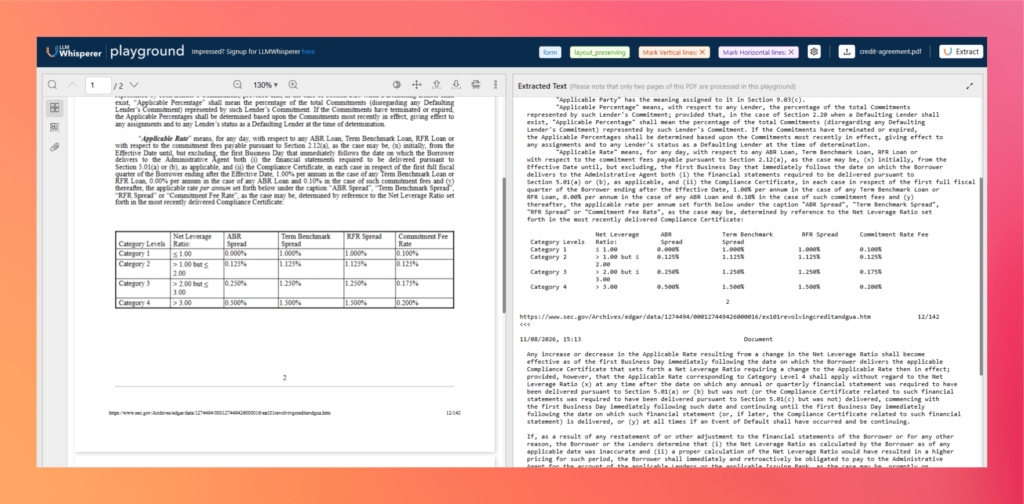
For this example, I used the legal agreement and tested it directly in the LLMWhisperer Playground.
Compare the original PDF on the left with the extracted text on the right
The difference becomes clear on the pages containing the definition of Applicable Rate and its associated pricing tables.
The original agreement contains long paragraphs, references such as Section 2.14(b) and Section 5.01(a), (b), and (c), nested conditions such as (x), (y), (i), and (ii), and a pricing table that connects leverage categories with several different interest-rate spreads.
LLMWhisperer keeps those relationships recognizable in the extracted output rather than flattening everything into an uninterrupted block of text.
Why Layout Preservation Matters for Legal Documents
Deeply nested clauses
Legal agreements frequently rely on references and nested conditions. In this credit agreement, clauses point to sections such as Section 5.01(a) and include further conditions under (i), (ii), (x), and (y). Preserving their order makes it easier for downstream models to understand which condition belongs to which provision.
Dense legal text
The agreement contains long definitions in which several rules, exceptions, and cross-references appear within the same paragraph. Maintaining the reading order prevents related provisions from becoming disconnected during extraction.
Tables
This example is particularly useful because the agreement contains pricing grids.
One table maps Net Leverage Ratio categories to:
ABR Spread
Term Benchmark Spread
RFR Spread
Commitment Fee Rate
A second pricing grid performs a similar mapping using Public Debt Ratings. The extracted output keeps the headers and corresponding category values aligned closely enough for the downstream AI layer to understand the relationships between them.
Multi-column and structured layouts
Legal documents often combine paragraphs, columns, schedules, and tabular sections on the same page. Layout-preserved extraction helps maintain the intended reading sequence instead of mixing content from different areas of the page.
Signature blocks
Agreements can also contain signature blocks where names, organizations, titles, and signing roles depend heavily on spatial placement. Preserving that layout gives the extraction model better context for associating each signer with the correct party.
Key-value relationships
Many legal fields are meaningful because of their relationship to nearby labels or headings. Maintaining those relationships improves the likelihood that downstream extraction associates a value with the correct legal concept rather than treating it as isolated text.
Why This Improves AI Legal Document Analysis
An LLM can reason over legal language, but it still depends on the quality of the document representation it receives.
If a pricing table is flattened, clauses are reordered, or labels become separated from their values, the model has to reconstruct relationships that were obvious in the original document.
With layout-preserved output, the processing flow becomes much stronger:
Legal PDF → LLMWhisperer → layout-preserved text → LLM analysis → structured legal data
For the credit agreement tested here, the Playground demonstrates this particularly well with the dense Applicable Rate provisions and pricing tables: the text remains readable, cross-references remain in context, and the table structure remains recognizable after extraction.
This gives Agentic Prompt Studio and the extraction LLM a cleaner foundation for tasks such as identifying terms, interpreting clauses, extracting financial conditions, and ultimately converting complex legal documents into structured data.
Deploy Legal Document Extraction as an API
Once the Agentic Prompt Studio project has been tested and the extraction quality is satisfactory, the next step is to make it available as a reusable API.
This turns the legal document extraction setup into a service that other applications can call whenever a new agreement needs to be processed.
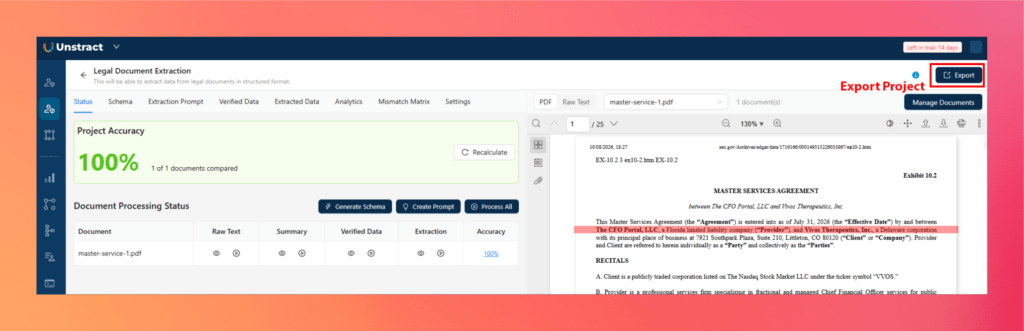
Step 1 — Export the Agentic Prompt Studio Project
First, export the completed extraction project.
Open the Agentic Prompt Studio project
Click Export
Export the tested schema and extraction prompt as a reusable tool
This preserves the extraction configuration that was already evaluated against the legal document set.
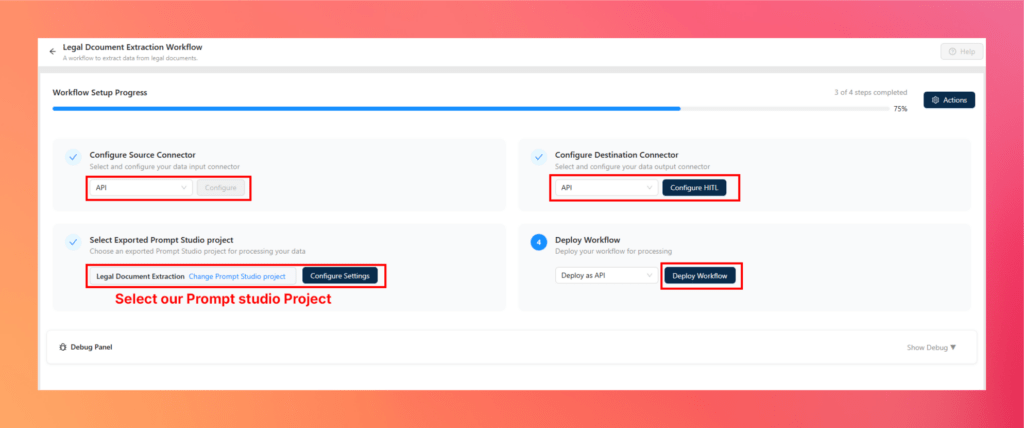
Step 2 — Create the Legal Document Processing Workflow
Next, create a workflow that uses the exported extraction tool.
Open Workflows from the Unstract sidebar
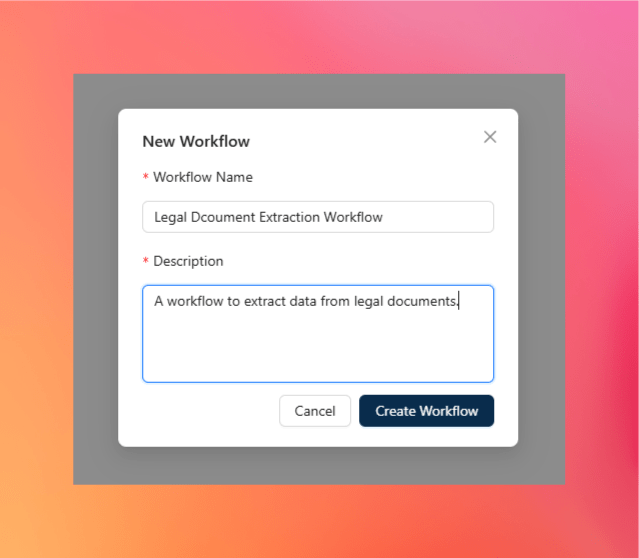
Click New Workflow
Enter the workflow name and description
Configure the Source Connector as API
Configure the Destination Connector as API
Select the exported Agentic Prompt Studio project as the extraction tool
Save the workflow
The workflow now connects incoming legal documents with the extraction logic created earlier.
Step 3 — Deploy the Workflow as an API
Once the workflow is configured, deploy it.
Click Deploy Workflow
Select Deploy as API
Complete the required deployment details
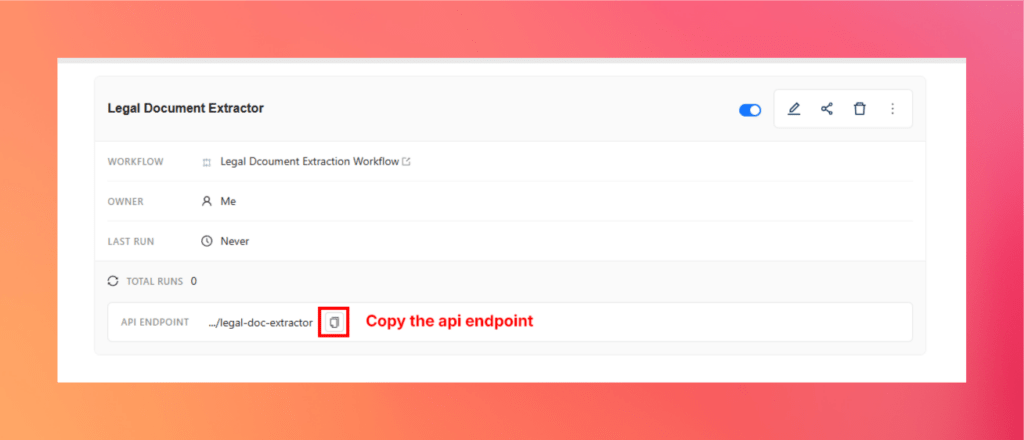
Open API Deployments
Copy the generated API endpoint
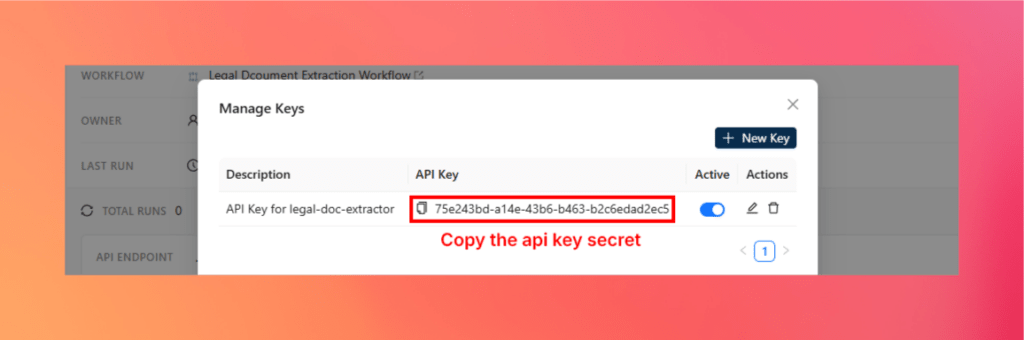
Open Manage Keys and copy the API key
The extraction project is now available through a standard API endpoint.
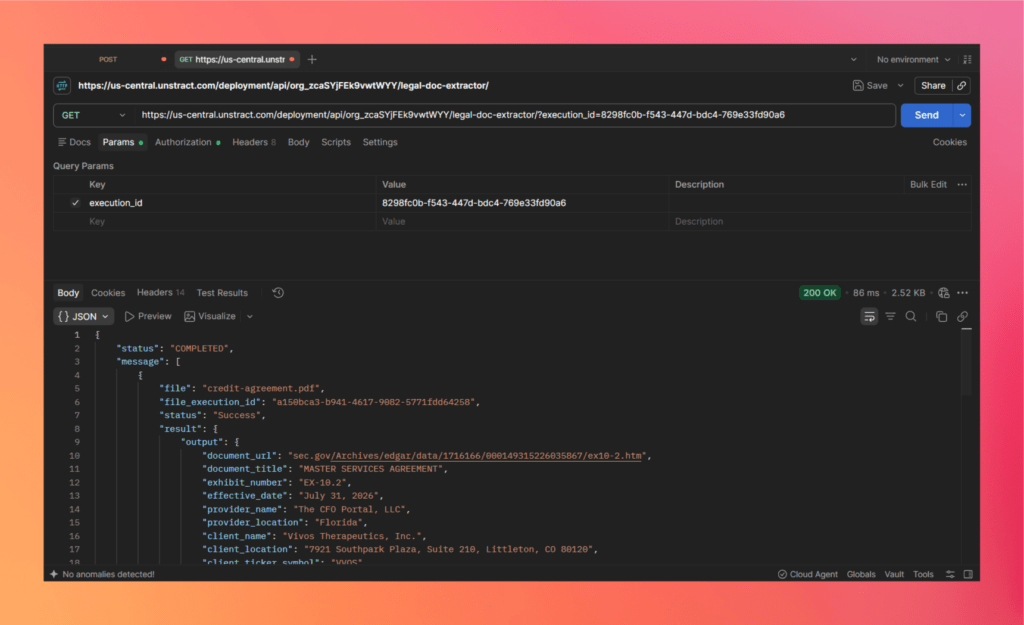
The deployed endpoint can now be tested using a new legal document.
Open Postman
Create a POST request
Paste the deployed API endpoint
Select Bearer Token authorization
Add the Unstract API key
Open Body → form-data
Add a files field and upload the legal PDF
Send the request
Once processing completes, the API returns the extracted legal information as structured JSON.
The important point is that the new legal document is processed using the same tested schema and extraction logic without requiring the project to be rebuilt.
Step 5 — Integrate the API With Legal Systems
Once deployed, the same endpoint can become part of a broader legal technology workflow.
It can integrate with:
CLM systems to populate contract metadata and extracted terms
Document management systems to enrich stored agreements with structured information
Legal operations platforms for contract review and workflow automation
Compliance workflows for extracting and validating relevant clauses or obligations
Internal legal applications that need structured contract information
ETL and data pipelines for moving extracted legal data into databases, warehouses, or analytics systems
This is what turns the Agentic Prompt Studio project from an extraction experiment into a reusable legal document data extraction API that can operate inside existing enterprise workflows.
Auditability, Confidence and Human Review for Legal Workflows
In legal document processing, extraction accuracy alone is not enough. Teams also need to know where a value came from, how confident the system was, and which model, prompt, or schema produced the result.
That traceability becomes important when extracted data is used in compliance checks, litigation discovery, contract review, or any workflow where results may need to be defended later.
Bounding Boxes and Source Highlighting
Unstract can retain the source location of extracted values through bounding boxes.
This allows reviewers to:
select an extracted field
see exactly where it appeared in the original document
compare the structured value with the source text
verify tables, clauses, dates, or names without searching through the full agreement
For long legal documents, this saves a significant amount of review time and makes the extraction easier to audit.
Confidence Scoring
Confidence scores help indicate how reliable an extracted value is likely to be.
Instead of treating every result equally, teams can use confidence levels to separate straightforward extractions from fields that may require additional review.
For example:
high-confidence fields can continue automatically
uncertain values can be flagged
critical clauses or financial terms can be routed for manual confirmation
This makes AI-based legal document analysis more practical in workflows where accuracy requirements are strict.
Human-in-the-Loop Review
Some legal fields should not move directly into downstream systems without review.
Human-in-the-loop workflows make it possible to route selected or uncertain extractions to a reviewer before they are accepted.
A reviewer can:
inspect the extracted value
check the highlighted source location
approve the result
correct it when necessary
This creates a controlled path between automation and legal judgment rather than forcing teams to choose between full automation and full manual review.
Model Versioning and Configuration Snapshots
Legal teams may also need to know exactly which configuration produced a particular extraction.
Keeping track of:
model version
extraction prompt
schema
project configuration
helps make results more reproducible and defensible.
If an extraction changes after a prompt or schema update, teams can trace that change back to the configuration that produced it instead of treating the system as a black box.
Why This Matters for Legal Teams
These controls become especially important in areas such as:
regulatory reviews
compliance monitoring
litigation discovery
internal legal governance
contract audits
due diligence
For legal workflows, the goal is not simply to automate extraction. It is to create a process where every important result can be reviewed, traced back to its source, and explained when needed.
Unstract vs. Legacy Legal Document Processing
Traditional legal document extraction systems were largely built around predictable layouts.
They often rely on templates, field coordinates, manually configured rules, and document-specific mappings. That approach can work well when every document looks almost identical, but legal agreements rarely stay that consistent.
Different law firms use different drafting styles. Clause locations move. Terminology changes. New exhibits appear. Even documents covering the same commercial terms may have completely different structures.
Modern AI-based legal document processing takes a different approach by focusing more on document understanding, adaptable schemas, and measurable extraction quality.
Capability
Legacy Legal Document Processing
Unstract
Setup time
Often requires substantial initial configuration
Agent-assisted setup reduces manual work
Templates and rules
Heavily dependent on fixed templates and rules
Designed to work across document variations without rigid templates
Schema creation
Usually created manually
Agents can generate the schema from sample documents
Extraction configuration
Rules, mappings, and manual tuning
Agent-generated prompts and schema-driven extraction
Handling document variation
New layouts often require additional configuration
Better suited to varying structures and wording
Accuracy visibility
Often limited or handled outside the extraction tool
Verified data, accuracy scoring, Analytics, and Mismatch Matrix
Maintenance effort
High as templates and rules accumulate
Lower reliance on document-specific rules
Auditability
Depends heavily on implementation
Source highlighting, review workflows, versioning, and traceability
Scalability
Becomes harder as document variants increase
Built around reusable extraction projects and APIs
API readiness
May require additional engineering
Extraction workflows can be deployed as APIs
Cost of iteration
Changes often require reconfiguration and retesting
Prompt and schema changes can be evaluated against existing documents
The biggest difference is not simply that one approach uses AI and the other does not.
Legacy systems tend to assume that the document must fit the extraction configuration. Modern AI document intelligence tries to make the extraction system adapt more naturally to the document.
For legal teams dealing with credit agreements, leases, MSAs, purchase agreements, amendments, and other highly variable contracts, that difference becomes important.
Instead of maintaining an expanding collection of templates and rules, teams can work with a reusable extraction system where schemas, prompts, accuracy, and errors are visible and easier to refine over time.
That shift—from template-driven extraction to adaptable, measurable legal document data extraction—is what makes modern legal IDP much better suited to complex legal workflows.
Top Legal Document Extraction Use Cases
The value of legal document data extraction becomes clearer when you look at the work legal teams actually do. The goal is not simply to make contracts searchable. It is to pull the right clauses, terms, dates, obligations, and financial details into structured data that can be reviewed, compared, monitored, or passed into another system.
8.1 Contract Clause Extraction and Risk Flagging
Large commercial contracts often contain the same kinds of provisions, but they rarely use identical wording or structure.
AI-based contract data extraction can identify:
parties and agreement dates
liability provisions
termination rights
change-of-control clauses
assignment restrictions
governing law
obligations and commitments
Once extracted, these fields can be used to build contract summaries, compare agreements, or flag clauses that may require legal review, such as uncapped liability or missing termination protections.
8.2 Lease Terms Extraction
Commercial and real estate leases contain operational terms that are often buried across schedules, amendments, and long sections of legal text.
Typical fields include:
rent amount
escalation terms
lease commencement and expiration dates
renewal options
termination notice periods
tenant obligations
Structured lease data can then support portfolio management, due diligence, renewal tracking, and property-related reporting without repeatedly reopening the original agreements.
8.3 Credit Agreement and Private Credit Document Processing
Credit agreements are particularly well suited to AI legal document analysis because many of the important terms need to be monitored long after the agreement is signed.
Extraction can cover:
facility amount and type
maturity date
interest rates and spreads
lender commitments
leverage ratios
coverage ratios
financial covenants
default-related provisions
The resulting data can be used to create structured covenant datasets for monitoring, compliance, credit operations, or portfolio analytics.
8.4 CLO and Structured Finance Document Extraction
CLO indentures and structured finance documents are among the most difficult legal documents to process. They can run for hundreds of pages and contain dense definitions, payment waterfalls, collateral rules, and cross-referenced tests.
Useful extraction targets include:
collateral definitions
coverage tests
priority of payments
waterfall structures
trigger conditions
eligibility criteria
Converting these provisions into structured data makes them easier to analyze, compare, and monitor across deals.
8.5 Purchase and Sale Agreement Processing
Purchase and Sale Agreements contain many of the terms that determine how a transaction proceeds and where the major risks sit.
Modern legal document processing can extract:
purchase price
representations and warranties
indemnification provisions
closing conditions
termination rights
material adverse change clauses
important dates and obligations
That structured output can support M&A due diligence, transaction review, comparison across agreements, and post-closing tracking.
8.6 Regulatory Filings, Compliance, and Litigation Discovery
Legal document extraction is also useful beyond contracts.
Regulatory filings, compliance documents, and litigation materials can contain large volumes of information that legal teams need to locate quickly.
Extraction can identify:
parties
dates
obligations
jurisdictions
specific clauses
regulatory references
relevant transaction details
For discovery workflows, structured extraction can help teams process large document sets and narrow down the material that requires closer human review.
Across all six use cases, the pattern is the same: AI document intelligence turns legal text into structured information that can be searched, compared, monitored, and used by downstream systems.
What Lawyers Actually Look For: The 41 CUAD Clause Categories
To understand what legal document data extraction really needs to capture, it helps to look at the Contract Understanding Atticus Dataset, or CUAD.
CUAD was created specifically for legal contract review. It contains 510 commercial contracts and more than 13,000 expert annotations across 41 categories that experienced attorneys consider important when reviewing contracts for transactions such as M&A, investments, and IPOs.
Put more simply: these are 41 things lawyers may need to hunt for across a contract manually.
The official CUAD repository provides the complete category list and a description of what should be identified for each one.
There is an important distinction in how these categories are reviewed. According to the official CUAD documentation, 33 of the 41 categories result in a Yes/No answer, while 8 require a specific value, such as a party name, date, duration, state, or country.
For example, a lawyer might need to determine:
Does the agreement contain a Change of Control provision? → Yes
But another review question might be:
What law governs the agreement? → New York
Or:
When does the agreement expire? → a specific date.
This is a useful way to frame modern contract data extraction. The job is not simply to summarize a contract. The system needs to identify whether particular provisions exist and, where required, extract the exact value associated with them.
A schema-based legal IDP system such as Unstract can represent these concepts as structured fields, allowing the same questions to be evaluated consistently across large contract collections. Confidence scoring and human review can then be used for fields where the result needs additional verification.
In that sense, CUAD provides a practical benchmark for the problem: these are the kinds of details lawyers manually look for in contracts, and they are exactly the kinds of details modern AI legal document analysis aims to turn into structured data.
Common Legal Documents Processed With AI
The same AI document intelligence approach is not limited to one kind of agreement. Legal teams work with many document classes, each with its own extraction requirements.
Common examples include:
Credit Agreements — revolving facilities, term loans, secured and unsecured agreements
Lease Agreements — commercial, real estate, and ground leases
Master Service Agreements (MSAs)
Purchase & Sale Agreements
CLO Indentures and Structured Finance Documents
Merger Agreements
Vendor and Supplier Agreements
Employment Agreements and Non-Competes
NDAs and Confidentiality Agreements
Commitment Increase and Amendment Agreements
Regulatory Filings
Other Commercial Agreements
What gets extracted depends on the document.
A lease may require rent, escalation terms, renewal dates, and tenant obligations. A credit agreement may require facility amounts, pricing terms, lender commitments, financial covenants, and maturity dates. An MSA may focus more heavily on services, liability, termination, IP ownership, and contractual obligations.
That flexibility is one of the important differences in modern legal document processing. Instead of forcing every agreement through the same template, the extraction schema can be designed around the document class and the legal information that actually matters.
How Legal Intelligent Document Processing Works
At a practical level, legal document processing is about turning contracts, agreements, filings, and other unstructured legal files into structured data that software can use.
The input might be a scanned credit agreement, a digital lease, a 200-page CLO indenture, or an email attachment. The output might be JSON sent to a contract management system, CSV used for analysis, or database-ready records consumed by another workflow.
Modern AI document intelligence handles this through several layers rather than relying on OCR alone.
Document Ingestion
The process begins by bringing documents into the system.
Typical inputs include:
digital PDFs
scanned PDFs
images
email attachments
multi-document legal packets
A production system needs to handle these formats without assuming that every document follows the same layout.
OCR and Layout Understanding
For scanned or visually complex files, the document first needs to be converted into machine-readable content.
This includes understanding:
page order
headings and sections
key-value relationships
tables
clause numbering
multi-column layouts
signature blocks
This is where layout-aware parsing becomes important. A legal document is not simply a collection of words; its structure often carries meaning.
Sections, Nested Clauses, Tables, and Cross-References
Legal agreements frequently contain structures such as:
Section 1.01(a)(i)(A)
A clause may also refer to another provision several pages away, while financial conditions may be defined inside a table embedded between dense paragraphs.
A good legal document processor needs to preserve enough of this structure for downstream models to understand which conditions, values, and obligations belong together.
OCR vs. LLM-Based Extraction
OCR and LLMs solve different parts of the problem.
OCR and document parsing convert the original file into readable content while preserving useful structure.
LLMs interpret that content and determine what it means.
For example, OCR may recover a paragraph containing a termination clause. The LLM then identifies that the paragraph represents a termination-for-convenience provision and extracts the notice period into the appropriate schema field.
The strongest legal document data extraction workflows therefore use both: one layer to preserve the document, another to understand it.
Schema Inference and Structured Output
Once the document is understood, the required information needs to be organized into a consistent schema.
A legal extraction schema could contain fields such as:
{
  "effective_date": "July 31, 2026",
  "governing_law": "State of New York",
  "termination_for_convenience": true,
  "notice_period": "30 days"
}
The final result can be returned as:
JSON
CSV
database-ready records
API-ready structured output
This is what makes the extracted information useful beyond the document itself.
Confidence, Validation, and Human Review
Not every extracted field should automatically be treated as equally reliable.
Production AI legal document analysis therefore benefits from:
confidence scoring
comparison with verified data
field-level validation
human review for uncertain results
source highlighting for verification
A high-confidence agreement date may pass automatically, while a complex covenant or liability provision can be sent for review.
Monitoring and Evaluation at Scale
Legal document extraction is not a one-time configuration exercise.
As new law firms, jurisdictions, document versions, and drafting styles enter the workflow, extraction performance needs to be monitored.
That means tracking:
field-level accuracy
failed extractions
document-specific errors
prompt and schema changes
regression across existing test documents
This evaluation loop is what makes modern AI document intelligence more practical for production use. Instead of assuming that an extraction configuration will remain accurate forever, teams can measure changes and improve the system over time.
For enterprise legal workflows, security and governance also matter. Access controls, audit trails, version tracking, and careful handling of privileged or sensitive documents need to sit alongside extraction accuracy.
Challenges in Legal Document Processing and Extraction
Legal documents are unusually difficult to automate because complexity appears in several forms at once: length, language, layout, cross-references, versioning, and accuracy requirements.
A system may extract a simple effective date correctly and still struggle with a covenant defined across several sections.
Here are the main challenges.
Very Long Documents
Credit agreements regularly exceed 100 pages, while CLO indentures and structured finance documents can run beyond 200 pages.
Important information may be separated by dozens of pages, making simple page-level extraction unreliable.
Modern AI-based processing addresses this by combining layout-preserved parsing with contextual extraction rather than treating each page as an isolated text block.
Deeply Nested Clause Hierarchies
Legal drafting often uses structures such as:
Section 1.01(a)(i)(A)
Losing that hierarchy can change the meaning of a provision.
Layout-aware parsing helps preserve clause order and nesting so downstream LLMs have more context when interpreting the text.
Tables Inside Dense Legal Prose
Credit agreements, CLOs, and financing documents frequently include:
covenant tables
commitment schedules
pricing grids
payment waterfalls
The surrounding prose may explain when and how those tables apply.
Modern legal document processing therefore needs to understand both the table and the surrounding legal language rather than extracting them independently.
Cross-References Between Clauses
A provision might say:
“as defined in Section 2.04(b)”
Understanding the current clause may therefore require information located elsewhere in the document.
LLM-based extraction is better suited to these contextual relationships than coordinate-based field extraction alone.
Variation Across Law Firms and Jurisdictions
Two contracts can express the same legal concept using completely different wording.
A termination provision drafted by one law firm may look nothing like the equivalent clause in another agreement.
This is one reason template-heavy systems struggle as document variety grows. AI-based contract data extraction can generalize across wording and layout differences more effectively.
Amendments and Restatements
Legal relationships also change over time.
Teams may need to process:
original agreements
amendments
restated agreements
commitment increases
supplemental documents
The challenge is not only extraction, but understanding which version is current and how later documents modify earlier terms.
Stringent Accuracy Requirements
Legal extraction has a much lower tolerance for mistakes than many ordinary document-processing tasks.
A missed covenant, incorrect maturity date, or wrongly interpreted termination clause can have material consequences.
That is why confidence scoring, verified datasets, source highlighting, and human review remain important even in highly automated workflows.
Multi-Document Transactions
One transaction may involve:
a credit agreement
guarantees
security agreements
intercreditor agreements
amendments
disclosure schedules
Useful legal analysis may require information from several documents rather than one file.
Modern AI document intelligence is moving toward workflows that can structure these document sets consistently and make the resulting data easier to compare and analyze.
Compliance and Defensibility
Finally, legal extraction results may need to survive regulatory review, internal audits, or litigation.
Teams must be able to answer questions such as:
Where did this value come from?
Which source document contained it?
Which prompt and schema produced the result?
Was the field reviewed?
What changed between extraction versions?
This is why auditability is not an optional feature in serious legal document data extraction. It is part of making the result trustworthy.
Business Value of Legal Document Processing Automation
The case for automating legal document processing is not simply “AI can read contracts faster.”
The larger value comes from turning information that is buried inside legal documents into structured data that can move through the rest of the organization.
Operational Efficiency
Legal professionals spend significant time locating clauses, copying terms, comparing agreements, and transferring information into other systems.
Automating those repetitive steps can provide:
faster contract review and processing
higher document throughput
reduced manual data entry
shorter turnaround times
lower operational cost
more time for higher-value legal work
It also allows document processing to continue beyond normal working hours, which can help teams dealing with high-volume transaction or review backlogs.
Accuracy, Compliance, and Data Quality
Manual processing is not automatically error-free.
When hundreds or thousands of documents are being reviewed, inconsistency becomes a real operational problem.
Structured legal document data extraction can create a more repeatable process by producing the same fields across similar agreements.
Combined with validation and review controls, organizations gain:
more consistent legal data
source-level traceability
measurable extraction accuracy
audit trails
lower manual transcription risk
stronger governance
For compliance-sensitive workflows, being able to trace a value back to the original clause can be just as important as extracting the value itself.
Strategic Value
The larger opportunity appears once legal information becomes structured.
A company may already hold thousands of contracts, but much of the useful information inside them is effectively trapped in PDFs.
With AI document intelligence, those collections can become searchable and analyzable datasets.
That can help organizations:
compare contractual terms across portfolios
identify obligations and upcoming dates
accelerate M&A due diligence
review larger document sets in less time
surface unusual or risky clauses earlier
make decisions using structured contract data rather than manual summaries
This can be particularly valuable during transactions where speed matters. Instead of waiting for large batches of contracts to be manually reviewed, structured extraction can move relevant information into review workflows much earlier.
And once the legal data is structured, it can support more than contract review. It becomes a foundation for analytics, compliance automation, knowledge systems, legal AI assistants, and other downstream automation initiatives.
That is ultimately the broader business case for modern legal document processing: not just reducing the time spent reading documents, but making the information inside those documents usable across the organization.
Strategic Guidance for Legal and Technology Teams
A successful legal document data extraction project usually starts with the right use case, not the largest one.
The best first candidates tend to have three characteristics:
high document volume
enough format variation to make manual processing painful
clear business impact if review time is reduced
Credit agreements, leases, MSAs, regulatory filings, and due-diligence document sets are all good examples because the information being extracted is well defined and the value of faster processing is easy to measure.
Define Success Before Building
Useful metrics include:
Extraction accuracy — how closely results match verified data
Review time — how much manual effort remains after automation
Cost per document — including processing, review, infrastructure, and maintenance
Exception rate — how often documents or fields need human intervention
Accuracy alone should not be the only KPI. A system with slightly lower raw accuracy but much better traceability and review workflows may be more practical for legal operations.
Decide Who Owns the Workflow
Production legal document processing normally crosses several teams.
Legal operations should define what information matters and when human review is required. Engineering owns integrations, APIs, monitoring, and deployment, while data or AI teams may manage evaluation sets, models, prompts, and ongoing quality checks.
Clear escalation rules are equally important. High-confidence metadata may flow automatically, while material clauses, unusual provisions, or low-confidence values can be routed to a legal reviewer.
Plan Beyond the Pilot
Teams should also consider early:
whether to build components internally or use an existing platform
integration with CLM, DMS, matter-management, and workflow systems
how ground truth and evaluation datasets will be maintained
whether schemas and extraction outputs remain portable
how easily new document types and models can be introduced
The goal should be an extensible AI document intelligence layer rather than another isolated extraction tool that becomes difficult to replace or expand.
Unstract implementation Guide for legal document processing: Getting Started
The safest way to introduce AI into legal document workflows is to start narrow, establish measurable baselines, and expand only after the extraction process is understood.
Step 1 — Identify the Bottleneck
Start with an existing process where legal teams spend substantial time reading, copying, or validating information.
Look for:
repetitive manual extraction
large review backlogs
frequent document variations
costly exception handling
information that must eventually enter another system
Step 2 — Choose a Focused Pilot
Select one document class rather than trying to automate every legal document at once.
For example:
Master Service Agreements → extract parties, dates, services, termination terms, and key references
This keeps the schema manageable and makes evaluation much easier.
Step 3 — Build a Representative Test Set
Collect examples that reflect the variations the production workflow will actually receive.
Then:
define the expected fields
establish verified or ground-truth data
include difficult examples
define accuracy and acceptance thresholds
Step 4 — Evaluate the Full Solution
When comparing legal document processor options, look beyond model or token cost.
Evaluate:
extraction accuracy
layout handling
flexibility across document variants
API and system integration
scalability
governance and auditability
total cost of ownership
The long-term cost of maintaining templates, fixing exceptions, and reviewing errors can matter more than the cost of an individual extraction.
Step 5 — Iterate and Monitor
Once the pilot works:
review mismatches
refine prompts or schemas
rerun the evaluation set
monitor model and configuration changes
expand gradually to additional document classes
This is where the combination of LLMWhisperer and Unstract becomes practical. LLMWhisperer provides the layout-preserved document foundation, while Agentic Prompt Studio handles schema generation, prompt creation, extraction evaluation, and accuracy tracking. The same tested project can then move into API-based production workflows.
Conclusion: Transforming Legal Document Processing in 2026
Legal document automation is moving away from fixed templates, coordinate rules, and extraction configurations that need constant maintenance.
Modern legal document processing works differently. Layout-aware parsing preserves the document, LLMs interpret the legal language, schemas turn that understanding into predictable fields, and evaluation workflows help teams determine whether the result can actually be trusted.
The walkthrough in this article showed that process end to end:
legal documents → layout-preserved text → agent-generated schema and prompt → structured extraction → accuracy evaluation → production API
Within that stack, each part has a clear role.
LLMWhisperer provides the layout-preserving foundation for complex legal documents.
Agentic Prompt Studio reduces manual schema and prompt work while adding verified data, accuracy scoring, Analytics, and mismatch detection.
Unstract brings those capabilities together with workflows, APIs, ETL, human review, and deployment options to create an end-to-end legal document data extraction platform.
For legal teams, the result is not simply faster OCR. It is a way to turn information trapped inside contracts into structured data that can support review, compliance, due diligence, analytics, and downstream automation.
Organizations considering a legal IDP initiative can start with a focused document class, build a representative evaluation set, test the extraction quality, and then move the proven workflow into production.
Unstract is available across cloud, on-premises, and open-source deployment options, giving teams flexibility around infrastructure and data requirements.
From there, the next step is straightforward: explore the platform and documentation, test a real legal document, run a focused pilot, or request a demo to evaluate the workflow against your own contracts.
The future of legal document processing is here, and it is becoming far more practical to put into production.
AI Legal Document Extraction: FAQs
1. What does legal document data extraction require beyond basic OCR? Legal document data extraction needs layout-preserved structure, not just recognized characters. Clause hierarchies, pricing tables, and cross-references carry meaning — flatten them and the extraction layer has to reconstruct relationships that were obvious in the original.
2. How does agent-generated schema work in legal document processing? Three agents divide the work: the Summarizer Agent identifies fields, meanings, data types, and examples per document; the Uniformer Agent reconciles naming differences like “Effective Date” versus “Agreement Date”; and the Finalizer Agent produces the JSON Schema with nested objects and arrays.
3. How do I deploy a legal contract extraction service as an API? Export the evaluated Prompt Studio project as a tool, create a workflow with API as both source and destination, then deploy it. You get an endpoint and an API key — posting a document with Bearer Token auth returns structured JSON without rebuilding the project.
4. Why does AI legal document analysis depend on layout preservation for credit agreements? Credit agreements contain nested clauses such as Section 1.01(a)(i)(A), pricing grids spread across several columns, and cross-references pointing to other sections. Without preserved structure, AI legal document analysis has to guess which spread belongs to which leverage category.
5. How does AI document intelligence handle amendments and restatements? Amendments, restatements, and commitment increases modify earlier terms, so extraction has to be evaluated against the full document set rather than one agreement. Prompt and schema version tracking records what configuration produced each result, which makes it possible to see what changed between versions.
6. What auditability features should a legal document processor provide? Bounding boxes link each extracted value back to its source location, confidence scoring separates reliable fields from uncertain ones, and human-in-the-loop review routes sensitive clauses to a reviewer. A Mismatch Matrix then shows which fields failed across document variants.
Unstract for AI Legal Documents Processing: Related topics to explore
Engineer by trade, creator at heart, I blend Python, ML, and LLMs to push the boundaries of AI—combining deep learning and prompt engineering with a passion for storytelling. As an author of books and articles on tech, I love making complex ideas accessible and unlocking new possibilities at the intersection of code and creativity.