The Complete Guide to Invoice OCR in 2026 — From Document to Accounting System
Table of Contents
Invoice OCR (Optical Character Recognition) is the technology that reads invoices, like PDFs, scans, Excel files, phone photos and converts them into structured data your systems can actually use.
The problem is that most OCR tools read the invoice. But they don’t understand it.
They extract a total. Maybe a date. But they miss line items. They lose the connection between a product description, its quantity, its unit price, and which tax code applies.
The result isn’t clean data, it’s a pile of fragments that AP (Accounts Payable) teams and developers have to manually fix before anything downstream can run.
If you’re an AP manager, this probably sounds familiar: a capture tool promised to eliminate data entry, and instead you’re still typing in line items by hand and now you’re also debugging why the “automated” bill doesn’t do it. If you’re a developer, you’ve probably built a regex parser that worked great on the first ten vendor invoices and fell apart on the eleventh.
This guide explains how invoice OCR works, what separates accurate extraction from accurate-looking extraction, and why that gap matters enormously once you connect OCR output to tools like QuickBooks, Xero, or an ERP automation pipeline.
What Is Invoice OCR?
Invoice OCR is software that reads an invoice, in any format, and turns it into structured, machine-readable data: field names and values a computer program can act on, instead of a flat image or a wall of unstructured text.
“Structured data” for an invoice specifically means fields like:
Vendor name and address
Invoice number and invoice date
Due date and payment terms
Line items, each with a description, quantity, unit price, and line total
Subtotal, tax amount, and grand total
PO (Purchase Order) number
Bank or payment details
Currency
That list matters because it’s the difference between generic OCR and invoice OCR. Generic OCR gives you the text, every word on the page, recognized as characters, in roughly the order it appears.
Invoice OCR gives you fields: it understands that “INV-10045” next to the word “Invoice #” is an invoice number, and that the number in the fourth column of a table row is a unit price. A number sitting near “Tax ID” is not the same kind of thing as a number sitting near “Invoice No.”, even though both are just digits to a pattern-matcher.
That distinction has a history. Early invoice capture tools were template-based: you told the software exactly where the invoice number sat on the page for Vendor X, and it broke the moment Vendor X redesigned their invoice.
Next came rules-based systems with keyword proximity, regular expressions, zonal OCR; they were more flexible than templates, but still brittle against new layouts. The current generation is AI/LLM-based: models that reason about the invoice the way a person would, without needing a template or per-vendor training data.
Invoice OCR is used by accounts payable teams, finance operations staff, accountants at firms managing multiple clients, and developers building document automation pipelines that feed ERPs, accounting platforms, or data warehouses.
The reason this matters at scale is because the average AP organization spends $9.40 to process a single invoice, but that average hides a wide gap. Ardent Partners’ AP Metrics That Matter in 2025 report found that Best-in-Class organizations (the top 20% by processing cost and cycle time) spend $2.78 per invoice, while “All Others” spend $12.88.
At 500 invoices a month, that’s the difference between $16,680 and $77,280 a year in processing labor; roughly $60,600 a year, before you count the cost of the errors that manual, non-automated processing introduces.
Where Invoice OCR Fits in the AP Workflow
To understand why OCR accuracy is such high leverage, it helps to see the whole AP workflow it sits inside. Most accounts payable processes, whether manual or automated, run through the same six steps:
Receive: the invoice arrives, as an email PDF, a postal scan, a feed, or a photo from a field employee.
Digitize: anything not already digital gets scanned or captured.
Extract: invoice OCR reads the fields and outputs structured data. This is the step this article is about.
Validate: a three-way match (PO vs. invoice vs. goods receipt), tax checks, duplicate checks, and approval routing.
Post: the validated invoice is pushed into the ERP or accounting system: QuickBooks, Xero, SAP, NetSuite, or others.
Pay: payment gets approved and disbursed.
Invoice OCR is Step 3. It’s the hinge between a paper or PDF document and everything that automation promises to do for you. If Step 3 produces incomplete or inaccurate output, every step after it inherits the damage:
Step
What Happens
What Goes Wrong with Bad OCR
3. Extract
OCR reads invoice fields
Line items missed, totals misread, tax fields blank
4. Validate
3-way match, tax check, duplicate check
Match fails on wrong data → manual review queue spikes
Here’s the part most teams miss: they think they have a validation problem, or an ERP problem, when they actually have an OCR accuracy problem propagating downstream.
A 3-way match doesn’t fail because the ERP is bad at matching, it fails because Step 3 handed it the wrong number. Finance teams end up spending Step 4 manually re-doing Step 3, which defeats the entire point of automating the workflow in the first place.
Test LLMWhisperer invoice OCR API for free — Instant Results, No Signup Required
If you want to skip straight to the tool, see how LLMWhisperer OCR API handles invoices of any complexity — scanned PDFs, handwritten receipts, poorly photographed images, multi-column layouts, and multi-language invoices.
Try LLMWhisperer Invoice OCR for free on the Playground. No signup required.
The Hidden Cost: What Bad Invoice OCR Actually Breaks
If you’re evaluating invoice OCR software right now, it’s probably because something upstream is already causing pain downstream. Here’s a closer look at exactly what that pain looks like, depending on which side of the workflow you sit on.
For Finance and Accounting Teams: Xero, QuickBooks, Wave, Intuit
Across Xero, QuickBooks, Wave, and Intuit-family tools, the same pattern shows up. Built-in and bundled capture tools reliably pull header-level fields, like vendor name, invoice total, date, invoice number and then stop there. Line items are the recurring gap.
For a business receiving invoices with 10+ line items, common in construction, manufacturing, and professional services, that means every line still gets coded to the correct account by hand, regardless of which of these tools sits in front of the accounting system.
It’s not a one-vendor quirk, it’s the default behavior of header-first capture across the category, and vendors have historically been slow to close it.
The downstream damage shows up in familiar ways regardless of which tool is involved. A slightly misread vendor name creates a duplicate vendor record, splitting that vendor’s transaction history across two entries. When line-item descriptions aren’t captured at all, the entire invoice amount lands in a single account, which quietly breaks cost-center reporting.
Complex multi-column invoices, which are common in manufacturing and distribution, introduce column bleed, where a value from one column ends up in the field for a different one. And tax-rounding mismatches are their own quiet failure mode: when OCR’s rounding doesn’t match the accounting system’s decimal precision, the bill entry can reject the save outright and for GST/VAT-registered businesses, a miscoded line can cascade into an incorrect tax that takes a full quarter to unwind.
Receipt-first tools like Wave face a related but distinct version of the problem: they’re built for simple, single-line receipts rather than multi-line vendor invoices, so line-item extraction was never really the design target. Systems built around strict double-entry bookkeeping make the consequences worse, a single wrong total or tax figure doesn’t just produce one bad invoice, it can cascade into a trial balance that won’t reconcile at month-end.
And whoever ends up integrating any of these tools via API runs into the sharpest version of this: bad OCR output doesn’t just break one invoice, it silently corrupts an entire batch, and the error usually only surfaces weeks later, during month-end close.
For Developers and Data Engineers Building Automation Pipelines
If you’re building AP automation rather than using an off-the-shelf capture tools, bad OCR shows up as a different but equally expensive set of problems:
Post-processing hell: When OCR output is unreliable, developers end up writing custom validation layers on top of it (regex patterns, field checks, confidence thresholds) just to get to usable data. These rules break every time a vendor changes their invoice template, and a 200-vendor supplier base can mean 200 potential format variations to account for.
Unstructured text output: Most OCR tools hand back raw, unstructured text. The developer then has to write a parser that hunts for “Invoice No.:”, “Total:”, “Tax:” by keyword proximity, which works fine until a vendor puts the total in a footer table instead of a header line, or labels it “Amount Due” instead of “Total.” A layout-preserving OCR engine keeps the spatial relationships intact, so a downstream parser or LLM can reason about structure instead of guessing from text alone.
Table extraction failures: Line items live in tables almost universally. Traditional OCR tends to linearize tables into flat text, which destroys the row-column relationships that made the table meaningful in the first place. The parser then has to reconstruct which value belonged to which column, a task that doesn’t scale reliably across formats.
No confidence scoring: Production pipelines need field-level confidence scores so low-confidence extractions can be routed to a human. Generic OCR tools rarely expose this. Without it, you’re stuck with two bad options: send everything to human review (which defeats the point of automating), or send nothing (which means bad data gets posted silently).
Scanned and photographed invoice quality: Phone photos, low-resolution scans, faded or bleed-through paper makes traditional OCR fails hard here. For any business still receiving a meaningful share of paper invoices, this is a daily, recurring problem, not an edge case.
The developer team at LlamaIndex put the underlying issue well: the problem isn’t text recognition, it’s contextual intelligence. A number next to “Invoice No.” and a number next to “Tax ID” look identical to a pattern-matcher. To a human reading the invoice, they’re completely different things. Invoice OCR that’s actually useful has to understand that difference, not just read the characters correctly.
Why Invoice OCR Accuracy Is Critical
Everything in the previous section traces back to one root cause: OCR errors don’t stay contained to Step 3. They multiply as they move downstream. A wrong field at extraction fails validation, or worse, passes validation and posts to the wrong account, gets paid, and only surfaces as a discrepancy during an audit months later. Each step downstream amplifies the cost of fixing the original error instead of catching it at the source.
What “High Accuracy” Actually Means at the Field Level
This is where a lot of OCR marketing gets misleading. A tool can advertise 99% character-level accuracy, meaning 99% of individual characters are read correctly, and still produce a wrong invoice total, because character accuracy says nothing about whether the OCR understood table structure. If a line-item table gets linearized incorrectly, every character in it might be read perfectly and the total will still be wrong, because values ended up in the wrong row or column.
Real accuracy for invoice OCR has to be measured at the field level: did the right value land in the right field? That’s a fundamentally different, and much harder bar than character recognition.
Common Failure Points in Traditional OCR Tools
Template-based OCR works reliably right up until a vendor changes their layout, at which point extraction silently degrades or fails outright.
Character-level OCR gets the text right but loses table structure, the classic cause of line-item chaos.
AI-trained-per-form models are accurate once trained, but need labeled training data for every new vendor format, which is real ongoing maintenance work.
Scanned document quality issues mean bleed-through from the reverse side of a page, skewed scans, low resolution scans end up defeating OCR engines that don’t specifically pre-process for these conditions.
The cost of one wrong invoice compounds fast: a payment error that has to be chased down and reversed, a reconciliation discrepancy that eats an accountant’s afternoon, an audit finding that raises questions about every other invoice processed the same way.
Finance teams waste at least 15 minutes per invoice on manual data entry, and IOFM’s own AP automation research puts the cost of inefficient AP processes at $8.78 per invoice.
At 500 invoices a month, that’s over 125 hours of pure data-entry labor and roughly $52,680 a year in avoidable inefficiency costs, every year, indefinitely, before you count the cost of the errors that manual entry introduces. Automated extraction can commonly brings per-invoice cost down to $1–$2 at scale, per broader industry benchmarks.
Accurate invoice OCR gets you:
Time back: hours per week that AP staff currently spend keying in data or fixing what a bad capture tool got wrong.
Fewer errors compounding downstream: a correct extraction at Step 3 means Steps 4 through 6 run on real numbers instead of guesses.
A cleaner compliance and audit trail: structured, correct data with a source document attached beats a pile of PDFs and a spreadsheet someone reconstructed from memory.
LLMWhisperer: Invoice OCR Built for Complex, Real-World Documents
Before going further, it’s worth being precise about what LLMWhisperer and Unstract actually are, because the distinction matters for anyone building or buying an end-to-end solution.
LLMWhisperer is the OCR layer. It reads an invoice in any format and outputs layout-preserved, LLM-ready structured text; table rows stay rows, columns stay columns, headers stay associated with the sections beneath them. It does not, by itself, output a JSON object with named fields like vendor_name or total_amount. What it outputs is structured text that a downstream LLM can reason about accurately, because the spatial relationships in the original document are still intact.
Unstract is the extraction platform built on top of LLMWhisperer. Unstract is what takes that structured text and turns it into the JSON fields (vendor, line items, totals, tax) that get mapped directly into QuickBooks, Xero, or any other system via APIs. We’ll cover that integration in detail later in this guide.
For now, the point to internalize is: LLMWhisperer solves the document-reading problem. Unstract solves the “now do something with this data” problem. Both matter, and they’re different layers.
What makes LLMWhisperer different from template-based tools and generic OCR comes down to five things:
Layout preservation: Table rows stay rows, columns stay columns. Line items don’t bleed into adjacent fields, and a downstream parser or LLM doesn’t have to guess at structure that was destroyed during extraction.
No templates required: LLMWhisperer handles a brand-new vendor’s invoice format on first encounter, with no per-vendor setup or training.
LLM-ready output: The extracted text is structured specifically so that a downstream LLM can reason about it correctly and produce accurate JSON.
Bounding-box API: Enables human-in-the-loop review at the individual field level, rather than an all-or-nothing accept/reject.
Form element extraction: Detects checkboxes and radio buttons, which matters for approval forms and PO documents that travel alongside invoices, not just the invoice itself.
Supported Formats and Document Types
LLMWhisperer handles a wide range of file formats:
Word processing: DOCX, DOC, ODT
Presentations: PPTX, PPT, ODP
Spreadsheets: XLSX, XLS, ODS
Documents and text: PDF, TXT
Images: BMP, GIF, JPEG, JPG, PNG, TIF, TIFF, WEBP
And document types relevant to invoice OCR specifically:
Native PDFs: high-fidelity text extraction straight from the source.
Scanned images: robust OCR even on lower-quality scans.
PDF forms: checkboxes and radio buttons detected and extracted alongside the invoice data.
Complex layouts: multi-column formats, nested tables, and mixed designs.
Photographed invoices: camera-captured images, with compensation for skew and uneven lighting.
Processing Modes Explained
LLMWhisperer offers four processing modes, so you can trade off speed, cost, and extraction fidelity depending on the invoice type you’re dealing with:
Mode
Key Advantages
Recommended Use Cases
Native Text
Extremely fast; superior layout preservation; ideal for native-text PDFs
Native PDF invoices, minimal preprocessing needed
Low Cost
Economical processing without sacrificing speed; handles scanned PDFs and images well
Cost-sensitive, high-volume processing of decent-quality scans
Medium/low-quality scans, cases needing maximum accuracy
Form
Optimized for checkbox/radio-button detection, AI/ML field enhancement, strong layout fidelity
Invoices and forms with interactive elements
Additional processing features worth knowing about are automatic rotation and skew compensation for imperfectly scanned or photographed documents, auto-repair for corrupted or non-standard PDFs, and ongoing AI/ML enhancements that improve extraction on complex, high-entropy documents.
Multi-lingual OCR (300+ Languages)
LLMWhisperer supports extraction in more than 300 languages, which matters directly for any business with international vendors or global procurement. An invoice in Portuguese, German, or Japanese gets the same layout-preserving treatment as one in English; no separate pipeline, no language-specific configuration.
Security and Compliance
For teams evaluating this as infrastructure rather than a one-off tool: LLMWhisperer supports SOC 2, HIPAA, and GDPR compliance requirements. It is also available as a self-hosted, on-premise deployment for organizations that can’t let invoice data leave their own infrastructure.
Invoice OCR in Action: 6 Real-World Use Cases
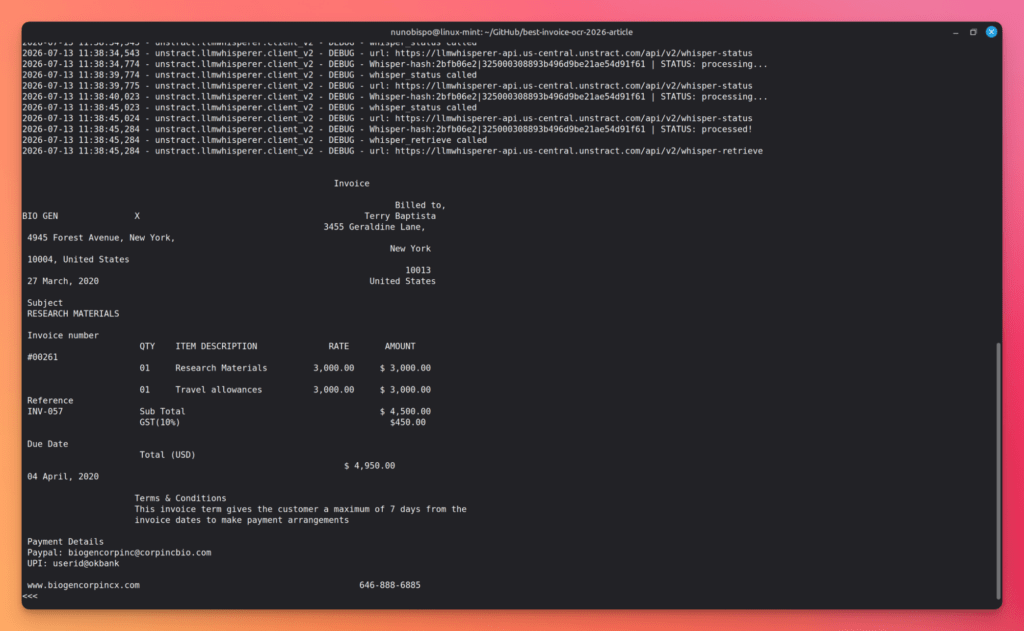
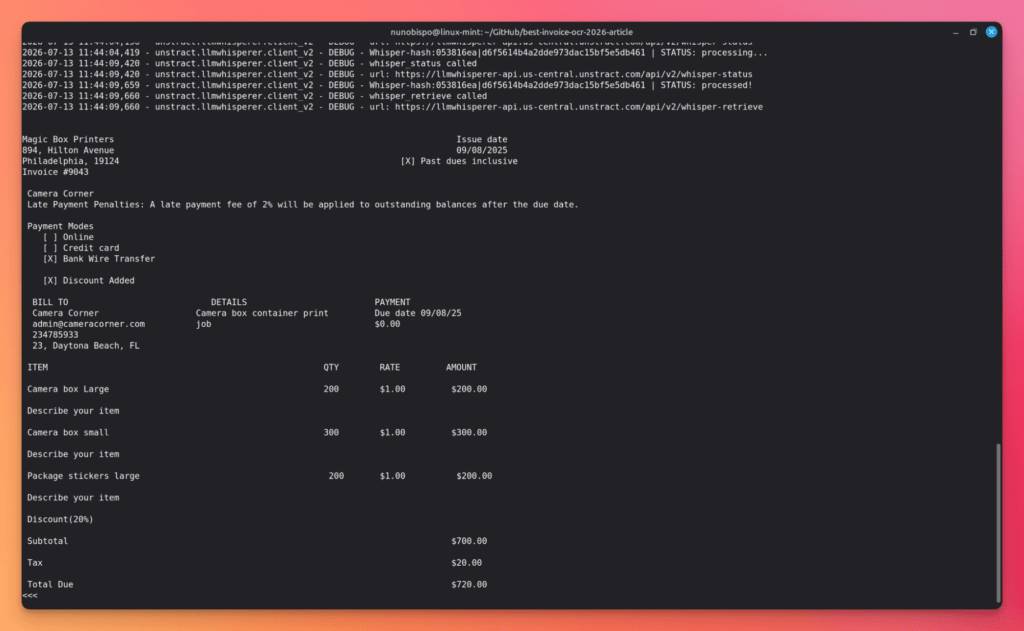
Here’s where theory meets actual documents. Here’s the Python code used to call the LLMWhisperer API v2:
import sys
from unstract.llmwhisperer import LLMWhispererClientV2
from unstract.llmwhisperer.client_v2 import LLMWhispererClientException


def process_document(file_path):
    client = LLMWhispererClientV2(
        base_url="https://llmwhisperer-api.us-central.unstract.com/api/v2",
        api_key="<your-api-key>",
    )
    try:
        result = client.whisper(
            file_path=file_path,
            wait_for_completion=True,
            wait_timeout=200,
        )
        print(result["extraction"]["result_text"])
    except LLMWhispererClientException as e:
        print(e)


if __name__ == "__main__":
    if len(sys.argv) != 2:
        print("Usage: python llmwhisperer.py <document>")
        sys.exit(1)
    process_document(sys.argv[1])
Install the client first:
pip install llmwhisperer-client
Then run it against any document:
python llmwhisperer.py <document>
LLMWhisperer: Best Invoice OCR to Extract Data from Handwritten Invoices
LLMWhisperer is available as an API that can be integrated into your existing systems to preprocess your documents before they are fed into LLMs. It can handle a variety of document types, including PDFs, images, and scanned documents.
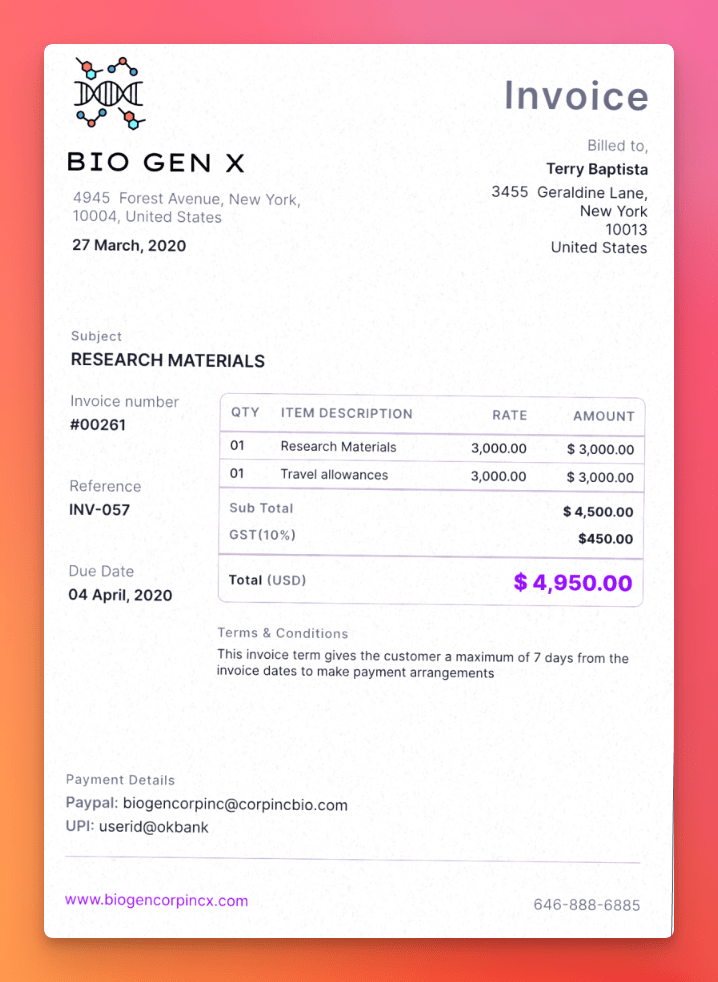
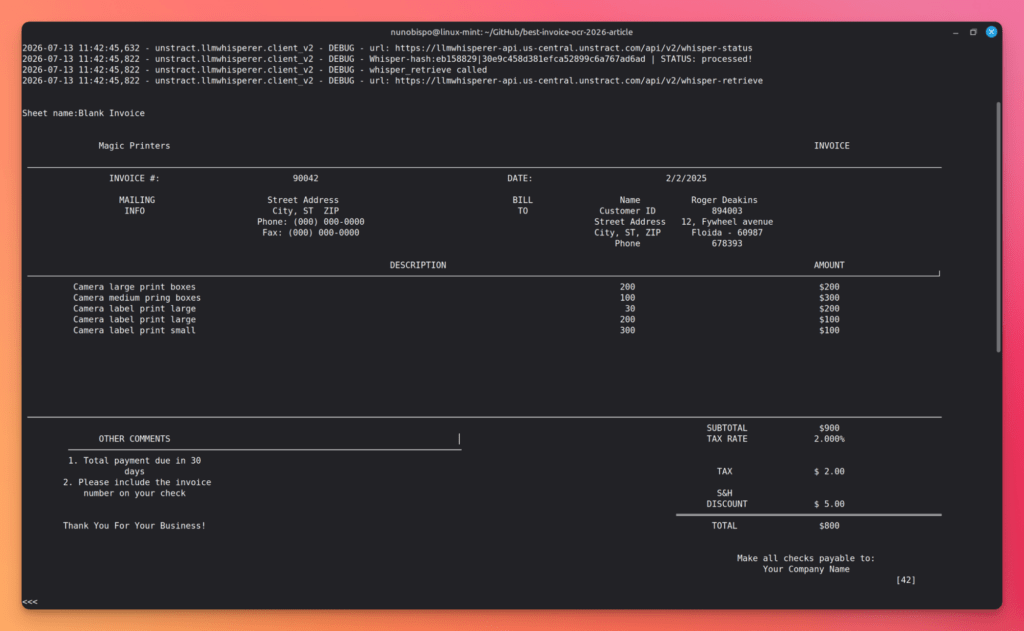
Invoice OCR Use Case 1: Native PDF Invoice
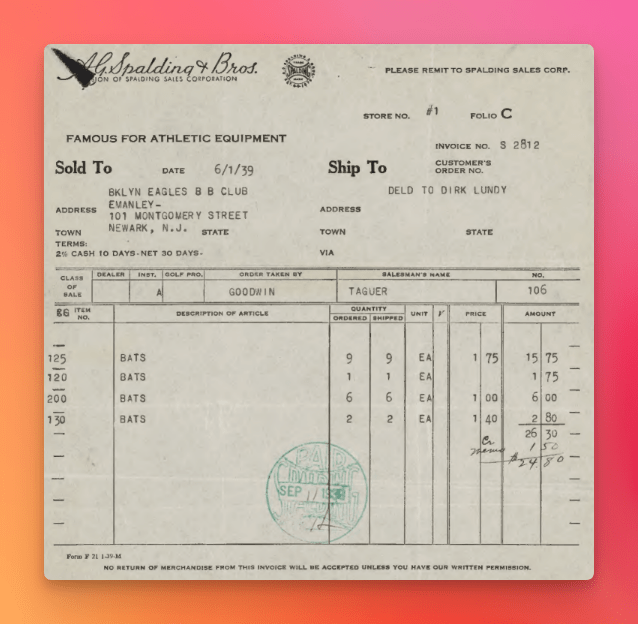
The challenge:. Even a “clean,” born-digital PDF invoice can hide table structures that OCR tools linearize incorrectly. Different tools generate PDFs differently, and margins, column alignment, and embedded graphics all vary; enough to trip up a system that isn’t specifically reading structure, not just characters.
What LLMWhisperer does: It extracts high-fidelity text while replicating the spatial layout; headers stay headers, table columns stay aligned, and footer totals stay associated with the table they summarize.
Downstream tie-in: Clean, correctly structured line items mean Unstract can map each row directly to a QuickBooks Bill line or a Xero ACCPAY line; one line item per accounting line, with no manual re-keying.
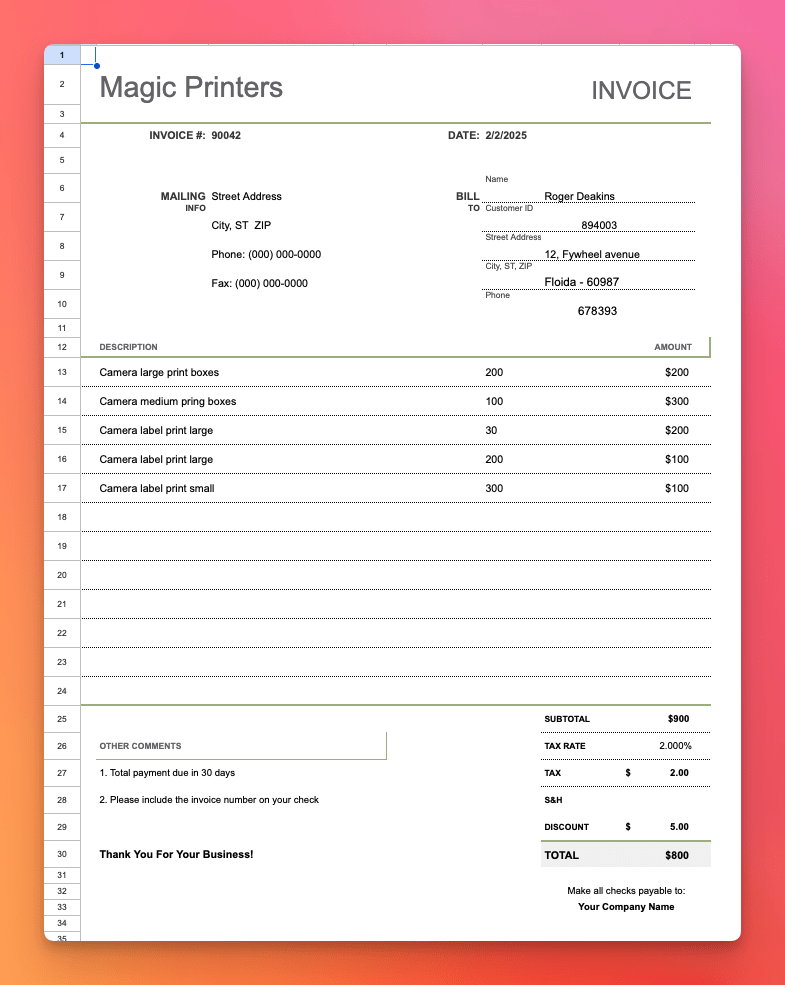
Invoice OCR Use Case 2: Excel-Format Invoice
The challenge: Excel invoices come with their own failure modes: non-standard layouts that don’t follow a strict grid, merged cells that obscure field boundaries, and embedded formulas calculating totals that aren’t plain text at all.
What LLMWhisperer does: It reads the spatial organization of the sheet, not just cell values, so merged cells, grouped headers, and calculated totals all come through with their relationships intact.
Downstream tie-in: Developers can run Excel invoices through the exact same pipeline as PDFs; no separate parser, no special-casing spreadsheet formats.
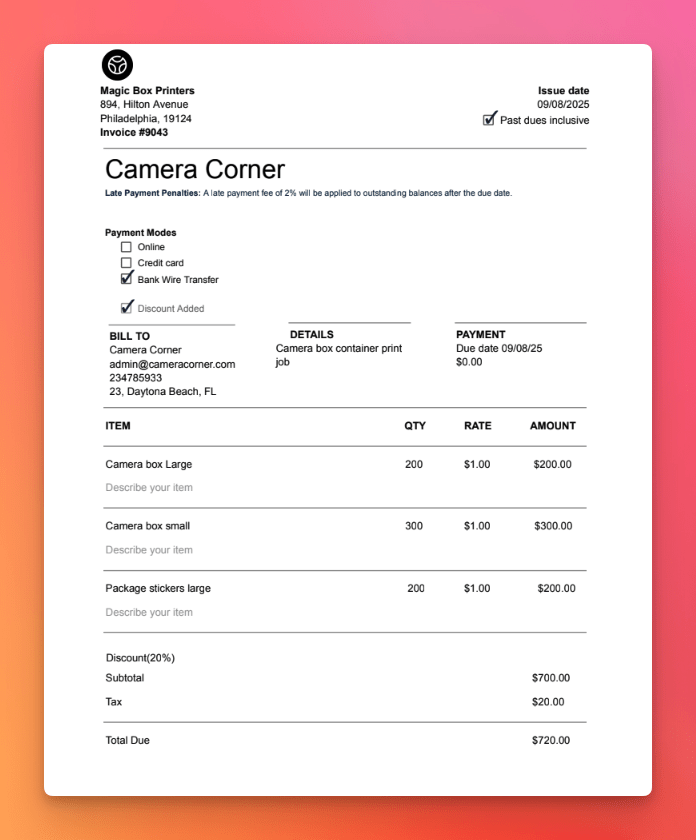
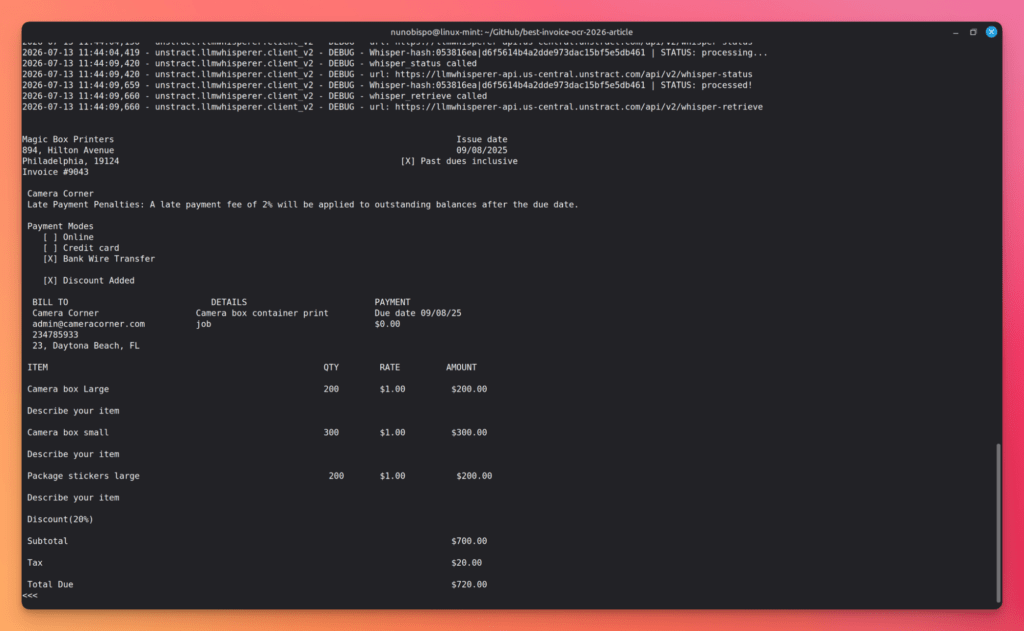
Invoice OCR Use Case 3: Invoice with Checkboxes and Form Elements
The challenge: PO forms, approval forms, and composite documents that combine invoice data with approval checkboxes require distinguishing graphical form elements from text, something traditional OCR handles poorly, often missing a checked box entirely or misclassifying an empty one.
What LLMWhisperer does: Form mode uses AI/ML-based detection specifically for checkboxes and radio buttons, so the extracted output reflects the actual state of each form element, not just the surrounding text.
Downstream tie-in: Approval status extracted alongside financial data enables automated approval routing before a bill is even created; the pipeline knows all the details of an invoice without a human re-checking the PDF.
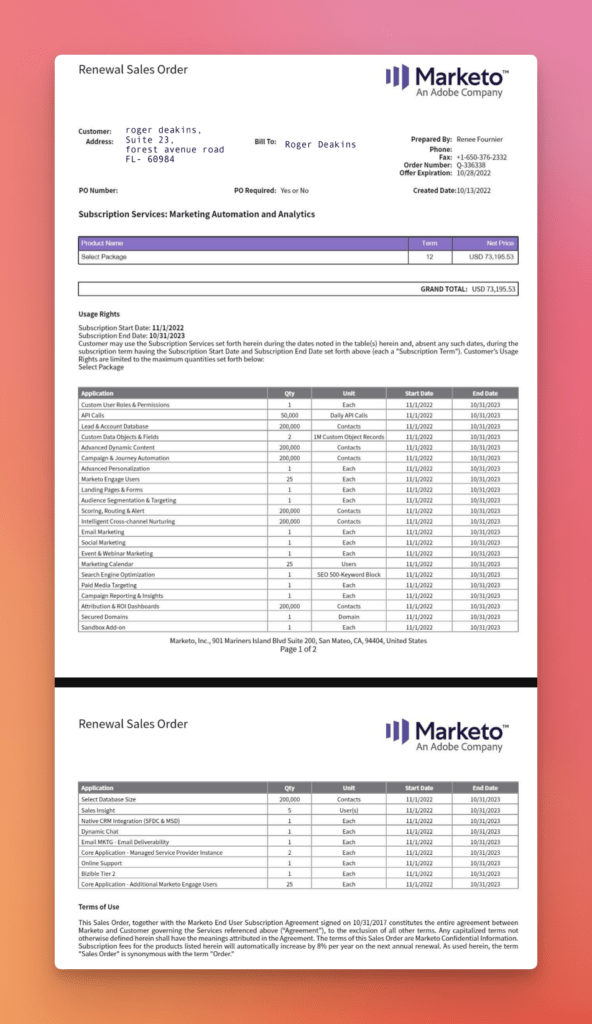
Invoice OCR Use Case 4: Complex Multi-Table Invoice
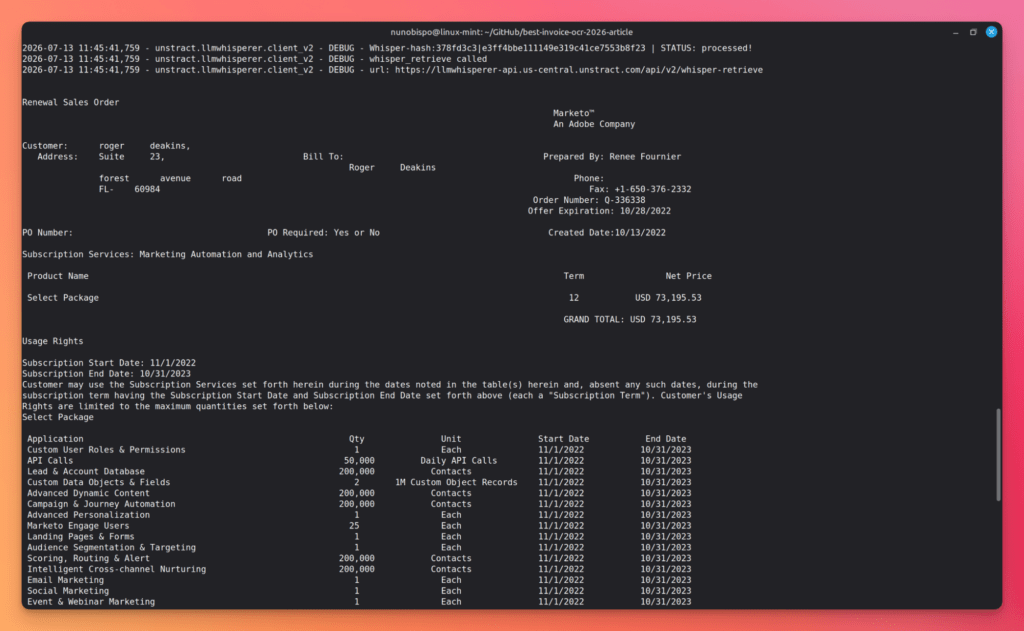
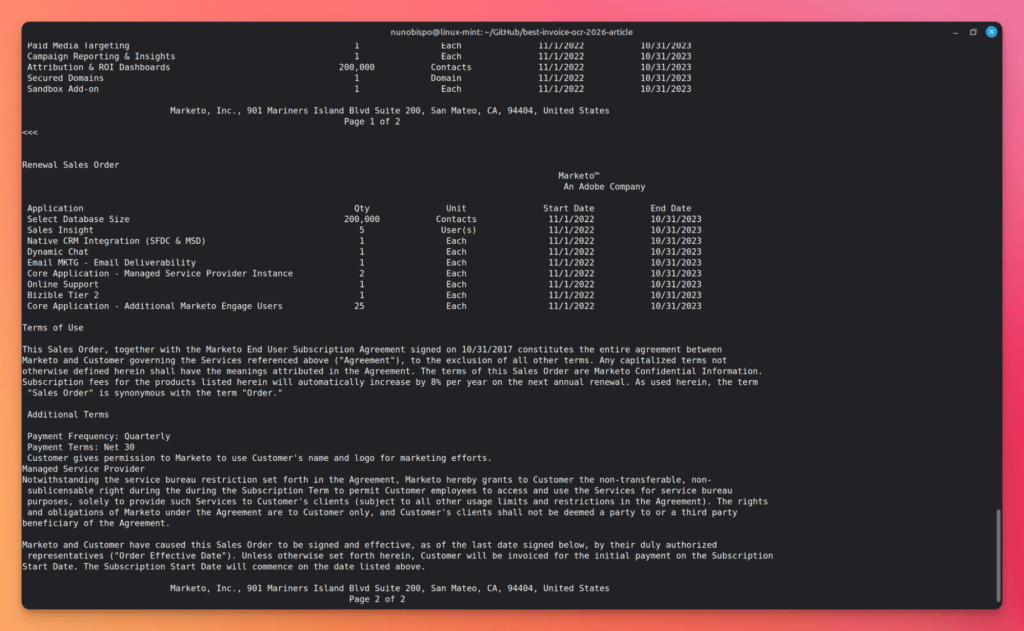
The challenge: Manufacturing and distribution invoices and other complex sales orders, often contain nested tables, multiple pricing tiers, and multiple tax rates per line, spanning several pages with subtotal rows and varying cell alignments. Traditional OCR tends to misalign columns or lose the hierarchy between a summary line and the detail rows beneath it.
What LLMWhisperer does: It gives a full extraction of the tables, with proper row and columns alignment, correctly identifying multiple tables.
Downstream tie-in: Correct table extraction means each line item maps to the right cost center or product code, preventing miscoding in QuickBooks or Xero.
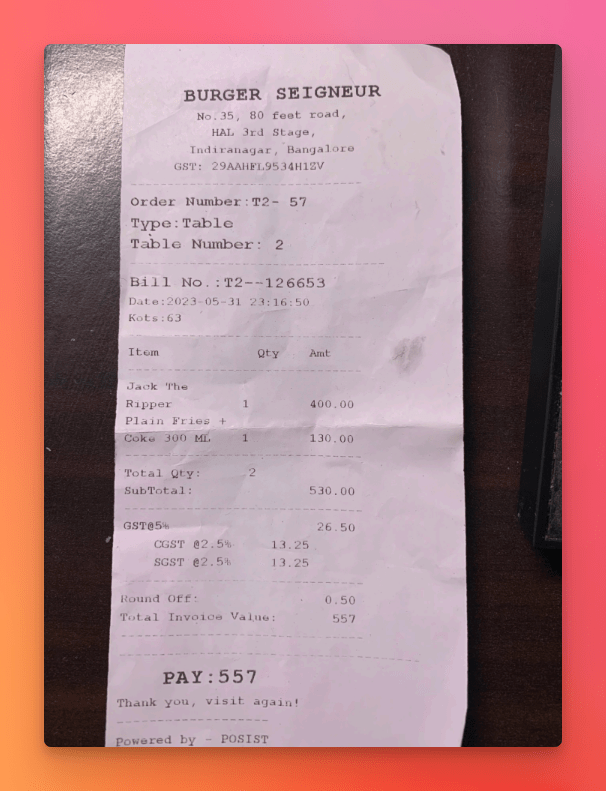
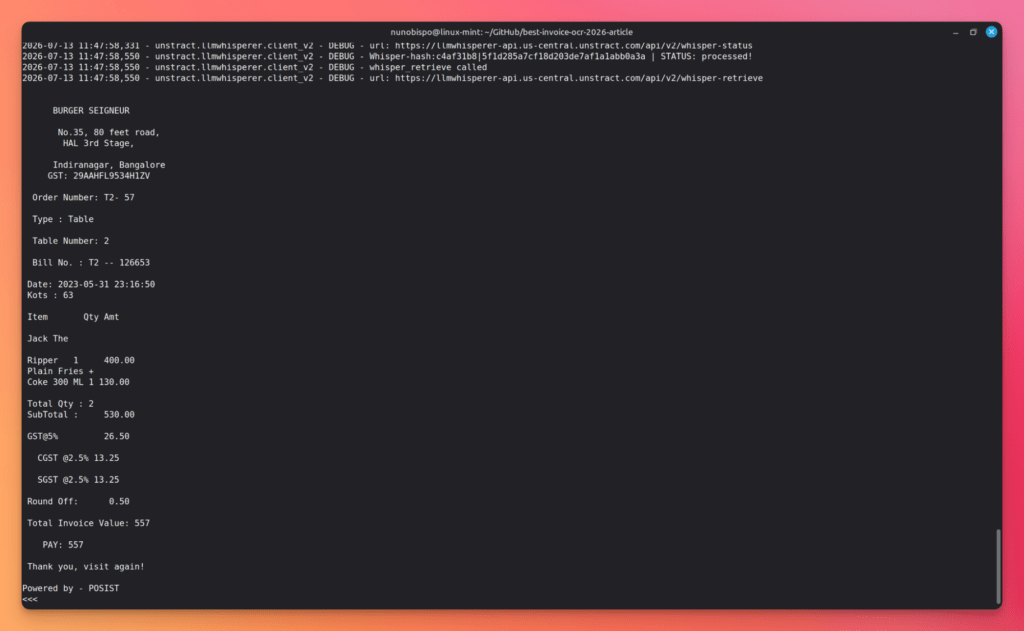
Invoice OCR Use Case 5: Poorly Photographed Invoice
The challenge: Field staff photographing invoices on-site introduce skewed angles, low light, partial shadows, and blur; conditions that make character recognition unreliable for OCR engines not built to compensate for them.
What LLMWhisperer does: High Quality mode applies automatic deskewing, noise reduction, and adaptive contrast enhancement before extraction, so a phone photo taken at an angle in bad light still produces usable structured output.
Downstream tie-in: Mobile-captured invoices can enter the pipeline directly; no manual pre-processing, no re-scanning back at the office.
Invoice OCR Use Case 6: Scanned Legacy Invoice
The challenge: Older paper invoices run through flatbed scanners bring uneven lighting, blurry text, compression artifacts, faded ink, and sometimes bleed-through from the reverse side; all of which degrade traditional OCR accuracy and destroy document structure.
What LLMWhisperer does: The use of AI/ML by LLMWhisperer allows it to accurately recognize the information present in even these old type of documents.
Downstream tie-in: Legacy supplier relationships don’t need a special handling path. The same pipeline, same output quality; no separate “old vendor” workaround.
From OCR to Accounting System: The Complete Invoice Workflow
Every use case above answers “can it read this document”? The next question is the one that actually determines whether this saves your AP team time; is “what happens to that extracted data next”?
This is the gap most invoice OCR articles skip, and it’s the one that matters most once you’re past evaluating tools and into actually building or buying a workflow.
LLMWhisperer Is Just the Invoice OCR – Here’s What You Actually Need
LLMWhisperer reads the invoice and extracts raw text with structure preserved. That’s genuinely hard and genuinely valuable; but it is not, by itself, a JSON object you can hand to an accounting system’s API. QuickBooks and Xero don’t accept “structured text”. They need named fields: VendorRef, TxnDate, Amount, AccountRef, and so on.
Unstract sits between LLMWhisperer and your accounting system as the data extraction and mapping layer. It consumes LLMWhisperer’s structured OCR output, applies LLM-based extraction logic against a defined schema, and produces the clean JSON your accounting API actually expects.
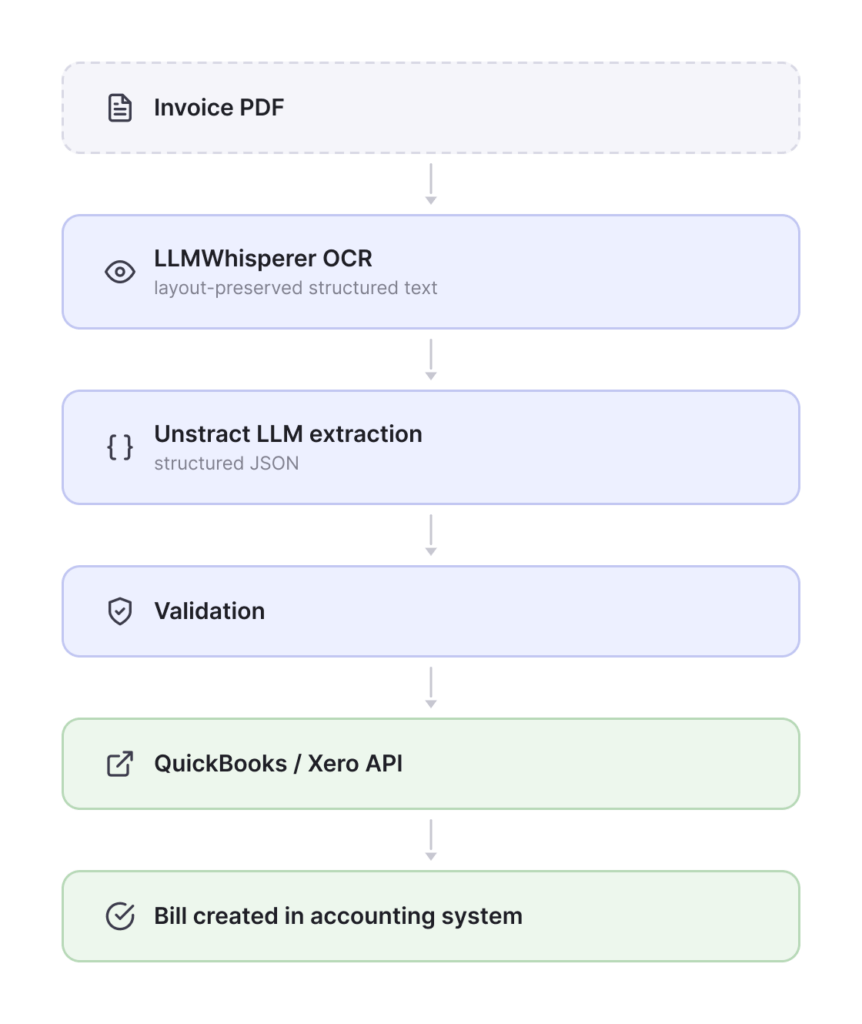
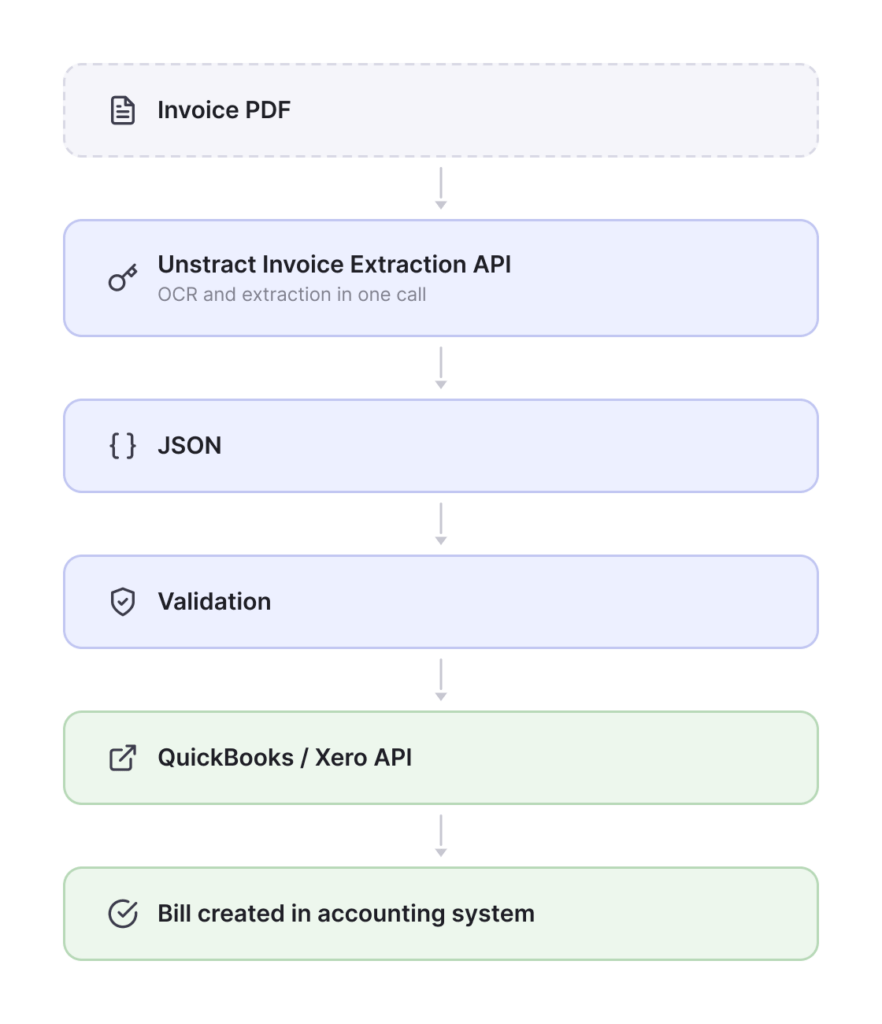
There are two ways to get from an invoice PDF to that JSON, and either one works:
Flow 1 – LLMWhisperer + Unstract as separate steps:
Flow 2 – Unstract’s Invoice Extraction API (LLMWhisperer built in):
Flow 2 is the faster path to a working integration, because the OCR step is already built into the API call; you send a document, you get JSON back with no separate OCR call to orchestrate. Flow 1 gives you more control if you want LLMWhisperer’s raw structured text for other purposes (search indexing, archival, a custom LLM pipeline) in addition to the accounting-ready JSON. Pick whichever matches how much control versus speed-to-integration you need, both land in the same place.
Either way, the value proposition is the same: the accountant sees a clean, correctly coded bill and not a pile of fragments to re-key, because the messy document-reading and field-mapping work already happened upstream, before the data ever reached QuickBooks or Xero.
Getting Structured JSON: Prompt Studio vs. the Invoice Extraction API
As we have just seen, Unstract offers two ways to get from a document to a defined JSON schema.
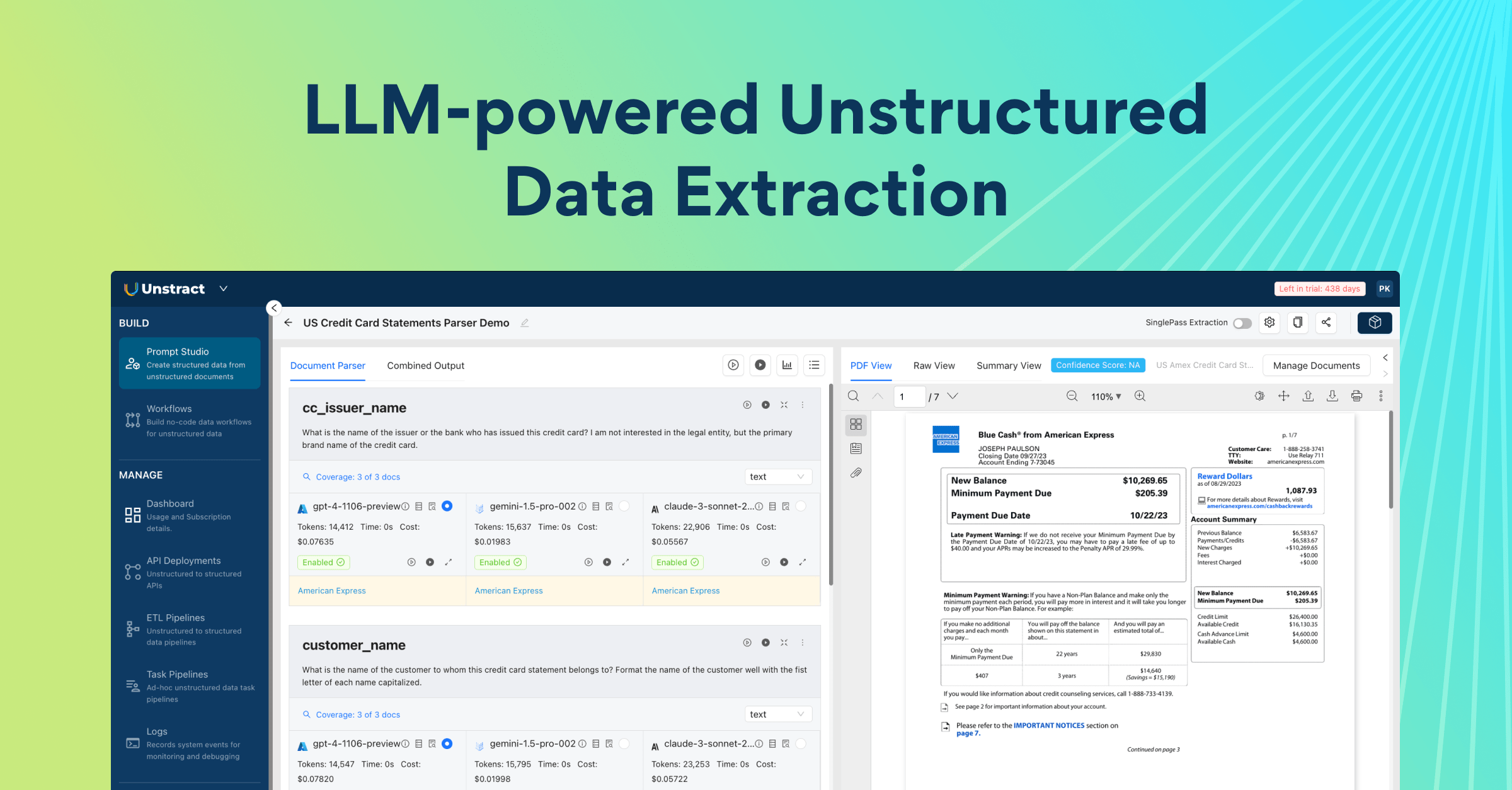
Option A – Agentic Prompt Studio: You build a project that defines exactly the fields you want extracted; vendor name, invoice number, date, due date, line items, totals, tax, PO number, bank details; and the platform’s AI builds and validates the extraction prompts against your schema.
This is the right choice when your invoices have fields specific to your business that a generic invoice schema wouldn’t cover (a custom cost-center code, a specific compliance field, a non-standard reference number).
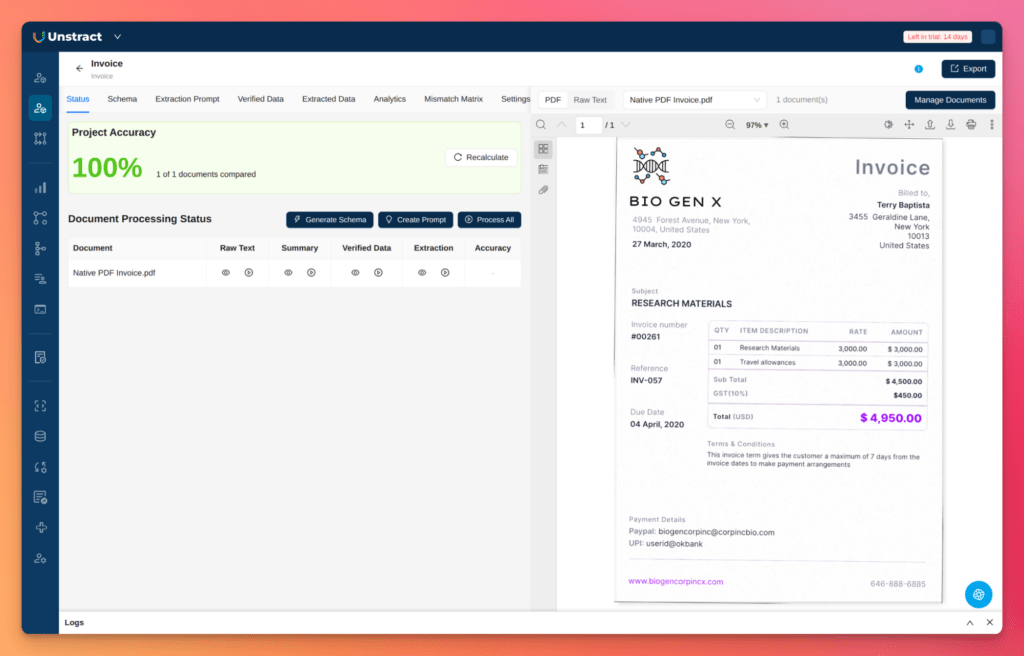
Create a new ‘Agentic Prompt Studio’ in Unstract, upload your sample document and follow the workflow to generate a schema and extract the data:
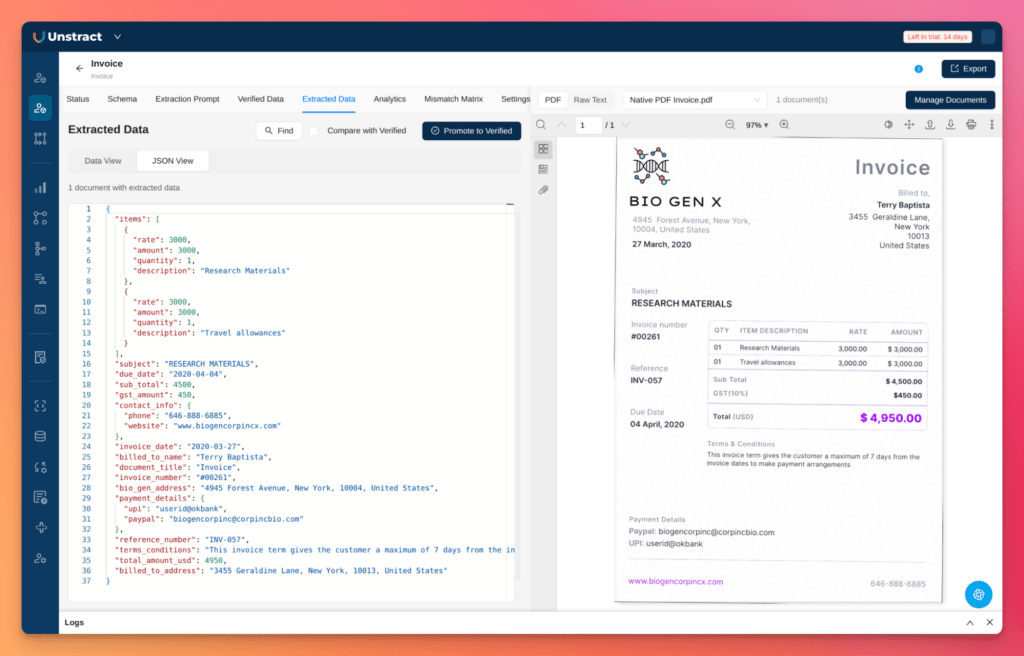
For example, you will get a similar output to this one, after the JSON extraction processes:
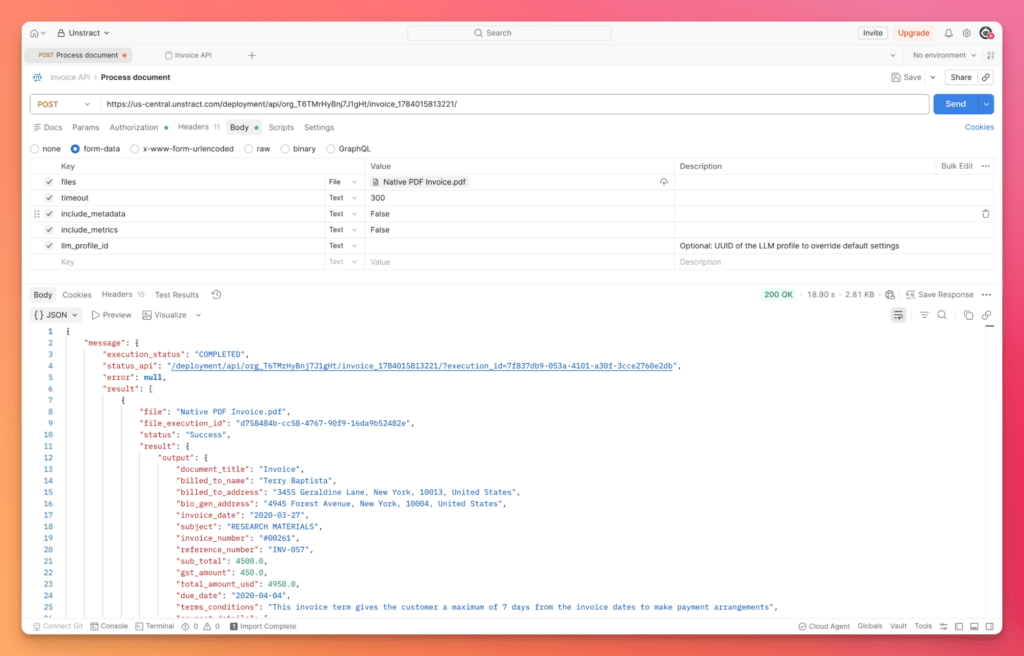
Once the project is configured, it can be deployed as its own API endpoint. Every invoice you send to it, regardless of format or layout, returns the same JSON structure.
Example of running Postman to call the generated API endpoint:
And the JSON for reference:
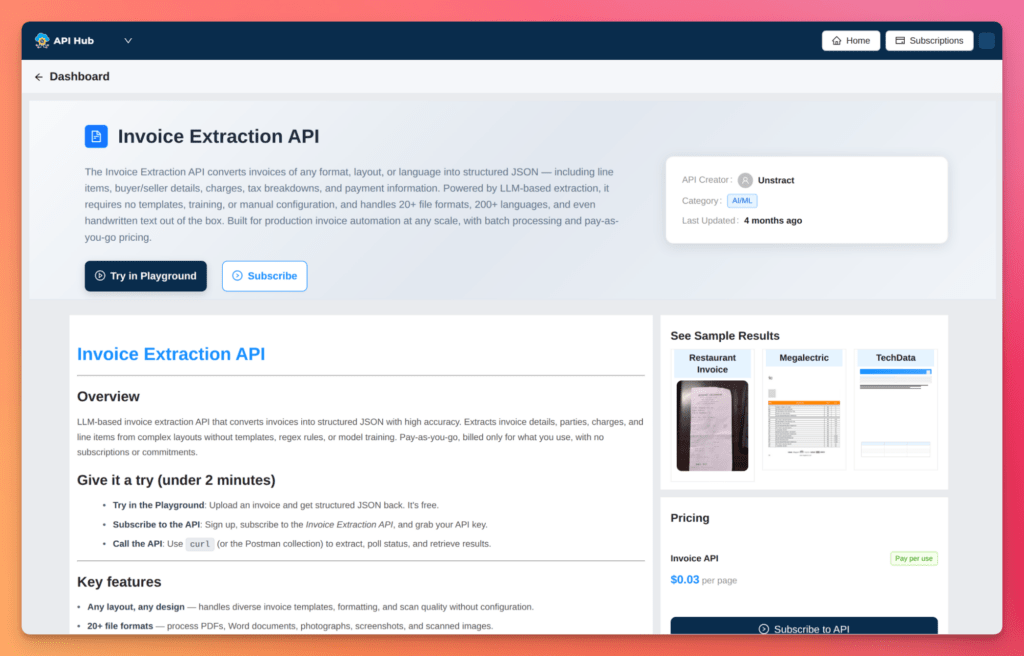
Option B – the dedicated Invoice Extraction API: For standard invoice fields, Unstract offers a purpose-built Invoice Extraction API with zero setup: no schema to define, no project to configure:
You send a document, you get back 30+ standard invoice fields as JSON. This is the faster path if your fields map to what invoices normally contain, like vendor and buyer details, line items, totals, tax breakdown, payment details, PO references.
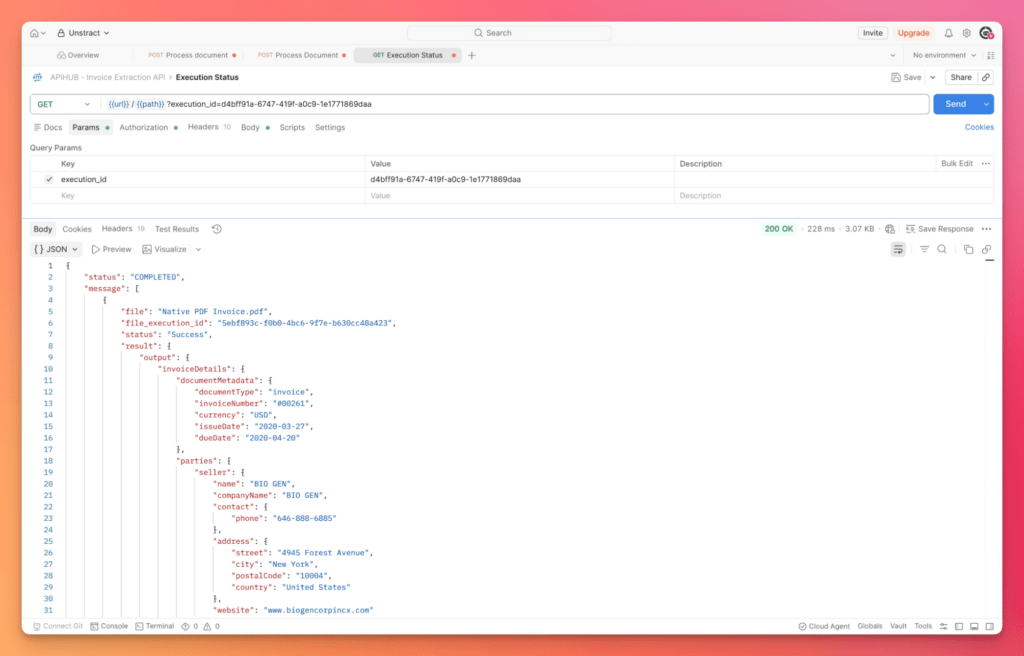
Here’s what that looks like from Postman:
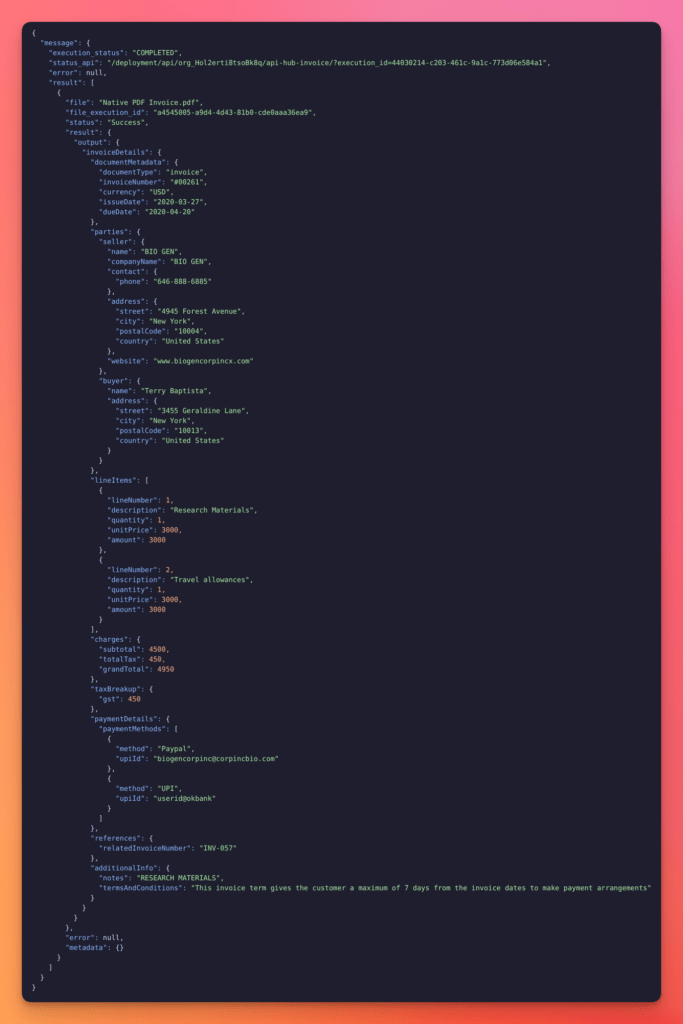
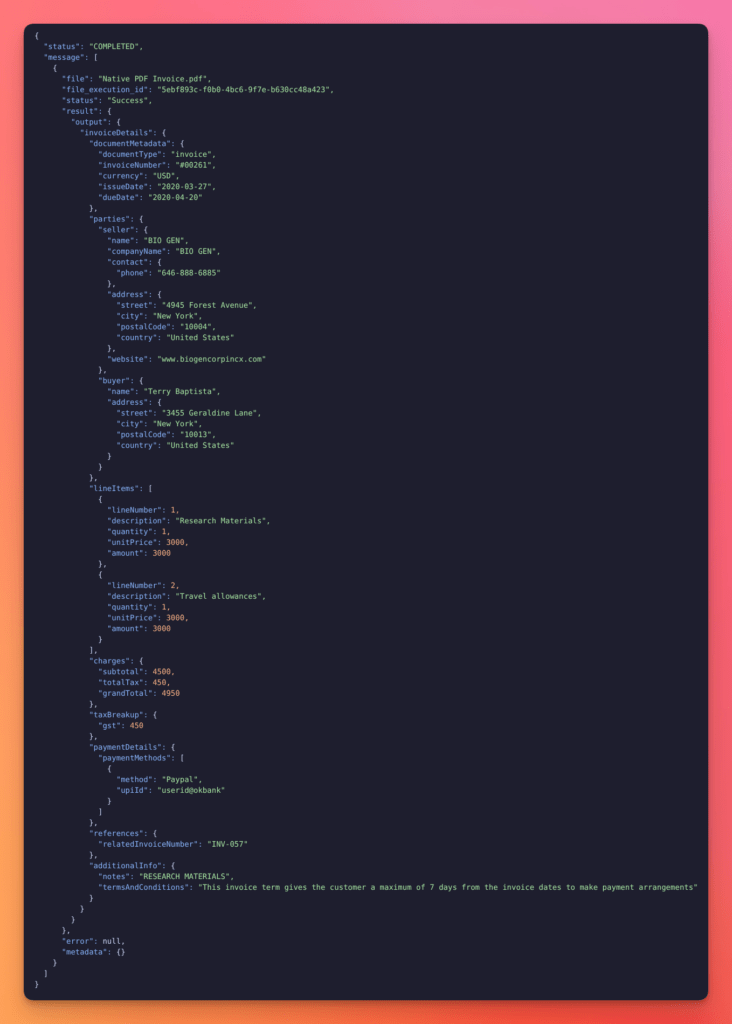
And the JSON for reference:
Notice the structure: it’s flat, predictable, and identical in shape regardless of what the source invoice looked like; whether it arrived as a native PDF, a scan, or a phone photo. That consistency is what makes the next step, mapping this JSON to an accounting system, a repeatable integration instead of a one-off script per vendor format.
Whichever option you use, Agentic Prompt Studio for a custom schema, or the Invoice Extraction API for standard fields; the output is the same kind of JSON object shown above, ready for the mapping step that follows.
Sending Unstract Data to QuickBooks
QuickBooks Online exposes a REST Accounting API. For a supplier invoice, the correct object to create is a Bill, not a sales invoice, because a Bill is what creates an Accounts Payable entry.
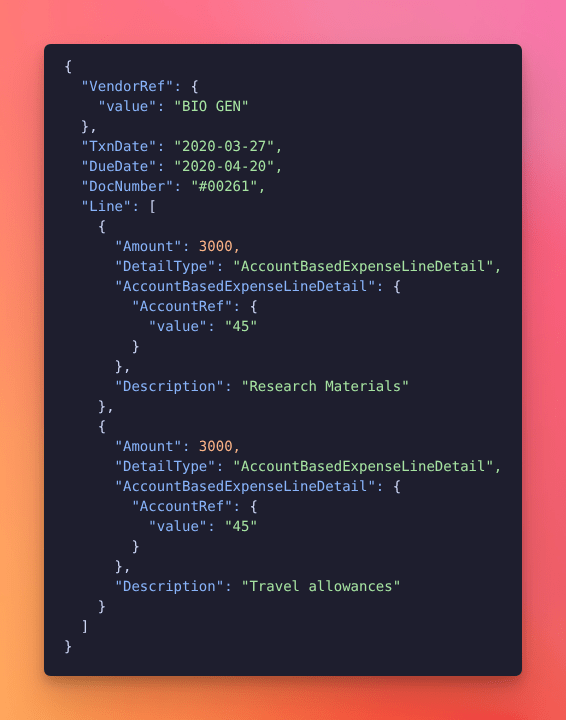
Endpoint:POST /v3/company/{realmId}/bill
Every field in the payload below is populated directly from the Unstract JSON shown above, VendorRef, TxnDate, DueDate, DocNumber, and each line item’s Amount and Description. Both line items from the extracted JSON map to their own Line entry. No manual re-keying:
VendorRef.value and AccountRef.value are internal QuickBooks IDs, your integration layer needs a lookup step that matches Unstract’s extracted vendor_name string to an existing QuickBooks vendor ID (or flags the invoice for review if no match exists, rather than silently creating a duplicate vendor).
The original invoice PDF can also be attached to the QuickBooks transaction using QuickBooks’ attachment workflow, so the accountant sees both the structured data and the source document in one place.
Sending Unstract Data to Xero
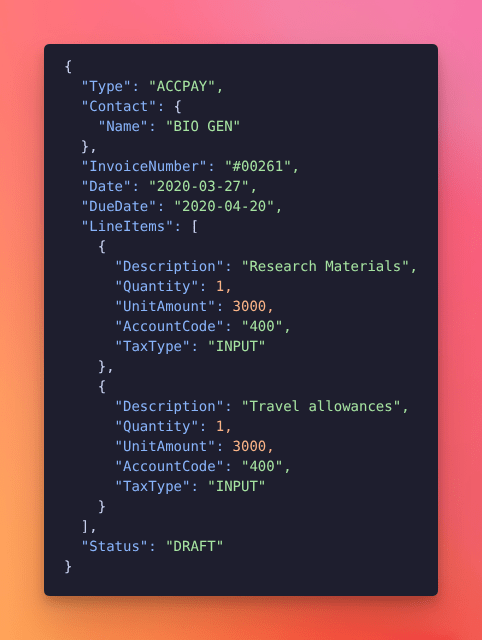
Xero uses a single Invoices endpoint for both sales invoices and purchase bills. For a supplier invoice (an Accounts Payable transaction), you create one with Type: "ACCPAY".
Endpoint:POST /api.xro/2.0/Invoices
The source invoice file can be attached to the Xero bill after creation via Xero’s Attachments API, giving the accountant the same side-by-side view of structured data and source document available in QuickBooks.
Pushing extracted data straight to “approved and ready to pay” is a mistake regardless of how accurate your OCR is, automation should reduce manual work, not remove the human checkpoint entirely. The safer, staged approach:
Extract: Unstract (using LLMWhisperer for the OCR step) pulls vendor, invoice number, date, due date, tax, total, PO number, line items, bank details, and currency.
Validate: before touching the accounting system, run automated checks: duplicate invoice number, vendor match against the existing vendor list, line-item math (subtotal + tax = total), tax sanity check, PO match if 3-way matching is in place, mandatory-field presence, and currency check for multi-currency operations.
Human review if needed: route low-confidence extractions or high-value invoices to AP for review before a Bill gets created. LLMWhisperer’s bounding-box API can drive confidence-based routing automatically, rather than sending everything or nothing to a human.
Create a draft Bill: push to QuickBooks as a draft Bill, or to Xero with Status: “DRAFT”. Not approved, not ready to pay; a clean entry for the finance team to review, instead of a raw document to re-key.
Attach the source PDF: attach the original invoice to the Bill so the accountant can compare structured data against the source in one screen.
Approve and pay: the finance team approves the draft, schedules payment, and reconciles the bank transaction later.
Unstract and LLMWhisperer’s role ends at Step 5; the accounting system handles the rest.
Who Benefits from This Workflow
Accounts Payable / Finance Ops: less manual invoice entry, faster bill creation, no duplicate vendor records.
Procurement: PO-to-invoice matching and vendor spend visibility, broken down by line item instead of by invoice total.
Approvers and department heads: faster review, because bills arrive pre-coded and pre-verified instead of as raw PDFs to interpret.
Audit and compliance: every bill carries structured extracted data and the original source document attached, in one place.
The separation of concerns here is intentional: LLMWhisperer handles the messy document-reading problem. Unstract handles the extraction and integration logic. QuickBooks or Xero remains your accounting system of record. Nothing moves between those layers manually.
Integrating Invoice OCR with Other ERPs (SAP, NetSuite, Oracle)
Enterprise teams running SAP, NetSuite, or Oracle instead of QuickBooks or Xero can apply the exact same pattern: Unstract produces structured JSON, and that JSON gets mapped to whatever API surface the ERP exposes for vendor bill creation.
The general integration points, based on each vendor’s public API documentation:
SAP typically exposes BAPIs or OData services for invoice verification (MIRO-equivalent postings).
NetSuite offers RESTlets or SuiteTalk (SOAP) for vendor bill creation.
Oracle provides REST APIs for Payables invoice import.
Since ERP editions, API versions, and licensing tiers vary considerably between organizations, confirm the specific endpoints and authentication requirements available on your instance before building against them. What’s enabled on one SAP or NetSuite deployment isn’t guaranteed on another.
The underlying value doesn’t change regardless of ERP: clean, structured data extracted from messy source documents, pushed programmatically to whatever system of record you run.
LLMWhisperer vs. Other Invoice OCR Approaches
If you’re comparing approaches rather than brands, here’s how the major categories stack up on the dimensions that actually matter for invoice processing:
Template-based tools are quick to set up but brittle: one vendor layout change and extraction quietly breaks.
Capture tools bundled inside accounting platforms have historically extracted header data reliably (vendor, total, date, invoice number), while consistently missing line items, forcing manual line coding back into the accounting system.
AI-trained-per-form models are accurate once trained, but “once trained” is the catch, they require labeled training data and ongoing maintenance as new vendor formats show up.
LLM-native, layout-preserving OCR handles a new vendor’s invoice format on first encounter, with no configuration step. Unstract then maps that extracted text into structured JSON for the accounting system.
Worth noting explicitly: open-source OCR tools (Tesseract and similar) are not a viable production option for invoice processing on their own. They extract text competently, but they have no invoice-domain awareness and no table-structure preservation, which means all the line-item and field-mapping problems described throughout this guide land squarely back on your team to solve.
Invoice OCR Security and Compliance
For any team running invoice data through a third-party service, compliance posture is a real evaluation criterion, not an afterthought:
SOC 2 compliance matters for any finance team handling sensitive vendor data, banking details, and payment information.
HIPAA is relevant for healthcare AP teams processing invoices from medical suppliers that may reference patient-adjacent account information.
GDPR applies to any organization processing invoices tied to European operations or European vendor/customer data.
On-premise deployment: LLMWhisperer is available self-hosted, which matters for regulated industries where invoice data that is often containing banking details and vendor financial information can’t leave the organization’s own infrastructure.
Data handling: Invoice data processed through the platform is not used for model training.
Audit trail: Because every extracted field can be traced back to a specific document and, at the field level, to a specific extraction, AP teams have a concrete trail to point to during financial audits and not just “we typed it in and it seemed right”.
Which Approach Actually Fits Your AP Process?
If your invoices are mostly clean, native PDFs from a small, fixed pool of vendors, a basic bundled capture tool may genuinely be sufficient for header-level extraction. Don’t over-engineer a problem that’s already small.
If you receive invoices from 50+ vendors in varied formats, need line items coded to different accounts, or are building an AP automation pipeline that feeds Xero, QuickBooks or an ERP; you need a layout-preserving, template-free extraction system with a structured JSON output layer sitting in front of it, not just a capture tool that stops at the header.
And if your OCR output is already feeding downstream automation: a bad extraction doesn’t just cost you the time to fix that one invoice. It propagates through validation, ERP posting, payment, and your audit trail; every step downstream inherits the error. The cost of fixing bad OCR after the fact runs 5–10x the cost of getting the extraction right at the source, because every hour it sits undetected is an hour closer to month-end close, when it’s hardest and most expensive to unwind.
Reading the invoice accurately and getting the result into your accounting system are two different problems, and this guide has treated them that way on purpose. Test LLMWhisperer and Unstract on your own invoices; the messy ones, not the clean samples a demo would pick.
Unstract Invoice OCR Extraction API: Automate Invoice Data Extraction
Unstract’s plug-and-play Invoice Extraction API instantly converts any invoice into structured JSON—no templates, training, or manual configuration required. Powered by LLM-based extraction, it automatically adapts to diverse layouts, scanned files, and handwritten notes while maintaining enterprise-grade security. Built for AP/AR automation, it scales from single invoices to millions with pay-as-you-go pricing.
Why It Stands Out:
• Zero Setup: Handles any invoice design, format, or scan quality out of the box.
• Universal Compatibility: Supports 20+ file formats (PDFs, images, Word docs) and 200+ languages.
• Structured JSON Output: Extracts multi-table invoices into clean, structured data with preserved headers and cell relationships.
• Field Normalization: Dates, currencies, and numeric values are standardized automatically.
• Scalable & Secure: Batch process documents via a simple REST API, fully HIPAA, SOC 2, and GDPR compliant.
Automatically Extracts 30+ Key Fields(and more):
1. Invoice Metadata: Invoice number, dates, currency, and document type
2. Buyer & Seller Details: Names, addresses, and contact information
3. Line Items: Description, quantity, unit price, and amount per row
4. Financial Totals: Subtotal, tax, and grand total
5. Payment Details: Bank accounts, PayPal, UPI, and other payment methods
6. Tax Breakdown: GST, VAT, and other tax types with amounts
7. Additional Info: Terms, conditions, and non-standard fields
8. Reference Numbers: PO references, contract IDs, and related identifiers
9. Processing Metadata: Confidence scores and extraction timestamps
10. Usage Metrics: Token counts and cost per extraction
11. Performance Data: Processing time and pages processed
Invoice OCR is the hinge of the entire accounts payable workflow — and the step most teams underestimate. A capture tool that reads characters correctly but misses table structure, misassigns line items, or drops tax fields doesn’t just create one bad invoice; it corrupts validation, ERP posting, payment, and your audit trail.
The real cost of bad OCR isn’t the time spent fixing a single document — it’s the compounding damage that surfaces weeks later during month-end close, when it’s hardest and most expensive to unwind. Getting extraction right at the source is the highest-leverage move an AP team can make.
The shift from template-based and character-level OCR to layout-preserving, AI-native extraction changes what’s possible. LLMWhisperer handles the document-reading problem — preserving spatial relationships so downstream systems can reason about structure, not just text. Paired with Unstract’s extraction layer that maps structured output into accounting-ready JSON, the entire workflow from messy PDF to coded bill in QuickBooks, Xero, or any ERP runs without manual re-keying.
he question isn’t whether to automate invoice capture anymore; it’s whether your OCR is accurate enough to trust what happens after it. Test it on your messiest invoices — not the clean demo samples — and let the results decide.
Take LLMWhisperer for a test drive, check out our free playground.
Explore Unstract Finance Document Processing by Document Type:
Contract Pricing Proposal Data Extraction — Extract pricing terms, discount structures, validity periods, and product/service line items from contract pricing proposals across formats
Purchase Requisition Form Data Extraction — Capture requisition numbers, requested items, quantities, estimated costs, department codes, and approval details from purchase requisition forms
Sales Order Acknowledgement Data Extraction — Extract order numbers, product details, quantities, pricing, delivery dates, and shipping terms from sales order acknowledgements automatically
Receipt Data Extraction — Pull merchant names, transaction dates, line items, taxes, payment methods, and total amounts from receipts and expense documents at scale
Quotation Data Extraction — Extract vendor details, item descriptions, unit prices, quantities, validity periods, and total quoted amounts from quotations and price lists
Invoice Data Extraction — Capture invoice numbers, vendor information, line items, tax breakdowns, payment terms, and total amounts from invoices across formats and languages
LLMWhisperer: Best Invoice OCR to Extract Data from Handwritten Invoices
PDF forms have checkboxes and radiobuttons that can be filled out by hand by the user. These form elements are used to collect various bits of important data from them. In this repo, we will show how to extract these form elements using LLMWhisperer in a way that LLMs can understand.
Invoice OCR: FAQs
1. What is invoice OCR and why does it matter for accounts payable teams? Invoice OCR is software that reads invoices in any format and turns them into structured, machine‑readable data — vendor names, invoice numbers, line items, totals, and taxes. Without accurate invoice OCR, AP teams spend hours manually re‑keying data from PDFs and scans, driving up processing costs and introducing errors.
2. Why is line‑item extraction the biggest gap in most invoice OCR software? Many invoice OCR software solutions reliably pull header‑level fields (vendor, total, date) but miss line items entirely. For businesses receiving invoices with 10+ line items, that means every line still has to be coded to the correct account by hand, defeating the purpose of automation.
3. What hidden costs does bad invoice OCR create for a business? Bad invoice OCR leads to duplicate vendor records, misrouted invoices, and tax‑rounding mismatches that can cascade into a trial balance that won’t reconcile at month‑end. A single wrong total doesn’t just produce one bad invoice — it silently corrupts an entire batch, and the error usually surfaces weeks later during close.
4. How does LLMWhisperer differ from traditional OCR invoice scanning software? Traditional OCR invoice scanning software relies on templates or keyword proximity, breaking when a vendor changes layout. LLMWhisperer uses layout preservation and LLM‑ready structured output to handle any vendor’s invoice on first encounter, with no per‑vendor setup or training required.
5. Can invoice OCR processing handle photographed invoices and low‑quality scans? Yes. With High Quality mode, invoice OCR processing applies automatic deskewing, noise reduction, and adaptive contrast enhancement before extraction. A phone photo taken at an angle in bad light still produces usable structured output, eliminating the need for manual pre‑processing or re‑scanning.
Nuno Bispo is a Senior Software Engineer with more than 15 years of experience in software development.
He has worked in various industries such as insurance, banking, and airlines, where he focused on building software using low-code platforms.
Currently, Nuno works as an Integration Architect for a major multinational corporation.
He has a degree in Computer Engineering.