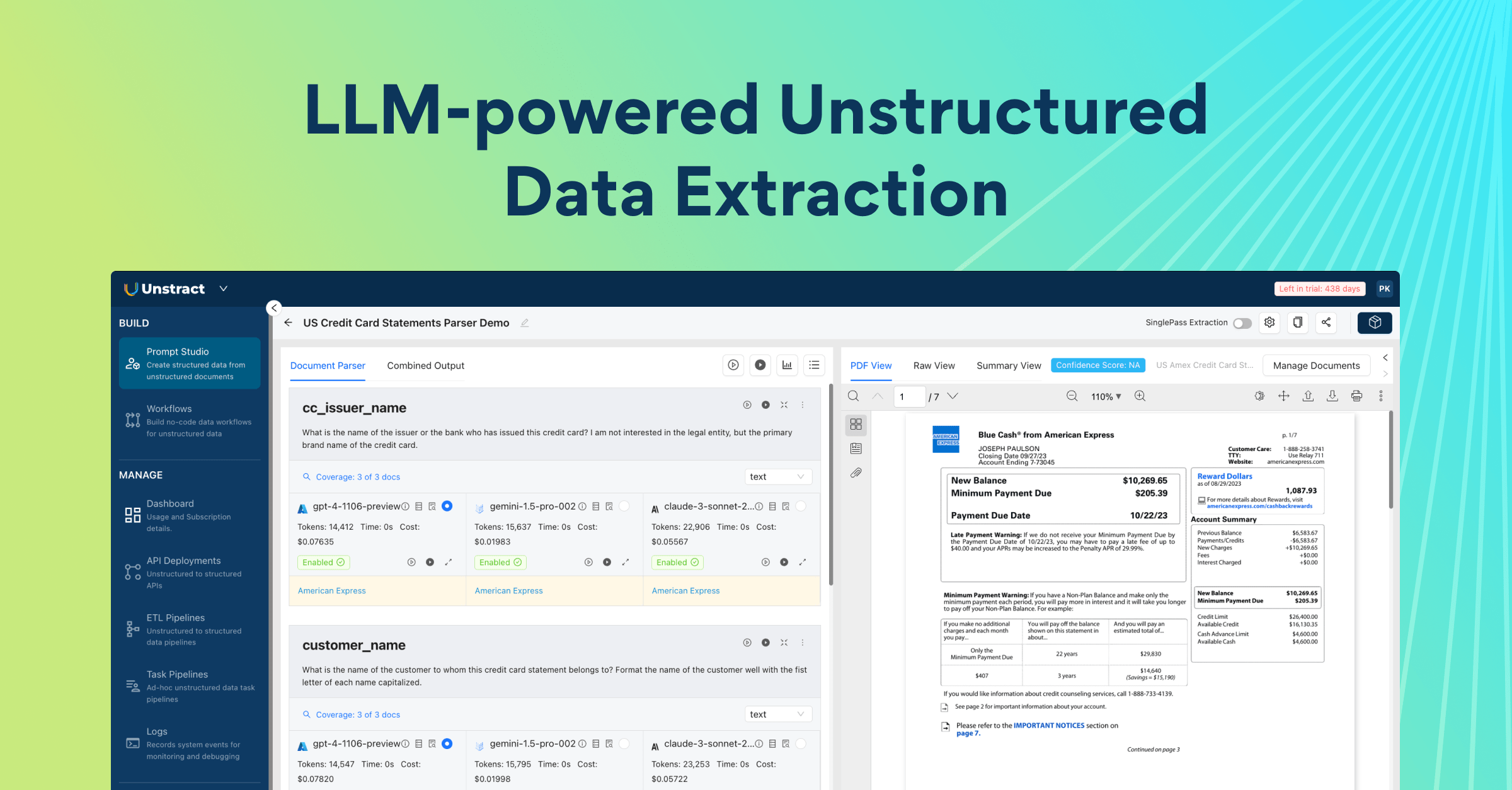
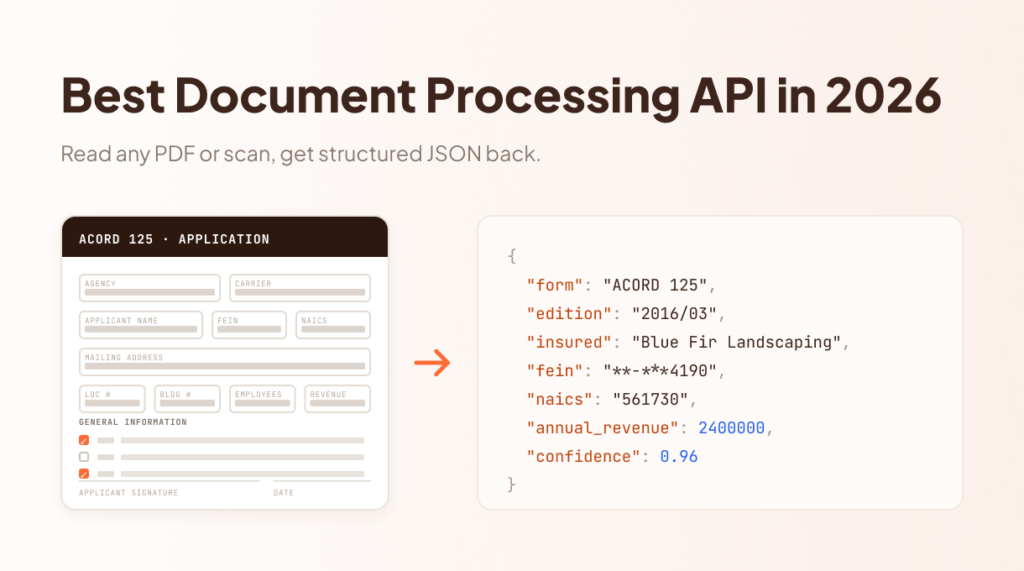
Your product or workflow needs to extract data from PDFs — loan applications, invoices, insurance forms, whatever your vertical throws at you.
You’ve tried multiple document processing APIs, and they all work great on the sample documents in their docs. Then you wire one into production. Suddenly you’re debugging why a scanned form returns garbage, why the JSON schema breaks on edge cases, and why your agent can’t reliably call the API without hallucinating parameters.
The demo looked perfect. The integration is a mess. This guide gives you seven evaluation checks that catch these problems before you commit — plus six vendors ranked by developer experience, and live extractions on real documents so you can see the difference.
Why Most Document Processing APIs Fail Developers
You’re evaluating document processing because your product needs data out of PDFs (loan packets, invoices, forms), not another enterprise workflow suite.
Most vendors still sell you the suite: polished UI, happy-path upload, confidence score. But you need an HTTP request, CLI, or agent-tool surface your backend will call on every document, under load, with failures you can debug.
That mismatch is why so many “OCR” and “IDP” picks look fine in a happy-path trial and fail under real traffic. Here are the traps that waste months.
The “99% accuracy” trap
Vendors lead with a number. Ninety-nine percent. Benchmarks. Leaderboard screenshots. Accuracy does matter, because garbage text in means garbage fields out, but it is a terrible primary score for an API you will maintain in production.
Accuracy says nothing about whether the response shape is stable, or whether “confidence” maps to a field you can rely on. It also says nothing about whether a multi-page loan packet returns the same structure as the one-page demo. It ignores time-to-first-success, auth friction, sandbox cost, and what happens when the model is wrong: a silent bad value, a vague 400, or an actionable error with a request ID.
Technical founders ship integrations, not accuracy slides. An API that is “99% accurate” in a brochure and unpredictable at the HTTP request will cost more than a slightly weaker extractor with stable, consistent contracts. Treat headline accuracy as the floor. Rank on whether you can trust the interface when the document is messy and something fails in your pipeline at 2 a.m.
What you actually care about
Your shortlist should answer product questions, not marketing ones. Three hooks that predict whether a vendor survives real traffic:
Can a new engineer get a successful call on your file in under five minutes?
When something fails, does the error tell you what to fix, with a request ID, or just Bad Request?
Can you integrate the way your ecosystem works? REST in the app, CLI in CI/batch, MCP when an agent needs the same extraction.
Demo ≠ production
The vendor demo is a clean PDF, a single page, a known layout, a human watching the UI. Your production path is a folder of documents with scans, rotated pages, and the occasional password-protected file, called from a worker at 2 a.m. with no one to click “retry”.
A clean demo proves the model can read a document. Production success needs retries, idempotency, timeouts, partial failures, and enough observability to tell an extraction miss from a schema change from an API outage. If you cannot reproduce a bad result from logs and a request ID, you cannot operate the API. You are guessing.
Stop ranking tools by brochure features. Demand principles you can test in a week.
Best Intelligent Document Processing APIs in 2026: Comparison
Rank
API
What it is
Integration paths
Key strengths
Pick this if
DevExp verdict
1
Unstract (LLMWhisperer + Unstract API)
Two layers in one platform: LLMWhisperer for layout-aware text extraction, and the Unstract API for schema-shaped JSON
REST, CLI, MCP and Prompt Studio
Prompt-based setup with no template maintenance; handles tables, checkboxes, multilingual and messy PDFs; open-source and hosted options
You want OCR plus structured extraction across multiple integration paths
Best fit when you need OCR plus structured extraction with more than one integration path
2
Reducto
AI-native parsing for complex documents
API (CLI and MCP maturity varies)
Layout-aware output, grounding and citations, strong results on messy pages; modern API experience
Accuracy on complex documents is your main risk
Excellent on hard documents; second place on the full scorecard
3
LlamaParse
Document parsing from the LlamaIndex team, aimed at RAG pipelines
API with native LlamaIndex hooks
Chunk-friendly output, parsing tiers, tight fit with LlamaIndex workflows
LlamaIndex is your backbone and parsing feeds RAG
Excellent inside LlamaIndex; limited as a universal API
4
Azure AI Document Intelligence
Microsoft’s document models (formerly Form Recognizer)
Azure APIs within the Azure platform
Prebuilt models for invoices, receipts and IDs; custom models when you have training data
Azure is already your ecosystem
Strong for Microsoft-centric teams; average to weak for others
5
Amazon Textract
AWS-native document processing
AWS APIs alongside IAM, S3 and Lambda
Forms, tables, expenses and identity documents; familiar auth and ops for AWS teams
You are committed to AWS
Strong for AWS-native teams; weak as a standalone choice
6
UiPath Document Understanding
Document extraction built into the UiPath RPA platform
Plugs into existing UiPath robots, workflows and human-in-the-loop review
UiPath is already how work gets done
Strong inside UiPath; weak as a standalone developer API
The 7 Principles of a Great Document Processing API
A feature matrix tells you what a vendor claims to support. It does not tell you whether a new engineer can get a real PDF through the API in an afternoon, or whether you can operate the integration when a document fails.
Use the seven checks below as pass/fail tests over about a week. Same messy file from your domain for every vendor. Public docs only when you can. Put the feature comparison aside until a vendor clears these. Fail more than one or two and the rest of the brochure does not matter, accuracy slides included.
Each principle names what good looks like, what failure looks like, and a concrete try-this you can run before you shortlist anyone.
1. Time-to-First-Success Should Be Under 5 Minutes
A new engineer with an API key should extract something real from a PDF in the first five minutes. If first success takes a sales call, a “solutions engineer”, or an afternoon of IAM archaeology, the API is broken for product teams even when the accuracy is strong.
Failure looks like: signup walls, unclear auth, “contact us for a sandbox”, or docs that start with architecture diagrams instead of a curl.
Try this: Start a timer. API key in hand → first successful call on a real file from your domain (loan packet, invoice, etc). Over five minutes without a usable response? Fail the principle.
2. Documentation Is the Product
Great docs answer questions in the order developers ask them: auth → upload → poll/result → errors → production concerns. Bad docs mirror the company’s internal view: product, platform, “advanced”, and a graveyard of outdated SDKs.
Failure looks like: three competing getting-started guides, missing request/response examples, or reference pages with no task path (“I have a PDF; what do I call?”).
Try this: Can you complete first success using only the public docs, with no Slack and no solutions engineer? If you need a human to translate the docs into a working call, the docs failed.
3. Test Modes Are Non-Negotiable
Payment APIs give you sandboxes. Document APIs often pretend every call is production: real pages billed, real side effects, no safe place to break things. That is unacceptable when you are wiring extraction into a product.
Failure looks like: no test keys, “free tier” that still hits prod quotas, or sample mode that returns canned JSON unrelated to your file.
Try this: Upload a messy document in a designated test/sandbox path. Confirm you can iterate without burning paid pages or writing irreversible state. No such path? Fail. Hold the same bar you would for integrating payments with Stripe.
4. Error Messages Should Be Actionable
A bare Error 400 tells you nothing useful. A useful failure names what went wrong, points at the field or constraint, includes a request ID, and ideally links to the doc section that fixes it.
Failure looks like: opaque codes, HTML error pages on JSON endpoints, or “something went wrong” with no correlation ID when you open a support ticket.
Try this: Force three failures on purpose: bad auth, unsupported file type, oversized upload. Can you fix each from the response body alone? If you need support to decode the error, the API failed this principle.
5. Consistency Beats Features
A predictable API with 80% of the feature list beats an unpredictable API with 100%. CTO’s pay for contracts: same auth pattern, same pagination, same error shape, same async story across endpoints, not a new dialect per feature.
Failure looks like: sync on one route, fire-and-forget on another; snake_case here, camelCase there; “v1” that behaves differently for invoices vs. custom docs.
Try this: Call two document types and one “advanced” endpoint. Do response envelopes, status fields, and failure shapes match? If each path needs its own client code, consistency failed even when the feature list looks complete.
6. Observability Is a Feature
If you cannot see request latency, error rates, and recent payloads (or redacted equivalents), you cannot operate extraction in production. Debugging “the extraction was wrong” vs “our worker timed out” vs “their API degraded” requires signals, not guesswork.
Failure looks like: no request IDs, no dashboard, support asking you to “send the file again”, or metrics that only the vendor can see.
Try this: After ten calls, can you find each request, its duration, and its outcome without emailing support? If the API is a black box past the HTTP response, observability failed.
7. Multiple Integration Paths (REST, CLI, MCP)
REST for the product backend. CLI for CI, cron, and batch folders. MCP (agent tool protocol), or equivalent agent tools, when an LLM workflow should call extraction without hand-rolled HTTP. One extraction engine; several integration paths.
Failure looks like: REST-only with a Postman collection as the “SDK”, no scriptable CLI, or agent support that is a blog post instead of a protocol.
Try this: Same deployment or API: invoke once via HTTP, once from a shell, once from an agent tool config if offered. Same auth story, same result shape? If only one path is first-class, you will rebuild the others yourself.
Stop wrestling with complex documents — See how LLMWhisperer parses them
The layout-preserved text that feeds our agent pipeline comes from LLMWhisperer. Try it on your own messy PDFs — bank statements, rent rolls, multi-header tables, cross-page rows — No signup required.
Try LLMWhisperer for free on the Playground. No signup required.
Top 6 Document Processing APIs (Ranked by Developer Experience)
This ranking uses the seven principles: time-to-first-success, docs, test modes, actionable errors, consistency, observability, and multiple integration paths.
Accuracy does matter, but it is not how this list is ranked.
Where a platform only makes sense inside one ecosystem (UiPath, AWS, Azure, LlamaIndex), that is called out. A strong DX inside a lock-in ecosystem is still a real win for teams already there.
6. UiPath Document Understanding
UiPath Document Understanding is built for enterprises already running a UiPath RPA stack. RPA (robotic process automation) means software robots that click through apps, move files, and drive workflows the way a human operator would; a full stack usually includes a studio to build those robots, an orchestrator to schedule and monitor them, and queues for human-in-the-loop review. Document Understanding plugs into that fabric rather than standing alone as a curl-first extraction API.
If your company standardized on UiPath, staying inside one vendor can beat a cleaner standalone API. Against the scorecard it struggles as a product API. Setup is platform-heavy. Pricing is enterprise sales. Time-to-first-success for a CTO who only wants HTTP extraction is measured in projects, not minutes. Docs and tooling assume the UiPath mental model.
Pick this if: UiPath is already how work gets done. Skip if: you want a document processing API without adopting an RPA stack.
DX verdict: Strong inside UiPath ecosystem. Weak as a standalone developer API.
5. Amazon Textract
Amazon Textract is AWS-native document processing: forms, tables, expenses, identity docs, plus Analyze APIs that fit IAM, S3, and the rest of the ecosystem. If your product already lives in AWS, auth, networking, and ops patterns are familiar.
DX friction shows up outside that comfort zone. Pricing is easy to misread (pages, APIs, async jobs). Multi-page work often means async workflows and polling.
Docs are complete but enterprise-shaped. Consistency and error clarity vary by API surface. For a CTO not already on AWS, time-to-first-success includes IAM, regions, and billing mental models before the first useful JSON.
Pick this if: you are committed to AWS and want document APIs next to S3/Lambda. Skip if: you want a vendor-neutral API with a five-minute curl path.
DX verdict: Strong for AWS-native teams. Weak as a greenfield, standalone choice.
4. Azure AI Document Intelligence
Azure AI Document Intelligence (formerly Form Recognizer) offers prebuilt models for invoices, receipts, IDs, and related layouts, plus custom models when you have training data. Fits companies using Microsoft that already live in Azure AD, Blob Storage, and the Azure portal.
Against the scorecard, DX tracks the platform. Docs skew enterprise. Custom models need labeled data and a training loop. Time-to-first-success is fine for a prebuilt invoice if you already have an Azure subscription and the right RBAC (Role Based Access Control). It stretches when you are learning Azure to unlock a single extraction API. Observability and errors follow Azure Monitor patterns, not a minimal API console.
Pick this if: Azure is already your ecosystem and you want Microsoft-supported document models. Skip if: you want a thin API without Azure tenancy overhead.
DX verdict: Strong for Microsoft-centric teams. Average-to-weak for everyone else.
3. LlamaParse
LlamaParse is document parsing from the LlamaIndex team, aimed at RAG pipelines: chunk-friendly output, parsing tiers, and native hooks into LlamaIndex workflows. If your product is already “LlamaIndex + vector store + agents”, the DX of staying in that stack is real.
Standalone, the surface area is narrower than a full OCR-plus-structured-extraction platform. Fewer integration paths outside the LlamaIndex ecosystem.
Feature depth lags dedicated document APIs on handwriting, complex tables, or schema-first JSON for loan packets. Docs and onboarding assume you care about retrieval, not document extraction automation.
Pick this if: LlamaIndex is your backbone and parsing is a RAG input step. Skip if: you need a general document processing API for product backends, CLI batch, and agents outside that ecosystem.
DX verdict: Excellent inside LlamaIndex. Limited as a universal document API.
2. Reducto
Reducto is AI-native parsing for complex documents: layout-aware output, grounding/citations, strong results on messy pages that break simpler OCR. Developers building RAG or agent workflows often pick it when accuracy on hard layouts is the bottleneck.
DX is closer to a modern API product than the cloud giants’ enterprise portals. Gaps show up as a younger ecosystem: smaller community, less multi-path tooling (CLI/MCP maturity varies), and pricing that can climb fast at volume. Consistency and docs are improving.
Pick this if: complex-document accuracy is the primary risk and you can absorb newer-vendor tradeoffs. Skip if: you need four integration paths, open-source options, or predictable unit economics at high page volume.
DX verdict: Excellent when accuracy on hard docs is the job. Second place when the full scorecard (sandbox, multi-path, ops) matters equally.
1. Unstract (LLMWhisperer + Unstract API)
Unstract is two layers, one platform: LLMWhisperer for layout-aware text extraction (tables, multilingual, modes, messy PDFs), and Unstract itself for schema-shaped JSON without template maintenance. Four integration paths: REST, CLI, MCP (agent tool protocol), and Prompt Studio for prototyping.
Open-source options exist alongside hosted. Against the principles scorecard, that multi-path story and prompt-based setup are why it ranks first for CTO’s wiring extraction into products and agents.
Tradeoffs vs the hyperscalers are mostly ecosystem breadth, not core DX: fewer third-party blog posts and forum threads than AWS or Azure, so you will learn mostly from Unstract’s own docs.
Pick this if: you want OCR plus structured extraction, with REST, CLI, MCP, and a Prompt Studio as the engine. Skip if: procurement has already locked you into a single cloud giant’s IAM and document stack.
DX verdict: Best fit when you need OCR plus structured extraction with more than one integration path.
How to turn complex document tables into usable data with AI
Catch the recorded webinar to dive into Unstract’s advanced table extraction capabilities. We walk through the All Table Extractor API—a ready-to-use, semantic + layout-aware solution that ensures precision, consistency, and context, even across the most complex document tables.
LLMWhisperer turns PDFs and scans into layout-aware text an LLM can actually use: reading order, tables, checkboxes, and column spacing preserved instead of a flattened OCR dump.
This section runs one call on a real Uniform Residential Loan Application (Form 1003-style): binary POST in, whisper_hash out, then poll and retrieve.
The challenge: a real Uniform Residential Loan Application
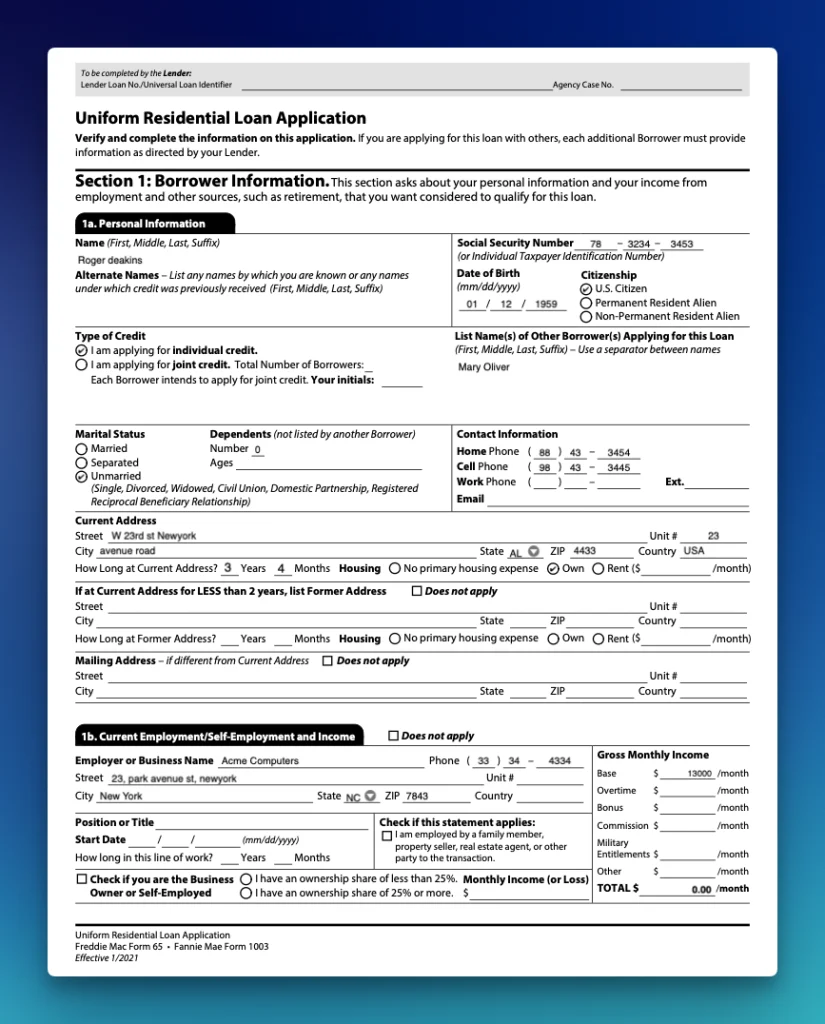
The test file is a filled Uniform Residential Loan Application (Form 1003-style):
Why this file is a useful stress test:
Multi-section form layout (borrower, employment, income columns)
Checkboxes and radio-style citizenship / credit-type marks
Dense address and phone fields with spacing that breaks naive line OCR
Several pages of the same visual grammar (easy to lose reading order)
This sample is typed and printed only. LLMWhisperer also handles handwriting when you need it.
The API call
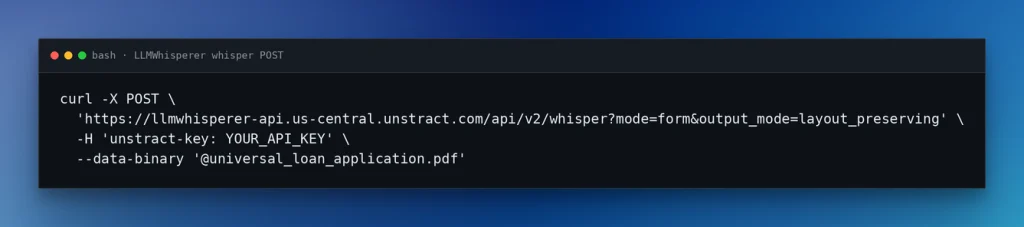
LLMWhisperer accepts the file as a binary POST, returns a whisper_hash, then you poll status and retrieve text. More details in the docs: Extraction API, modes, supported file types.
Here, we used mode=form and output_mode=layout_preserving for a form-heavy document:
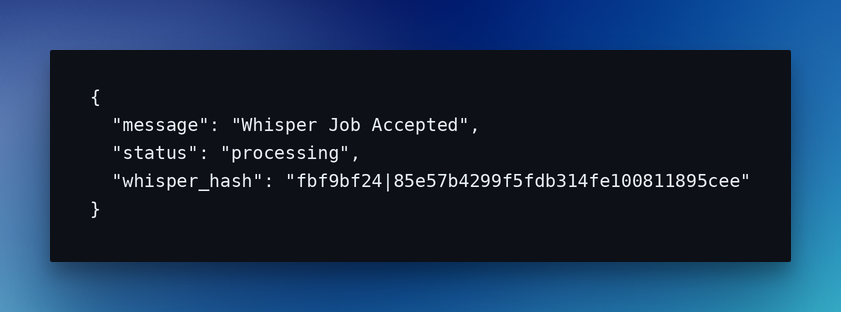
Which returns a 202 response:
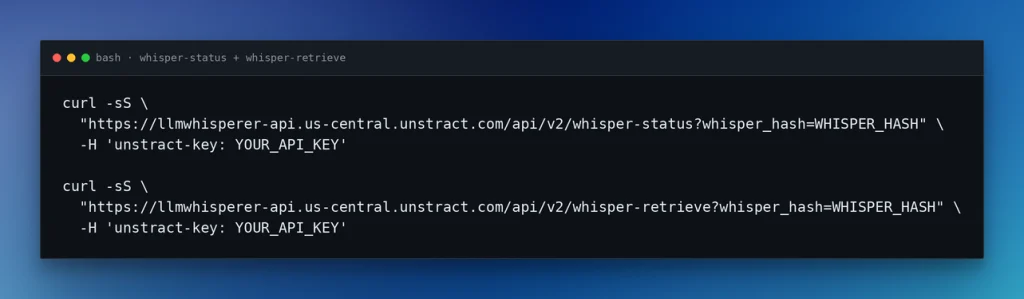
The next step is to use the WHISPER_HASH with the value from the 202 response, to get processing status and retrieve:
The result
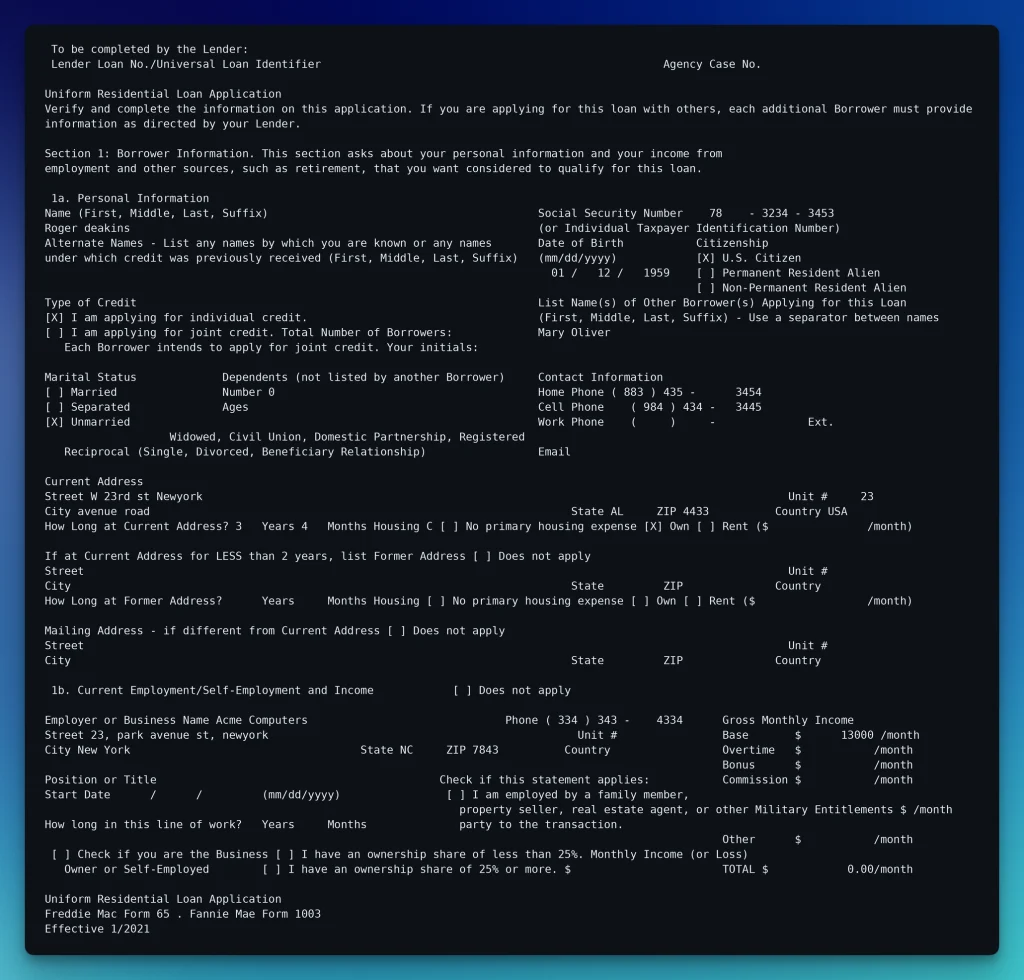
On this run, status reached processed in under ~10 seconds for six pages (mode=form, about 6s average per page in the job metadata). Retrieve returns JSON with result_text (the layout-preserving string) plus metadata. Page 1 of that result_text:
Checkboxes as [X] / [ ], phone and SSN spacing kept, income columns still aligned beside the employer block.
Why this matters
Layout OCR for a product path: one API key, a binary POST, a short poll, and text that still looks like the form. Checkboxes, SSN spacing, and side-by-side income columns survived because the output keeps structure, not because you trained a custom model or drew templates for this 1003 layout.
You can drop result_text into an LLM prompt as-is. When you need typed fields in a database instead of a wall of text, the next step is the schema-bound Unstract API.
Turn your complex PDF tables into structured data with Unstract
Unstract uses LLMs to extract clean, structured JSON from any document — PDFs, scans, images, tables of any layout. Define what you want using natural language, deploy as an API or ETL pipeline, and get data your systems can actually use.
Try Unstract for free on the Playground. No signup required.
Live Demo: Unstract API for Structured Document Data Extraction
The Whisperer demo gave layout-aware text. A product backend needs typed JSON it can store. This section defines that contract in Prompt Studio, publishes it as a deployment API, and calls the Execution API on a Form 1008.
The challenge: Form 1008 → schema fields
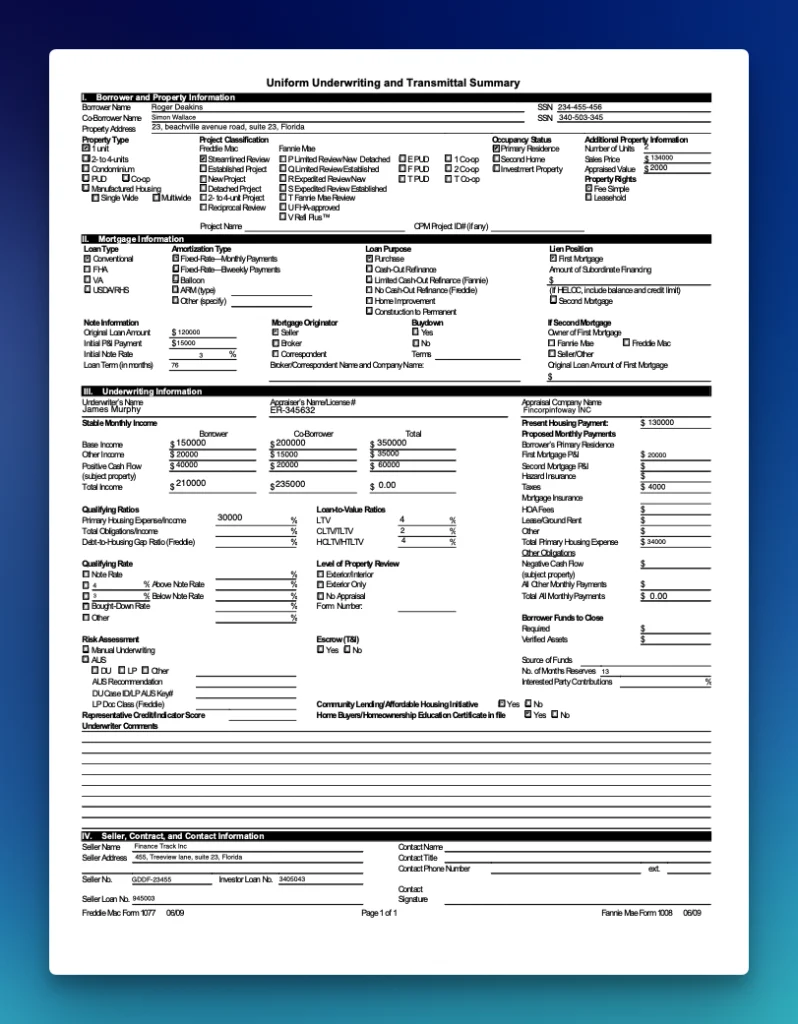
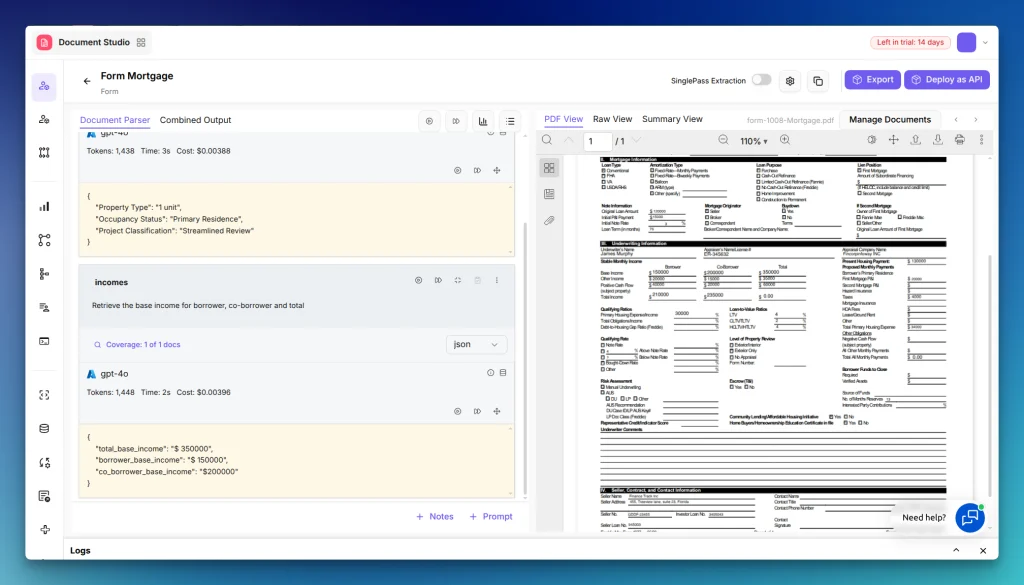
This example uses Form 1008, the Uniform Underwriting and Transmittal Summary lenders fill when they package a loan: borrower and co-borrower income, property type, occupancy, and related underwriting fields on a dense one-page layout:
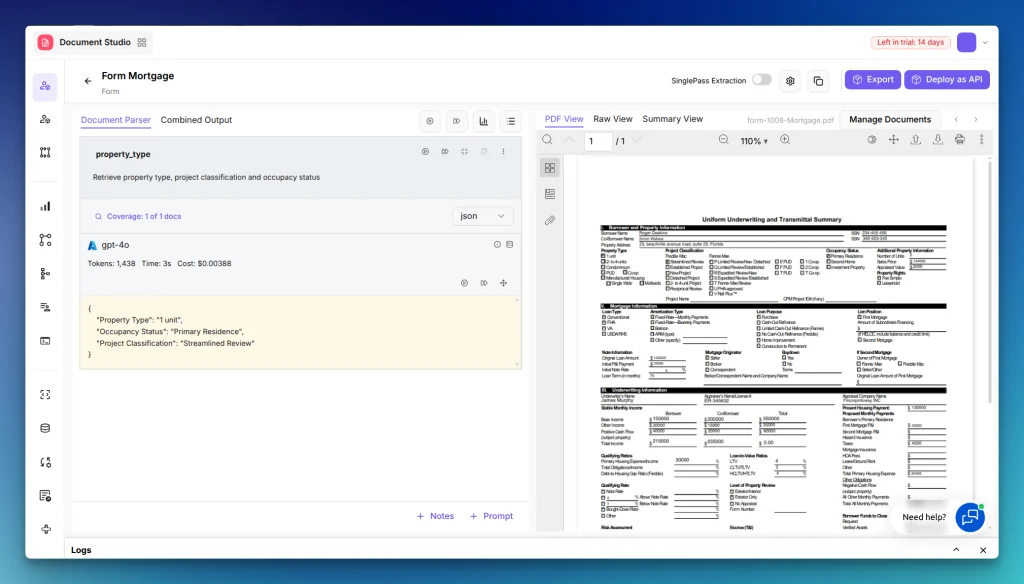
In Prompt Studio you define the fields once as prompts, not as per-layout templates. For this mortgage project we asked for property classification:
And income totals:
When those prompts look right on sample 1008s, publish the project as an API deployment. Callers hit one URL with a Bearer key and a file; they never send the schema.
The API call
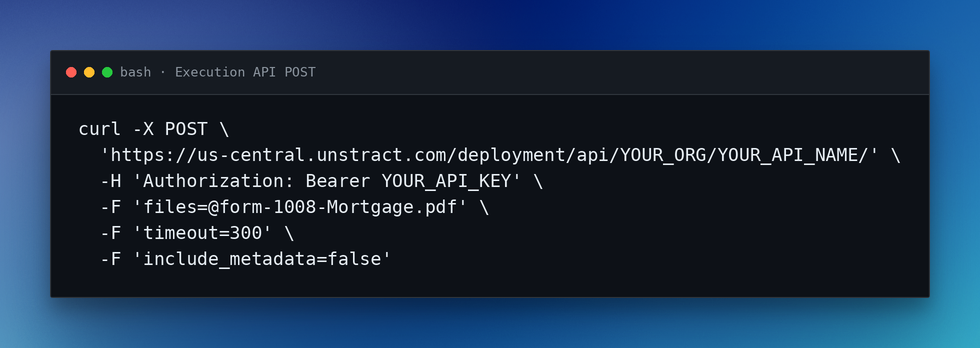
Call the Execution API with a multipart POST to your deployment URL and a Bearer token:
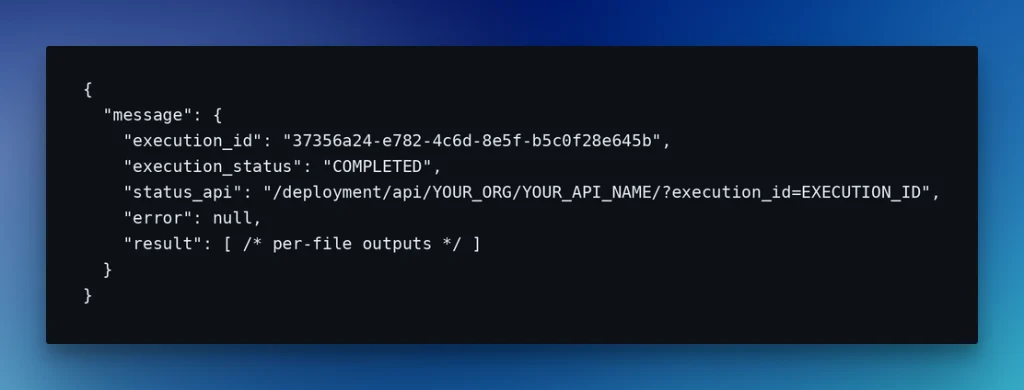
timeout=300 keeps the HTTP call open until extraction finishes (or 300 seconds elapse). On this one-page Form 1008 mortgage deployment the response came back in about 20 seconds with execution_status: COMPLETED. Here is the trimmed 200 response:
The result
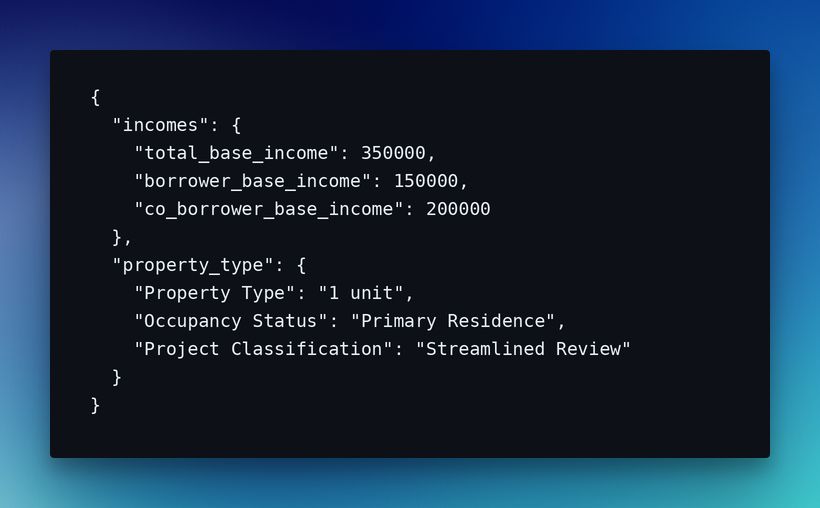
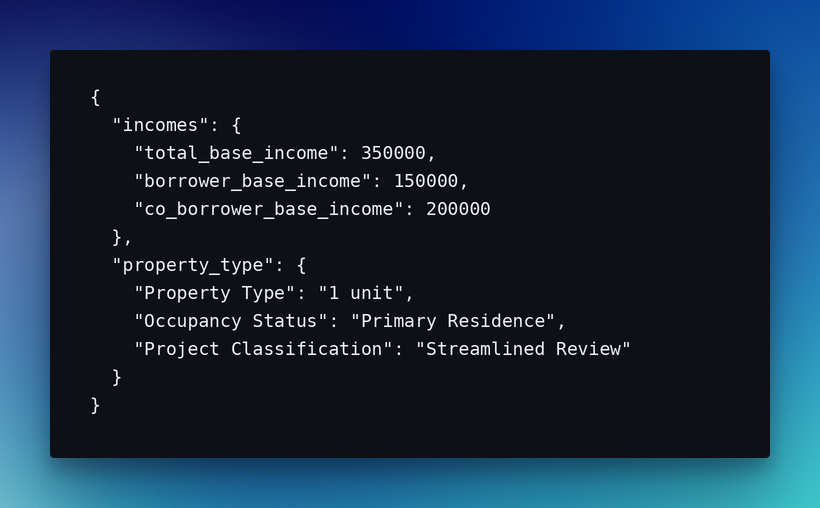
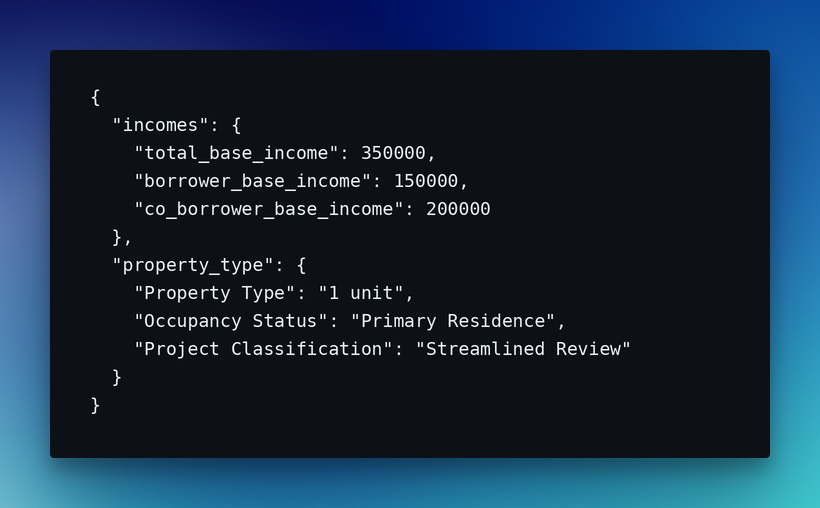
The run finished with execution_status: COMPLETED and per-file status: Success. Inside result is the structured output: the same shape as the Prompt Studio prompts:
Your backend can deserialize incomes and property_type into columns without regex over Whisperer result_text. Change a prompt, redeploy, keep the same URL.
Why this matters
Prompt Studio defines the fields, a deployment URL + Bearer key runs them, and you get JSON shaped for your database.
Live Demo: Unstract CLI for Document Extraction
Product backends speak HTTP requests. Operations often speak shell: CI jobs, cron folders, Makefiles, one-off smoke tests. unstract-cli wraps the same Form 1008 work from the last demos, LLMWhisperer text extract and the example mortgage API deployment, behind commands that print with {ok, data, error, meta} or envelope with -o json.
The challenge: same Form 1008 from the terminal
Same PDF, same mortgage deployment example, but from a shell that a CI job or cron can run.
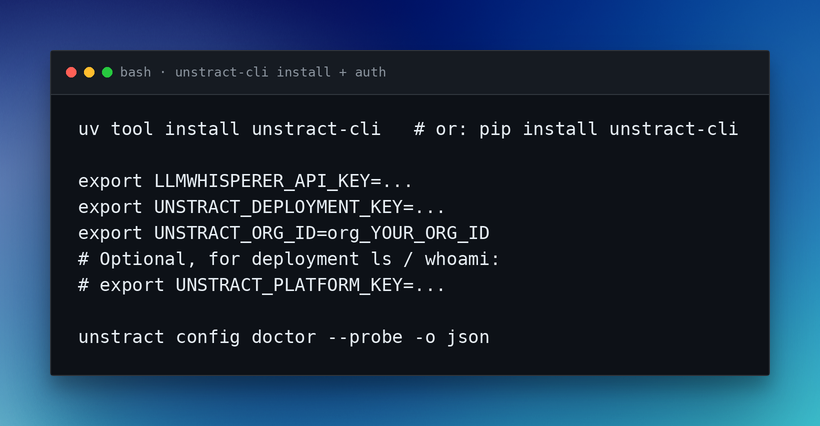
Install and auth
Full reference in the docs at Unstract CLI. Export keys into the environment, not command line flags, since they show up in ps output.
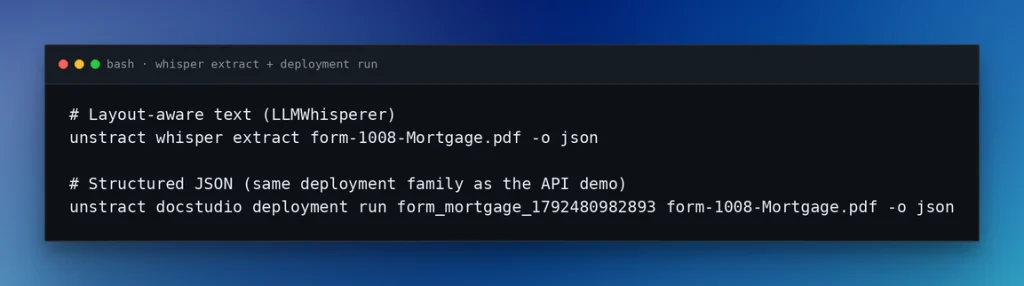
The commands
-o json prints one {ok, data, error, meta} envelope. Failures exit non-zero. If you want to run a batch, that is a shell loop over the same run line.
The result
docstudio deployment run -o json returned ok: true and execution_status: COMPLETED. Inside data, the structured output matches the Prompt Studio fields:
Same numbers as the Execution API demo. The CLI adds an {ok, data, error, meta} wrapper and exits non-zero on failure: enough for a script to branch without parsing HTTP status codes.
Why this matters
One binary, keys in the environment, -o json on stdout. Cron, CI, Makefiles, and agents that shell out can run the same Form 1008 job without an HTTP client.
Live Demo: Unstract MCP Server for Document Extraction
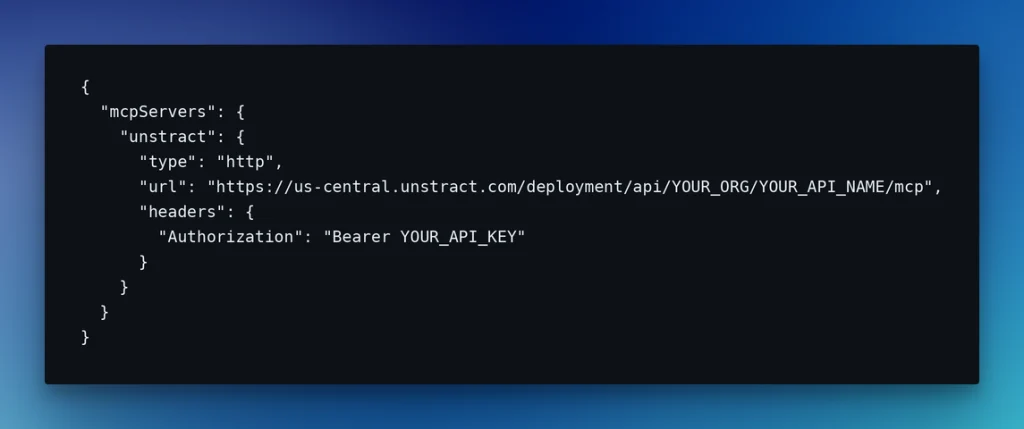
HTTP requests and the CLI still make you own the request loop. Agents prefer tools. The same Form Mortgage deployment exposes an MCP server at /mcp: Claude Code or another MCP client calls extractDocument and getExecutionStatus with the same Bearer key as the REST API. Unstract hosts the server; you just register the URL.
The challenge: extraction as an agent tool
Same Form 1008 fields, incomes and property type, but the caller is an agent, not your backend. Claude Code, Cursor, or a custom MCP client should call tools, not invent curl, auth headers, or a polling loop.
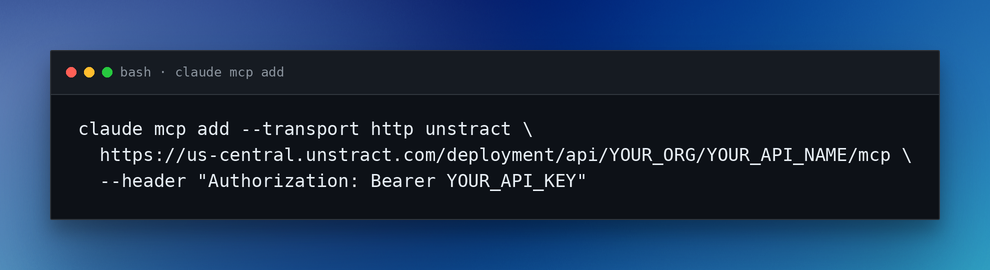
Setup
Append /mcp to the deployment’s REST URL. Auth is the same Bearer deployment key. Full reference in the docs at MCP Server.
Other clients (shape varies by product):
Tools and the extract
tools/list exposes four tools: readMeFirst, getApiInfo, extractDocument, getExecutionStatus.
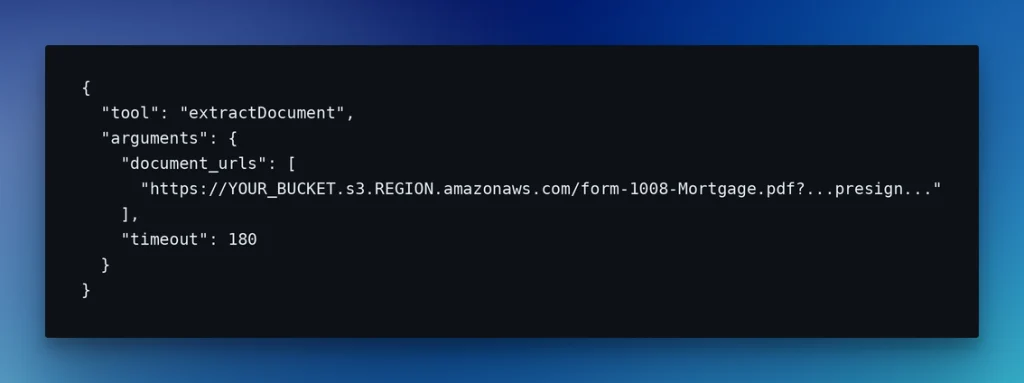
Documents are not uploaded through MCP. extractDocument takes document_urls: HTTPS on an AWS S3 host (presigned for private objects). Google Drive and other hosts are rejected. A bare S3 path that returns 403 also fails until you pass a working presigned URL.
Recommended flow:
readMeFirst → getApiInfo → extractDocument
If PENDING, poll getExecutionStatus
Default MCP timeout is 30s (shorter than REST on purpose)
A COMPLETED result can be read once. Ask again and it is gone. Run a new extract if you need the data again.
What the agent effectively sends (presigned URL redacted; not the full JSON-RPC tools/call wire frame):
Our live call returned execution_status: COMPLETED with execution_id e30042c9-f2e7-… and structured output:
Same numbers as the API and CLI demos. No curl, no CLI: tools only.
Why this matters
Same Bearer key and Prompt Studio schema as the REST API, but tools instead of curl. Put a PDF on S3, let an agent extract and poll.
Which Document Processing API Interface Should You Use?
The demos ran one stack four ways: LLMWhisperer for layout-aware text, then a Prompt Studio deployment over HTTP requests, from the CLI, and as MCP tools.
You do not need all four on day one. Pick how you need to interface with the extraction and how it fits your workflow.
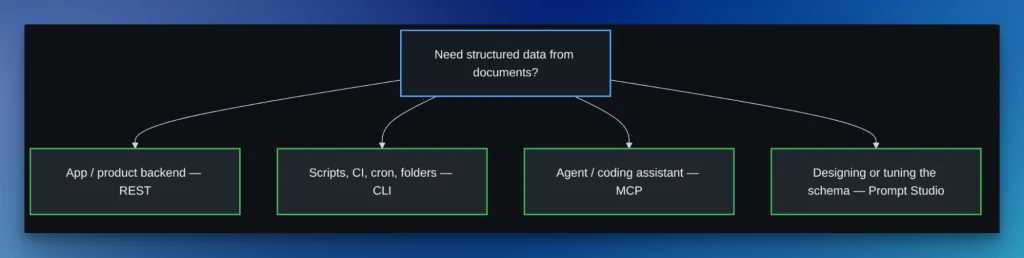
REST API for Document Processing
Use when extraction lives in your product backend: upload flows, workers that own auth/retries/timeouts, anything that needs a stable HTTP contract.
Example: a loan desk accepts Form 1008 uploads and writes income/property fields to the database.
CLI
Use when the work is scripts, folders, and schedules: CI, Makefiles, cron, or a smoke test without an app.
Example: a nightly job runs unstract-cli over a drop folder of mortgage PDFs.
MCP Server
Use when an agent should call extraction as a tool instead of inventing curl and a polling loop.
Example: an agent gets a loan packet on a presigned S3 URL, calls extractDocument, and continues with the JSON.
Prompt Studio
Use when you are designing the schema: iterate fields on sample docs, check accuracy, publish a deployment API.
Example: lock borrower income and property fields on a few 1008s, deploy once, then call that deployment from REST, CLI, or MCP.
A quick decision tree
Can you use more than one?
Yes. A common sequence: Prompt Studio (schema) → deploy as an API → batch with the CLI → expose the same deployment to agents over MCP. Same engine, same fields, different callers.
How to Evaluate a Document Processing API?
Print the seven principles as yes/no for an evaluation week against any vendor, including the six in the ranking. Add one eighth check for versioning, the only axis not covered in the principles list.
Bring your own messy PDF (loan packet, invoice, scanned form), not the vendor’s sample. Mark yes only when a real call or the public docs prove it. Soft promises and sales-deck screenshots do not count.
The checklist
Print this. Run it once per vendor. Mark yes only with evidence (real call or public docs). Use each principle’s Try this as the bar for items 1–7. Item 7 can pass with REST plus CLI or MCP, you do not need all three on day one.
Time-to-first-success under 5 minutes
Docs organized by task
Sandbox or test mode
Actionable errors
Consistent across endpoints
Observability you can operate
More than one integration path (REST + CLI and/or MCP)
Versioning and migration guides (breaking changes announced; upgrade path documented. If silent schema churn then no)
How to score an evaluation week
One vendor at a time. Same file for every vendor. Mark yes/no on all eight (seven principles + versioning). Partials in the margin are not yes.
Rule of thumb: two or more hard fails → leave the shortlist, accuracy slide or not. One fail → keep only if you accept the risk (common inside AWS, Azure, or UiPath shops). Zero fails and usable fields from your PDF → keep them.
When two vendors both clear the checklist, pick on fit: ecosystem, price predictability, and whether REST / CLI / MCP match how you will integrate into your ecosystem.
Document Processing API: FAQ
What’s the difference between OCR and a document processing API?
OCR turns pixels into text. Good OCR keeps reading order, tables, and checkboxes so a human or an LLM can work with the page(s). That is still text: useful, but not columns in your database.
A document processing API defines the fields you need, accepts a document, and returns structured JSON your product can store. Some vendors blur the labels (OCR, intelligent document processing / IDP, “AI extraction”). The practical split is text out versus schema-shaped data out.
LLMWhisperer is the OCR/layout layer. The Unstract API is schema → JSON.
What’s the difference between LLMWhisperer and Unstract API?
LLMWhisperer extracts layout-aware text from PDFs and images (modes, tables, messy forms). You poll a job and get result_text you can feed to an LLM or another pipeline.
The Unstract API runs a Prompt Studio schema you already deployed: upload a file to that URL, get typed JSON fields back.
How do I know if a document processing API is “good” or just “popular”?
Popularity is market share, analyst slides, and logo gravity. A good product API gets first success fast, fails in ways you can debug, and keeps a stable response shape on messy documents.
Run the checklist on your own PDF. The ranking above used those DX checks.
Why should I care about API design? Can’t I just wrap a bad API?
You can wrap anything. You still inherit the vendor’s auth story, error shapes, async model, rate limits, and schema drift. Your wrapper becomes a second product: retries, mapping, and support archaeology every time their contract wobbles.
A thin client over a predictable API is cheap. A compatibility layer over a black box is where integrations go to die. Prefer vendors you would integrate without the wrapper.
What’s the best way to test a document processing API?
Use the checklist: one messy PDF from your domain (not the vendor sample), same file for every vendor, eight yes/no scores from real calls and public docs. Two or more hard fails → drop them from the shortlist.
Do you have CLI tools for automation?
Unstract ships unstract-cli for deployment runs, batch folders, and CI-style smoke tests. For any vendor, if the only “automation” path is a Postman collection, you will build the real one yourself.
Can document processing APIs work with AI agents (MCP)?
Yes. Unstract exposes an MCP endpoint beside the REST deployment URL. Agents call tools such as extractDocument and getExecutionStatus with the same Bearer key. Documents need HTTPS S3 URLs (presigned).
How do I migrate from one API to another without breaking my app?
Keep a thin adapter at your boundary: your domain types in, vendor payloads out. Pin API versions. Dual-run the old and new vendor on the same messy PDF until field parity and error handling match. Prefer vendors with migration guides and announced breakages. Silent schema churn breaks apps more often than the cutover day itself.
Making the Right Document Processing API Choice
You came here for a shortlist. What you actually need is a bar: first success on your file, failures you can debug, and a response shape that stays boring when the PDF is messy. Accuracy is the floor. The seven principles and the checklist are how you enforce it on any vendor, Unstract included.
The demos showed one way that bar can look in practice. LLMWhisperer for layout-aware text. A Prompt Studio deployment for schema-shaped JSON. The same deployment over REST requests, the CLI in batch and CI, or MCP when an agent should call tools instead of curl. One extraction contract; four integration paths.
What to do today
Pick one messy file from your domain.
Run one extraction: LLMWhisperer for layout text, or a structured Unstract API call if you have a deployment.
Print the checklist. Score the next vendor on that same PDF before you sign anything.
If a vendor clears the checklist and still fits how you ship, keep them. If they fail the week, walk away with a reason you can defend, not a slide you cannot.
Unstract – Best Document Processing API: Related topics to explore
Nuno Bispo is a Senior Software Engineer with more than 15 years of experience in software development.
He has worked in various industries such as insurance, banking, and airlines, where he focused on building software using low-code platforms.
Currently, Nuno works as an Integration Architect for a major multinational corporation.
He has a degree in Computer Engineering.