Modern Unstructured Document Data Processing with Unstract
Table of Contents
Why Processing Unstructured Documents Are a Trillion-Dollar Problem
According to IDC, about 90% of enterprise data is unstructured. It exists in formats such as PDFs, scanned forms, emails, invoices, and handwritten records that traditional databases cannot directly process.
Research shows that only 18% of organizations effectively use this data, with document-related administrative expenses amounting to trillions of dollars. AI-powered document processing is an emerging avenue for addressing such issues.
However, AI alone does not solve the problem. Production-grade unstructured document processing requires consistent structured outputs, measurable extraction accuracy, and workflows that support reliable deployment at scale.
In this article, we’ll explore the evolution of unstructured data processing, the limitations of legacy extraction systems, and how Unstract enables production-grade unstructured data extraction.
What Is Unstructured Document Data Processing?
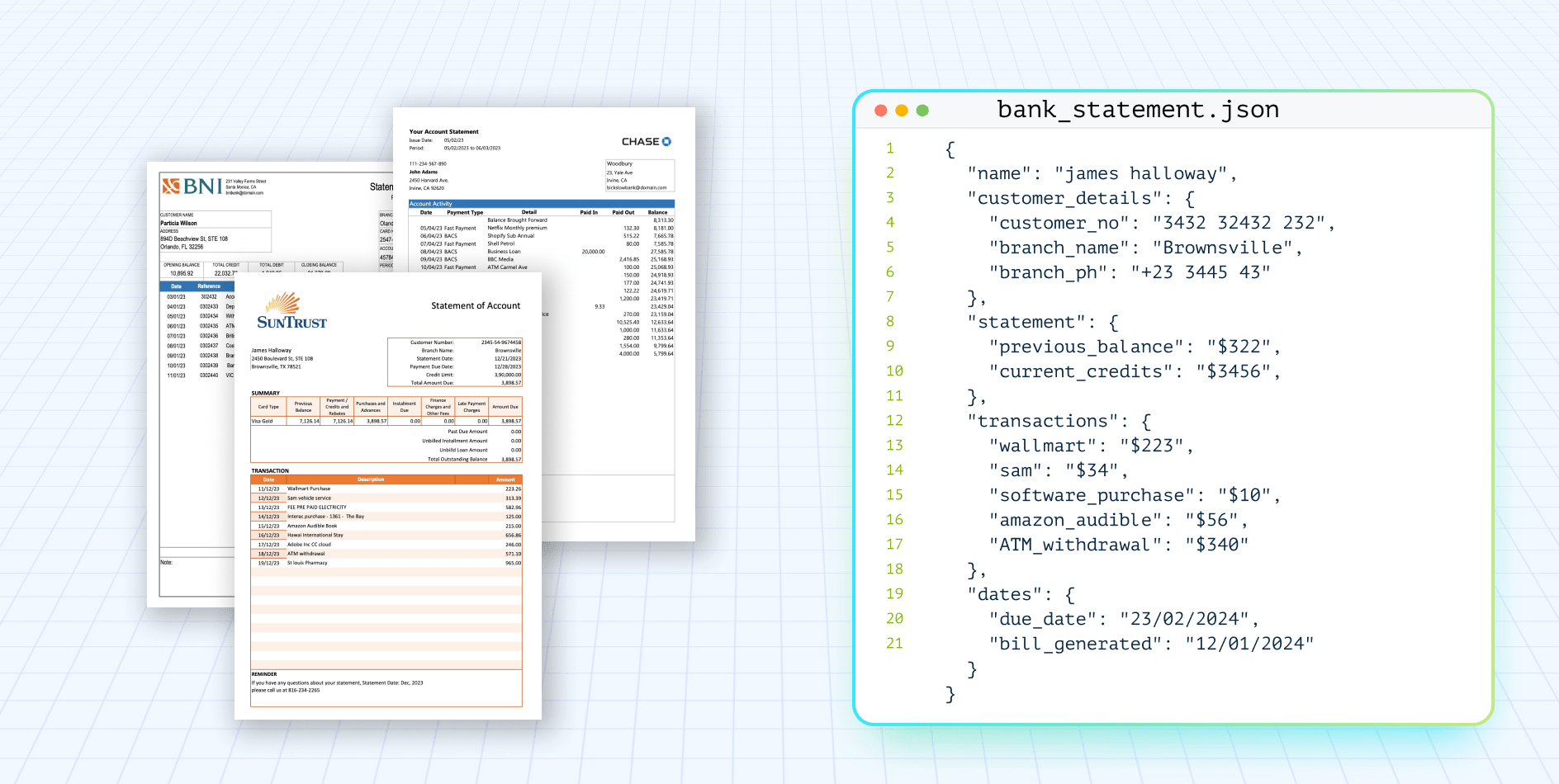
Unstructured document data processing is the automated conversion of messy, inconsistent documents into predictable structured outputs like JSON, CSV, or database records.
Unlike structured datasets, these documents have no fixed schema. The same field may appear in different locations, use different labels, or be handwritten, making them difficult for traditional software to process reliably.
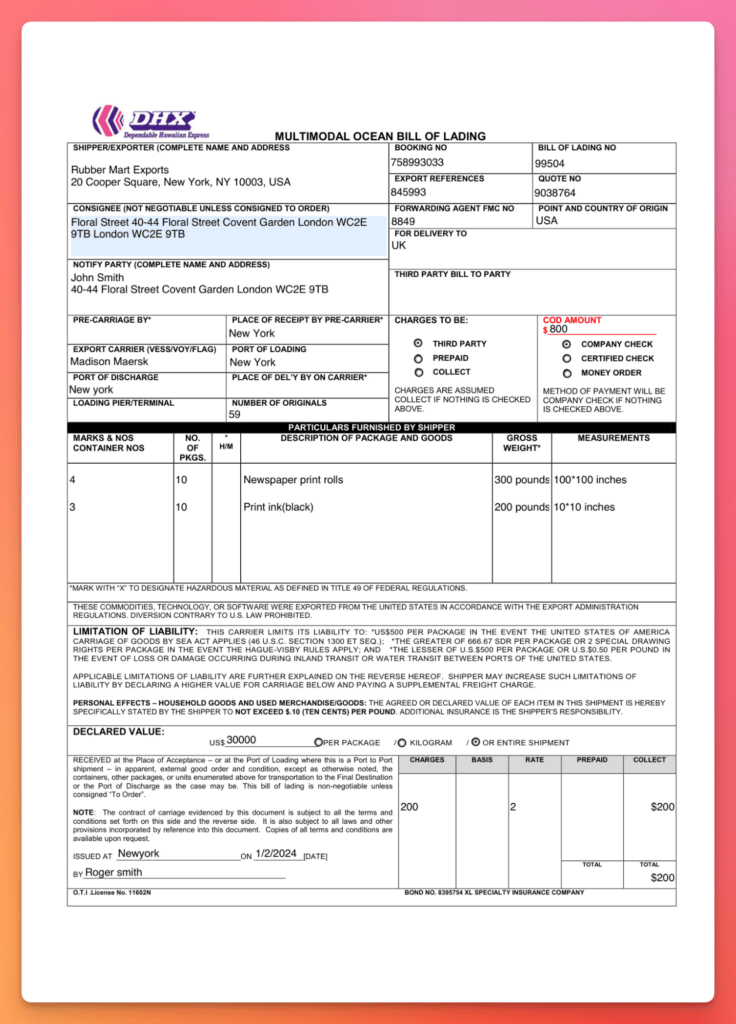
Consider the Bill of Lading document below. It contains shipment details, carrier information, freight terms, reference numbers, and other business data. The information is present, but it is embedded within the document and cannot be directly queried, validated, or used by downstream systems.
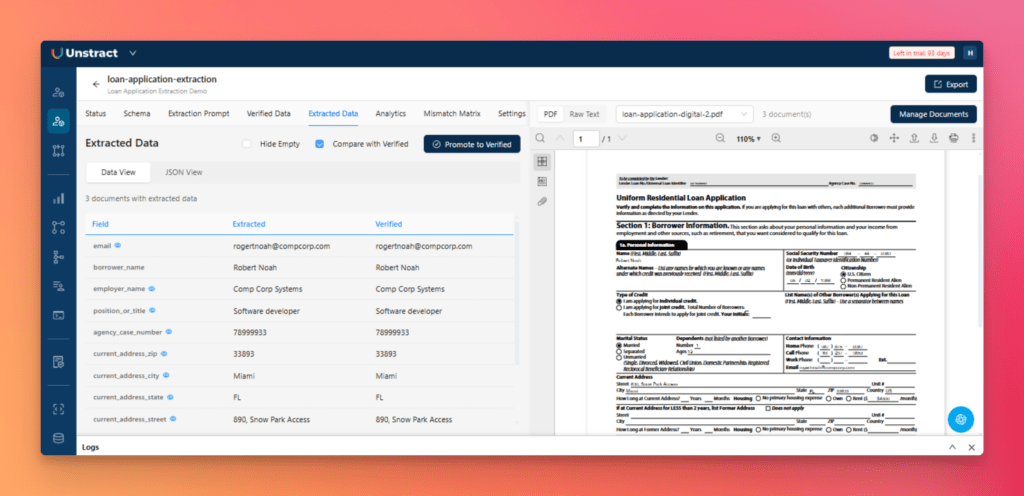
Unstructured data extraction tools convert that content into a structured JSON object with normalized fields. Here’s what the extracted output looks like for one of our loan applications:
The goal is to convert static documents into structured records that can be validated, searched, and integrated into business systems. This is the foundation of modern unstructured document processing.
Where Unstructured Document Processing Matters Most
The challenge is the same across industries. Business-critical data remains trapped inside documents that systems cannot directly use. That is the problem unstructured document processing is designed to solve.
Stop wrestling with complex documents — See how LLMWhisperer parses them
The layout-preserved text that feeds our agent pipeline comes from LLMWhisperer. Try it on your own messy PDFs — bank statements, rent rolls, multi-header tables, cross-page rows — No signup required.
Try LLMWhisperer for free on the Playground. No signup required.
Why 87% of the Fortune 1000 Still Struggle with Document Processing
Despite major advances in automation software, enterprises still struggle to build reliable unstructured data pipelines. The main challenge is document variability.
Legacy extraction systems built on templates, regex, and positional logic break quickly under this variability.
When extraction systems break, organizations fall back to manual processing workflows. That fallback is considerably more expensive than it appears on the surface. It incurs:
Labor Cost: Organizations spend millions paying teams to manually re-key values from multi-page PDFs, forms, and statements into ERPs (Enterprise Resource Planning) and internal systems.
Error Cost: Human review introduces inconsistencies into financial records, compliance workflows, and customer data.
Speed Cost: Workflows like loan approvals, claims settlement, and vendor onboarding slow down due to manual validation bottlenecks.
Scale Cost: Hiring more data-entry operators increases operational overhead without improving unstructured data extraction reliability.
Audit Cost: Manual workflows make it difficult to trace structured values back to their original source documents.
This becomes an infrastructure-level problem. Downstream systems cannot scale reliably without consistent, structured data flowing out of unstructured documents.
Two Decades of OCR and Rules: Why They Broke at Scale
For more than two decades, unstructured document processing involved converting documents into structured data using templates, coordinates, and handwritten rules. That approach worked in controlled environments, but struggled as document diversity increased.
Let’s look at some of these legacy approaches.
Legacy Approach 1: Template-Based Extraction
Template-based systems, such as ABBYY FlexiCapture, require engineers to define where every field appears on a document. If the layout stays the same, extraction is reliable. But every new document variant requires another template.
The result is an N+1 maintenance problem:
New document variant = new template
More templates = more testing and maintenance
More maintenance = slower onboarding and higher costs
For organizations processing unstructured data from thousands of different sources, the template library eventually becomes the bottleneck.
Legacy Approach 2: Rule-Based Parsers and Regex
To avoid rigid templates, engineering teams built custom pipelines using OCR, regular expressions (Regex), and coordinate-based logic. These systems were more flexible but still depended on predictable inputs.
They began to fail as document variability increased due to:
Scan noise and OCR errors
Layout changes across vendors or document versions
Unexpected formatting and edge cases
Every exception required another custom rule, making the codebase more and more difficult to test and maintain.
The FlexiLayout Era: Relationship-Based Extraction
The next evolution was relationship-based extraction, where values were located relative to nearby labels instead of fixed coordinates.
For example, the system searched for information associated with labels such as “Invoice Total” and then extracted the corresponding value.
This reduced template maintenance but introduced new limitations. It still relied on predictable label-value patterns and struggled with complex tables, multi-column layouts, and documents that represented the same data differently across variants.
The DIY Rat’s Nest
Many engineering teams eventually combined OCR tools, regex scripts, validation logic, and internal APIs into internal unstructured data pipelines. Initially, these pipelines appeared flexible, but over time, they became difficult to maintain as document types and business rules expanded.
Every extraction change introduced:
New edge cases
Hidden dependencies
Inconsistent validation behavior
Regression risks
Without proper versioning, observability, or evaluation workflows, debugging became slow and operationally expensive.
How Engineers Evaluated Legacy Extraction Systems
Earlier, engineers measured extraction quality by OCR accuracy rate, template coverage, and how reliably a tool processed known document layouts.
As document volume and variety increased, the evaluation criteria shifted entirely. Modern unstructured data processing systems are now evaluated on their ability to:
Generalize across different layouts without new templates
Enforce a well-defined output schema
Measure extraction accuracy at the field level
Detect regressions before they reach production
Move from prototype to deployment without manual re-engineering
Template accuracy was the benchmark for legacy systems. Production reliability is the benchmark for modern unstructured data processing platforms.
The LLM Inflection Point: From Positional Parsing to Contextual Understanding
Given the limitations of legacy systems, the emergence of large language models (LLMs) offered a new gateway to unstructured data extraction. LLMs introduced contextual understanding, allowing them to infer relationships between labels, text, and document semantics.
The same unstructured data extraction logic generalizes across multiple document variants without requiring new templates or rules.
This shift has made structured data extraction one of the most valuable enterprise applications of LLMs. As Simon Willison puts it, “Structured data extraction is the single most commercially valuable application of LLMs.”
Why LLMs Alone Are Not Enough
Although LLMs increase extraction flexibility, they do not automatically create reliable extraction systems. The same document can return slightly different outputs across runs, fields may be missing or misformatted, and hallucinated values can appear without an explicit validation layer.
To make extraction reliable, the output must first be defined with a JSON Schema. The schema acts as a contract, specifying the fields to extract, their data types, and the expected structure of the output. Modern LLMs can use schema enforcement through constrained decoding, guiding the model to generate responses that conform to the defined schema.
Processing unstructured data with LLMs in production also requires:
Validating extraction results against verified documents
Continuous testing and regression tracking as prompts and document variants evolve
Monitoring extraction quality before deploying workflow changes
Without these controls, unstructured data pipelines become difficult to govern, debug, and safely deploy into production environments.
What a Modern Production-Grade Extraction Pipeline Requires
Converting unstructured documents into production-ready structured data requires a multi-staged pipeline. This includes:
A document parsing layer that preserves layout and structural information before content reaches the LLM.
A schema engineering environment for defining what to extract consistently across document variants
A prompt engineering workflow that enables extraction logic to be generated, tested, and refined for different layouts.
An evaluation layer that measures extraction accuracy, validates results against verified outputs, and detects regressions before they reach downstream systems.
Deployment infrastructure that exposes extraction as a callable API or automated ETL(Extract, Transform, Load) pipeline
Building and maintaining each of these components independently requires significant engineering effort. Unstract brings them together into a single platform designed for production-grade unstructured data processing.
Introducing Unstract: A Production-Grade Platform for Unstructured Document Extraction
Unstract is an LLM-powered platform for unstructured data processing, built by Zipstack Inc. and available under the AGPL 3.0 license. It provides the tooling needed to take unstructured document processing workflows from prototype to production.
LLM-stack Agnostic:Bring your own LLM, embedding model, vector DB, or OCR engine without rebuilding the extraction workflow.
Flexible Deployment:Available as a managed cloud service, self-hosted open source, or on-premise for organizations with strict compliance requirements.
Security and Compliance: Designed to support enterprise requirements, including GDPR, ISO 27001, SOC 2, and HIPAA compliance.
Four Core Services in Unstract’s Extraction Pipeline
Every Unstract extraction project is built on four independently configurable service layers:
Service
Role
LLM Provider
Process prompts and generates structured responses
Embedding Model
Enables semantic search and retrieval across document content
Vector Database
Stores and retrieves embeddings for context-aware extraction
Text Extractor
Handles OCR and converts uploaded documents into LLM-ready text
Each service is independently configurable. Teams can replace individual components as requirements evolve without redesigning the entire unstructured data pipeline.
Under the Hood: Key Components of Unstract
Unstract combines multiple services to support production-grade unstructured document processing, enabling teams to build, evaluate, and deploy end-to-end extraction workflows from a single platform.
LLMWhisperer: A layout-preserving OCR engine optimized for LLM consumption, specifically handling handwriting, checkboxes, and complex tables
Agentic Prompt Studio: A no-code workbench for automated schema generation, prompt engineering, evaluation, and version-controlled extraction workflows.
LLMChallenge: An LLM-as-a-Judge framework that uses two independent LLM evaluations to validate extraction results, helping detect low-confidence outputs and reduce hallucinations
SinglePass and Summarized Extraction: Extraction strategies that reduce token consumption by up to 7x without compromising accuracy on large documents.
Connectors & ETL Pipelines:Native integrations for ingesting documents from source systems and delivering structured outputs to databases, warehouses, and downstream workflows.
Human-in-the-Loop (HITL):Built-in review workflows that route low-confidence extractions to human reviewers before they reach downstream systems.
These capabilities work together as an integrated platform, allowing teams to move from document ingestion to production-ready unstructured data extraction with a single, configurable workflow.
Agentic Prompt Studio: The Workbench for Document Extraction
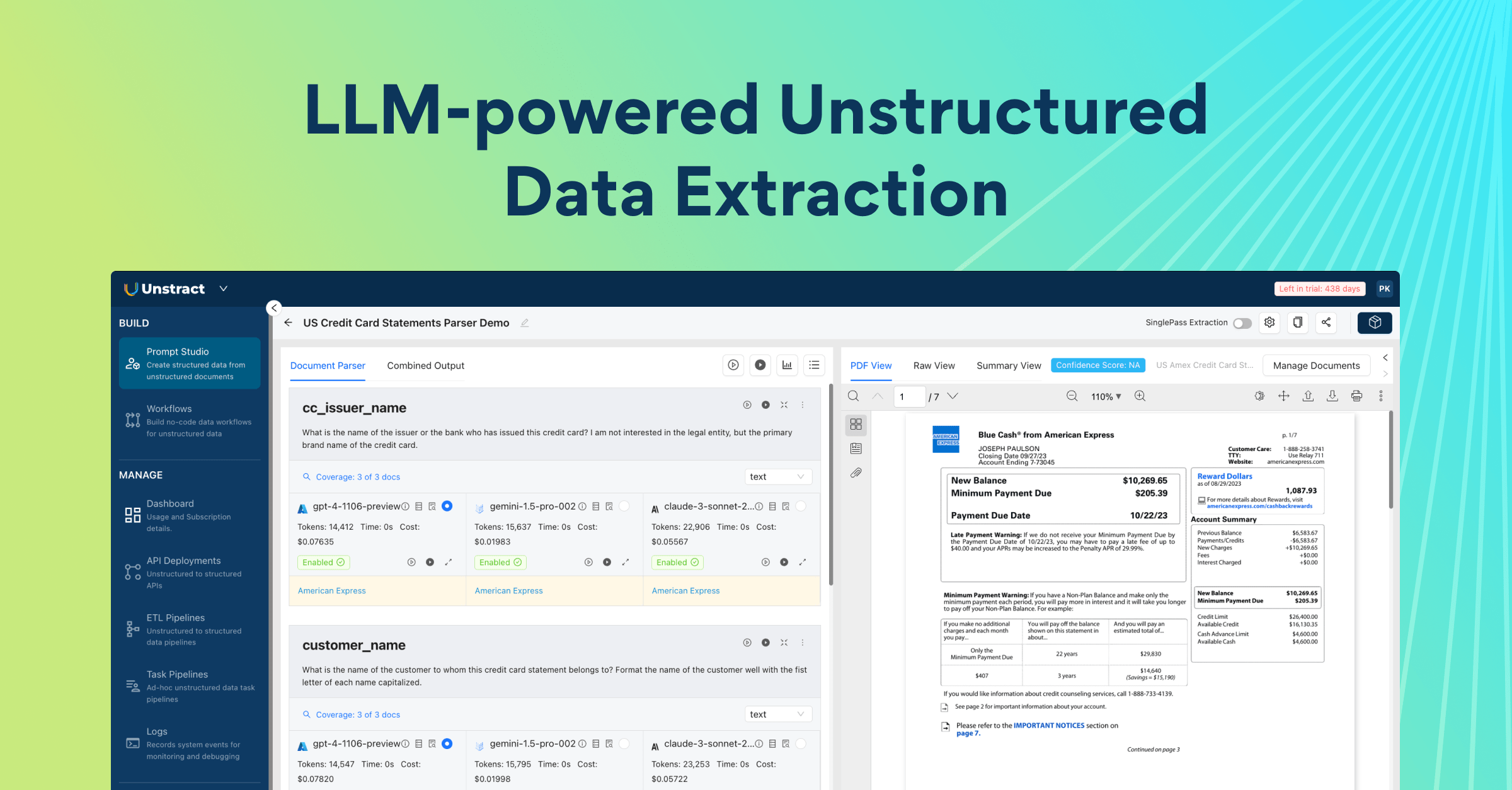
Agentic Prompt Studio is Unstract’s multi-agent environment for automated schema generation, extraction prompt creation, and accuracy evaluation. Instead of manually designing schemas and iterating on prompts, teams can generate, test, and refine extraction workflows from a single interface.
It solves three major challenges in unstructured document processing:
Creating schemas that work across multiple document variants
Building extraction prompts that generalize beyond a few sample files
Measuring extraction accuracy and tracking regressions before deployment
Agentic Schema Generation (Multi-Agent Pipeline)
To create a production-ready schema, Agentic Prompt Studio orchestrates three specialized agents:
Summarizer Agent: Creates a structured summary for each document independently, identifying fields, data types, descriptions, and example values
Uniformer Agent: Compares summaries across document variants and reconciles inconsistent field names. It merges duplicates, picks consistent names, and consolidates descriptions across all variants
Finalizer Agent: Converts the reconciled output into a standards-compliant JSON schema with appropriate field types, nested structures, and validation rules
What previously required hours of manual schema design across multiple document samples can now be completed in minutes.
Once the schema is generated, Agentic Prompt Studio launches a second three-agent pipeline to create the extraction prompt:
Pattern Miner: Analyzes sample documents to identify field cues, recurring patterns, labels, and layout-specific signals.
Prompt Architect: Assembles a structured extraction prompt based on the schema and the patterns identified. It builds prompt logic that accounts for the variability the Pattern Miner found.
Dry Runner: Executes an automated feedback loop by testing the generated prompt, identifying potential failures, and iteratively refining the prompt before it is presented to the user.
The result is an extraction prompt that handles real-world document variability without days of manual prompt tuning. This reduces document onboarding effort from roughly ten hours to around three.
How to turn complex document tables into usable data with AI
Catch the recorded webinar to dive into Unstract’s advanced table extraction capabilities. We walk through the All Table Extractor API—a ready-to-use, semantic + layout-aware solution that ensures precision, consistency, and context, even across the most complex document tables.
How Agentic Prompt Studio Enables Reliable Extraction in Production
Generating the schema and prompt is only the first step. Production unstructured document processing requires a way to measure accuracy, investigate failures, and safely improve workflows over time.
A verification set is a small collection of representative documents paired with human-verified JSON outputs that define what “correct” looks like.
Once the verification set is created, every extraction run is evaluated against the baseline. This enables teams to:
Measure overall and field-level accuracy
Compare prompt or schema changes across versions
Identify regressions before deployment
Surface recurring issues such as truncation, formatting, or casing errors
Extraction quality becomes measurable, repeatable, and easy to track over time.
Debugging Extraction Like Code
When extraction issues occur, Agentic Prompt Studio provides tools to measure extraction quality and identify issues.
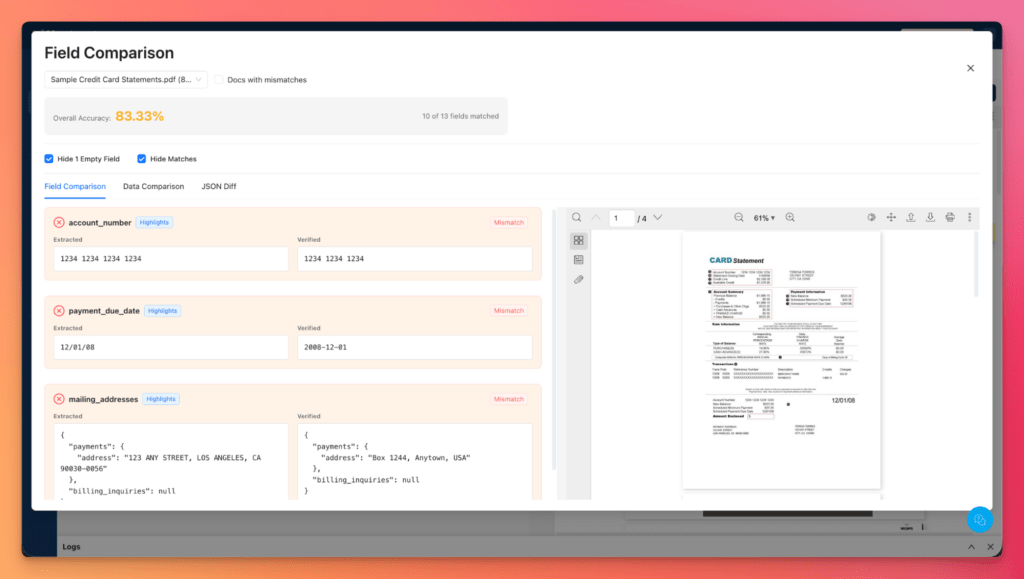
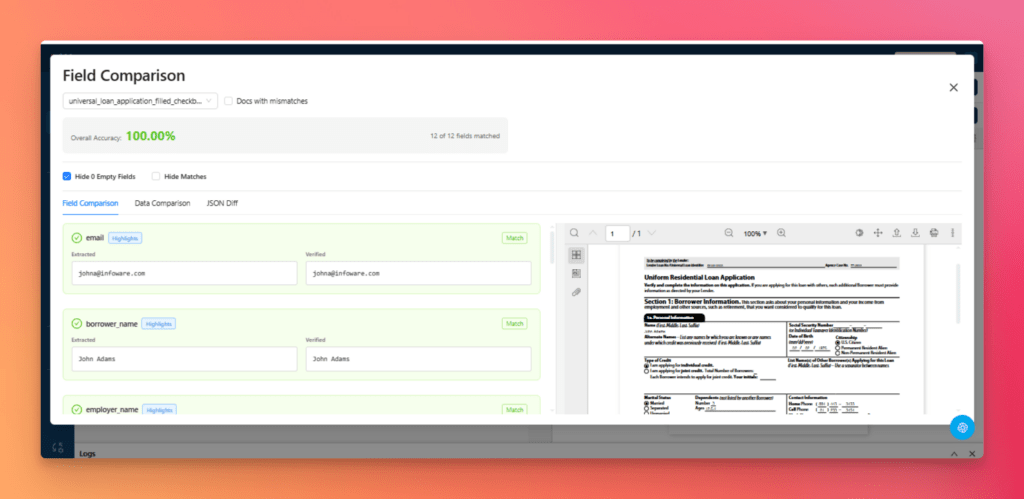
Field-level comparison views display expected and extracted values side by side, making it easy to see which fields failed and why.
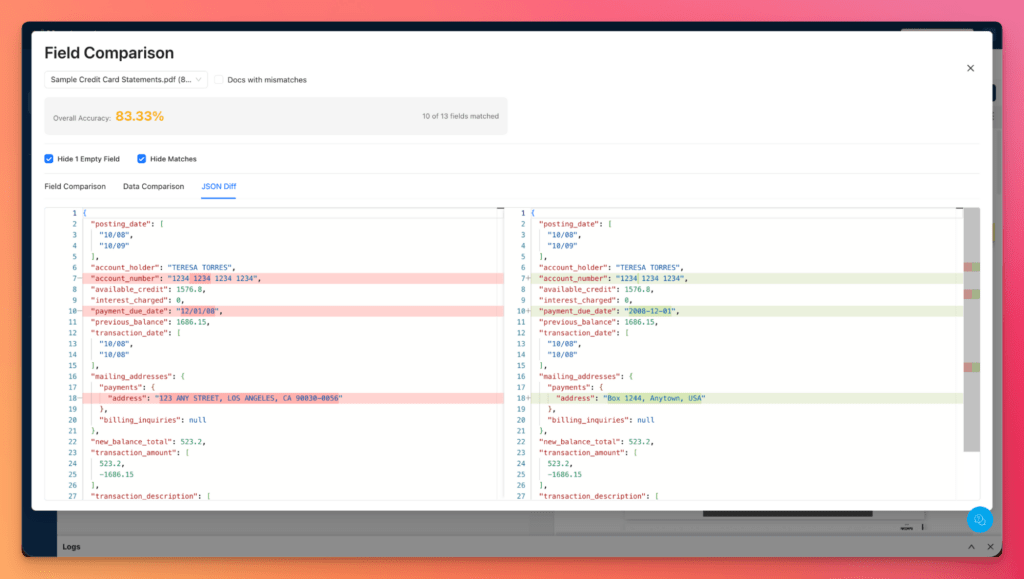
For deeper analysis, JSON Diff View highlights the differences between expected and extracted outputs and allows users to focus directly on mismatches and validation failures.
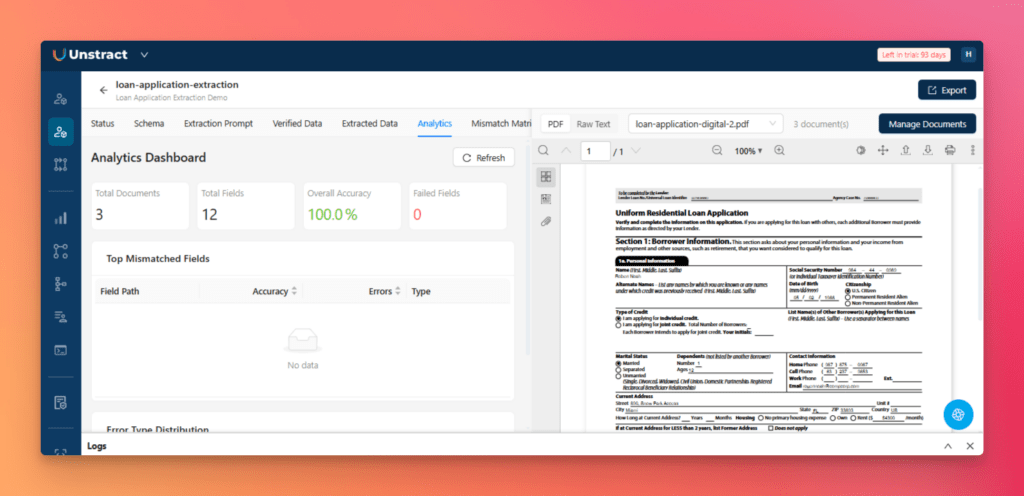
Click-to-highlight functionality maps extracted values back to their original location in the source document, while the analytics dashboard surfaces recurring error patterns across documents and variants.
Versioning and Rollback for Safe Iteration
One of the most common failure modes in LLM systems is a prompt change that improves one document type and breaks another.
Agentic Prompt Studio prevents “prompt changes broke production” scenarios through built-in versioning for prompts, schemas, and verification sets. Every change can be tested against the same benchmark documents before deployment.
Teams can compare versions side by side, track accuracy shifts over time, and analyze how a change impacts extraction quality. If performance drops, workflows can be rolled back to a previously validated version. If accuracy improves, the updated workflow can be promoted with confidence.
From Prototype to Production: A Step-by-Step Walkthrough
To demonstrate the complete workflow, we’ll use three loan applications with different layouts to show how Agentic Prompt Studio builds a production-ready unstructured data pipeline.
Step 1: Upload Sample Documents
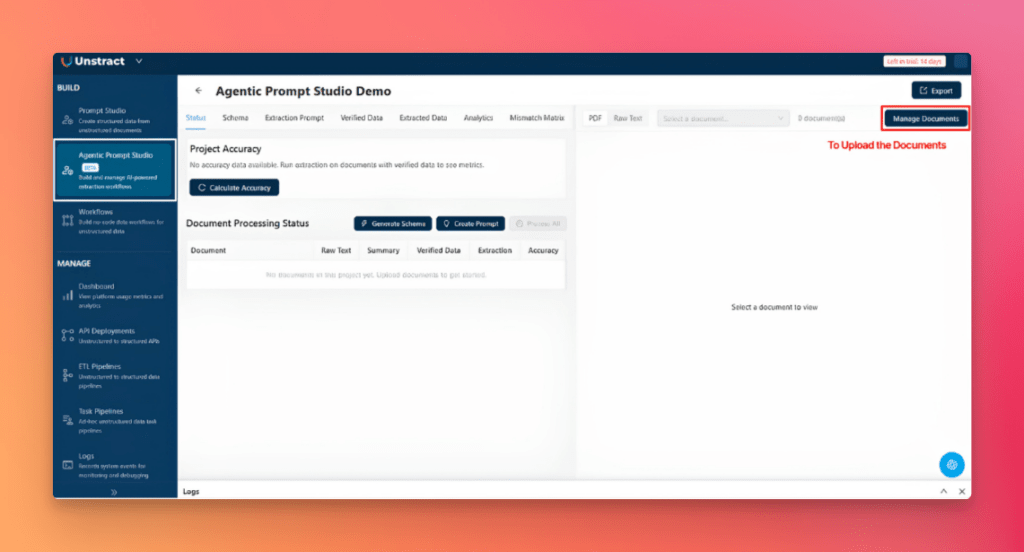
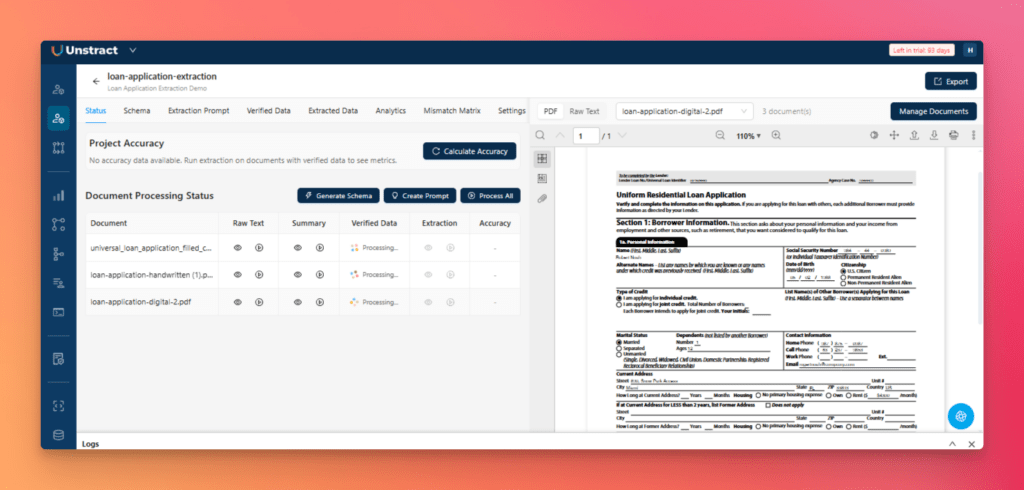
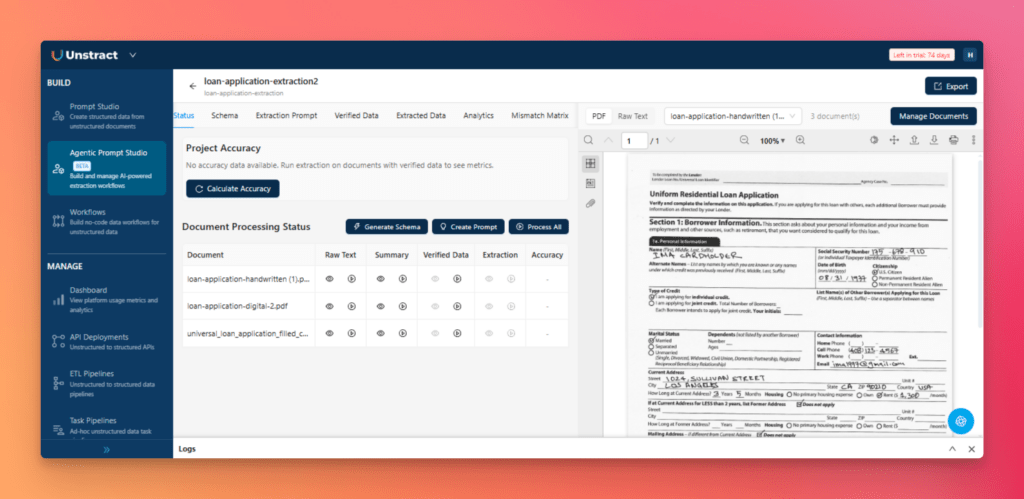
Open Agentic Prompt Studio and click New Project. Give the project a name, then click Manage Documents and upload your three loan application PDFs.
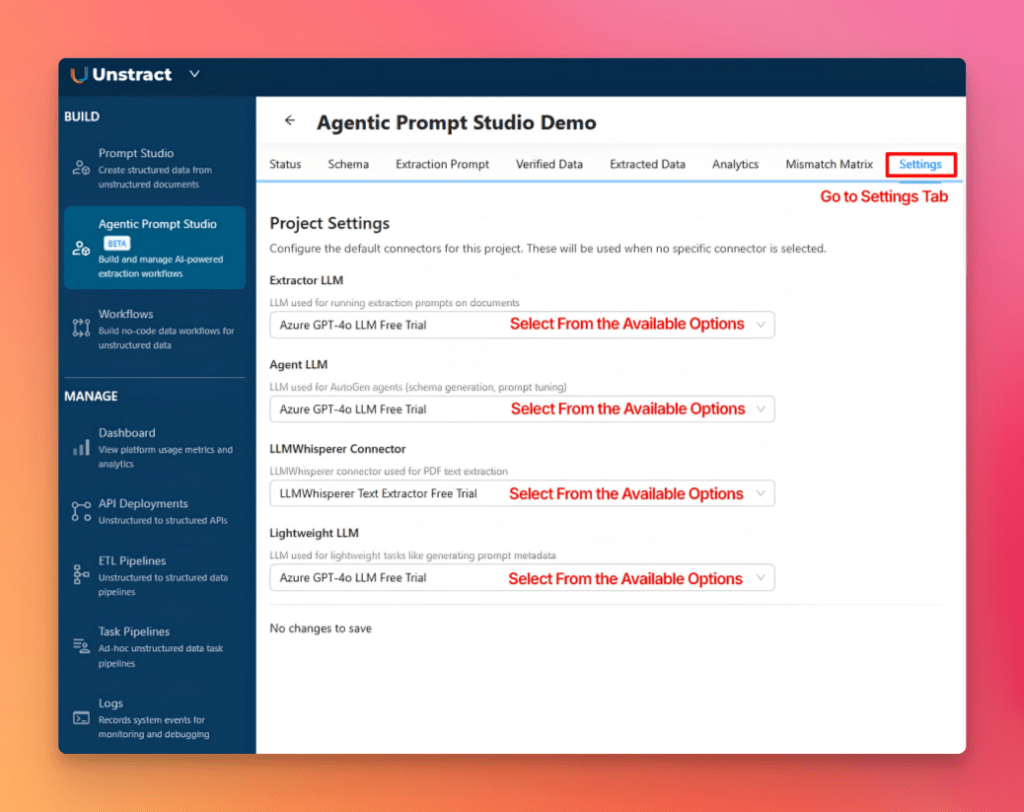
Next, open the Settings tab and configure the LLM connectors that will be used throughout the project.
With the documents uploaded and the LLMs configured, the project is ready for processing.
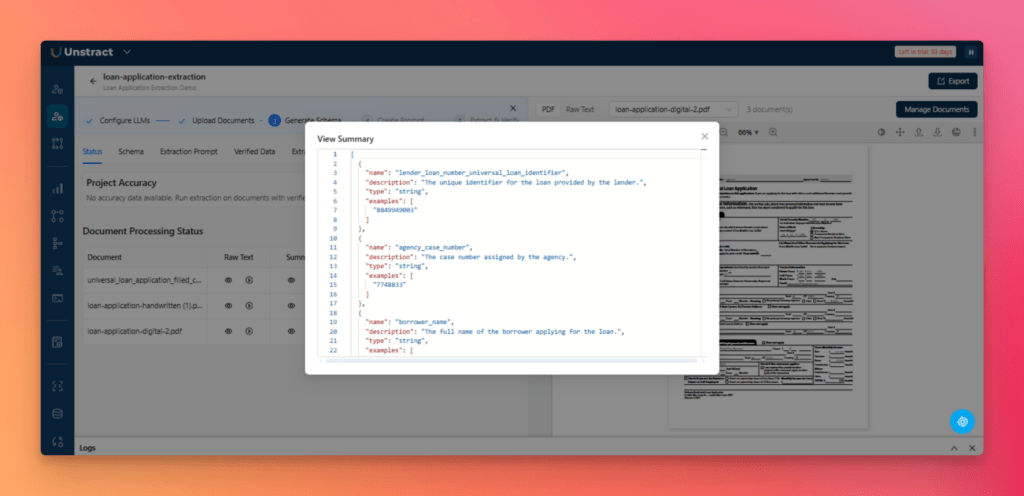
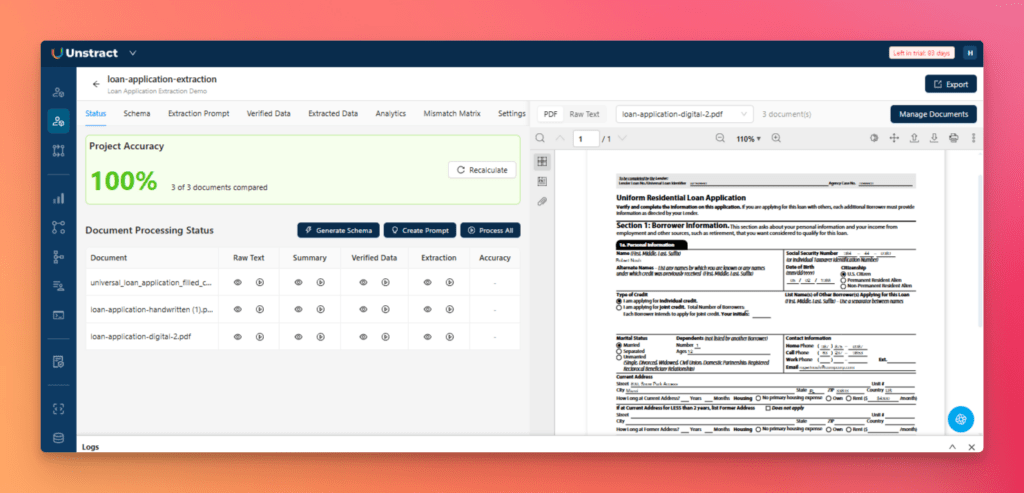
Step 2: Generate Raw Text and Document Summaries
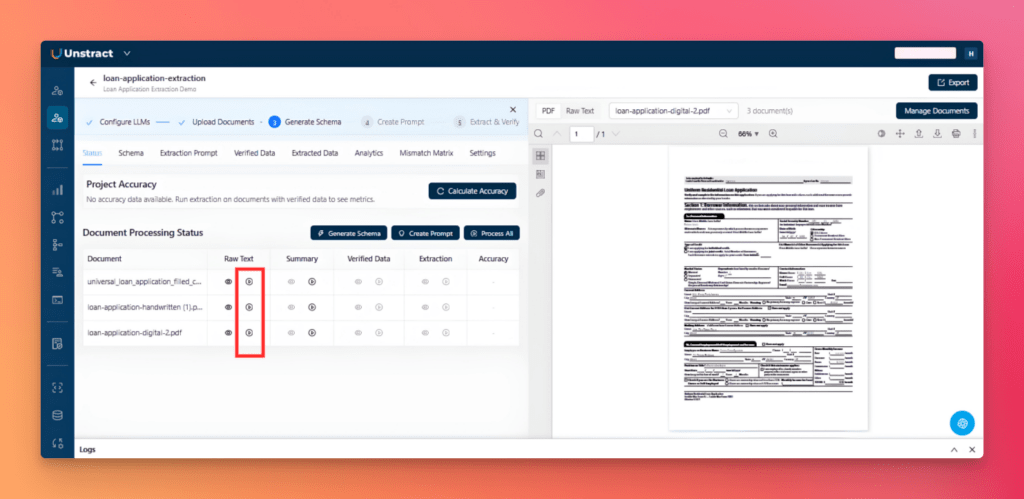
From the Status tab, click the play icon in the Raw Text column for each document.
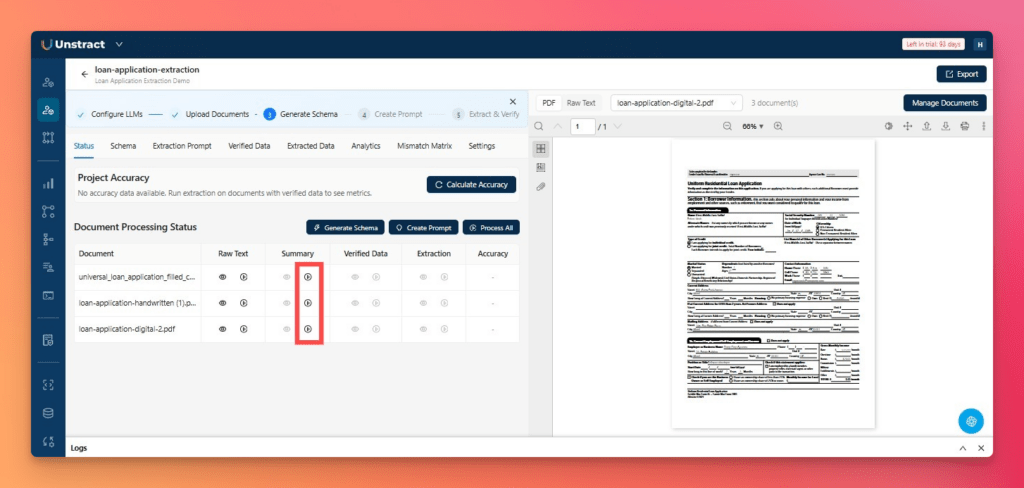
After the raw text is generated, the next step is to generate summaries. Click the play icon in the Summary column for each document.
You can review the generated raw text and summary at any time by clicking the eye icon.
These summaries provide the foundation for schema generation by giving the system a structured understanding of each document.
Step 3: Generate the Schema
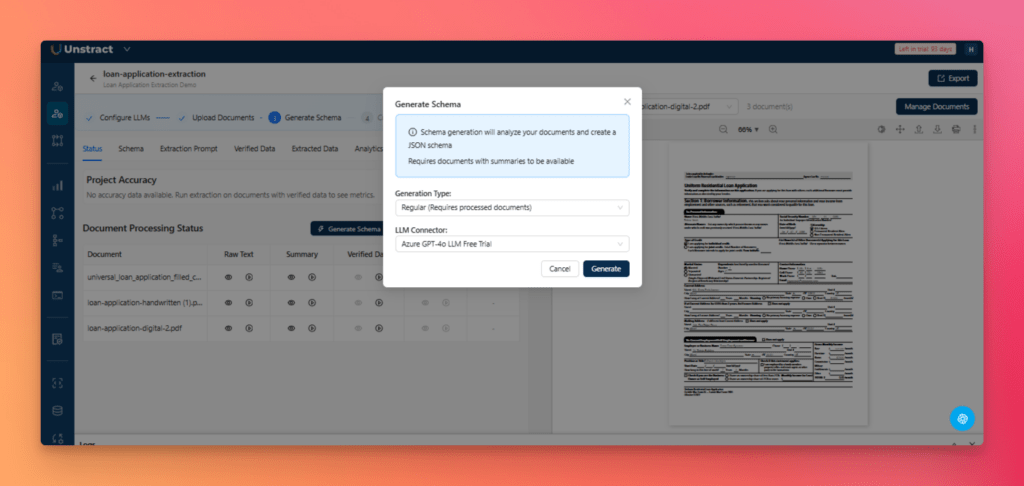
Next, click Generate Schema, select the generation type and LLM connector in the dialog, then click Generate.
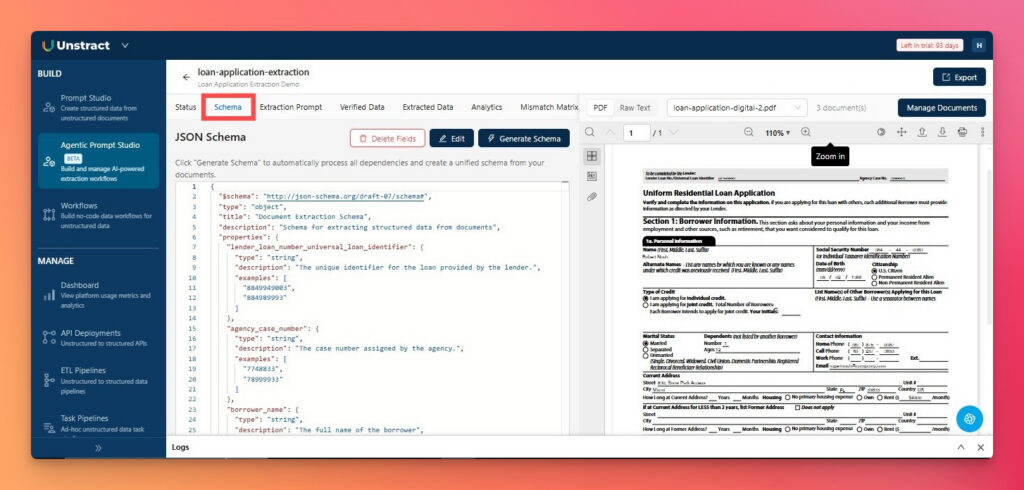
Three agents, Summarizer, Uniformer, and Finalizer, automatically create a unified JSON Schema across all document variants.
The generated schema is available in the Schema tab, where you can review, edit, and remove unnecessary or noisy fields in bulk before generating the extraction prompt.
This simplifies one of the most tedious parts of unstructured data processing, which is the manual creation of a schema that works across various document types.
Turn your complex PDF tables into structured data with Unstract
Unstract uses LLMs to extract clean, structured JSON from any document — PDFs, scans, images, tables of any layout. Define what you want using natural language, deploy as an API or ETL pipeline, and get data your systems can actually use.
Try Unstract for free on the Playground. No signup required.
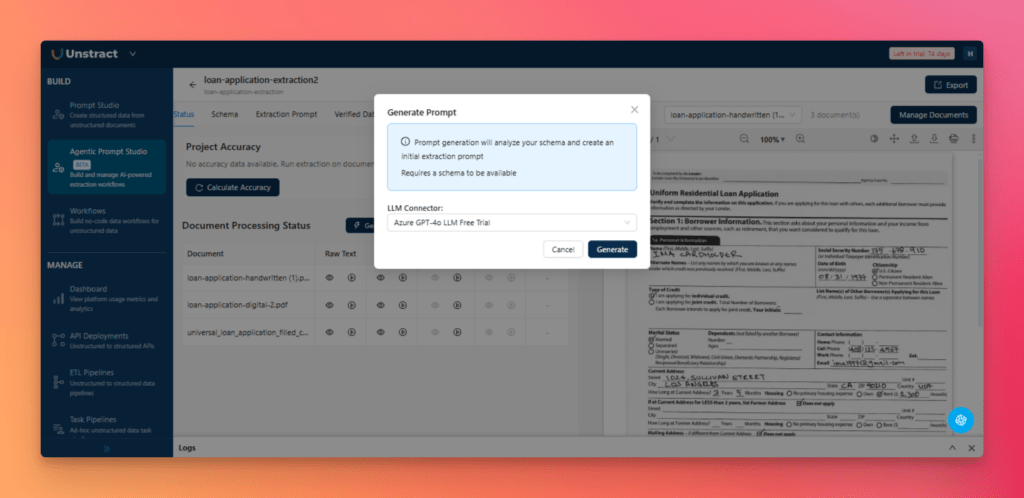
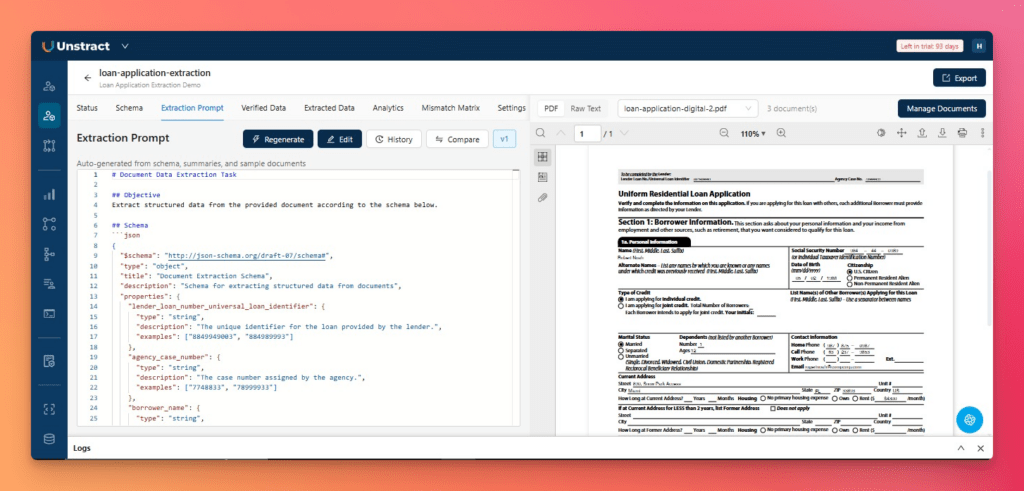
From the Status tab, click Generate Prompt, select LLM connector, and click Generate.
Three agents run in sequence:
Pattern Miner scans the documents for field cues and label patterns
Prompt Architect assembles a structured extraction prompt
Dry Runner automatically tests and refines it before saving a new version under the Extraction Prompt tab
This removes the need for manual prompt engineering and significantly reduces document onboarding effort.
Step 5: Run Extraction and Review Output
Before evaluating accuracy, generate Verified Data, which serves as the expected baseline for comparison. The results can be viewed from the Verified Data tab or by clicking the eye icon.
Next, run extraction from the status tab, and click the play icon in the Extraction column for each document.
Open the Extracted Data tab to review the output in either Data View or JSON View.
At this stage, the uploaded PDFs have been converted into structured, machine-readable data.
Step 6: Validate Extraction Accuracy
From the Status tab, click Calculate Accuracy to evaluate the extracted results against the verified baseline.
Open the Analytics tab to review the overall extraction score and inspect highlighted differences:
Green: Verified expected value
Red: Extracted value differs from the expected result
The field-level breakdown shows exactly which fields failed and in which documents.
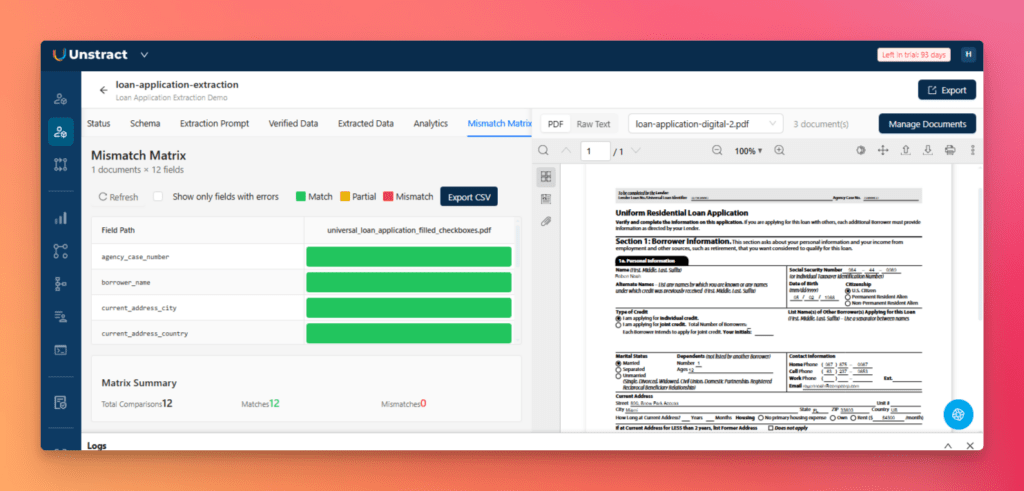
For a complete overview, open the Mismatch Matrix tab, where extraction quality is displayed across every document and every field:
Green means match
Yellow means a partial match
Red means a mismatch
Step 7: Deploy as an API and Test in Postman
Once the extraction workflow is ready, click Export to package it as a reusable Tool.
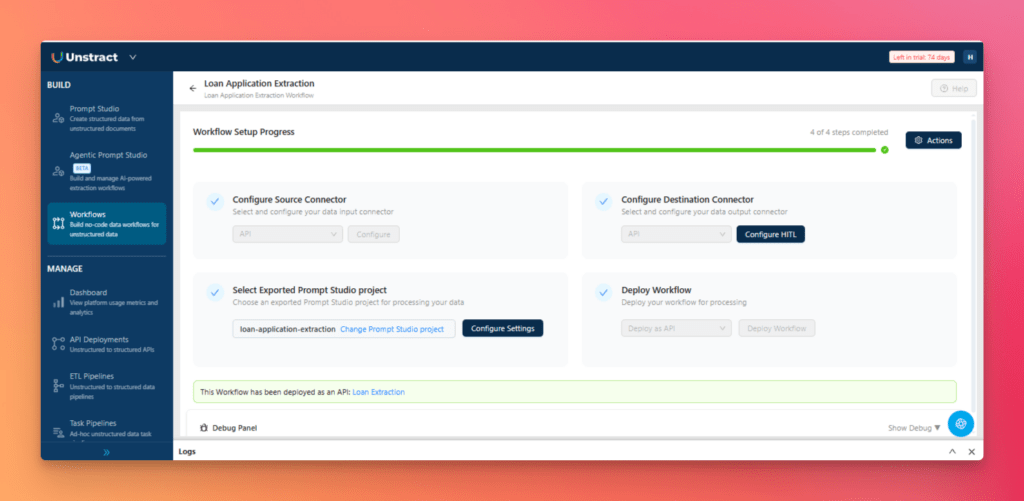
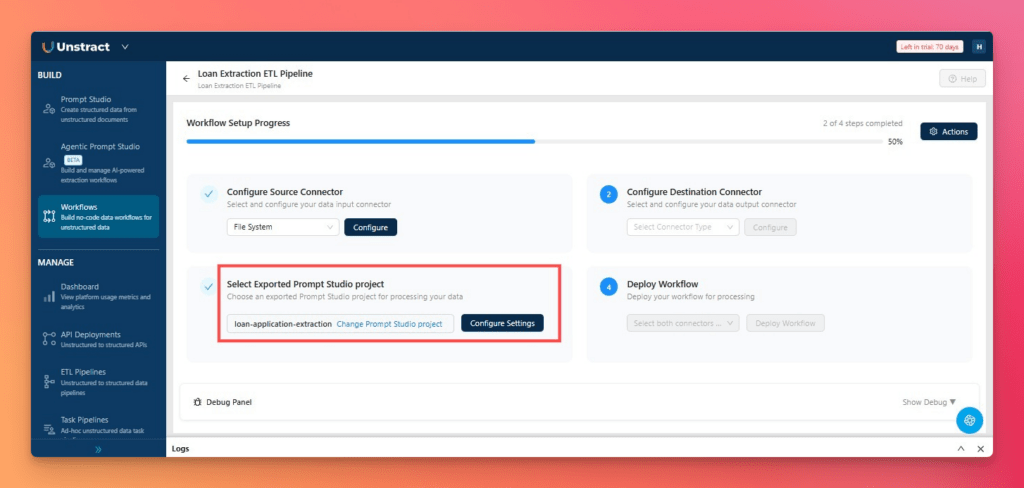
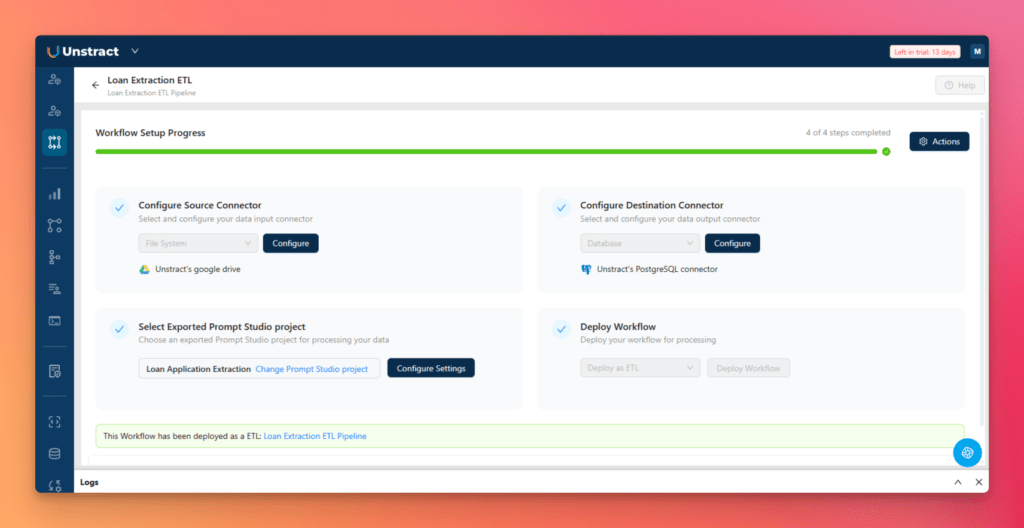
Create a new workflow from the Workflows section, configure the source and destination connectors, select the exported project, and click Deploy Workflow.
Once deployed, the workflow becomes a live API endpoint that can process incoming documents and return structured outputs.
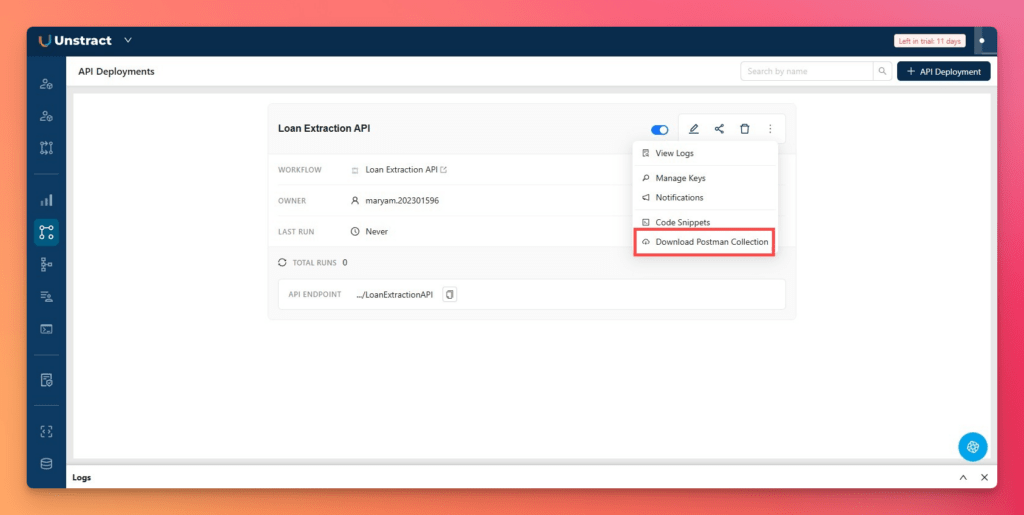
Open API Deployments from the left sidebar, download the Postman collection.
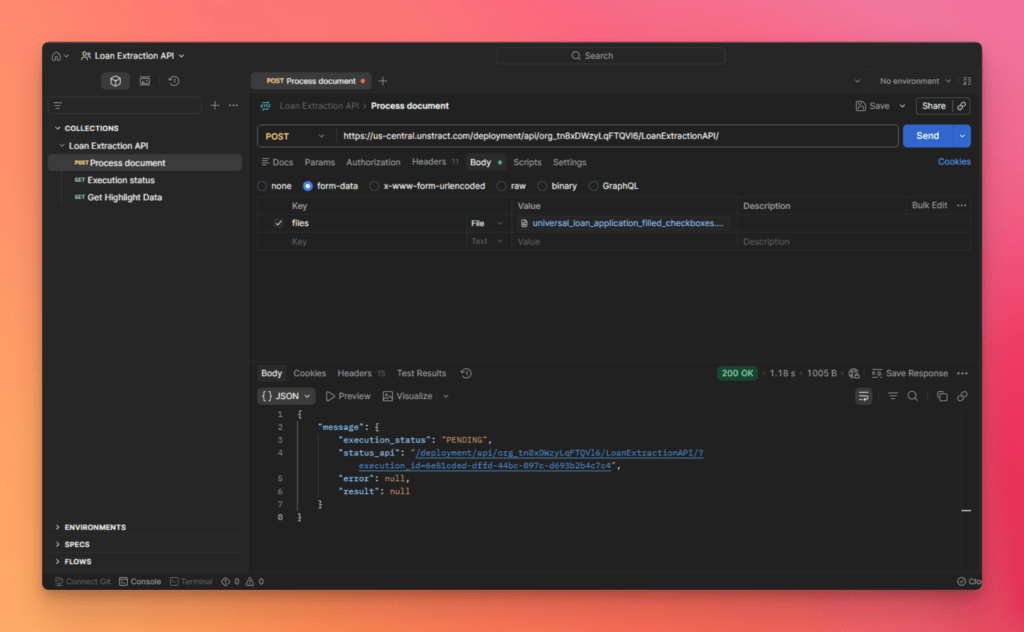
Import the Postman collection into Postman. It automatically creates three preconfigured requests:
Process Document to submit a document for extraction.
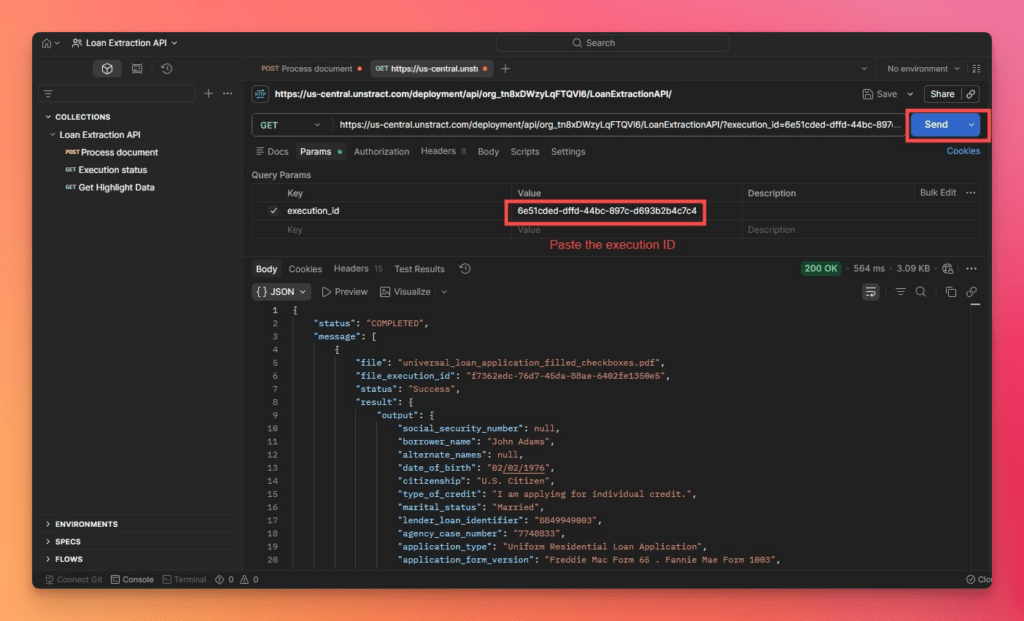
Execution Status to monitor the extraction job.
Get Highlight Data to retrieve highlighted extraction results.
The Process Document request returns an execution ID. Copy this value and paste it into the Execution Status request, then send the request to monitor the job and retrieve the final structured JSON output.
If needed, use Get Highlight Data to view the extracted fields alongside their locations in the source document.
The extraction is now available as a production-ready API that can be integrated into downstream applications.
Step 8: Build the End-to-End ETL Pipeline
Open Workflows from the left navigation and click New Workflow. Enter a workflow name and select the exported Agentic Prompt Studio project created in the previous step.
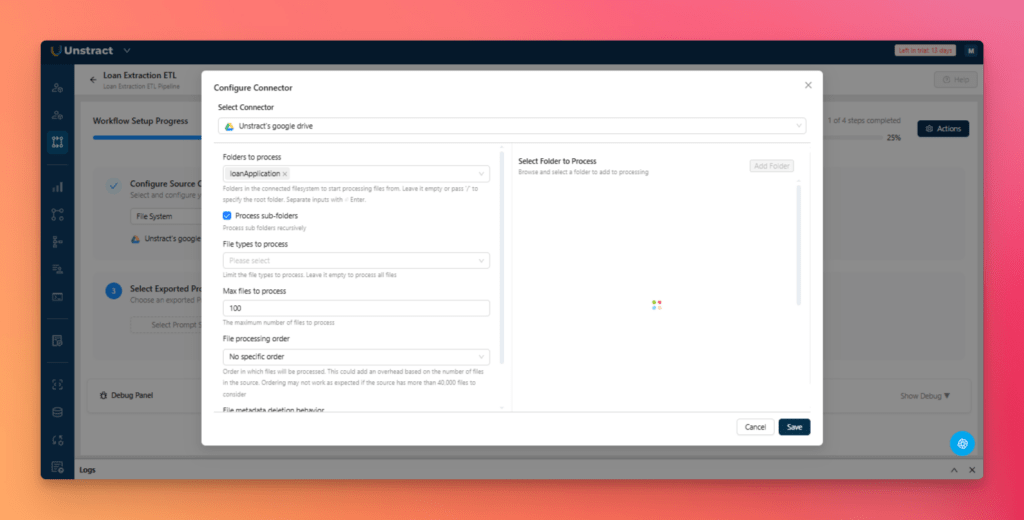
Next, configure the source connector. Select Google Drive, authenticate your account, and choose the folder that will be monitored for incoming documents.
Next, configure the destination connector by selecting Database and choosing PostgreSQL
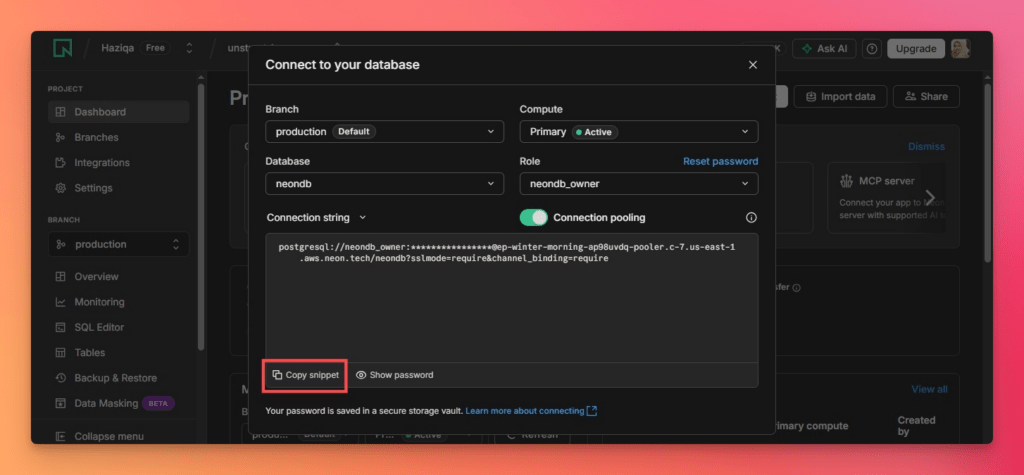
For this walkthrough, we will use PostgreSQL(Neon).
NeonDB is a free cloud Postgres database provider. To integrate with Unstract:
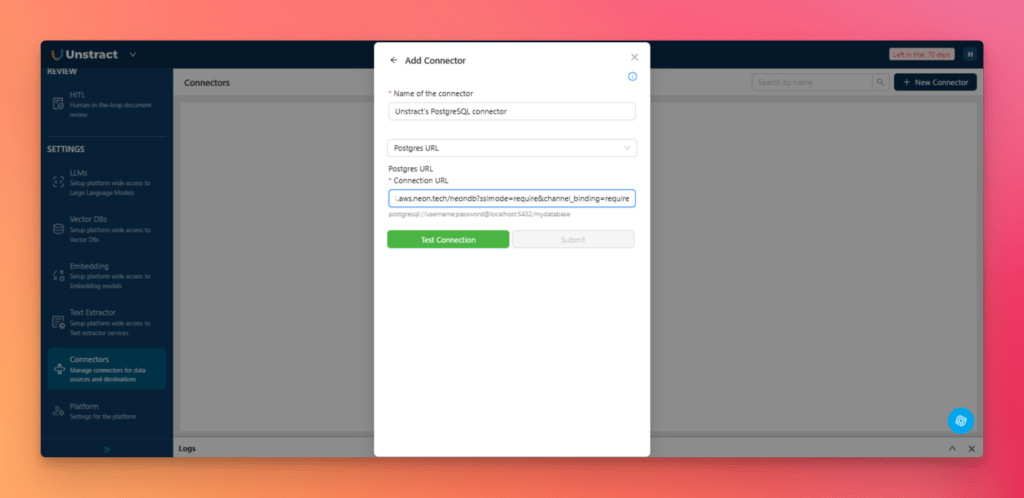
Back in Unstract, add a PostgreSQL connector, paste the Neon connection URL, and click Test Connection.
With both connectors configured, deploy the workflow to activate the ETL pipeline.
The workflow now consists of three stages:
Google Drive as the document source
The exported Unstract Tool as the extraction layer
PostgreSQL via Neon as the destination
Once deployed, every new document added to the configured Google Drive folder is automatically processed. Unstract extracts the structured data and writes the results directly into PostgreSQL.
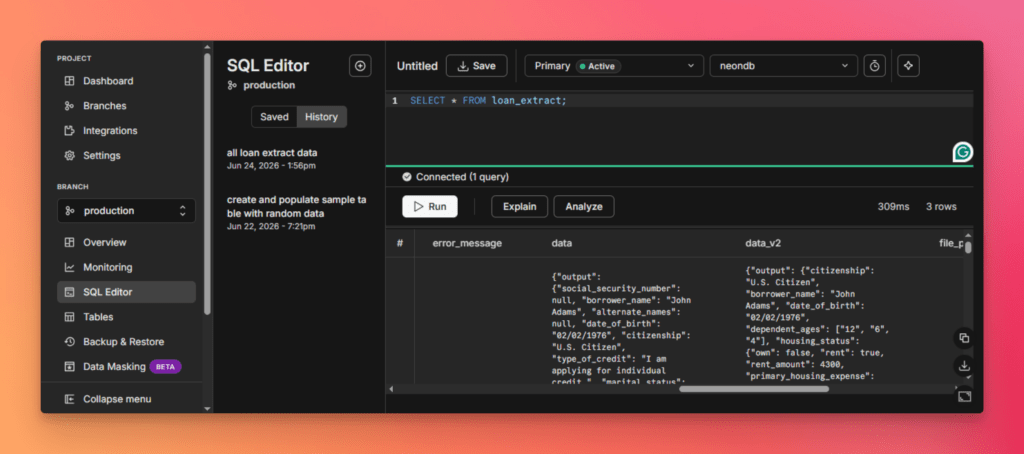
Open Neon and run a SQL query against the target table to verify that the extracted records have been successfully loaded into the database.
The unstructured to structured data pipeline is now fully automated. New documents flow from Google Drive through Unstract and into PostgreSQL for downstream reporting, analytics, and business workflows.
Evaluating Modern Document Extraction Platforms: Unstract vs. Alternatives
Modern unstructured data extraction tools should be evaluated on how they perform across document variants, how easily they can be configured, and how reliably they deploy into production workflows.
The following comparison highlights how Unstract differs from traditional OCR platforms, parsing libraries, and custom-built extraction stacks.
Bring your own LLMs, embeddings, vector DB, and OCR
Proprietary stack
LLM-flexible and modular
Fully custom integration required
Deployment options
Cloud, on-premise, open-source
Enterprise licensing, on-premise
Cloud and API
Self-hosted only
Time to production
Fast onboarding with automated workflows
Slow template creation cycle
Moderate setup effort
Long engineering cycle
Open source
Yes (AGPL 3.0)
No
Partial
Internal implementation only
The key distinction is that Unstract combines document extraction, evaluation, debugging, and deployment into a single workflow. This reduces the engineering effort required to build and maintain a reliable unstructured data pipeline in production.
Conclusion: Building Reliable Data Pipelines from Unstructured Documents
Most enterprise data still lives inside documents, making unstructured data processing a critical part of modern automation. The challenge is no longer extracting text. It is consistently converting unstructured documents into accurate, structured data that downstream systems can trust.
As document volumes and variation increase, production-grade extraction requires more than an LLM. Teams need schema generation, prompt engineering, accuracy validation, version control, and deployment infrastructure that can scale reliably.
Unstract brings these capabilities together in a single platform, helping teams move from sample documents to a production-ready unstructured data pipeline without building and maintaining a custom extraction stack.
Ready to build a production-grade unstructured data pipeline? Start with the Unstract Cloud free trial, explore the open-source platform on GitHub, and join the community Slack for technical support.
Unstructured Document Data Processing: FAQs
1. What does a production‑grade unstructured data processing pipeline require beyond just an LLM? Production‑grade unstructured data processing requires a document parsing layer that preserves layout, a schema engineering environment, a prompt engineering workflow, an evaluation layer for accuracy measurement, and deployment infrastructure. Unstract brings all these components together into a single platform for processing unstructured data at scale.
2. How does Unstract handle unstructured document processing across hundreds of different document layouts? Unstract is document‑agnostic — it does not rely on templates or manual reconfiguration for new layouts. Its Agentic Prompt Studio uses a multi‑agent pipeline to generate schemas and extraction prompts automatically, enabling unstructured to structured data conversion without writing new rules for each variant.
3. What is Agentic Prompt Studio and how does it reduce manual effort in unstructured data processing? Agentic Prompt Studio is Unstract’s multi‑agent workbench that automates schema generation, prompt creation, and accuracy evaluation. It uses specialized agents (Summarizer, Uniformer, Finalizer) to process unstructured data and reduce document onboarding effort from roughly ten hours to around three hours.
4. How can developers validate extraction accuracy when processing unstructured data in production? Developers can create a verification set (golden set) of representative documents with human‑verified JSON outputs. Unstract then measures extraction accuracy at the field level, compares versions, and detects regressions — making unstructured to structured data conversion measurable and auditable.
5. How does Unstract help debug extraction failures during unstructured document processing? Agentic Prompt Studio provides field‑level comparison views, JSON Diff View, click‑to‑highlight functionality that maps extracted values back to the source document, and an analytics dashboard for recurring error patterns. These tools make processing unstructured data more transparent and easier to debug.
6. Can Unstract be deployed as an API or ETL pipeline for processing unstructured data at scale? Yes. Unstract workflows can be exported as APIs and deployed via the API Hub, or configured as ETL pipelines with connectors for sources like Google Drive and destinations like PostgreSQL. This allows organizations to process unstructured data automatically as new documents arrive.
Unstract for Unstructured Document data extraction: Related topics to explore