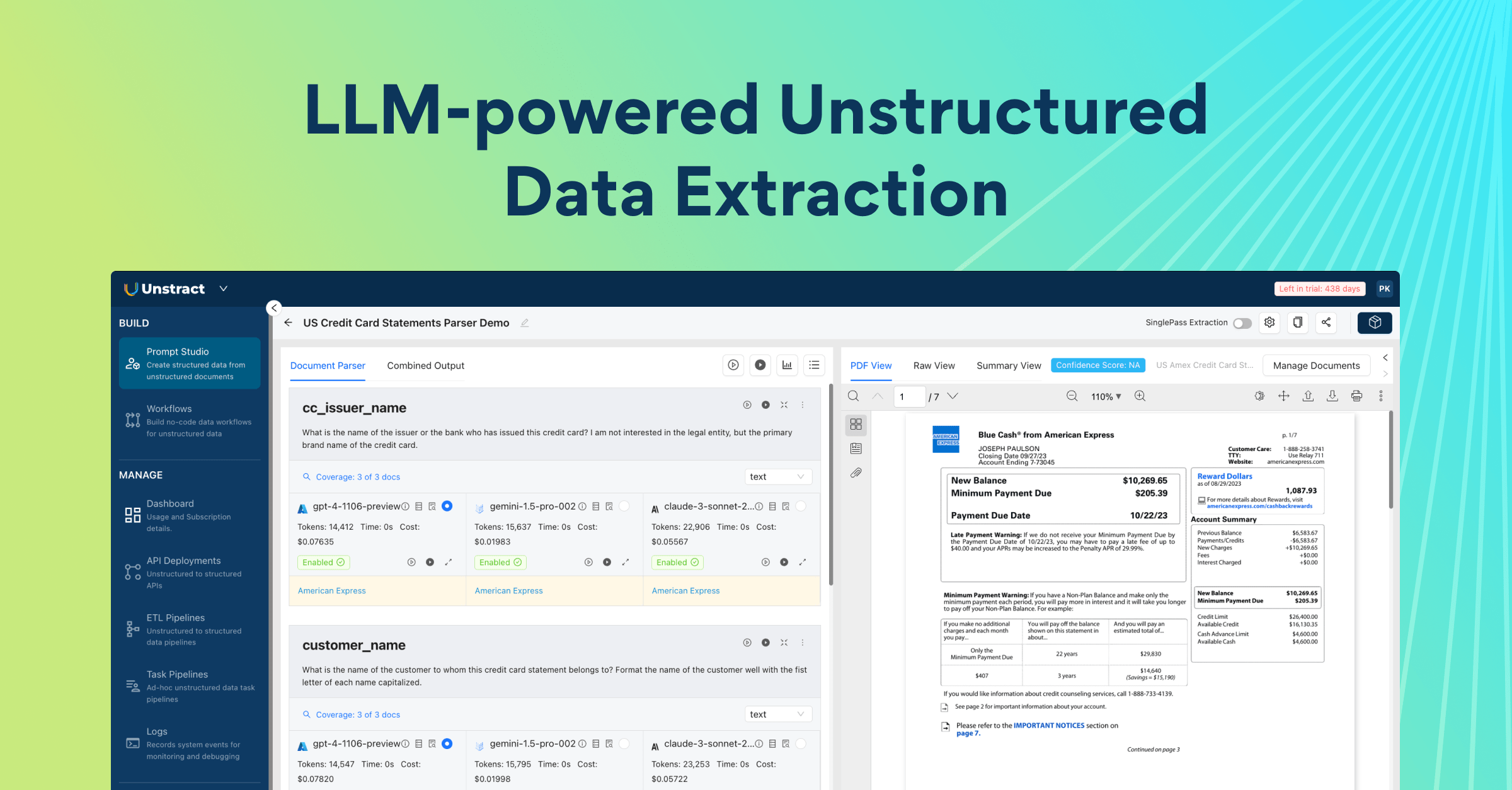
Introduction— What If Document Processing Needed Zero Setup?
Every business runs on documents.
Invoices trigger payments. Bank statements power reconciliation. Contracts define obligations. Insurance forms drive claims. Airway bills move goods across supply chains. These documents are not side inputs to business operations—they are the operational layer for many teams.
And yet, in most organizations, document workflows are still painfully inefficient.
Teams either process documents manually or rely on legacy automation setups that require endless template creation, brittle rules, manual schema design, and frequent rework whenever formats change. That approach does not scale well in a world where companies are processing thousands—or millions—of pages across different formats, vendors, languages, and layouts.
That is exactly why automated document processing matters now more than ever.
Modern businesses do not just need text extraction. They need systems that can reliably turn messy, unstructured documents into clean, structured data that downstream tools can actually use. They need speed, consistency, accuracy, and a path to production that does not take months of setup. This is where modern automated document processing software begins to separate itself from older OCR-and-template-based approaches.
Now consider the real question at the heart of this shift:
You have a pile of PDFs— invoices, contracts, forms, and millions of pages of data. What if you didn’t have to manually build templates, write rules, craft prompts, or define schemas? What if an AI agent could handle that work for you in one click?
That is the hook.
And that is also the reason Unstract matters.
Instead of starting with theory, it is easier to understand Unstract through the simplest possible mental model:
One API endpoint.
Send in documents of the same nature—such as invoices, bank statements, or airway bills—and get structured JSON back.
That is the core experience.
- No manual template building.
- No hand-crafted extraction rules.
- No prompt-writing treadmill.
- No schema-definition overhead before you can even begin.
Just:
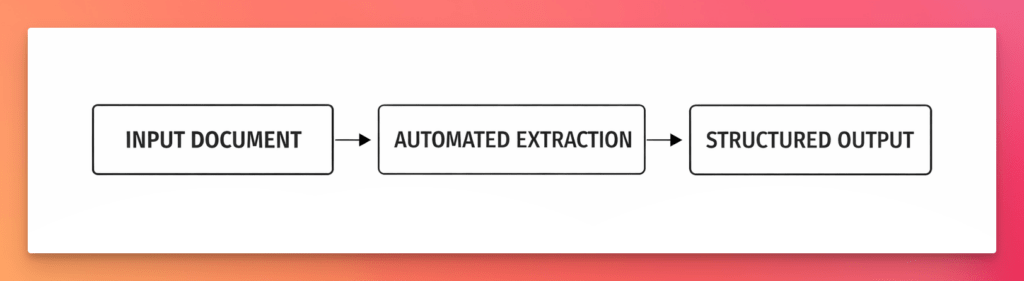
That “magic moment” is what a modern automated document processing platform should feel like. A document goes in. AI handles the heavy lifting. Clean, structured data comes out—ready for workflows, databases, business systems, and APIs.
This is what makes Unstract compelling. It is not just another OCR layer or another document parser. It is an AI-powered system built to reduce setup effort, accelerate extraction, and make production-grade document automation far more accessible. In a category crowded with rigid tools and maintenance-heavy systems, Unstract pushes toward a much better promise: zero-effort setup for real-world document processing.
That matters because document automation usually fails long before deployment. It fails during setup. It fails in schema creation. It fails in rule maintenance. It fails when one document layout changes and the whole pipeline starts throwing errors. Unstract is designed to remove that friction and replace it with a much more practical model—one where AI agents help do the setup work, not just the extraction work.
In that sense, Unstract is more than just automated document processing technology. It is a shift in how teams think about document automation itself: from manual configuration to agent-assisted extraction, from brittle pipelines to adaptable systems, and from document chaos to structured outputs at scale.
Unstract exists to make document processing feel less like setup work—and more like software finally doing what it should.
Product-First Demo: See Automated Document Processing in Action
The easiest way to understand automated document processing is not through theory, but through output.
Instead of starting with definitions, start with the result: a document goes in, and structured JSON comes out. That is the clearest possible demonstration of what modern automated document processing software is supposed to do.
Below is a representative example of structured JSON returned from the deployed extraction API:
{
  "status": "COMPLETED",
  "message": [
    {
      "file": "focusmate.pdf",
      "file_execution_id": "6c994690-4076-4cb1-aeb4-b8eff9a3cea0",
      "status": "Success",
      "result": {
        "output": {
          "address": null,
          "city_state_zip": null,
          "company_name": "Focusmate Inc",
          "date_of_issue": "November 11, 2021",
          "digital_copy_email": "[email protected]",
          "document_type": "Invoice",
          "gst_amount": null,
          "gst_number": null,
          "invoice_number": "80FB1D13-0006",
          "invoice_recipient_email": null,
          "pan_number": null,
          "payment_due_date": "November 11, 2021",
          "product_name": "Focusmate Turbo",
          "product_usage_charge_description": "Focusmate is a subscription remote coworking service.",
          "product_usage_charges": "$5.00",
          "recipient_address": "23, Rohde Building, 401 NW 2nd Ave",
          "recipient_city_state_zip": "Miami, Florida, 33101",
          "recipient_name": "Gerrard Martin",
          "subtotal": "$5.00",
          "total_due": "$5.00",
          "total_usage_charges": "$5.00",
          "usage_end_date": "12-11 00:00",
          "usage_hours": null,
          "usage_start_date": "11-11 00:00"
        }
      },
      "error": null,
      "metadata": {
        "source_name": "focusmate.pdf",
        "source_hash": "9ef35b8f99b6e9d3a7e9b5f2bc6c1b1def34f46aef2b47d7c43b57cc8e6f816c",
        "organization_id": "org_F3cHGJ22p8lrCSm9",
        "workflow_id": "1169e6ed-8d38-4f66-bc51-e6b19c3d9212",
        "execution_id": "95e55c78-b3d2-43f4-9103-d97183812ff9",
        "file_execution_id": "6c994690-4076-4cb1-aeb4-b8eff9a3cea0",
        "tags": [],
        "workflow_start_time": 1775728312.7048478,
        "total_elapsed_time": 43.056804895401,
        "tool_metadata": [
          {
            "tool_name": "structure_tool",
            "elapsed_time": 27.984964,
            "output_type": "JSON"
          }
        ],
        "usage": {
          "file_execution_id": "6c994690-4076-4cb1-aeb4-b8eff9a3cea0",
          "embedding_tokens": null,
          "prompt_tokens": null,
          "completion_tokens": null,
          "total_tokens": null,
          "cost_in_dollars": null
        },
        "total_pages_processed": null,
        "hitl": {
          "file_sent_to_hitl": false,
          "reason": "API deployment without file history - HITL not applicable"
        }
      }
    }
  ]
}
This matters because it shows the real advantage of a modern automated document processing platform:
- no manual template building
- no hand-crafted schema design
- no heavy prompt engineering overhead before getting usable output
That is the practical difference between legacy extraction systems and newer automated document processing solutions. Legacy systems often require extensive setup before they can reliably parse documents. Unstract is designed to shorten that path dramatically.
The API-First Mental Model
The simplest mental model for Unstract is this:
document goes in → structured data comes out
Once the extraction project is deployed, Unstract exposes it as an API endpoint. You send a document to the endpoint, and the system returns structured JSON.
A representative API call looks like this:
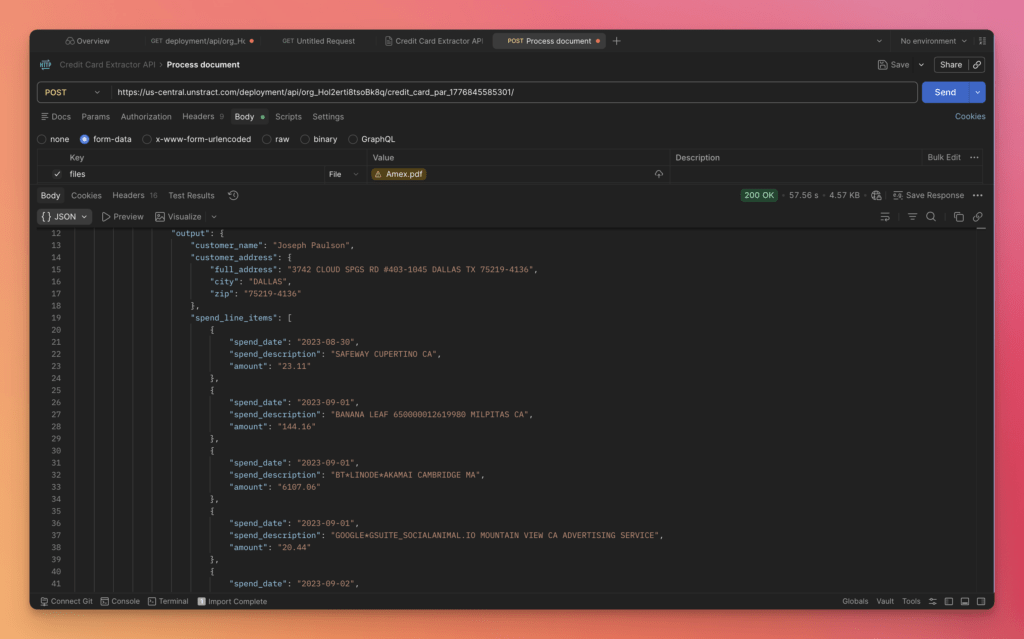
This model is intentionally simple. It helps explain the platform without getting lost in internal setup details. The deployed endpoint is designed to process documents of the same class or type—for example invoices, bank statements, or airway bills—so that extraction remains consistent and production-ready.
Why This “Magic Moment” Matters
This “document in, structured JSON out” experience matters for three different audiences at once.
- Business users immediately see value because manual extraction work disappears
- Technical users immediately understand how the output can plug into systems and workflows
- Decision-makers immediately see the speed-to-production advantage
This is where Unstract separates itself from many other automated document processing software offerings. It does not just promise automation in theory. It makes the outcome visible early, in a form that is easy to understand, easy to test, and easy to integrate.
What Unstract Is: AI-Powered Automated Document Processing Software
Modern enterprises do not struggle because they lack documents. They struggle because they have too many of them—spread across PDFs, scanned forms, invoices, bank statements, insurance files, shipping documents, and countless other formats that do not arrive in clean, structured form. That is the gap Unstract is built to close.
Unstract is an AI-powered automated document processing platform designed to turn unstructured business documents into structured, usable outputs. Instead of forcing teams to depend on manual templates, brittle extraction rules, or endless document-specific tweaks, Unstract uses AI to understand document content, extract the right fields, and return structured data that can be sent directly into downstream systems.
At a practical level, this means a business can take documents that normally require manual review—such as invoices, statements, forms, claims documents, or logistics paperwork—and convert them into clean JSON, database-ready records, or API-consumable outputs. That is the core value of modern automated document processing software: not just reading files, but making them operational.
Unstract is especially relevant for enterprise workflows where document complexity is high and the cost of manual processing is even higher. That includes:
- Finance and accounting, where invoices, remittance advice, statements, and payment records need to be extracted accurately
- Insurance, where claims forms, underwriting documents, and policy paperwork often arrive in varied formats
- Logistics, where airway bills, bills of lading, packing lists, and customs documents must move quickly through workflows
- Healthcare, where forms, records, claims, and intake documents require reliable extraction with auditability
- And more broadly, any workflow where structured data is trapped inside unstructured files
In that sense, Unstract is not just another OCR utility. It is a full automated document processing solution built to help organizations move from raw documents to structured business data with much less effort and much faster time to value.
Brief Overview of Unstract
The simplest way to think about Unstract is this:
It takes in unstructured documents and gives you back structured outputs.
That sounds straightforward, but it solves one of the hardest problems in business automation. Most documents are not neatly formatted for software systems. They contain tables, free text, handwritten notes, variable layouts, scanned images, and mixed formats. Traditional systems often break under that variability. Unstract is designed to handle it more intelligently.
As an AI-powered automated document processing software platform, Unstract helps organizations:
- Ingest real-world business documents
- Extract relevant information using AI-driven understanding
- Validate and measure extraction quality
- Export structured data for business systems and workflows
- Deploy the extraction flow as an API for production use
That is why Unstract fits so well into enterprise operations. It is not limited to a single department or one document type. It can support cross-functional workflows across automated document processing in insurance, financial services, healthcare, and for logistics—all within a unified platform.
Core Product Components
What makes Unstract powerful is not just one feature, but how its components work together as a complete document automation stack.
Agentic Prompt Studio
This is the intelligence layer that simplifies extraction setup. Instead of making users manually define schemas and write extraction prompts from scratch, Agentic Prompt Studio uses agents to automate much of that work. It is the fastest path from sample documents to production-ready extraction logic.
Workflow Builder
Once extraction is defined, Workflow Builder helps connect that logic into larger document processing pipelines. It enables teams to orchestrate how documents move through ingestion, extraction, validation, and downstream delivery.
ETL
Unstract also supports ETL-style processing, making it easier to move extracted data into the systems where it actually needs to go—whether that is a database, analytics stack, internal workflow, or business application.
APIs
APIs make the whole system operational. Once a project is ready, it can be exposed as an API endpoint so external systems can send documents in and receive structured outputs back. This is what turns document extraction into deployable software rather than a one-off tool.
Taken together, these components form a unified automated document processing platform:
documents come in → AI extracts structure → accuracy is evaluated → outputs are deployed via APIs → business systems consume the data
That is what makes Unstract more than just a parser. It is a practical stack for real document automation.
Key Rationale Behind Agentic Prompt Studio
One of the most important shifts in Unstract is the move from manual setup to agent-assisted setup.
In older document extraction workflows, users had to upload documents, study their structure, manually design a schema, write prompts, test extraction results, and keep iterating whenever something failed. That process worked, but it demanded time, technical effort, and repeated manual tuning.
Agentic Prompt Studio changes that model.
Its core rationale is simple: the hardest part of automated document processing technology is often not the extraction itself—it is the setup required before extraction can work reliably. Agentic Prompt Studio reduces that setup burden dramatically by automating the most tedious parts of the workflow.
No manual schema creation
Instead of asking users to define every field by hand, agents analyze the uploaded documents and generate the schema automatically. This removes one of the biggest sources of friction in document extraction projects.
Automatic production-grade extraction prompts
Once the schema is inferred, prompts are generated automatically. That means users do not need to spend hours crafting, refining, and restructuring prompts just to get a working extraction flow.
Automated accuracy checking
The platform does not stop at extraction. It also evaluates extraction quality at the document level, helping users see how well the system is performing and where mismatches exist.
Faster path from raw documents to usable structured data
This is the real value. Agentic Prompt Studio compresses the path from “I have a folder of documents” to “I have structured, validated output ready for API deployment.” That speed matters for both pilots and enterprise rollouts.
This is why Agentic Prompt Studio is such a strong differentiator for Unstract. It makes automated document processing software feel less like a configuration project and more like an intelligent system that helps build itself around your documents.
The Big Shift: From Manual Prompt Studio to Agentic Prompt Studio
One of the biggest changes in Unstract is not just a feature upgrade—it is a shift in how document extraction projects are built. Earlier, setting up extraction required a more hands-on workflow. Users had to manually upload documents, study the structure, write prompts, define the schema, validate outputs across multiple files, and keep iterating until the extraction became reliable enough for production use.
That approach worked, but it came with friction. Every new document set demanded effort. Every schema change required attention. Every extraction miss meant another round of prompt edits, validation, and troubleshooting. In practice, much of the time in automated document processing was spent not on using the output, but on preparing the system to generate it.
What the Old Workflow Looked Like
The original Prompt Studio followed a more manual path:
- Upload sample documents
- Write prompts by hand
- Generate or define the schema manually
- Validate extraction results across documents
- Repeat the cycle whenever something did not work as expected
This meant users needed both document understanding and prompt-design intuition to get good results. For teams trying to productionize automated document processing software, the extraction logic itself often became a project.
What Has Changed With Agentic Prompt Studio
Agentic Prompt Studio changes that setup model by automating the most time-consuming parts of the workflow.
With the new approach:
- Schema generation is automated by agents, based on the uploaded documents
- Prompt creation is automated, removing much of the manual prompt engineering work
- Accuracy scoring is built in at the document level, so performance becomes visible immediately
- Change tracking shows how prompt updates affect extraction accuracy in real time
- Mismatch detection pinpoints where extracted values differ from verified values, making debugging far more precise
This makes the system feel far more intelligent and self-guided. Instead of users manually assembling the extraction pipeline piece by piece, the platform helps generate and evaluate it automatically.
Why This Matters
This shift matters because it changes the economics and usability of automated document processing technology.
This:
- Reduces setup effort, especially in the early stages of a project
- Reduces the level of expertise required, making extraction workflows more accessible
- Speeds experimentation, because teams can move from sample documents to evaluated output much faster
- Improves reliability, thanks to built-in accuracy measurement and mismatch visibility
- Strengthens Unstract’s position as one of the most practical and modern automated document processing solutions available today
In short, Agentic Prompt Studio moves document extraction from a manual configuration exercise toward a more autonomous, AI-assisted workflow. That is a meaningful shift—and one of the strongest reasons Unstract stands out in the increasingly competitive market for automated document processing platforms.
Hands-On Demo: Setting Up Agentic Prompt Studio With 4 Sample Invoices
The fastest way to understand a modern automated document processing platform is to see it work on a real document class. For this walkthrough, we use four sample invoices and build an extraction project inside Agentic Prompt Studio. The goal is simple: upload a small but varied set of invoices, let Unstract generate the extraction foundation automatically, validate the results, and move toward deployment-ready structured outputs.
Why Use Invoices for the Demo
Invoices are one of the best examples for demonstrating automated document processing software in practice.
They are:
- Extremely common across finance and accounting workflows
- Highly variable across vendors, layouts, and field naming conventions
- Strongly aligned with real buyer intent for automated document processing solutions
- A classic case where legacy template-based systems break down quickly
One invoice may say Invoice Number, another may say Invoice No., and another may bury it in a header block next to tax details or purchase order references. That is exactly why invoices are such a good benchmark. They show whether a platform can generalize across document variants instead of only handling one fixed format.
Using four sample invoices also improves the quality of automation. Multiple examples help the system infer a more reliable shared structure, detect common fields across variants, and generate extraction logic that is more stable in production.
Short Introduction to Agentic Prompt Studio
Agentic Prompt Studio is Unstract’s workbench for document extraction projects. It helps teams go from a small set of messy, variant-heavy documents to a stable schema, a strong extraction prompt, and measurable accuracy—without forcing users to manually design everything from scratch.
In simple terms, it solves three major problems in automated document processing:
- schema creation across document variants
- prompt engineering for reliable extraction
- accuracy validation and regression tracking
That is what makes it important. In most document extraction projects, the hardest part is not just getting the first output—it is making that output reliable, measurable, and repeatable across document variations. Agentic Prompt Studio simplifies that setup by using purpose-built agents to automate much of the heavy lifting.
Step-by-Step Agentic Prompt Studio Flow
Below is the practical flow used to set up the invoice extraction project.
Step 1 — Create a New Project and Upload Documents
From the left sidebar, open Agentic Prompt Studio and click New Project. Once the new project is created, click Manage Documents and upload the four invoice files.
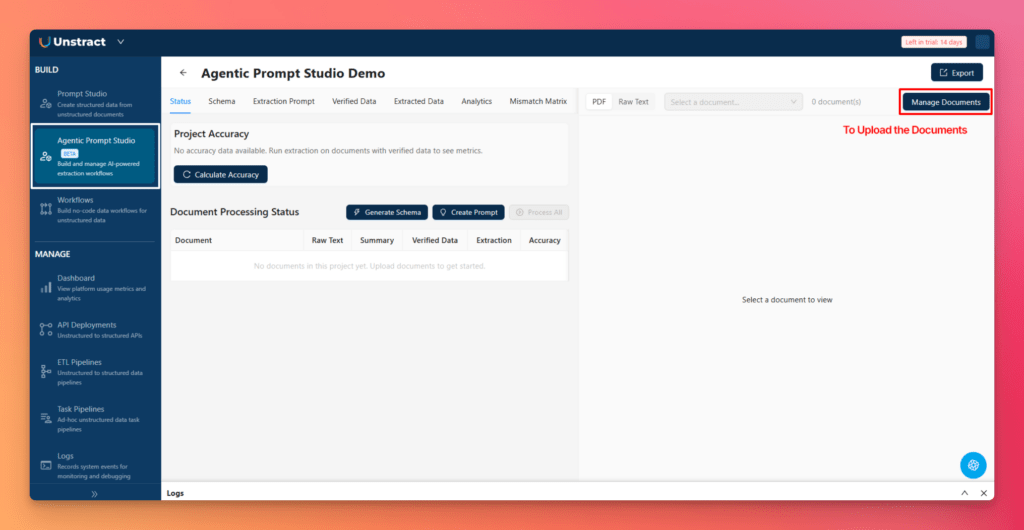
This is the first important point: using multiple invoice samples improves extraction quality. It gives the system enough variation to understand which fields are common, which labels change between vendors, and which structures should be generalized into the schema.
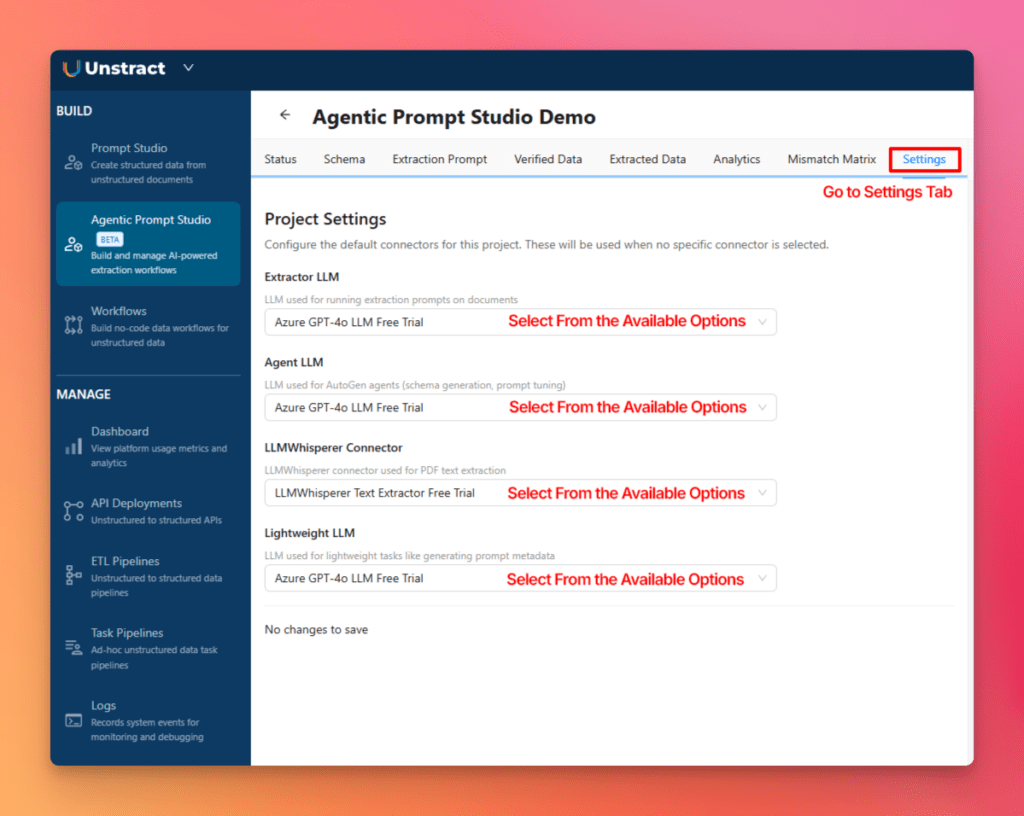
You can then move to the Settings tab and configure the LLM connectors used by the project. There are four connector slots, each serving a different role, so they can be selected based on availability and project requirements.
Step 2 — Generate Raw Text
Next, generate the raw text for each uploaded invoice.
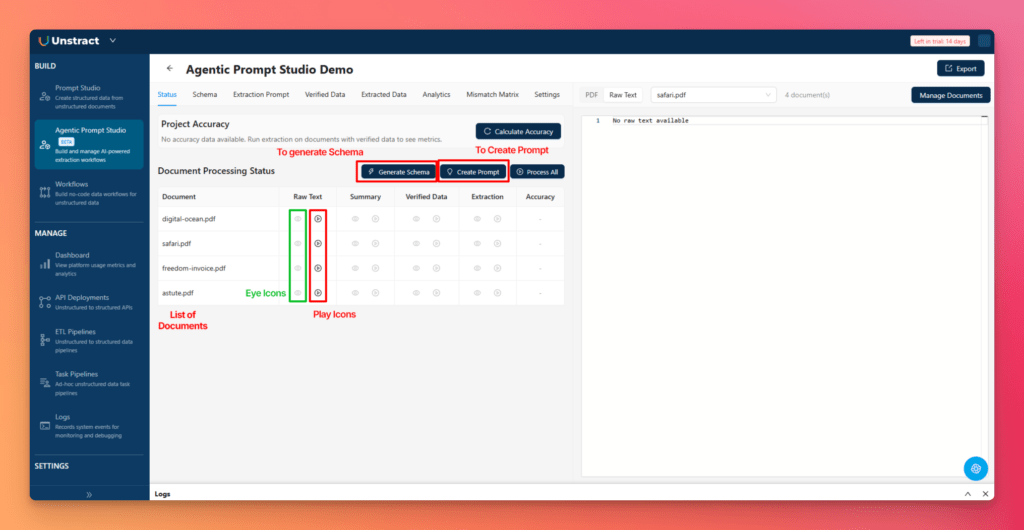
From the Status tab, click the play icon in the Raw Text column for a specific document.
This triggers raw text generation manually. You can preview the result by clicking the eye icon in the same column. Alternatively, you can toggle the Raw Text view in the top bar to see the text extracted by LLMWhisperer.
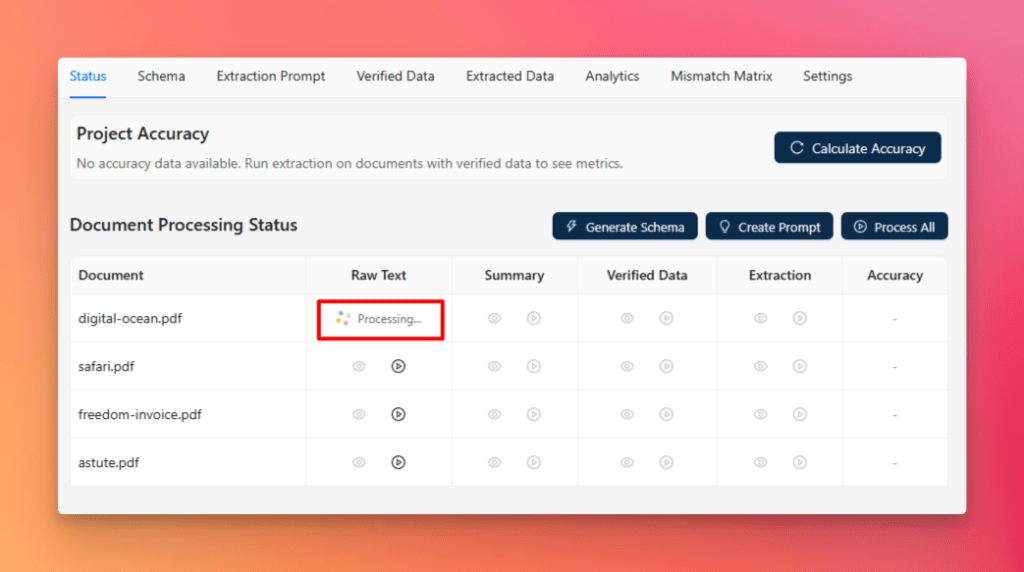
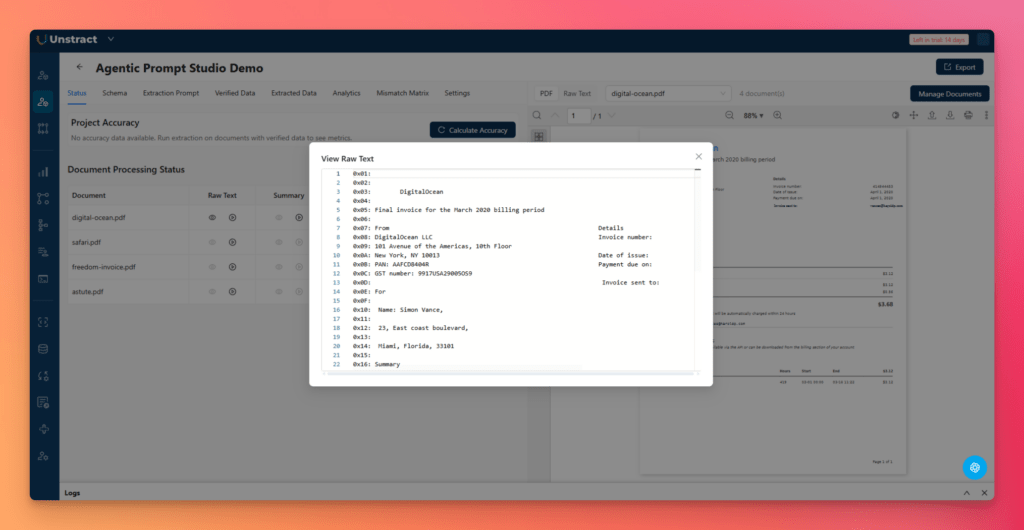
This step matters because raw text is the foundation of everything that follows. Before a system can summarize, infer a schema, or build a strong extraction prompt, it first needs a reliable text layer from the original invoices.
Step 3 — Generate Document Summaries
Once raw text is available, the next step is to generate summaries.
From the Status tab, click the play icon in the Summary column. You can preview the generated summary using the eye icon.
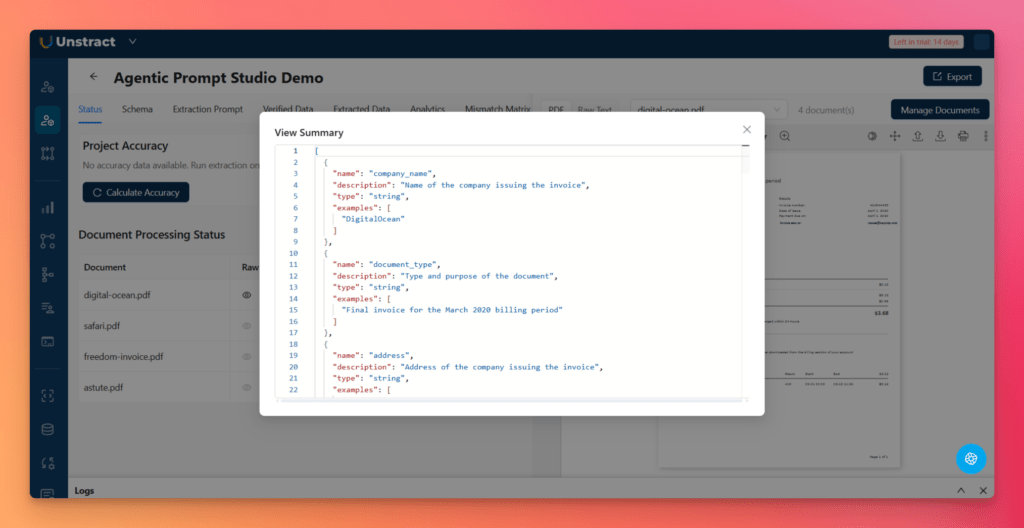
These summaries are important because they help the system understand each invoice as a document variant. Instead of treating all invoices as identical, Unstract analyzes their structure and the fields present in each one. This makes later schema generation much stronger, especially when invoice layouts vary by vendor.
Generating raw text and summaries for every uploaded document is an essential prerequisite before moving on to schema and prompt generation.
Step 4 — Generate the Schema Automatically
After summaries are ready, click Generate Schema from the Status tab. In the popup dialog, choose the generation type and the LLM connector, then click Generate.
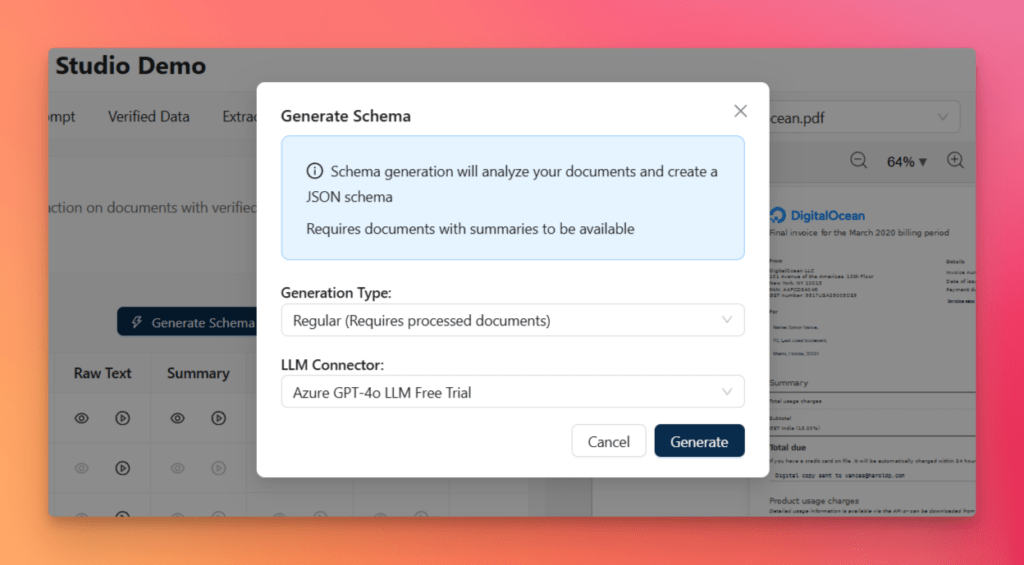
This is where Agentic Prompt Studio shows one of its biggest strengths. Schema generation is handled through a three-agent pipeline:
- Summarizer Agent analyzes each uploaded document independently and identifies the fields present
- Uniformer Agent reconciles naming differences across variants, such as “Invoice No.” vs “Invoice #”
- Finalizer Agent produces a complete JSON Schema with types, descriptions, examples, required fields, and nested structures
Once complete, the generated schema becomes available in the Schema tab, where it appears in a code editor alongside a document preview. If needed, the schema can also be edited manually, and unnecessary fields can be deleted.
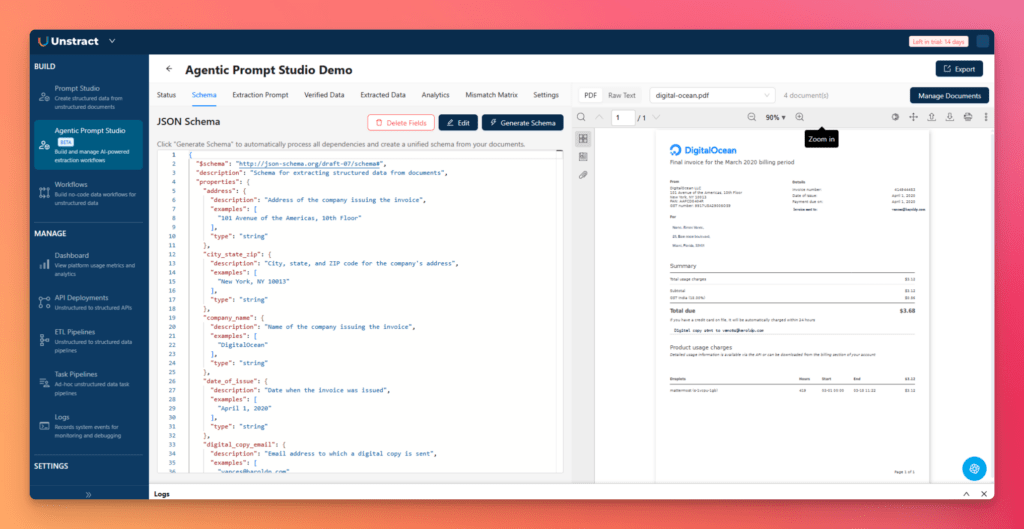
This removes one of the most tedious parts of traditional automated document processing software: manually building a schema that works across multiple document variants.
Step 5 — Generate the Extraction Prompt Automatically
With the schema in place, the next step is to generate the extraction prompt.
From the Status tab, click Create Prompt. In the dialog, select an LLM connector and click Generate. The system then generates the extraction prompt and saves it as a new version, which appears in the Extraction Prompt tab.
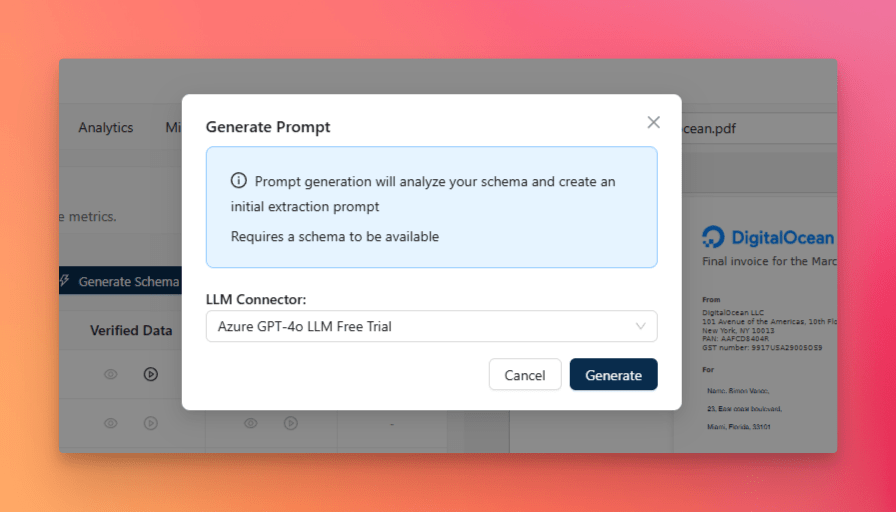
This prompt is created through another three-agent pipeline:
- Pattern Miner Agent detects field anchors, labels, formatting patterns, and layout cues
- Prompt Architect Agent builds a structured extraction prompt aligned with the schema
- Critic Dry Runner stress-tests the prompt, checks for ambiguity or JSON issues, and improves it before finalizing
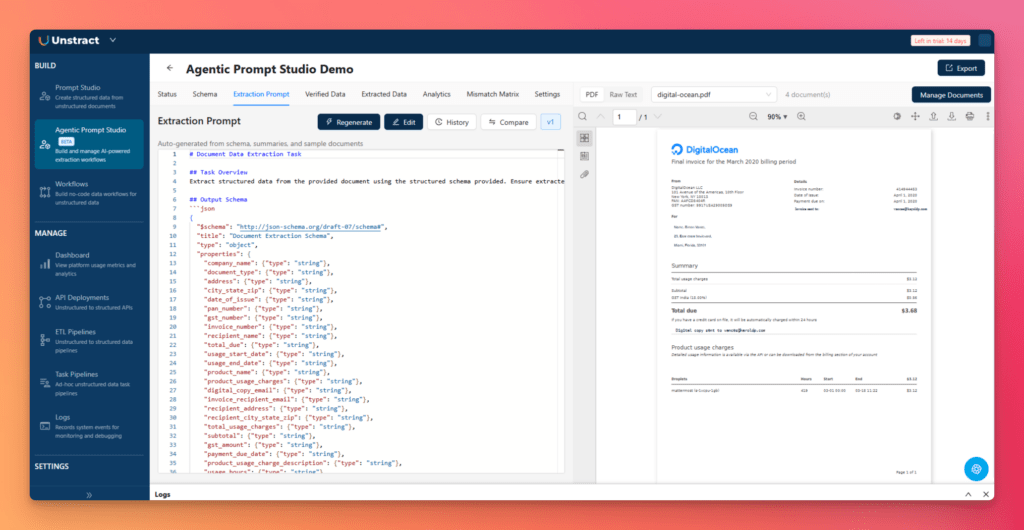
This is very different from manual prompt writing. Instead of guessing the right wording and iterating by trial and error, Agentic Prompt Studio generates a production-grade starting point automatically.
Step 6 — Generate Verified Data and Run Extraction
Before comparing results, create Verified Data, which acts as the known-correct baseline.
From the Status tab, click the play icon in the Verified Data column. You can preview it by clicking the eye icon or by opening the Verified Data tab, where it can also be edited manually if required.
Now run extraction.
From the Status tab, click the play icon in the Extraction column for a document. The status will change to Processing… while Unstract extracts structured data according to the schema and prompt.
You can review results in the Extracted Data tab, which offers:
- Data View for structured, human-readable fields
- JSON View for raw extracted JSON with line numbers
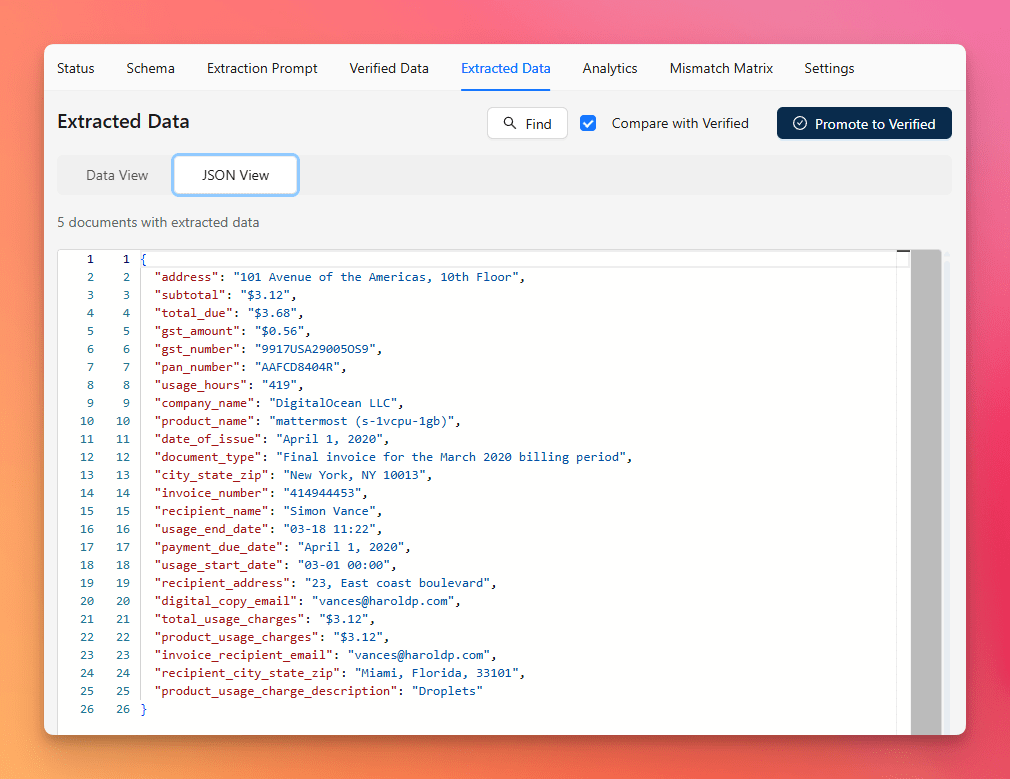
This is the point where the project moves from setup into usable output.
Step 7 — Compare Verified vs Extracted Data
To compare extraction quality, enable Compare with Verified in the Extracted Data toolbar.
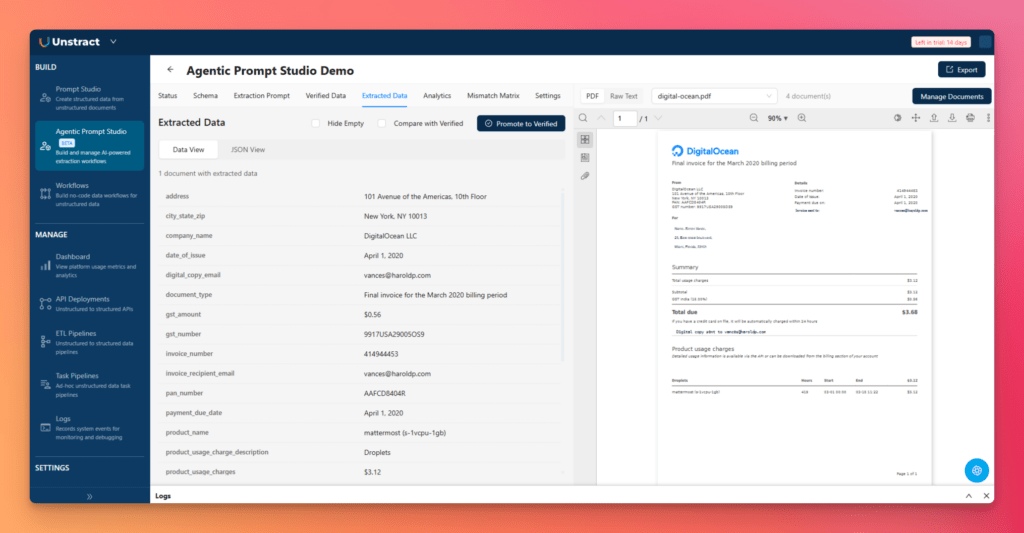
This allows you to measure how the extracted output compares with the verified baseline. In JSON diff mode, differences are clearly highlighted:
- Red for extracted values that diverge
- Green for the expected verified values
This is especially useful because it turns extraction quality into something concrete and debuggable. Instead of vaguely feeling that the result looks “mostly correct,” teams can see exactly where the model diverged from the expected data.
Step 8 — Accuracy Score
Every document receives an accuracy score, making extraction quality measurable at the document level.
This matters because production readiness is not just about getting a JSON output—it is about knowing how accurate that output is. Accuracy scoring helps teams judge whether the extraction is ready for deployment, needs prompt refinement, or requires verified baseline improvements.
This is one of the key things that elevates Unstract from a simple extraction utility to a serious automated document processing platform.
Step 9 — Analytics
Next, open the Analytics tab.
This dashboard gives a broader view of extraction performance across the uploaded invoice set. It can display metrics such as:
- total documents
- total fields
- overall accuracy
- failed fields
- top mismatched fields
- error type distribution
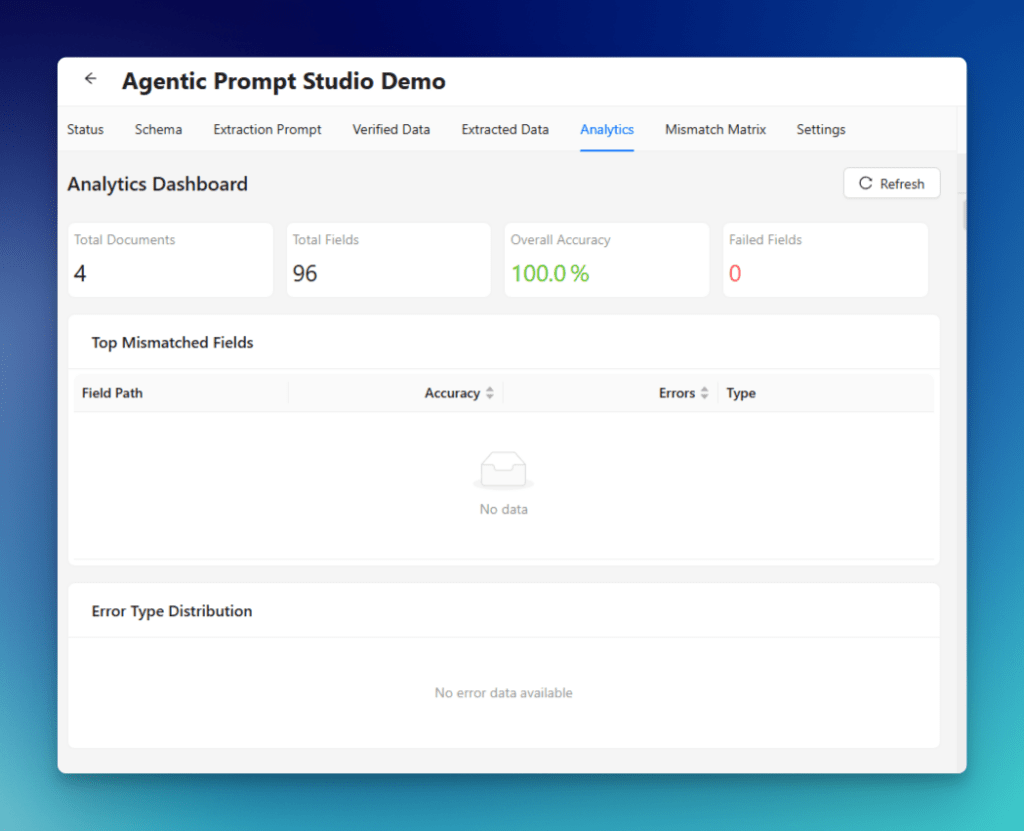
Analytics help teams move from document-level inspection to project-level evaluation. That is important when scaling beyond a pilot and trying to operationalize automated document processing technology.
Step 10 — Mismatch Matrix
Finally, go to the Mismatch Matrix tab.
This provides a bird’s-eye view of extraction quality across all documents and all fields. It is displayed as a grid where:
- Green means match
- Yellow means partial match
- Red means mismatch
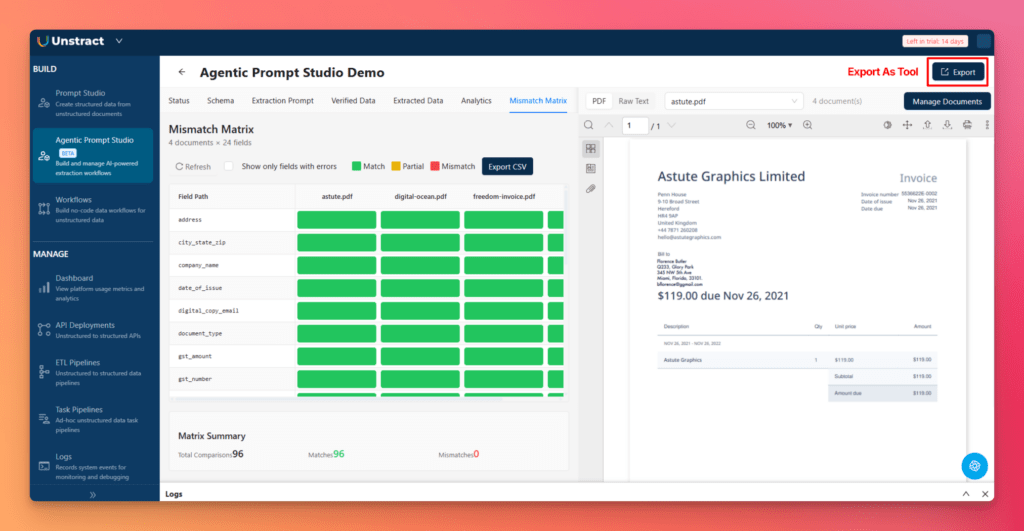
Rows represent field paths, and columns represent documents. There is also a filter to show only fields with errors, plus the ability to Export CSV for offline analysis.
This is one of the most useful debugging views in the workflow. It shows exactly which fields break, in which invoice variants, and how often. That makes iteration much faster.
5.4 Why Agentic Prompt Studio Is the Real Differentiator
The biggest value of Agentic Prompt Studio is not just that it generates outputs—it changes how extraction projects are onboarded and improved.
It:
- removes the need for manual schema design
- reduces the burden of prompt engineering
- makes evaluation visible and measurable
- speeds the path from raw invoices to usable structured data
In traditional systems, much of the effort goes into preparation before extraction can even begin. In Unstract, agents take over much of that setup work. That is a major shift, and one of the strongest reasons Unstract stands out in the market for automated document processing solutions.
6) Export as a Tool and Prepare for Deployment
Once the extraction project is working well, the next step is to make it reusable and deployment-ready.
6.1 Exporting the Project as a Tool
Click the Export button in the top-right corner of the project.
This exports the project configuration, including:
- the schema
- the extraction prompt
- verified data
- project settings
That makes the extraction logic reusable. Instead of being locked inside one setup session, it becomes a portable project artifact that can be shared, versioned, and promoted toward production.
6.2 Direct API Conversion
There is also an important enhancement in the newer workflow:
Prompt Studio projects can now be directly converted into APIs in some cases, without requiring a separate workflow setup.
This reduces deployment friction significantly. It shortens the path from successful extraction design to live API consumption, which is a major advantage for teams adopting automated document processing software in real operational environments.
LLMWhisperer: The OCR Layer Behind Reliable Extraction
7.1 What LLMWhisperer Is
LLMWhisperer is Unstract’s OCR and layout-preserving parsing engine. It is designed to do more than simply read text from documents. Its real role is to convert raw files into an extraction-friendly representation that keeps the document’s structure, reading flow, and spatial meaning as intact as possible.
That distinction matters.
In many document processing pipelines, OCR is treated as a basic pre-processing step: extract the text, pass it downstream, and hope the rest of the system can reconstruct meaning from a flattened output. But enterprise documents rarely work that way. Invoices, bank statements, forms, airway bills, and scanned business records depend heavily on layout. A field’s meaning often comes not just from the words themselves, but from where they appear, what they are aligned with, and which section they belong to.
This is where LLMWhisperer becomes especially important inside Unstract. It provides the text foundation on which the rest of the extraction pipeline depends. Before Agentic Prompt Studio can generate a stable schema, before prompts can be created, and before structured extraction can be trusted, the system needs a high-quality representation of the original document. LLMWhisperer is the layer that makes that possible.
In short, it is not just OCR. It is OCR built for AI-driven document understanding.
7.2 Why OCR Still Matters in Automated Document Processing
Even in a world of LLMs, agents, and AI-native extraction systems, OCR still matters enormously.
That is because many real-world business documents are not clean, digitally native text files. They are often:
- scanned PDFs
- photographed receipts
- faxed copies
- low-quality legacy records
- handwritten or partially handwritten forms
- layout-heavy documents with tables and stamps
If these documents are not converted properly into a machine-readable form, the quality of everything that comes after—schema generation, extraction, validation, analytics—starts to degrade.
This is an important point in understanding automated document processing software. LLMs are powerful, but they still need strong inputs. If the OCR layer is weak, the downstream extraction layer inherits that weakness. Misread text, broken reading order, collapsed tables, and lost structure all lead to noisier outputs and lower reliability.
So while modern automated document processing technology goes far beyond OCR, OCR still remains foundational. It is the first step in turning messy, real-world documents into something an AI system can reason over accurately.
7.3 Why Layout Preservation Matters
This is where LLMWhisperer stands out.
Flat OCR output often strips away the very structure that makes a document understandable. It may extract all the text, but in the wrong order. It may merge labels with the wrong values. It may break tables into disconnected lines. It may lose section boundaries that are obvious to a human reader but invisible in plain text form.
Layout preservation solves that problem.
By preserving the structure of the original page, LLMWhisperer helps maintain:
- reading order, so text is interpreted in the correct flow
- section relationships, so headers, labels, and associated values stay connected
- tables and key-value alignment, so structured business data does not collapse into noise
- document meaning, which is critical for downstream LLM extraction quality
This has a direct impact on real extraction performance. A layout-preserved input makes it easier for AI systems to identify invoice numbers, vendor blocks, totals, address sections, line items, reference IDs, and many other fields that depend on structure as much as on text.
That is why layout preservation is not just a nice technical feature. It is one of the core reasons modern automated document processing solutions perform better than older OCR-only systems.
7.4 Demonstration With an Airway Bill
A good way to see this in action is through the LLMWhisperer Playground.
Go to: https://playground.llmwhisperer.unstract.com/
Then upload the provided Air Way Bill document.
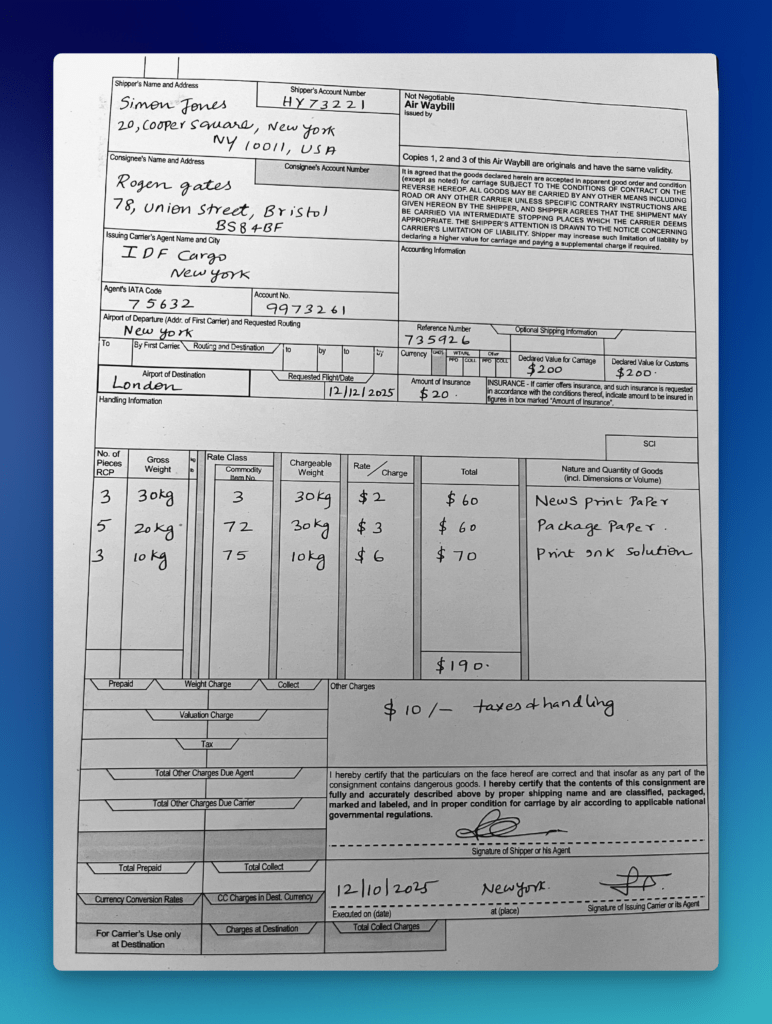
This is an ideal demonstration file because it includes many of the characteristics that make document extraction difficult:
- the document is old
- it is scanned
- it contains both typed and handwritten content
- it includes tabular sections
- it has a dense layout with multiple blocks of operational data
A traditional OCR engine may still extract text from this kind of file, but the output is often messy and flattened. Important relationships can get lost. Labels and values may separate. Rows may collapse. Handwritten additions may become harder to interpret in context.
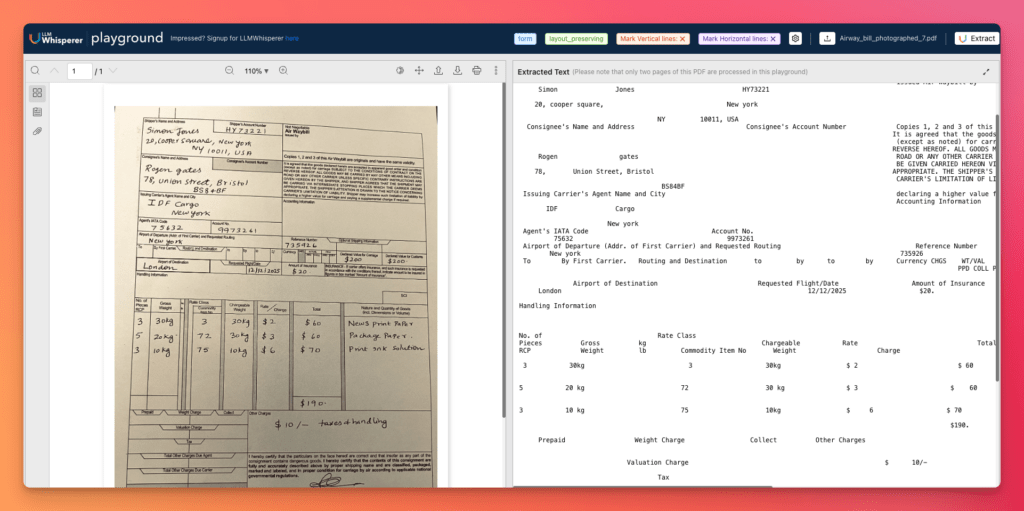
With LLMWhisperer, the output is much more usable because the layout is preserved along with the text. The page retains its structure in a way that is closer to how a human would read it. That makes the result far better suited for downstream AI extraction inside Unstract.
And that is the real point: reliable automated document processing does not start at prompt generation. It starts much earlier, with the quality of the document representation itself. LLMWhisperer gives Unstract a stronger OCR foundation, which in turn improves schema generation, extraction quality, and the overall reliability of the full pipeline.
That is the “quiet advantage” behind the system. Before Unstract can turn documents into structured business data, LLMWhisperer helps ensure the document is understood in the right shape first.
8) Automate Document Processing Workflow With API
Once the extraction logic is ready in Agentic Prompt Studio, the next step is to turn it into a usable API. This is where Unstract starts to feel like real automated document processing software rather than just a document experimentation tool. Instead of keeping extraction inside the UI, you can deploy it as a reusable endpoint that accepts documents and returns structured outputs.
8.1 Deploy the Extraction as an API
To deploy the project as an API:
- From the left sidebar, open Workflows
- Click New Workflow
- Enter the workflow name and description
- Complete the workflow setup steps:
- Configure Source Connector → select API
- Configure Destination Connector → select API
- Select Exported Prompt Studio Project → choose the exported Agentic Prompt Studio project
- Deploy Workflow → choose Deploy as API
- Click Deploy Workflow
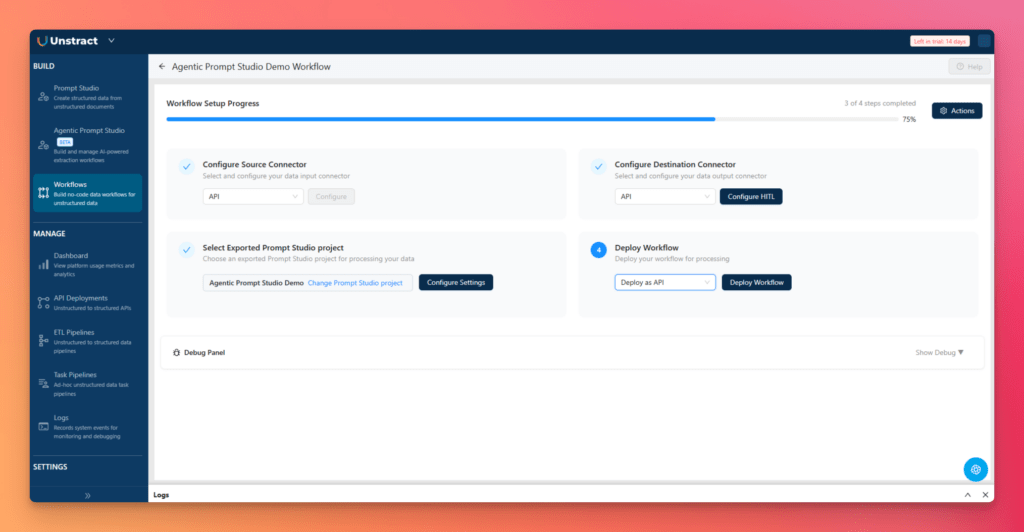
Once deployed, the workflow becomes a live API endpoint that can process incoming documents and return structured outputs.
After deployment:
- Go to the API Deployment section in the left sidebar
- Locate your deployed workflow, such as Agentic Extractor API
- Copy the API endpoint
- Open Manage Keys
- Copy the API key
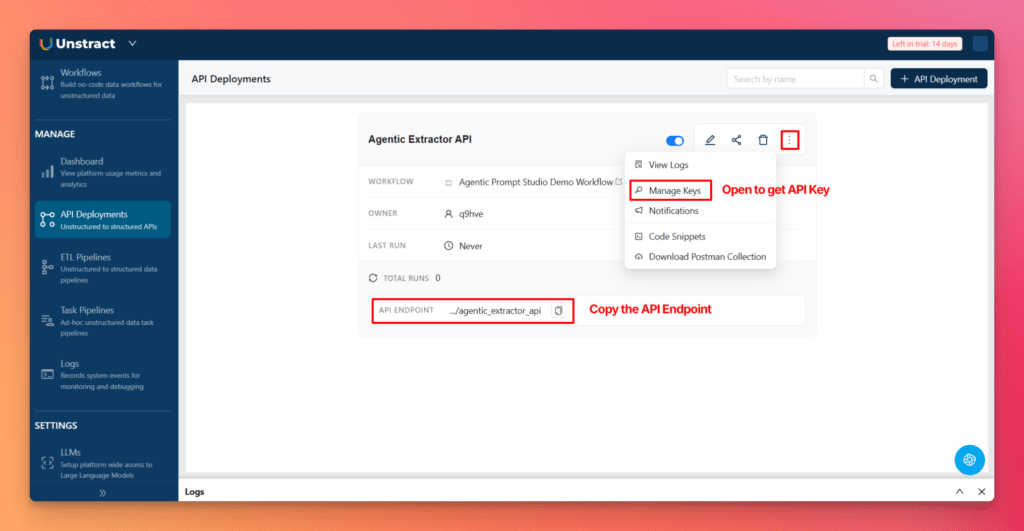
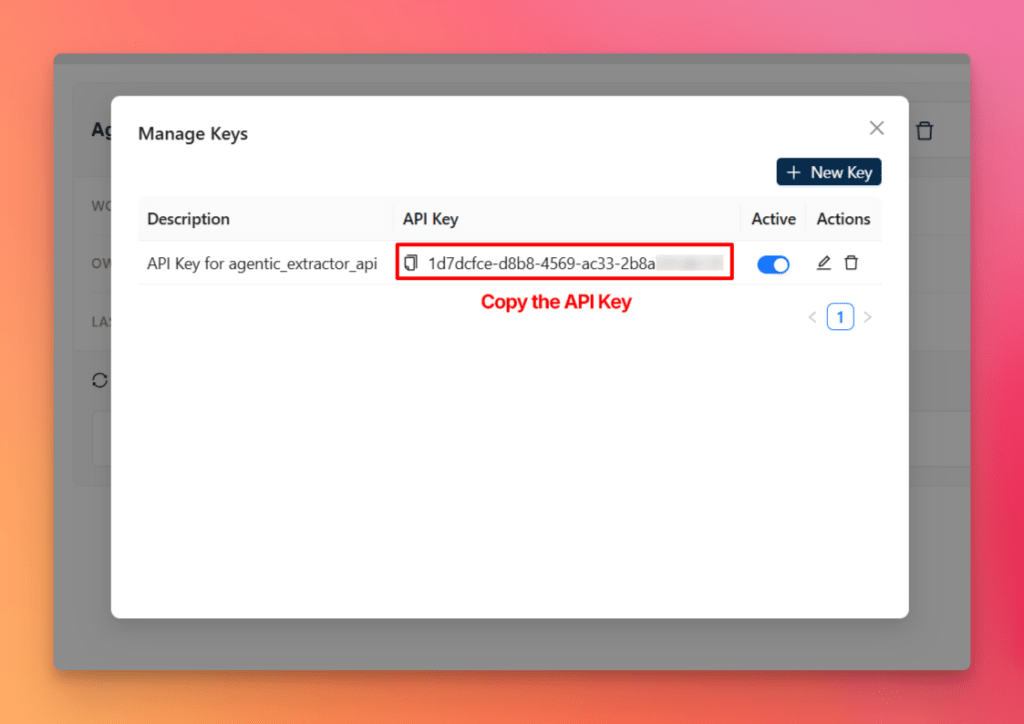
This gives you everything needed to test the extraction pipeline outside the platform.
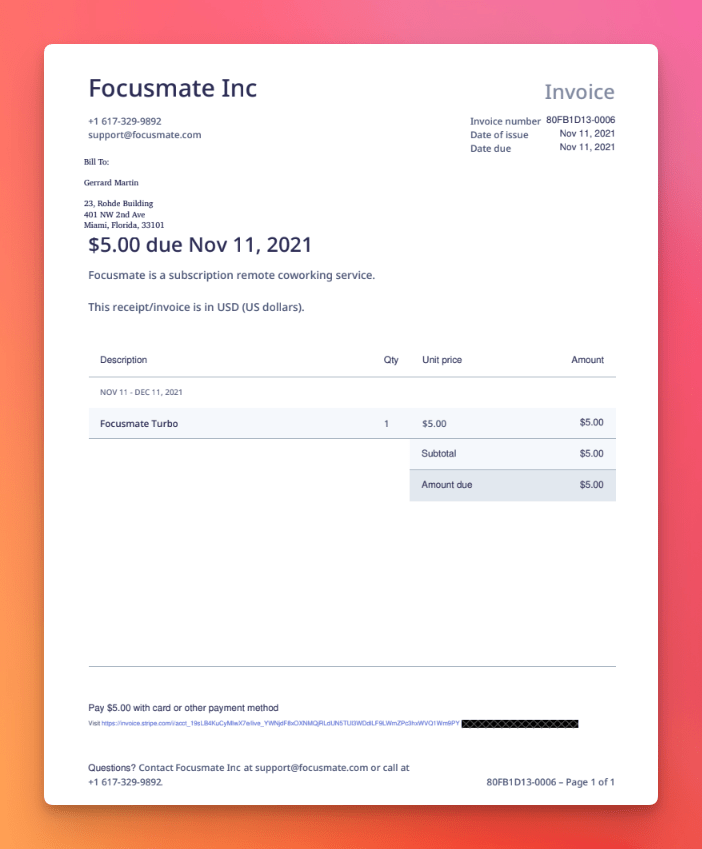
Invoice Document we are going to use:
8.2 Test the API With Postman
With the API endpoint and key ready, testing is straightforward.
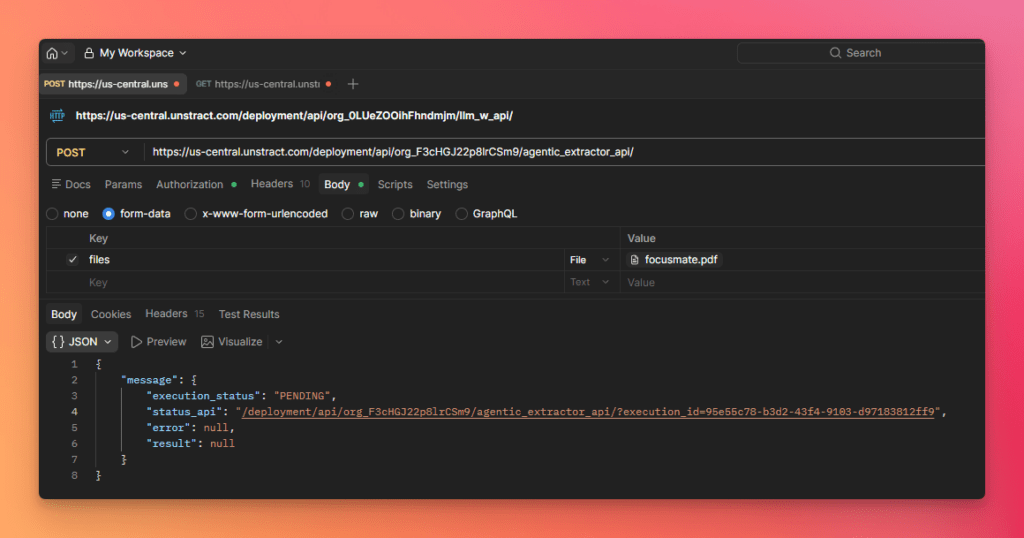
- Open Postman
- Create a POST request
- Paste the copied API endpoint
- Open the Authorization tab
- Select Bearer Token
- Paste the copied API key
- Attach the test invoice document to the request
- Send the request
In response, you will first receive a status API or job reference.
Then:
- Copy the returned status/result URL
- Send a GET request to that endpoint
The API then returns the extracted invoice data in structured JSON format.
This output includes the extracted fields in a clean machine-readable structure, preserving the document’s business meaning and making the result ready for downstream processing.
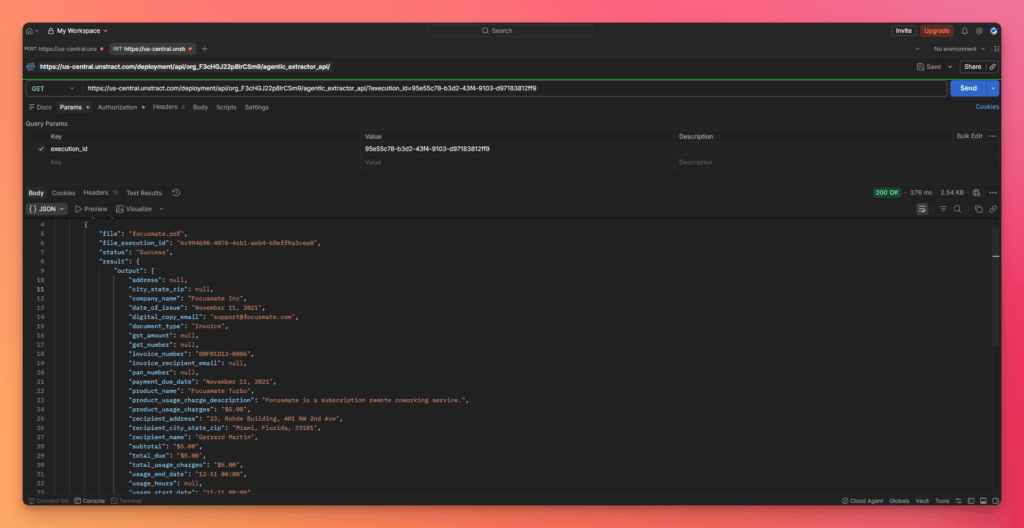
This is the key moment in the workflow: a raw invoice goes in, and structured JSON comes back out through an API. That is the core operational promise of a modern automated document processing platform.
8.3 Why API-First Deployment Matters
An API-first deployment model is important because it makes document extraction usable across the rest of the enterprise stack.
It enables:
- Easy integration with ERP systems
- Direct connectivity with CRM platforms
- Use inside workflow automation tools
- Integration into ETL pipelines
- A simpler operating model for engineering teams
Instead of building separate custom connectors or manual handoff steps, teams can treat document extraction as a service: submit a document, receive structured output, move on with the workflow.
That simplicity is one of the strongest reasons Unstract stands out as automated document processing software designed for production use.
9) Why Unstract vs. Legacy Extraction Systems
9.1 Comparison Table
| Capability | Legacy Extraction Systems | Unstract |
| Setup time | Slow; often requires days or weeks of configuration | Fast; agents accelerate onboarding and setup |
| Schema creation effort | Manual and document-specific | Automatically generated from sample documents |
| Prompting effort | Manual prompt writing or rule crafting | Agent-generated extraction prompts |
| Accuracy visibility | Limited or external | Built-in document-level accuracy scoring |
| Maintenance burden | High; templates and rules need constant updates | Lower; more adaptable to document variation |
| Scalability | Becomes fragile as formats increase | Handles multiple variants more gracefully |
| Cost of iteration | High; every change needs rework and validation | Lower; changes are measurable and easier to test |
| Adaptability to new formats | Weak; new layouts often mean new templates | Stronger; agents infer patterns across variants |
| API readiness | Often requires extra engineering effort | Built for API deployment and reuse |
9.2 Key Takeaway
Legacy systems are usually built around templates, rigid rules, and ongoing maintenance. They can work for narrow document sets, but they become expensive and fragile as document variation increases.
Unstract takes a very different approach. By using AI agents for schema generation, prompt creation, and accuracy validation, it reduces setup work and improves adaptability. That makes it a much stronger fit for organizations looking for scalable, production-ready automated document processing solutions rather than another maintenance-heavy extraction stack.
10) What Automated Document Processing Means in Practice
After seeing the product workflow, it is worth stepping back and defining what automated document processing actually means in practical, operational terms.
At its core, automated document processing is the use of software and AI to take incoming business documents, understand their contents, extract the relevant data, validate that data, and deliver it in a structured format that downstream systems can use. In other words, it turns documents from static files into usable business data.
That sounds simple, but it is one of the most important shifts in enterprise operations. Documents contain critical information, but that information usually arrives in unstructured or semi-structured formats: invoices, forms, statements, scanned PDFs, images, emails, and multi-page records. Humans can read them easily. Software systems usually cannot—unless a proper extraction layer is in place.
This is where automated document processing software comes in. A modern system does not just read text. It helps organizations:
- ingest documents from multiple sources
- identify the important fields and sections
- structure those fields into machine-readable outputs
- route the results into workflows, databases, and business applications
That is why a true automated document processing platform is more than an OCR utility. It acts as a bridge between raw business documents and operational systems.
10.1 Definition
A practical definition of automated document processing is this:
It is the process of automatically converting unstructured and semi-structured documents into structured, validated, workflow-ready data.
The inputs can be many different kinds of business documents.
The outputs are usually structured data formats such as JSON, CSV, or database-ready records.
The operational role is to remove manual extraction work and make document content usable inside business systems.
This is why organizations increasingly adopt automated document processing solutions rather than relying on manual review or legacy extraction systems. They are not just looking for text recognition; they are looking for a way to operationalize the information trapped inside documents.
10.2 Where It Fits in a Workflow
In practice, automated document processing usually sits in the middle of a larger business workflow.
A typical flow looks like this:
- Intake – documents enter the system through uploads, email, APIs, or connected sources
- Extraction – relevant fields, tables, and sections are identified and pulled out
- Validation – extracted results are checked using confidence scores, rules, or human review
- Structuring – outputs are normalized into JSON, CSV, or database-ready formats
- Routing – structured data is sent to ERP systems, CRM tools, workflow platforms, ETL pipelines, or analytics systems
This is what makes automated document processing software operationally valuable. It is not just about extraction accuracy in isolation. It is about where that extracted data goes next and how smoothly it flows into the rest of the business.
10.3 Typical Input Types
A modern automated document processing platform must handle far more than clean digital PDFs.
Typical inputs include:
- PDFs
- Scans
- Images
- Emails and email attachments
- Structured and semi-structured files
- Multi-page and layout-heavy business documents
That input diversity is one of the biggest reasons the space has evolved so rapidly. The problem is not just reading a file. The problem is handling a wide range of real-world formats consistently and at scale.
11) How Automated Document Processing Works: The Tech Behind the Magic
To decision-makers, automated document processing can feel deceptively simple: upload a document, receive structured data, move on. But under the hood, a lot has to happen correctly for that result to be reliable.
A modern automated document processing platform works by combining multiple layers of document understanding, extraction, validation, and delivery. Each layer matters, and weakness at any one stage can affect the entire pipeline.
11.1 Document Ingestion
The process starts with ingestion.
A strong automated document processing software stack must be able to accept documents from different channels and in different formats. That includes uploaded PDFs, scanned records, photographed documents, emails, spreadsheets, and files pulled from connected systems.
This matters because real-world operations are messy. Documents do not arrive in one standard format or one single intake channel. Any serious document automation system must account for that variability from the start.
11.2 Layout Understanding
Once a document is ingested, the system needs to understand its structure.
That means interpreting:
- pages and page order
- section boundaries
- tables and line items
- key-value pairs
- headers, footers, and repeated blocks
- multi-page continuity
This is a critical stage. In many documents, meaning depends not just on text, but on layout. A number on a page is only useful if the system knows whether it is a total, an invoice number, a tax field, or a balance carried from a previous page.
That is why layout understanding is central to high-quality automated document processing solutions.
11.3 OCR vs LLM-Based Extraction
This is where modern systems differ sharply from older ones.
OCR is responsible for turning document visuals into machine-readable text. It is especially important for scans, photos, faxes, and image-heavy PDFs.
LLMs add a different capability. They help interpret the extracted content in context. They can understand that fields with different labels may refer to the same underlying concept, infer meaning across variable layouts, and generalize better across document variants.
So the distinction is:
- OCR extracts the readable text and preserves document structure
- LLMs interpret that text and map it into useful business fields
Modern automated document processing needs both. OCR provides the raw material. LLMs provide the document understanding needed to make extraction reliable across real-world variations.
11.4 Schema Inference and Structured Output
Once the system understands the document, it needs to organize the extracted information into a defined structure.
This is where schema inference becomes powerful.
A schema tells the system what the final output should look like: field names, data types, nesting, required values, arrays like line items, and object groupings like addresses. That structure is what makes the output usable downstream.
Typical outputs include:
- JSON-ready extraction for APIs and modern applications
- CSV-ready data for spreadsheets and analytics
- Database-ready records for enterprise systems
Without a schema, extracted text remains loosely organized. With a schema, the output becomes operational. This is one of the reasons a modern automated document processing platform is so valuable: it does not stop at reading documents; it shapes them into structured outputs that systems can actually consume.
11.5 Confidence Scoring, Validation, and Human-in-the-Loop
Production reliability depends on more than just extraction.
A serious automated document processing software system needs a way to evaluate how trustworthy the output is. That is where confidence scoring, validation, and human-in-the-loop review come in.
These layers help answer critical questions:
- Which extracted fields are highly reliable?
- Which ones need manual review?
- Where does the system consistently make mistakes?
This matters because enterprise adoption requires trust. Teams cannot put extraction into production if they have no measurable way to assess output quality. Validation and review workflows are what make automation safe enough for finance, compliance, healthcare, and other high-stakes processes.
11.6 Reliability at Scale
A pilot is easy. Scale is hard.
Real-world document automation has to handle:
- vendor variability
- changing layouts
- document drift over time
- new formats entering the workflow
- ongoing monitoring and evaluation
This is where many older systems become expensive to maintain. They may work on a narrow set of documents, but every variation creates new rules, new templates, and more operational burden.
Modern automated document processing solutions need continuous evaluation, regression testing, and monitoring so that teams can improve accuracy without breaking what already works. Reliability at scale is less about a one-time setup and more about having the right evaluation and iteration loop in place.
11.7 Security and Governance Basics
For enterprise use, document processing also needs governance.
That includes:
- access control so only the right users and systems can interact with sensitive data
- audit trails so extraction decisions and changes can be tracked over time
- responsible data handling for financial, insurance, healthcare, and personal records
- governance models suitable for production deployments
This is especially important for regulated industries. Whether it is automated document processing insurance, automated document processing healthcare, or automated document processing financial services, organizations need assurance that automation is not only fast and accurate, but also controlled and accountable.
12) Why Modern Automated Document Processing Is Different From Legacy Extraction
The reason this category is evolving so quickly is that modern document processing is built on a fundamentally different model than legacy extraction systems.
Older systems were designed around predictability. Modern systems are designed around variability.
That sounds like a small difference, but it changes everything.
12.1 Legacy Approach
Legacy extraction systems typically rely on:
- templates
- rules
- manual mappings
- constant upkeep
This works reasonably well when documents are highly standardized. But most business environments are not that clean. Vendors use different layouts. Forms change over time. New formats appear unexpectedly. Small changes in wording or positioning can break an otherwise stable extraction flow.
The result is a maintenance treadmill. Teams spend large amounts of time updating templates, fixing mappings, and reacting to extraction failures.
12.2 AI-Native Approach
Modern, AI-native automated document processing software works differently.
Instead of depending entirely on brittle rules, it uses:
- schema inference
- generalized extraction across variants
- faster iteration loops
- less manual setup
That means the system is better able to adapt to document variability. It can recognize that different label styles may refer to the same business field. It can generalize across multiple invoice or statement layouts. It can help users measure extraction performance rather than simply assuming the configuration is correct.
This is the paradigm shift. Instead of hardcoding one format at a time, modern automated document processing platforms aim to understand document classes more flexibly and refine extraction through evaluation and iteration.
12.3 Practical Advantages
This shift produces very practical business benefits.
Less Manual Work
Teams spend less time building templates, writing brittle rules, and manually mapping fields. That alone can remove one of the biggest bottlenecks in document automation.
Faster Implementation
AI-native systems reduce the time required to move from sample documents to usable outputs. That shortens pilot cycles and lowers setup friction.
Better Scalability
As new formats enter the workflow, complexity does not grow as sharply as it does in legacy systems. This is especially important in areas like automated document processing for logistics, where suppliers, carriers, and document sources vary constantly.
Lower Maintenance
Because the system is less dependent on rigid document-specific logic, there is less ongoing rework when layouts change.
Higher Long-Term Accuracy
Accuracy improves over time when systems include evaluation, verified baselines, regression testing, and iteration loops. This is one of the biggest strengths of AI-driven extraction over static rule systems.
Faster Pilot-to-Production Path
Perhaps the biggest advantage is operational. Modern automated document processing solutions make it easier to go from an initial pilot to a measurable, production-ready workflow. That speed matters for organizations under pressure to automate quickly and show business value early.
In short, legacy extraction was built for stable documents. Modern automated document processing is built for the real world. That is why this shift matters—and why platforms like Unstract are gaining relevance across industries.
13) Industry Use Cases: Where Automated Document Processing Delivers Value
The value of automated document processing becomes clearest when you look at industry workflows. Different sectors have different documents, risks, and compliance needs, but the pattern is the same: critical business data is locked inside files, and manual extraction slows everything down.
13.1 Automated Document Processing in Insurance
Automated document processing insurance workflows are especially challenging because insurance teams deal with high document variability and high accuracy requirements.
Common document types include:
- claims documents
- policy forms
- underwriting files
- ACORD forms
These documents often contain mixed layouts, handwritten entries, checkboxes, multi-page sections, and supporting attachments. Legacy systems struggle because even small layout changes can break extraction logic.
Unstract modernizes insurance workflows by combining layout-aware OCR, AI-driven extraction, validation, and API deployment. That makes it easier to extract policy numbers, insured details, claim values, coverage terms, and underwriting data in a structured format—without building a template for every form variation.
13.2 Automated Document Processing in Finance and Accounting
Finance teams are among the biggest adopters of automated document processing software because they deal with large document volumes and repetitive extraction tasks.
Typical finance and accounting documents include:
- invoices
- bank statements
- credit applications
- reconciliation documents
This is also where automated document processing financial services workflows matter most. Accuracy is critical because extracted values directly affect approvals, reporting, payments, and reconciliation.
Unstract helps automate these workflows by turning invoices and statements into structured data that can be routed into ERP systems, finance workflows, or analytics pipelines. Instead of spending time on manual entry and correction, teams can focus on review, exceptions, and higher-value decisions.
13.3 Automated Document Processing for Logistics
Automated document processing for logistics is important because logistics teams work with dense, operationally critical documents that often arrive in inconsistent formats.
Common examples include:
- airway bills
- bills of lading
- packing lists
- customs documents
These files may be scanned, handwritten, multi-page, or partially structured. They also often include tables, shipment references, consignee details, and itemized cargo data.
Unstract helps logistics teams by preserving layout, extracting structured shipment data, and making that information available via APIs for downstream systems. This reduces manual bottlenecks and speeds up processing across shipping, customs, and warehouse workflows.
13.4 Automated Document Processing in Healthcare
Automated document processing healthcare workflows require both accuracy and traceability because the documents are operationally and legally sensitive.
Common healthcare document types include:
- claims
- intake forms
- medical records
- referral documents
These documents are often semi-structured, multi-page, and filled with domain-specific terminology. Manual processing creates delays and increases the risk of missing or inconsistent data.
Unstract helps healthcare teams extract structured information from these documents in a more reliable way, supporting intake automation, claims handling, document review, and downstream system updates. With validation and review workflows, it also supports the governance standards healthcare organizations need.
14) Business Value: Why Organizations Invest in Automated Document Processing
Organizations do not invest in automated document processing solutions just to save keystrokes. They invest because documents sit at the center of operational throughput, compliance, and decision-making.
14.1 Operational Efficiency and Cost Reduction
The first benefit is speed and efficiency.
Automated document processing helps organizations achieve:
- faster turnaround times
- lower processing overhead
- 24/7 document handling
- reduced manual data entry
It also allows teams to shift effort away from repetitive extraction work and toward review, analysis, and exception handling. That improves both cost efficiency and workforce productivity.
14.2 Accuracy, Compliance, and Data Quality
A strong automated document processing platform also improves data quality.
Key benefits include:
- better consistency across documents
- traceability of extracted outputs
- auditability for regulated workflows
- lower manual risk
With validation, confidence scoring, and review workflows, organizations gain more control over what enters their systems. That is especially important in finance, insurance, and healthcare environments where incorrect extraction can create downstream operational or compliance problems.
14.3 Competitive Advantage and Transformation
Beyond efficiency, automated document processing creates strategic value.
It helps organizations:
- unlock trapped data from hard-to-process documents
- make faster decisions
- improve customer experience with quicker response cycles
- build a foundation for broader AI and automation programs
In many cases, document processing is the first step toward deeper workflow modernization. Once document data becomes structured and accessible, it can power analytics, automation, and system integration across the business.
15) Common Use Cases and Applications
One reason automated document processing has become such an important category is that it applies across many document types and business scenarios.
15.1 Common Document Types
Common document types include:
- invoices
- contracts
- statements
- medical forms
- claims
- agreements
- government forms
- HR documents
These files may be structured, semi-structured, or highly variable, but they all contain information that businesses need to move into systems and workflows.
15.2 Common Scenarios
Typical usage scenarios include:
- high-volume document processing
- multi-format extraction
- compliance-heavy workflows
- structured data generation for downstream systems
This is why modern automated document processing software is increasingly viewed as a core operational layer rather than a niche tool. It supports everything from finance back-office automation to industry-specific workflows in insurance, logistics, and healthcare.
16) Strategic Guidance for Decision-Makers and Implementers
Adopting automated document processing successfully is not just about choosing a tool. It is about choosing the right starting point, defining measurable outcomes, and building an operating model that can scale.
16.1 How to Choose the Right First Use Case
The best first use case usually has four traits:
- High volume — enough document flow to justify automation
- High variability — enough complexity that manual work or legacy rules are painful
- High business impact — direct value in cost, speed, or risk reduction
- Clear ROI path — measurable improvement within a realistic pilot window
This is why invoices, claims documents, statements, and logistics paperwork are common starting points for automated document processing solutions.
16.2 Define Success Metrics
Before rollout, define what success looks like.
Key metrics usually include:
- Accuracy
- Cycle time
- Cost per document
- Exception rate
- Review load
A strong automated document processing platform should make these metrics visible and improvable over time.
16.3 Operating Model Considerations
Even the best automated document processing software needs a clear operating model.
Teams should decide:
- who owns the workflow
- how review and approval flows work
- what the escalation path is when extraction fails
- how changes will be managed and rolled out
This is especially important in finance, insurance, and healthcare where document errors have downstream consequences.
16.4 Long-Term Planning
Long-term success depends on planning beyond the pilot.
Important decisions include:
- Build vs buy
- Integration strategy across ERP, CRM, and workflow systems
- Data strategy for ground truth, validation, and evaluation sets
- Extensibility for future document types
- Avoiding vendor lock-in while keeping deployment flexible
That is where a modern automated document processing platform has an advantage over point tools.
17) Implementation Guide: Getting Started With Automated Document Processing
A practical rollout works best when it is narrow, measurable, and grounded in a real business workflow.
17.1 Assessment and Planning
Start with the basics:
- identify current bottlenecks
- prioritize a high-impact pilot
- build a business case using realistic baselines
- define KPIs and acceptance criteria
The goal is not to automate everything at once. It is to prove that automated document processing can improve one valuable workflow first.
17.2 Solution Selection Criteria
When evaluating options, focus on:
- Accuracy
- Flexibility
- Integration
- Governance
- Scalability
- Total cost of ownership
This is where organizations should look beyond surface demos. The right automated document processing software should not only extract well, but also support validation, deployment, and long-term maintenance.
17.3 Why Unstract + LLMWhisperer Is a Strong Option
The earlier demo shows why this combination stands out.
- Unstract simplifies setup through Agentic Prompt Studio
- LLMWhisperer provides layout-preserving OCR for reliable input handling
- Built-in evaluation, verified data, and deployment workflows make the path to production clearer
Together, they form a practical automated document processing solution that reduces setup friction while improving extraction quality and deployment readiness.
17.4 Implementation Best Practices
A few practices make adoption smoother:
- Start narrow, then expand
- Establish ground truth and a test set early
- Build evaluation loops for review and iteration
- Plan for monitoring, versioning, and scale from the beginning
This is what turns a pilot into a durable automated document processing platform rollout.
18) Conclusion: Transforming Document Processing in 2026
18.1 Key Takeaways
The biggest shift in 2026 is clear: document processing is moving away from templates, brittle rules, and manual mappings toward AI-driven extraction that is faster to set up, easier to evaluate, and more adaptable in production.
The demo showed exactly what that looks like in practice:
- upload real documents
- generate schema and prompts automatically
- extract structured data
- measure accuracy
- deploy the workflow as an API
Call to Action: What’s next?
The next step is simple:
Unstract is available in multiple editions, including:
- On-prem
- Cloud
- Open source
The future of document processing is here, and it is more accessible than you think.
Frequently Asked Questions:
1. How does Unstract’s API-first model simplify automated document processing integration?
You just send a document to a single API endpoint and receive structured JSON back, eliminating the need to manually build templates or write extraction rules. This allows you to plug automated document processing directly into your existing ETL pipelines, ERP systems, or serverless functions.
2. Can I deploy the extraction workflow without managing infrastructure or prompts?
Yes, you export your Agentic Prompt Studio project as a deployable API, and the platform auto-generates production-grade prompts using a three-agent pipeline. This turns automated document processing software into a managed service where you focus on code, not prompt engineering.
3. How does LLMWhisperer handle scanned and layout-heavy documents?
LLMWhisperer is a layout-preserving OCR engine that converts scanned PDFs and images into machine-readable text while maintaining reading order, tables, and key-value pairs. This ensures your automated document processing platform receives clean inputs, which dramatically improves extraction accuracy for messy real-world files.
4. How does the platform handle schema inference across multiple document variants?
Agentic Prompt Studio uses a three-agent pipeline (Summarizer, Uniformer, Finalizer) to analyze sample documents and automatically generate a JSON schema that reconciles field naming differences like “Invoice No.” vs “Invoice #”. This removes the manual schema-design overhead common in legacy automated document processing software.
5. Can I run Unstract locally or on my own infrastructure?
Yes, Unstract is available in multiple editions including on-premise and open source, not just cloud. This allows engineering teams to integrate automated document processing into air-gapped or VPC environments for security and compliance.