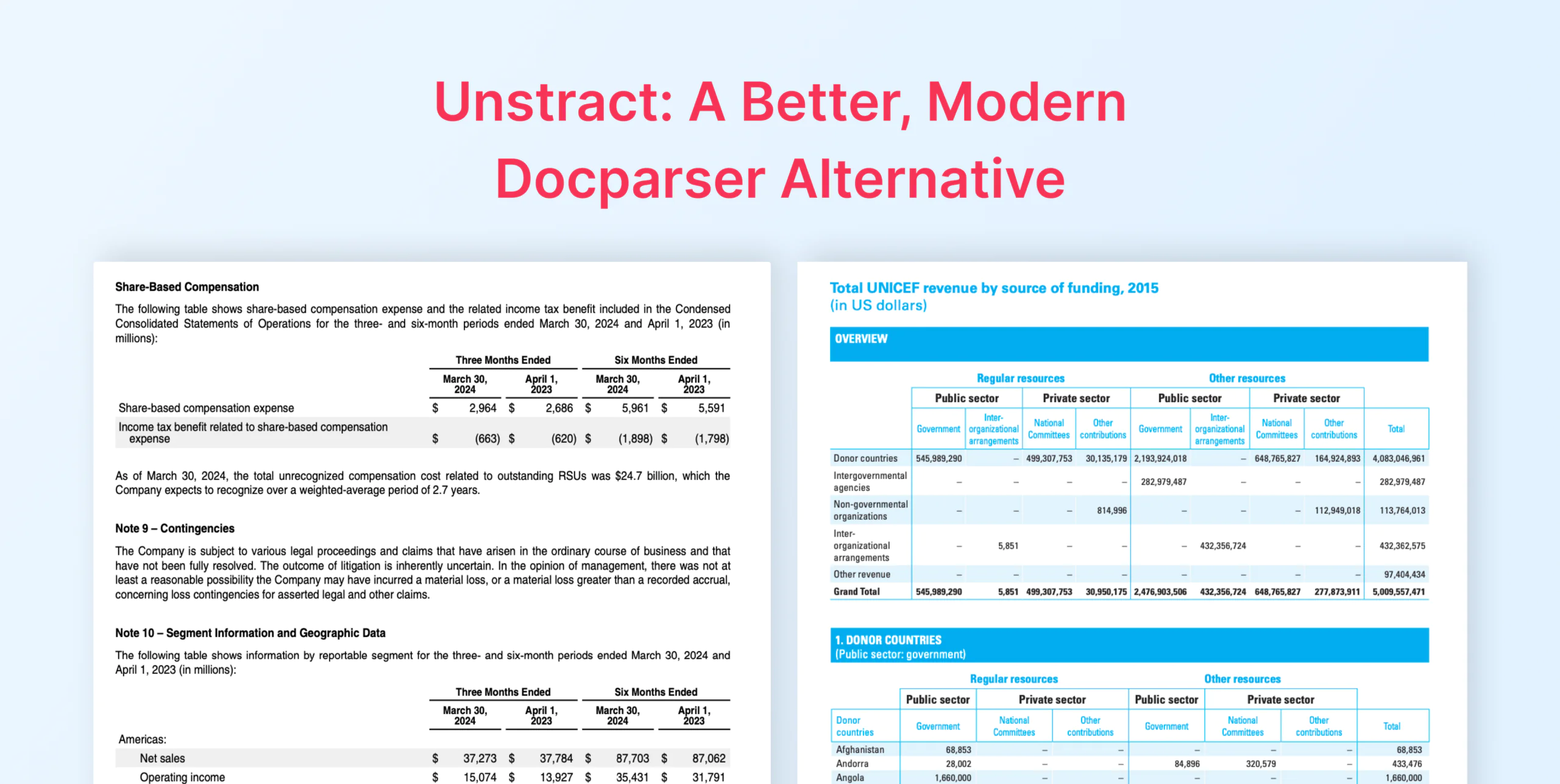
Docparser struggles with handwriting, checkboxes, and layout drift — its zone‑based rules return wrong data silently when formats shift. Unstract uses agents to build extraction logic automatically, preserving layout and scoring every result. On real documents, Unstract outperformed Docparser across every test. It’s the alternative that actually handles messy, real‑world documents.
Every document automation tool looks good when the documents have a fixed format. Upload a clean invoice. Extract a few fields. Send the data to the next system. Done. The problem starts when the next document looks slightly different. Suddenly, the extraction pipeline that worked yesterday needs attention again.
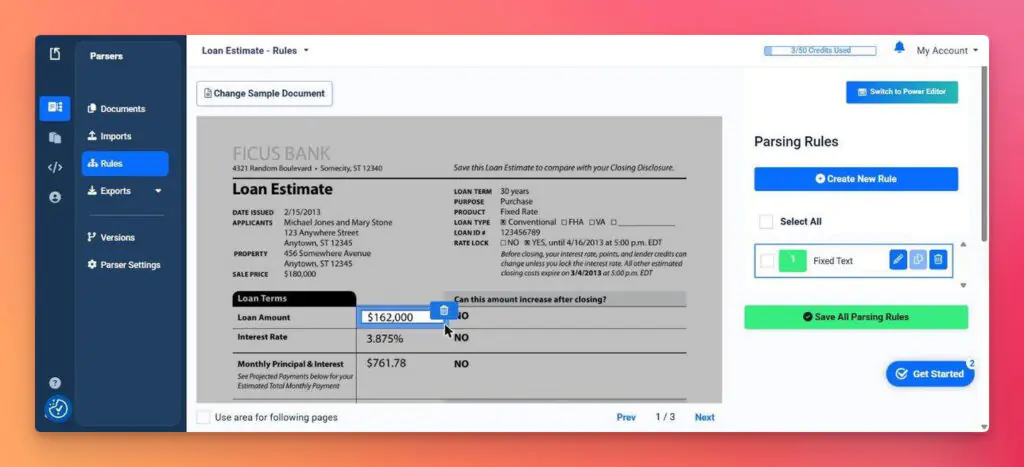
That is the trade-off behind rule-based document extraction tools like Docparser. Docparser processes PDFs through rule-based extraction. You upload a sample document, draw zones around the fields you want, and anchor them to keywords.
For stable, recurring layouts, that works. But when document quality or format changes, someone has to rebuild the pipeline. That maintenance loop is what drives teams to hunt for a Docparser alternative like Unstract.
Unstract is an LLM-powered document processing platform built on an open-source core, where agents generate the extraction schema themselves. No zones to draw, nothing to redraw when layouts drift.
This Docparser vs. Unstract walkthrough shows how both tools behave on the same documents, a hands-on Docparser comparison across OCR accuracy, structured data extraction, workflows and Docparser pricing.
Stop rebuilding your document parser every time a layout changes.
Docparser rules break when vendors redesign invoices or scans arrive crooked. Unstract uses agents to generate the schema and extraction prompt automatically — no zones to draw, nothing to redraw when formats shift. One project scales from ten documents to ten thousand without a single template.
Try Unstract for free on the Playground. No signup required.
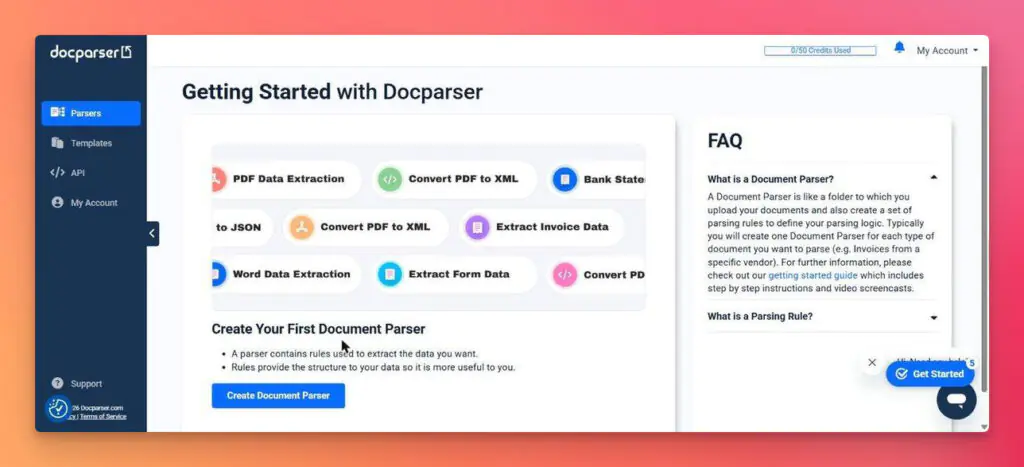
Docparser is a rule-based document parser. You upload a sample document, drag rectangles around the data you want, and anchor each zone to a keyword or pattern. Those become your parsing rules. A template library covers common cases such as invoices and purchase orders. Each parser handles one document layout, which explains most of what follows.
Parsed data downloads as Excel, CSV, JSON, or XML, or lands in Google Sheets and Salesforce directly. Everything else connects through Zapier, Make, Power Automate, or webhooks.
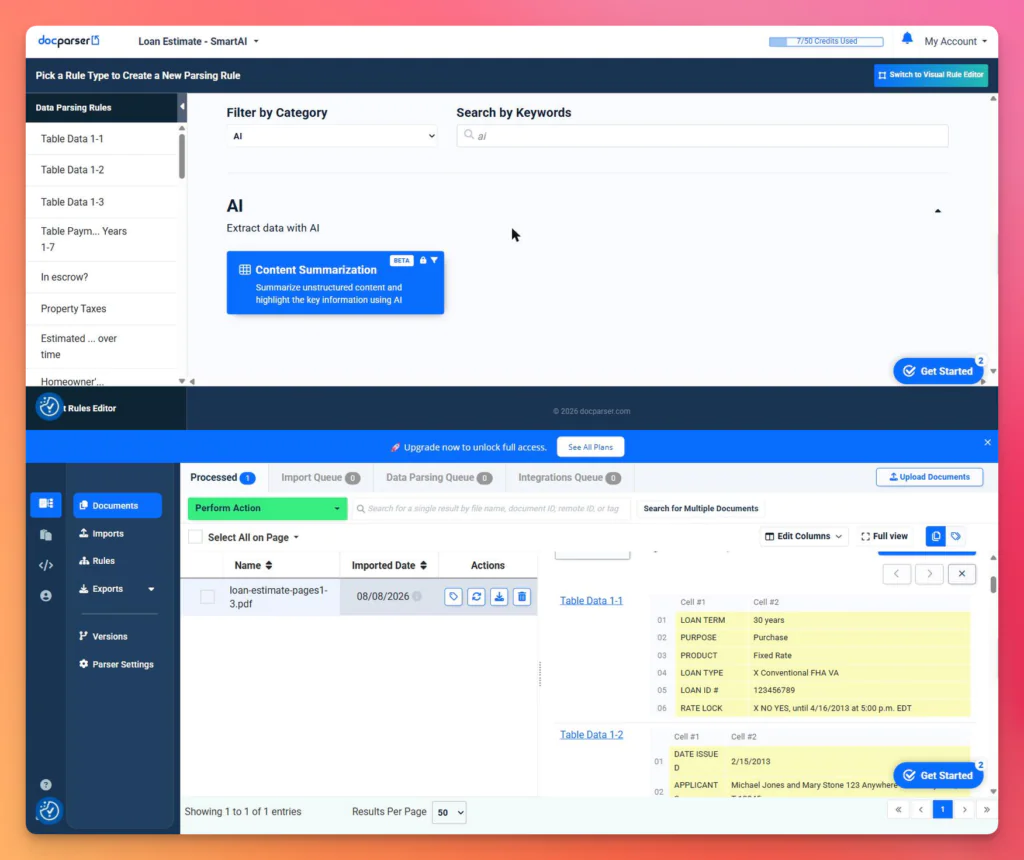
DocparserAI adds two AI features on top of the rules engine. A SmartAI Parser template drafts parsing rules from a single sample, and a Smart Checkboxes rule type reads checkbox state with a confidence score. We tested both. Neither changes the underlying model: the output is still positional rules, tied to where things sit on the page.
Docparser holds 4.6 out of 5 across 54 reviews on G2 and 4.8 across 127 on Capterra at the time of writing. Across both sites, the praise and the complaints each land in four places, which is how the two lists below are split.:
Strengths
Printed text: clean on a fixed layout, including typed values and table cells.
Rule editor: quick to learn, with instant preview on each zone.
SmartAI: drafts a full rule set in two minutes instead of 22.
Predictability: billing is per document, and a zone returns the same text every time.
Limitations
Rule maintenance: one parser per layout, capped per plan.
Scan quality: one Capterra reviewer, a company president in farming, reports values drifting when PDFs change or arrive scanned at an angle, and errors that are hard to catch at order-entry time.
Handwriting: mostly beyond what zonal rules can reach, a gap covered in our guide to OCR for forms.
Multi-layout parsing: a $25/month add-on on the two lower plans, bundled only from Business up.
How to pick the right document extraction platform in 2026: Legacy IDP to LLMs
Signup needs no credit card. The trial runs for 14 days with 50 parsing credits. One credit covers up to five pages, so a 15-page document costs three.
Testing Docparser’s OCR
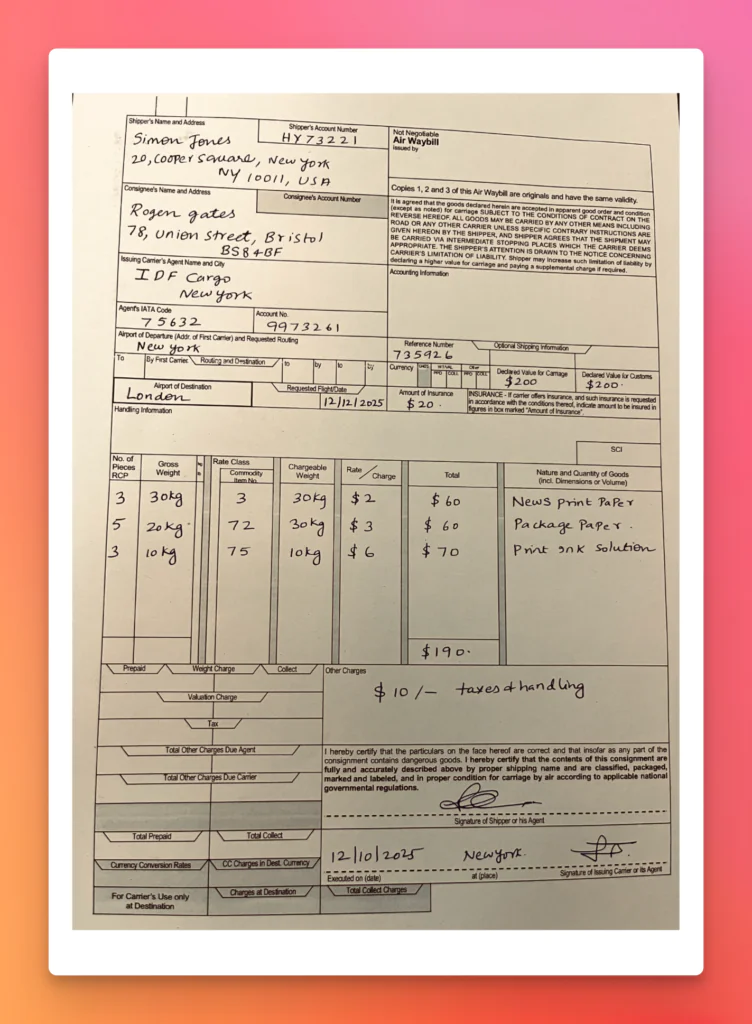
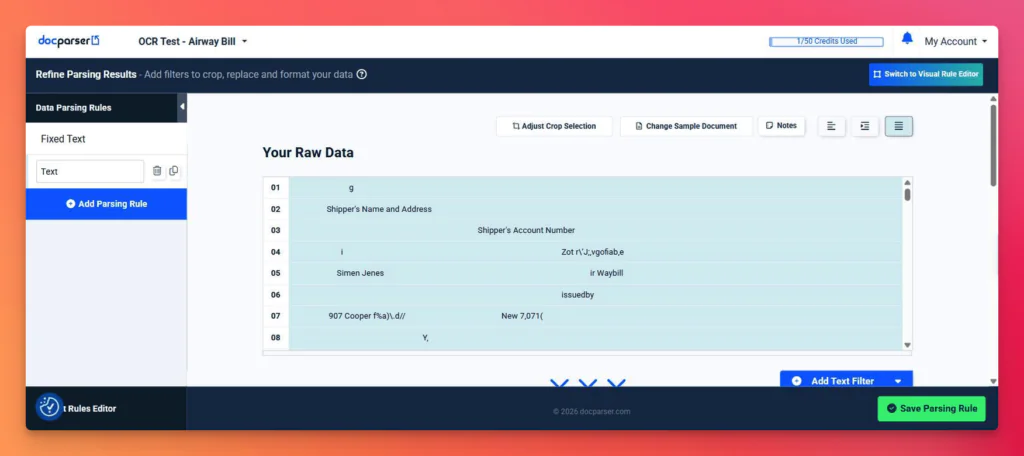
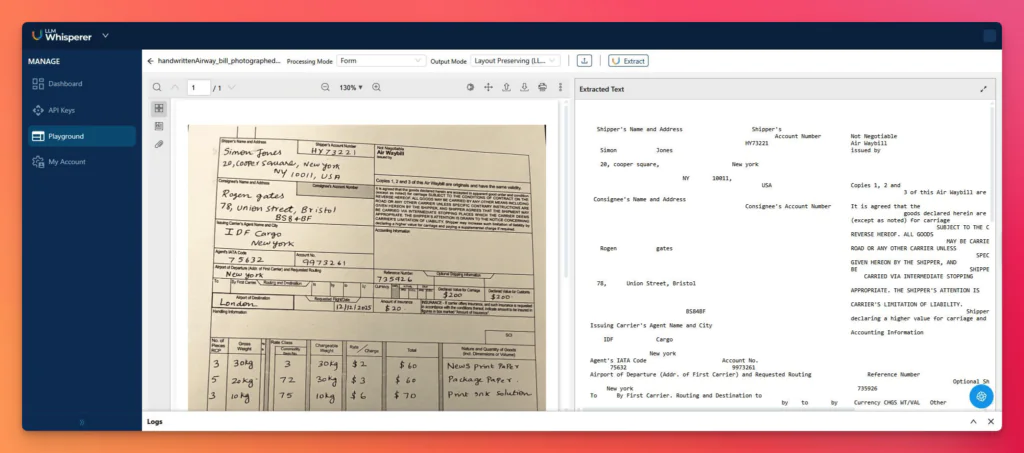
The first document was a photographed handwritten air waybill.
Docparser returned 3 of 21 target fields. The shipper’s name came back as Simen Jenes, the street address as broken characters, London as ondert, and the handwritten total of $190 as 4119. No charge row came back complete. The middle row collapsed, the other two lost their totals.
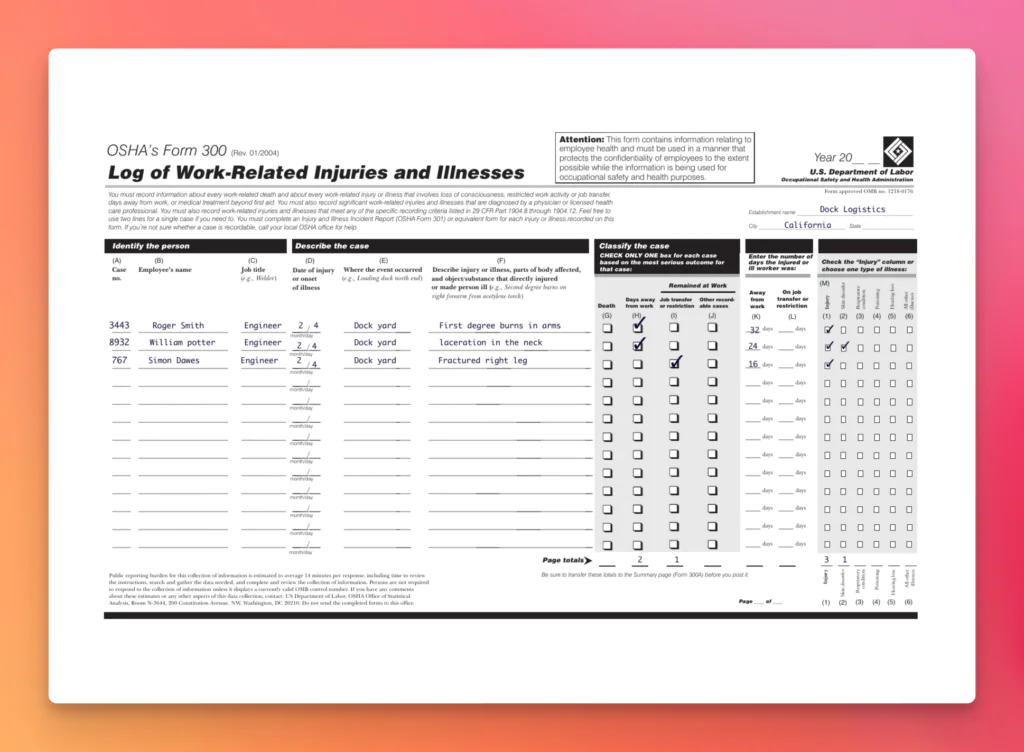
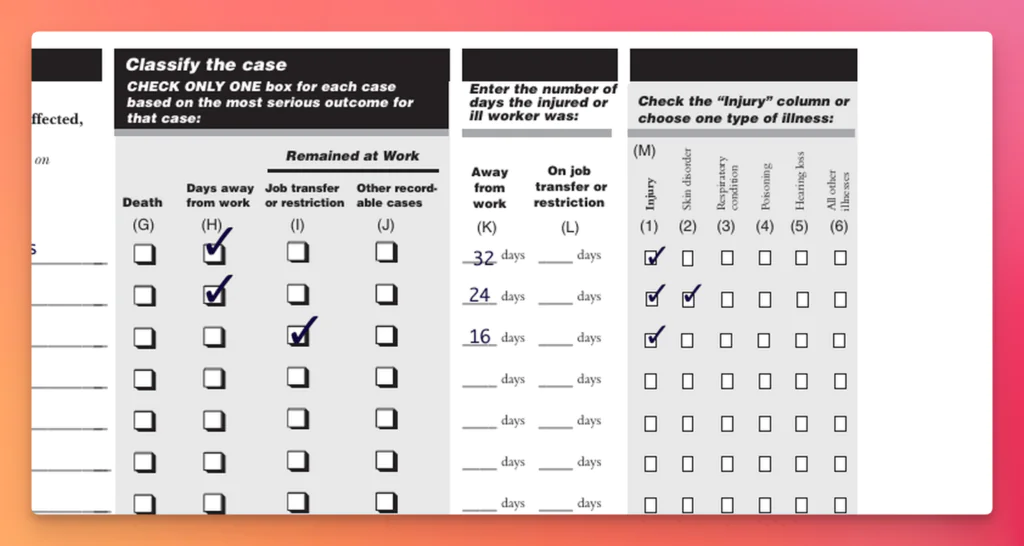
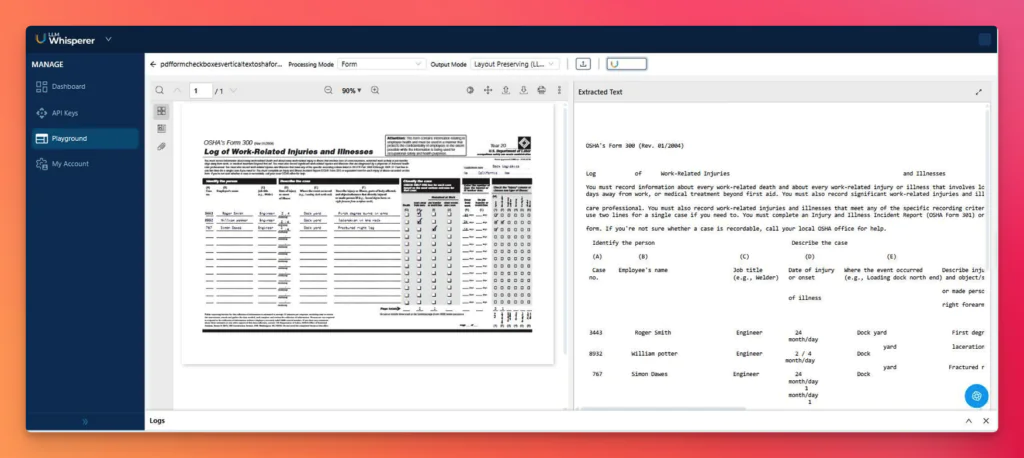
The second document was a filled OSHA Form 300.
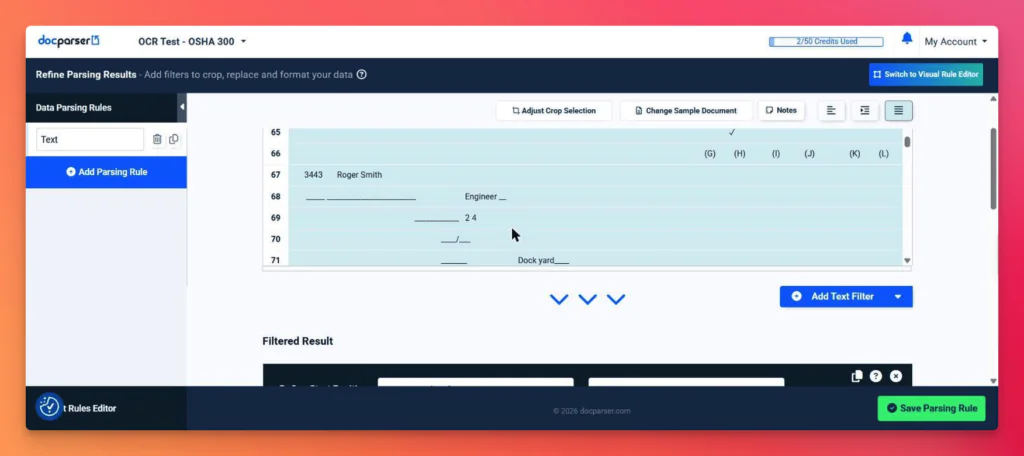
Printed and typed text came through fine. Examples include case numbers, employee names, job titles, the dock yard location, and the page totals row.
The checkbox grid did not. All four outcome columns render as the same glyph pair on every row, filled and blank alike. A few check marks float at the end of lines with no indication of which column they belong to. The form exists to record which outcome applies to which case. Lose that mapping and the extraction has lost the point of the form.
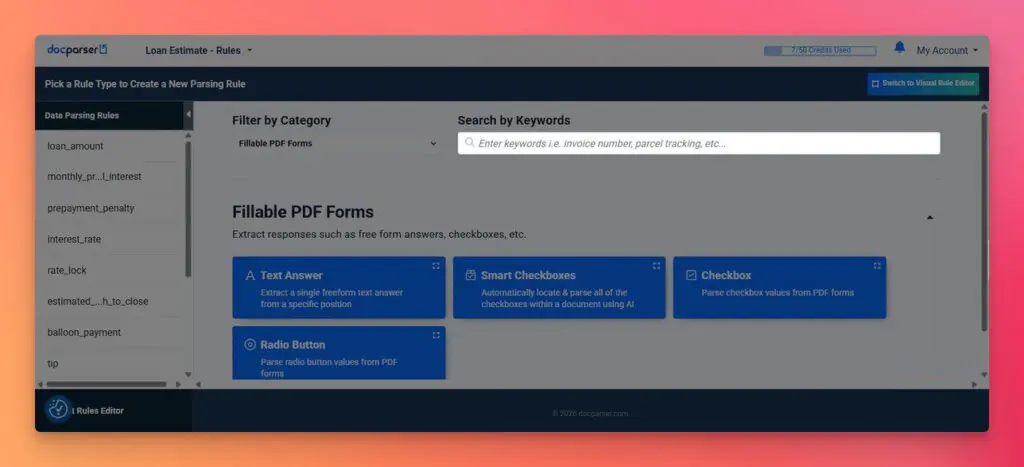
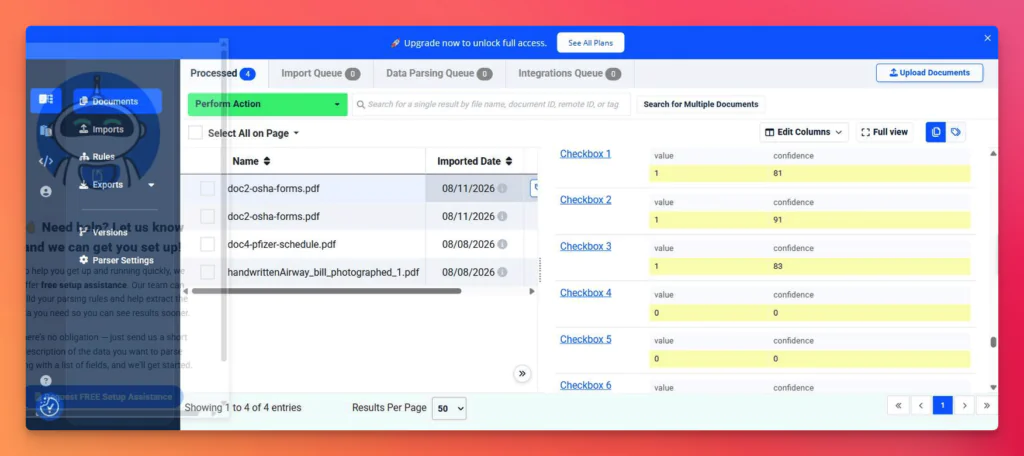
Smart Checkboxes produces a more usable result for the checkbox grid and is available on the Starter plan.
Pointed at the same form, it found 44 checkboxes and flagged 6 as ticked, four with confidence scores between 81 and 93. The form carries 7 ticks, visible in the close-up below.
The count is close. The naming is the problem. The rules come back as Checkbox 1 through Checkbox 44, and nothing in the output says where any of them sit on the page.
Rules break when documents change. Unstract doesn’t.
Docparser returned 3 of 21 fields on a handwritten air waybill and misaligned checkboxes on an OSHA form. Unstract returned all 21 fields correctly, preserved checkbox positions, and handled the same documents without a single zone drawn. Get accurate extraction on handwriting, checkboxes, and messy real‑world documents.
Try Unstract for free on the Playground. No signup required.
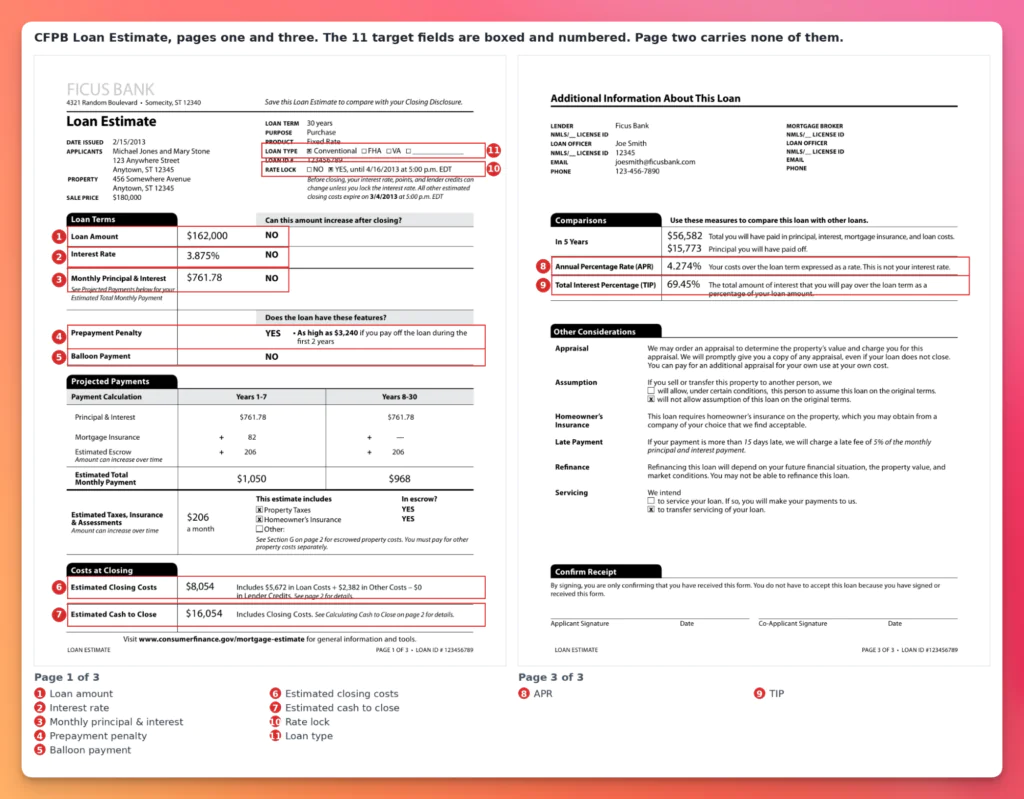
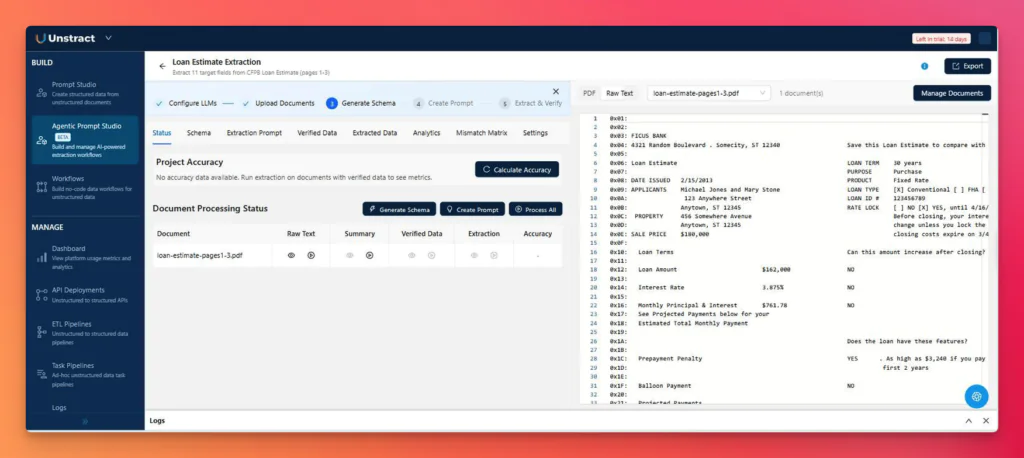
The third document was a three-page CFPB loan estimate. We targeted 11 fields on the three-page loan estimate.: loan amount, interest rate, monthly principal and interest, prepayment penalty, balloon payment, estimated closing costs, estimated cash to close, APR, TIP, rate lock and loan type.
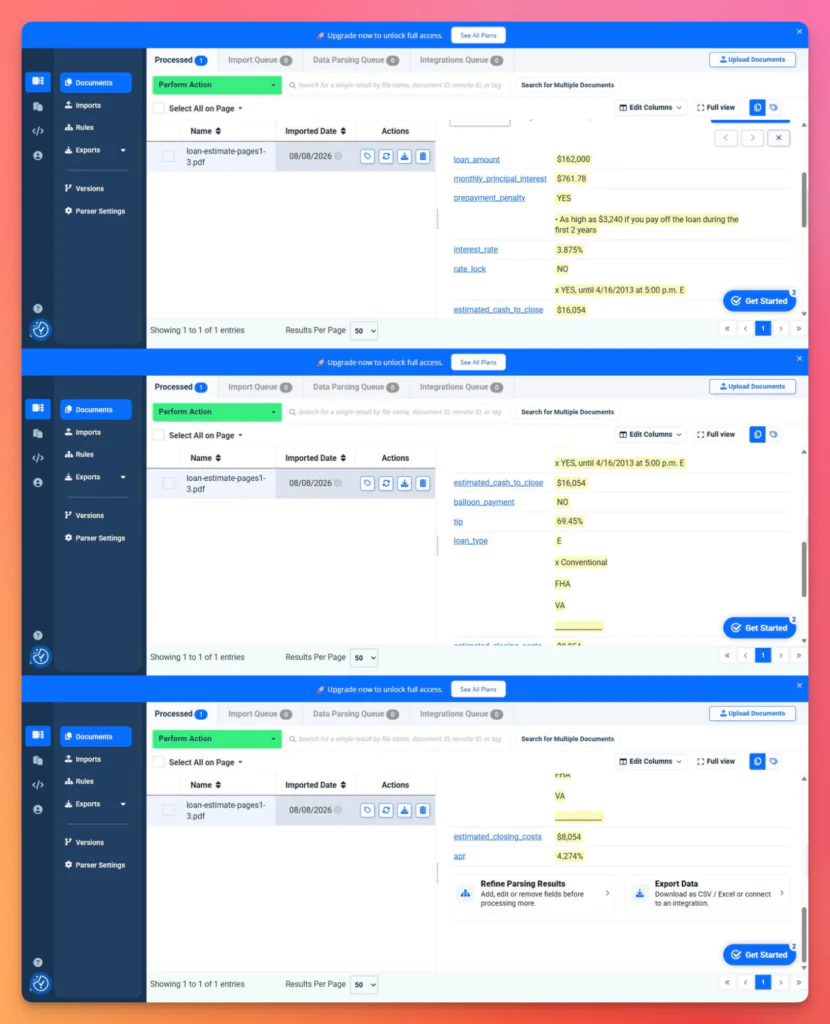
Drawing the zones by hand took 22 minutes. Nine of those 11 target fields came back correct: loan amount, interest rate, monthly payment, closing costs, cash to close, APR, and TIP all clean.
Rate lock and loan type failed the same way, returning every option on the form as one blob. The loan type field reads E, then x Conventional, then FHA, then VA. The X is present. Nothing indicates which option it marks.
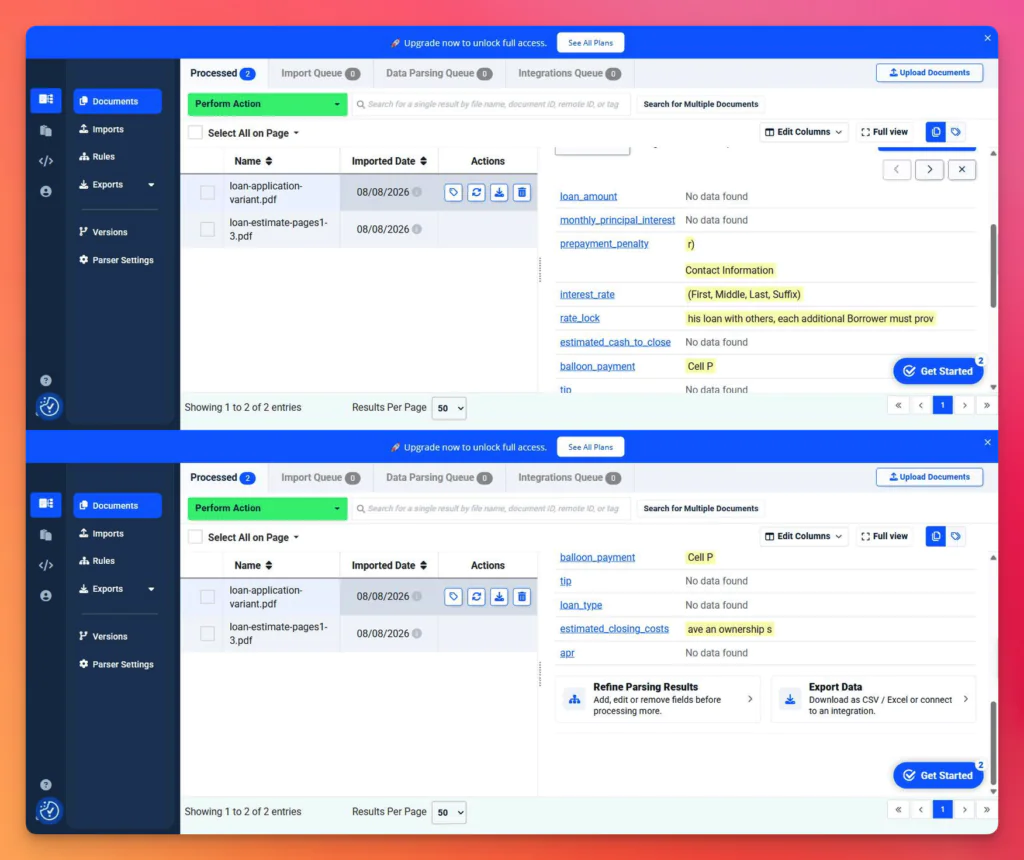
Using the same 11 hand-drawn zones, we pointed the parser at a Uniform Residential Loan Application, where the same information sits elsewhere on the page. Score: 0 of 11.
Six zones landed on blank space and returned nothing. The other five returned whatever text now sat at those coordinates: interest rate came back with a label about name suffixes, closing costs with a fragment about ownership shares. Docparser reported the run as successful and flagged none of it.
We also ran the SmartAI Parser on the same document. It generated around 35 editable rules in two minutes instead of 22, and landed at the same 9 of 11, failing differently.
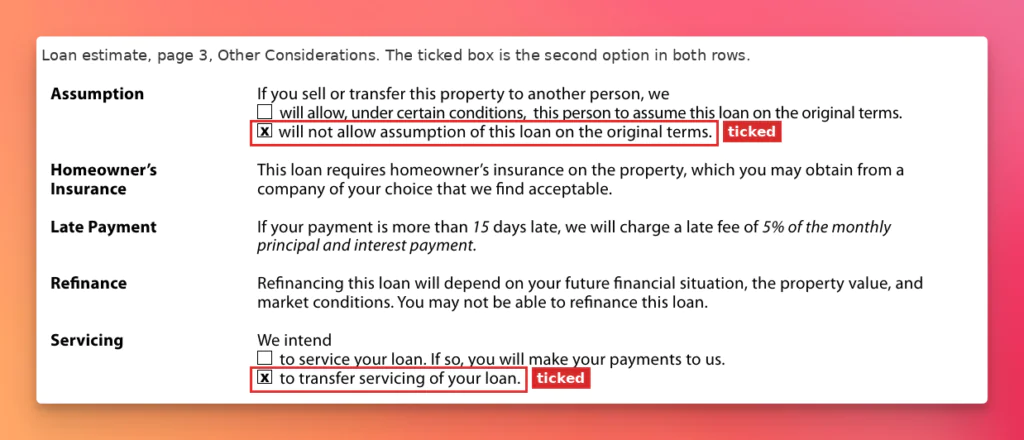
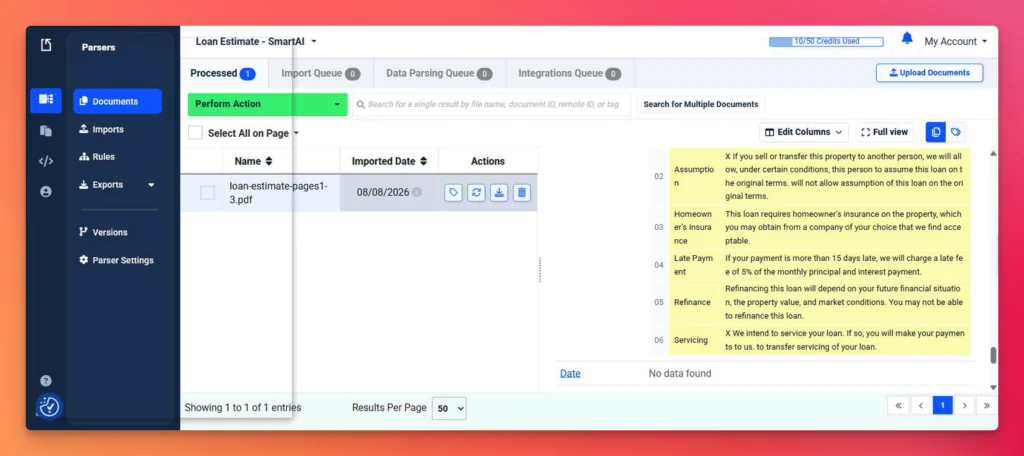
Two rows in the Other Considerations block on page 3 show the pattern. On the form, both rows have the second box ticked. Assumption reads “will not allow assumption of this loan”, and Servicing reads “to transfer servicing of your loan”.
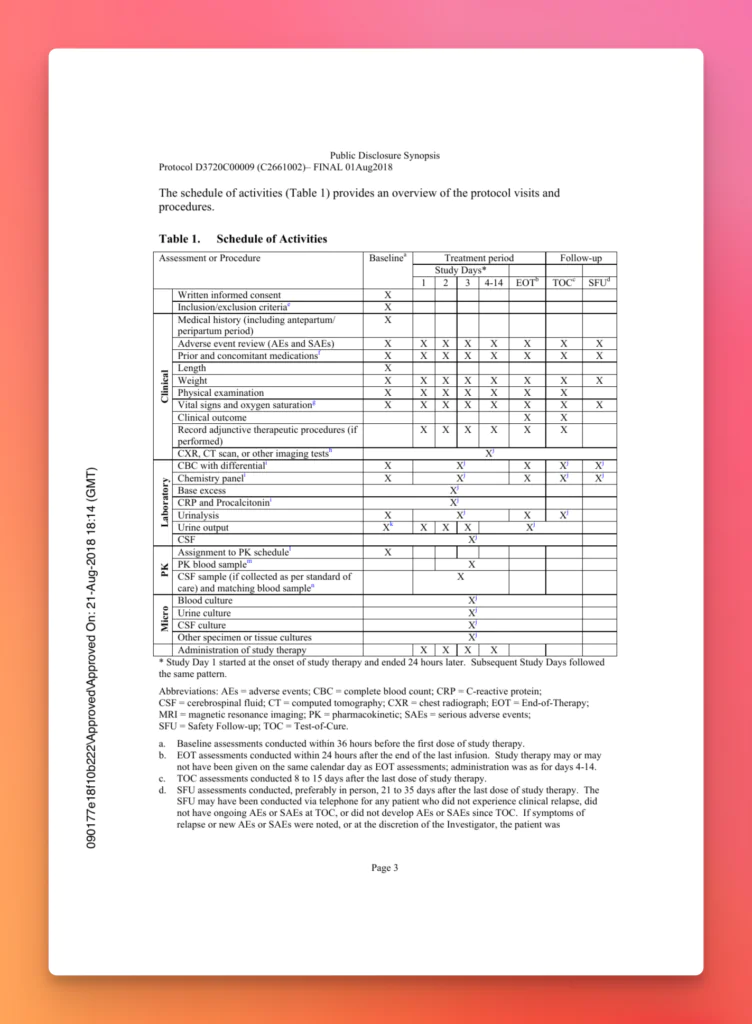
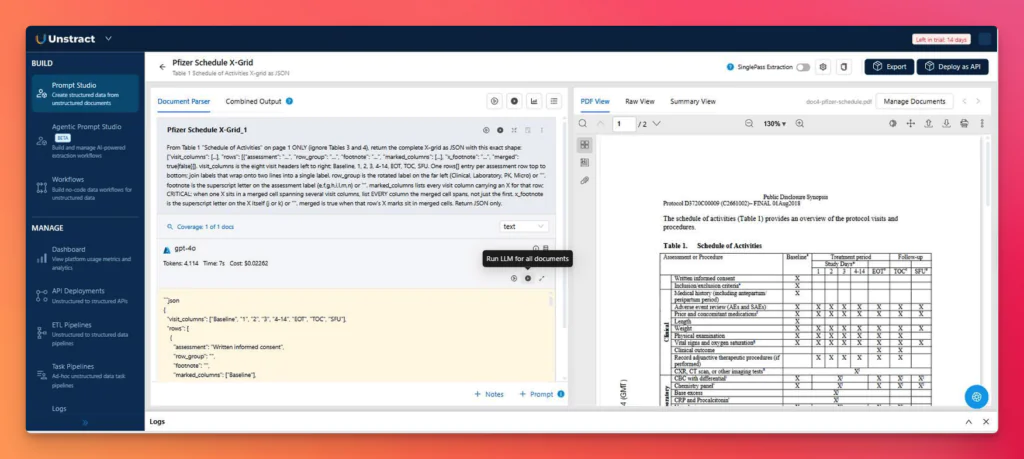
SmartAI returned both rows but with the checkmarks misaligned. The fourth document was a clinical trial schedule of activities, a nine-column grid where many X marks span several visit columns.
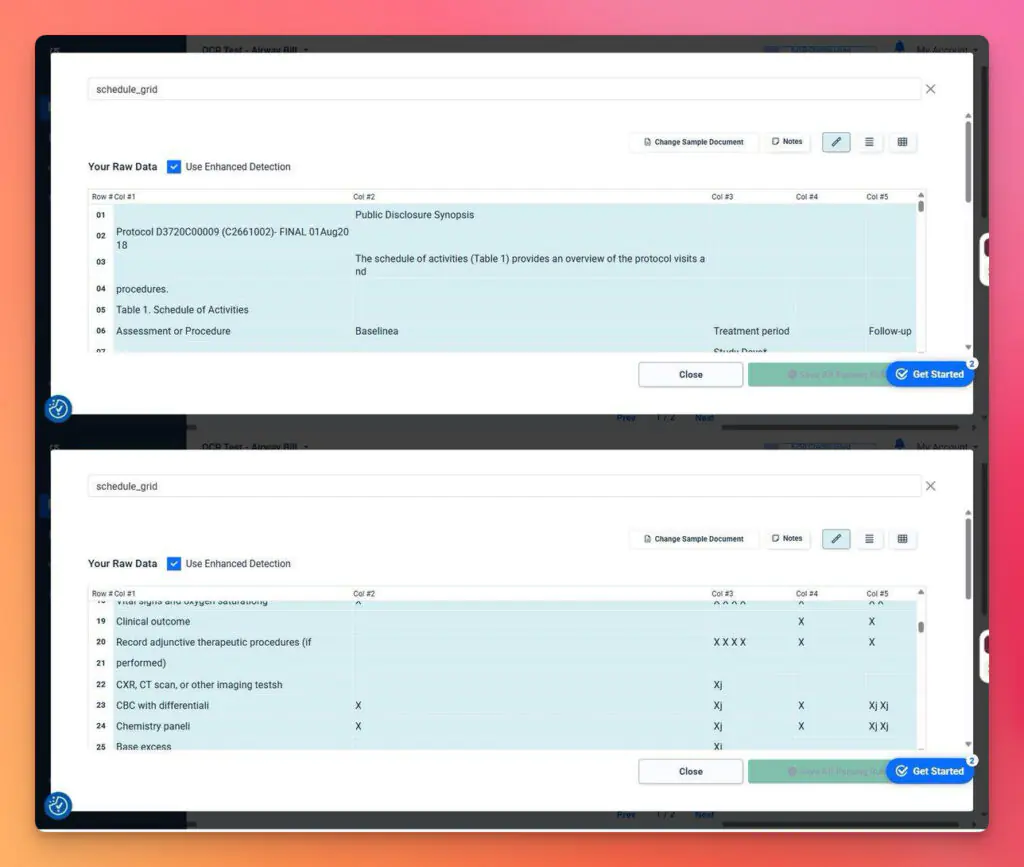
Rather than drawing nine separate column rules by hand, we used Docparser’s table rule, placing one zone over the grid with Use Enhanced Detection enabled so the rule could infer the column boundaries.
Docparser detected five of the nine columns. The output labels them Col #1 through Col #5, and the visit names that should head those columns are demoted to an ordinary data row, so a row like Clinical outcome comes back with two X marks and no way to say which visits they fall in.
Summary Analysis of Docparser’s Processing
Printed text on a fixed layout is Docparser’s home ground, and SmartAI makes setup quick. The failures were consistent:
The OCR layer loses form semantics. Handwriting largely did not survive, and checkbox marks were misaligned, so a tick could not be traced to its row or column.
Table structure flattens. A nine-column merged grid returned as five columns, footnotes fused into values.
Positional rules break silently. A changed layout produced confident wrong values, not an error.
Watch: How to turn complex document tables into usable data with AI
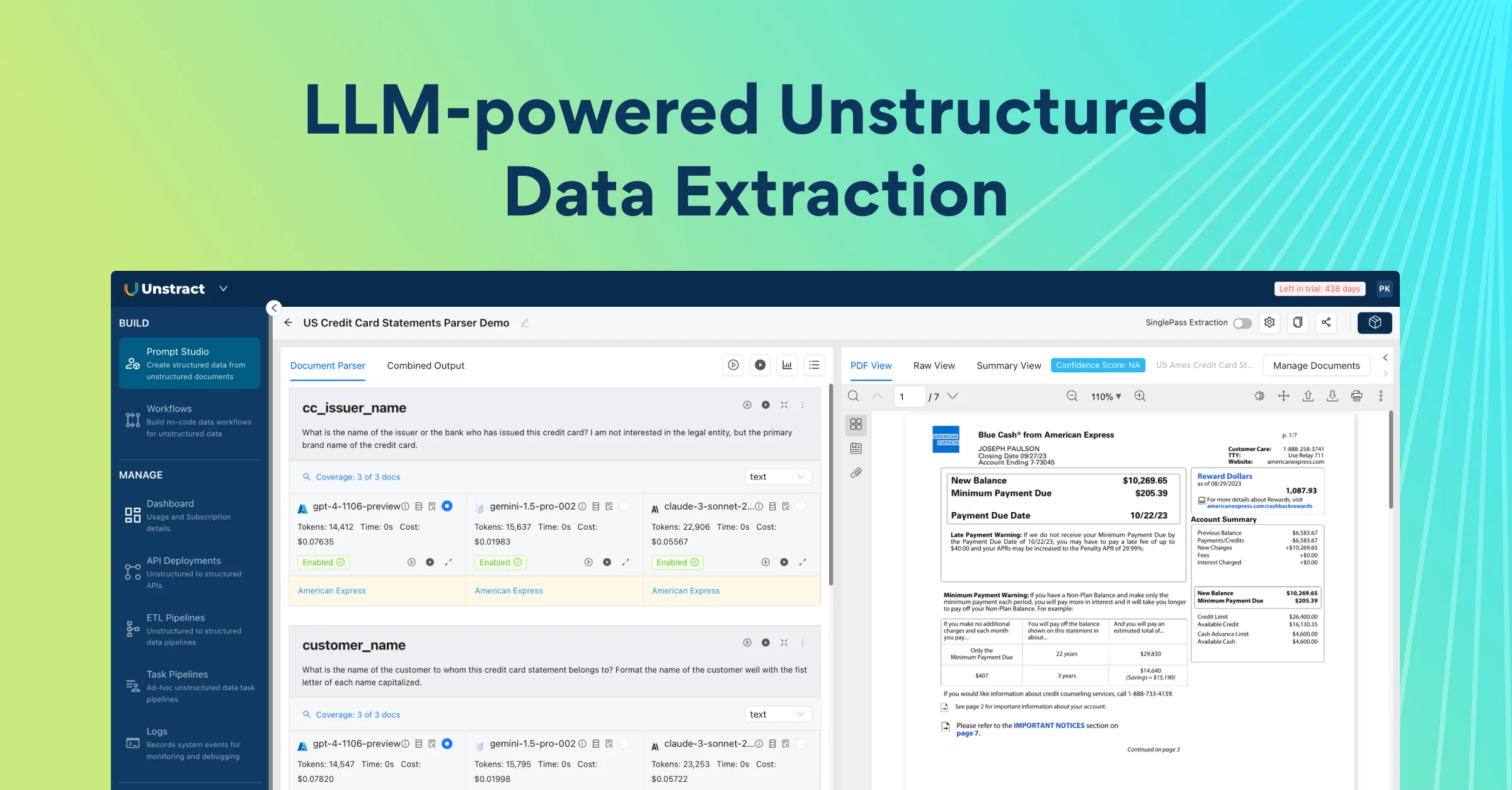
Agentic Prompt Studio: agents read the document, generate a JSON schema, write the extraction prompt, run the extraction, and score the result against a verified baseline. No zones, no rules.
LLMWhisperer: converts PDFs, scans, and photographs into layout-preserved text before any model sees them, which determines whether checkbox states and handwriting survive.
Workflows and ETL pipelines: projects deploy as REST APIs or as pipelines with pre-built connectors at the source and destination ends.
Human review: a review step can gate anything moving downstream.
The stack is modular. You choose the LLM, the text extractor, and the vector database rather than accepting one vendor’s defaults.
Core Advantages Over Docparser
Five differences matter in any Docparser vs. Unstract evaluation.
Setup is generated, not drawn. Agents produce the schema and prompt by reading the document. No zones to place, none to replace when a layout shifts.
Nothing in the setup is positional. There are no coordinates to drift when a form is redesigned..
Checkbox state and handwriting survive the OCR step. LLMWhisperer preserves position instead of flattening the page into a character stream. That accounts for most of the gap below.
Accuracy is measurable, and review is built in. Every extraction carries an accuracy score and a field-level mismatch matrix, and human review lets a person edit verified data cell by cell before promoting it downstream. Docparser has no review surface.
The stack is open. Bring your own LLM, text extractor, and vector database, and inspect or self-host the core. Docparser’s engine is closed, with no public repository or license.
Trying Out Unstract
The same four documents now go through Unstract, from signup to the deployed API, which is half of this Docparser comparison that matters most.
Registration
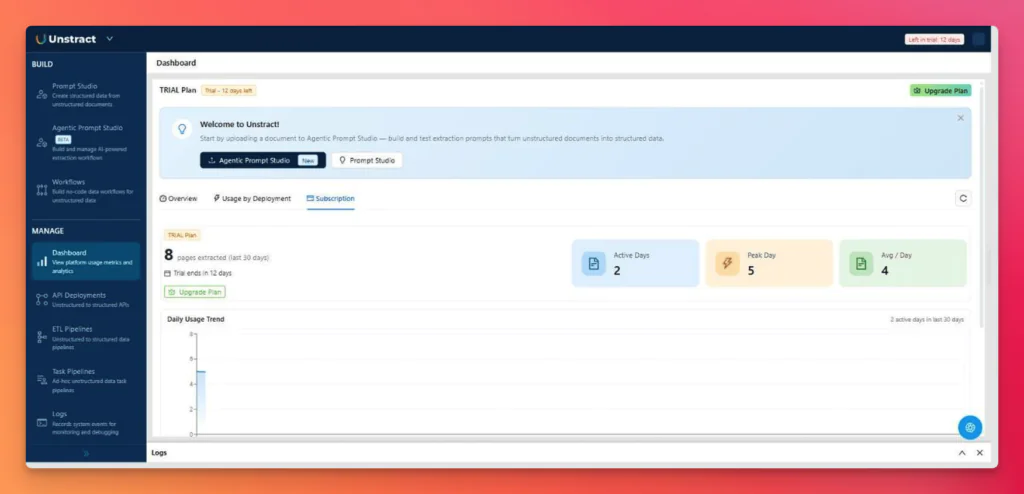
The trial runs 14 days with a pre-configured AI stack, so there are no API keys to plug in. Usage is metered in pages extracted, with no page cap or token allowance shown in the account. Our four-document test consumed 8 pages and about five cents in LLM cost.
Testing Unstract’s OCR with LLMWhisperer
We ran the same two documents through the LLMWhisperer playground in the default mode with layout-preserving output on. The forms and tables modes cost more, per the pricing section, and we did not use them.
Document 1
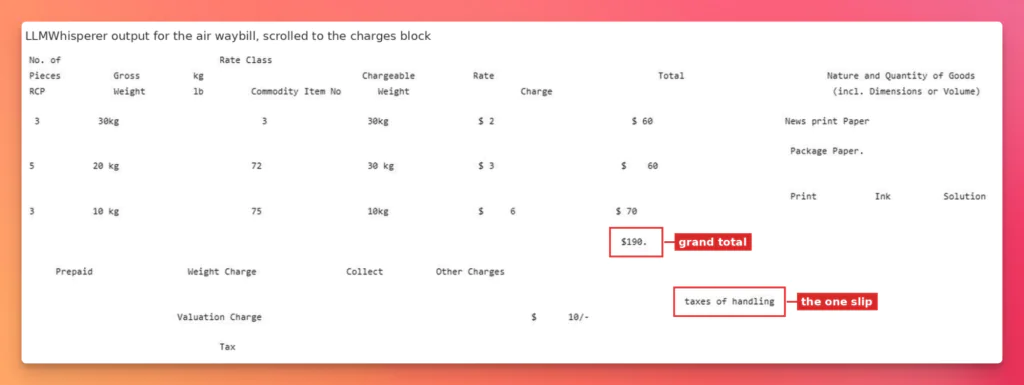
The air waybill returned all 21 target fields correctly against Docparser’s 3. All hand written parts read cleanly.
All three rows keep their weights, rates and totals in the right columns, and the $190 grand total that Docparser read as 4119 is there in full. The only slip in the whole document is one line below it, where “taxes & handling” comes back as “taxes of handling”.
Document 2
On the OSHA form, every checkbox comes back as an empty or filled bracket in the position it occupies on the page, so the grid keeps its shape. Each of the three filled case rows carries its four outcome boxes in order, with only the ticked one filled. Roger Smith’s row returns as [ ] [X] [ ] [ ]. This puts his tick in the second outcome column, H, days away from work, and his 32 days sit further along under column K. The empty template rows below come back as empty brackets, with no ticks invented to fill them. Docparser returned this same grid as one identical glyph pair on every row, ticked or blank.
Unstract is the modern alternative to Docparser.
Docparser locks you into one parser per layout, capped by plan. Unstract is open‑source (AGPL‑3.0), lets you bring your own LLM and vector database, and deploys as a REST API or ETL pipeline with source/destination connectors. Test it on your own documents — no zones, no templates, no maintenance loops.
Try Unstract for free on the Playground. No signup required.
Extracting Structured Data with Agentic Prompt Studio
Document 3
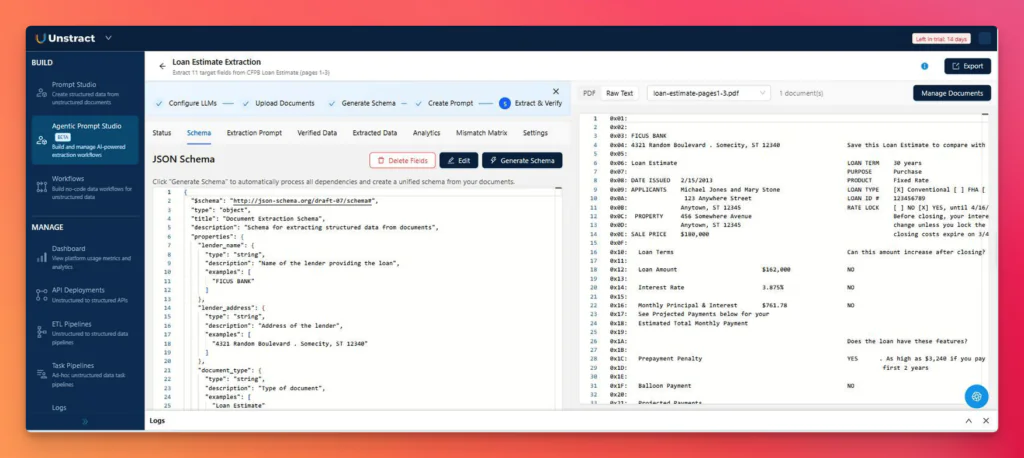
Same loan estimate, same 11 fields. In the raw text view, the loan type checkboxes are already resolved before any model reads them
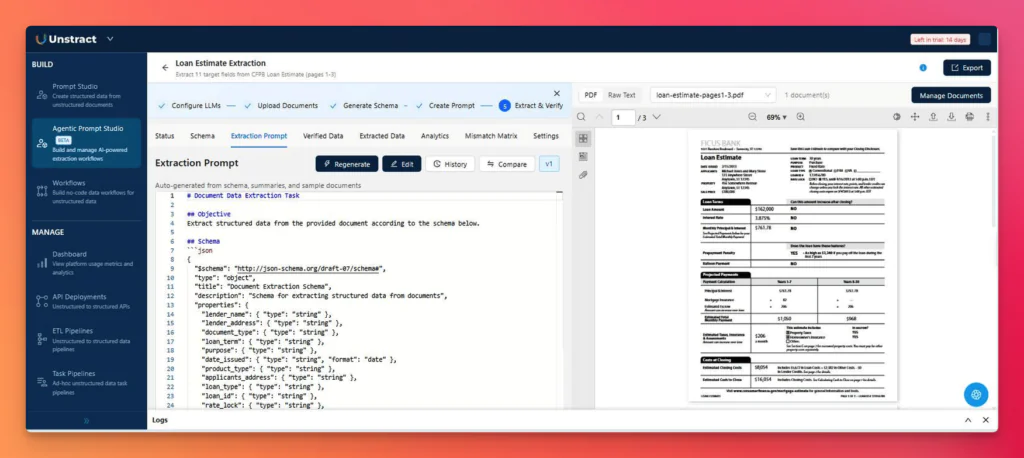
Generate Schema produced a 31-property JSON schema from the document, with typed fields, descriptions, and worked examples. We asked for 11 fields. It added 20 more based on its own reading of the page, including origination charges, prepaids, the initial escrow payment, and a typed array of applicants. Create Prompt wrote the extraction prompt from that schema.
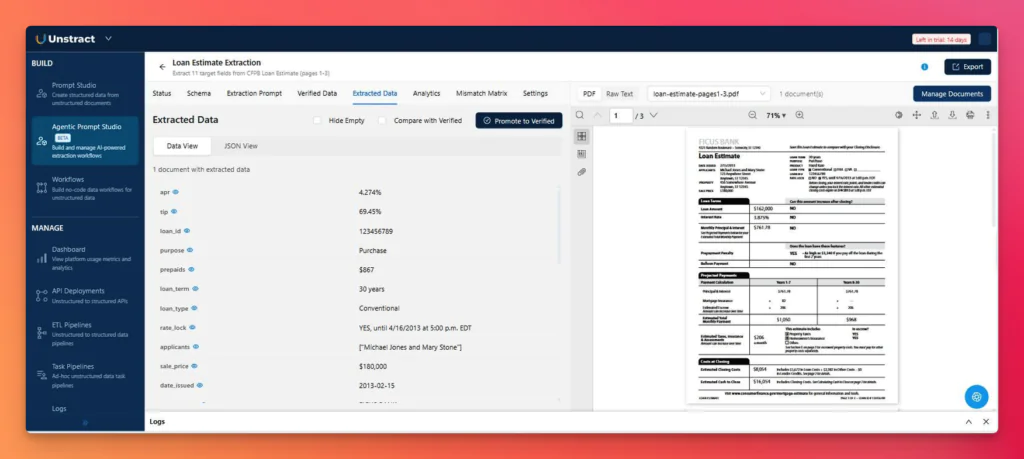
The extraction returned all 11 fields correctly, including the two that defeated every Docparser path. Rate lock came back as YES with the expiry date attached, loan type as Conventional.alloon payment
The Data View lists one field per row, so JSON View is the quickest way to see the whole output at once. It is also where the balloon payment field is worth a look. The form prints the word NO, and Unstract returns a typed false, so the value arrives ready to use rather than as text that something downstream has to interpret. The full output, all 31 fields:
{
  "apr": "4.274%",
  "tip": "69.45%",
  "loan_id": "123456789",
  "purpose": "Purchase",
  "prepaids": "$867",
  "loan_term": "30 years",
  "loan_type": "Conventional",
  "rate_lock": "YES, until 4/16/2013 at 5:00 p.m. EDT",
  "applicants": [
    "Michael Jones and Mary Stone"
  ],
  "sale_price": "$180,000",
  "date_issued": "2013-02-15",
  "lender_name": "FICUS BANK",
  "loan_amount": "$162,000",
  "product_type": "Fixed Rate",
  "document_type": "Loan Estimate",
  "interest_rate": "3.875%",
  "lender_address": "4321 Random Boulevard . Somecity, ST 12340",
  "balloon_payment": false,
  "property_address": "456 Somewhere Avenue, Anytown, ST 12345",
  "total_other_costs": "$2,382",
  "applicants_address": "123 Anywhere Street, Anytown, ST 12345",
  "prepayment_penalty": "YES, As high as $3,240 if you pay off the loan during the first 2 years",
  "origination_charges": "$1,802",
  "total_closing_costs": "$8,054",
  "estimated_cash_to_close": "$16,054",
  "estimated_closing_costs": "$8,054",
  "services_you_can_shop_for": "$3,198",
  "monthly_principal_interest": "$761.78",
  "services_you_cannot_shop_for": "$672",
  "taxes_and_other_government_fees": "$85",
  "initial_escrow_payment_at_closing": "$413"
}
The 11 we asked for are all there and all correct. The other 20 were added by the agent on its own.
Unstract also grades itself, and it is worth being exact about what that score is. Before any extraction runs, a Verified Data step fills in an expected value for every property in the schema. It gets its own tab, and the point of the tab is that a person can correct any cell before it is used, which is where human review comes in.
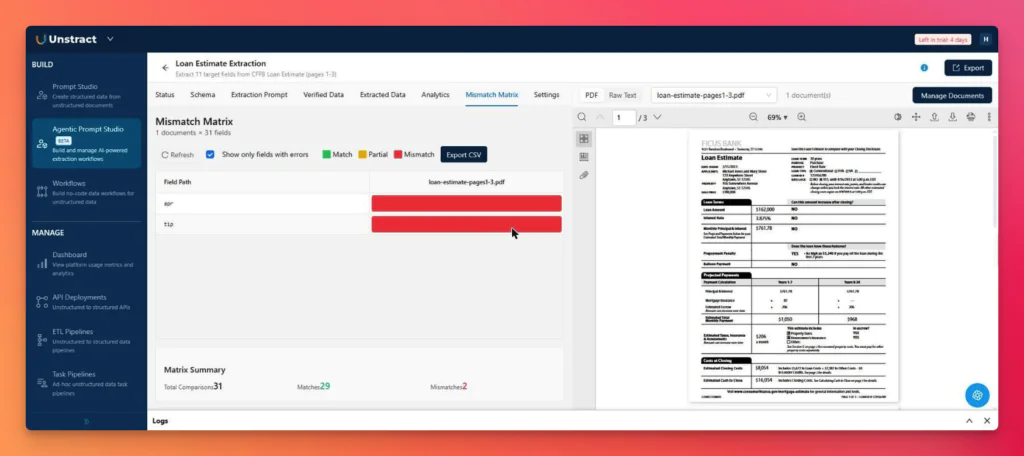
Every extraction is then compared against that copy, one comparison per property, in the Mismatch Matrix. Ours came back with 31 comparisons, 29 matches, and 2 mismatches.
The two red fields are apr and tip, the pair the agent did not write, and were added manually. The baseline had already been built from its 29 properties, so those two had nothing to compare against, which is also why they sit last in the schema. Both values are, in fact, correct.
That makes the 29 out of 31, the 93.55 percent Unstract reports. For the 11 values that were needed, the run got 11 of 11 correct.
The clinical trial grid was harder. 19 of 27 rows came back correct. That said, this is fixable by sharpening your prompts in the prompt editor. For this test, we’re measuring the accuracy Unstract achieves out of the box, before any prompt tuning.
Unstract returns JSON with named columns per row, so wrong rows are visible and fixable. Docparser returns X marks with no column identity, which cannot be corrected because the information is gone.
Deploying the Project as an API
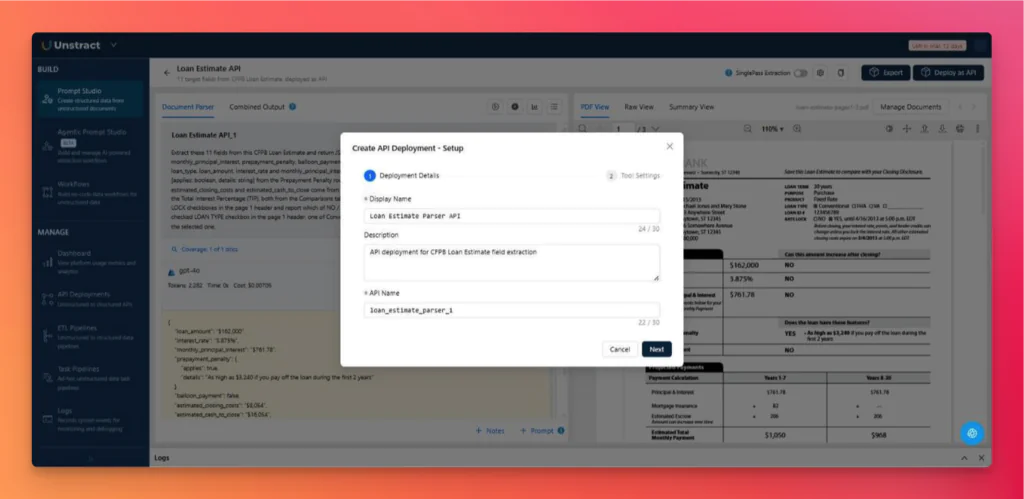
Deploy as API opens a two-step wizard. Name the deployment, pick a challenger LLM, and create it. The documentation covers the flow. The deployment appears with an endpoint and a ready-made Postman collection.
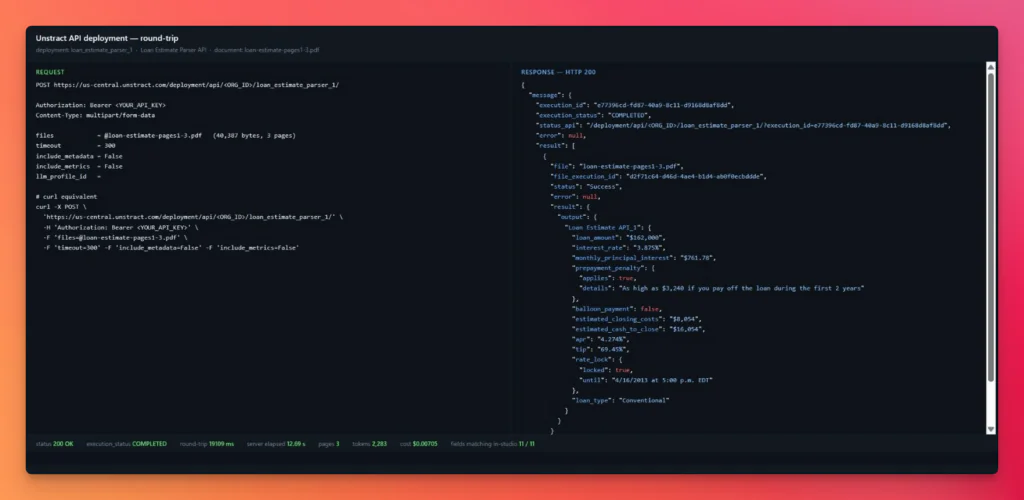
Posting the same loan estimate to the live endpoint returned HTTP 200, three pages processed, 2,283 tokens, and all 11 fields identical to the in-studio result. The round trip was 19 seconds on a trial account.
The API is one of two exits, the other is an ETL pipeline. The project is exported as a tool and dropped into a workflow, it also gains source and destination connectors. It is useful because with this, the documents arrive from Google Drive, S3, or Dropbox, and structured rows land in PostgreSQL, Snowflake, BigQuery, or Redshift with no glue code. Docparser’s equivalent is a one-way export to Excel, CSV, JSON, Google Sheets or Salesforce, with anything else routed through Zapier, Make or a webhook you maintain.
Human review sits inside that path. Extractions can be edited cell by cell and promoted to verified before the workflow writes downstream. Docparser has no comparable surface, so once a parser runs, the output goes wherever the export points.
Summary Analysis of Unstract’s Processing
Setup was minutes rather than tens of minutes, with no rectangles placed.
The decisive results were ones Docparser could not reach. Checkbox state was tied to the correct row, and handwriting was read from a photograph.
The ceiling is real. The clinical grid failed on merged cells in 19 of 27 rows.
Failure is legible. Named JSON identified which rows were wrong and left them fixable, while the accuracy score surfaced the errors without a manual check.
Docparser Pricing vs Unstract Pricing
Docparser pricing and Unstract pricing bill on different units, so it is worth being exact about what each one buys.
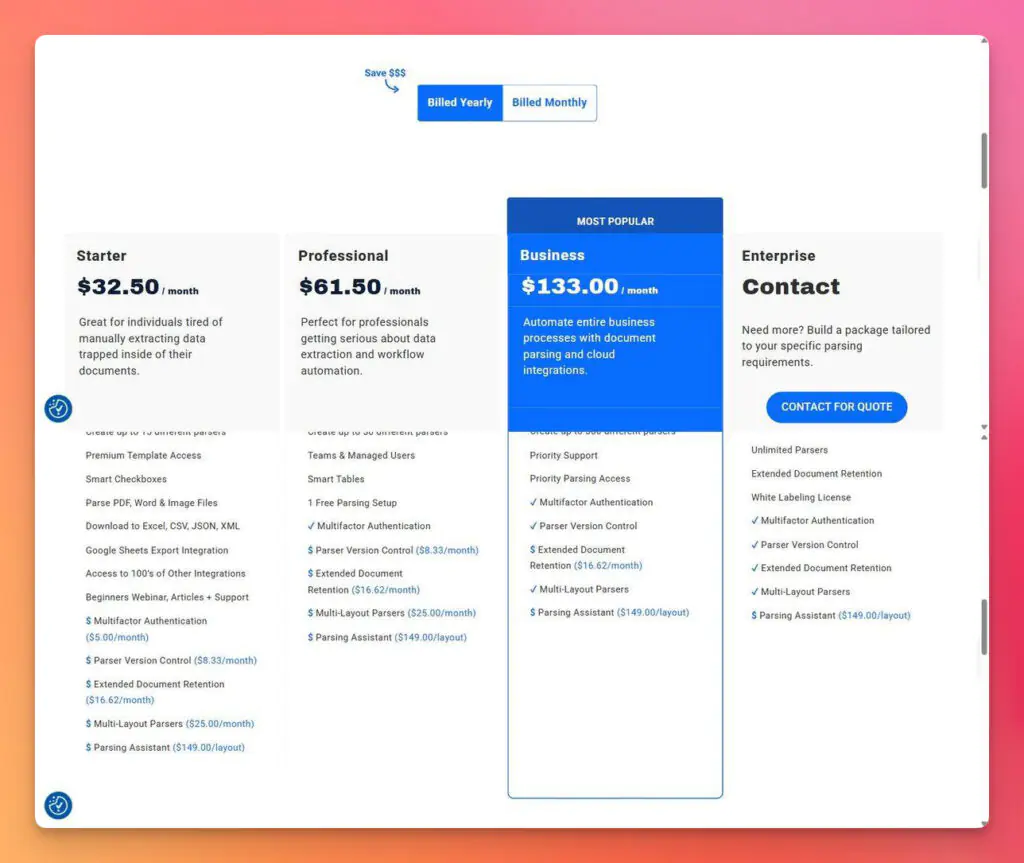
Docparser starts at $32.50/month on Starter, $61.50 on Professional, and $133 on Business, billed yearly, with Enterprise on quote. Billing is by parsing credit, and one credit covers up to five pages.
Two details matter more than the headline Docparser pricing. Multi-layout parsers cost $25/month on top of Starter and Professional and are only included from Business and up. Parser counts are capped by plan too, at 15 on Starter, 50 on Professional, and 500 on Business. One parser handles one layout, so that cap limits how many formats a plan covers.
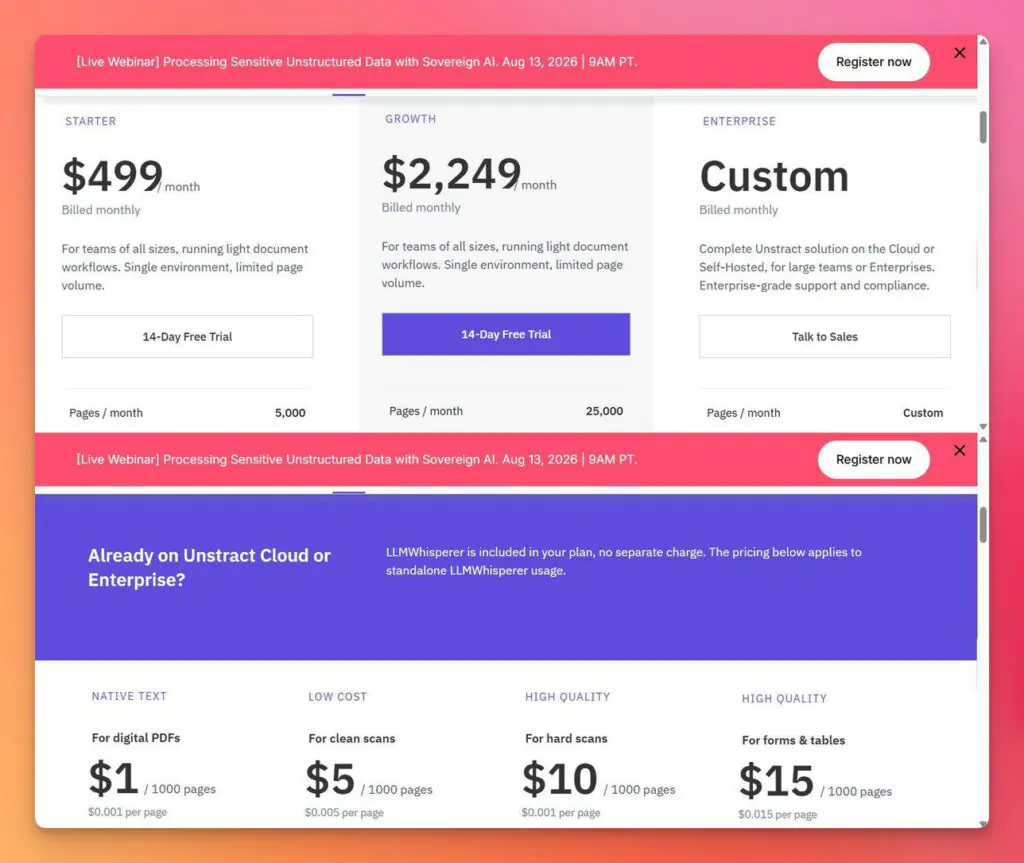
Unstract starts at $499/month for 5,000 pages and $2,249 for 25,000, billed monthly, with Enterprise on quote. Billing is by page, and LLMWhisperer is included at no separate charge.
LLMWhisperer is also sold standalone, from $1 per thousand pages for digital PDFs to $15 per thousand for forms and tables. LLM usage sits outside that, and on our documents, it ran under a cent per extraction.
A small team parsing one frozen invoice layout pays less on Docparser and gets what it needs. Once formats start changing, the monthly fee stops being the deciding number Pick Unstract in this case. Nothing positional has to be rebuilt when a layout moves, and every extraction carries a score.
Both are free to trial. Docparser gives 14 days and 50 credits, Unstract 14 days metered in pages, which is enough to run your own Docparser vs. Unstract test before either invoice arrives.
Docparser vs Unstract: The Full Comparison
The Docparser vs Unstract figures below come from the four documents run through both tools, scored against a ground truth written before opening either product. Where we did not test something, the row says so. We measured Docparser on a changed layout but never ran the matching variant through Unstract, so that row describes a design difference, not a score. The same method was applied to Reducto and Nanonets.
Docparser
Unstract
Setup
Draw zones and rules, one parser per layout
Agents generate schema and prompt from the document
Scaling
Another parser per layout, capped at 15/50/500 per tier
One project per document type, no per-layout artifacts
Nine columns flattened to five, footnotes fused, 0 of 27 rows keep column identity
27 of 27 rows as named JSON, 12 correct, merged cells wrong but visible
Format change
Wrong values returned silently, 0 of 11 on a new layout
Nothing positional to drift; no variant test run
Multi-layout
$25/month add-on below Business
No layouts to configure
Run-to-run stability
Deterministic; a zone returns the same text
Five runs byte-identical; one document, not a general claim
Accuracy scoring
None
Per-field score plus mismatch matrix
Human review
None
Verified data, promote to verified, side-by-side compare
Deployment
Account-level REST API and webhooks
Per-project REST API, ETL and task pipelines with source/destination connectors
AI stack
Closed
Bring your own LLM, OCR and vector database
Open source
No public repository or license
AGPL-3.0 core on GitHub, self-hosting available
Billing unit
Parsing credits, one per five pages
Pages, LLMWhisperer included
Conclusion: Why Unstract Is the Better Docparser Alternative
If your documents never change, Docparser still earns its keep. A small team parsing the same invoice layout can set up rules once and coast for months. That’s the workflow it was built for, and it handles it fine.
Most document pipelines don’t stay frozen, though. Vendors redesign, scans arrive crooked, handwriting creeps in, and every change means another round of redrawing zones. A Docparser alternative built this way removes that loop. Agents build the schema, each document gets an accuracy score, and one project scales from ten documents to ten thousand without a single template.
If that cycle sounds familiar, you don’t need better rules. You need a Docparser alternative that doesn’t use any. Try Unstract free, or drop your ugliest document into the LLMWhisperer playground and see what comes back.
Unstract — A better Docparser Alternative: FAQs
1. What is the hidden cost of Docparser’s rule‑based approach? Docparser requires one parser per document layout, capped at 15/50/500 per tier. Every new vendor format, redesigned invoice, or changed template means someone has to rebuild the pipeline — a maintenance loop that drives teams to search for a Docparser alternative.
2. How does Docparser pricing compare to Unstract pricing? Docparser pricing starts at $32.50/month for Starter, billed yearly, with multi‑layout parsers costing an extra $25/month below the Business plan. Unstract pricing starts at $499/month for 5,000 pages with LLMWhisperer included, and LLM usage on our test ran under a cent per extraction.
3. Why do Docparser rules fail on real‑world documents like handwriting and photographs? Docparser’s built‑in OCR loses form semantics, handwriting largely does not survive, and checkbox marks misalign — a tick cannot be traced to its row or column. On the handwritten air waybill, Docparser returned 3 of 21 target fields; Unstract returned all 21.
4. How does Unstract reduce manual review and maintenance compared to Docparser? Unstract provides a per‑field accuracy score, a mismatch matrix showing every failed field, and a Verified Data step where you can edit cells before promoting them downstream. Docparser has no review surface, so once a parser runs, the output goes wherever the export points.
5. Can Unstract integrate with our existing systems without custom glue code? Yes. Unstract deploys as a REST API with a ready‑made Postman collection, and ETL pipelines with source and destination connectors (Google Drive, S3, Dropbox, PostgreSQL, Snowflake, BigQuery, Redshift) let you route documents and structured rows without glue code. Docparser’s equivalent is a one‑way export to Excel, CSV, JSON, Google Sheets, or Salesforce, with anything else routed through Zapier or a webhook.
Unstract, A better Docparser Alternative: Related topics to explore
Salman Haider is a technical content writer focused on AI, machine learning, and data-driven innovation. He bridges the gap between complex technology and clear communication, using data storytelling to turn insights into compelling narratives. With a passion for simplifying advanced concepts, his work empowers businesses to make smarter, evidence-based decisions.