Recent benchmarks show OCR accuracy drops to between 54% and 85% on messy layouts, tables, and complex PDFs. Forms expose that weakness most clearly because they combine the most difficult document conditions on one page.
Complex tables, multi-section layouts, checkboxes inside dense grids, and handwritten fields often appear together. Rotated or skewed scans add more noise, especially when stamps or signatures obscure printed text.
OCR for forms needs an engine built for those conditions from the start, not a general text extractor stretched past its limits.
For OCR forms such as tax documents, loan applications, insurance claims, supplier onboarding packets, KYC, and other field-heavy business paperwork, LLMWhisperer is built specifically for the job. It preserves document layout, reads handwriting and checkboxes accurately, and returns auditable structured output for LLMs and automation systems.
This article explains where traditional OCR fails on forms, how LLMWhisperer works differently, and walks through five real-world document demos.
What Is OCR for Forms and Why It Matters
OCR for forms is a technology that reads form image-based documents and converts their content into structured, selectable text. Instead of returning a flat block of text, it captures the specific elements forms contain, including fields, tables, and checkboxes.
That structure matters because businesses need normalized, named outputs such as:
- Name
- Address
- Taxpayer Identification Number (TIN)
- Policy Number
They also need tables and checkbox states to flow into databases, ERP systems, or LLM-powered workflows. Generic OCR often loses the spatial relationships that make forms usable. Form-aware OCR preserves layout so labels stay paired with values and headers stay linked to the right cells. That spatial integrity makes extracted data usable in downstream systems.
TL;DR
If you want to skip straight to live extractions and see how LLMWhisperer handles tax forms, loan applications, insurance certificates, air waybills, and government property declarations, click here.
Why Traditional OCR Struggles with Forms
Standard OCR tools assume documents are clean, consistent, and mostly linear. Business forms violate those assumptions in several ways:
- Poor scan quality: OCR forms arrive skewed, low-resolution, faded, and crumpled, producing garbled output from tools trained on clean inputs.
- Handwritten fields: Mixed print and cursive, with variable styles, make character recognition unreliable. One misread digit in a TIN invalidates the record.
- Variable layouts: The same form type has different layouts across organizations, breaking pipelines that depend on fixed coordinates.
- Multi-language content: International forms can contain fields in multiple scripts on the same page.
- Checkboxes and marks: Standard OCR for forms skips checkboxes or misclassifies their state, especially inside tables.
- Tables and nested fields: Merged cells, wrapped text, and nested tables flatten into linear text, losing column-row relationships.
- Overlapping data: Stamps, signatures, and watermarks confuse traditional OCR for forms during character segmentation.
- Context loss: Even accurate character recognition can lose label-value and header-cell relationships, making extracted text unusable as structured data.
Business Use Cases for PDF OCR
PDF OCR matters most when forms must move from documents into systems without manual cleanup.
Tax Forms Arrive Degraded Even When the Layout Is Fixed
Tax forms such as W-9, W-2, 1099, 1040, and 941 use standardized IRS layouts with repeatable fields. Even so, they typically arrive as scanned PDFs, faxed copies, and phone photos that still require manual entry.
Teams evaluating OCR software for tax forms find that the structure is consistent, but input quality is not. The specific extraction pressure varies by form type:
- Form W-9 OCR: Particularly sensitive to the horizontal checkbox row for tax classification. A single misread state changes how a payee is reported to the IRS.
- Form W-2 OCR: Requires precise extraction of employer and employee identifiers alongside box-level withholding amounts.
- Form 1099 OCR and Form 1040 OCR: Introduce the same pressure for payroll and compliance teams. Standardized layouts still degrade under real scan conditions.
- Form 941 OCR: Covers employer quarterly tax reporting, where table-heavy sections must retain column integrity.
Loan Applications Need Checkbox Precision to Clear Credit Decisioning
Loan and mortgage applications collect identity, employment, income, assets, and liabilities across multi-page, mixed-quality PDFs. Loan application form OCR at production scale requires layout preservation, reliable checkbox handling, and a clean handoff to credit decisioning systems. Without it, manual re-typing slows origination and introduces errors.
KYC Requires Traceability to Source
KYC form OCR requires more than an accurate extraction. Each extracted value must trace back to its exact source location for audits and regulatory reviews. These forms collect identity details, risk questionnaire responses, and consent signatures.
Compliance teams must prove where each field originated. When OCR misreads a name, misplaces a response, or drops a consent field, that proof disappears. A value that cannot be traced to its source fails regulatory review, and in AML and KYC workflows, that failure can mean a blocked onboarding, a compliance finding, or a reportable incident.
Supplier Forms Must Be Precise Enough to Enter ERP Directly
Supplier onboarding form OCR must capture company details, bank account information, tax IDs, and certifications with enough precision to flow into ERP and procurement systems. Structured output eliminates manual re-entry, removes the transcription errors that delay vendor activation, and shortens procurement cycles.
Insurance Packet Density Creates Bottlenecks Across the Policy Lifecycle
ACORD 25 certificates, ACORD 130 workers’ comp applications, and ACORD 125/126/127 commercial applications pack dense fields into multi-page packets. Each packet includes insured details, policy numbers, coverage limits, dates, and claims intake schedules that need to be extracted.
If OCR misreads or misplaces those values, teams can quote the wrong coverage, route claims incorrectly, delay policy issuance, or create compliance and servicing errors that take time to detect and fix.
Official Stamps and Low-Quality Scans Make Government Forms Hard to Digitize
Government property declaration forms capture property attributes, valuations, and official stamps from low-quality scans. Those conditions make extraction difficult because poor image quality and stamped markings interfere with the underlying text.
How LLMWhisperer Makes Forms LLM-Ready
Complex forms often require LLMs for interpretation, but raw OCR output is risky when labels, values, and structure are distorted. Once spatial relationships are lost, the model must infer context from broken text, increasing wrong mappings and untraceable errors.
LLMWhisperer applies deterministic, layout-preserving OCR before any generative step, producing cleaner, LLM-ready output with lower hallucination risk.
Because structured output preserves layout, it remains usable with ChatGPT, Claude, and newer LLMs as they evolve.
One Engine, Every Form Type, Without Configuration Overhead
OCR tools such as Tesseract or PaddleOCR are optimized for a limited set of input types and degrade on other inputs. LLMWhisperer accepts PDFs, scanned images, Excel files, and photographed originals, and within those formats, handles the document types that break generic pipelines.
For instance, PDF forms with checkboxes and radio buttons, documents with complex or nested tables, low-quality scans, and mobile-captured images with skew and glare.
Extraction Modes Tuned to Document Conditions
Format variation is handled through purpose-built extraction modes rather than forcing every document through the same pipeline. Form mode renders checkbox and radio button states as [X] or [ ] directly in the output, so downstream systems read the selection state without additional parsing.
High Quality mode applies AI/ML-assisted rotation compensation, skew correction, and handwriting recognition for degraded or hand-completed documents. Table mode preserves column-row alignment across dense structured data, including nested rows, spanning cells, and irregular shapes that standard OCR for forms flattens into unreadable strings.
When text-mode extraction produces insufficient output, the engine switches to OCR mode automatically. A mixed document packet containing machine-readable cover pages, scanned income forms, and handwritten addendums processes through a single API endpoint with no routing logic required on the developer’s side.
Layout Preservation and Audit Traceability
LLMWhisperer retains the positional relationships between every extracted element. Bounding-box metadata ties each field back to its exact location on the source page, so any extracted value can be traced to its precise origin for human review, regulatory inspection, or dispute resolution. For KYC, AML, and insurance compliance workflows, that traceability is not optional.
Token Efficiency at Scale
Raw OCR output frequently dumps excessive whitespace, repeated headers, and formatting noise into LLM prompts, inflating cost and reducing accuracy. LLMWhisperer’s auto-compaction removes low-value tokens while preserving layout, producing smaller, denser prompts that lower API spend and reduce parsing errors across high-volume workflows.
Multi-lingual Coverage and Enterprise Deployment
The engine supports 300+ languages, mixed-language content, and non-Latin scripts including Arabic, Chinese, Japanese, Cyrillic, and Hindi. It is available as a fully managed SaaS offering or as an on-premise deployment for organizations that must keep sensitive document data within their own infrastructure.
The platform holds GDPR, ISO, SOC 2, and HIPAA certifications. Teams can evaluate it on a free tier of up to 100 pages per day with no credit card required.
How LLMWhisperer Compares to Traditional and AI OCR
Traditional OCR often loses the layout that gives forms meaning, while AI OCR can invent details that were never there. The table below shows where each approach fails and how LLMWhisperer handles the specific challenges that make forms hard to extract accurately.
| Capability | Traditional OCR | AI OCR (LLM in Extraction) | LLMWhisperer |
|---|---|---|---|
| Output type | Plain text, flat character stream | LLM-generated structured output | Layout-preserving structured text |
| Table handling | Flattens tables into linear text | May reconstruct but can misalign | Preserves column-row relationships spatially |
| Checkbox detection | Skips or misreads checkboxes | Inconsistent, depends on LLM | Dedicated Form mode: [X] / [ ] rendering |
| Label-value pairing | Lost, text without spatial context | LLM infers pairings (hallucination risk) | Preserved through layout retention |
| Handwriting | Low accuracy on mixed print/cursive | Varies by model | High Quality mode with AI/ML enhancement |
| Hallucination risk | None (but high error rate) | Present, LLM can invent fields | None, deterministic non-LLM extraction |
| Auditability | Low, no source tracing | Low, hard to trace output to source | High, bounding boxes map values to source |
| Scan quality tolerance | Degrades quickly on skew/noise | Depends on upstream OCR quality | Built-in skew/rotation correction, noise handling |
| LLM integration | Requires separate structuring step | LLM embedded (tightly coupled) | Clean handoff, LLMs receive pre-structured data |
| Cost model | Low extraction cost, high rework cost | High token cost per document | Low extraction cost, low downstream LLM cost |
Demonstrating LLMWhisperer on Five Real-World Forms
The five real-world forms below show whether LLMWhisperer can extract reliable structure across very different documents without templates or per-document setup.
Demo 1: IRS Form W-9
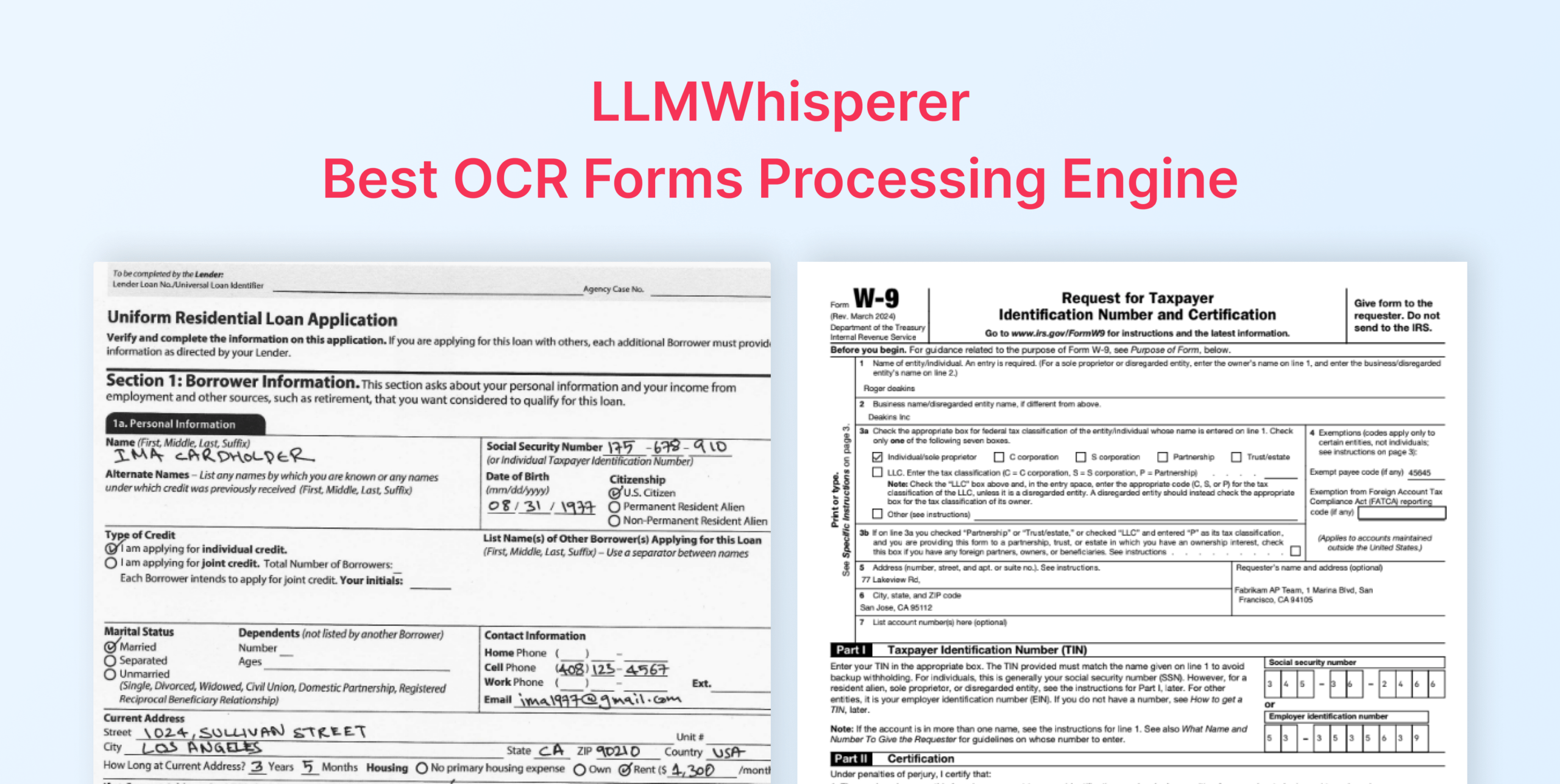
The W-9’s tax classification section runs a horizontal row of checkboxes, including Individual, C Corp, S Corp, Partnership, Trust/estate, LLC, and Other. Standard form OCR tools frequently misread or skip this row.
A single misread state changes how a payee is reported to the IRS. The TIN field compounds the problem, and one wrong digit invalidates the record. W-9s also arrive in variable condition, including clean digital PDFs, phone photos, and third-generation faxed scans with faded ink and skew.
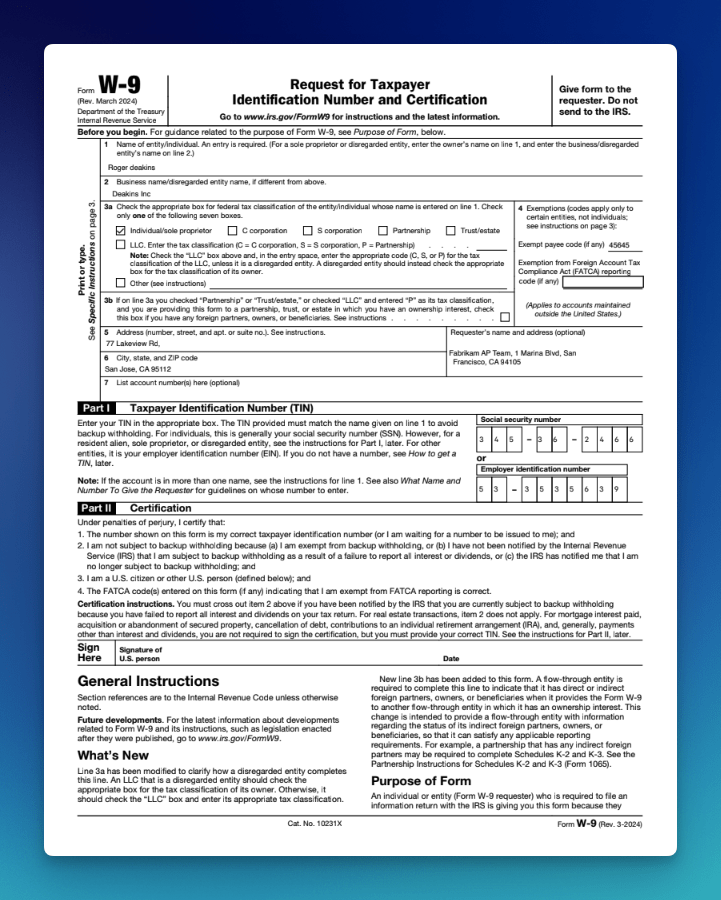
The W-9 extraction workflow supports scanned and photographed versions with structured JSON output, with no template or training required. The same configuration extends across the broader IRS form family: W-2, 1099, 941, and 1040.
Playground
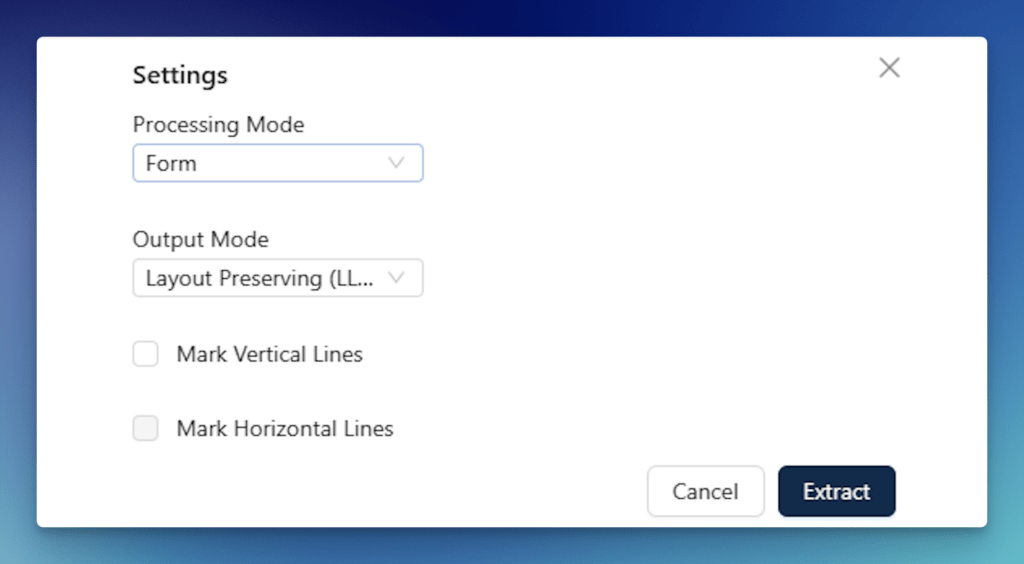
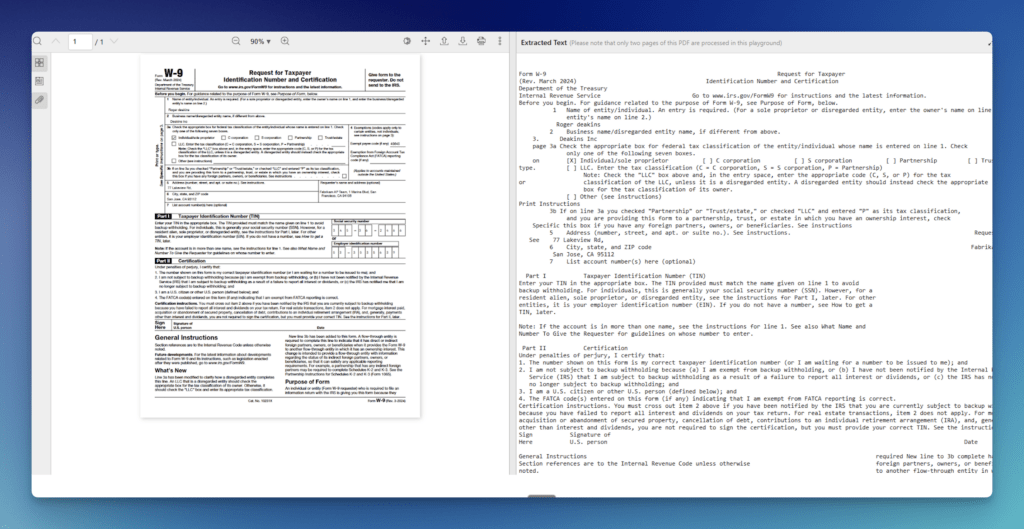
- Open the LLMWhisperer Playground and upload the W-9 PDF or image.
- Select Form mode to capture the tax classification checkbox row and ensure TIN field accuracy.
- Run extraction.
- Review the output for:
- Checkbox states clearly represented across the full tax classification row.
- TIN, name, and address fields captured in their correct positions.
- Label-value pairs intact, with no field merging or position drift.
Demo 2: Universal Loan Application (Form 1003)
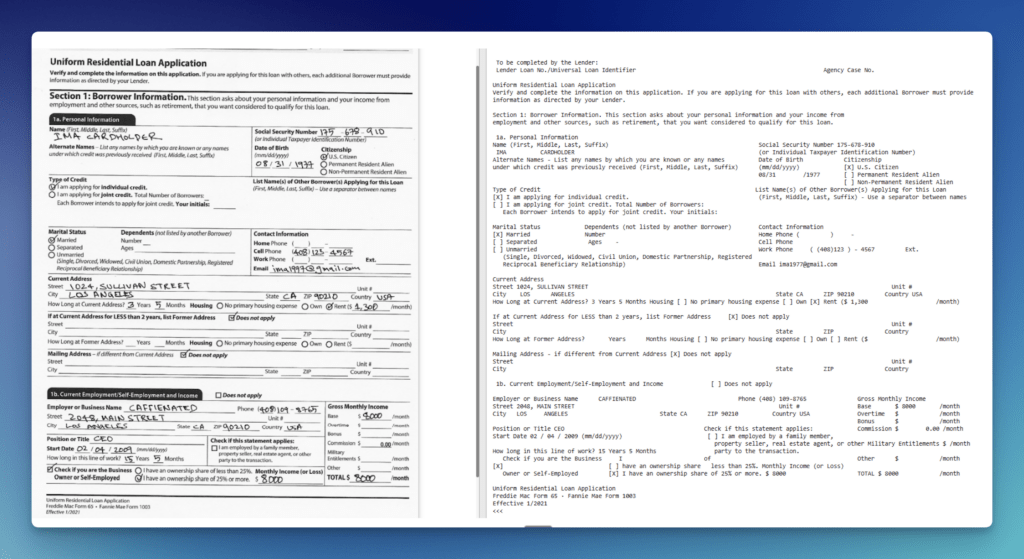
Form 1003 is one of the most checkbox-dense documents in financial services. Clusters of radio buttons govern credit type, citizenship status, marital status, housing status, and employment ownership.
Many copies arrive as scans of handwritten originals or smartphone photos, introducing skew, inconsistent ink density, and variable handwriting. Financial tables in the income, assets, and liabilities sections mix wrapped text with numbers in narrow columns, which is a consistent source of alignment failures in standard OCR.
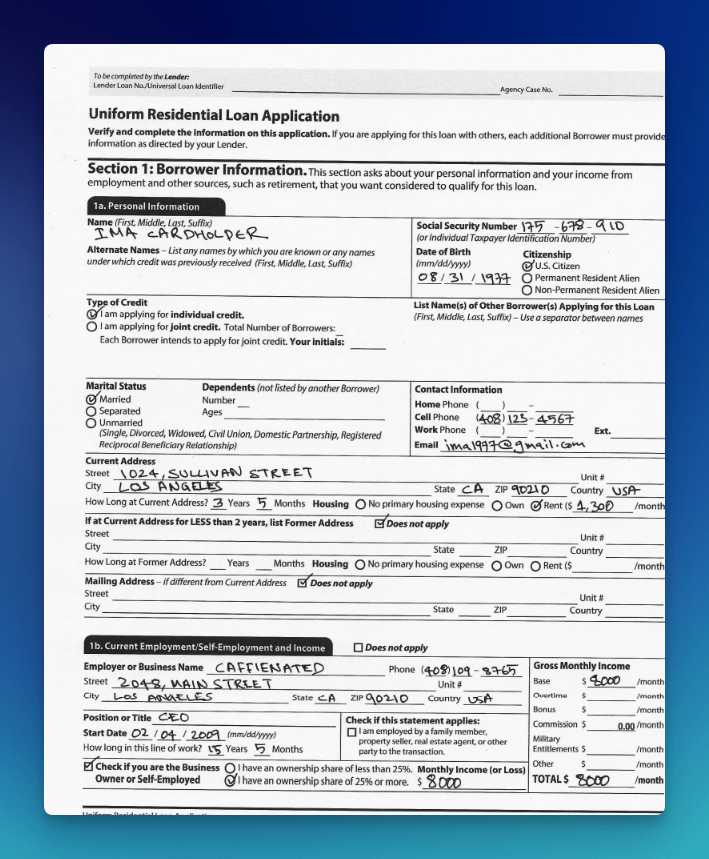
Form 1003 is the primary demo in a complete code-level checkbox extraction walkthrough. LLMWhisperer enables users to capture the borrower’s name, SSN, DOB, citizenship status (with the selected radio option marked), credit type, marital status, address, housing status (with dollar amounts), and employment details.
The walkthrough uses a Pydantic schema with four model classes (PersonalDetails, ExtraDetails, CurrentAddress, and EmploymentDetails) composed into a top-level Form1003 model. Extracted text passes to GPT-3.5-Turbo via Langchain’s PydanticOutputParser to return structured JSON.
Playground
- Open the LLMWhisperer Playground and upload the Form 1003 PDF. A sample is available at the companion GitHub repo.
- Select Form mode for the checkbox and radio button clusters.
- Run extraction.
- Review the output for:
- Checkbox and radio button states clearly marked across all cluster groups.
- Borrower name, SSN, address, and employment fields extracted with spatial structure intact.
- Financial table columns (income, assets, liabilities) preserved without row merging.
Demo 3: ACORD Certificate of Insurance
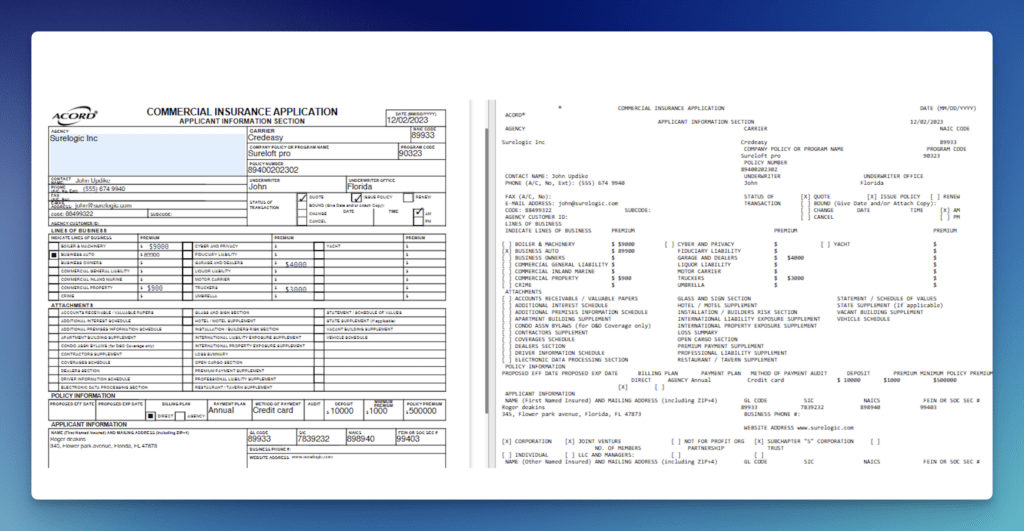
ACORD certificates compress dozens of fields into a compact grid with thin cell borders. Each coverage section (general liability, auto liability, umbrella/excess, workers’ compensation) carries its own limit sub-fields. Certificates often arrive scanned sideways or photographed at an angle, shifting grid lines relative to field content. Many checkboxes sit inside the grid itself. Small labels and legal text packed against cell borders cause standard OCR for forms to split or merge adjacent values.
The ACORD extraction workflow covers 24 extractable fields.Insurance document automation built on this engine reports 99% accuracy for standard fields and 95%+ for complex unstructured data.
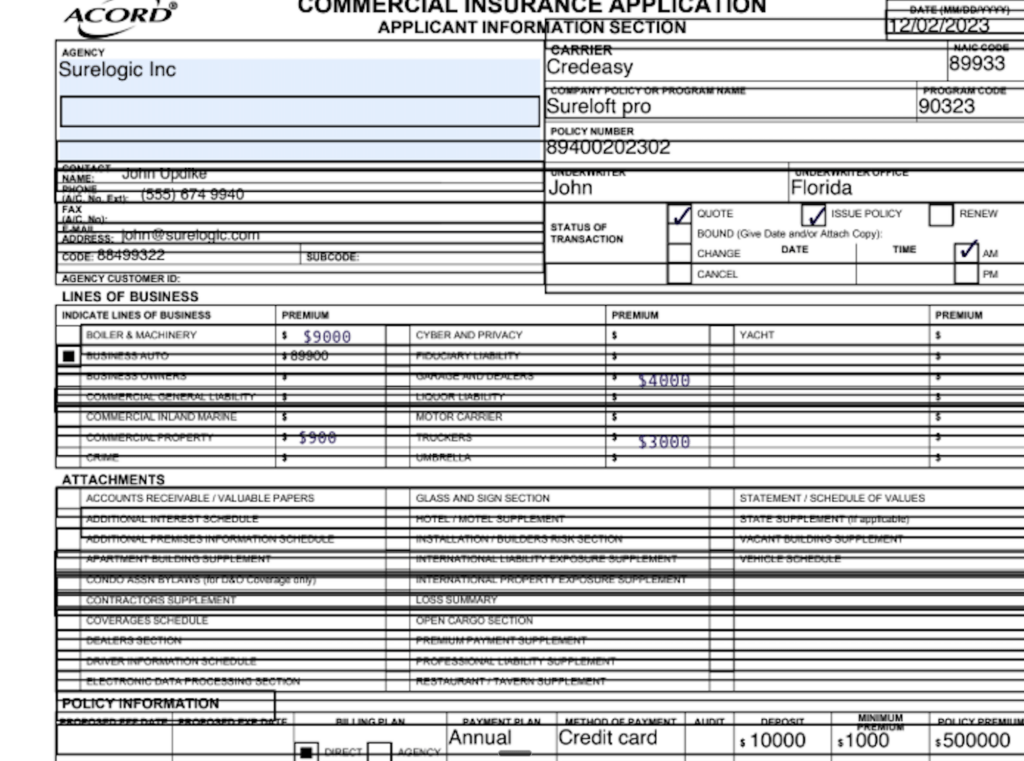
A published Postman walkthrough shows extraction from a poorly aligned ACORD form, with checkboxes, addresses, policy details, and limits all captured despite grid interference.
The same approach handles mixed document packets. For example, a photographed paper ACORD alongside a scanned repair invoice and a typed denial letter. At scale, one insurer digitized 10,000 legacy ACORD forms in a single week, storing them as structured rows in a relational database.
Playground
- Open the LLMWhisperer Playground and upload the ACORD certificate PDF or scanned image.
- Select Form mode to handle checkbox selections and multi-font formatting across the coverage grid.
- Run extraction.
- Review the output for:
- Coverage grid sections, policy numbers, and limits preserved with column alignment.
- Checkbox states clearly represented across all coverage type selections.
- Insured details and certificate holder blocks captured without cell boundary merging.
Demo 4: Air Waybill
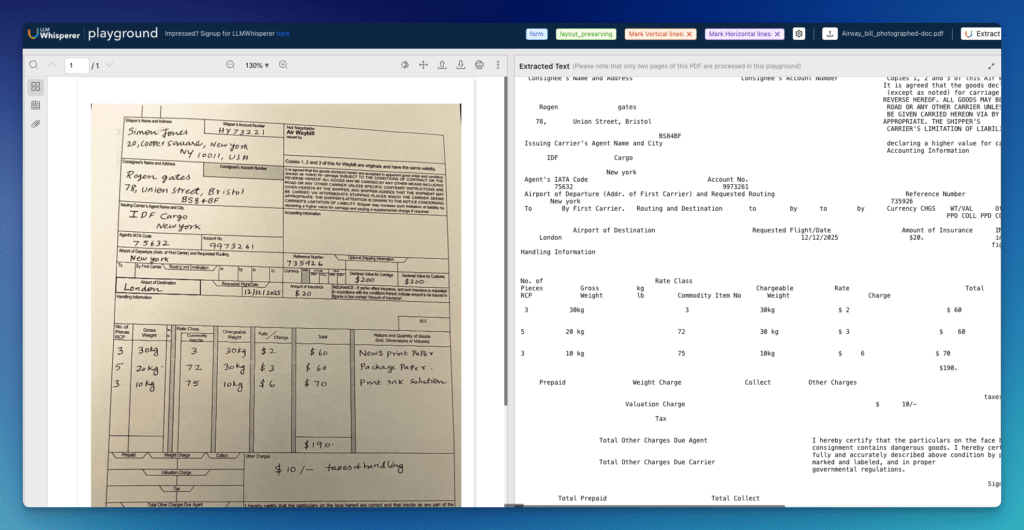
AWBs are among the most physically degraded documents OCR encounters in production. One documented test specimen was a yellowed waybill with mixed handwritten and printed data, merged table headers, very small text, and handwritten numeric amounts with currency symbols. AWBs are frequently photographed in warehouse and cargo environments, introducing skew, glare, and stamps overlaid on printed fields. Tight table cells mixing codes, descriptions, and amounts compound alignment errors across rows.
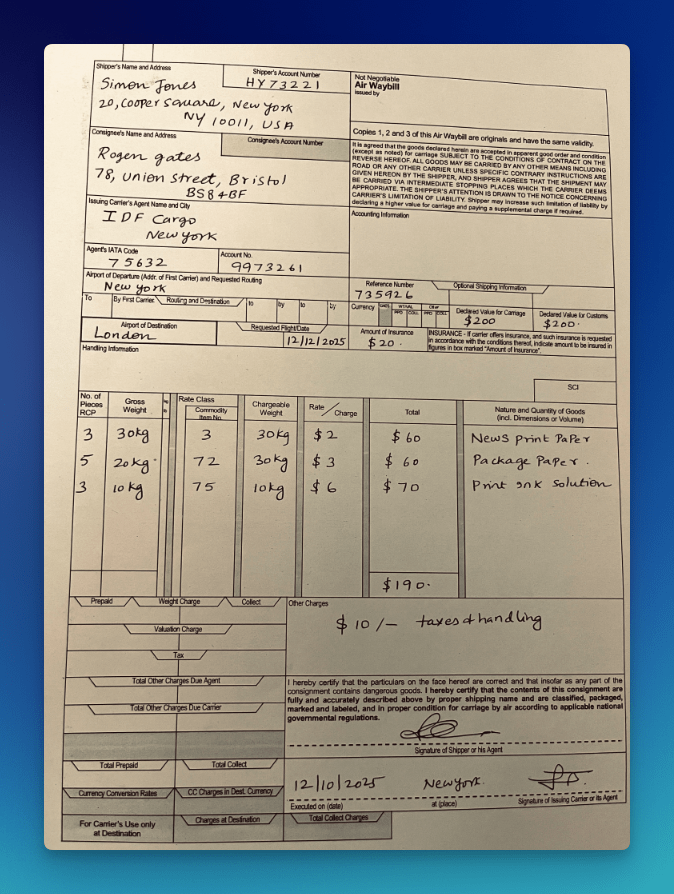
A Playground demonstration confirms structured text output from a photographed AWB, maintaining the spatial layout of shipper/consignee blocks, routing tables, and charge grids despite skew, glare, and stamps. The AWB extraction workflow covers 20+ extractable fields, including carrier, routing, cargo descriptions, weights, and payment terms.
Playground
- Open the LLMWhisperer Playground and upload the handwritten air waybill (PDF or image).
- Select a handwriting-friendly mode when checkboxes and handwritten fields are present.
- Run extraction.
- Review the output for:
- Handwritten fields captured as text, not dropped or misread.
- Checkbox states represented clearly.
- Table sections preserved as rows and columns, not merged into a blob.
Demo 5: Government Building Completion Notices
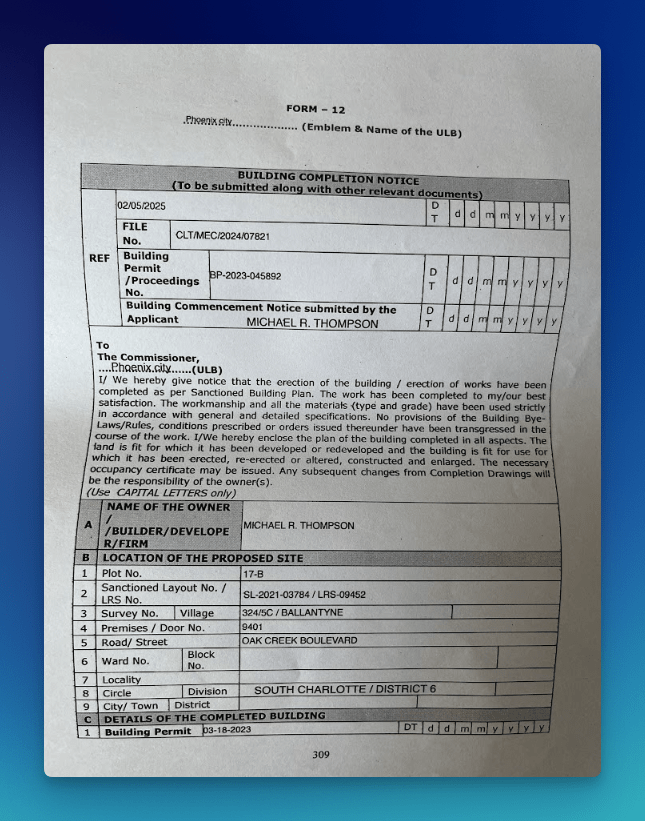
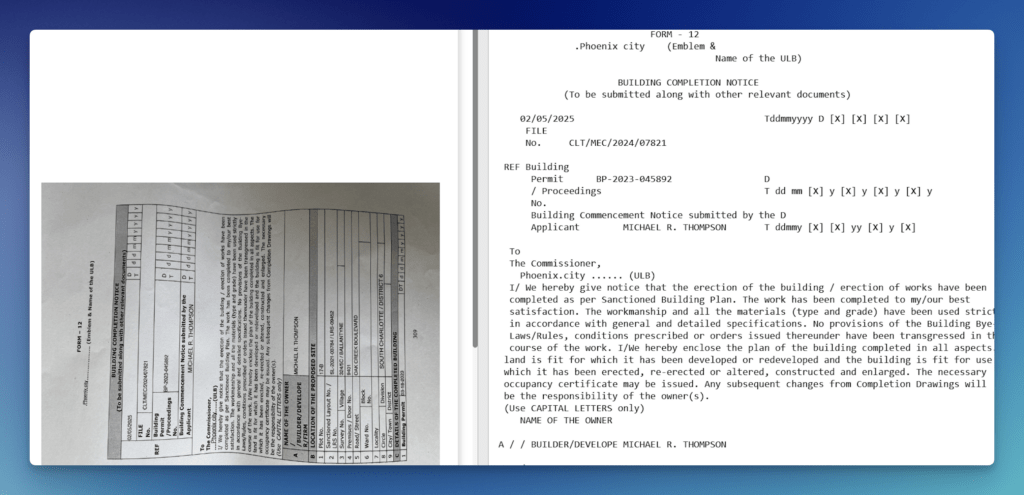
Building Completion Notices combine a formal declaration body with tightly structured data grids across three sections: reference identifiers, site location, and completed building details. Form 12 packs file numbers, permit numbers, applicant names, and date grids into the header before moving into nine site location rows and a building permit section, all within a single photographed or scanned page.
These forms typically arrive as low-quality scans or field photographs. The date grid format, with individual cells for day, month, and year running alongside permit and commencement fields, is a consistent source of alignment failures in standard OCR.
Thin cell borders, multi-row label cells like “Building Permit / Proceedings No.”, and mandatory all-caps entries across sections A, B, and C compound the extraction challenge. No prior training or template creation is required. LLMWhisperer also supports customs declarations as a dedicated government document type.
Playground
- Open the LLMWhisperer Playground and upload the government property declaration form (PDF or photographed image).
- Select Form mode for checkbox and radio button fields. For low-quality scans or significant handwriting, select High Quality mode instead.
- Run extraction.
- Review the output for:
- Property identification fields and valuation figures captured with no column drift.
- Checkbox states for property status and certification sections clearly represented.
- Signature and stamp areas handled without corrupting adjacent field values.
Conclusion: Why LLMWhisperer Is the Best OCR for Forms
LLMWhisperer solves the extraction problem at the source. Deterministic extraction, spatial layout preservation, checkbox detection, skew correction, and bounding-box traceability mean the data reaching your LLM is already clean, positioned, and auditable.
That is what makes it the best OCR for forms across tax, banking, KYC, supplier onboarding, insurance, logistics, and government workflows. The capabilities are specific, and they address exactly what general-purpose OCR leaves broken.
Getting the extraction layer right is cheaper than fixing errors everywhere downstream. As teams invest more in AI-driven document automation, that step determines how much of the investment actually pays off.
Ready to see it on your own documents? Sign up for free and run your first 100 pages without touching a template or writing a line of configuration.
Best OCR for forms processing: FAQ
1. How does LLMWhisperer handle checkbox and radio button extraction differently than standard OCR for forms?
Standard ocr for forms like Tesseract or PaddleOCR typically skip checkboxes or return inconsistent states. LLMWhisperer’s Form mode renders checkbox and radio button states directly as [X] or [] in the output text. This means downstream systems or LLMs receive unambiguous selection data without custom parsing logic.
2. What extraction modes are available for processing degraded ocr forms like faxed W-9s or photographed air waybills?
LLMWhisperer provides multiple modes: Form mode (for checkboxes/radios), High Quality mode (AI/ML-assisted skew correction, rotation compensation, and handwriting recognition), and Table mode (preserves column-row alignment across nested tables). The engine can also auto-switch to OCR mode when text extraction fails, all through a single API endpoint.
3. Can I trace every extracted field back to its source location for audit compliance?
Yes. LLMWhisperer retains bounding-box metadata for every extracted element. Each value maps directly to its exact position on the source page. For KYC, AML, or insurance workflows that require regulatory traceability, this deterministic audit trail is critical — unlike generic AI OCR, which cannot reliably link output to source coordinates.
4. How does LLMWhisperer improve token efficiency when feeding extracted data into LLMs like GPT-4 or Claude?
Raw ocr forms output often dumps excessive whitespace, repeated headers, and formatting noise into LLM prompts. LLMWhisperer’s auto-compaction removes low-value tokens while preserving layout, producing denser prompts. This lowers API spend and reduces parsing errors at scale — especially important for high-volume ocr software for tax forms processing.
5. What languages and deployment options are supported for enterprise use?
The engine supports 300+ languages, including mixed scripts (Arabic, Chinese, Japanese, Cyrillic, Hindi). It is available as a fully managed SaaS or on-premise deployment for sensitive document data. LLMWhisperer holds GDPR, ISO, SOC 2, and HIPAA certifications, and offers a free tier (100 pages/day) with no credit card required.