Chunking Strategy: An Introduction
Large language models (LLMs) have proven remarkably capable at understanding and synthesizing information. However, when presented with long, dense documents, contracts spanning dozens of pages, financial statements with complex tables, dense policy documents with interconnected rules, their performance degrades. The model may hallucinate (confidently produce false or factually incorrect information), miss details, or simply hit token limits.
The problem isn’t the model itself. It’s what precedes the model: how the document is broken into chunks before being indexed and retrieved. This is where intelligent chunking and purpose-fit retrieval strategies become essential.
In this article, we’ll look at what chunking is, why your specific strategy makes or breaks your retrieval quality, and the different retrieval strategies that Unstract offers to help improve document extraction. Finally, we will look at how to implement these strategies within Unstract to build reliable extraction pipelines.
What is Document Chunking?
Chunking is the process of breaking down large documents into smaller, semantically meaningful pieces called chunks. This is a crucial first step in preparing data for use with LLMs, enabling them to process documents more accurately and efficiently.
Chunking is an important factor for any Retrieval-Augmented Generation (RAG) system. How documents are split affects your system’s ability to find relevant information and provide accurate answers.
TL;DR
If you want to skip directly to the retrieval strategies and see how Unstract’s Prompt Studio supports different retrieval modes for long, complex documents, click here.
Why Chunking Strategy Matters?
The reason for chunking in LLMs is the limited context window, which means models can only focus on a certain amount of text at once. If there is too much text within the context window, LLMs suffer from the lost-in-the-middle problem, resulting in incomplete or inaccurate answers.
Bad chunking = Bad retrieval = Bad answers
Chunking solves this by creating smaller, focused pieces of content that allow the retriever to surface only the most relevant context for a given query. Chunk size, overlap, and semantic boundaries all influence embedding quality and retrieval precision.
In practice, naive chunking introduces a few recurring failures:
- Broken Logic and Clauses: Critical clauses, steps, or conditions get split across chunks, so the retriever surfaces only half the reasoning. The LLM then answers from partial context and produces logically incorrect or incomplete outputs.
- Tables and Numbers Stripped of Meaning: When tables are split into header-only and row-only chunks, numeric values lose their labels. Retrieval might find the right numbers but not the corresponding field names, leading to misinterpreted totals, dates, or risk scores.
- Oversized, Mixed-Topic Chunks: Very large chunks often contain multiple unrelated sections. This increases retrieval noise and raises the risk of hallucinations, as the model is forced to reason over loosely related content.
Published evaluations in clinical RAG systems show that changing the chunking method can significantly alter retrieval performance. As a result, chunking decisions have a significant downstream impact on the overall behavior of a RAG system.
Best Practices for Intelligent Chunking
Regardless of the strategy you choose, the quality of your chunks defines the limit of your system’s accuracy.
Below are the core principles for effective chunking in RAG systems.
- Maintain Logical Boundaries: Chunk boundaries should follow the document’s natural structure. Split at meaningful points such as headings, paragraphs, clauses, or table ends.
- Optimize Chunk Size: Chunk size should reflect the length and density of the source material. Shorter documents benefit from smaller, more focused chunks, such as invoices and forms, while longer or more complex materials may require larger segments to maintain coherence.
- Use Overlaps Wisely: A small amount of overlap helps maintain continuity between chunks, especially when ideas span multiple sections. Excessive overlap increases token usage and can bias retrieval toward repeated text. Keep the overlap large enough to preserve context without creating unnecessary repetition.
- Preserve Structural Elements: Tables, lists, and headers often carry meaning as a whole. Maintain row–column relationships in tables by chunking them as structured blocks. Structural fidelity improves both retrieval relevance and downstream reasoning.
- Adapt Chunking to Query Type: Different question types benefit from different chunking strategies. Match chunk size to the type of questions users are likely to ask.
- Quick lookup or fact-based queries work best with smaller, precise chunks.
- Analytical or summarization queries benefit from larger, more comprehensive segments.
This ensures the retriever surfaces the appropriate granularity of information for each query style.
- Monitor Token Limits: Each model has a finite context window, so the retrieval layer must operate within it. Efficient chunking ensures that each chunk fits well within the model’s context limit, preventing overflows. Smaller, well-structured chunks also reduce the number of tokens processed per query, lowering inference cost and latency while improving output stability.
Retrieval Strategies You Can Use
Once documents are chunked and embedded, the next step is choosing how to retrieve the right chunks when a query comes in. Chunking determines how information is broken down and indexed, while retrieval controls which of those pieces are actually surfaced at query time.
This is why retrieval strategy matters. Retrieval strategy directly affects accuracy, especially when dealing with complex or domain-heavy documents. To address this, Unstract provides several retrieval modes inside Prompt Studio, each suited to different document types and query patterns. Below is a high-level overview of the strategies and how they work in practice.
Strategy 1: Simple Vector Retrieval (Baseline)
This is the standard approach used in most basic retrieval-based systems. The document is split into chunks, each chunk is embedded, and the system retrieves the Top-K most semantically similar chunks using cosine similarity.
How it Works: The system embeds the incoming query and computes cosine similarity between the query vector and every stored chunk vector. The top-K most similar chunks are selected as the retrieval result. Since this method depends entirely on vector proximity, chunk size and overlap play a significant role; well-structured chunks that preserve boundaries typically produce cleaner embeddings and more accurate rankings.
Cosine similarity measures how closely two vectors align in embedding space, and it is computed as:
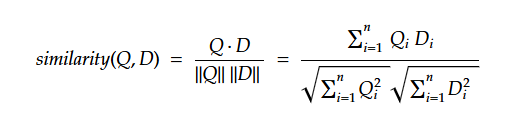
Here, Q represents the query embedding, and D represents a document chunk embedding. Higher scores indicate stronger semantic alignment between the query and the retrieved chunk.
Implementation: In Prompt Studio, Simple Vector Retrieval operates as the default retrieval mode. This retrieval uses cosine similarity over embedded chunks to find the most relevant context efficiently.
When to Use: Simple vector retrieval is efficient for short, direct queries where the answer is explicitly stated in a single section of text. It also serves as a dependable baseline to build more advanced retrieval strategies on top of.
Limitations: This strategy can miss deeper context because each chunk is treated independently. It is sensitive to chunking choices and may struggle with multi-part or analytical queries where relevant information is distributed across the document.
Strategy 2: Sub-Question Retrieval
Sub-Question retrieval decomposes a complex, multi-part query into smaller, distinct sub-questions and executes a separate retrieval for each one. The system then aggregates the results from these individual searches to synthesize a single, comprehensive answer.
How it Works: The system breaks the complex query into smaller sub-questions. For example, if the user asks, “How does the revenue of Company A compare to Company B?”, the system may generate two lookups: “Revenue of Company A” and “Revenue of Company B,” retrieve context for both, and synthesize the answer.
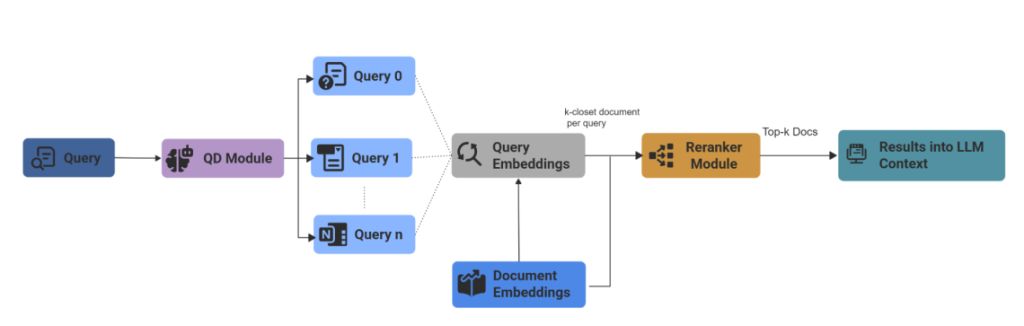
Implementation: Unstract uses LlamaIndex’s SubQuestionQueryEngine for this strategy, which orchestrates decomposition and then synthesizes comprehensive answers.
When to Use: This approach is essential for multi-hop questions, financial comparisons, and compliance summaries, where an answer depends on multiple variables.
Limitations: Sub-Question Retrieval can suffer from a lost-in-retrieval problem when individual sub-questions retrieve incomplete context. The final response may miss important connections or produce an imbalanced result. This approach also increases computational cost due to multiple retrieval and synthesis steps.
Strategy 3: Fusion Retrieval (RAG Fusion)
Fusion retrieval generates multiple variations of the user’s queries and combines the results using the Reciprocal Rank Fusion (RRF) algorithm, ensuring the most pertinent information is prioritized.
How it Works:
Conceptually, RAG Fusion works in three main steps:
- Generate Multiple Related Queries: Use an LLM to derive several variations of the user’s question (synonyms, narrower or broader phrasing) or potential follow-up questions the user may not have considered
- Run Multiple Retrievals: For each query variant, it performs a vector search and retrieves multiple ranked lists of candidate chunks.
- Fuse Results with RRF: It assigns a score to each chunk based on its rank in each list. RRF combines search results from multiple queries and gives higher weight to items that appear at the top of any ranked list.

Where k is a small constant and rankᵢ(d) is the rank of document d in list i.
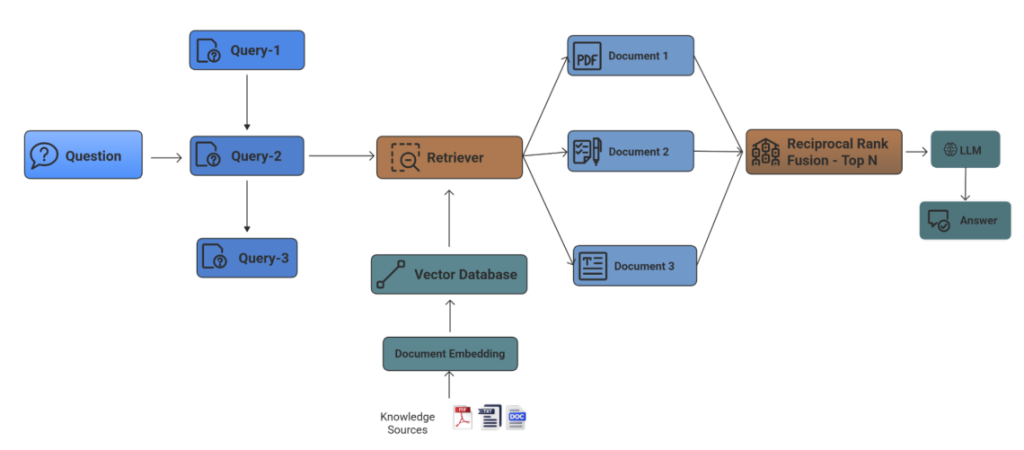
Implementation: In Unstract, Fusion Retrieval generates 3-5 query variations using an LLM, then merges and ranks the results using RRF scoring. Users can also implement it with LangChain RAG Fusion pipelines.
When to Use: This retrieval is ideal when you have semantically uniform text but ambiguous user queries. It prioritizes recall (finding relevant answers) over speed, as it requires multiple vector searches.
Limitations: Fusion Retrieval is computationally expensive due to multiple retrieval passes and LLM calls. It can produce off-topic answers when the generated queries are not sufficiently relevant to the original query, which may reduce precision.
Strategy 4: Recursive Retrieval
Recursive retrieval is optimized for documents with hierarchical or interlinked structures. Instead of stopping at the initial set of retrieved chunks, the system explores related sections to build a more connected understanding of the content.
How it Works: It starts with an initial semantic match and then follows explicit document relationships (e.g., parent/child, references) or metadata links to gather related nodes. The retriever builds an expanded context graph by traversing connected nodes up to a configured depth.
Implementation: In Unstract, the Recursive retriever uses LlamaIndex RecursiveRetriever traverses document relationships up to a configurable depth to assemble connected context.
When to Use: This strategy works best on hierarchical or highly interlinked sources, such as policies, technical standards, and research, with citations where meaningful answers require traversing document structures or reference chains.
Limitations: Recursive Retrieval significantly increases token usage and retrieval cost due to hierarchical traversal of related chunks. If some nodes are disconnected, this may reduce the ability to capture broader or long-range semantic connections.
Strategy 5: Router-Based Retrieval
A router is the component that decides which retriever or index to use to handle that request. Router-based retrieval uses an LLM as a classifier to analyze a query’s intent and dynamically route it to the most appropriate retrieval tool.
How it Works: The router (e.g., an LLM) analyzes the intent, domain, and structure of the query, then directs it to the appropriate retrieval mechanism (semantic vector search, keyword lookup, summary index, or a specialized domain retriever). The final retrieved context is assembled from the chosen retriever. The system effectively becomes multi-modal within the retrieval layer.
Implementation: Router-Based Retrieval in Unstract uses LlamaIndex RouterQueryEngine, which analyzes query intent and dynamically selects the most appropriate retrieval strategy at runtime.
When to Use: This approach is used when your document repository spans multiple content types. For example, a workspace combining HR manuals, financial ledgers, and legal contracts benefits greatly from a router because no single retrieval strategy performs well across all domains.
Limitations: The central limitation of router-based systems is the “routing error”. Incorrect routing decisions can degrade retrieval quality and lead to suboptimal results.
Strategy 6: Keyword Table Retrieval
Keyword Table Retrieval targets structured documents by indexing table fields, labels, and metadata, enabling direct lookup of values through keyword or fuzzy matching instead of semantic similarity.
How it Works: During indexing, the system analyzes each document and extracts keywords, table headers, labels, and other structured fields. When a query comes in, the retriever identifies keywords from the question and performs exact or fuzzy matching against the indexed keyword table. Results may be ranked using a Term Frequency-Inverse Document Frequency (TF-IDF) scoring mechanism.
TF gives higher weight to terms that are important in a specific document. IDF gives lower weightage to terms that are overly common across the entire dataset. This allows the system to return highly targeted results with minimal noise.
The TF-IDF weight for a term t in document d over a corpus D is typically expressed as:

Here,
tf(t, d) is the normalized frequency of term t in document d.
idf(t, D) is the logarithmically scaled inverse document frequency.
Implementation: In Unstract, Keyword Table Retrieval uses LlamaIndex SimpleKeywordTableIndex, and ranks matches using TF-IDF scoring.
When to Use: This strategy works best for highly structured documents such as invoices, forms, financial statements, and spreadsheets, where labels and field names are consistent, and the user often seeks a specific value.
Limitations: This approach depends on exact or near-exact keyword matches. It performs poorly on unstructured text and does not capture semantic meaning, and can miss results when labels and terms are inconsistent.
Strategy 7: Auto-Merging Retrieval
Auto-Merging Retrieval expands context when relevant information spans across adjacent or semantically related chunks and automatically merges them into a single context window for improved continuity.
How it Works: When the base retrieval identifies relevant leaf chunks, the system checks neighboring or parent chunks to determine whether additional context should be folded in. If the content is connected, the chunks are automatically merged into a larger segment before being passed to the LLM.
Implementation: In Unstract Prompt Studio, Auto-Merging Retrieval uses LlamaIndex AutoMergingRetriever to merge leaf nodes with relevant parent nodes.
When to Use: This strategy is especially useful for long-form narrative documents, legal clauses that flow across paragraphs, or any context where breaking content into strict chunk boundaries risks losing meaning.
Limitations: Auto-merging uses threshold parameters that determine the length of retrieved context from child nodes. Increasing the merge threshold adds more surrounding context but can quickly consume tokens, while lower thresholds may trim important context and reduce answer quality.
Deep Dive: Retrieval Strategies in Real Documents
The differences between retrieval strategies become obvious when you test them against real documents. To make this concrete, let’s look at two scenarios of how these strategies impact results in Unstract Prompt Studio, showing how strategy choice changes the quality of extracted outputs, particularly when documents contain a mix of tables, multi-column layouts, and fragmented fields.
Unstract’s Prompt Studio allows users to create custom prompts and select retrieval strategies through configurable LLM Profiles, allowing the extraction of specific fields from complex documents.
Use Case 1: Financial Report with Keyword Table vs Recursive Retrieval
In this use case, we work with a financial report that consists of structured tables and narrative sections. The goal is to evaluate how Keyword Table Retrieval and Recursive Retrieval behave for different types of financial queries.
Task A: Extract a field from a Cash Flow Statement
Extract the “Depreciation, amortisation and impairment” from a Consolidated Cash Flow StatementResult:
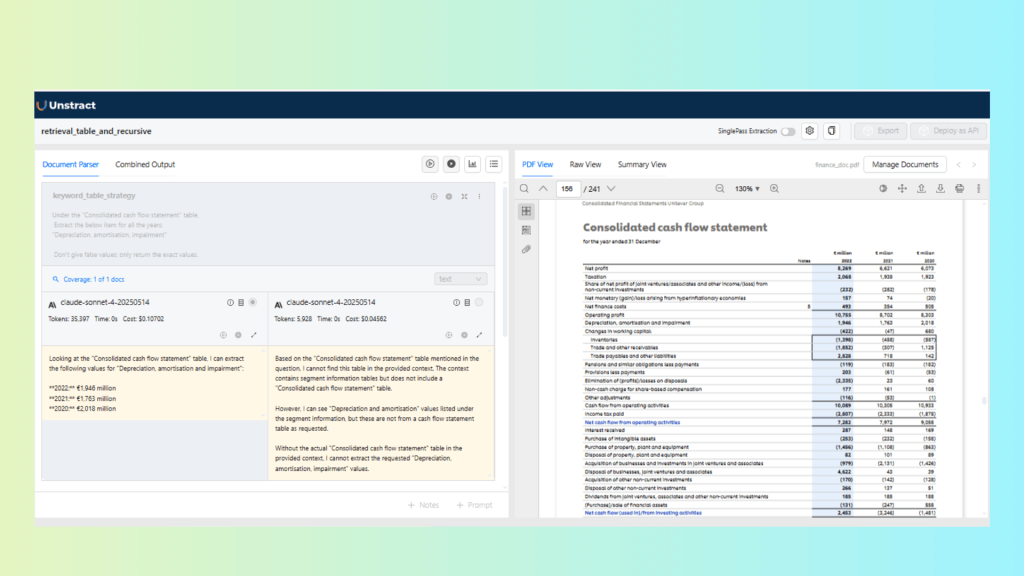
Keyword Table Retrieval performs better for this task because the target value appears as a labeled line item within a structured financial table. The keyword-based lookup is able to directly associate the label with its corresponding numeric value. Recursive Retrieval, on the other hand, does not consistently surface the exact row, as it is optimized for navigating related sections rather than precise table lookups.
Task B: Compare Unilever Group financial performance: 2021 vs 2022
Prompt:
Compare the performance in 2021 with 2022 in terms of the financial Unilever group performance.Result:
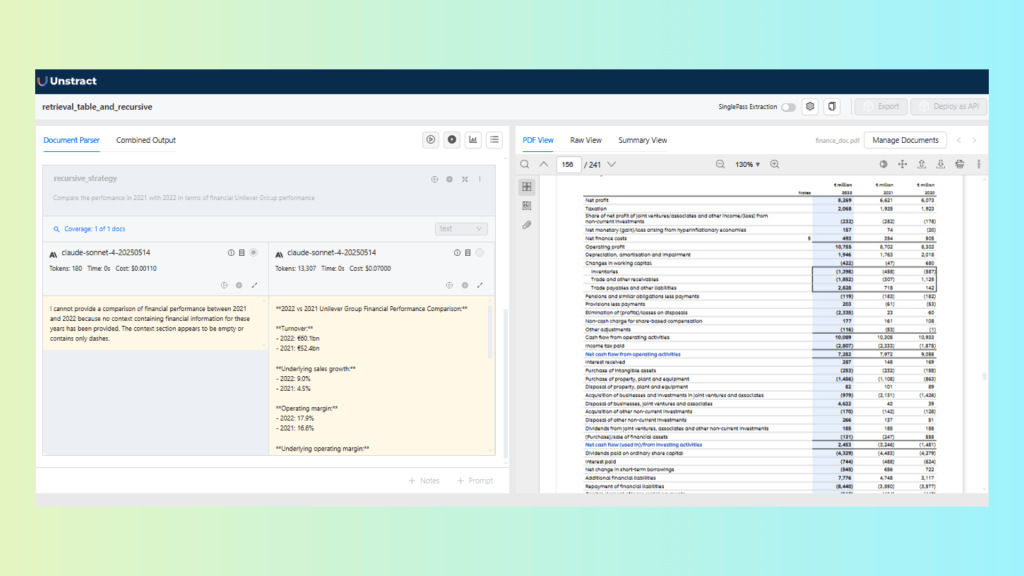
For this analytical, multi-section question, Recursive Retrieval performs better. The comparison requires context from multiple sections of the report rather than a single table row. Recursive Retrieval is able to traverse related sections and aggregate relevant information, producing a more coherent and contextual response than Keyword Table Retrieval.
Use Case 2: Safety Certificate with Auto-Merging vs Simple Retrieval
This use case focuses on a long safety certificate document, which includes well-defined sections and multiple related fields. We compare Simple Vector Retrieval and Auto-Merging Retrieval to evaluate how each strategy handles focused extraction in long-form documents.
Task A: Extract the “System Description” section
Prompt:
Extract the “system description” section of this FOAM system certificateResult:
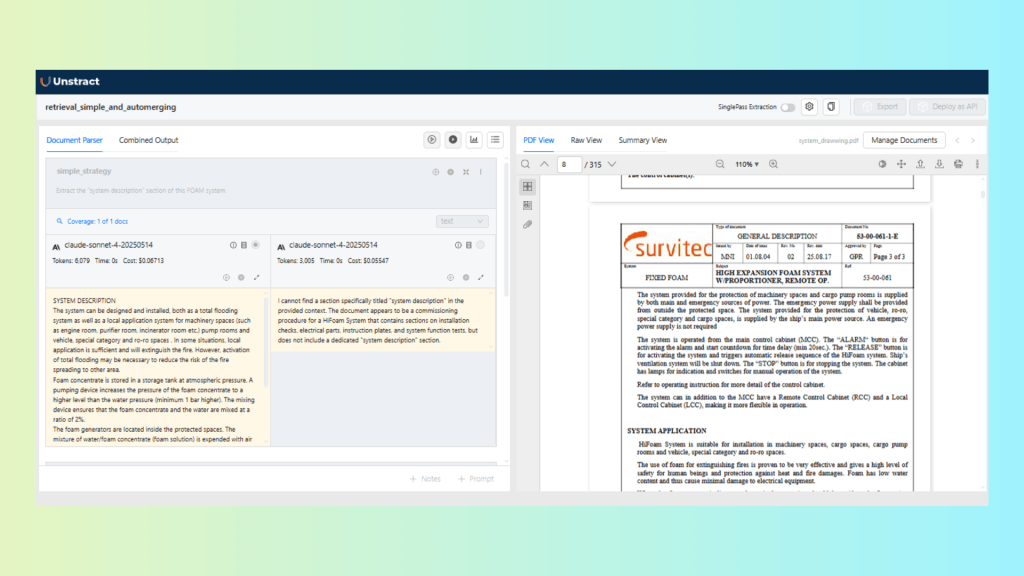
The results show that Simple Vector Retrieval is sufficient for this task. The section is clearly bounded and contained within a single part of the document, making additional merging unnecessary. Using a more complex retrieval strategy here adds overhead without improving results.
Task B: Extract multi-field certificate details
Prompt:
Extract the below things in JSON format:
- Product description
- Terms of validity
- Test carried out
- Fire test report
- Order no of the high expansion foam system
- Hull no of the high expansion foam system
- Certificate number
Result:
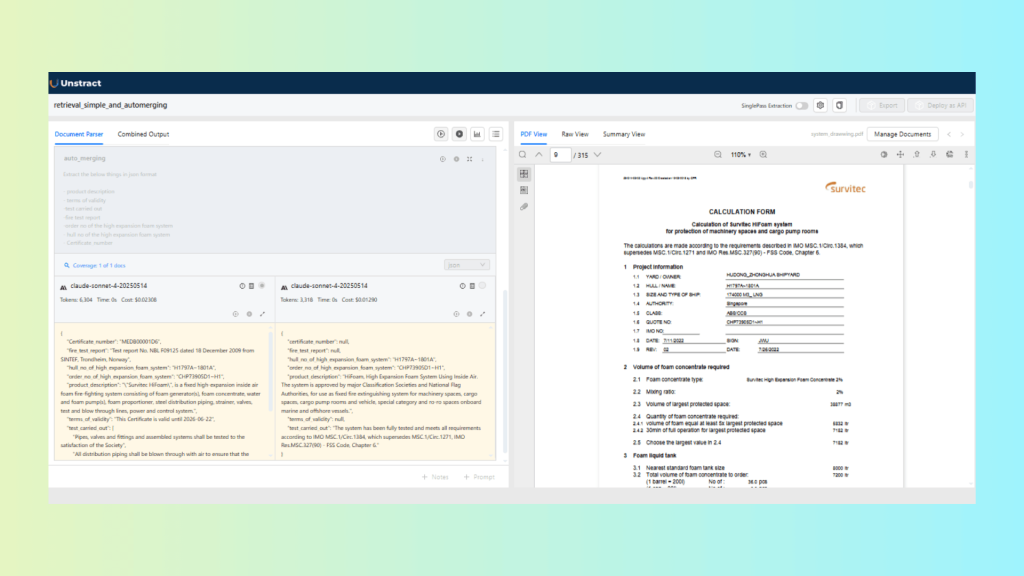
Auto-Merging Retrieval performs better in this scenario. The required fields are distributed across adjacent sections and paragraphs. Auto-merging combines related chunks before passing context to the LLM, resulting in more complete and reliable extraction compared to Simple Retrieval.
Choosing the Right Retrieval Strategy for Your Use Case
The optimal choice of retrieval strategy depends on document structure, query complexity, data format, and the level of reasoning required. To help you select the right configuration in Unstract, here is a comparison of how these strategies stack up:
| Strategy | Best For | Document Types |
| Simple Vector Retrieval | General Q&A, direct queries | Policies, SOPs, FAQs, shorter contracts |
| Fusion Retrieval | Robust search across varied phrasings | Interlinked docs (Contracts, Policies) |
| Sub-Question Retrieval | Multi-part analytical questions | Multi-section docs (Agreements, Financial reports) |
| Recursive Retrieval | Multi-hop, cross-referenced content | Academic papers, Policies, Regulations |
| Router-based Retrieval | Mixed-domain repositories | Mixed repositories (Heterogeneous) |
| Keyword Table Retrieval | Exact term matching or specific lookups | Invoices, Forms, Spreadsheets |
| Auto-Merging Retrieval | Narrative flow, context continuity | Long-form narratives(Certificates, long clauses) |
Tools like Unstract can help you implement the above strategies efficiently, so let’s break it down.
How Unstract Implements These Retrieval Strategies
Unstract is an open-source, no-code LLM platform for turning long, complex documents into structured, machine-readable data. It combines layout-preserving OCR, configurable chunking, and vector search to build RAG-style extraction workflows that can be deployed as APIs or ETL pipelines. It enables teams to automate document-heavy processes with high accuracy, speed, and adaptability.
Prompt Studio for Designing Extraction Workflows
Within the Unstract platform, Prompt Studio is the central workspace where teams can design custom extraction schemas with field-level rules. This ensures deterministic, structured outputs across various formats.
To get started, create a new project in Prompt Studio. This project will be a dedicated workspace for designing prompts tailored to your specific data extraction needs.
Creating and Configuring an LLM Profile:
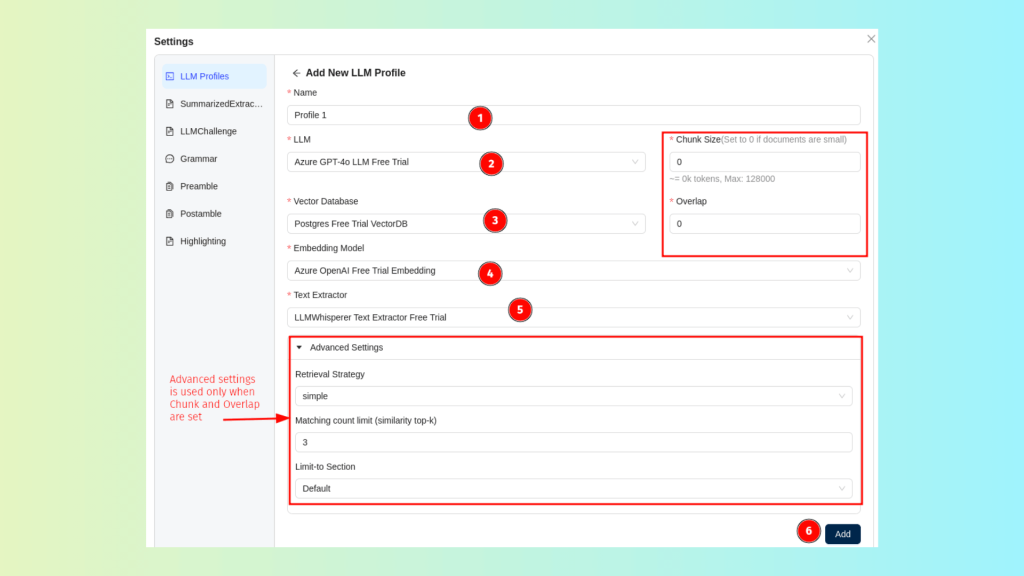
Within Prompt Studio, each extraction project is backed by an LLM Profile, which defines how the system will process, chunk, embed, retrieve, and interpret document data. It also enables users to configure their own custom LLM profiles with preferred components.
LLM Profile generally includes the following pre-configured components:
- LLM Selection: Specifies the model used to process prompts and generate responses.
- Vector Database: Stores the embeddings and serves as the backend for similarity-based retrieval.
- Embedding Model: Enables semantic representation of text for context-aware retrieval.
- Text Extractor: Handles OCR and content extraction from uploaded documents (e.g., LLMWhisperer).
- Chunk Size: Determines how the document is segmented into smaller units before embedding.
- Overlap: Defines how many tokens or characters are shared between adjacent chunks to preserve continuity when chunking is enabled.
- Retrieval Strategy: Selects the algorithm used to retrieve relevant context (e.g., vector, fusion, keyword-table, auto-merge, sub-question, router-based).
- Matching Count Limit (Similarity Top-K): Specifies how many retrieved chunks are passed to the LLM as input context (e.g., if Top-K = 3, the top three most similar chunks are included in the final prompt sent to the model.)
Choosing and Combining Retrieval Strategies:
Unstract allows you to choose the retrieval strategy that best matches your document type and extraction goal, directly within the LLM Profile’s advanced settings.
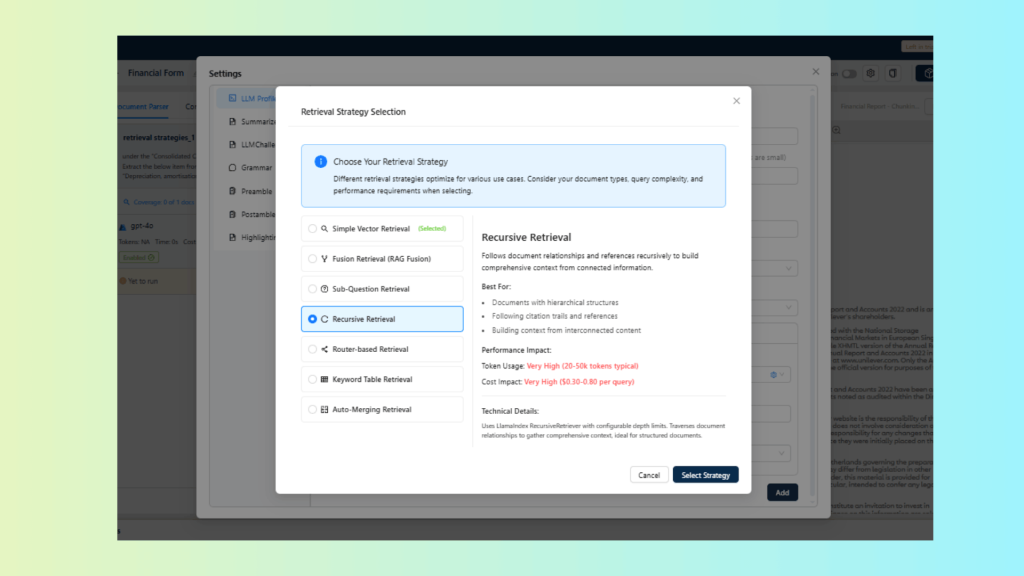
Creating the Bank Statement Extraction Project
For this demo, we extract structured shipment details from a sample Ocean Bill of Lading, a document type known for dense, multi-column layouts with shipping, financial, and cargo details scattered across sections.
- Create a Prompt Studio Project
- Navigate to Prompt Studio
- Click New Project and name it “Bill of Lading Extraction”
- Upload the Ocean Bill PDF under Manage Documents
- Define custom prompts for extracting critical information
- Select Retrieval and Chunking Strategy
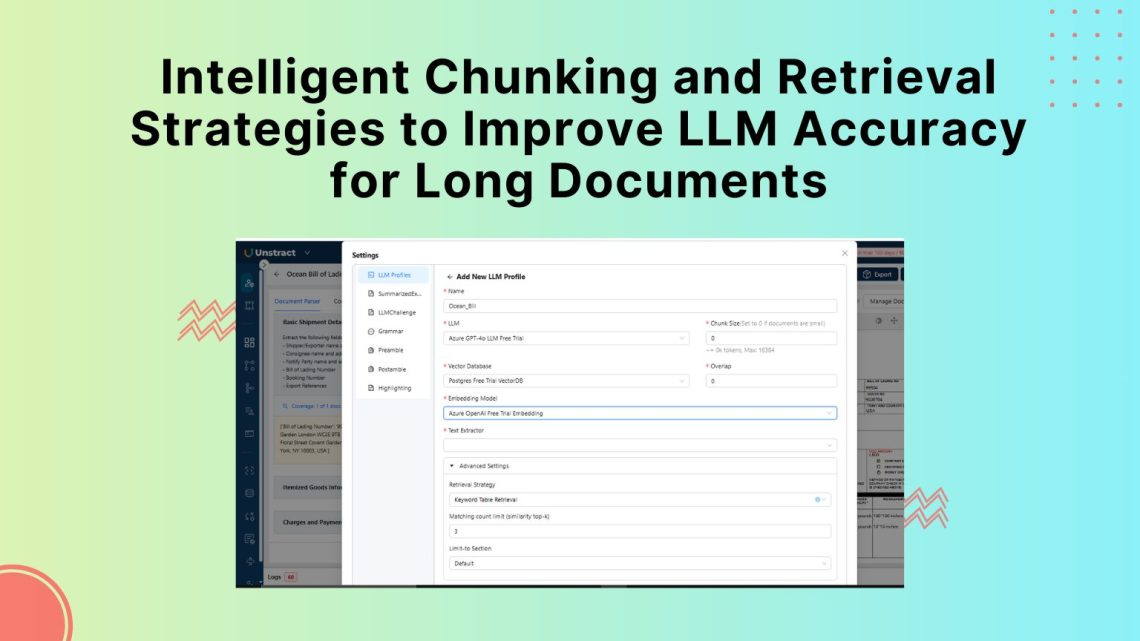
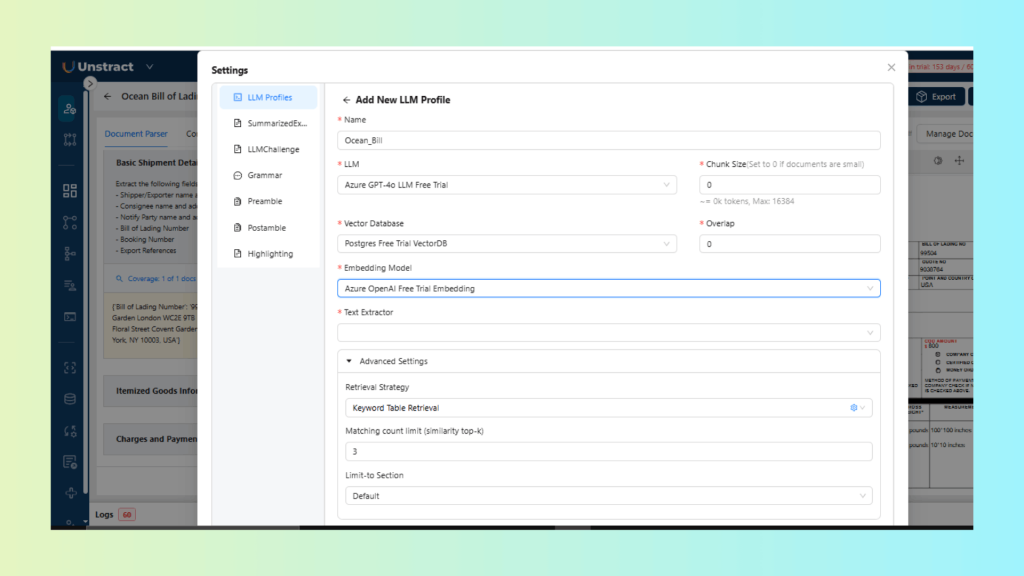
For the retrieval strategy, we use keyword-table retrieval, which works well for structured documents with clearly labeled fields such as Bill of Lading Number or Booking Number.
Chunk size and overlap are both set to 0. Since the document follows a single-page, form-style layout, splitting it into multiple chunks provides no benefit and increases the risk of separating labels from their corresponding values.
Below is the LLM Profile configuration:
3. Testing Retrieval and Extraction
- In Prompt Studio, click Add Prompts and define your extraction fields to identify any shipment details.
Extract the following fields from the document:
- Shipper name and address
- Consignee name and address
- Notify Party name and address
- Bill of Lading Number
- Booking Number
- Export References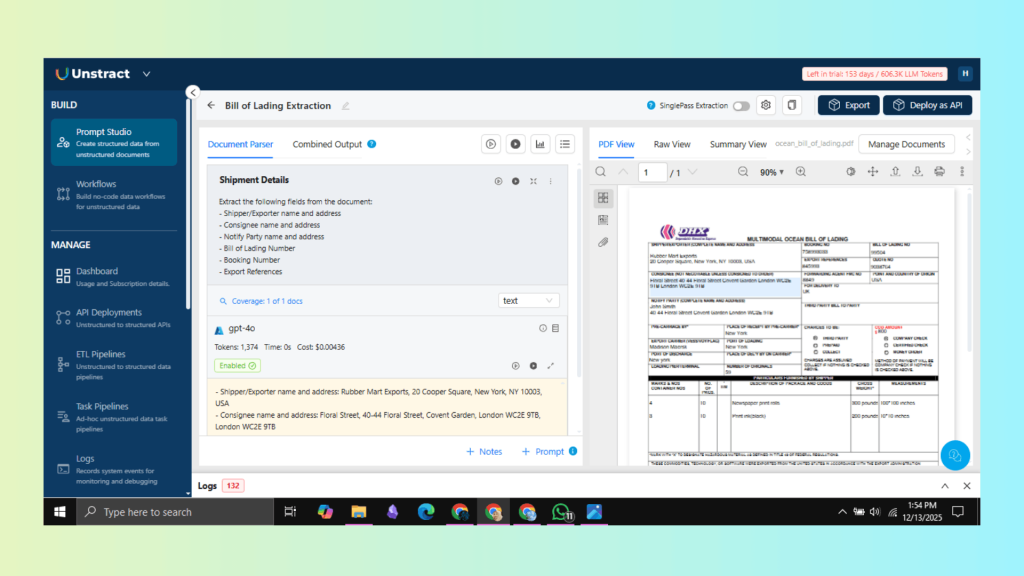
4. Deploying as APIs or Workflows
- After validating the extraction performance, Unstract allows you to deploy this workflow as a secure API, making it easy to integrate with Enterprise Resource Planning (ERP) systems, shipping management tools, or logistics platforms.
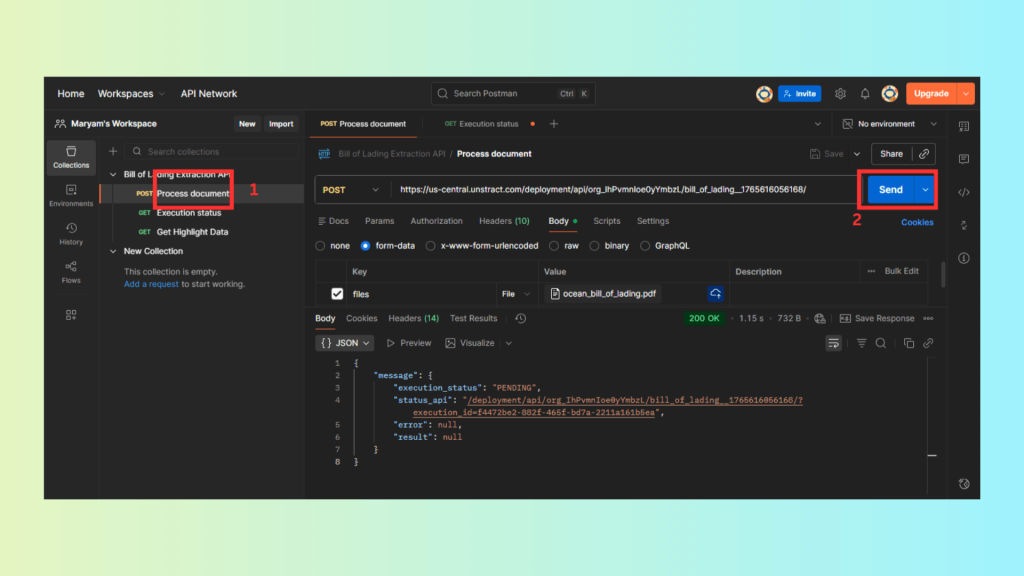
Finally, retrieve the JSON response; the API returns structured insurance data as clean JSON output.
{
  "status": "COMPLETED",
  "message": [
    {
      "file": "ocean_bill_of_lading.pdf",
      "file_execution_id": "9e7703e0-e61c-4c7d-93c2-aef9ff6aba6c",
      "status": "Success",
      "result": {
        "output": {
          "shipper_exporter": {
            "name": "Rubber Mart Exports",
            "address": "20 Cooper Square, New York, NY 10003, USA"
          },
          "consignee": {
            "name": "Floral Street",
            "address": "40-44 Floral Street Covent Garden, London WC2E 9TB"
          },
          "notify_party": {
            "name": "John Smith",
            "address": "40-44 Floral Street Covent Garden London WC2E 9TB"
          },
          "bill_of_lading_details": {
            "bill_of_lading_number": "99504",
            "booking_number": "758993033",
            "export_references": "845993"
          }
        }
      },
      "error": null,
      "metadata": {
        "source_name": "ocean_bill_of_lading.pdf",
        "organization_id": "org_IhPvmnIoe0yYmbzL",
        "workflow_id": "bill_of_lading_1765616056168",
        "execution_id": "14472be2-882f-465f-bd7a-2211a16b5ea",
        "file_execution_id": "9e7703e0-e61c-4c7d-93c2-aef9ff6aba6c",
        "total_elapsed_time": 18.4,
        "tool_metadata": [
          {
            "tool_name": "structure_tool",
            "output_type": "JSON"
          }
        ]
      }
    }
  ]
}
You now have a production-ready API that applies configurable chunking and retrieval strategies to extract structured responses from complex documents.
Conclusion
Handling long, complex documents with LLMs depends heavily on how the data is prepared before retrieval. Intelligent chunking ensures that semantic boundaries are preserved, tables and clauses remain coherent, and multi-step logic is retained. Choosing the right retrieval strategy determines whether the model can access the right context for accurate, complete answers.
Unstract brings these capabilities together in a single platform. With configurable chunking parameters, overlap control, LLMs, and multiple retrieval strategies inside Prompt Studio, teams can adapt their extraction pipelines to any document type.
For organizations working with contracts, financial documents, or policy-heavy content, applying the right chunking and retrieval approach is essential. Prompt Studio enables teams to test and refine these workflows, helping them achieve higher accuracy, better cost efficiency, and faster document extraction at scale.
Book a free demo with Unstract to see how configurable chunking and retrieval strategies can improve accuracy and reliability across complex document workflows.