OCR RPA: Choosing the Right OCR Tool for Robotic Process Automation
Table of Contents
Introduction: Why OCR Still Breaks Most RPA?
Robotic Process Automation (RPA) is great at what it was built for: repetitive, rule-based work. A bot can log into systems, copy data between apps, trigger approvals, and update records all day without getting tired or distracted.
And yet, a lot of RPA programs hit the same wall once they move beyond a pilot: documents.
Most real business processes don’t start with clean APIs or perfectly structured inputs. They start with an invoice someone emailed as a scanned PDF. A claim form filled by hand. A photographed receipt taken under bad lighting. A tax document where the checkboxes matter more than the text. That’s where “RPA OCR” stops being a feature and becomes the deciding layer.
Here’s the uncomfortable part: RPA bots usually don’t fail because the automation logic is wrong. They fail because the document input is unreliable. When the text extraction is inconsistent, the bot doesn’t always crash—it often does something worse: it proceeds with wrong or missing data, then the workflow quietly lands in exceptions, rework, or compliance risk.
Traditional OCR was treated like a simple step: extract characters, pass the text downstream, done. But OCR for RPA automation needs more than character accuracy. In production, what matters is whether the output is:
Structurally stable across similar documents (so mappings don’t break)
Layout-aware (so labels stay attached to values)
Table-safe (so line items don’t collapse into a paragraph)
Form-capable (checkboxes and radio buttons must be captured reliably)
Traceable (so reviewers can verify what was extracted and where it came from)
Because in OCR automation, tiny shifts create big failures. A line break changes, a column wraps, a table cell merges, and suddenly your field mapping drifts. One week it works. The next week the same vendor’s invoice format “looks” the same to humans—but your bot starts misreading totals or missing tax values.
That’s why teams evaluating OCR tools for RPA should stop asking only: “Does it extract text?” The practical questions are:
Does it preserve layout consistently?
Does it reconstruct tables the same way every time?
Can it detect checkboxes and radio selections reliably?
Can we validate and audit extracted values with confidence?
RPA automates actions. OCR determines whether those actions are based on trustworthy input. And when you scale automation across finance, insurance, healthcare, and compliance-heavy workflows, that input layer is what separates reliable automation from an expensive exception machine.
What is RPA?
Robotic Process Automation (RPA) is a technology that uses software bots to execute repetitive, rule-based business tasks. These bots mimic human interactions with systems — clicking through interfaces, entering data, validating fields, triggering workflows, and updating records.
RPA excels in environments where:
Inputs are structured and consistent
Business rules are clearly defined
System interfaces remain stable
For example, bots can:
Move data between ERP and CRM systems
Process approval workflows
Generate reports
Trigger notifications
Where RPA struggles, however, is with unstructured inputs — especially documents.
Most business processes do not begin with clean, structured APIs. They begin with:
Scanned PDFs
Handwritten forms
Photographed receipts
Excel-based reports
Complex insurance or banking documents
This is where robotic process automation OCR becomes critical. Without reliable OCR, bots are forced to rely on brittle screen scraping, templates, or manual preprocessing. When document layouts change, automation breaks.
Document-heavy workflows require more than simple character recognition. They require a robust document parser that can:
Extract structured data from complex layouts
Maintain spatial relationships
Handle tables and forms
Tolerate noisy or low-quality scans
In other words, effective RPA with OCR requires a document understanding layer — not just a text extraction engine.
As enterprises scale automation across departments — finance, insurance, healthcare, logistics, compliance — the quality of OCR becomes the determining factor between pilot success and production failure.
This is why evaluating the right OCR tools for RPA is no longer optional. It is foundational to building reliable, scalable automation systems.
What is OCR, and Why It’s Critical in Enabling RPA
Optical Character Recognition (OCR) is the technology that converts text within images, PDFs, and scanned documents into machine-readable data. In isolation, OCR simply extracts characters. But in the context of automation, its role is much more strategic.
In modern RPA OCR architectures, OCR acts as the input layer of business automation. Every automated workflow that begins with a document—invoice, form, receipt, application, claim—depends on OCR to convert unstructured content into structured data.
Without reliable OCR in RPA, bots cannot:
Identify key-value pairs
Extract structured tables
Detect checkboxes or radio buttons
Interpret handwritten or low-quality scans
Maintain consistent field mapping
In real-world enterprise environments, documents rarely arrive in perfect condition. They are scanned at angles, photographed on mobile devices, partially filled by hand, or generated from different systems with varying layouts. This is where the integration between OCR and RPA becomes critical.
The primary role of OCR for RPA automation is not just to “read text,” but to:
When evaluating OCR tools for RPA, organizations should focus on four key success criteria:
1. Accuracy
The OCR engine must reliably extract text across varied document types, including scanned PDFs, photographed images, and multilingual content.
2. Layout Stability
Stable layout output prevents field-mapping drift. In RPA with OCR, even small shifts in formatting can cause bots to fail or misclassify data. Layout-aware parsing ensures consistent automation performance.
3. Traceability
Enterprise-grade robotic process automation OCR must support spatial context (such as bounding boxes) so extracted values can be validated against source documents—critical for compliance-heavy industries like banking and insurance.
4. Scalability
OCR automation must handle large document volumes across departments without requiring heavy template maintenance or preprocessing pipelines.
In short, OCR is not a peripheral component in RPA—it is the foundation. Weak OCR leads to broken automation. Robust OCR enables scalable, reliable digital transformation.
Processes Automated by OCR-Enabled RPA
When implemented correctly, RPA and OCR together unlock automation across document-intensive workflows in nearly every industry. Below are the most common processes where OCR RPA delivers measurable ROI.
With reliable RPA OCR capabilities, bots validate extracted data against ERP systems, flag mismatches, and trigger payment approvals. Layout preservation and table extraction are essential here to prevent misaligned line items and incorrect totals.
Know Your Customer (KYC) processes require extraction of structured data from:
Identity documents
Application forms
Financial statements
Multilingual forms
Robotic process automation OCR enables banks to automatically validate names, IDs, addresses, and financial disclosures. Traceable outputs and spatial validation are critical for regulatory compliance and audit requirements.
Supply chain operations rely heavily on structured yet variable documents such as:
Packing lists
Shipping manifests
Bills of lading
Customs forms
Using OCR tools for RPA, logistics companies can automatically extract shipment details, quantities, weights, and tracking information. Reliable table extraction and tolerance for skewed or misaligned scans are crucial in these scenarios.
Across all these use cases, the pattern is clear:
Documents are diverse and unpredictable
Bots require structured, stable data
Automation fails when OCR output is inconsistent
That is why choosing the right OCR for RPA automation is not just a technical decision—it directly determines whether automation scales or stalls.
In the next sections, we will examine why traditional OCR engines struggle with these real-world scenarios and how modern, layout-preserving solutions redefine what effective OCR automation looks like in production RPA environments.
The Crippling Challenges: RPA Without Robust OCR
Many automation initiatives begin with strong RPA design and clear business logic, yet fail when deployed at scale. The common denominator is weak or unstable OCR. Without a reliable document parsing layer, even well-built bots struggle to deliver consistent results.
5.1 Field Mapping Drift — The Hidden Cost of Poor OCR
In RPA with OCR, bots rely on predictable output structures. If OCR output shifts due to minor layout changes—such as line breaks, column order, or spacing differences—field mappings break.
For example:
An invoice total shifts position
A policy number appears on a different line
A table column gets merged incorrectly
The result is “field mapping drift.” Bots extract the wrong data, trigger validation errors, or send cases into exception queues. Over time, this leads to:
Increased manual reviews
Higher bot failure rates
Rising maintenance costs
In large-scale RPA OCR deployments, these small inconsistencies compound quickly. What seems like a minor OCR formatting issue can undermine automation ROI.
5.2 No Spatial Context = No Trust
Traditional OCR tools often output plain text without structural or spatial information. But in regulated industries—banking, insurance, healthcare—plain text is not enough.
Engineers integrating OCR and RPA need spatial context:
Where exactly was this value located on the document?
Was it inside a specific table cell?
Was it adjacent to a particular label?
Without coordinates or layout anchors, validation becomes guesswork. There is no reliable way to highlight extracted fields for review or generate audit trails.
Modern OCR for RPA automation must provide spatial awareness to enable verification, compliance, and human-in-the-loop workflows.
5.3 Checkbox and Radio Buttons Break Traditional Pipelines
Forms are common across industries—insurance claims, tax filings, onboarding forms, compliance declarations. These documents often include checkboxes and radio buttons that determine business logic.
When robotic process automation OCR fails to reliably detect form elements:
Selected options are missed
Incorrect assumptions are made
Downstream workflows trigger the wrong actions
To compensate, teams frequently add brittle computer vision rules or manual validation layers. This increases complexity and reduces reliability.
For true OCR automation, native extraction of form elements must be built into the parsing layer.
Real-world documents are rarely perfect. They may be:
Skewed or misaligned
Photographed under uneven lighting
Stained or faded
Low resolution
In many OCR RPA implementations, teams build heavy preprocessing pipelines—deskewing, denoising, thresholding, cropping—to compensate for weak OCR performance.
This increases infrastructure cost and system fragility. A robust OCR solution should tolerate low-fidelity inputs and reduce reliance on complex preprocessing workflows.
Ultimately, weak OCR introduces instability at the very start of automation. Without accurate, layout-stable, and traceable outputs, RPA systems generate more exceptions than efficiency.
Industry Use Cases: Where OCR and RPA Must Work Together
Across industries, document-heavy workflows are the primary driver for OCR and RPA integration. Each sector highlights why layout preservation, validation capabilities, and structural reliability are critical for scalable automation.
Banking and Financial Services
Banks process thousands of documents daily—loan applications, account opening forms, financial statements, identity proofs, and compliance disclosures.
In OCR in RPA workflows:
Customer data must be extracted accurately
Regulatory forms must be validated
Financial tables must be reconstructed reliably
Even small layout inconsistencies can cause incorrect data entry into core banking systems. In regulated environments, traceability and validation are essential to avoid compliance risks.
Robust RPA OCR capabilities reduce onboarding times while maintaining audit readiness.
Insurance
Insurance operations depend heavily on forms and structured documents—claims submissions, ACORD forms, coverage schedules, policy updates.
These documents often include:
Handwritten notes
Complex tables
Checkboxes and radio buttons
Multi-page layouts
With effective OCR automation, insurers can automatically extract policy numbers, coverage limits, deductibles, and claim details. Layout stability prevents field-mapping drift, while form element detection ensures correct interpretation of selected options.
Reliable OCR tools for RPA significantly reduce manual claim reviews and speed up processing cycles.
Healthcare
Healthcare systems handle patient intake forms, insurance verification documents, prescriptions, lab reports, and billing statements.
In RPA with OCR, automation must:
Capture patient demographics
Extract insurance details
Identify medical codes
Maintain high accuracy standards
Given the sensitive nature of healthcare data, spatial traceability and validation workflows are crucial. Strong OCR ensures data integrity before it enters hospital information systems.
Accounting and Finance
Accounting teams process invoices, expense reports, tax forms, audit documentation, and financial statements.
For robotic process automation OCR, the ability to:
Extract line items from tables
Preserve column alignment
Capture totals and tax breakdowns accurately
is critical. A misaligned table or incorrect value extraction can impact financial reporting and reconciliation.
Reliable OCR RPA systems reduce accounts payable cycle time and improve financial accuracy.
Logistics and Supply Chain
Logistics companies handle packing lists, bills of lading, customs declarations, shipping manifests, and warehouse documentation.
These documents often:
Contain dense tabular data
Arrive as scanned copies or photographs
Include multilingual content
In such scenarios, OCR and RPA must work seamlessly to extract shipment details, quantities, and tracking information. Layout preservation ensures that structured shipping data remains consistent across documents.
Strong OCR for RPA automation minimizes manual data entry and accelerates supply chain operations.
Across banking, insurance, healthcare, accounting, and logistics, one pattern is consistent:
Documents vary in format and quality
Bots require structured, stable data
Automation success depends on OCR reliability
That is why selecting the right OCR RPA solution is not just a technical optimization—it is a foundational decision for enterprise automation at scale.
OCR Landscape: Key Approaches + Integration Challenges for Engineers
Choosing the right OCR tools for RPA starts with understanding the current OCR landscape. Not all OCR is built for automation. Some engines are designed for clean text recognition, while modern platforms focus on document parsing—preserving structure so downstream systems (RPA bots and LLMs) can reliably consume outputs.
7.1 Traditional OCR Engines
Traditional OCR engines perform well when documents are clean, uniform, and text-heavy—think high-resolution printed pages with consistent formatting. In controlled environments, they can deliver acceptable accuracy.
However, most enterprise workflows are not controlled. Real-world documents bring variability that traditional OCR struggles with, including:
From an engineering standpoint, the biggest drawback is operational: traditional OCR often requires constant tuning and template maintenance. Teams end up building brittle pipelines involving:
document classification + template selection
manual coordinate mapping
preprocessing (deskew/denoise)
exception handling rules
This becomes expensive over time. In large-scale RPA OCR deployments, “template drift” and frequent edge cases translate directly into higher bot failure rates and manual review load.
7.2 Modern Solutions for LLM-Era Document Processing
Modern OCR has moved beyond character recognition into document parsing—extracting text while preserving structure so it can be reliably interpreted by automation systems.
In the LLM era, OCR output is no longer just a blob of text. LLM-driven workflows need:
stable layout and reading order
clear segmentation (headers, fields, sections)
table structure retained
spatial context for validation and traceability
This is why OCR in RPA is evolving into “OCR + layout preservation + downstream readiness.” When the output is structurally consistent, both RPA bots and LLM-based extraction pipelines can operate with fewer exceptions and less engineering overhead.
In other words, modern OCR automation focuses on reliability of structure, not just recognition of text.
7.3 Key Integration Challenges When Combining OCR + RPA
Even with strong tools, engineering teams face predictable integration challenges when deploying OCR and RPA together:
Output instability across pages/scans: minor variations can shift labels and values, breaking mappings
Table extraction inconsistencies: line items often fail when table structure is not preserved
Human review and audit requirements: enterprises need review workflows, traceability, and proof of extraction source
Latency and cost at scale: OCR throughput, batching, and runtime cost become critical in production
Security and compliance constraints: many workflows contain PII and require on-prem/self-hosted OCR options
These challenges are exactly why selecting the right OCR for RPA automation requires evaluating more than “accuracy.” Engineers need predictable output formats, layout stability, and validation-ready extraction to make automation scalable in real production environments.
What is LLMWhisperer?
LLMWhisperer is a layout-preserving OCR engine built for LLM-ready document understanding. Instead of treating OCR as simple character recognition, it focuses on extracting text while maintaining the original structure of the document—its layout, tables, form elements, and spatial relationships.
This positioning is critical in modern OCR for RPA automation. In document-heavy workflows, stability and structure matter more than raw recognition accuracy alone. If the extracted output shifts across similar documents, downstream automation breaks.
Document extraction at the cutting edge with LLMs vs LLMWhisperer
Watch this webinar where we put top LLMs to the test—evaluating their performance across documents of varying complexity. We’ll dive into why directly parsing raw documents often leads to subpar results, and showcase the impact LLMWhisperer has on improving extraction outcomes.
LLMWhisperer is designed with this reality in mind. It prioritizes:
Structural consistency
Layout preservation
Downstream usability for LLMs and automation systems
For RPA OCR use cases, that means fewer mapping errors, more predictable outputs, and smoother integration with bots and validation workflows.
Why LLMWhisperer Fits RPA Automation Better
When evaluating OCR tools for RPA, the key question is not just “Does it read text?” but “Does it produce stable, automation-ready outputs?” LLMWhisperer addresses the core engineering challenges that commonly disrupt OCR and RPA implementations.
9.1 Layout Preservation = Fewer Exceptions
In traditional pipelines, small formatting shifts cause major automation failures. LLMWhisperer preserves layout, which creates a stable extraction structure.
The impact is direct:
Layout preservation → stable extraction structure
Stable structure → prevents field mapping drift
Less drift → fewer bot breaks → lower exception handling
For large-scale RPA with OCR, this significantly reduces maintenance overhead and manual intervention.
9.2 Bounding Boxes = Human Validation UI + Audit Trails
LLMWhisperer outputs spatial coordinates for extracted text. These bounding boxes enable:
Highlighting extracted values on the original document
Reviewer confirmation workflows
Clear audit trails for compliance and governance
In regulated industries using robotic process automation OCR, spatial traceability is essential for trust and validation.
9.3 Checkbox and Radio Extraction = Real Form Automation
Many enterprise forms include checkboxes, radio buttons, and structured fields. LLMWhisperer natively extracts these elements, enabling:
Reliable interpretation of selected options
Clean form automation
Elimination of brittle computer vision rules or template hacks
This makes OCR automation far more reliable for insurance, tax, onboarding, and compliance documents.
9.4 Low-Fidelity Tolerance = Less Preprocessing
Real-world documents often contain stains, skew, shadows, or low resolution. LLMWhisperer handles such variability effectively, reducing the need for:
Deskewing pipelines
Denoising workflows
Complex preprocessing layers
For OCR in RPA, this simplifies architecture and lowers operational complexity.
9.5 Tables and Complex Layouts
Structured table extraction is critical for invoices, insurance reports, coverage schedules, and logistics documents. LLMWhisperer preserves table structure, maintaining row and column relationships—something traditional OCR engines frequently distort.
Reliable table parsing directly improves RPA OCR capabilities in finance and accounting workflows.
9.6 Multilingual OCR (300+ Languages)
Global organizations operate across regions and languages. Supporting 300+ languages ensures that RPA and OCR workflows can scale internationally without maintaining separate OCR stacks for each geography.
This is especially important for multinational banking, insurance, and logistics operations.
This flexibility ensures OCR for RPA automation works across diverse document sources—not just ideal, clean inputs.
9.8 Secure Deployments and Transparent Pricing
Organizations can deploy LLMWhisperer via cloud APIs or self-hosted/on-premise OCR solutions. This flexibility addresses:
Data residency requirements
PII and compliance constraints
Enterprise security policies
Combined with a straightforward pricing approach, it supports scalable and secure OCR RPA deployments across industries.
The “Traditional OCR Underperforms Here”
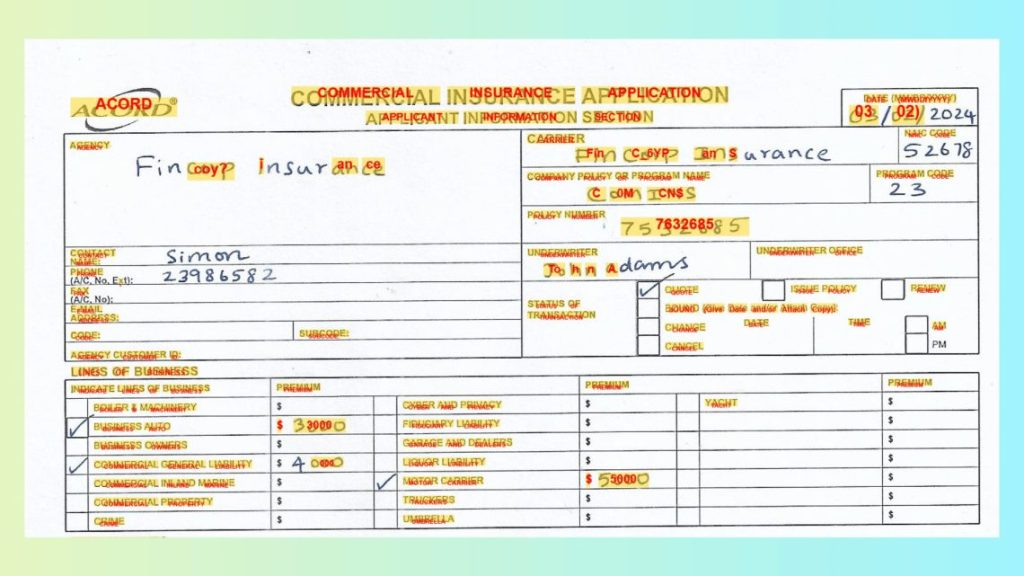
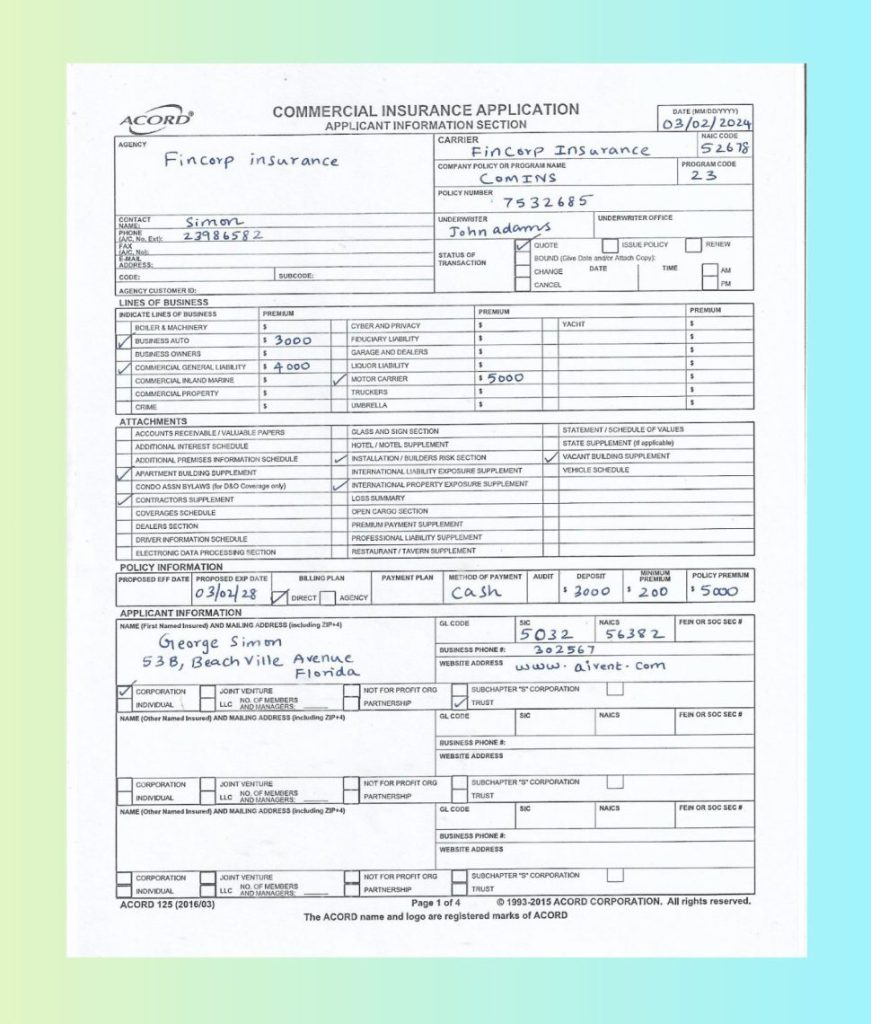
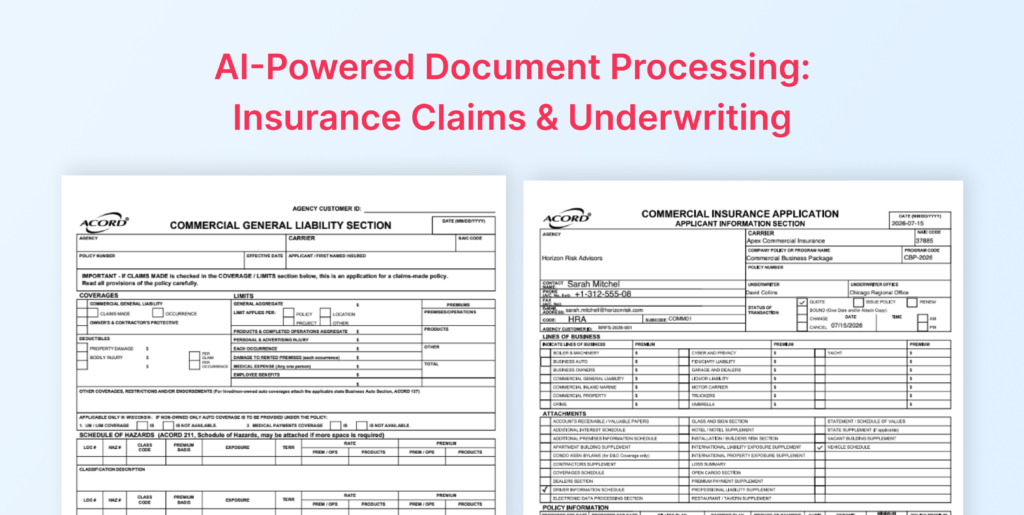
To see where traditional RPA OCR solutions struggle, let’s take a real example: a handwritten, scanned ACORD Commercial Insurance Application form (shown above).
For traditional OCR in RPA, this mix of handwriting + layout + tables often leads to broken label-value mapping and inconsistent outputs.
How LLMWhisperer Solves It
LLMWhisperer strengthens OCR for RPA automation by providing:
Handwriting recognition for filled fields
Layout preservation to keep labels aligned with values
Form element extraction for checkboxes and structured fields
Bounding boxes to support validation UI and audit trails
                ®                COMMERCIAL INSURANCE APPLICATION                                                  DATE (MM/DD/YYYY)

                                           APPLICANT INFORMATION SECTION                                        03/02/2024
 AGENCY                                                            CARRIER                                              NAIC CODE

                                                                         Fincorp          Insurance                     52678
           Fincorp          insurance                              COMPANY POLICY OR PROGRAM NAME                   PROGRAM CODE

                                                                           COMINS                                     23
                                                                  POLICY NUMBER
                                                                                7532685
 CONTACT NAME: Simon                                              UNDERWRITER                      UNDERWRITER OFFICE
 PHONE                                                                        adams
 (A/C, No, Ext): 23986582                                            John
 (A/C, FAX No);                                                                   [X] QUOTE         [ ] ISSUE POLICY [ ] RENEW
                                                                   STATUS OF          BOUND (Give Date and/or Attach Copy):
 ADDRESS: E-MAIL                                                   TRANSACTION    [ ]
 CODE:                            SUBCODE:                                        [ ] CHANGE     DATE           TIME    [ ] AM

 AGENCY CUSTOMER ID:                                                              [ ] CANCEL                            [ ] PM
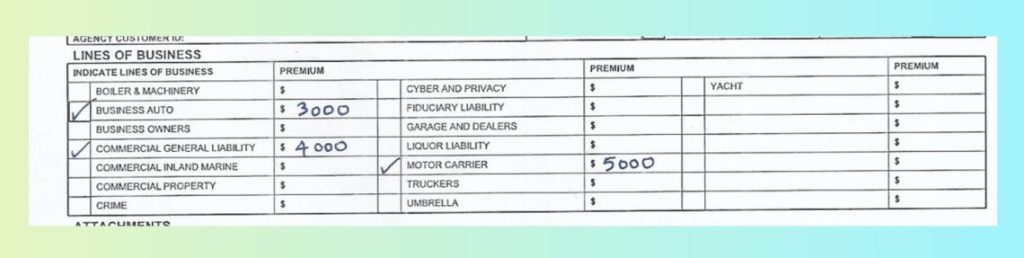
 LINES OF BUSINESS
 INDICATE LINES OF BUSINESS    PREMIUM                                     PREMIUM                                    PREMIUM

 [ ] BOILER & MACHINERY        $             [ ] CYBER AND PRIVACY         $            [ ] YACHT                     $
 [X] BUSINESS AUTO             $ 3000        [ ] FIDUCIARY LIABILITY       $            [ ]                           $
 [ ] BUSINESS OWNERS           $             [ ] GARAGE AND DEALERS        $                                          $
 [X] COMMERCIAL GENERAL LIABILITY $ 4000     [ ] LIQUOR LIABILITY          $            [ ]                           $
 [ ] COMMERCIAL INLAND MARINE $              [X] MOTOR CARRIER             $ 5000       [ ]                           $
 [ ] COMMERCIAL PROPERTY       $             [ ] TRUCKERS                  $            [ ]                           $
 [ ] CRIME                     $             [ ] UMBRELLA                  $            [ ]                           $
 ATTACHMENTS

[ ] ACCOUNTS RECEIVABLE / VALUABLE PAPERS   [ ] GLASS AND SIGN SECTION                  [ ] STATEMENT / SCHEDULE OF VALUES
 [ ] ADDITIONAL INTEREST SCHEDULE            [ ] HOTEL / MOTEL SUPPLEMENT               [ ] STATE SUPPLEMENT (If applicable)
 [ ] ADDITIONAL PREMISES INFORMATION SCHEDULE [X] INSTALLATION / BUILDERS RISK SECTION [X] VACANT BUILDING SUPPLEMENT
 [X] APARTMENT BUILDING SUPPLEMENT           [ ] INTERNATIONAL LIABILITY EXPOSURE SUPPLEMENT [ ] VEHICLE SCHEDULE
 [ ] CONDO ASSN BYLAWS (for D&O Coverage only) [X] INTERNATIONAL PROPERTY EXPOSURE SUPPLEMENT [ ]
 [X] CONTRACTORS SUPPLEMENT                  [ ] LOSS SUMMARY                           [ ]
 [ ] COVERAGES SCHEDULE                     [ ] OPEN CARGO SECTION                      [ ]
 [ ] DEALERS SECTION                        [ ] PREMIUM PAYMENT SUPPLEMENT              [ ]
 [ ] DRIVER INFORMATION SCHEDULE            [ ] PROFESSIONAL LIABILITY SUPPLEMENT       [ ]
[ ] ELECTRONIC DATA PROCESSING SECTION      [ ] RESTAURANT / TAVERN SUPPLEMENT          [ ]
 POLICY INFORMATION
 PROPOSED EFF DATE PROPOSED EXP DATE BILLING PLAN      PAYMENT PLAN METHOD OF PAYMENT AUDIT   DEPOSIT      PREMIUM MINIMUM POLICY PREMIUM
                                                                                            $ 3000       $ 200        $ 5000
                03/02/28        [X] DIRECT [ ] AGENCY                cash
 APPLICANT INFORMATION
 NAME (First Named Insured) AND MAILING ADDRESS (including ZIP+4) GL CODE          SIC             NAICS           FEIN OR SOC SEC #
                                                                                   5032             56382
         George         Simon                                     BUSINESS PHONE #:   302567

      53B, Beach Ville               Avenue                       WEBSITE ADDRESS
                                     Florida                                      www.aivent.com

 [X] CORPORATION [ ] JOINT VENTURE             [ ] NOT FOR PROFIT ORG [ ] SUBCHAPTER "S" CORPORATION [ ]
                         NO. OF MEMBERS            PARTNERSHIP           TRUST
[ ] INDIVIDUAL [ ] [ ] LLC AND MANAGERS:       [ ]                   [X]
 NAME (Other Named Insured) AND MAILING ADDRESS (including ZIP+4) GL CODE          SIC             NAICS           FEIN OR SOC SEC #

                                                                  BUSINESS PHONE #:
                                                                  WEBSITE ADDRESS

[ ] CORPORATION [ ] LLC JOINT NO. VENTURE OF MEMBERS [ ] NOT PARTNERSHIP FOR PROFIT ORG [ ] TRUST SUBCHAPTER "S" CORPORATION [ ]
[ ] INDIVIDUAL   [ ]     AND MANAGERS:         [ ]                   [ ]
 NAME (Other Named Insured) AND MAILING ADDRESS (including ZIP+4) GL CODE         SIC              NAICS           FEIN OR SOC SEC #

                                                                  BUSINESS PHONE #:
                                                                  WEBSITE ADDRESS

[ ] CORPORATION [ ] JOINT VENTURE              [ ] NOT FOR PROFIT ORG [ ] SUBCHAPTER "S" CORPORATION [ ]
    INDIVIDUAL       LLC NO. OF MEMBERS            PARTNERSHIP           TRUST
[ ]              [ ]     AND MANAGERS:         [ ]                   [ ]
 ACORD 125 (2016/03)                                        Page 1 of 4         1993-2015 ACORD CORPORATION. All rights reserved.
                                      The ACORD name and logo are registered marks of ACORD
<<<
Instead of fragmented text, the result is clean, structured output that remains stable across scans—making it reliable for downstream RPA with OCR workflows.
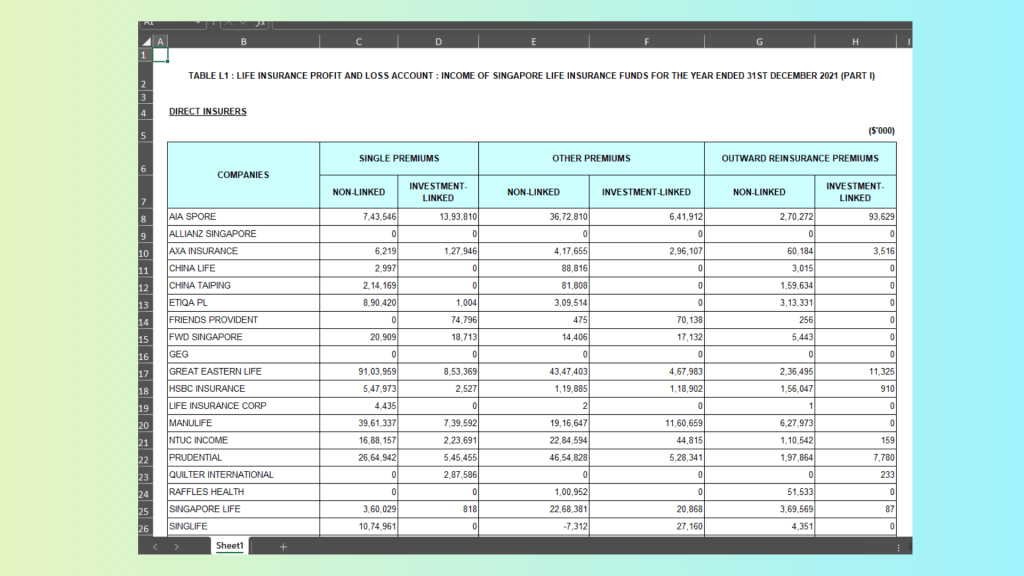
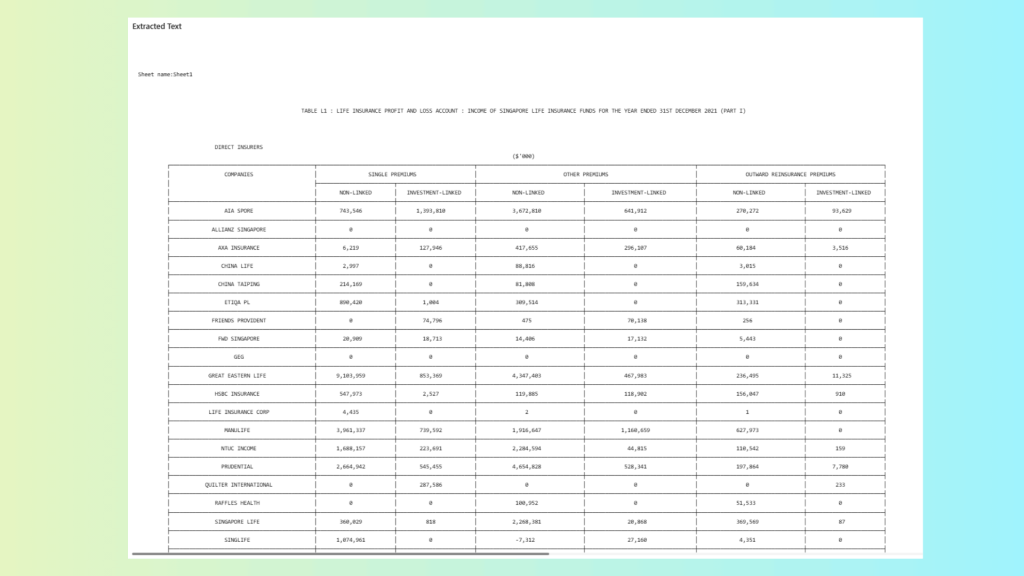
Use Case B: Insurance Performance Report (Excel)
Nature of the Document
Insurance performance reports are typically delivered as Excel files with:
Structured tables with premium, claims, and loss ratios
Merged headers and grouped columns
Numeric alignment that carries financial meaning
For traditional OCR RPA setups, Excel files are often flattened or inconsistently parsed. Column shifts, merged cells, or sheet-level context loss can break downstream mappings in RPA with OCR workflows.
How LLMWhisperer Solves It
LLMWhisperer strengthens OCR for RPA automation through:
Native Excel extraction (no conversion to image required)
Reliable table extraction that preserves row and column structure
Layout preservation to maintain header-value relationships
This ensures financial metrics remain correctly aligned—critical for insurance analytics, underwriting automation, and compliance reporting.
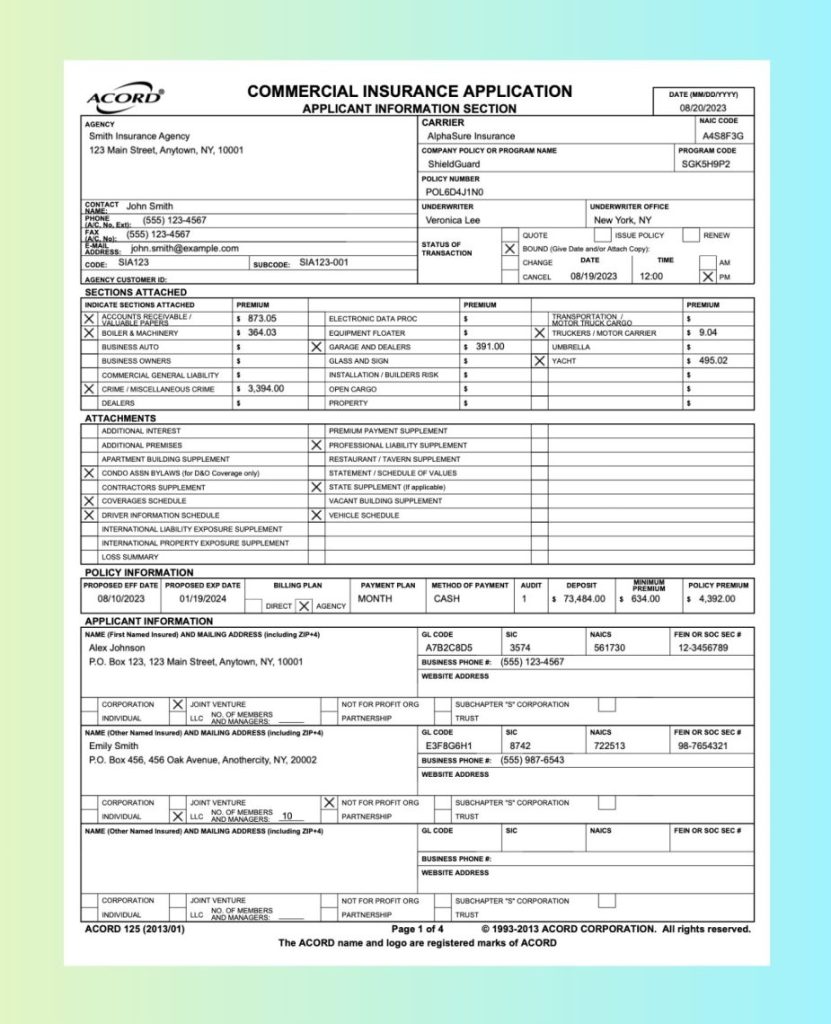
Use Case C: Image OCR – Insurance Form with Checkboxes
Nature of the Document
This insurance application form (shown above) is a scanned image containing:
Multiple checkbox selections
Structured policy and applicant sections
Tabular premium fields
Typed and printed data
Minor scan artifacts and compression noise
Unlike clean digital PDFs, image-based forms introduce variability in alignment and checkbox clarity. In traditional OCR RPA systems, checkboxes are often ignored, misread, or flattened into plain text—breaking downstream automation logic.
How LLMWhisperer Solves It
For OCR in RPA workflows, LLMWhisperer improves reliability through:
Checkbox and radio extraction – accurately detecting selected options
Bounding boxes – preserving spatial coordinates for validation UI and audit trails
                ®                 COMMERCIAL INSURANCE APPLICATION                                                        DATE (MM/DD/YYYY)
 ACORD
                                              APPLICANT INFORMATION SECTION                                                  08/20/2023
AGENCY                                                                 CARRIER                                                   NAIC CODE
 Smith Insurance Agency                                                 AlphaSure Insurance                                       A4S8F3G
  123 Main Street, Anytown, NY, 10001                                  COMPANY POLICY OR PROGRAM NAME                       PROGRAM CODE
                                                                        ShieldGuard                                          SGK5H9P2
                                                                       POLICY NUMBER
                                                                        POL6D4J1NO
 CONTACT NAME: John Smith                                              UNDERWRITER                        UNDERWRITER OFFICE
 PHONE (A/C, No, Ext); Ext): (555) 123-4567                             Veronica Lee                       New York, NY

 FAX (A/C, No): (555) 123-4567                                                          [ ] QUOTE          [ ] ISSUE POLICY [ ] RENEW
 E-MAIL ADDRESS: [email protected]                                STATUS TRANSACTION OF [X] BOUND (Give Date and/or Attach Copy):
 CODE: SIA123                       SUBCODE: SIA123-001                                 [ ] CHANGE      DATE            TIME     [ ] AM
AGENCY CUSTOMER ID:                                                                     [ ] CANCEL    08/19/2023     12:00       [X] PM
 SECTIONS ATTACHED
 INDICATE SECTIONS ATTACHED     PREMIUM                                         PREMIUM                                       PREMIUM

[X] ACCOUNTS VALUABLE PAPERS RECEIVABLE / $ 873.05 [ ] ELECTRONIC DATA PROC     $             [ ] TRANSPORTATION MOTOR TRUCK CARGO / $
[X] BOILER & MACHINERY          $ 364.03       [ ] EQUIPMENT FLOATER            $             [X] TRUCKERS / MOTOR CARRIER    $ 9.04
[ ] BUSINESS AUTO               $               [X] GARAGE AND DEALERS          $ 391.00      [ ] UMBRELLA                    $
[ ] BUSINESS OWNERS             $              [ ] GLASS AND SIGN               $             [X] YACHT                       $ 495.02
[ ] COMMERCIAL GENERAL LIABILITY $             [ ] INSTALLATION / BUILDERS RISK $             [ ]                             $
[X] CRIME / MISCELLANEOUS CRIME $ 3,394.00     [ ] OPEN CARGO                   $             [ ]                             $
[ ] DEALERS                     $              [ ] PROPERTY                     $             [ ]                             $
 ATTACHMENTS
[ ] ADDITIONAL INTEREST                        [ ] PREMIUM PAYMENT SUPPLEMENT                 [ ]
[ ] ADDITIONAL PREMISES                         [X] PROFESSIONAL LIABILITY SUPPLEMENT         [ ]
[ ] APARTMENT BUILDING SUPPLEMENT              [ ] RESTAURANT / TAVERN SUPPLEMENT             [ ]
[X] CONDO ASSN BYLAWS (for D&O Coverage only) [ ] STATEMENT / SCHEDULE OF VALUES              [ ]
[ ] CONTRACTORS SUPPLEMENT                      [X] STATE SUPPLEMENT (If applicable)          [ ]
[X] COVERAGES SCHEDULE                         [ ] VACANT BUILDING SUPPLEMENT                 [ ]
[X] DRIVER INFORMATION SCHEDULE                [X] VEHICLE SCHEDULE                           [ ]
[ ] INTERNATIONAL LIABILITY EXPOSURE SUPPLEMENT [ ]                                           [ ]
[ ] INTERNATIONAL PROPERTY EXPOSURE SUPPLEMENT [ ]
[ ] LOSS SUMMARY                               [ ]                                            [ ]
 POLICY INFORMATION
PROPOSED EFF DATE PROPOSED EXP DATE     BILLING PLAN      PAYMENT PLAN   METHOD OF PAYMENT AUDIT     DEPOSIT       PREMIUM MINIMUM POLICY PREMIUM
   08/10/2023       01/19/2024        DIRECT     AGENCY MONTH            CASH               1     $ 73,484.00   $ 634.00      $ 4,392.00
                                  [ ]        [X]
 APPLICANT INFORMATION
NAME (First Named Insured) AND MAILING ADDRESS (including ZIP+4)       GL CODE          SIC               NAICS             FEIN OR SOC SEC #
 Alex Johnson                                                           A7B2C8D5         3574              561730            12-3456789
 P.O. Box 123, 123 Main Street, Anytown, NY, 10001                     BUSINESS PHONE #: (555) 123-4567
                                                                       WEBSITE ADDRESS

[ ] CORPORATION   [X] JOINT VENTURE               [ ] NOT FOR PROFIT ORG [ ] SUBCHAPTER "S" CORPORATION     [ ]
[ ] INDIVIDUAL    [ ] LLC NO. AND OF MANAGERS: MEMBERS [ ] PARTNERSHIP    [ ] TRUST
 NAME (Other Named Insured) AND MAILING ADDRESS (including ZIP+4)      GL CODE          SIC               NAICS             FEIN OR SOC SEC #
 Emily Smith                                                            E3F8G6H1         8742              722513           98-7654321
 P.O. Box 456, 456 Oak Avenue, Anothercity, NY, 20002                  BUSINESS PHONE #: (555) 987-6543
                                                                       WEBSITE ADDRESS

[ ] CORPORATION   [ ] JOINT VENTURE               [X] NOT FOR PROFIT ORG [ ] SUBCHAPTER "S" CORPORATION     [ ]
[ ] INDIVIDUAL    [X] LLC NO. AND OF MANAGERS: MEMBERS 10 [ ] PARTNERSHIP [ ] TRUST
NAME (Other Named Insured) AND MAILING ADDRESS (including ZIP+4)       GL CODE          SIC               NAICS             FEIN OR SOC SEC #

                                                                       BUSINESS PHONE #:
                                                                       WEBSITE ADDRESS

[ ] CORPORATION   [ ] JOINT VENTURE               [ ] NOT FOR PROFIT ORG [ ] SUBCHAPTER "S" CORPORATION     [ ]
                           NO. AND OF MANAGERS: MEMBERS PARTNERSHIP           TRUST
[ ] INDIVIDUAL    [ ] LLC                         [ ]                     [ ]
 ACORD 125 (2013/01)                                             Page 1 of 4          1993-2013 ACORD CORPORATION. All rights reserved.
                                         The ACORD name and logo are registered marks of ACORD
<<<
This ensures form selections remain structured and automation-ready, eliminating brittle rule-based detection logic common in legacy OCR automation setups.
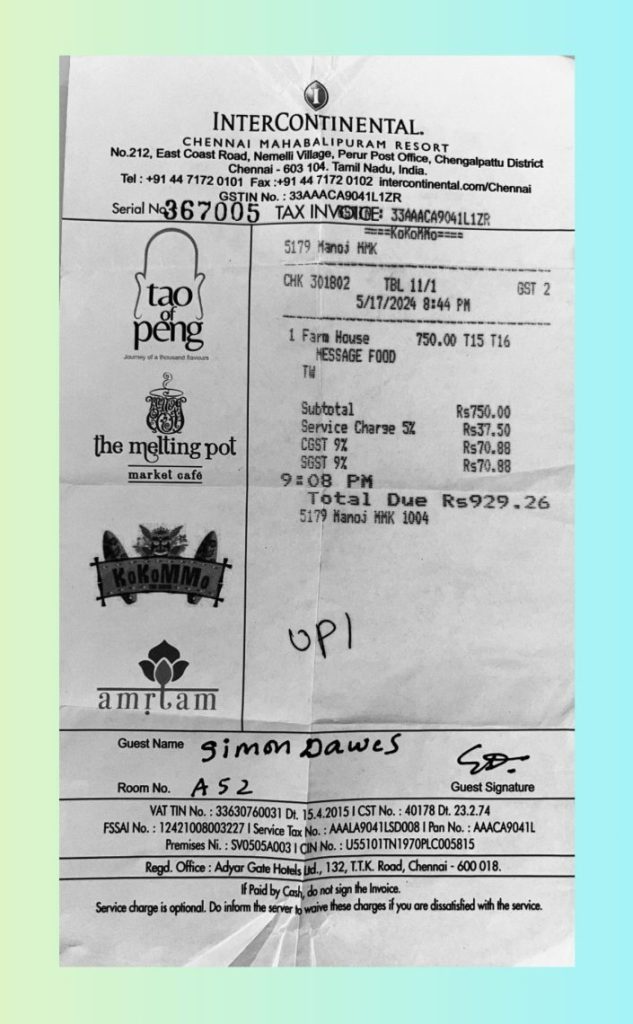
Use Case D: Photographed Invoice / Bill / Receipt
This is a photographed hotel restaurant receipt containing:
Perspective distortion (folds and camera angle)
Uneven lighting and shadows
Mixed fonts and logos
Printed totals plus handwritten guest details
Tax breakdown and line-item pricing
In traditional OCR RPA systems, such photographed receipts often produce fragmented text, misaligned totals, or missing numeric values—especially when the paper is folded or the image quality varies.
How LLMWhisperer Solves It
For OCR in RPA workflows, LLMWhisperer improves reliability through:
Low-fidelity tolerance to handle shadows, folds, and lighting variance
Layout preservation to keep line items, taxes, and totals aligned
Structured extraction suitable for downstream automation
                       INTERCONTINENTAL.
                 CHENNAI MAHABALIPURAM RESORT
   No.212, East Coast Road, Nemelli Village, Perur Post Office, Chengalpattu District
                          Chennai - 603 104. Tamil Nadu, India.
     Tel : +91 44 7172 0101 Fax :+91 44 7172 0102 intercontinental.com/Chennai
                        GSTIN No. : 33AAACA9041L1ZR
   Serial No367005                  TAX INVOICE: 33AAACA9041L1ZR
                                                     ==== KokořMo ====
                                     5179 Manoj MMK

                                     CHK 301802          TBL 11/1                  GST 2
          tao                                       5/17/2024 8:44 PM
             of

      Journey peng of a thousand flavours 1 Farm MESSAGE House FOOD 750.00 T15 T16
                                         TW

                                         Subtotal                       R$750.00
                                         Service Charge 5%               Rs37.50
                                         CGST 9%                         Rs70.88
the melting pot                          SGST 9%
       market café                   9:08         PM                     Rs70.88
                                           Total          Due        Rs929.26
                                         5179 Manoj MMK 1004

    KoKoMM.

                                       UP/

  amrlam

      Guest Name      Simon Dawes
                                                                        So-
      Room No.      A52                                                Guest Signature
            VAT TIN No. : 33630760031 Dt. 15.4.2015 CST No. : 40178 Dt. 23.2.74
   FSSAI No. : 12421008003227 Service Tax No. : AAALA9041LSD008 Pan No. : AAACA9041L
               Premises Ni. : SV0505A003 CIN No. : U55101TN1970PLC005815
           Regd. Office : Adyar Gate Hotels Ltd., 132, T.T.K. Road, Chennai - 600 018.
                              If Paid by Cash, do not sign the Invoice.
  Service charge is optional. Do inform the server to waive these charges if you are dissatisfied with the service.
<<<
This ensures that totals, tax components, and guest details remain logically grouped—critical for expense automation and financial reconciliation in OCR automation pipelines.
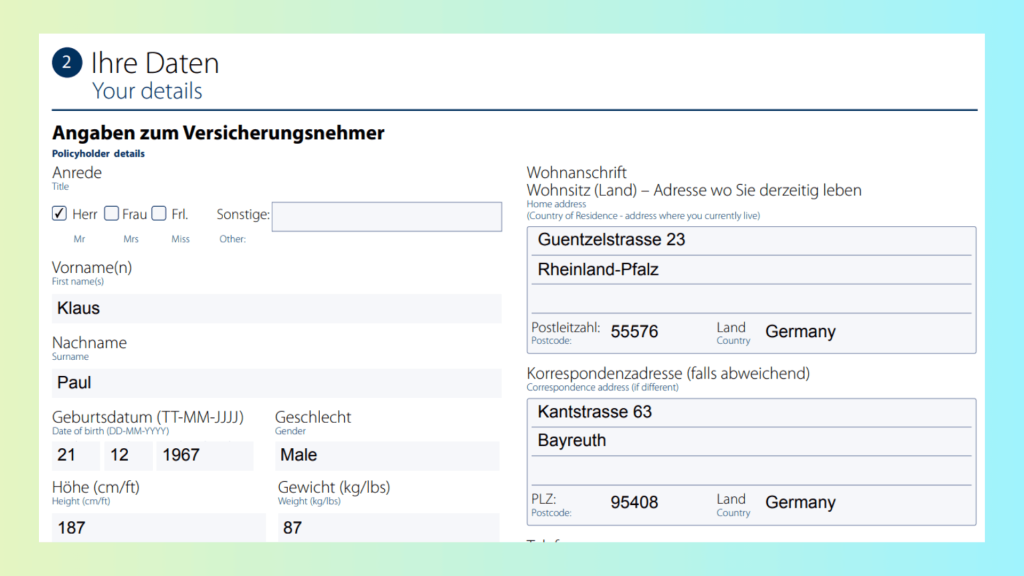
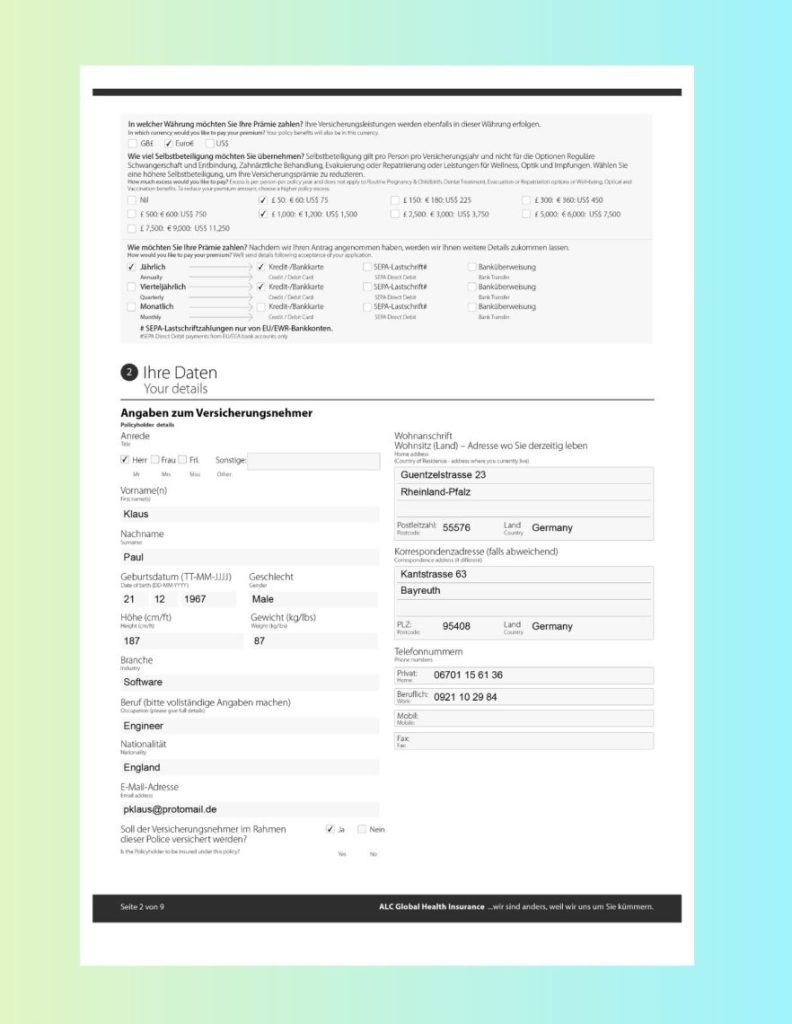
Use Case E: Multilingual (German) Insurance Application Form
Nature of the Document
This insurance application form contains:
German-language instructions and labels
Mixed bilingual text (German + English explanations)
Multiple checkboxes and structured selection fields
Personal information sections with typed entries
Address fields and numeric identifiers
For traditional OCR in RPA, multilingual forms create two major risks:
Incorrect language detection leading to recognition errors
Loss of structure when extracting checkbox selections and field values
In global RPA OCR deployments, maintaining separate OCR stacks per language quickly becomes complex and costly.
How LLMWhisperer Solves It
LLMWhisperer strengthens OCR for RPA automation through:
Multilingual OCR (300+ languages) for accurate German text recognition
Layout preservation to maintain section headers and field alignment
Form extraction to detect selected options and structured inputs
   In welcher Währung möchten Sie Ihre Prämie zahlen? Ihre Versicherungsleistungen werden ebenfalls in dieser Währung erfolgen.
   In which currency would you like to pay your premium? Your policy benefits will also be in this currency.
   [ ] GB£      [X] Euro€     [ ] US$
   Wie viel Selbstbeteiligung möchten Sie übernehmen? Selbstbeteiligung gilt pro Person pro Versicherungsjahr und nicht für die Optionen Reguläre
   Schwangerschaft und Entbindung, Zahnärztliche Behandlung, Evakuierung oder Repatriierung oder Leistungen für Wellness, Optik und Impfungen. Wählen Sie
   eine höhere Selbstbeteiligung, um Ihre Versicherungsprämie zu reduzieren.
   How much excess would you like to pay? Excess is per person per policy year and does not apply to Routine Pregnancy & Childbirth, Dental Treatment, Evacuation or Repatriation options or Well-being, Optical and
   Vaccination benefits. To reduce your premium amount, choose a higher policy excess.
   [ ] Nil                                       [X] £ 50: € 60: US$ 75                         [ ] £ 150: € 180: US$ 225                      [ ] £ 300: € 360: US$ 450
   [ ] £ 500: € 600: US$ 750                     [X] £ 1,000: € 1,200: US$ 1,500                [ ] £ 2,500: € 3,000: US$ 3,750               [ ] £ 5,000: € 6,000: US$ 7,500

   [ ] £ 7,500: € 9,000: US$ 11,250

   Wie möchten Sie Ihre Prämie zahlen? Nachdem wir Ihren Antrag angenommen haben, werden wir Ihnen weitere Details zukommen lassen.
   How would you like to pay your premium? We'll send details following acceptance of your application.
   [X] Jährlich                                  [X] Kredit-/Bankkarte                [ ] SEPA-Lastschrift#                [ ] Banküberweisung
       Annually                                      Credit / Debit Card                  SEPA Direct Debit                    Bank Transfer
   [ ] Vierteljährlich                           [X] Kredit-/Bankkarte                [ ] SEPA-Lastschrift#                [ ] Banküberweisung
       Quarterly                                     Credit / Debit Card                  SEPA Direct Debit                    Bank Transfer
   [ ] Monatlich                                 [ ] Kredit-/Bankkarte                [ ] SEPA-Lastschrift#                [ ] Banküberweisung
       Monthly                                       Credit / Debit Card                  SEPA Direct Debit                    Bank Transfer
       # SEPA-Lastschriftzahlungen nur von EU/EWR-Bankkonten.
       #SEPA Direct Debit payments from EU/EEA bank accounts only

  2     Ihre Daten

         Your details

Angaben zum Versicherungsnehmer
Policyholder details
Anrede                                                                                           Wohnanschrift
Title                                                                                            Wohnsitz (Land) - Adresse wo Sie derzeitig leben
                                                                                                 Home address
 [X] Herr [ ] Frau [ ] Frl.       Sonstige:                                                      (Country of Residence - address where you currently live)
     Mr        Mrs       Miss      Other:                                                           Guentzelstrasse 23

Vorname(n)
First name(s)                                                                                       Rheinland-pfalz

 Klaus
                                                                                                  Postleitzahl: Postcode: 55576         Land Country Germany
Nachname
Surname

 Paul                                                                                            Korrespondenzadresse Correspondence address (if different) (falls abweichend)

 Geburtsdatum (TT-MM-JJJJ)                    Geschlecht                                            Kantstrasse 63
Date of birth (DD-MM-YYYY)                    Gender
                                                                                                    Bayreuth
 21          12        1967                    Male

 Höhe (cm/ft)                                  Gewicht (kg/lbs)
Height (cm/ft)                                 Weight (kg/lbs)                                    Postcode: PLZ:   95408                Land Country Germany

  187                                           87
                                                                                                 Phone Telefonnummern numbers
 Branche
Industry                                                                                          Privat:
                                                                                                               06701 15 61 36
  Software                                                                                        Home:
                                                                                                  Work: Beruflich: 0921 10 29 84
 Beruf (bitte vollständige Angaben machen)
 Occupation (please give full details)                                                            Mobile: Mobil:

  Engineer
                                                                                                  Fax: Fax:
 Nationalität
Nationality

  England

 E-Mail-Adresse
 Email address

  [email protected]

 Soll der Versicherungsnehmer im Rahmen                                  [X] Ja      [ ] Nein
 dieser Police versichert werden?
 Is the Policyholder to be insured under this policy?                        Yes         No

Seite 2 von 9                                                                               ALC Global Health Insurance ... wir sind anders, weil wir uns um Sie kümmern.
This ensures names, addresses, policy choices, and payment selections remain properly associated with their labels—critical for reliable RPA with OCR workflows in international environments.
Quick Intro to Unstract
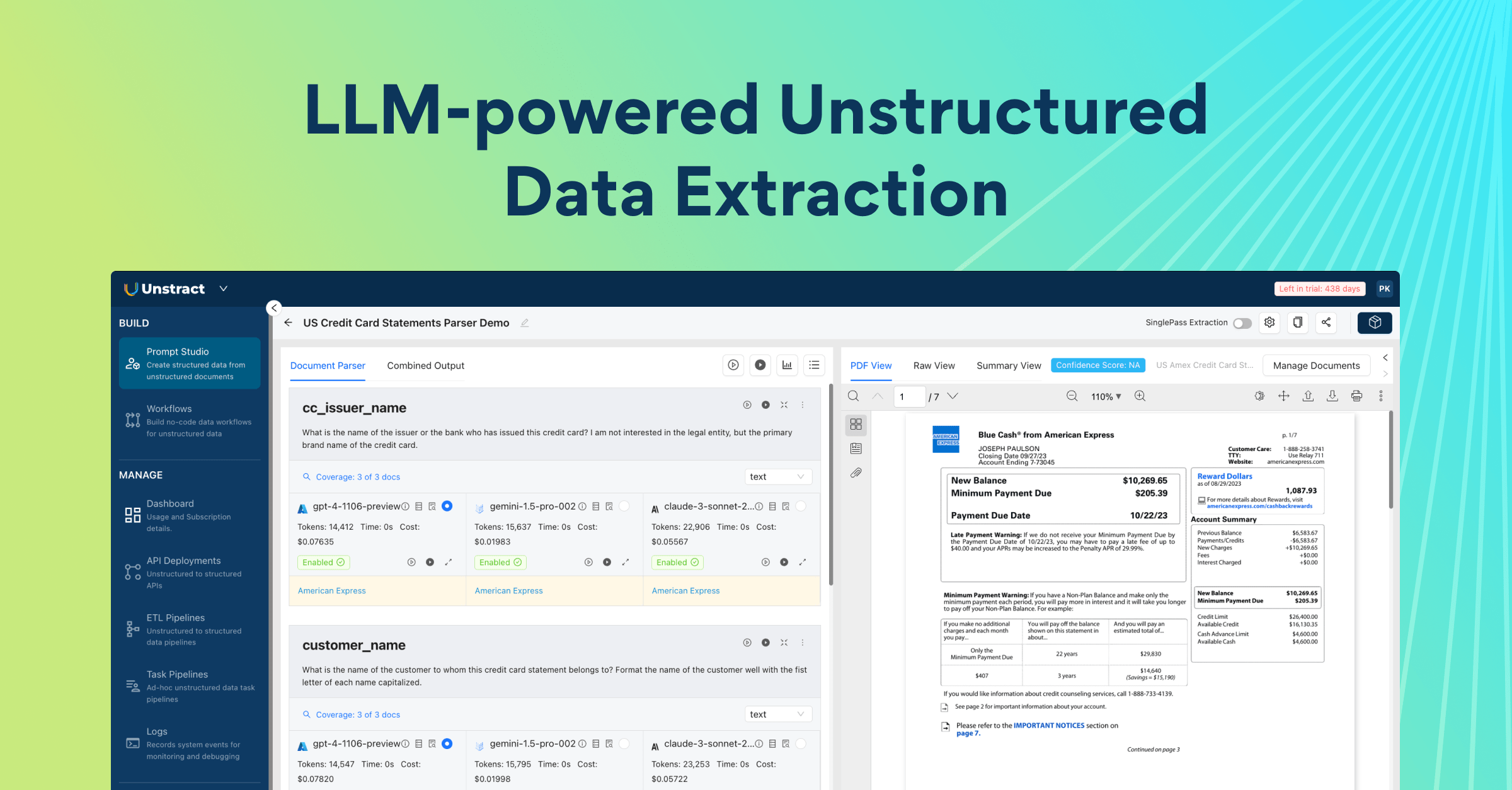
Unstract is a no-code, AI-powered Intelligent Document Processing (IDP) platform designed to strengthen OCR for RPA automation across finance, logistics, insurance, and other document-heavy industries.
In modern RPA OCR environments, bots execute workflows—but documents remain the most fragile input layer. Unstract solves this by combining layout-preserving OCR, LLM-based extraction, confidence scoring, and API deployment into a unified pipeline purpose-built for robotic process automation OCR use cases.
At a practical level, Unstract solves a core problem in OCR for RPA automation: converting messy, real-world documents into clean, structured JSON that bots and downstream systems can trust.
Where Unstract Fits in the Stack
Unstract combines:
OCR (via LLMWhisperer) for layout-preserving text extraction
LLM-based data extraction for structured field identification
Confidence scoring to measure extraction reliability
Human-in-the-loop (HITL) workflows for review and validation
API deployment to plug directly into RPA and enterprise systems
This makes it ideal for teams implementing RPA with OCR, where stability, auditability, and structured outputs are critical.
Rather than focusing on generic setup steps, the next section moves directly into a practical workflow demonstration—showing how a scanned handwritten document can be processed, extracted, deployed as an API, and integrated into automation systems with confidence scoring and validation support.
Feature
Traditional RPA OCR
LLMWhisperer RPA OCR
Layout & Structure
Flattens pages into linear text — columns, tables, and labels bleed together.
Preserves original layout — columns stay aligned, tables retain their structure.
Table Extraction
Breaks table row/column relationships — values appear under wrong headers.
Reconstructs tables with row/column integrity — ideal for line-item extraction.
Form Elements (Checkboxes / Radio)
Misses or misinterprets checkbox states — leading to incorrect workflow routing.
Detects checkboxes and radio buttons as structured booleans — reliable for decision logic.
Scanned & Handwritten Documents
Fails without extensive preprocessing (deskew, denoise, contrast adjustment).
Handles low-quality scans and handwriting out-of-the-box with built-in OCR enhancement.
Field Mapping Stability
High risk of “field mapping drift” — small layout changes break bot logic.
Stable, consistent output across document variants — fewer bot failures and exceptions.
Output Consistency
Varies significantly between similar documents — requires constant monitoring.
Predictable, deterministic output — same document type produces same structure every time.
Maintenance Effort
High — requires ongoing template tuning, regex updates, and rule maintenance per vendor.
Low — no templates, no per-vendor rules; adapts to new layouts automatically.
Supports both cloud and self-hosted / on-premise deployment for sensitive workflows.
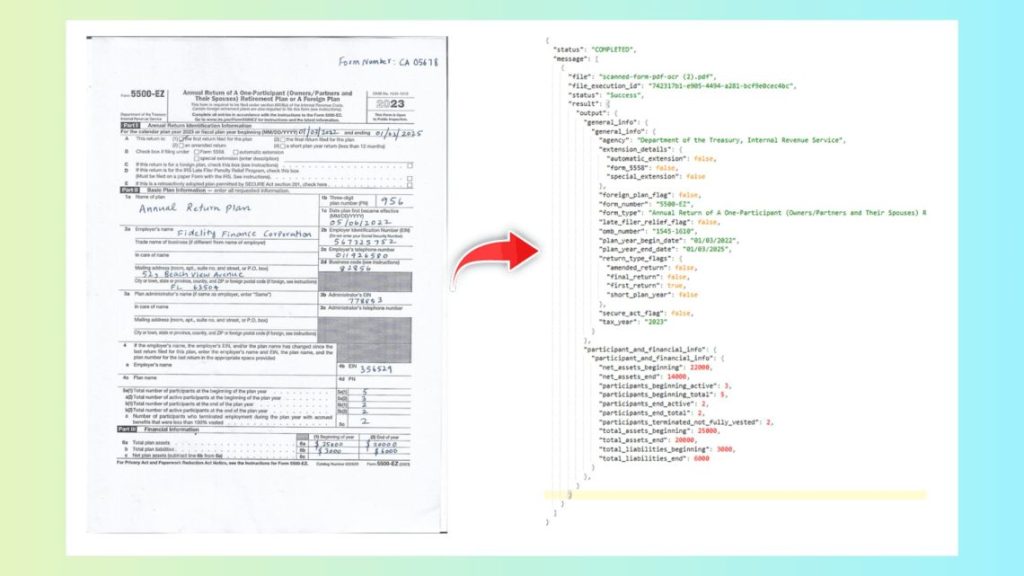
Demo Walkthrough: Extract Data from a Scanned Handwritten Tax Form (Prompt Studio)
To demonstrate how OCR and RPA come together in practice, let’s walk through a real example: extracting structured data from a scanned handwritten tax form using Unstract’s Prompt Studio.
This section focuses on practical execution—turning a raw document into structured JSON ready for RPA with OCR integration.
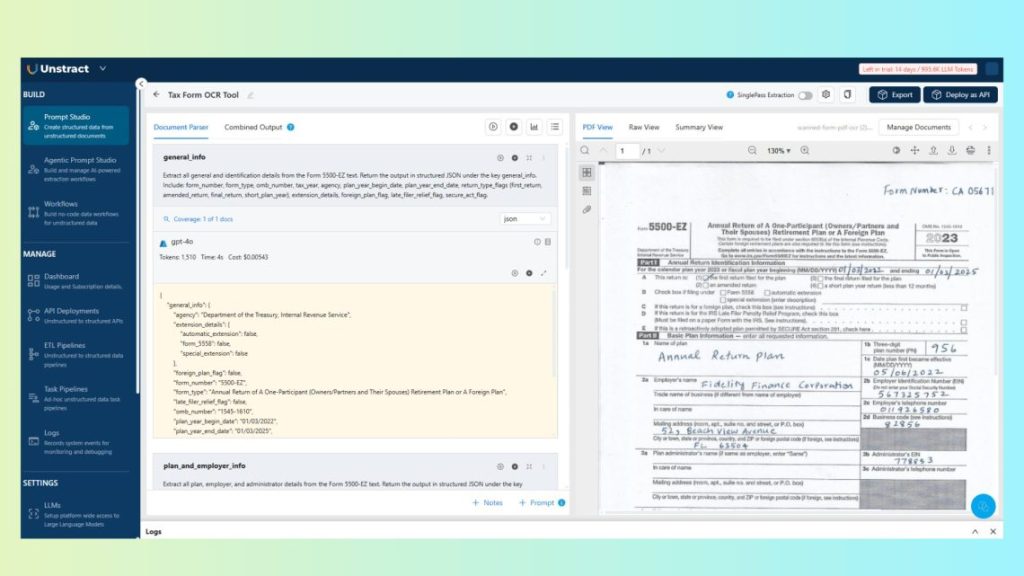
12.1 Prompt Studio
First, upload the scanned handwritten tax form into Prompt Studio.
Next, clearly define the extraction goals.
Prompts are designed to produce:
Stable JSON output (fixed schema)
Consistent field naming (e.g., taxpayer_name, tax_year, total_income)
Graceful handling of missing or unclear values (e.g., return null if not found)
Example instructios:
general_info: Extract all general and identification details from the Form.
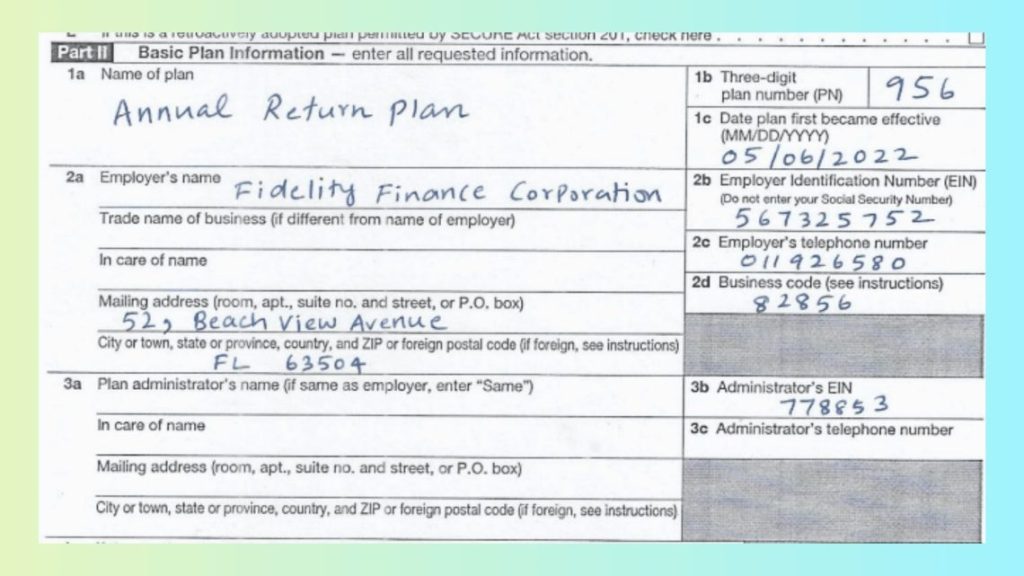
plan_and_employer_info: Extract all plan, employer, and administrator details from the Form.
participant_and_financial_info: Extract all participant counts and financial information from the Form.
This structured prompting ensures the extracted output can be consumed directly by downstream OCR RPA workflows without additional parsing logic.
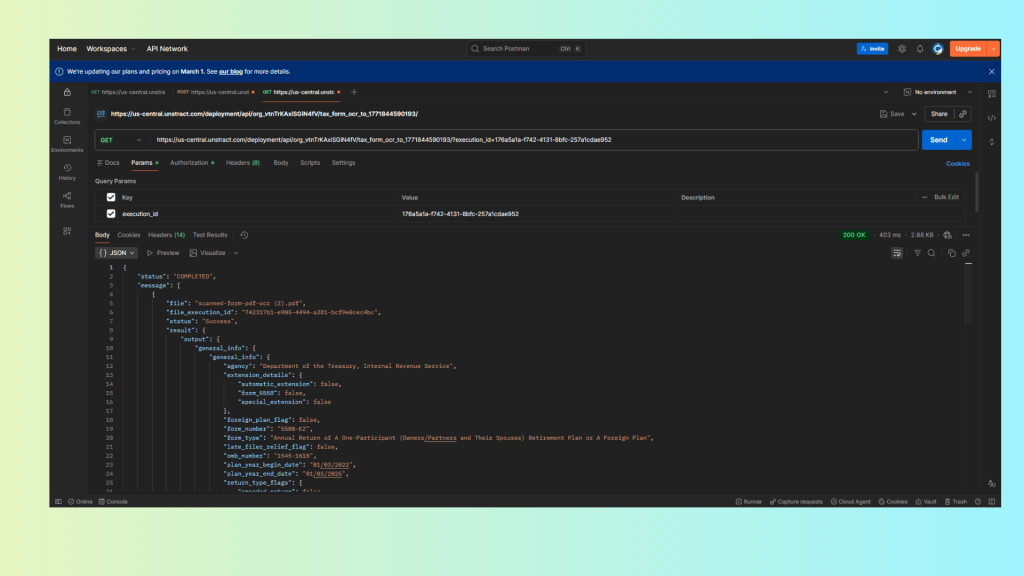
12.2 Test via Postman (Show JSON Output)
Once the workflow is configured, deploy it as an API.
Using Postman:
Send the handwritten tax form to the API endpoint.
This structured JSON can now be directly consumed by robotic process automation OCR pipelines—triggering downstream actions only when confidence thresholds are met, and routing low-confidence fields for human review when necessary.
Confidence Scoring + Human-in-the-Loop (Must-Have for RPA)
In enterprise OCR for RPA automation, confidence scoring is what separates true automation from operational risk.
Extracting data is only half the problem. The real challenge is knowing whether the extracted data can be trusted. Without confidence indicators, bots either:
Proceed blindly (risking incorrect entries), or
Route everything to manual review (defeating automation benefits)
Confidence scoring provides a measurable reliability signal for each extracted field.
How the HITL Flow Works
A practical OCR RPA workflow looks like this:
Document is processed via API
Structured JSON is returned with confidence scores
Low-confidence fields are flagged automatically
Low-confidence fields → routed to a reviewer UI Reviewer sees extracted value + highlighted source (via bounding boxes) Reviewer approves or overrides the value Action is logged → audit trail recorded
Because bounding boxes preserve spatial context, reviewers can quickly validate values against the original document—critical for regulated industries like banking, insurance, and healthcare.
Over time, this feedback loop improves reliability without requiring brittle templates or constant manual tuning. For large-scale RPA with OCR, this balance between automation and validation is essential.
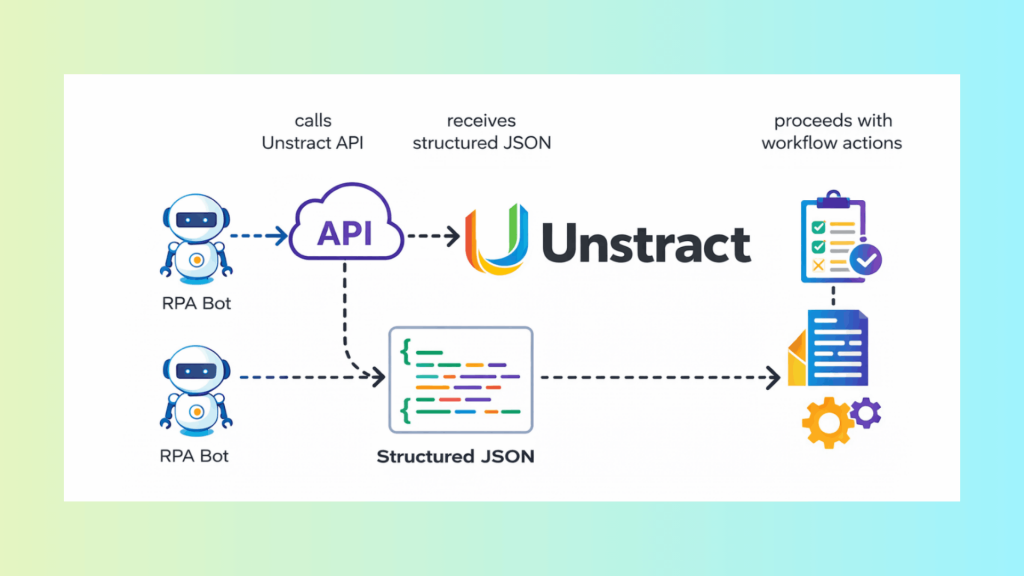
How This Integrates with Any RPA Tool or System
From an architecture perspective, integration is straightforward.
Generic Integration Flow
RPA bot → calls Unstract API → receives structured JSON → proceeds with workflow actions
The API becomes the standardized document intelligence layer in the automation stack.
Typical Downstream Actions
Once structured data is returned, the bot can:
Create or update CRM records
Post entries into ERP or claims systems
Trigger approval workflows
Generate tickets or compliance logs
Initiate payment or reconciliation processes
Because outputs follow a consistent schema, integration remains stable even as document variations change.
Why This Scales
Standardized API interface
Predictable, structured outputs
Confidence-based review gates (only when needed)
Reduced exception handling
This makes the OCR and RPA pipeline sustainable at enterprise scale, rather than fragile and template-dependent.
Conclusion: Choosing the Right OCR Tool for RPA
Selecting the right OCR tools for RPA requires looking beyond basic text recognition.
Key decision criteria include:
Layout stability to prevent field mapping drift
Spatial context (bounding boxes) for validation and auditability
Form element extraction for checkbox-driven workflows
Low-fidelity tolerance for real-world scanned inputs
Reliable table extraction for financial and insurance documents
Flexible deployment options (cloud or self-hosted)
A robust combination like LLMWhisperer + Unstract provides a practical, production-ready pipeline:
Instead of increasing exception queues and maintenance overhead, this approach reduces manual intervention, strengthens auditability, and enables safe, scalable automation.
The result is not just OCR automation—but reliable, enterprise-grade document-driven RPA.
OCR RPA: FAQs
1. Why do most RPA programs fail when they move beyond simple, structured tasks? RPA excels at rule‑based work, but real business processes start with messy documents—scanned PDFs, handwritten forms, photographed receipts. Without reliable RPA OCR, bots either crash or, worse, proceed with wrong data, creating exceptions and compliance risk.
2. What is the hidden cost of poor OCR in RPA automation? Weak OCR for RPA causes field mapping drift—small formatting shifts break data mappings. This leads to increased manual reviews, higher bot failure rates, and rising maintenance costs. At scale, these small inconsistencies compound and undermine your automation ROI.
3. Which business processes benefit most from combining RPA and OCR? Processes like accounts payable (invoice extraction), insurance claims, KYC verification, healthcare intake, HR/payroll, and logistics (shipping manifests) all rely on RPA and OCR. Each requires reliable table extraction, checkbox detection, and layout stability to avoid manual bottlenecks.
4. How does layout preservation reduce exception handling in RPA workflows? When robotic process automation OCR preserves layout, extraction structure stays stable across similar documents. Stable structure prevents field mapping drift, which means fewer bot breaks, less exception handling, and significantly lower maintenance overhead.
5. What security and deployment options should enterprises consider for RPA OCR? Many document workflows contain PII and require strict data residency. Modern OCR for RPA solutions support both cloud APIs and self‑hosted/on‑premise deployments, addressing compliance constraints and enterprise security policies without sacrificing scalability.
6. How do you evaluate OCR tools for RPA beyond basic accuracy claims? Don’t ask only “Does it read text?” Ask: Does it preserve layout consistently? Does it reconstruct tables the same way every time? Can it detect checkboxes reliably? Can we validate and audit extracted values with confidence? These determine whether automation scales or stalls.
UNSTRACT
AI Driven Document Processing
The platform purpose-built for LLM-powered unstructured data extraction. Try Playground for free. No sign-up required.
Engineer by trade, creator at heart, I blend Python, ML, and LLMs to push the boundaries of AI—combining deep learning and prompt engineering with a passion for storytelling. As an author of books and articles on tech, I love making complex ideas accessible and unlocking new possibilities at the intersection of code and creativity.