Processing Sensitive Unstructured Data with Sovereign AI
Table of Contents
If your organization handles sensitive documents at scale, you’ve probably hit a wall that has nothing to do with model quality.
Other teams are already using LLM-assisted extraction to pull structured fields from invoices, intake forms, and correspondence. You want the same capability on documents that carry real sensitivity – then legal, security, or compliance stops the conversation. The data cannot go to a hosted inference API, no matter how capable the model or how strong the vendor’s security documentation.
That refusal is rational, not technophobic. Every API call transmits document content – or fragments of it – to infrastructure outside your control. You add a vendor to your processing chain, new jurisdictions where bytes might be stored or logged, and breach scenarios your incident response plan was never built to absorb. The best hosted inference API in the world doesn’t help if you’re not allowed to send the data in the first place.
The answer is sovereign AI: running capable models and document processing on infrastructure your organization controls, inside your own network. NVIDIA calls it that – and unlike most vendor slogans, it names a workflow you can reproduce end to end.
Hold every design decision to one test: does any byte of sensitive data leave your network boundary? If yes, it’s a prototyping shortcut, not a sovereign deployment. Nothing should leave the building.
The sovereignty constraint
For organizations buried in unstructured documents, the question isn’t which LLM to use – it’s whether LLM-assisted extraction is permitted at all.
PDFs, scanned forms, and legacy correspondence don’t fit neatly into databases. Manual data entry is slow and error-prone; an LLM that reads them like a trained clerk would save real time. The blocker is where that reading happens.
Government agencies work through veteran discharge records, immigration applications, and federal procurement documents. Healthcare organizations handle CMS-1500 claims, patient intake forms, and clinical correspondence. Financial institutions process tax documents, loan applications, and account statements.
Different industries, same payload: Social Security numbers, dates of birth, service histories, diagnosis codes, account details. Route any of it to a hosted inference API and you’ve handed compliance a data-processing event to justify.
Capability isn’t the failure mode. A frontier model behind a hosted inference API may outperform anything you can run locally today. Policy is. Agency rules against outbound PII, HIPAA requirements about where PHI is processed – a third-party inference endpoint doesn’t qualify – FedRAMP boundaries that stop at your network edge, and supplier breaches your incident response plan never accounted for.
Data residency, regulatory exposure, and blast radius close the door, not benchmark scores.
What replaces the hosted API is a stack you operate end to end inside your network: document processing and model inference connected over internal network, with upload, prompts, inference, and structured output all staying inside the boundary.
Architecture: nothing leaves the building
Draw a hard network boundary around everything that touches sensitive documents.
Document processing – Unstract, self-hosted on the same network;
Model inference – NVIDIA NIM containers on local GPUs.
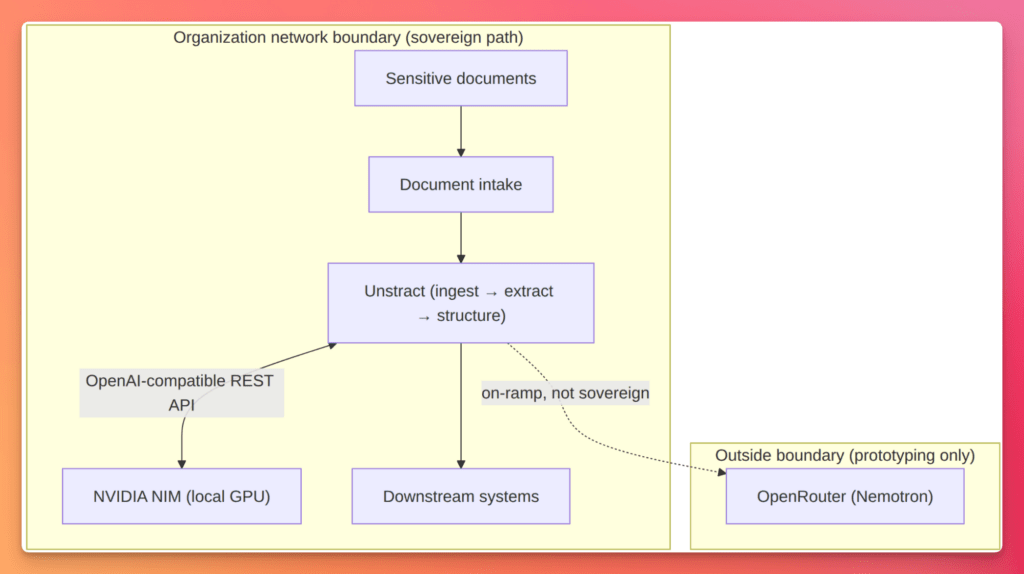
Users and downstream systems talk only to components inside that boundary. The sovereign path never calls an external site like build.nvidia.com, OpenAI, or any third-party inference API. If document content or extracted output crosses the boundary on its way to inference, the workflow is no longer sovereign.
Use the diagram below as the mental model when configuring connectors and reviewing security architecture. Every solid arrow stays inside the box.
A dashed line to a cloud inference endpoint belongs in prototyping, not production.
When a sensitive file arrives, Unstract ingests it: stores the original, extracts text from PDFs and scans, and prepares the content for field-level extraction. It builds prompts against your extraction schema and sends them to NIM as requests over internal network, not a public endpoint.
NIM runs the model on your GPUs and streams back the completion; Unstract parses the response into structured output and delivers it downstream. The source document and inference payload never transit the public internet. Unstract already speaks the OpenAI-compatible API – you’re only changing where it points.
Outside the boundary, a second path is worth showing for comparison. Nemotron models are available through OpenRouter using the same Unstract OpenAI Compatible connector – swap the base URL, model name, and API key. That lets you prototype extraction prompts and schemas before local GPUs or a full NIM deployment are ready.
It is not sovereign: document content leaves your network and you inherit OpenRouter’s data handling terms. Validate the workflow on the on-ramp, then cut over to local NIM when your architecture review requires it.
Stop sending sensitive documents outside your network.
Unstract runs on your infrastructure — document ingestion, LLM extraction, and structured output all inside your network boundary. Nothing leaves the building.
NVIDIA Inference Microservices (NIM) packages a model for production inference as a containerized micro-service. Each image bundles model weights, an optimized inference engine – TensorRT-LLM, vLLM, or SGLang, chosen automatically for the target hardware – and a standardized HTTP API. You send requests; the container handles GPU scheduling, batching, quantization, and streaming. You trade some tuning flexibility against rolling your own vLLM setup for a single, predictable interface across dozens of models.
That interface is OpenAI-compatible. NIM exposes related endpoints in the same request and response shapes the OpenAI SDK expects – the bridge that lets Unstract’s OpenAI Compatible connector work without modification. Point it at a NIM endpoint instead of api.openai.com and the extraction pipeline runs unchanged: same connector, same prompt format, different base_url.
NIM ships in two deployment modes behind the same API.
In hosted mode, NVIDIA runs models on DGX Cloud at build.nvidia.com: a large catalog, roughly 1,000 free inference credits on signup, rate limits suited to prototyping – not production sovereignty. Requests leave your network; treat hosted NIM as a development on-ramp, parallel to the OpenRouter path in the architecture diagram.
In self-hosted mode, you pull a container from NVIDIA’s registry (nvcr.io) and run it on your own GPU inside your network. The API is identical; only the endpoint changes.
Self-hosted (sovereign path):
  base_url: http://localhost:8000/v1   # or your internal hostname
  api_key:  any placeholder    # inference auth not required locally
Self-hosted deployment follows a repeatable pattern: install the NVIDIA Container Toolkit, configure Docker for GPU pass-through, then run the NIM image with your NGC API key so the container can pull model weights on first start:
docker run --gpus all --ipc=host \
  -e NGC_API_KEY="$NGC_API_KEY" \
  -v /nim-cache:/root/.cache/nim \
  -p 8000:8000 \
  nvcr.io/nim/<model-name>:<tag>
On first launch, the container downloads the checkpoint from NVIDIA’s NGC catalog. Mount a cache directory – as above – so subsequent restarts skip the download. You need the NGC key to pull the image and weights even though inference itself requires no API key once the container is running.
NIM targets data-center NVIDIA GPUs – H100, H200, A100, and L40S are the common self-hosted choices. Size hardware to the model: roughly 24 GB VRAM for an 8B-parameter model, 80 GB or more for a 70B-class model. NIM containers are free for NVIDIA Developer Program members on up to 16 GPUs.
Air-gapped environments: The standard NIM pull-and-run flow assumes cluster access to NGC. Fully air-gapped systems need to pre-load container images into a local registry and deploy from there – plan for that if sovereignty requirements include no outbound network at all.
Model catalog drift: Hosted NIM model identifiers at build.nvidia.com change on a roughly monthly cadence. Parameterize the model string in your connector config rather than hard-coding it in extraction workflows you’ll maintain over time.
Unstract on your network
Unstract is the document-processing layer in the sovereign stack. Where NIM answers “run the model here”, Unstract answers “get structured data out of this PDF, scan, or form without manual data entry”.
It ingests unstructured files, prepares their content for extraction, calls an LLM against your schema, and emits structured output – JSON fields, database rows, API payloads. In the architecture above, it sits between document intake and model inference, owning the orchestration loop that turns a sensitive file into labeled records.
That loop stays sovereign only if Unstract runs on your network alongside NIM. A self-hosted deployment keeps originals, extracted text, per-job prompts, and structured results on infrastructure you control. Point Unstract at a local NIM endpoint and LLM calls traverse internal network. Point it at a hosted inference API and you’ve broken the boundary – even if Unstract itself is self-hosted. Running Unstract locally is necessary but not sufficient; the connector target must stay inside the boundary too.
Unstract ships for self-hosted deployment via Docker Compose and Kubernetes – the same patterns most teams use for internal services on private networks.
For the demos below, we will use the Unstract Open Source Edition from GitHub. Clone the repository and start the platform:
./run-platform.sh
That script starts up the full stack via Docker Compose – backend API, Django frontend, Celery worker for async extraction jobs, Postgres for workflow and credential storage, Redis for task queuing, and a vector store for document indexing. All containers run on your Docker host over an internal network; none need outbound access once images are pulled. Same boundary logic as the architecture diagram: Unstract’s internal services stay inside your network, along with document and inference traffic.
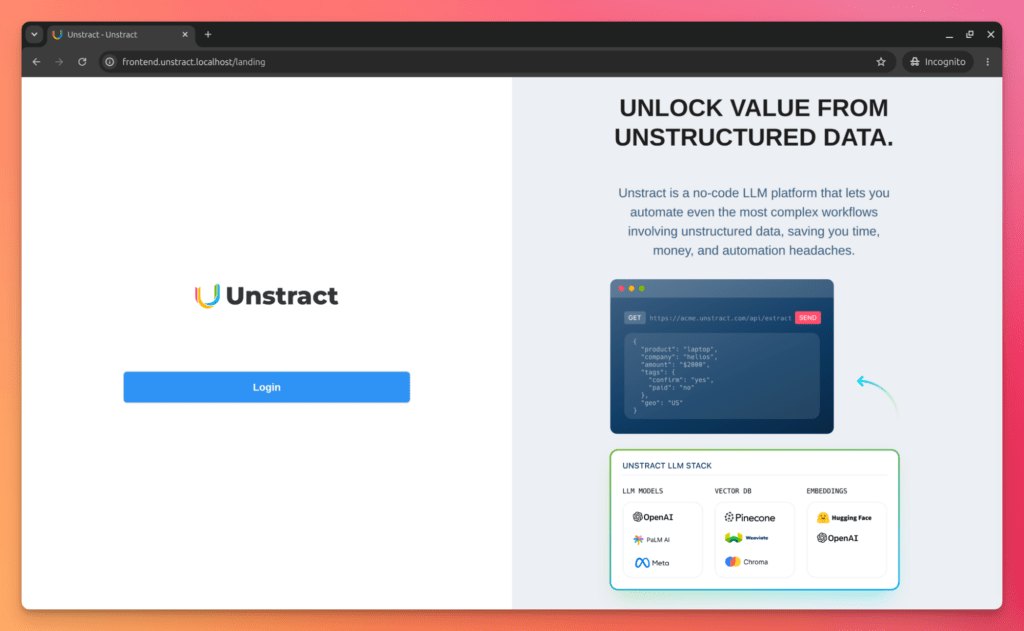
Open http://frontend.unstract.localhost in your browser. The hostname resolves to the frontend container’s exposed port on your machine – local-only, no external DNS. Log in with username and password unstract.
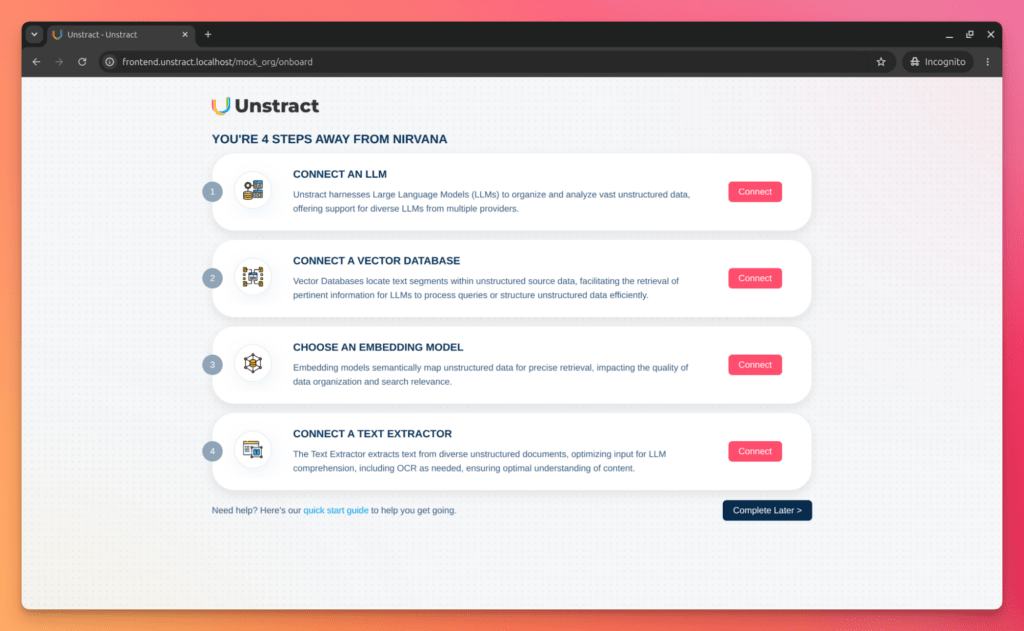
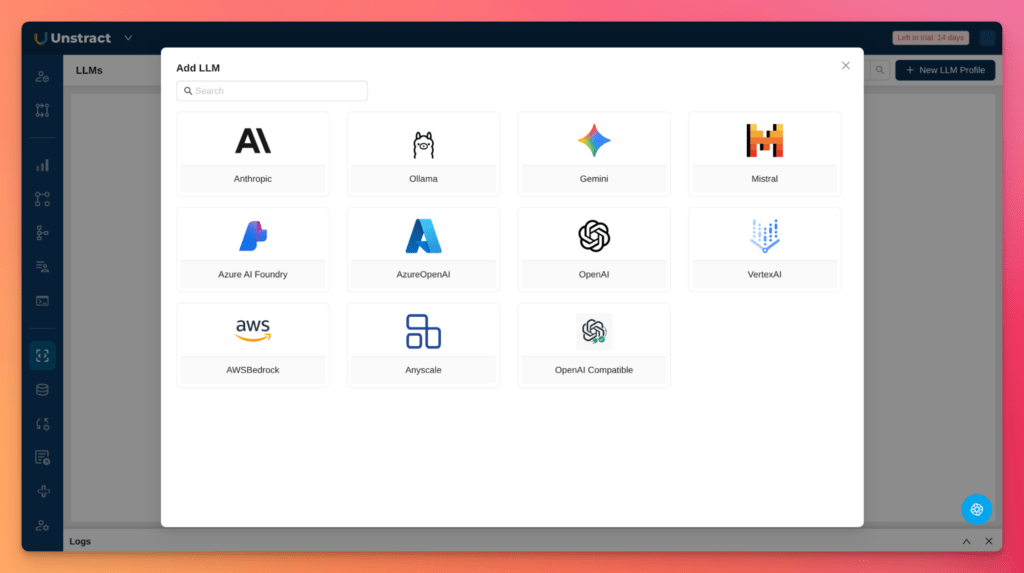
Then configure the connectors shown below:
This tutorial focuses on data sovereignty, not full Unstract setup. For connector configuration – storage backends, LLM profiles, Prompt Studio – see Open-Source Unstructured Data ETL with Unstract. The architectural point: once these containers are running, they live on infrastructure you control; the only external dependency is the initial image pull from Docker Hub or GitHub.
How to turn complex document tables into usable data with AI
Catch the recorded webinar to dive into Unstract’s advanced table extraction capabilities. We walk through the All Table Extractor API—a ready-to-use, semantic + layout-aware solution that ensures precision, consistency, and context, even across the most complex document tables.
Wiring it together: the OpenAI Compatible connector
Unstract does not yet ship native connectors for NVIDIA Build models or Nemotron via OpenRouter – both are on the roadmap.
Until they land, the OpenAI Compatible connector is the bridge that makes this stack work already today: local NIM on your GPUs, hosted NIM at build.nvidia.com, or Nemotron on OpenRouter. Same connector type, same prompt format; only three fields change – base URL, model identifier, and API key.
Sovereign path – local NIM
Point the connector at the NIM container running inside your network:
Connector:  OpenAI Compatible
base_url:   http://nim.internal:8000/v1    # your internal NIM hostname
model:      <model-name>:<tag>
api_key:    placeholder                      # local NIM needs no inference auth
The base URL must resolve inside your network boundary – the same endpoint from the architecture diagram. The model string must match the NIM image you deployed; check the NIM catalog for the identifier your container expects. Unstract sends extraction prompts to that endpoint; NIM returns completions without document content ever leaving your infrastructure.
On-ramp path – Nemotron via OpenRouter
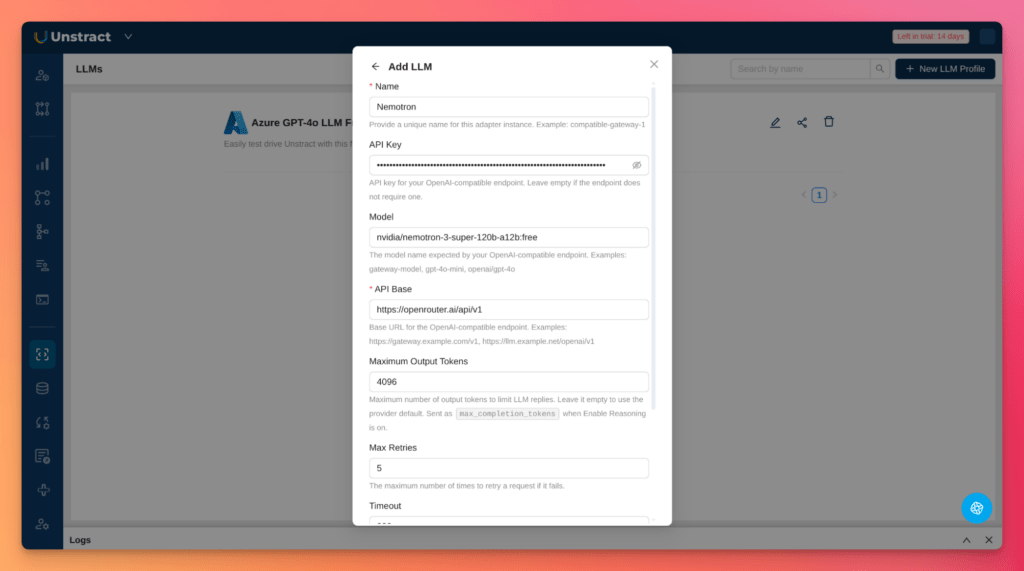
To prototype extraction prompts and schemas before local GPUs are available, point the same connector at OpenRouter:
Nemotron is NVIDIA’s Llama-Nemotron model family – available through OpenRouter hosted inference and as downloadable NIM containers. This path validates your Unstract extraction workflow without standing up an A100-class GPU locally, which local NIM typically requires for 70B-class models.
The demos below use this on-ramp path.
Why OpenRouter for a sovereignty demo? This walkthrough uses synthetic data because the on-ramp path is not sovereign – document content leaves your network en route to OpenRouter, so nothing in it should be real. That tradeoff is fine for validating prompts and schemas, never for production data. Cutover to the sovereign path requires no schema or prompt changes – only the connector’s three fields: base_url becomes your internal NIM endpoint (http://nim.internal:8000/v1), model becomes your deployed NIM image tag (e.g. meta/llama-3.3-70b-instruct), and api_key becomes a placeholder.
Configuring Unstract
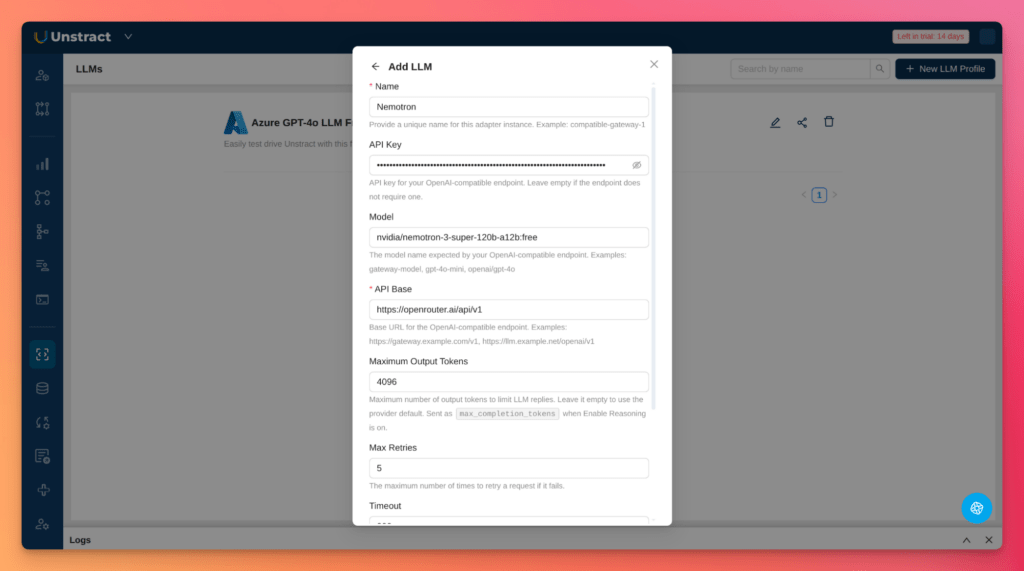
Let’ see how to perform these configurations in Unstract. Go to Settings → LLMs, create a new LLM profile, and choose OpenAI Compatible.
Enter the values from the OpenRouter block above.
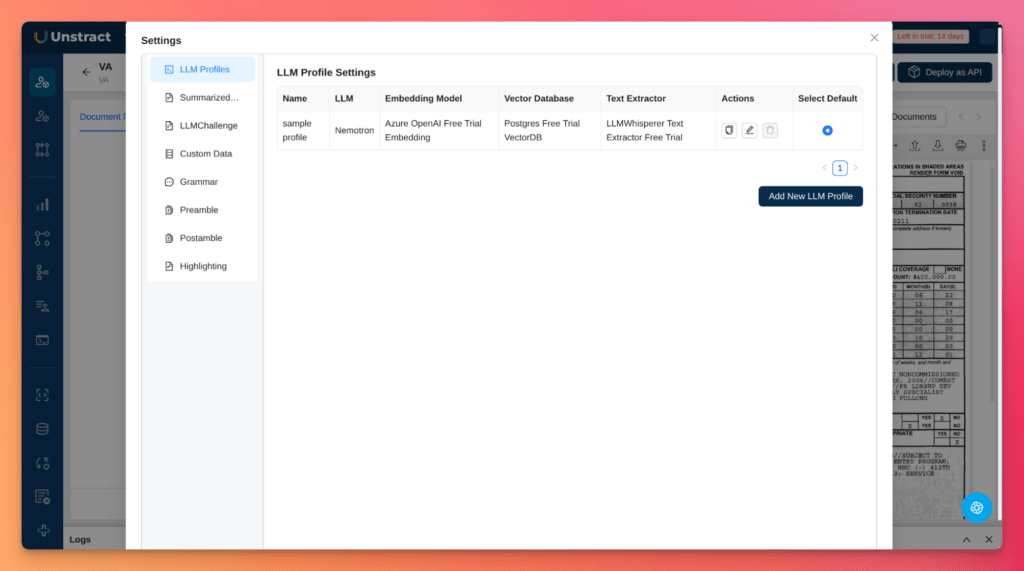
You may also need to select that LLM profile in Prompt Studio:
Native connectors coming: Unstract will ship NVIDIA Build and Nemotron/OpenRouter connectors soon – when that happens, the sovereign architecture stays the same; only the connector UI changes.
Demo – Extracting from a PII-heavy document
The architecture above is set up; this walk-through demonstrates it against a document your compliance team would block from a hosted inference API.
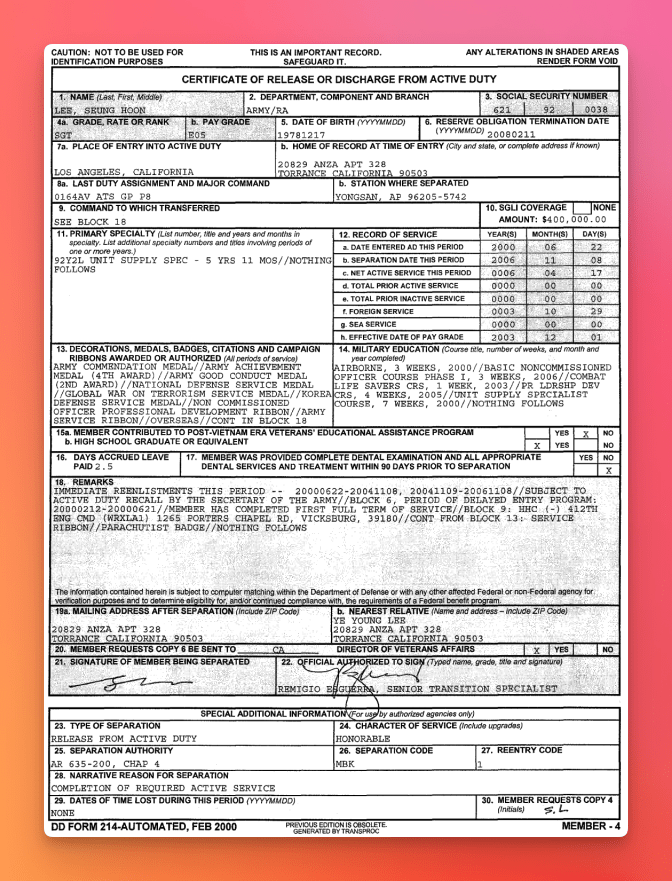
The DD Form 214 (Certificate of Release or Discharge from Active Duty) is processed at scale by the VA for veterans’ benefits. It carries Social Security numbers, dates of birth, and full service histories – PII that makes legal and security reviewers say no to cloud APIs on sight.
Source a blank form from public repositories and populate it with synthetic data only. The schema and prompt below assume a standard DD-214 field layout; adjust if your sample uses a different edition.
Step 1 – Load the document into Unstract
Upload your synthetic DD-214 through Unstract’s document intake UI or API. In this demo, we will use this example:
Checkpoint: the PDF bytes land on storage your organization controls – not a vendor’s shared bucket. If intake routes through a third-party SaaS layer, you’ve lost sovereignty before extraction starts.
Step 2. Configure the OpenAI Compatible connector
For this walkthrough, use the OpenRouter on-ramp settings from the previous section:
Step 3 – Define the extraction schema and prompt
Paste the JSON schema and system prompt into your Unstract extraction workflow.
The schema constrains what the model returns; the prompt tells it how to read a military discharge form without inventing values:
You are extracting structured fields from a DD Form 214 (Certificate of Release or Discharge from Active Duty).

Extract only the fields defined in the provided JSON schema. Use values exactly as they appear on the form. Normalize dates to YYYY-MM-DD when the source date is unambiguous. If a field is missing, blank, or illegible, return null for that field.

Rules:
- Do not invent or infer values that are not visible on the document.
- Preserve formatting for identifiers (e.g. SSN dashes) when present on the form.
- For discharge characterization, use the character-of-service wording from the form.
- If multiple service periods are listed, extract dates for the primary period of active duty.


Return valid JSON matching the schema. No commentary outside the JSON object.

{
    "veteran_name",
    "social_security_number",
    "date_of_birth",
    "branch_of_service",
    "service_start_date",
    "service_end_date",
    "discharge_characterization"
}
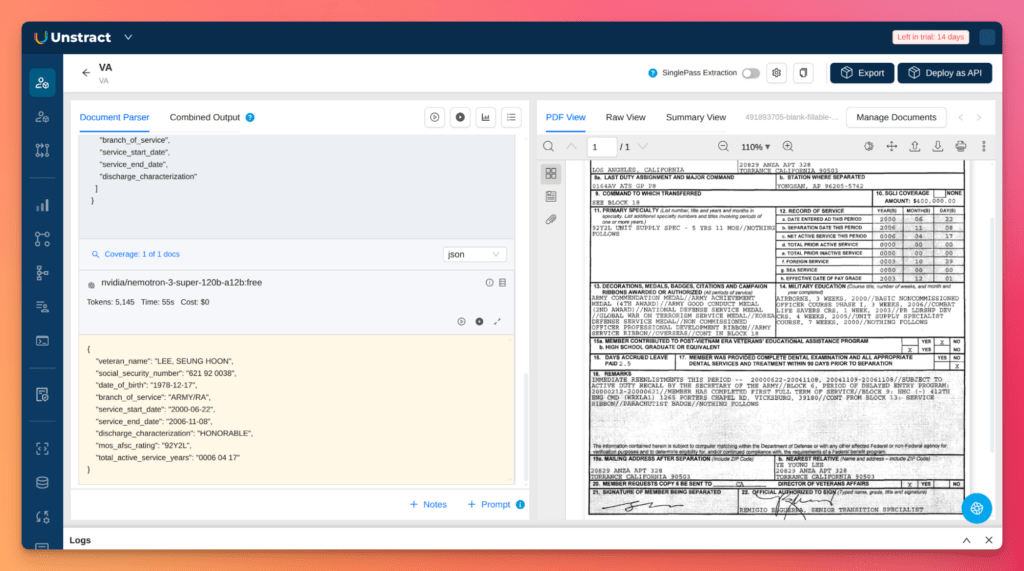
Step 4 – Run extraction and inspect structured output
Unstract sends the document content and prompt to your configured LLM endpoint. The model returns a completion; Unstract parses it against the schema.
On the OpenRouter on-ramp, document text leaves your network – acceptable here only because the sample is synthetic. On local NIM, packet captures or proxy logs should show traffic only between Unstract and your internal NIM host.
Example output for a synthetic form (placeholder SSN — not real PII):
Compare the output field by field against your synthetic source. If the schema validates and fields match, the extraction workflow works.
Cut over to local NIM and confirm every hop stays inside your network boundary – document in, structured records out, nothing leaves the building.
Demo – Messy public records
Agency workloads also include documents where layout is the hard part: multi-page tables, wrapped descriptions, footnotes splitting rows across pages, dollar amounts buried in nested schedules.
Federal procurement documents are the contrast case – solicitations, SF-1449 forms, and contract award notices from SAM.gov or USAspending.gov. They’re genuinely public records, so you can download a real PDF with no synthetic data fabrication.
Step 1 – Source a procurement PDF
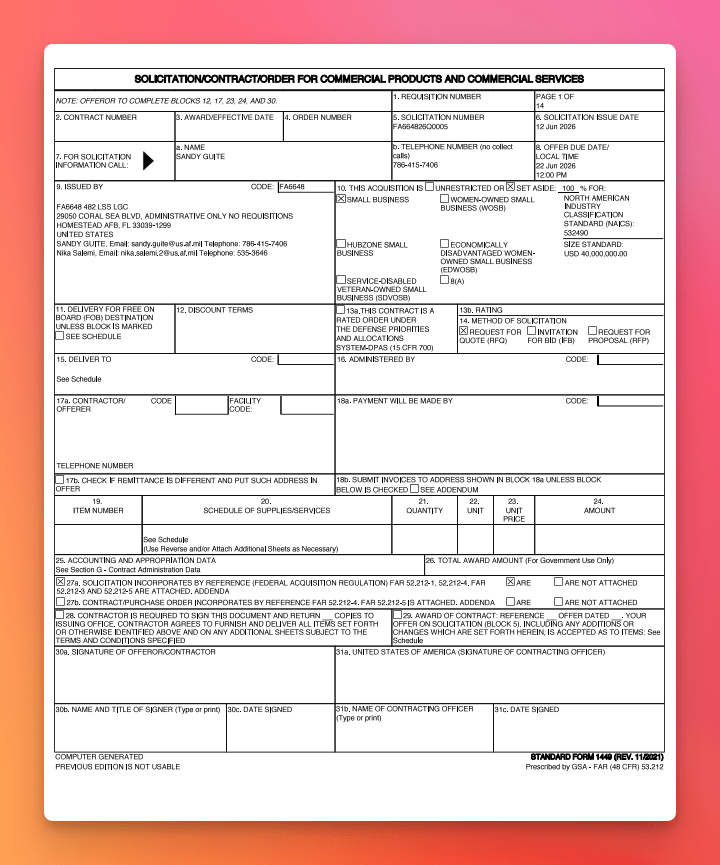
Pick a solicitation or award notice with a visible line-item table – CLINs, quantities, and extended prices across at least two pages. Save the PDF locally and upload it to Unstract. For this demo, we will use this example:
Step 2 – Apply a table-friendly schema and prompt
Flat form-field schemas fail on procurement documents. For generic award notices, use a line_items array so each CLIN or schedule row maps to its own object:
You are extracting structured fields from Standard Form 1449 (SF-1449) -- Solicitation/Contract/Order for Commercial Products and Commercial Services.

Extract only the fields defined in the JSON schema below. Use values exactly as they appear on the form and any attached schedule pages. If a field is missing, blank, or illegible, return null (or [] for arrays).

Rules:
- Extract only values visible on the form. Do not infer contract awards if blocks 29-31 are unsigned or blank.
- Normalize unambiguous dates to YYYY-MM-DD (e.g. "12 Jun 2026" → "2026-06-12"). For offer due date, preserve the time if shown (e.g. "2026-06-22 12:00 PM").
- For set_aside, combine the percentage and checked category (e.g. "100% FOR SMALL BUSINESS").
- For issued_by.contacts, include every named contact in Block 7 with name, telephone, and email when present.
- Map schedule rows from Blocks 19-24 or attached schedule pages into the items array -- one object per line item.
- Preserve NAICS codes, dollar amounts, and office codes exactly as printed.

Return valid JSON matching the schema. No commentary outside the JSON object.

{
    "solicitation_number",
    "contract_number",
    "award_effective_date",
    "order_number",
    "solicitation_issue_date",
    "offer_due_date",
    "issued_by": {
        "code",
        "address",
        "contacts": [{ "name", "email", "telephone" }]
    },
    "set_aside",
    "naics",
    "size_standard",
    "delivery_terms",
    "discount_terms",
    "rating",
    "method_of_solicitation",
    "deliver_to",
    "administered_by",
    "contractor",
    "payment_info",
    "items": [{
        "item_number",
        "description",
        "quantity",
        "unit",
        "unit_price",
        "amount",
        "pricing_arrangement",
        "product_service_code",
        "line_item_type"
    }]
}
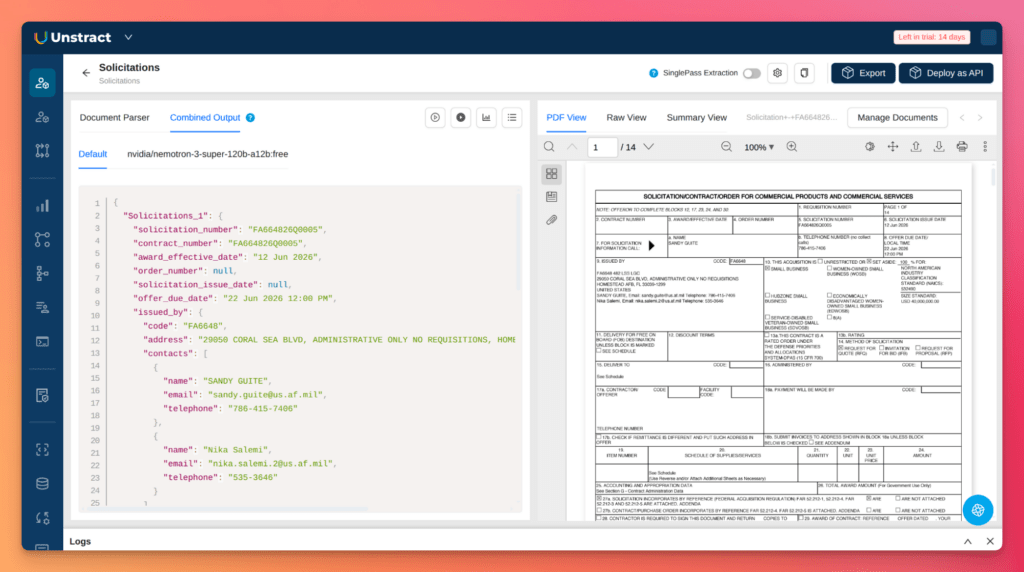
Step 3 – Run extraction and validate row coverage
Form-field extraction fails loud – a missing SSN is obvious. Table extraction fails quiet – a dropped CLIN row or mangled dollar amount can slip through if you only glance at the JSON.
Open the source PDF alongside the output: count the rows, spot-check amounts against what’s printed, and confirm NAICS and vendor identifiers match.
The source document is public, but the sovereignty argument still applies to agencies running internal analysis.
Your contracting office published the award notice; that doesn’t mean they want the extraction pipeline – prompts, intermediate representations, and inference traffic – routed through a third-party API.
Keeping Unstract and NIM on your network means even public-record workflows stay inside the boundary you’re defending for the sensitive ones.
Turn your complex PDF tables into structured data with Unstract
Unstract uses LLMs to extract clean, structured JSON from any document — PDFs, scans, images, tables of any layout. Define what you want using natural language, deploy as an API or ETL pipeline, and get data your systems can actually use.
Try Unstract for free on the Playground. No signup required.
The argument is simple and practical: if your organization cannot send sensitive documents to a hosted inference API, LLM-assisted extraction is still possible — but only when every hop runs on infrastructure you control.
Today that wiring goes through Unstract’s OpenAI Compatible connector pointed at local NIM. Native NVIDIA Build and Nemotron/OpenRouter connectors are on Unstract’s roadmap; when they ship, only the configuration surface changes – the architecture and the test stay the same.
Stand up NIM on your GPUs, deploy Unstract on the same network, and point the connector at your internal endpoint. Validate prompts and schemas on the OpenRouter on-ramp if you need to, then cut over to local NIM before production data touches the pipeline.
The demo is the proof of concept. Your compliance team’s question – can we use this without exposing the data? – now has an answer you can show, not just describe.
Nothing leaves the building. That’s the test. Make sure every deployment passes it.
Sensitive Document Processing with Sovereign AI: FAQs
1. What is the sovereign AI architecture for processing sensitive documents, and how does it keep data from leaving the network? The sovereign architecture runs Unstract and NVIDIA NIM containers on infrastructure inside your network boundary. Document intake, LLM inference, and structured output all happen over internal network – no document content or extracted data ever reaches the public internet.
2. How do I connect Unstract to a local NVIDIA NIM instance for sovereign document extraction? Use Unstract’s OpenAI Compatible connector pointed at your internal NIM endpoint (e.g., http://nim.internal:8000/v1). Set the model to your deployed NIM image tag and use a placeholder API key – local NIM does not require inference authentication once running.
3. Can I prototype extraction workflows without local GPUs, and then switch to a sovereign path later? Yes. Point the same OpenAI Compatible connector at OpenRouter’s hosted Nemotron endpoint (e.g., https://openrouter.ai/api/v1 with nvidia/nemotron-3-super-120b-a12b:free) to validate prompts and schemas. When ready, cut over to local NIM by changing only the base_url, model, and api_key – no prompt or schema changes required.
4. How do I set up Unstract and NVIDIA NIM on my own network for the first time? Run Unstract’s self‑hosted stack via ./run-platform.sh (Docker Compose). Deploy a NIM container on local GPUs with docker run --gpus all ... and mount a cache directory for model weights. Point Unstract’s OpenAI Compatible connector at the NIM container’s internal hostname and port.
5. What GPU and model considerations should I plan for when deploying local NIM? NIM targets data‑center GPUs – H100, H200, A100, or L40S. Size hardware to your model: roughly 24 GB VRAM for an 8B‑parameter model, 80 GB or more for a 70B‑class model. The NIM containers are free for NVIDIA Developer Program members on up to 16 GPUs.
6. What is the difference between the on‑ramp (hosted) and sovereign (self‑hosted) paths in the blog demos? The on‑ramp path uses OpenRouter or hosted NVIDIA build endpoints to prototype extraction – document content leaves your network, so it is not sovereign. The sovereign path uses local NIM on your own GPUs, with Unstract pointed at an internal endpoint; every byte stays inside your network boundary.
UNSTRACT
AI Driven Document Processing
The platform purpose-built for LLM-powered unstructured data extraction. Try Playground for free. No sign-up required.
Shuveb Hussain is the Co-founder and CEO of Unstract. Previously, he served as VP of Engineering at Freshworks, a NASDAQ-listed global SaaS company. With over two decades of experience, Shuveb has co-founded multiple internet startups and worked with companies operating at massive scale—handling petabytes of data and billions of requests per hour.