Why Relying on PDF to Markdown Hurts LLM Accuracy and Reliability
In recent years, modern OCR tools have increasingly embraced Markdown as their default output format, often describing it it as “LLM-ready” due to its simplicity, human readability, and version control friendliness. At first glance, this approach seems practical: Markdown is lightweight, easy to parse, and works well for simple text documents. However, when it comes to structured data extraction at scale, the story is very different.
The problem is that Markdown fundamentally discards critical layout and metadata that are essential for accurate extraction by large language models (LLMs). Bounding boxes, reading order, confidence scores, and complex table structures are often lost during the conversion to Markdown. This information loss can silently corrupt data, introduce errors, and make downstream LLM processing unreliable, particularly for complex enterprise documents such as multi-column reports, financial statements, scientific papers, and scanned forms.
This article compares Markdown-based OCR outputs with LLMWhisperer, a layout-preserving OCR solution designed specifically for LLM pre-processing, to highlight why Markdown is insufficient for high-fidelity, LLM-driven structured data extraction. Unlike Markdown-based tools that prioritize human readability, LLMWhisperer retains critical layout information, confidence scores, and spatial relationships that enable more accurate downstream extraction. By evaluating real-world document scenarios, we will show how Markdown fails to retain the structural and semantic richness needed for accurate automated processing, and how LLMWhisperer overcomes these challenges.
The Trend: Markdown in Modern OCR
Over the past few years, a clear trend has emerged in the OCR ecosystem: Markdown has become the preferred output format for many modern OCR tools. Solutions such as OLMOCR2, Docling and Mistral OCR increasingly default to Markdown when converting PDFs and scanned documents into machine-readable text. This shift is often framed as a natural evolution driven by the rise of LLMs and the need for “LLM-friendly” inputs.
The rationale behind this choice is easy to understand. Markdown is human-readable, lightweight, and easy to diff and version-control using tools like Git. It converts reasonably well to other formats, integrates smoothly into documentation workflows, and avoids the verbosity and complexity of traditional OCR formats. For simple documents, plain text PDFs, basic reports, or single-column layouts, Markdown often appears “good enough” and convenient.
However, while Markdown works well as a presentation or documentation format, it performs poorly as an OCR output format for LLM-based structured data extraction. In practice, Markdown-based OCR pipelines consistently lose crucial information: spatial layout, reading order, bounding boxes, confidence scores, and the nuanced structure of tables and forms. These losses are not always obvious, many conversions succeed silently, but they significantly degrade extraction accuracy when the output is fed into downstream LLM workflows.
As document complexity increases, like multi-column layouts, nested tables, financial statements, scanned forms, or mixed text-and-table PDFs, the limitations of Markdown become increasingly apparent. What initially looks like a clean and readable output often masks structural corruption and missing metadata, leading to unreliable LLM responses and costly post-processing.
This growing reliance on Markdown highlights an important misconception in modern OCR pipelines: being LLM-compatible is not the same as being LLM-accurate. In the sections that follow, we’ll examine where Markdown-based OCR breaks down in real-world scenarios and why layout-preserving approaches like LLMWhisperer are better suited for enterprise-scale, structured data extraction.
Why Markdown Fails for OCR: Key Challenges
Markdown was never designed to be an OCR interchange format. It excels at representing simple, linear text for humans, but OCR, especially OCR intended for LLM-based structured data extraction, requires far richer information.
When documents are converted to Markdown, a large amount of critical signal is lost, often irreversibly. The following paragraphs describe the most common and impactful issues observed in real-world OCR pipelines.
Loss of Layout and Positional Data
One of the most fundamental problems with Markdown is that it has no concept of spatial layout. During OCR-to-Markdown conversion, bounding boxes and coordinates disappear entirely. There is no way to express where a word, line, or block of text appeared on the page, nor how different regions relate to each other spatially.
This loss directly impacts reading order. Multi-column documents, common in bank statements, invoices, research papers, and reports, are flattened into a single linear sequence. The original left-to-right, top-to-bottom reading flow is often destroyed, resulting in text from different columns being interleaved incorrectly.
Metadata Loss
Beyond layout, Markdown discards nearly all OCR metadata that production systems rely on. Confidence scores, essential for identifying uncertain OCR regions, have nowhere to live in Markdown. Without them, it is impossible to automatically flag low-quality extractions or route problematic documents for human review.
Other critical metadata is also lost, including:
- Font styles and emphasis
- Colour information
- Semantic roles such as headers, footnotes, captions, or labels
This loss severely impacts human-in-the-loop (HITL) workflows and large-scale batch processing. Teams lose the ability to verify, audit, highlight, or selectively reprocess OCR output based on confidence or semantic importance.
Tables and Complex Layouts Break
Tables are one of the most fragile structures in Markdown-based OCR. Markdown tables are limited to simple row-and-column grids and cannot represent merged cells (colspan/rowspan), nested tables, or irregular layouts. As a result, complex tables, especially those found in financial statements, scientific papers, and regulatory documents, are frequently corrupted.
Common failure patterns include:
- Repeated text across rows
- Values appearing under incorrect headers
- Nested tables collapsing into unreadable text blocks
Unlock the full value of tables hidden inside your PDFs.
In this article, discover how to use Unstract’s LLMWhisperer to extract exactly what you need, page by page, with output optimized specifically for LLM processing. See how it differs from traditional OCR and why it makes structured data extraction far more accurate and reliable.
Silent Corruption via LLM Pipelines
Many modern OCR tools rely on LLMs or vision-language models to generate Markdown directly. While powerful, this introduces a dangerous failure mode: silent corruption. LLMs may hallucinate content, omit sections, or truncate output without raising any explicit error.
Because the resulting Markdown still “looks valid,” these failures often go unnoticed until extraction results are wrong, at which point diagnosing the root cause becomes extremely difficult.
Other Limitations
Several additional issues further limit Markdown’s usefulness as an OCR output format:
- Special characters and Unicode are frequently misrendered, especially in non-Latin scripts.
- Images in scanned PDFs are often replaced with placeholders such as <!– image –>, losing all embedded content.
- Nested structures, such as lists within tables or tables within tables, regularly break parsing logic.
- Manual correction of these issues is cumbersome and impractical at enterprise scale, particularly for non-technical users.
Summary: Markdown OCR Limitations
| Issue Category | Description | User Impact |
|---|---|---|
| Positional Data Loss | Multi-column flattening, no bounding boxes | Difficult navigation and review |
| Metadata Loss | Confidence scores and semantic info discarded | Manual correction and reprocessing |
| Formatting Limitations | Tables, equations, nested lists fail | Loss of structural integrity |
| Silent Corruption | LLM-generated output may hallucinate or omit | Undetected extraction errors |
Taken together, these challenges show that Markdown is not merely an imperfect OCR format, it is structurally incapable of representing the information required for reliable, large-scale, LLM-based structured data extraction.
In the next section, we’ll contrast these limitations with layout-preserving approaches and demonstrate in practice how tools like LLMWhisperer address many of these gaps.
Comparison: Markdown-Based OCR vs LLMWhisperer
To move beyond theoretical limitations, we now compare Markdown-based OCR tools with LLMWhisperer using real-world documents and extraction scenarios.
The goal of this comparison is not to discredit Markdown-based tools, but to identify where they struggle in practice, and to clearly show how a layout-preserving approach changes extraction outcomes when LLMs are involved.
Comparing PDF to Markdown OCR Tools: Strengths and Limitations
The following tools represent the current state of Markdown-first OCR pipelines. Each of them aims to produce LLM-compatible text, but does so by flattening documents into Markdown:
- OLMOCR2 – Used for selected document types where its OCR performance is strong, particularly on cleaner or more uniform layouts.
- Docling – Applied to documents requiring broader PDF parsing capabilities, including text, tables, and mixed content.
- Mistral OCR – Used for cases where LLM-powered OCR is advantageous, especially for scanned documents and noisy inputs.
These tools all output Markdown and share similar strengths: simplicity, readability, and ease of integration, along with the same structural limitations discussed earlier.
On the other hand, LLMWhisperer takes a different approach. Instead of optimizing for Markdown output, it produces layout-preserved plain text with JSON metadata, explicitly designed for LLM pre-processing. Spatial relationships, reading flow, confidence scores, and form elements are retained to the extent required for accurate structured extraction.
The following subsections illustrate these differences using real documents across multiple scenarios, demonstrating how each approach handles complex layouts, tables, and mixed content.
Scenario 1 – Nested Tables
This document contains nested tables, checkboxes embedded within tables, and multi-level row/column relationships, making it a good stress test for OCR systems.
To evaluate how Markdown-based OCR handles complex layouts, we tested this document using the OLMOCR2 demo site, https://olmocr.allenai.org/.
The Markdown output produced by OLMOCR2 correctly recognizes most of the text inside individual cells:
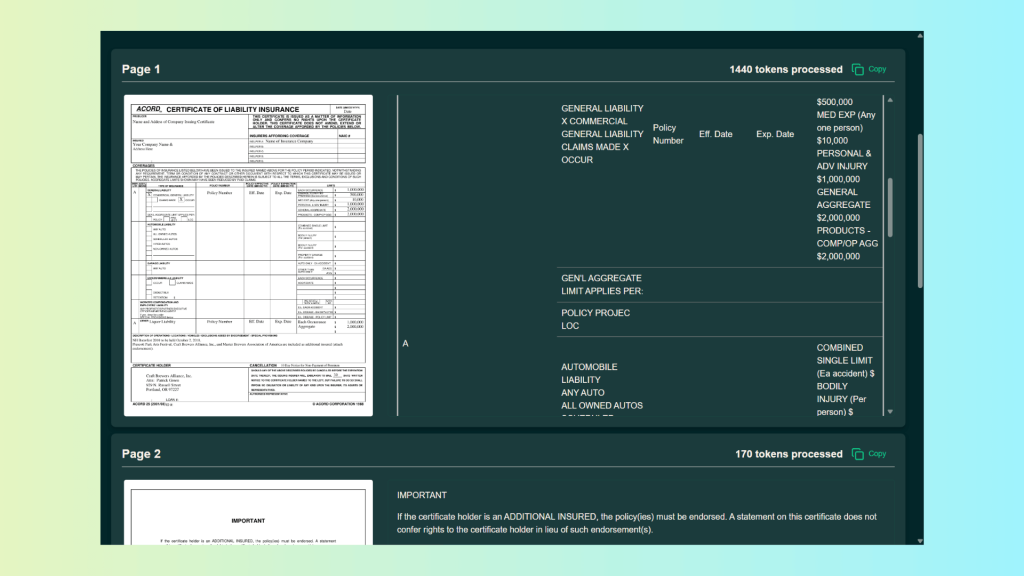
However, once the document structure becomes complex, critical issues emerge:
- Column alignment is lost: Text belonging to the same row is split across different logical rows in the Markdown output.
- Row semantics break down: In several places, column labels (such as “A”) disappear entirely, making it impossible to determine which value belongs to which category.
- Nested tables lose meaning: While the text exists, the hierarchical relationship between inner and outer tables is flattened.
- Checkbox context is unclear: Checkboxes are detected as text artifacts, but their association with specific rows or columns is ambiguous.
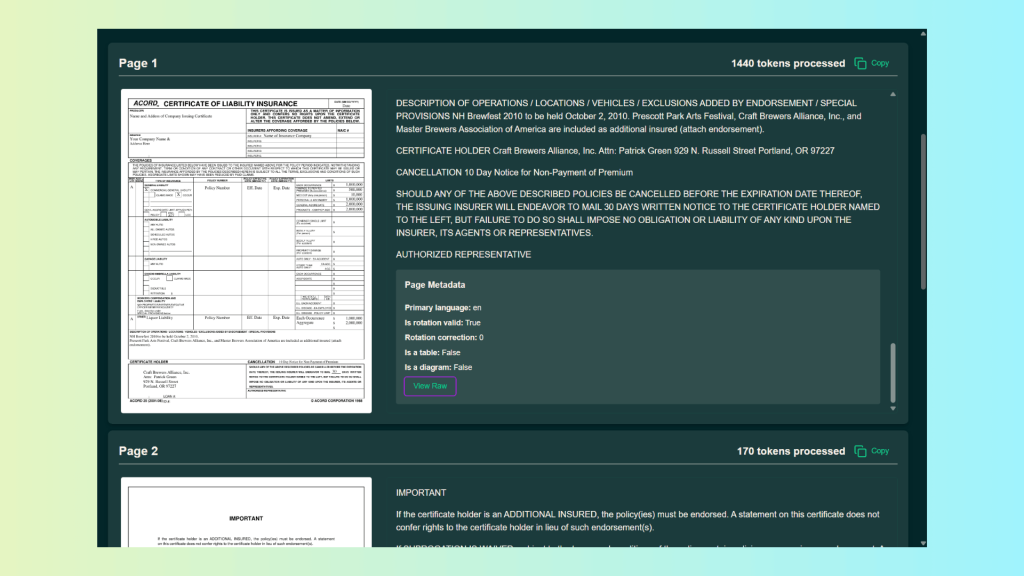
Additionally, OLMOCR2 provides no real page or positional metadata:
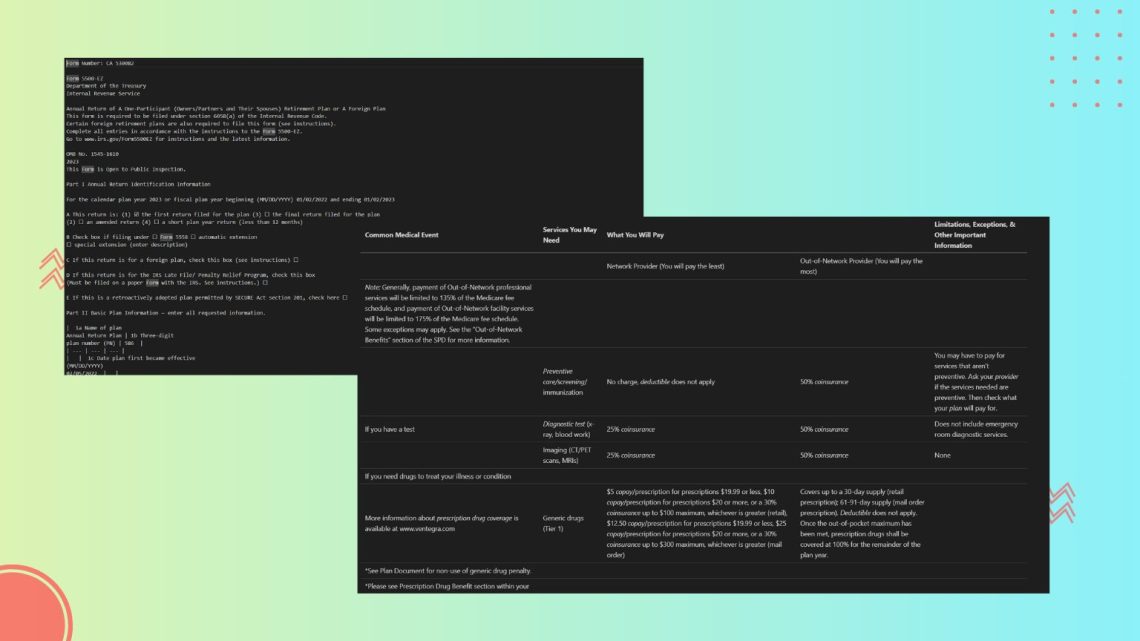
Processing the document with the LLMWhisperer API using a Python script, we obtain the following output:
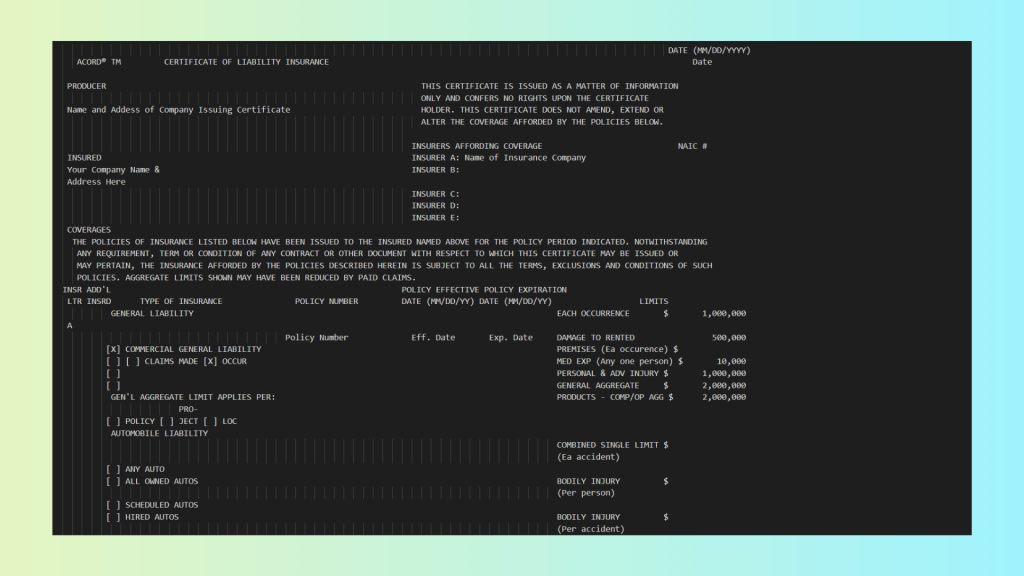
As you can see, in contrast, LLMWhisperer produces a near-perfect translation of the nested tables:
- All rows and columns remain aligned, both within inner tables and across outer tables.
- Nested table structure is preserved, allowing the document to retain its original hierarchy.
- Checkboxes are explicitly identified, with clear association to their respective rows.
- Reading order is preserved, ensuring that related fields appear together in the correct sequence.
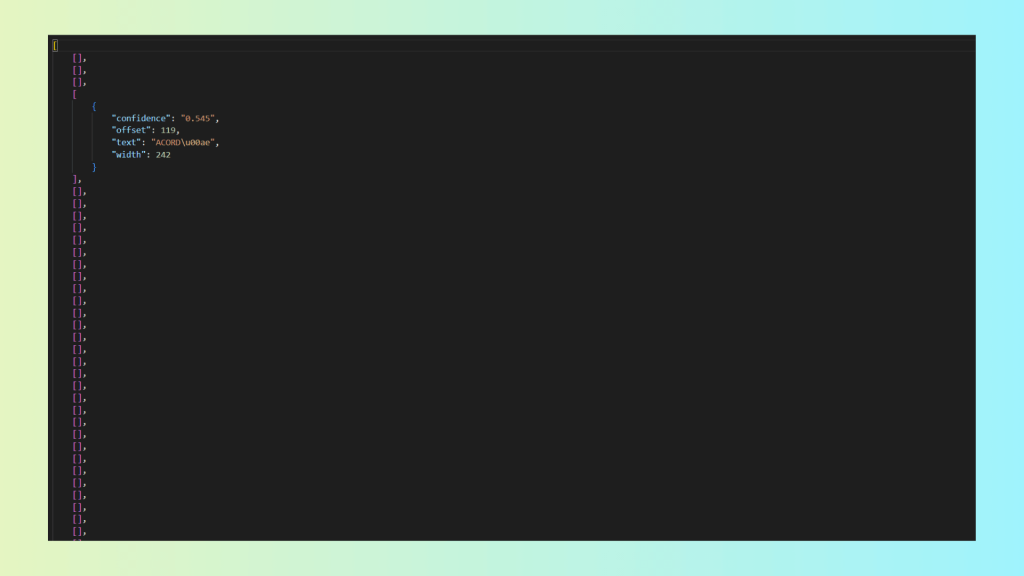
- Confidence scores are provided, as shown below, enabling verification and targeted review of low-confidence items.
Confidence score metadata is provided only for words with a confidence score below 0.9. As you can see, in this document, only one word is flagged:
Scenario 2 – Multi-Column Layouts
This document contains a multi-column layout combined with diverse table structures, a common pattern in bank statements and financial reports.
To evaluate how Markdown-based OCR handles complex layouts, we tested Docling using a Python-based extraction script that converts PDFs into Markdown.
Running the script, we get the following result:
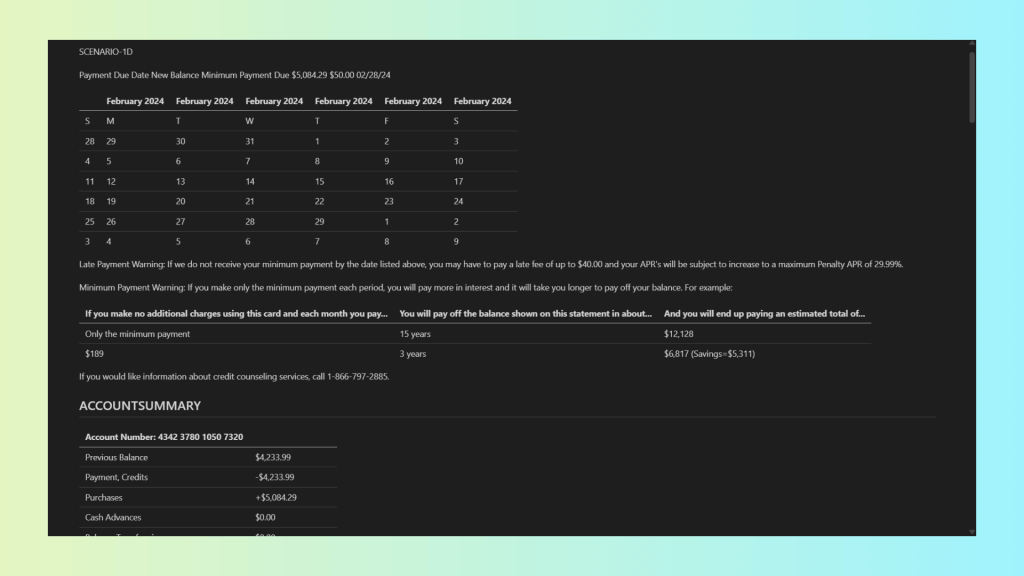
This output has some key issues:
- Extraction accuracy: While much of the text is recognized, structural loss leads to incorrect field associations and unreliable LLM outputs.
- Layout preservation: Multi-column layouts are flattened, destroying the visual and logical separation of content.
- Metadata preservation: Positional data, confidence scores, and structural metadata are entirely absent.
- Tackling complex formats and layouts: Calendars, mixed layouts, and tables are misinterpreted or restructured incorrectly.
- Confidence scores: Not available, preventing quality checks and human-in-the-loop workflows.
- Bounding boxes: No coordinate data is preserved, making validation and spatial reasoning impossible.
- Reading and semantic order: Content order is inferred and frequently incorrect, breaking the document’s semantic flow.
We then processed the same document using LLMWhisperer’s Python script, calling the API as before:
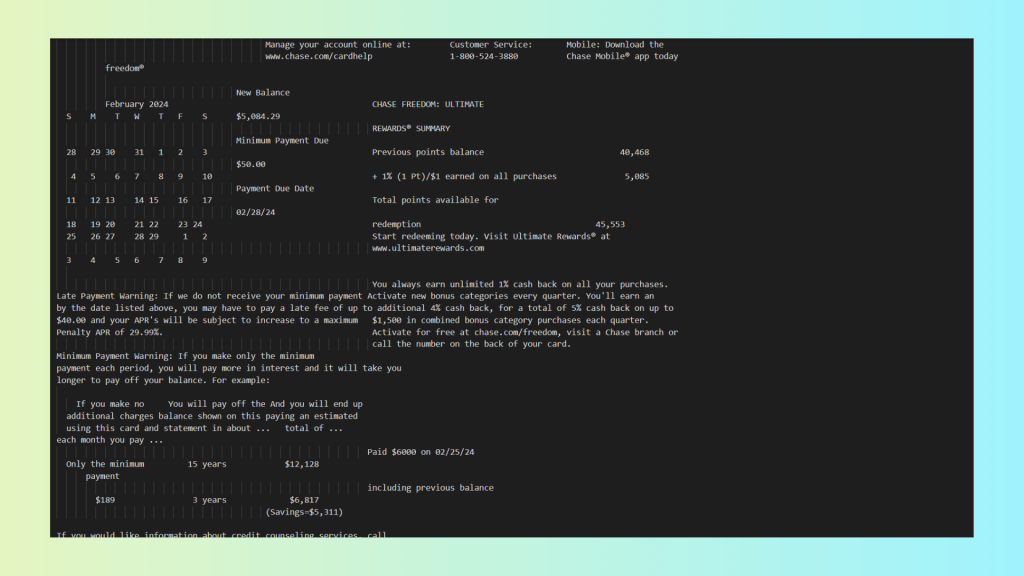
As you can see, LLMWhisperer results are far better:
- Layout preserved: Multi-column sections remain aligned, nested tables retain their hierarchy, and rows/columns are correctly associated.
- Checkboxes and form elements: Clearly marked as checked/unchecked and linked to their respective rows or fields.
- Metadata included: Word-level confidence scores are present, enabling HITL workflows and quality validation.
- Positional data: Line-level Y-coordinates allow downstream systems to reason about spatial relationships.
- Reading and semantic order: Text flows naturally according to the original layout, preserving semantic meaning.
- Complex formats handled: Calendars, tables, and mixed content regions are represented correctly, without introducing spurious headers or footers.
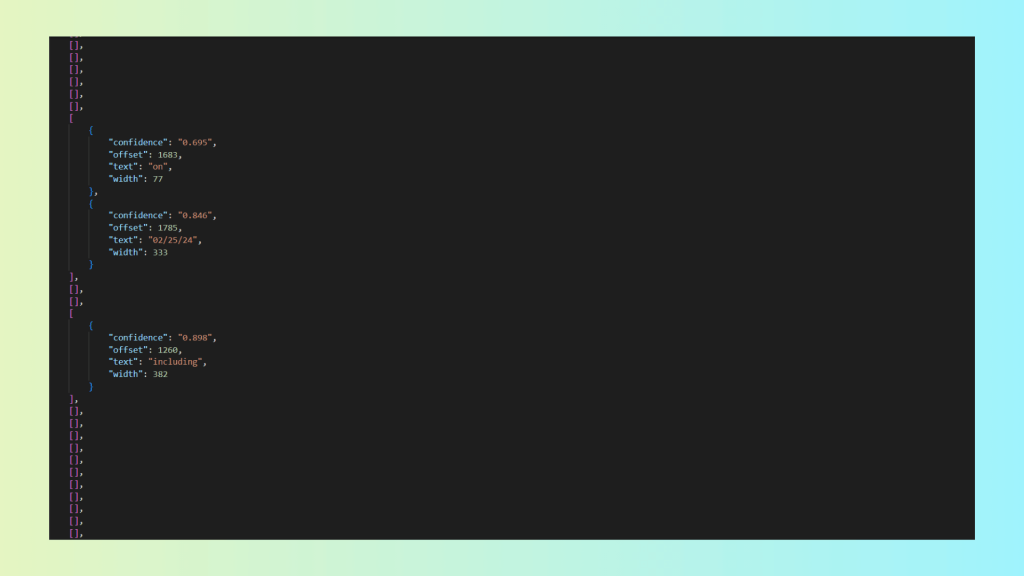
For LLMWhisperer, word-level confidence metadata is provided for all words with confidence < 0.9:
Scenario 3 – Handwritten Forms with Checkboxes
This document contains handwritten text combined with checkboxes and form fields, representing a common but challenging scenario for OCR systems processing real-world forms such as tax returns, applications, and surveys.
For the Markdown-based OCR, we used Mistral OCR with a small Python script to automate PDF conversion:
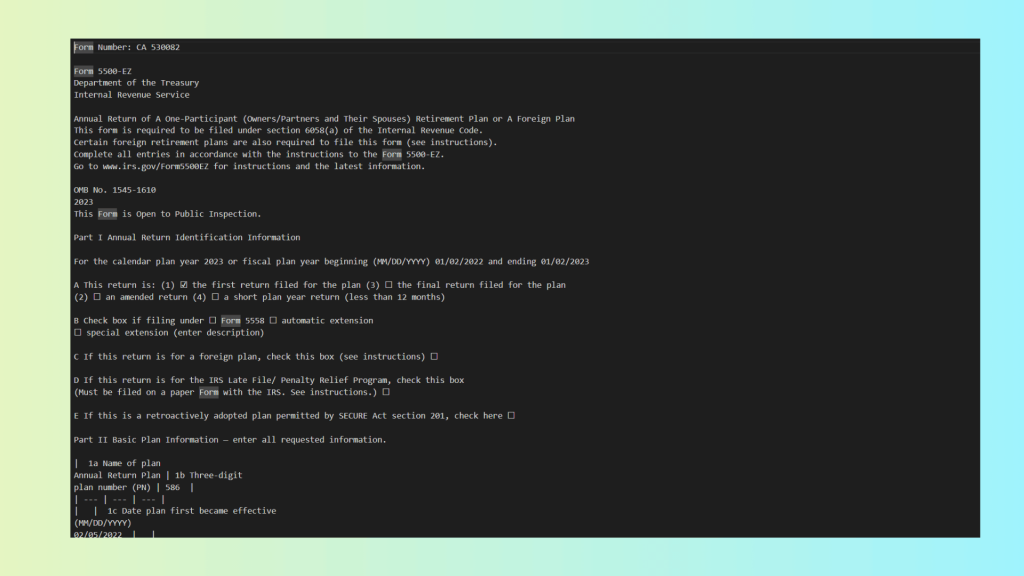
Results from Markdown-based OCR from Mistral OCR:
- Handwriting recognized – individual handwritten text is detected reasonably well.
- Checkboxes detected – presence of checkboxes is noted, but their checked/unchecked state may be ambiguous.
- Layout not preserved – multi-column sections and nested tables are flattened or misaligned.
- Reading flow corrupted – rows and columns are interleaved incorrectly, breaking the semantic order of the document.
- No highlights or confidence scores – low-confidence regions cannot be flagged, making validation and HITL workflows impossible.
We then processed the same document using the LLMWhisperer API, as before, via Python:
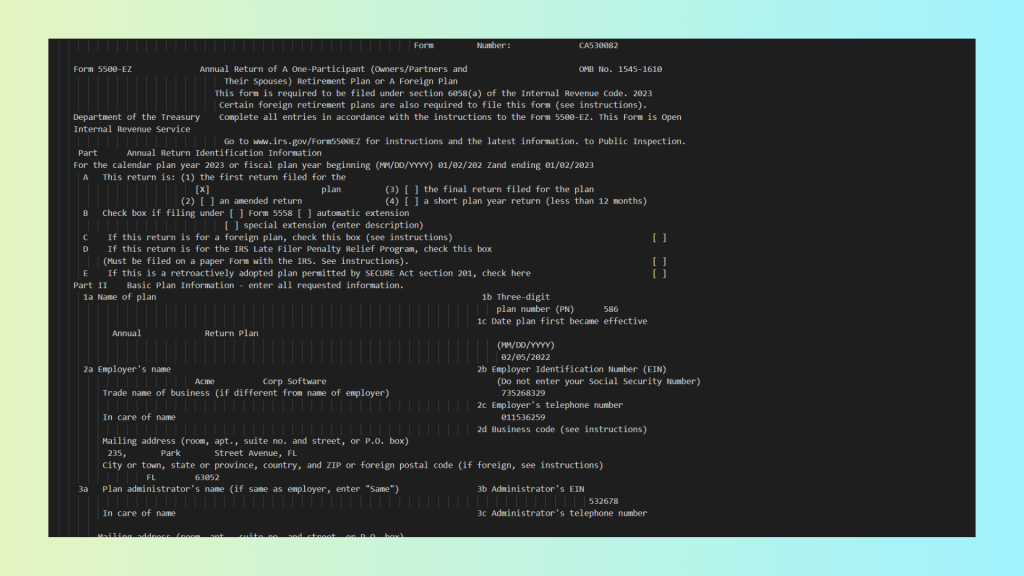
As you can see, LLMWhisperer provides:
- Accurate handwriting recognition – both printed and handwritten text are correctly captured.
- Layout preservation – multi-column sections, nested tables, and forms remain aligned.
- Highlights and annotations – low-confidence regions can be flagged for review, supporting HITL workflows.
- Correct checkbox interpretation – checked and unchecked states are clearly marked and associated with the right rows.
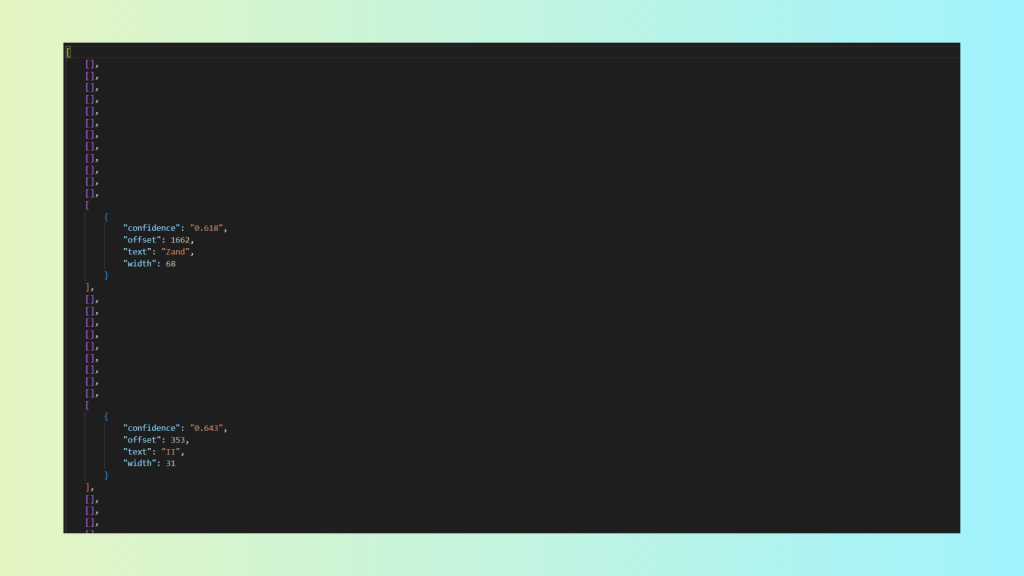
As show before, we have the confidence score metadata:
Scenario 4 – Complex Scientific and Financial Tables
This document contains several tables with complex relationships and detailed descriptions of the data
Analysing the document with Docling, we obtain the following Markdown output:

Even though Docling does a reasonable job reproducing basic tables, the Markdown output is missing several critical elements:
- Merged table cells are lost – hierarchical or grouped data is flattened.
- Totals are missing in the first table – key summary values are dropped during conversion.
- Layout is not preserved – tables and surrounding text lose their original spatial relationships.
- No confidence or metadata available – there is no way to assess extraction quality or flag uncertain values.
We then processed the same document using the LLMWhisperer API, using the same Python-based approach as before:
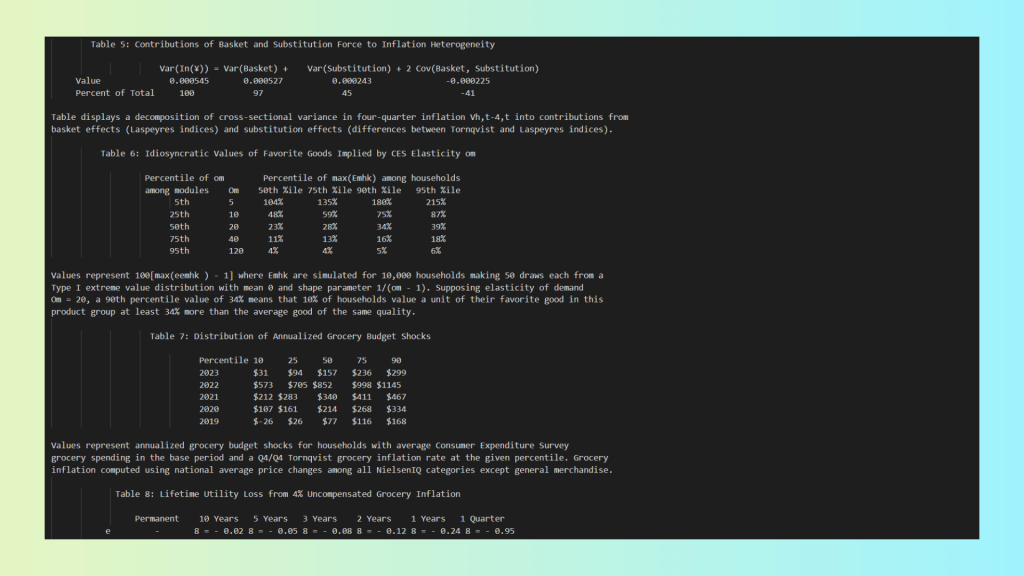
Notably, LLMWhisperer delivers a complete and reliable extraction, addressing the shortcomings seen in Markdown-based OCR:
- Accurate layout replication – the original visual and structural layout is preserved.
- Merged cells retained – complex table hierarchies and grouped data remain intact.
- Totals correctly extracted – summary rows and calculated fields are not lost.
- Document flow preserved – reading order and semantic relationships are maintained.
- Confidence metadata included – low-confidence items are explicitly flagged for review.
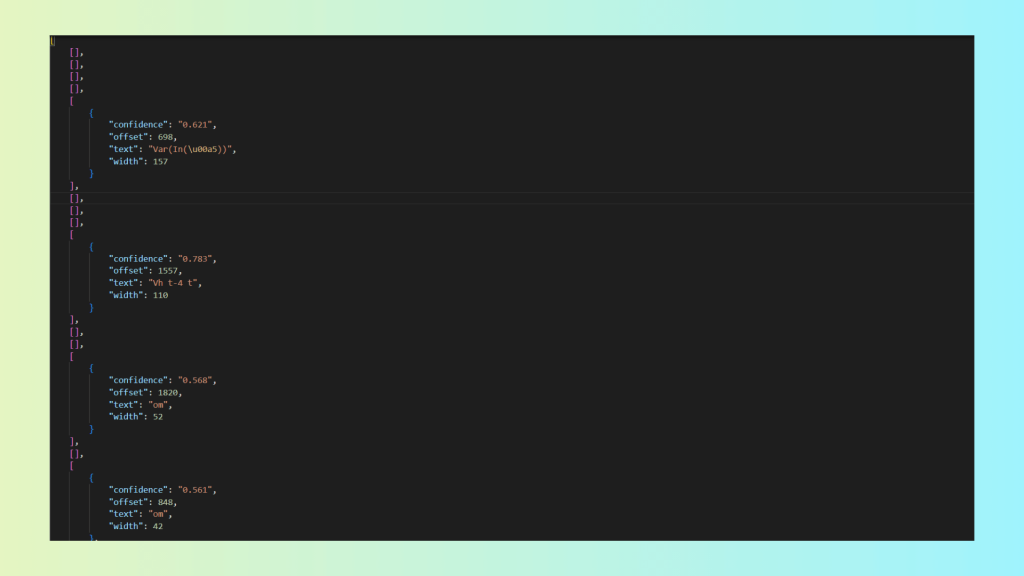
And for the few words where the confidence level was not high, LLMWhisperer explicitly exposes this information via metadata:
Scenario 5 – Mixed Content PDFs
This document contains a complex mix of tables and descriptive text, with relationships between cells, rows, and surrounding explanations that are critical for understanding the data.
Using Mistral OCR, we get the following Markdown output:
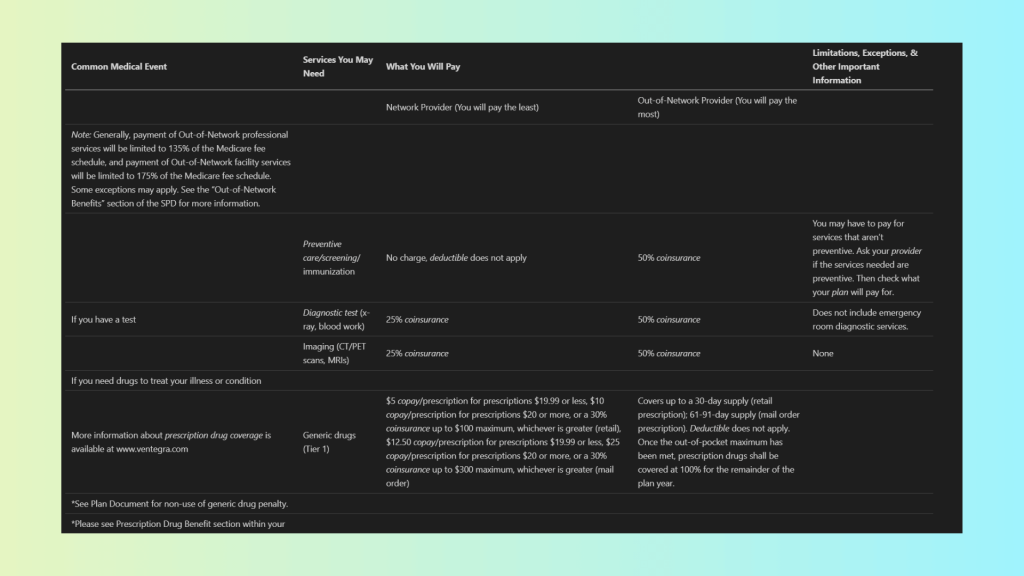
The Markdown output has the following limitations:
- Tables and nested tables scrambled – inner tables and corresponding descriptive text lose their structure.
- Flow not replicated – reading order is corrupted, making it difficult to follow relationships between data and explanations.
- Hard to read and interpret – flattened and misaligned content reduces usability for humans and LLMs alike.
Using LLMWhisperer, we can see the benefits of layout preservation:
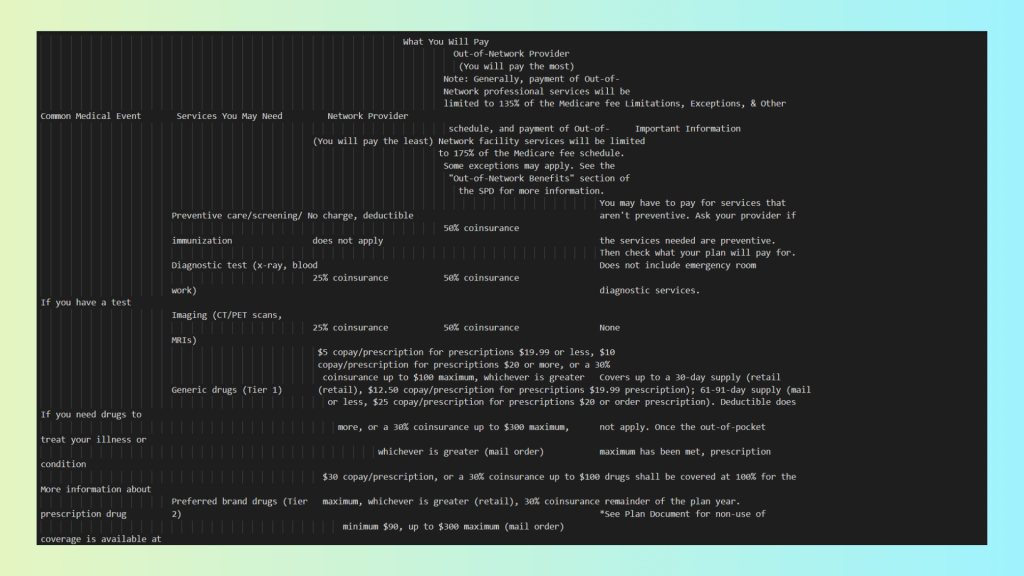
Benefits of LLMWhisperer for this document:
- Tables beautifully replicated – outer tables maintain their original structure and alignment.
- Inner tables preserved – nested tables retain their layout and hierarchy.
- Corresponding text maintained – descriptive text stays correctly associated with tables and data.
- Confidence metadata provided – although not needed here, low-confidence words would be flagged automatically.
For this document, all words have confidence scores higher than 0.9, indicating very high OCR accuracy:
Key Differences: Why PDF to Markdown Falls Short Compared to LLMWhisperer
The table below summarizes the practical differences between LLMWhisperer and Markdown-based OCR tools when used for LLM-driven structured data extraction.
| Aspect | LLMWhisperer | Markdown-based OCR | Notes |
|---|---|---|---|
| Bounding boxes | ✅ Line-level Y coordinates | ❌ None | Positional data is critical for validation, review, and downstream processing |
| Confidence scores | ✅ Word-level | ❌ None | Enables detection of low-confidence regions and HITL workflows |
| Multi-column layout | ✅ Yes | ❌ Flattened | LLMWhisperer preserves reading order; Markdown interleaves columns |
| Complex tables | ✅ ASCII-based visual preservation | ❌ Collapsed or corrupted | Markdown cannot represent merged cells or nested tables |
| Semantic structure | ⚠️ Headers and footers detected | ❌ Lost | Footnotes, captions, and roles are discarded |
This comparison makes the trade-off explicit: Markdown-based OCR optimizes for simplicity, while LLMWhisperer optimizes for extraction fidelity. For LLM-centric pipelines, the latter consistently provides more reliable and auditable inputs.
LLMWhisperer Advantages
As the comparison above suggests, LLMWhisperer takes a fundamentally different approach from Markdown-based OCR tools.
Instead of optimizing for human readability or document conversion, it is designed specifically for LLM pre-processing, with a strong emphasis on preserving layout, structure, and signals that matter for downstream extraction.
This design choice addresses many of the core failures discussed earlier.
Layout preservation leads to higher extraction accuracy: LLMWhisperer preserves the visual structure of documents far more effectively than Markdown. By maintaining spatial alignment and relative positioning in its output, it allows LLMs to reason about documents in a way that closely resembles how humans read them. This is especially valuable for multi-column layouts, dense reports, and mixed-content PDFs where reading order is critical.
Word-level confidence enables HITL workflows: Unlike Markdown-based outputs, LLMWhisperer provides word-level confidence metadata, exposing low-confidence regions explicitly.
This enables production-grade workflows such as:
- Automatically flagging uncertain extractions
- Routing problematic documents for human review
- Applying quality thresholds in batch processing
These capabilities are essential for enterprise deployments where accuracy, auditability, and traceability matter.
Robust handling of multi-column and nested structures: LLMWhisperer performs significantly better on complex layouts, including multi-column documents, nested tables, and mixed text–table regions. Rather than flattening or interleaving content, it preserves spatial relationships, reducing logical corruption during extraction.
Semantic detection for common document elements: The system detects headers, footers, and form elements such as checkboxes and radio buttons, which are frequently lost or misrepresented in Markdown pipelines. This semantic awareness improves structured extraction from forms, regulatory documents, and enterprise PDFs.
Reduced silent corruption: Because LLMWhisperer is not primarily generating Markdown via free-form LLM responses, it avoids many silent failure modes such as hallucinated content, truncated output, or incomplete responses that appear valid but are semantically wrong.
Practical Recommendations
Based on real-world experiments and comparative analysis, the choice of OCR output format should be driven by document complexity and downstream usage, not by convenience alone.
The following recommendations can help teams avoid common pitfalls and design more reliable LLM-based extraction pipelines.
Use Markdown for small-scale, human-readable OCR: Markdown works reasonably well for simple use cases: single-column documents, short reports, or content intended primarily for human reading and lightweight editing. If the goal is documentation, quick previews, or basic text extraction with minimal structure, Markdown can be an acceptable choice.
Avoid Markdown for enterprise-grade or complex documents: For large-scale processing or documents with complex layouts, such as multi-column reports, financial statements, scientific papers, scanned forms, or nested tables, Markdown becomes a liability. The loss of layout, metadata, and confidence information leads to extraction errors that are difficult to detect and expensive to correct downstream.
Use LLMWhisperer for LLM preprocessing and metadata-rich workflows: When the primary goal is accurate structured data extraction using LLMs, LLMWhisperer is a far better fit. Its layout-preserving output, confidence metadata, and improved handling of complex structures make it suitable for production systems where accuracy, traceability, and HITL workflows are critical.
Adopt hybrid pipelines for specialized requirements: No single OCR tool or format solves every problem. Documents with heavy mathematical notation, strict compliance requirements, or a need for full coordinate precision may still require specialized formats. In such cases, a hybrid pipeline, combining LLMWhisperer for LLM preprocessing with domain-specific OCR outputs for specialized needs, offers the most robust and flexible approach.
Markdown should be treated as a convenience format, not a canonical OCR representation.
PDF to Markdown in OCR: What is next?
The growing popularity of Markdown as an OCR output format is driven largely by convenience and perceived LLM compatibility. However, as this article has shown, Markdown discards critical information that is essential for reliable, production-grade structured data extraction.
Layout, positional data, confidence scores, and semantic context are either flattened or lost entirely, leading to silent corruption and degraded extraction accuracy, especially for complex, real-world documents.
In contrast, LLMWhisperer’s layout-preserving approach, combined with confidence metadata and better handling of complex structures, consistently produces outputs that LLMs can reason over more accurately and reliably. LLMWhisperer aligns far more closely with the needs of structured extraction pipelines than Markdown-centric solutions.
Ultimately, OCR outputs should be evaluated not by how “LLM-friendly” they appear, but by how well they preserve the signals that matter in real-world use cases. Organizations building serious LLM-driven extraction systems must look beyond convenience formats and choose tools based on extraction accuracy, metadata preservation, and robustness at scale. Markdown may be useful at the margins, but for high-fidelity, structured data extraction, it is simply not enough.
Frequently Asked Questions(FAQ):
Why is Markdown a popular OCR output format, and what are its limitations for developers?
Markdown is popular for OCR because it’s human-readable, lightweight, and integrates well with version control systems like Git. However, it discards critical layout information, bounding boxes, and confidence scores—making it unreliable for structured data extraction, especially for complex documents like financial statements or multi-column reports.
How does Markdown-based OCR handle tables and nested structures?
Markdown struggles with complex tables, often flattening or misaligning rows, columns, and nested structures. It cannot represent merged cells, hierarchical relationships, or irregular layouts, leading to corrupted data and unreliable downstream LLM processing.
What are the risks of using Markdown for enterprise-scale OCR workflows?
Markdown-based OCR loses positional data, confidence scores, and semantic context, which can silently corrupt data and introduce errors. This makes validation, auditing, and human-in-the-loop (HITL) workflows difficult, especially for large-scale or mission-critical document processing.
How does LLMWhisperer improve structured data extraction compared to Markdown?
LLMWhisperer preserves spatial layout, reading order, and confidence scores, ensuring high-fidelity extraction. It handles multi-column layouts, nested tables, and complex forms accurately, making it more reliable for LLM-driven pipelines than Markdown-based tools.
When should developers use Markdown for OCR, and when should they avoid it?
Use Markdown for simple, single-column documents or human-readable outputs like basic reports or documentation. Avoid it for complex layouts, financial statements, or enterprise-scale extraction, where structural integrity and metadata preservation are critical.