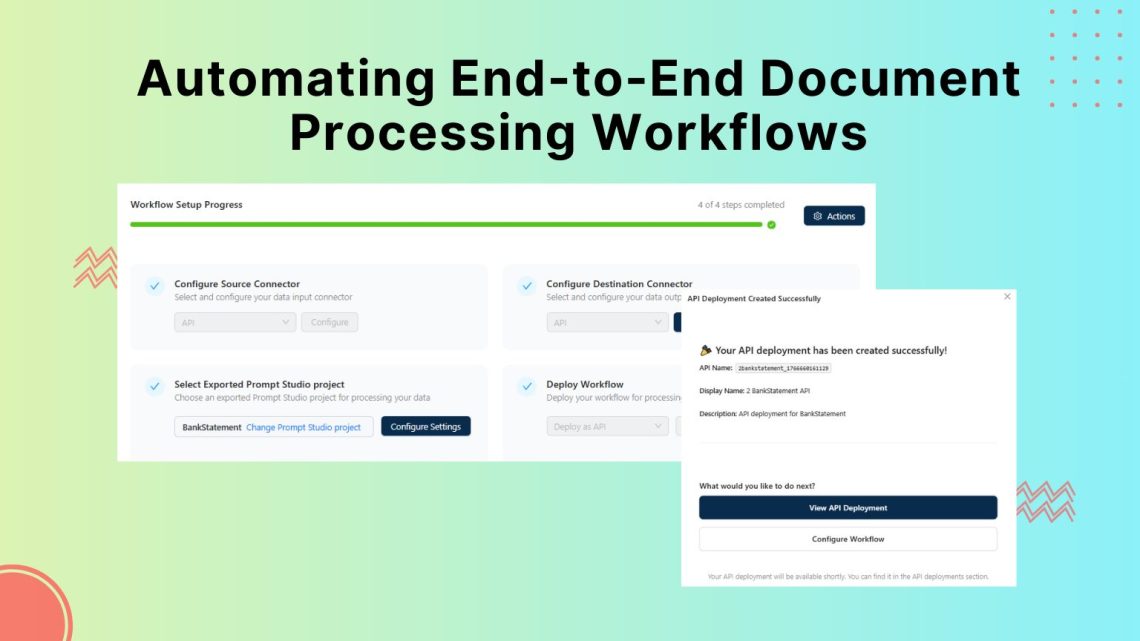
Automating End-to-End Document Processing Workflows with Unstract
Table of Contents
Organizations run on documents, yet critical data still arrives as PDFs, scans, emailed forms and spreadsheets. That creates unstructured to structured workflows that many teams still handle manually.
Teams manually pull fields from documents and re-enter them into finance systems, CRMs and databases, which leads to errors and unpredictable processing times. Template-based OCR and one-off scripts fail when document layouts change, forcing continuous fixes and manual intervention.
Unstract provides a production-grade inbox-to-database workflow with versioned, testable extraction and validation. This guide explains how to replace manual document processing with a controlled inbox-to-database workflow that improves accuracy, predictability and trust in downstream data.
What Are Document Processing Workflows?
A document processing workflow defines the end-to-end path a document follows from ingestion to the creation of reliable, structured data. It establishes a controlled, repeatable process that makes document-derived data predictable, auditable and suitable for use in production systems.
A simple way to understand this is to follow a monthly bank statement as it moves through each stage from ingestion to downstream delivery.
Ingestion: The statement arrives through a shared inbox or secure file drop. The workflow assigns an ID, records source and owner and queues the file for processing.
OCR and preprocessing: The workflow converts the PDF into machine-readable text while preserving layout, including tables, headings and page structure.
Data extraction: The workflow captures balances, transaction rows, dates, and account identifiers, then maps them to your data model and returns structured records.
Validation: Business rules check for missing, inconsisten,t or out-of-range values before any downstream write.
Targeted review: The workflow sends only rule failures or low-confidence fields to reviewers, who verify values against the source document.
Delivery: The workflow writes approved outputs to databases or exposes them through APIs in a consistent, traceable format for downstream systems.
Managed as a single workflow, this approach provides clear visibility into document status, consistent extraction behavior and operational control that isolated scripts or point automations cannot deliver.
Why Document Processing Needs Automation
Automation is essential in inbox-to-database pipelines to increase straight-through processing and control errors, exceptions and audit lineage.
Inbox-to-database pipelines need control at scale. Automation increases straight-through processing and reduces errors by standardising how documents enter the workflow and how exceptions get handled.
Manual re-keying degrades data quality. Re-entering fields from emails, PDFs and scans introduces avoidable errors that then propagate into systems of record and become costly to correct.
Unstructured volume and layout drift increase exception rates. As document volume grows and formats change, teams spend more time handling edge cases, remediating failures and maintaining brittle processes.
Audit and compliance require traceability. Regulated workflows need a reproducible record of where values came from and how the workflow captured, transformed, validated and delivered them.
Automation supports sustainable throughput. A well-defined workflow validates extracted fields before downstream writes and routes only exceptions for review, keeping operational effort focused on high-risk cases.
Challenges In Automating Document Processing Workflows
Document workflows fail to automate cleanly because they combine changing layouts, probabilistic extraction and compliance requirements inside a single pipeline.
Document layouts change over time:Vendor invoices, bank statements and customer forms regularly change column order, field labels and table structure. If extraction depends on fixed coordinates or a single template, it will fail as soon as the next layout version arrives.
Template-based OCR has limitations: Traditional OCR works best on clean, consistent pages. It often fails on multi-page tables, rotated scans, stamps, handwriting, faint text and heavy headers or footers, which leads to missing or wrong values that someone must correct.
Every new format creates ongoing update work: New document variants force updates to templates, rules or prompts. Without regression tests on a representative set of documents, a change that fixes one format often breaks another.
Documents enter through multiple systems: Files arrive through shared inboxes, portals, SFTP drops and shared drives, then move across different tools. Without a single intake path, document IDs and a clear status for each step, teams lose time tracking where a document failed and who needs to act.
Human review becomes a queue without strict rules: Compliance and risk teams often require review for high-dollar or regulated documents. If the system cannot flag specific fields that failed checks and show the source location in the PDF, reviewers end up re-checking whole documents and throughput collapses.
The Role of AI / LLMs in Processing Unstructured Documents
Most critical business processes still rely on PDFs, scans and email attachments instead of clean, structured data. AI and LLMs enable unstructured to structured workflows. They convert document content into consistent fields that finance, operations and risk systems can use.
Industry examples include:
Insurance: AI reads claims, policies and supporting reports, extracts key identifiers such as policy numbers, claim amounts and loss details and supports faster triage, fraud checks and settlement workflows.
Banking and Mortgages: AI processes statements, applications and KYC documents, normalizes data for affordability and risk checks and reduces turnaround time in review cycles.
Logistics: AI interprets bills of lading and delivery and customs documents, captures shipment details for TMS/ERP accuracy and supports billing and exception handling.
Accounting and Finance: AI extracts invoice and statement data, standardizes accounts mapping, and reduces manual entry so teams can focus on reconciliation and analysis.
How AI And LLMs Change Document Processing Workflows, But Not Completely
LLMs can reduce the amount of document-specific extraction logic you must maintain. Instead of rebuilding templates when labels, wording or table layouts change, you can maintain a stable extraction specification and rely on the model to map variations to your schema.
However, this benefit holds only when inputs are controlled and verified. LLMs do not reliably compensate for poor OCR, lost table structures or scrambled reading order. If the input text is incorrect or incomplete, extracted fields will be unreliable. Weak prompts or vague schemas can also yield outputs that appear plausible but fail validation.
This is why LLMs should not operate as a standalone component in a document workflow. In production, they must be embedded in a layered pipeline that controls inputs, constrains outputs and prevents invalid data from reaching downstream systems.
At a minimum, you must set OCR confidence thresholds, preserve table structures during preprocessing and enforce schema-level validation before posting to business systems.
Automating Document Processing Workflows from Ingestion to Output with Unstract
Unstract is an open-source, low-code platform designed for unstructured data extraction and full document workflow automation, so your team can move from experiments to production without rebuilding everything from scratch.
It brings together three core components:
LLMWhispererhandles OCR and layout-aware text extraction, producing structured document output that preserves tables, headings and handwriting.
Prompt Studiodefines extraction logic, so subject-matter experts and technical leads can describe required fields, refine prompts and manage extraction behaviour without scattered scripts.
The workflow layer automates ingestion, extraction, validation and human review as a single flow, with clear control points for manual intervention when confidence is low or rules fail.
The platform enables teams to build production-ready document pipelines that scale across business units, adapt to new document types and evolve as rules or AI models change, without constant rework.
OCR Workflows With LLMWhisperer
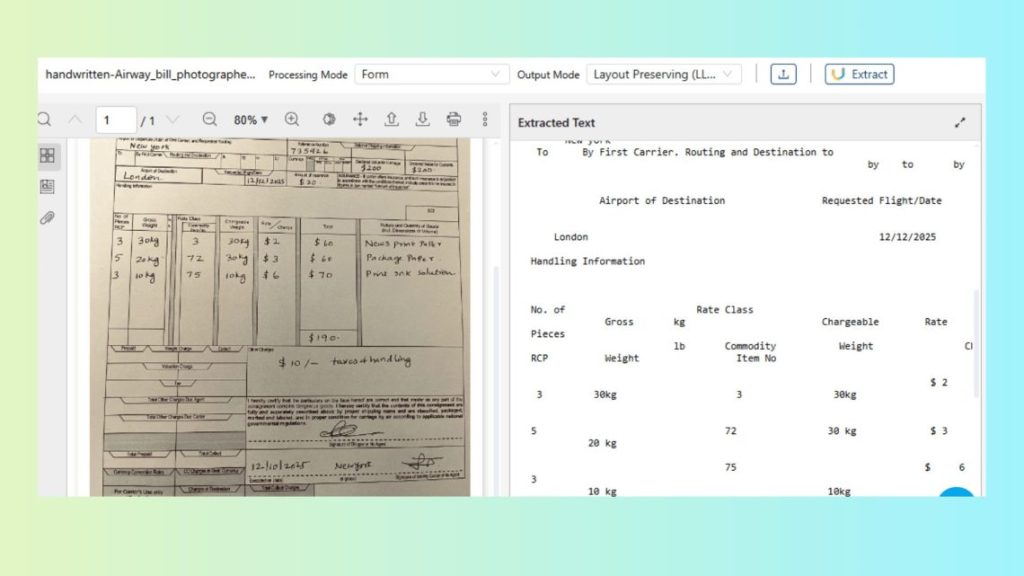
Handwritten air waybills are a reliable OCR test case because they mix handwriting, checkboxes and table-like blocks that generic OCR often flattens into unstructured text.
How Unstract Processes Complex Documents
LLMWhisperer is an OCR and text-extraction service designed to produce LLM-ready output from real-world documents. It supports extraction modes tuned for different inputs, including low-quality scans, handwriting-heavy forms and table-dense documents.
Layout Preservation plays a key role in this OCR workflow, as it helps maintain the document’s reading order and structure required for extraction. It allows users to maintain field groupings and table rows rather than returning a single stream of text. This keeps labels aligned with values and line items usable for schema-shaped JSON extraction.
Steps to run later in the Playground (using the handwritten air waybill):
2. Select an extraction mode that matches the document (form/handwriting-friendly when checkboxes and handwriting matter).
3. Run extraction.
Running the OCR extraction
4. Review the output for:
Handwritten fields captured as text (not dropped).
Checkbox states represented clearly.
Table sections preserved as rows/columns (not merged into a blob).
Extracting Text from a Credit Application PDF Using the LLMWhisperer API (Postman)
These steps show how to send a credit application PDF to LLMWhisperer, track processing and retrieve layout-preserving text for downstream extraction.
Get the Postman collection and your API key
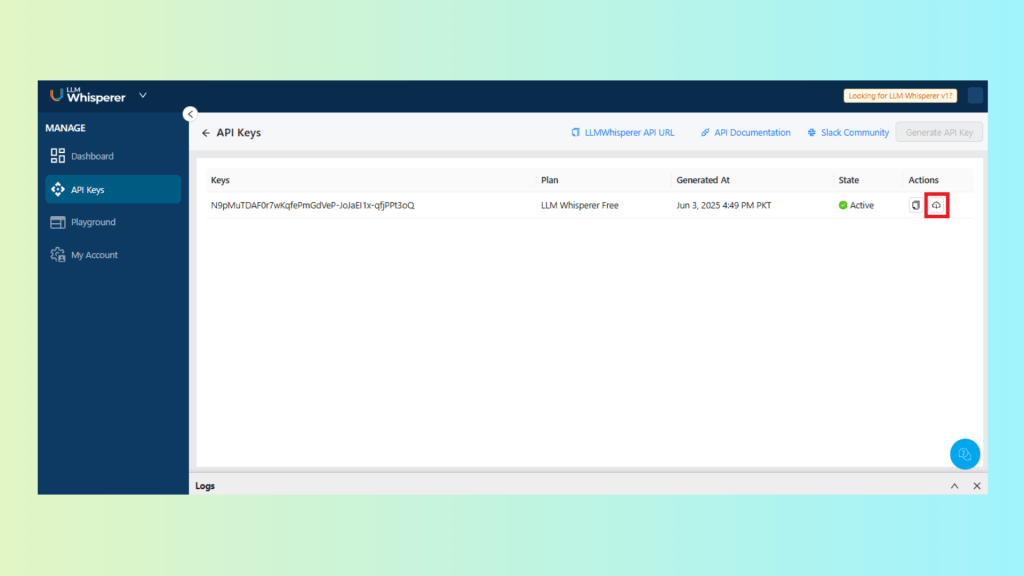
Open the API Keys area in LLMWhisperer
Copy your API key and download the pre-built Postman collection (if provided).
Downloading the Postman Collection from the API Keys Section in LLMWhisperer
Import the collection into Postman
Import the collection file.
Set the API key as an environment variable (or directly in the request headers), so every request authenticates correctly.
Upload the credit application PDF (POST)
Use the collection’s POST upload request.
Attach the credit application PDF as the file payload.
Send the request.
The response should return a processing status and a document identifier (often a hash or ID).
Sending credit application PDF via POST
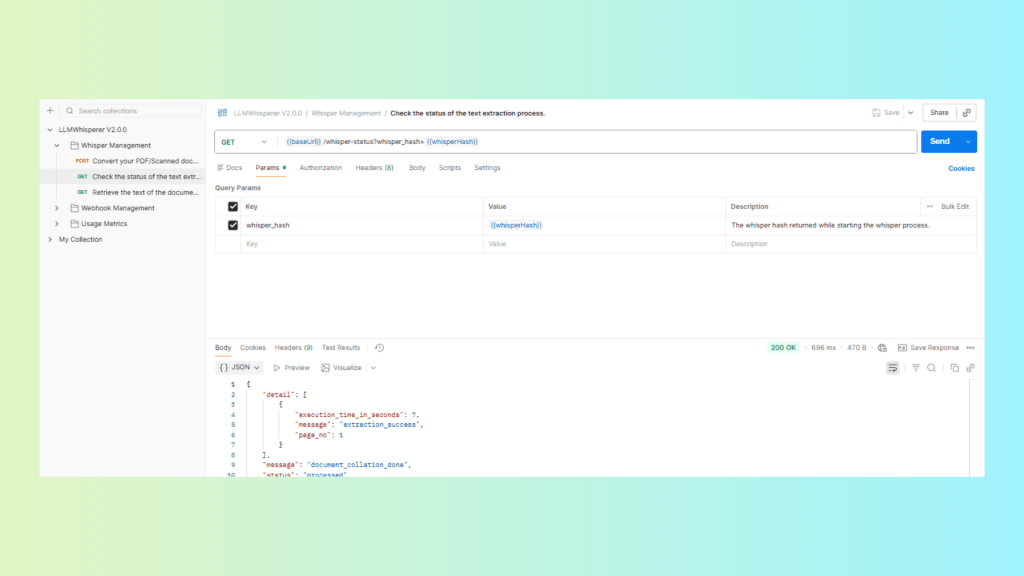
Poll for completion (GET status)
Use the GET status request with the returned document ID.
Continue until the status changes to complete (or equivalent).
GET status with the document ID until it shows “complete”
Retrieve the extracted text (GET result)
Use the GET result request for the same document ID.
Save the returned output. This should be layout-consistent text that you can feed into Unstract for structured extraction.
Use GET result with the same ID, then save the extracted text
Unstract: Unstructured Data Extraction & Automating Document Processing Workflows
LLMWhisperer is a standalone OCR API. If your team already handles structured data extraction or has existing systems in place, and OCR is the only missing piece, you can use LLMWhisperer on its own—either as a standalone tool or via API.
Unstract is an end-to-end document processing workflow automation platform. At its core is Prompt Studio, where you write natural language prompts to extract structured data from documents. Unstract integrates seamlessly with LLMWhisperer and other OCR tools, making OCR just one step in a complete extraction workflow.
Every Unstract workflow begins with creating a Prompt Studio project.
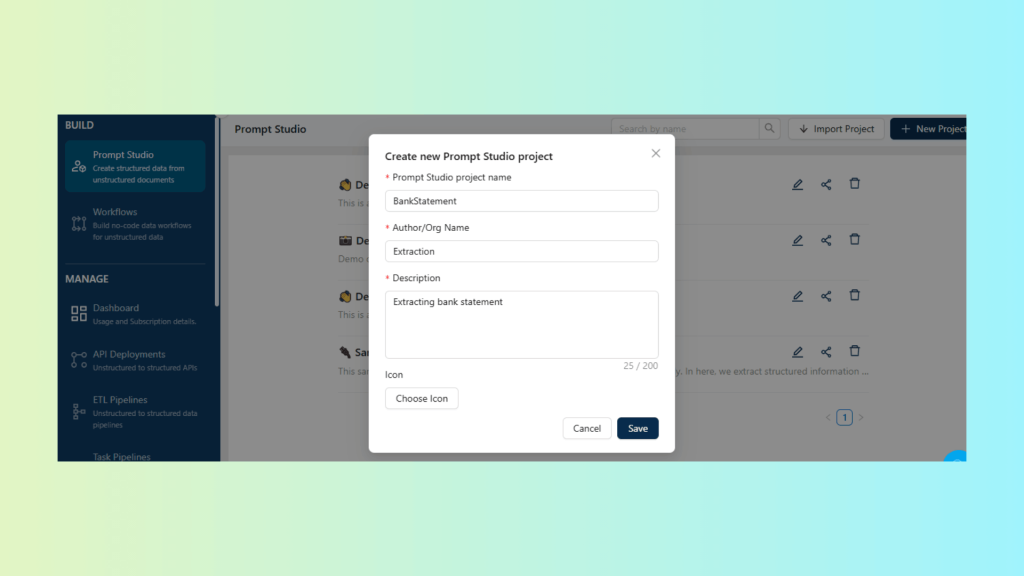
Create a New Prompt Studio Project
Create a project specifically for bank statement PDFs.
Upload one or more representative bank statements as test inputs.
Create a Prompt Studio project for bank statements and upload sample PDFs
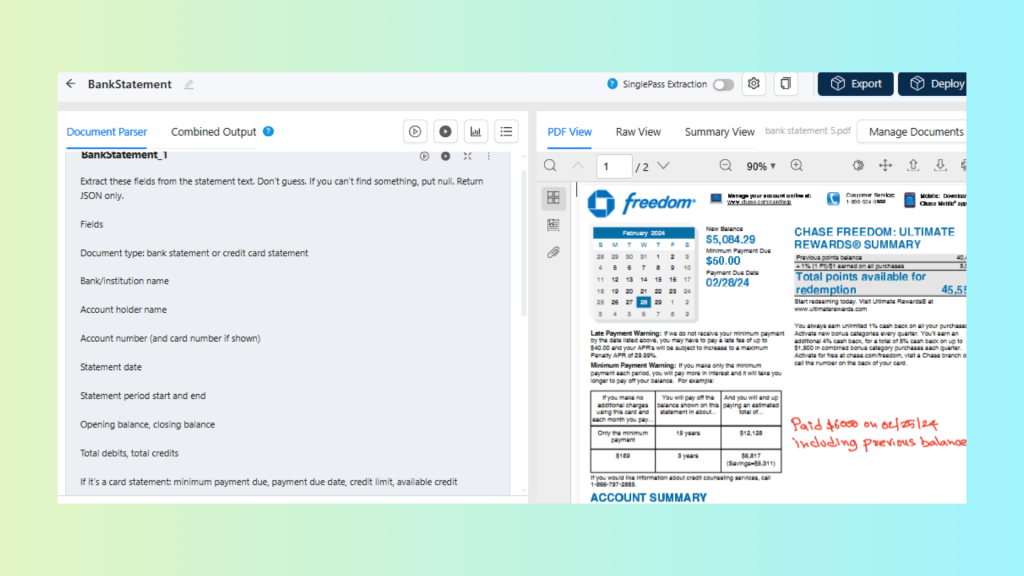
Write Extraction Prompts for Your Target Schema
Define the fields you need as structured output. For example:
Account holder name, account number (masked if needed), bank name
Write prompts that return JSON matching your schema (field names and formats aligned to your database).
Write extraction prompts that return JSON matching the target schema
Configure Project Settings
Before creating a Prompt Studio project, you need to configure the extraction engine. This is the essential first step—it powers everything that follows.
You’ll set up four key components:
LLM model – Provides the intelligence for extraction
Vector database – Stores and retrieves document embeddings
Embedding model – Converts documents into vector representations
OCR text parser – Extracts text from documents (LLMWhisperer integration available, plus support for other parsers)
Once these are configured, you’re ready to create your Prompt Studio project.
Select the LLM model that will read the extracted text and return structured JSON in your target schema.
Select the embeddings model that turns your statements into vectors so you can run retrieval, similarity search and reuse prompts across documents.
Configure the vector database that stores these embeddings to enable fast search, indexing and retrieval across many statements.
Set the text extraction tool or input source so the project uses LLMWhisperer output for the bank statement PDF.
Set project LLM, embeddings model, vector DB and text extractor tool
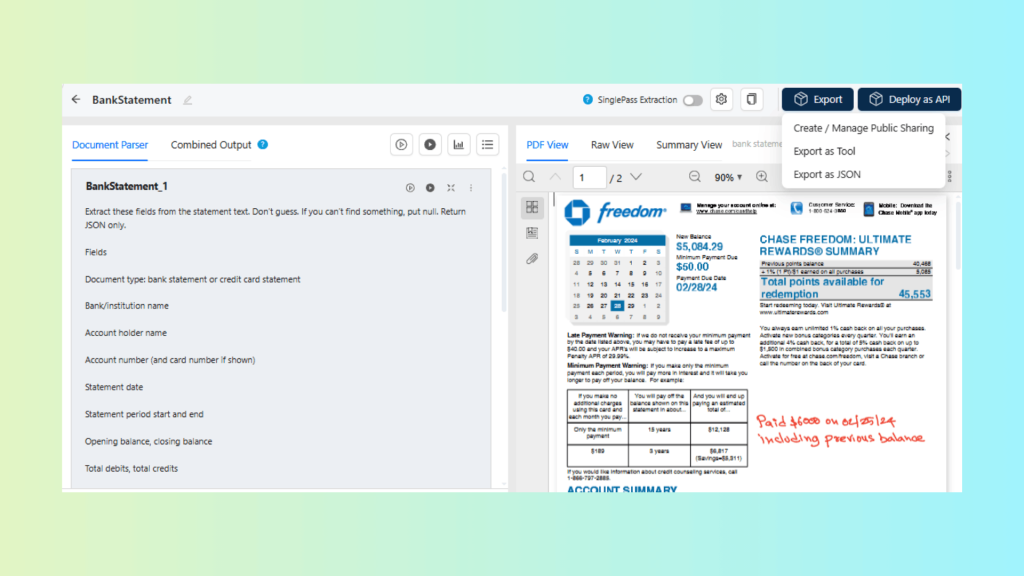
Export the Prompt Studio Project as a Reusable Tool
Export the project so it can be invoked from workflows as a single extraction step.
Export the Prompt Studio project as a reusable extraction tool for workflows
Create the Workflow and Wire Inputs or Outputs
Create a new workflow in Unstract.
Create a new Unstract workflow and connect the project inputs/outputs
Set the API file upload (bank statement PDF) as the input.
Add the exported bank statement extraction tool as the processing step.
Set the output to an API response
Set API upload as input, run the extraction tool, return JSON as API output
Deploy the Workflow as an API and Test with Postman
Deploy the workflow.
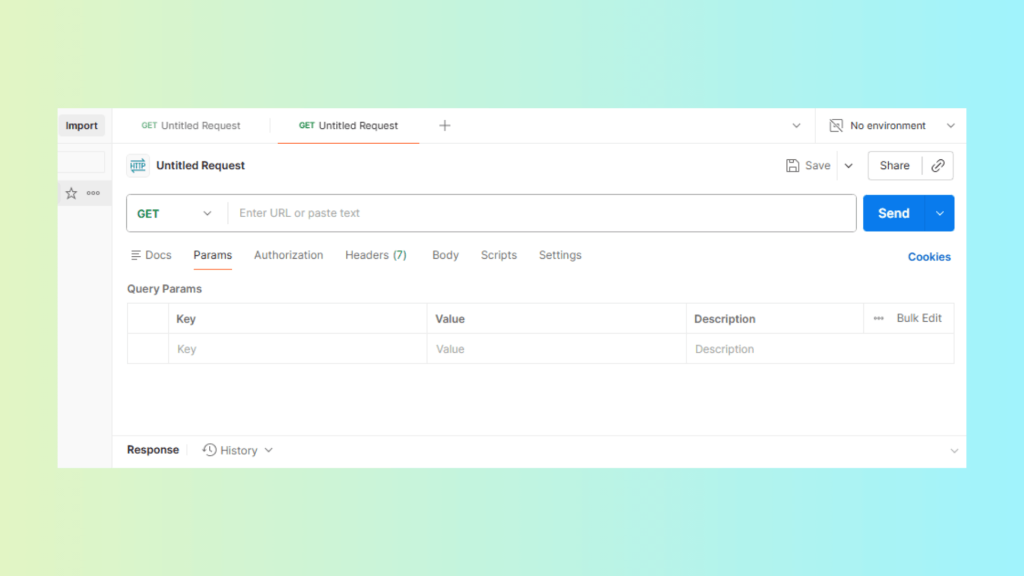
Download the workflow’s Postman collection (if Unstract provides one) or create requests manually.
Import the collection into Postman.
Download the API collection from Unstract and import it into Postman
Send a POST request with a bank statement PDF.
Select the sample bank statement and send it via a POST request
Verify the response returns clean JSON matching your schema.
Automate Document Processing Workflow with ETL Pipeline
An ETL workflow lets you run bank statement extraction as a repeatable pipeline. Files are picked up from a source folder, processed through your exported Prompt Studio project and written to a database table for downstream use.
How the ETL Workflow Runs
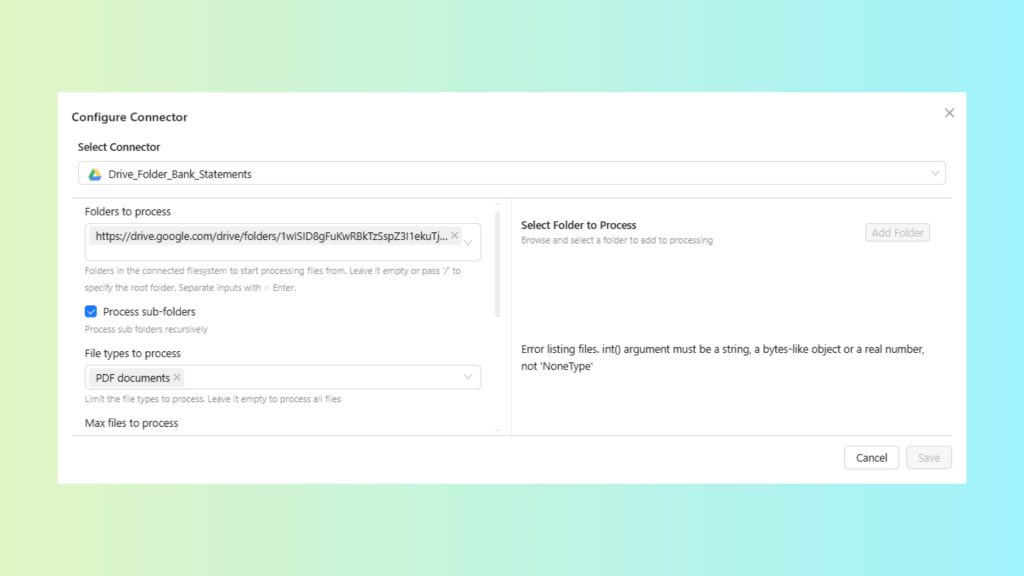
Input: Bank statement PDFs are pulled automatically from Google Drive or Dropbox.
Processing: The workflow calls your exported Prompt Studio project (BankStatement) to extract schema-shaped JSON.
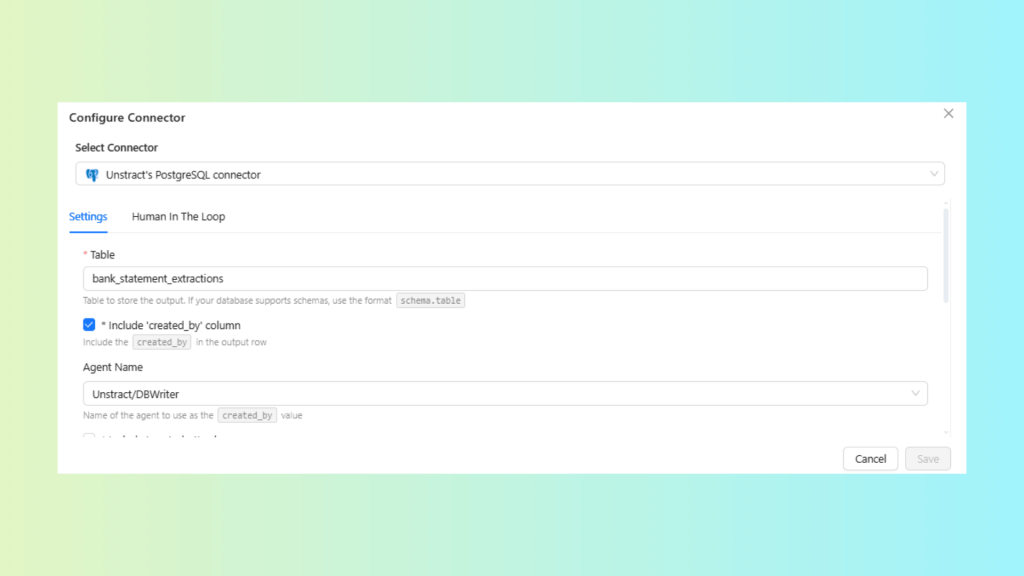
Output: Results are written to Postgres (NeonDB) using Unstract’s PostgreSQL connector.
Key Steps to Configure and Deploy Workflow to an ETL Pipeline
Configure Source Connector: Select and configure your input connector.
Connector: Drive_Folder_Bank_Statements
Confirm: folder path, file type filter (PDF) and polling/schedule settings.
Configure the Drive folder connector with PDF filter and schedule settings
Configure Destination Connector: Select and configure your output connector.
Connector: Unstract’s PostgreSQL connector (Postgres via NeonDB)
Confirm: connection details, target schema/table and write mode (insert/upsert).
Configure the PostgreSQL connector with database, table and write-mode settings
Select Exported Prompt Studio Project: Choose the exported Prompt Studio project that will process each incoming file.
Project: BankStatement
Confirm: the project outputs fields and transaction rows in the JSON structure your table expects.
Select the BankStatement project and confirm its JSON matches the table schema
Deploy Workflow: Deploy the workflow so it runs end-to-end for new files.
Confirm: deployment status is active and the workflow can process a sample statement from the source folder through to Postgres.
Automating Document Processing Workflow with n8n
In this workflow, n8n runs an agentic intake loop for bank-statement PDFs. Documents arrive through approved sources (email or SFTP) and n8n does more than deposit files in a folder. It evaluates intake signals, selects the next step from an approved set of actions and records each decision with traceable metadata.
Once a document passes intake policy checks and is routed correctly, Unstract’s workflow layer performs OCR (via LLMWhisperer), extraction (via Prompt Studio), validation and human review where required.
You can set up the following n8n intake flow for bank statements:
Trigger and intake: Trigger on a new email from approved senders or an SFTP upload. Assign a unique document ID and capture source metadata (sender, received timestamp, channel, mailbox/SFTP path).
Policy gating (accept, quarantine or hold): Enforce intake rules before the document enters the pipeline. Reject non-PDFs, detect password-protected or encrypted PDFs where possible and quarantine corrupted or out-of-policy files with a reason code. Where resubmission is required, notify the owner of the approved format requirements.
File-level inspection (routing signals, not extraction): Capture lightweight signals such as file size, page count (if available) and whether the PDF appears text-based versus image-based. Use these signals to route documents through the appropriate processing path.
Rule-based routing to the correct processing path: Route documents to the bank-statement workflow based on trusted intake context (approved mailbox, sender allowlist, subject conventions or SFTP drop location). Route unknown or non-conforming items to a separate triage path rather than forcing them into the bank-statement pipeline.
Deduplication (intake signature): Deduplicate using a stable signature available at intake (for example, file hash plus sender and a received-time window) to prevent reprocessing when filenames vary.
Normalize filenames and attach canonical metadata: Rename using an operational deterministic pattern that does not depend on extracted content (for example, source_sender_YYYY-MM-DD_documentID.pdf). Attach canonical metadata (document ID, route chosen, reason codes, intake timestamp), so downstream systems can maintain lineage.
Handoff to Unstract (two deployment patterns): Choose one of the following handoff methods based on your operational needs:
Folder handoff: Upload to the designated Drive path (for example, /Finance/BankStatements/YYYY/MM) that Unstract’s ETL workflow monitors.
API handoff: When near real-time processing is required, call the deployed Unstract workflow API directly and persist the returned correlation ID for status tracking.
Outcome tracking and operational controls: Log each handoff with a correlation ID and track processing outcomes (success, queued for human review, failed). Use retries with backoff for transient errors, alerts for repeated failures and quarantine routing when items repeatedly fail intake or handoff.
Human in the Loop (HITL) Workflow for Document Processing
Unstract positions HITL review between automated extraction and the final destination, so reviewers can validate or correct extracted fields before the workflow stores results in a database or passes them to the next processing step.
You can follow the steps below to set up HITL in your ETL document processing workflow:
Rules for review routing: Set the percentage of documents that require manual review, choose AND/OR logic and add conditions based on extracted fields. Any document that matches the rule routes to HITL review.
Set review rules so matching documents are routed to HITL for manual review
Post-review routing: After approval, configure where Unstract sends results (for example, the destination database or a queue for further processing).
Roles and permissions: Assign roles such as reviewer and supervisor to control who reviews and who approves.
Reviewer operations: Use the Human Quality Review dashboard to pull the next queued document and track review status.
For a more in-depth review of the process, you can refer to the webinar recording, which includes a live demo covering setup, access permissions and the end-to-end review process.
Stepping into Modern Document Processing Workflow with Unstract
End-to-end document automation delivers ROI more reliably when it runs as a version-controlled pipeline. That means clear ownership, tests and monitoring, rather than a pile of templates and scripts.
LLM-based OCR provides clean, layout-aware input for each document, which gives downstream extraction a reliable starting point. When you run the workflow as a version-controlled pipeline, you also maintain clear ownership, testing and monitoring instead of relying on brittle templates and ad hoc scripts.
Unstract combines layout-preserving OCR with prompt-based extraction to return JSON aligned with your target schema. It then validates that output with deterministic rules before any database write or downstream API call.
Most documents proceed automatically. The workflow routes only the exceptions to Human-in-the-Loop (HITL), such as fields or documents that fail your rules or fall below configured confidence thresholds.
Reviewers validate the extracted values in the context of the source PDF, which supports auditable approvals. Those review outcomes also help you refine prompts and rules so the workflow becomes more automated and more dependable over time.
Build your first extraction project in Prompt Studio using a small, representative set of real bank statements or invoices. Export the project and run it in your ETL pipeline or n8n intake, then add validation and exception routing early so layout changes or model updates do not create an expanding review queue.
Document Processing Workflow: FAQ
What is a document processing workflow, and why does it need automation?
A document processing workflow defines the end-to-end path a document follows from ingestion to structured data output. Automation is essential because manual re-keying introduces errors, layout changes increase exception rates, and audit requirements demand traceability that ad hoc scripts cannot provide.
How does an AI-powered intelligent document processing workflow differ from traditional OCR approaches?
A modern intelligent document processing workflow combines layout-aware OCR, LLM-based extraction, and validation rules instead of relying on fixed templates. Unlike traditional OCR that fails when column order or table structure changes, intelligent workflows adapt to layout drift and route only exceptions for human review.
What role do LLMs play in modern document workflow automation?
LLMs convert unstructured content into consistent, schema-shaped fields that finance and operations systems can use. However, they must be embedded within a layered document workflow automation pipeline that controls inputs, enforces validation, and prevents invalid data from reaching downstream systems.
How does Unstract enable end-to-end document workflow automation?
Unstract combines LLMWhisperer for layout-aware OCR, Prompt Studio for defining extraction logic, and a workflow layer for automating ingestion, validation, and delivery. This creates a complete intelligent document processing workflow that scales across business units without constant rework.
What is a Human-in-the-Loop (HITL) workflow, and when is it needed?
A HITL workflow sits between automated extraction and final delivery, allowing reviewers to validate fields that fail confidence thresholds or business rules. In document workflow automation, this ensures only exceptions require manual review while most documents proceed automatically.
UNSTRACT
AI Driven Document Processing
The platform purpose-built for LLM-powered unstructured data extraction. Try Playground for free. No sign-up required.
Salman Haider is a technical content writer focused on AI, machine learning, and data-driven innovation. He bridges the gap between complex technology and clear communication, using data storytelling to turn insights into compelling narratives. With a passion for simplifying advanced concepts, his work empowers businesses to make smarter, evidence-based decisions.
Necessary cookies help make a website usable by enabling basic functions like page navigation and access to secure areas of the website. The website cannot function properly without these cookies.
Marketing cookies are used to track visitors across websites. The intention is to display ads that are relevant and engaging for the individual user and thereby more valuable for publishers and third party advertisers.
Preference cookies enable a website to remember information that changes the way the website behaves or looks, like your preferred language or the region that you are in.