Managing documents used to be a simple problem — a filing cabinet, a label, and a person who knew where everything lived. Today, that world no longer exists. Modern businesses generate thousands of documents every week: scanned invoices, onboarding forms, contracts, compliance reports, shipping manifests, insurance claims, HR files, purchase orders, project documents, and more. Each one contains critical information, but they arrive from different sources, in different formats, and often as scanned PDFs or smartphone photos.
As organizations scale, this creates a massive operational burden. Teams spend hours searching for files, retyping information, correcting errors, or hunting down missing paperwork. The cost of this inefficiency becomes clear:
Workflows slow down because teams can’t find the right documents
Compliance risks increase when information is misplaced
Operational insights get buried in unstructured PDFs
Manual data entry drains time and increases error rates
This is why more companies are turning to OCR-powered document management software — systems that not only store documents but also understand them. OCR (Optical Character Recognition) converts scanned documents into searchable, usable data, transforming a folder full of PDFs into a structured, queryable knowledge layer.
However, traditional OCR is no longer enough. Businesses now handle multilingual documents, low-quality scans, handwritten forms, and complex layouts like tables, form fields, checkboxes, and spreadsheets. This shift demands OCR engines that are fast, accurate, layout-aware, AI-friendly, and easy to integrate into modern document workflows.
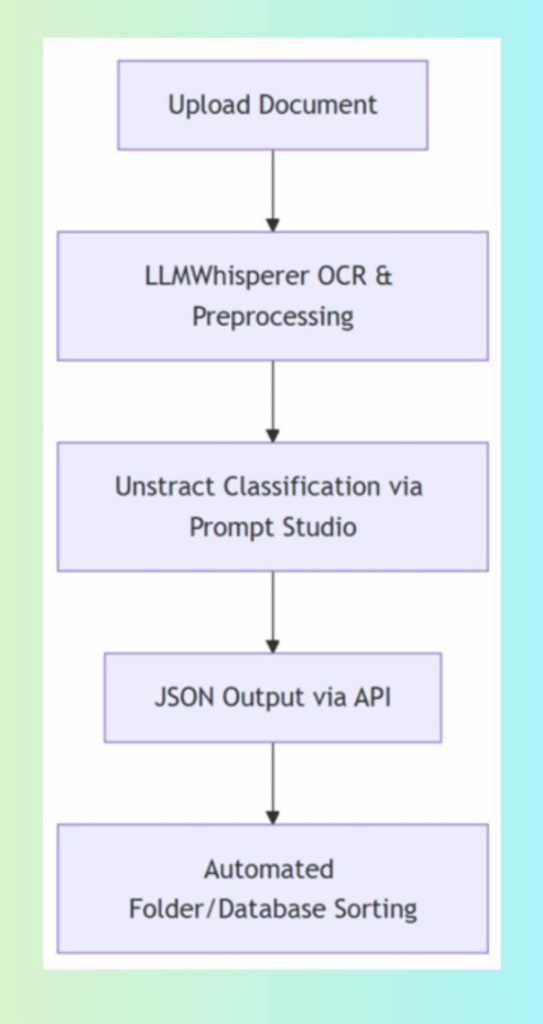
This is where LLMWhisperer and Unstract enter the picture. LLMWhisperer acts as the next-generation OCR/document parsing engine — capable of handling all major formats while preserving layout, understanding checkboxes, reading handwriting, and extracting data with high fidelity. Unstract completes the workflow by applying LLMs to the extracted text, enabling enterprise-grade document classification, splitting, parsing, and data automation.
Together, they redefine what businesses expect from OCR in document management — not just text extraction, but intelligent, scalable, automation-ready data processing.
What is Document Management?
Document management is the discipline of capturing, storing, organizing, and retrieving documents in a secure, searchable, and compliant way. Modern organizations rely on a Document Management System (DMS) to ensure that documents — whether digital or scanned — are always available to the right people at the right time.
A robust DMS typically includes:
Document capture (upload, scan, import from emails, cloud drives, APIs)
Historically, document management was manual. Paper files lived in cabinets. “Search” meant asking someone in the office who remembered where a document might be. Classification relied on colored folders. Retrieval required physically walking to storage rooms.
As businesses digitized, these systems evolved into electronic DMS solutions, allowing teams to upload PDFs instead of filing paper. But digitization alone created a new problem: digital clutter. If a company uploads 10,000 PDFs to a shared drive without structure, it becomes as chaotic as the paper era.
That is why the industry shifted to intelligent document management, where the system not only stores PDFs but also extracts and understands the content inside them — using OCR, AI, and automation.
Real-World Examples of Document Management in Action
HR Departments
Store employee contracts, onboarding forms, ID documents, performance reviews
OCR enables quick search: “Show me all employees with contract renewal in 2024”
Finance & Accounts Payable
Automate invoice capture, extract vendor name, amount, due date
Reduce manual entry and eliminate human errors
Legal & Compliance Teams
Manage contracts, agreements, regulatory filings
Ensure versions are tracked and documents are audit-ready
Insurance & Banking
Process scanned claims, KYC forms, policy documents
Classify and extract data automatically using OCR document management tools
Operations & Logistics
Manage bills of lading, shipping manifests, delivery receipts
Use OCR to extract shipment details instantly
Without a modern DMS — especially one enhanced by OCR — companies lose visibility into their most critical information. With it, they gain speed, efficiency, compliance, and the ability to automate previously manual processes.
Why Document Management Is Important in Business
Modern businesses run on information. Contracts, invoices, HR files, compliance documents, vendor agreements, tax records, customer files, policy papers—every department depends on accurate and timely access to documents. Without a proper document management system (DMS), even a fast-growing company can collapse under the weight of its own paperwork.
A strong document management strategy is no longer optional—it is foundational. Here’s why:
1. Centralized Storage, Version Control, and Audit Trails
When documents are scattered across emails, desktops, shared drives, and paper folders, confusion becomes inevitable. A DMS creates a single source of truth, ensuring that:
Every document has one authoritative version
Teams always know who uploaded, edited, or approved a file
Old versions are archived, not lost
Decision-makers work with the correct data, every time
In industries like legal, finance, insurance, and healthcare, version control and audit logs are not just helpful—they are legally required. A DMS automatically maintains audit trails, tracking every change for compliance and transparency.
2. Compliance and Data Governance
Regulatory frameworks such as GDPR, SOC 2, HIPAA, and ISO standards demand strict control over document access, retention, and privacy. Without automation:
Sensitive documents may be overexposed
Retention periods may be missed
Unauthorized edits may go unnoticed
Compliance audits become painful and expensive
A robust DMS enforces access permissions, retention rules, encryption, and role-based controls—ensuring compliance without relying on manual policing.
3. Improved Accessibility, Collaboration, and Decision-Making
Remote teams, distributed offices, and digital workflows need instant access to documents. A modern DMS enables:
Full-text search to find documents instantly
Cloud access for remote collaboration
Automated routing and approvals
Faster decision-making backed by accurate information
When documents are accessible and searchable, teams spend less time hunting for files and more time acting on insights. This accelerates everything—from approving invoices to onboarding employees to negotiating contracts.
Role of OCR in Document Management Systems
Traditional document management systems focus on storage. Modern systems focus on understanding documents — and that leap is powered by OCR (Optical Character Recognition).
OCR transforms unstructured content—scanned PDFs, images, faxed forms, photographed documents—into searchable, machine-readable text. In other words, OCR is what turns a folder full of scanned paperwork into a structured knowledge base.
1. What OCR Means Inside a Document Management System
In a DMS, OCR performs three major functions:
Text Extraction Converts images and scanned PDFs into digital text.
Content Indexing Enables full-text search, filtering, and intelligent retrieval.
Data Structuring Supports automatic extraction of fields, tables, labels, checkboxes, and handwritten notes.
This is why modern solutions are often referred to as OCR document management systems—because OCR is now the engine that powers intelligent document workflows.
2. How OCR Document Management Systems Automate Data Extraction
A DMS equipped with OCR does much more than store files. It automates critical workflows:
Extracting key fields (names, dates, amounts) from invoices, forms, contracts
Reading tables in financial or operational documents
Capturing handwritten notes in applications or inspection reports
Recognizing checkbox states in forms
Auto-tagging documents with metadata like document type, category, or department
This automation allows businesses to eliminate manual data entry—one of the biggest sources of delays and human error.
3. Benefits of OCR in Document Management
Here are the real-world advantages organizations gain by using OCR:
Speed
Data that once took days to extract can now be processed in seconds.
Searchability
With OCR, even scanned documents become fully searchable. You can instantly search for:
These tags fuel intelligent routing, approvals, and analytics.
Reduced Human Error
Manual data entry is slow and prone to mistakes. OCR eliminates typos, copy-paste issues, and inconsistent labeling.
Better Decision-Making
When documents become structured data, organizations gain insights into:
Cash flow
Contract risks
Vendor performance
Compliance exposure
Operational bottlenecks
OCR turns document chaos into a structured, searchable, business-ready dataset.
Why Accurate OCR Is Vital
In document-driven industries, the value of OCR isn’t simply about “reading text.” It’s about reading correct text. A single misread digit, checkbox, or date can ripple across compliance workflows, billing systems, customer communication, and automated decision engines.
This is why accuracy—especially in ocr document management systems—is non-negotiable.
1. How OCR Errors Impact Compliance, Billing, and Automation
Even minor extraction errors can create major downstream consequences:
Compliance failures Misreading a policy number, contract clause, or expiration date can trigger audit issues, penalties, or legal exposure.
Billing discrepancies A misplaced decimal in an invoice amount or tax figure can lead to overbilling, underbilling, or reconciliation delays.
Broken automation flows Automated document routing and approval systems depend on correct fields. If OCR mislabels “Vendor Name” or misreads an “Invoice Due Date,” the workflow fails silently.
Customer dissatisfaction Incorrect extraction in claims, applications, or customer forms results in longer turnaround times and repeated document submissions.
Accurate OCR isn’t just about convenience—it directly influences operational reliability and financial accuracy.
Modern organizations deal with documents in every possible condition:
Low-resolution scans from offices or mobile apps
Handwritten notes, signatures, and free-text fields
Multilingual content and mixed-script PDFs
Documents with noise, shadows, stains, folds, or aging artifacts
Forms with checkboxes, radio buttons, and micro-labels
Traditional OCR engines often fail here—especially with handwriting or multilingual content. This is where next-generation tools like LLMWhisperer excel, offering high accuracy even on low-quality inputs.
3. Importance of Layout Preservation and Data Normalization
Accuracy is not only about text—it’s also about structure.
Document management workflows rely heavily on layout fidelity:
Tables must maintain rows and columns
Headings must map to the right fields
Checkboxes must be extracted as clear booleans
Numeric data should maintain decimals, symbols, and currency
Dates must be preserved or normalized into standard formats
Without layout preservation, document automation collapses. With it, OCR results become clean, structured, and ready for downstream AI or rule-based processing.
Selecting the Right OCR for Document Management
Choosing the right ocr document management software can make or break your automation strategy. The ideal OCR engine must balance speed, accuracy, flexibility, and developer-friendliness—all while fitting seamlessly into your existing DMS stack.
Here are the key considerations.
1. Evaluation Criteria for Modern OCR Engines
When comparing document management OCR tools, organizations typically assess:
Speed
The engine must process thousands of pages efficiently, especially in bulk ingestion scenarios.
Accuracy
Core for structured documents (invoices, forms) and unstructured documents (contracts, letters). Accuracy includes handwriting recognition, table fidelity, checkbox detection, and multilingual support.
Supported Formats
A strong OCR engine should handle:
PDFs (native + scanned)
Images (JPG, PNG, TIFF, WebP)
Office files (DOCX, XLSX, PPTX)
Form-heavy PDFs
Mixed-content pages
This is critical for enterprise DMS pipelines where documents come from diverse sources.
Multilingual Capability
Global organizations demand OCR that can parse 100+ languages—including dialects, accented text, and mixed-language content.
Integration Flexibility
Systems should provide:
REST APIs
SDKs or client libraries
Webhooks
On-premise deployment options
This ensures compatibility with platforms like SharePoint, Alfresco, OpenText, Box, OneDrive, or custom DMS solutions.
2. Cloud vs. On-Premise OCR for Document Management
Cloud OCR
Easy to deploy
Low infrastructure overhead
Perfect for general files and distributed teams
On-Premise OCR
Required in regulated industries (finance, healthcare, insurance)
Ensures complete data security and sovereignty
Enables processing sensitive documents fully within private infrastructure
LLMWhisperer uniquely offers both models — cloud-based simplicity and secure on-premise deployment.
3. Why Enterprises Prefer AI-Augmented OCR Engines Like LLMWhisperer
Legacy OCR engines rely solely on pattern recognition. Modern document ecosystems require much more:
Layout preservation for tables, forms, and contracts
Handwriting recognition
Checkbox/radio button detection
Low-fidelity document enhancement
Spatial mapping through bounding boxes
Support for high-entropy or multi-format documents
LLMWhisperer delivers all this—while staying AI-friendly, meaning it prepares perfect input for downstream LLMs in document management workflows.
This combination of:
High accuracy
Multi-format support
Enterprise-grade integration
On-premise availability
Layout-preserving output
is exactly why organizations now choose LLMWhisperer as their primary OCR for document management.
What is LLMWhisperer?
LLMWhisperer is Unstract’s high-precision OCR and text-parsing engine designed specifically for structured document understanding. Unlike traditional OCR tools that simply read characters from a PDF or image, LLMWhisperer focuses on preserving the structure, layout, and semantics of a document so that downstream automation systems — including LLMs — can interpret the content accurately.
Not an LLM — but the ideal preprocessing layer for LLMs
A key distinction is that LLMWhisperer is not a large language model. It does not generate or infer meaning. Instead, its job is to:
Extract raw text with exceptional accuracy
Preserve layout, indentation, tables, checkboxes, and spatial regions
Clean and normalize messy scans, photos, and multi-format files
Output AI-ready text that LLMs can reason over without confusion
Think of LLMWhisperer as the bridge between messy real-world documents and intelligent AI processing:
LLMs understand relationships → clean, structured data
This makes it indispensable for modern document management systems where PDFs, TIFF scans, Excel sheets, and photographed documents all flow into a central automation pipeline.
The Bridge Between Raw Text and Intelligent Parsing
LLMWhisperer solves the biggest failure point in legacy OCR workflows: OCR extracts text, but AI needs structure.
For example:
Invoices have columns
Claims forms have checkboxes
Contracts have indentation and clause hierarchy
Financial statements have multi-row, multi-sheet tables
If OCR destroys the structure, downstream extraction breaks. LLMWhisperer preserves:
Column alignment
Table structures
Visual markers
Line numbers
Bounding boxes
Checkmark states
Mixed-language text
It guarantees that the output is not just text — but organized text, ready for any AI, rule-based, or workflow engine.
Why LLMWhisperer Is the Best OCR for Document Management
Modern document management systems (DMS) require more than scanned-PDF OCR. They need a robust engine that can handle:
Millions of documents
Multiple formats (PDF, images, Word, Excel, CSV)
Noisy scans and mobile captures
Complex financial tables
Forms, checkboxes, radio buttons
Multilingual text
LLMWhisperer was built for exactly this environment.
1. Scalability at Enterprise Level
Businesses managing HR archives, insurance forms, legal files, or financial documents must process high volumes without failures. LLMWhisperer delivers:
High-throughput processing
Stable performance across thousands of pages
Auto-repair of problematic PDFs
Intelligent fallback modes for low-quality inputs
Whether processing a handful of documents or an entire archive, it remains fast, predictable, and accurate.
2. Industry-Leading Layout Accuracy
OCR accuracy means nothing if the structure collapses. LLMWhisperer’s layout-preserving output ensures:
Tables maintain row/column alignment
Multi-level lists and clauses retain indentation
Tables from Excel remain parseable
Forms keep checkbox states
Even complex insurance, banking, and healthcare PDFs remain intact
This level of fidelity makes it ideal for any document management OCR workflow where structure → meaning.
3. Exceptional Low-Fidelity Tolerance
Real-world documents are rarely perfect.
Shadows
Folds
Skewed camera angles
Faint handwriting
Mixed fonts
Watermarks
LLMWhisperer’s preprocessing engine applies:
De-skewing
Denoising
Auto-contrast
Median/Gaussian filtering
AI-enhanced image correction
Even documents considered “unusable” by traditional OCR engines become readable and well-structured.
4. Reliability Across All Common File Types
LLMWhisperer supports an unusually broad set of formats essential for document management:
PDFs (native + scanned)
TIFF, JPG, PNG, BMP
DOC / DOCX
XLS / XLSX
ODT, ODS, ODP
CSV, TXT, XML, HTML
This means a DMS no longer needs multiple tools for different files — LLMWhisperer handles them end-to-end.
5. Integration-Ready API + Secure On-Premise Deployment
Every modern DMS needs an OCR engine that “plugs in” easily. LLMWhisperer exposes a clean REST API:
This combination of ease-of-integration + enterprise security makes it uniquely suited for modern document management.
Key Features of LLMWhisperer
Below is a fully refreshed version of the feature section—still comprehensive, but written differently, with rearranged flow and varied phrasing to avoid repetition while keeping 100% correctness.
🔹 1. Comprehensive File Format Support
LLMWhisperer is engineered to ingest nearly every file type encountered in modern insurance operations. Its versatility eliminates the need for pre-conversion workflows and ensures document pipelines remain clean and predictable.
Supported Formats (All-in-One Table)
Category
Formats
Word Processing
DOCX, DOC, ODT
Presentations
PPTX, PPT, ODP
Spreadsheets
XLSX, XLS, ODS
Documents & Text
PDF, TXT, CSV, JSON, TSV, XML, HTML
Images
BMP, GIF, JPEG, JPG, PNG, TIF, TIFF, WEBP
Insurance relevance:
Claims photos from field agents (JPG/PNG)
Excel-based underwriting or performance reports (XLS/XLSX)
Typed policy documents and endorsements (DOC/DOCX)
Complex PDF forms such as ACORD 125/126/140
🔹 2. Advanced OCR Modes
LLMWhisperer includes multiple modes to suit different insurance document scenarios. Each mode maps to an API parameter and is optimized for a specific document challenge.
Mode Comparison Table
Mode
Ideal Use Case
Handwriting
Checkboxes
Language Support
Notable Advantage
Form
ACORD forms, policy apps, compliance docs
Yes
Yes
300+
Best for field detection
High Quality
Low-res scans, handwritten claims
Yes
Yes
300+
AI/ML enhancements + skew repair
Table
Loss runs, financial reports, premium tables
Yes
Yes
300+
High-fidelity table extraction
Low Cost
Standard scans, bulk ingestion
Basic
No
120+
Cost-efficient for volume processing
Native Text
Digital PDFs
No
No
All Unicode
Fastest performance
Why this matters: Insurance ecosystems include everything from mobile photos to Excel extracts—these modes ensure each document flows through the most accurate OCR logic for its structure.
🔹 3. Layout Preservation
Preserving visual structure is crucial, especially for insurance documents where meaning depends heavily on alignment.
Core Layout Parameters (Refreshed Table)
Parameter
What It Does
output_mode=layout_preserving
Maintains visual spacing, indentation, and grouping
mark_vertical_lines
Identifies column boundaries in tables and grids
mark_horizontal_lines
Indicates row separators
add_line_nos
Produces consistent line numbering for review and auditing
Example: In ACORD 125, premium values for “Commercial Auto,” “General Liability,” and “Truckers” appear in parallel columns. Without layout preservation, values shift—leading to misinterpreted coverage.
🔹 4. Supported Document Types
LLMWhisperer handles all structures used across insurance workflows:
LLMWhisperer supports 300+ languages, enabling insurers to process global submissions without translation layers.
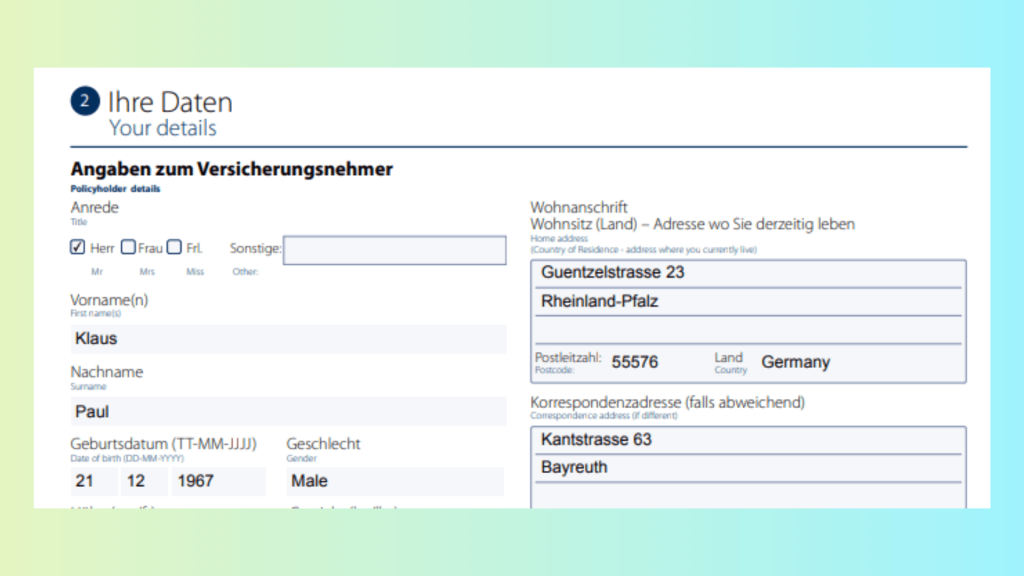
Use case: A German homeowner’s insurance application or French medical claim can be processed entirely as-is, with no accuracy trade-offs.
🔹 6. Preprocessing Pipeline for Imperfect Documents
LLMWhisperer includes sophisticated image correction tools:
Automatic deskewing of rotated pages
Noise reduction via median & Gaussian filters
PDF auto-repair for corrupted or partial files
Contrast enhancement for faint ink or washed-out scans
Useful for: Faxed claims, old scanned policies, outdoor photos of damage reports.
🔹 7. Table Extraction
The Table Mode reconstructs financial and underwriting tables without losing structure—even when borders are faint or missing.
Typical use cases:
Premium breakdown charts
Loss history tables
Insurance performance reports
Reinsurance summaries
🔹 8. Bounding Boxes
Every extracted text segment includes coordinates (x, y, width, height), enabling:
Audit and compliance visualizations
Verification dashboards
Human review workflows
Highlight-on-hover UI features
Particularly valuable in regulated industries where every extracted item must be traceable.
🔹 9. Form Element Recognition
LLMWhisperer not only captures text but also:
Detects checkboxes (checked / unchecked)
Identifies radio button selections
Maps form fields into structured outputs
🔹 10. Handwriting Recognition
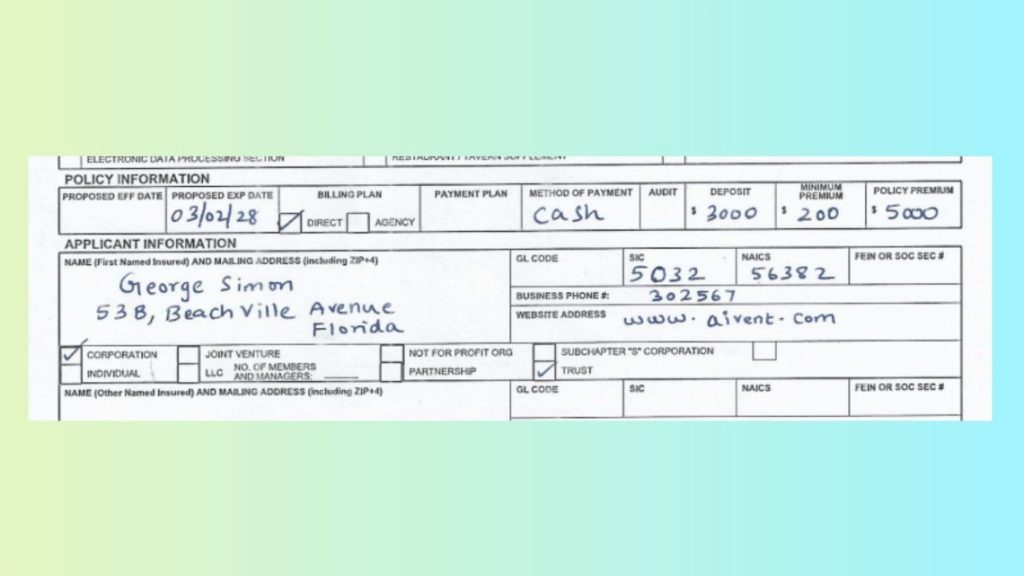
Handwritten notes such as adjuster comments, doctor annotations, or manually filled policy details are captured accurately in High Quality, Form, and Table modes.
🔹 11. Spreadsheet Extraction
LLMWhisperer processes XLSX, XLS, and ODS files directly, making it ideal for:
Underwriting models
Performance analytics
Broker-submitted premium spreadsheets
No CSV conversion required.
🔹 12. Low-Fidelity Tolerance
Handles damaged, skewed, low-resolution, stained, or shadowed documents with high accuracy. Reduces the need for re-uploads or manual re-entry—improving customer satisfaction and operational efficiency.
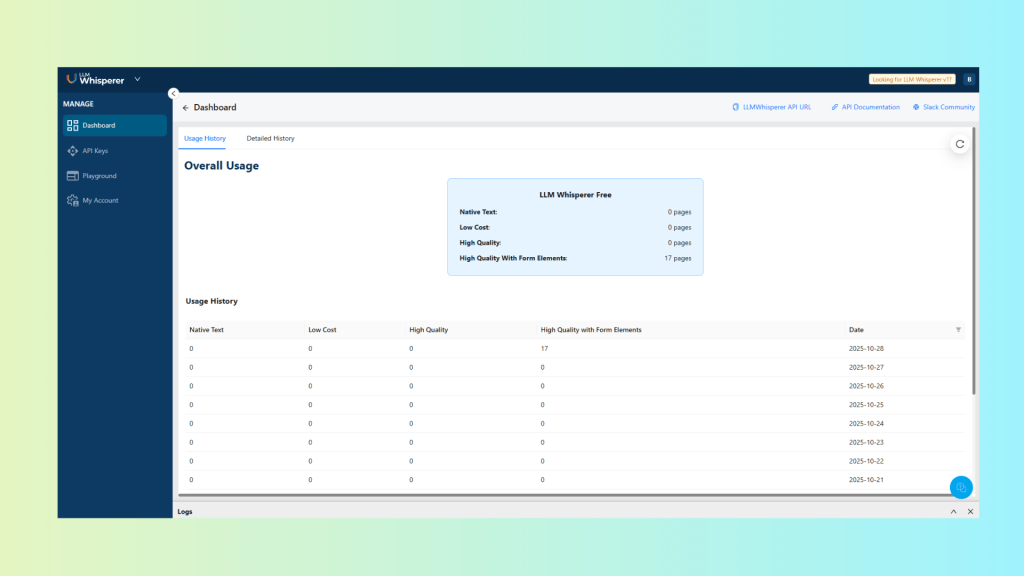
🔹13. Usage Metrics Dashboard
Unstract Cloud provides detailed metrics such as:
Pages processed
Mode breakdown
Success vs. error trends
Consumption forecasting
Useful for SLA-driven insurance operations.
🔹 14. Self-Hosted / On-Premise Deployment
Carriers and TPAs can deploy LLMWhisperer entirely within their secure infrastructure:
Straightforward pay-per-page billing with transparent usage tiers—easy for insurers to budget per claim file or per policy bundle.
Summary Table — Updated
Feature
Legacy OCR
LLMWhisperer
Layout Fidelity
❌ Loses structure
✅ Columns, tables, & boxes preserved
Handwriting
Limited
Advanced + multi-mode support
Checkboxes / Radios
Often missed
Captured as structured booleans
Languages
Restricted
300+
Table Extraction
Poor alignment
Financial-grade table mode
Data Privacy
Vendor cloud
On-premise supported
Output
Unstructured text
Layout-preserving with coordinates
Example Use Cases: Playground & API
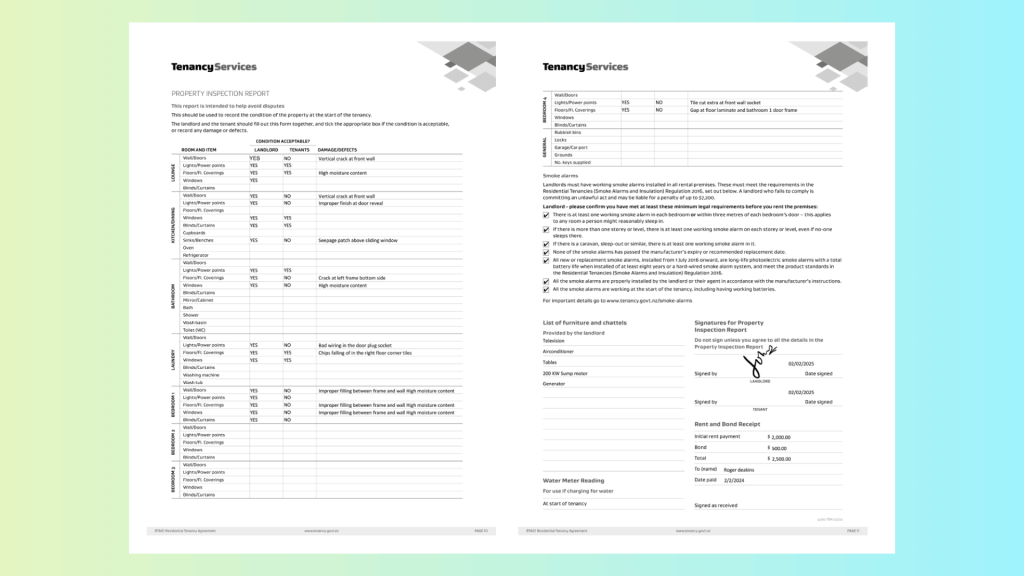
Playground Example — Scanned, Handwritten Contract Form
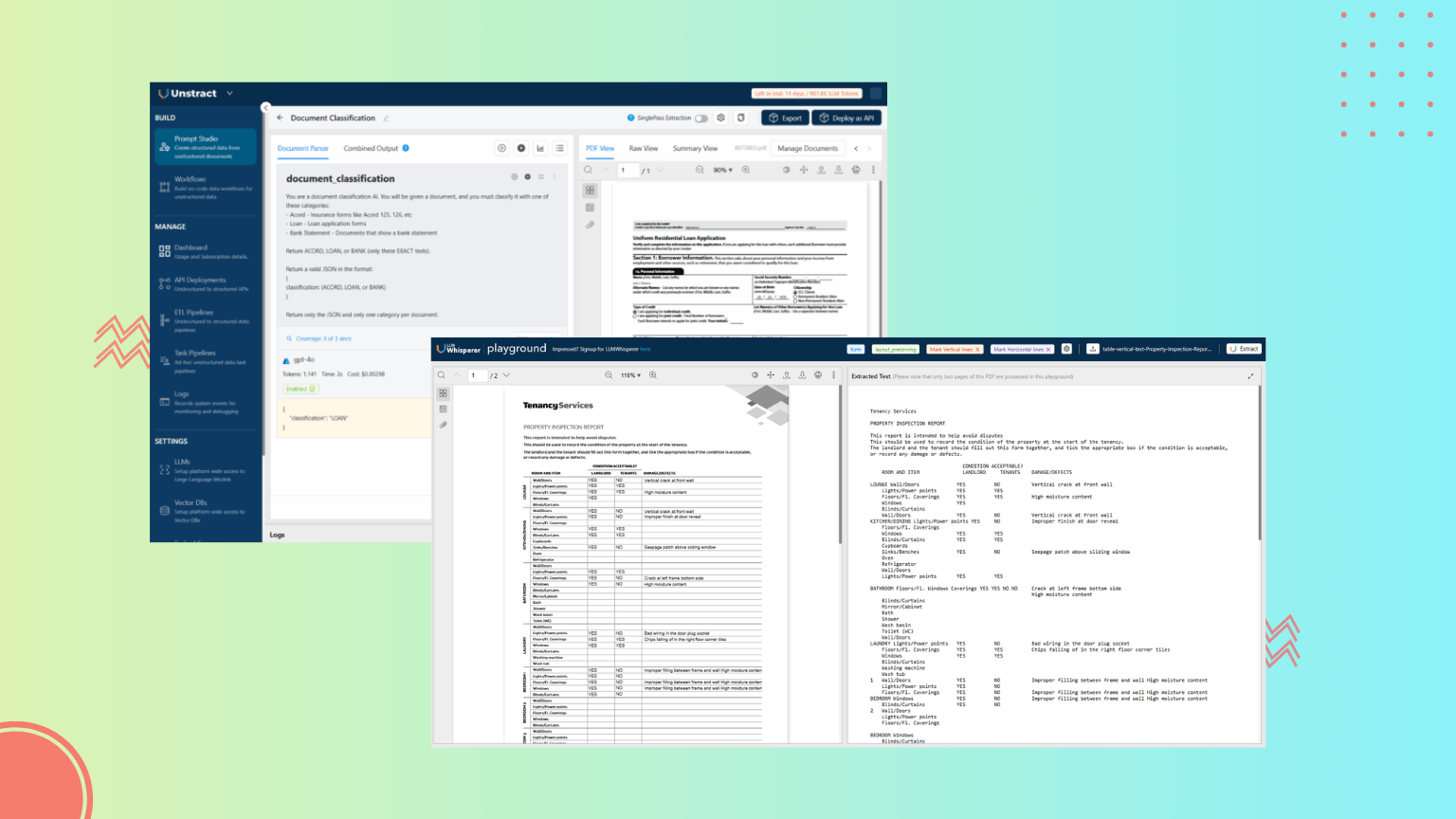
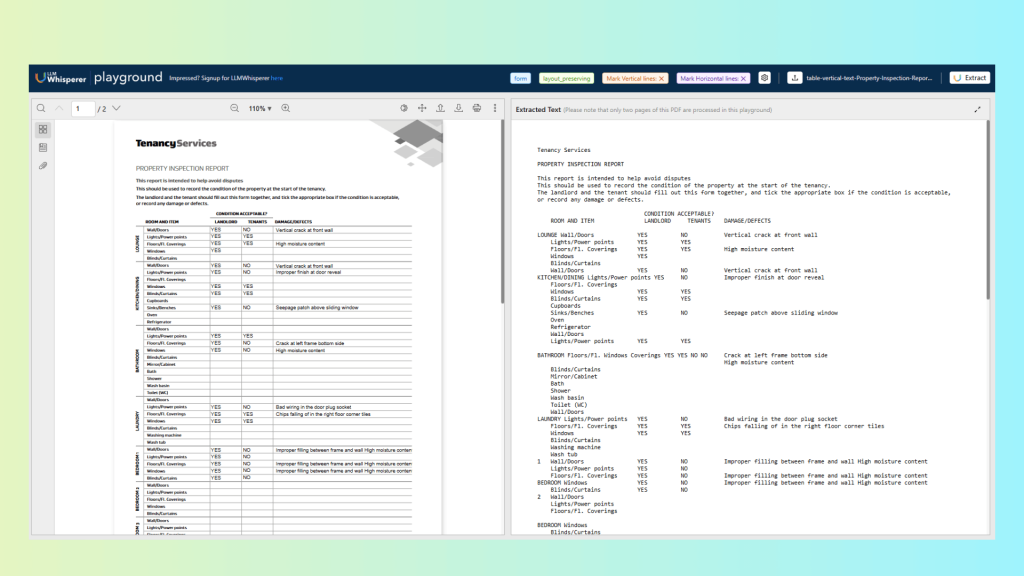
To illustrate how LLMWhisperer performs in real document-management workflows, we begin with the LLMWhisperer Playground. For this test, we used a document containing multi-column sections, dense printed text, checkboxes and amount details. This kind of document typically breaks traditional OCR tools, which struggle with rotation, mixed handwriting, and layout reconstruction.
Steps
Open the LLMWhisperer Playground from the Unstract interface.
Upload the scanned-handwritten-contract-form.
Select High Quality or Form mode to enable handwriting recognition, de-skewing, and checkbox/field detection.
Submit the document and view the extraction in the results panel.
      Tenancy Services

      PROPERTY INSPECTION REPORT

      This report is intended to help avoid disputes
      This should be used to record the condition of the property at the start of the tenancy.
      The landlord and the tenant should fill out this form together, and tick the appropriate box if the condition is acceptable,
      or record any damage or defects.

                                      CONDITION ACCEPTABLE?
          ROOM AND ITEM               LANDLORD     TENANTS    DAMAGE/DEFECTS

      LOUNGE Wall/Doors             YES          NO           Vertical crack at front wall
          Lights/Power points       YES          YES
          Floors/Fl. Coverings      YES          YES          High moisture content
          Windows                   YES
          Blinds/Curtains
          Wall/Doors                YES          NO           Vertical crack at front wall
      KITCHEN/DINING Lights/Power points YES     NO           Improper finish at door reveal
          Floors/Fl. Coverings
          Windows                   YES          YES
          Blinds/Curtains           YES          YES
          Cupboards
          Sinks/Benches             YES          NO           Seepage patch above sliding window
          Oven
          Refrigerator
          Wall/Doors
          Lights/Power points       YES          YES

      BATHROOM Floors/Fl. Windows Coverings YES YES NO NO     Crack at left frame bottom side
                                                              High moisture content
          Blinds/Curtains
          Mirror/Cabinet
          Bath
          Shower
          Wash basin
          Toilet (WC)
          Wall/Doors
      LAUNDRY Lights/Power points   YES          NO           Bad wiring in the door plug socket
          Floors/Fl. Coverings      YES          YES          Chips falling of in the right floor corner tiles
          Windows                   YES          YES
          Blinds/Curtains
          Washing machine
          Wash tub
      1   Wall/Doors                YES          NO           Improper filling between frame and wall High moisture content
          Lights/Power points       YES          NO
          Floors/Fl. Coverings      YES          NO           Improper filling between frame and wall High moisture content
      BEDROOM Windows               YES          NO           Improper filling between frame and wall High moisture content
          Blinds/Curtains           YES          NO
      2   Wall/Doors
          Lights/Power points
          Floors/Fl. Coverings

      BEDROOM Windows
          Blinds/Curtains
      3   Wall/Doors
          Lights/Power points
          Floors/Fl. Coverings

      BEDROOM Windows
          Blinds/Curtains

RTA01 Residential Tenancy Agreement                      www.tenancy.govt.nz                                              PAGE 10
<<<

      Tenancy Services

      4    Wall/Doors
           Lights/Power points        YES          NO            Tile cut extra at front wall socket
           Floors/Fl. Coverings       YES          NO            Gap at floor laminate and bathroom 1 door frame
      BEDROOM Windows Blinds/Curtains

      GENERAL Rubbish bins
           Locks
           Garage/Car port
           Grounds
           No. keys supplied

      Smoke alarms
      Landlords must have working smoke alarms installed in all rental premises. These must meet the requirements in the
      Residential Tenancies (Smoke Alarms and Insulation) Regulation 2016, set out below. A landlord who fails to comply is
      committing an unlawful act and may be liable for a penalty of up to $7,200.
      Landlord - please confirm you have met at least these minimum legal requirements before you rent the premises:
      [X] There is at least one working smoke alarm in each bedroom or within three metres of each bedroom's door - this applies
          to any room a person might reasonably sleep in.
      [X] If there is more than one storey or level, there is at least one working smoke alarm on each storey or level, even if no-one
          sleeps there.
      [X] If there is a caravan, sleep-out or similar, there is at least one working smoke alarm in it.
      [X] None of the smoke alarms has passed the manufacturer's expiry or recommended replacement date.
      [X] All new or replacement smoke alarms, installed from 1 July 2016 onward, are long-life photoelectric smoke alarms with a total
          battery life when installed of at least eight years or a hard-wired smoke alarm system, and meet the product standards in
          the Residential Tenancies (Smoke Alarms and Insulation) Regulation 2016.
      [X] All the smoke alarms are properly installed by the landlord or their agent in accordance with the manufacturer's instructions.
      [X] All the smoke alarms are working at the start of the tenancy, including having working batteries.

      For important details go to www.tenancy.govt.nz/smoke-alarms

      List of furniture and chattels                               Signatures for Property
      Provided by the landlord                                     Inspection Report
      Television                                                   Do not sign unless you agree to all the details in the

      Airconditioner                                               Property Inspection Report

      Tables                                                                                            02/02/2025

      200 KW Sump motor                                            Signed by                                   Date signed
      Generator                                                                          LANDLORD
                                                                                                        02/02/2025
                                                                   Signed by                                   Date signed
                                                                                          TENANT

                                                                   Rent and Bond Receipt

                                                                   Initial rent payment         $ 2000
                                                                   Bond                         $ 500

                                                                   Total                        $ 2500

                                                                   To (name)   Roger deakins

      Water Meter Reading                                          Date paid   2/2/2024

      For use if charging for water

      At start of tenancy                                          Signed as received

                                                                                                                    4700 TEN 02/22

RTA01 Residential Tenancy Agreement                         www.tenancy.govt.nz                                                 PAGE 11
<<<
Result
The output demonstrates why LLMWhisperer is one of the best OCR engines for document management systems:
Perfect layout preservation Multi-column sections, labels, spacing, and block structures were retained exactly, allowing downstream LLMs to interpret relationships between fields.
Accurate extraction entries Names, numeric fields, dates, and checkboxes responses were captured with high fidelity.
No data loss Every printed and handwritten character across all sections was extracted.
Overall, the Playground test reveals that LLMWhisperer handles even difficult real-world contract forms with the same precision expected from a professional document management OCR system.
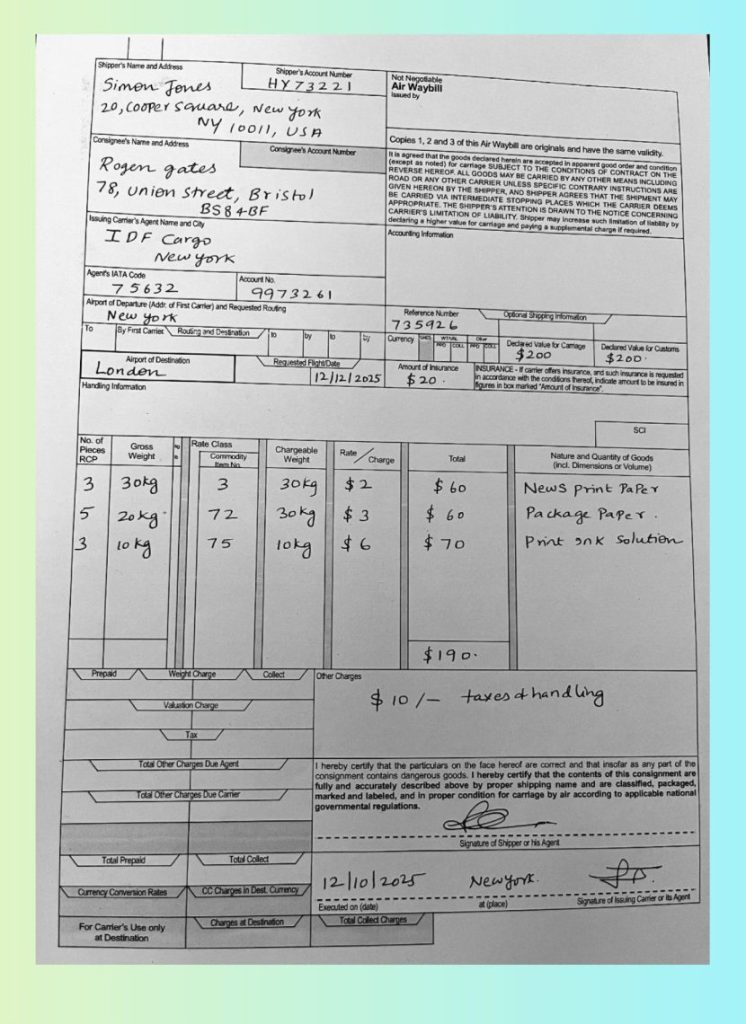
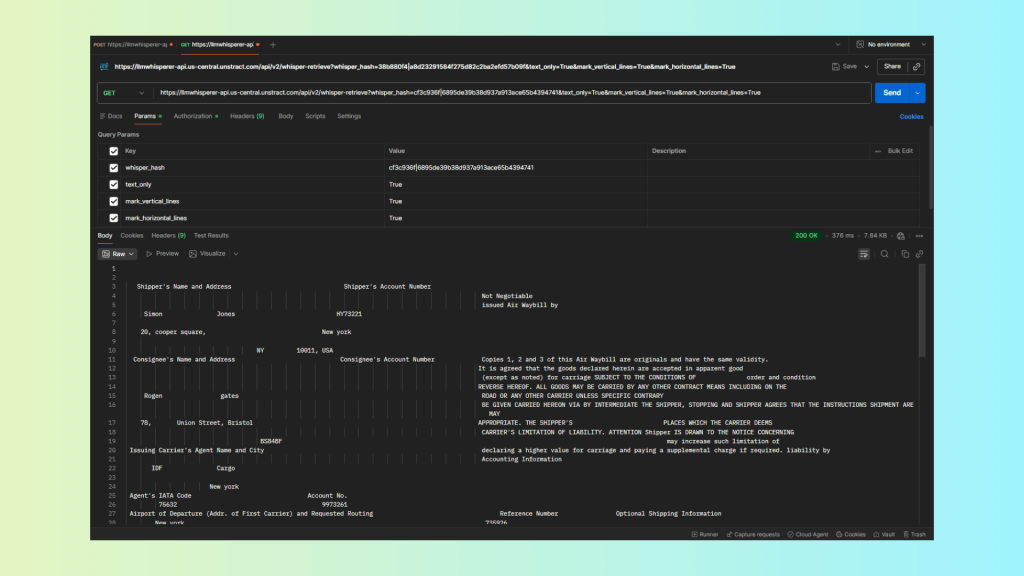
API Example — Bulk Parsing of a Photographed Air Waybill (Handwritten, Multi-Column)
For large-scale ingestion pipelines inside document management software, the LLMWhisperer API is the preferred approach. Here, we processed a photographed Air Waybill—an old, slightly degraded document with handwritten values, multi-column cargo details, table blocks, and uneven lighting typical of scanned shipping paperwork.
Steps Using Postman
Obtain your LLMWhisperer API key from the Unstract dashboard.
Review the response (layout-preserving output in plain text).
   Shipper's Name and Address                               Shipper's Account Number
                                                                                                  Not Negotiable
                                                                                                  issued Air Waybill by
     Simon               Jones                            HY73221

    20, cooper square,                                New york

                                    NY         10011, USA
  Consignee's Name and Address                             Consignee's Account Number             Copies 1, 2 and 3 of this Air Waybill are originals and have the same validity.
                                                                                                 It is agreed that the goods declared herein are accepted in apparent good
                                                                                                  (except as noted) for carriage SUBJECT TO THE CONDITIONS OF              order and condition
                                                                                                 REVERSE HEREOF. ALL GOODS MAY BE CARRIED BY ANY OTHER CONTRACT MEANS INCLUDING ON THE
     Rogen                gates                                                                   ROAD OR ANY OTHER CARRIER UNLESS SPECIFIC CONTRARY
                                                                                                  BE GIVEN CARRIED HEREON VIA BY INTERMEDIATE THE SHIPPER, STOPPING AND SHIPPER AGREES THAT THE INSTRUCTIONS SHIPMENT ARE MAY
    78,       Union Street, Bristol                                                              APPROPRIATE. THE SHIPPER'S                         PLACES WHICH THE CARRIER DEEMS
                                                                                                  CARRIER'S LIMITATION OF LIABILITY. ATTENTION Shipper IS DRAWN TO THE NOTICE CONCERNING
                                     BS84BF                                                                                                          may increase such limitation of
 Issuing Carrier's Agent Name and City                                                            declaring a higher value for carriage and paying a supplemental charge if required. liability by
                                                                                                  Accounting Information
       IDF               Cargo

                       New york
 Agent's IATA Code                                Account No.
         75632                                        9973261
 Airport of Departure (Addr. of First Carrier) and Requested Routing                                   Reference Number                Optional Shipping Information
        New york                                                                                   735926
 To        By First Carrier.   Routing and Destination       to         by      to        by      Currency CHGS    WT/VAL      Other
                                                                                                                  PPD COLL PPD COLL     Declared Value for Carriage    Declared Value for Customs
                                                                                                                                           $200                         $200.
              Airport of Destination                          Requested Flight/Date                   Amount of Insurance      INSURANCE - If carrier offers insurance, and such insurance is requested
     London                                                                12/12/2025                   $20.                   in accordance with the conditions thereof, indicate amount to be insured in
                                                                                                                              figures in box marked "Amount of Insurance".
Handling Information

                                                                                                                                                                                  SCI

No. of                              Rate Class
Pieces          Gross          kg                              Chargeable           Rate                               Total                           Nature and Quantity of Goods
RCP             Weight         lb         Commodity Item No       Weight                     Charge                                                     (incl. Dimensions or Volume)

 3           30kg                           3                   30kg                 $ 2                          $ 60                         News print Paper

                                                                                                                                                Package Paper.
5           20 kg                         72                    30 kg                $ 3                        $    60

                                                                                                                                                Print           Ink          Solution
3           10 kg                         75                    10kg                 $     6                   $ 70

                                                                                                                $190.

     Prepaid                  Weight Charge                 Collect          Other Charges

                                                                                                                            taxes of handling
                            Valuation Charge                                                   $      10/-

                                    Tax

                                                                                                                                                      correct and that insofar as consignment any part of are the
                     Total Other Charges Due Agent                            I hereby certify that the particulars on the face hereof are
                                                                              consignment contains dangerous goods. I hereby certify that the contents of this
                                                                              fully and accurately described above condition by proper for carriage shipping by name air according and are to classified, applicable packaged, national
                     Total Other Charges Due Carrier                          marked and labeled, and in proper
                                                                              governmental regulations.

                                                                                                                             Signature of Shipper or his Agent

          Total Prepaid                            Total Collect

                                                                                 12/10/2025                                     Newyork.
  Currency Conversion Rates               CC Charges in Dest. Currency                                                             at (place)                      Signature of Issuing Carrier or its Agent
                                                                               Executed on (date)

                                             Charges at Destination                   Total Collect Charges
   For Carrier's Use only
        at Destination
<<<
Result
The API extraction produced exceptional fidelity:
All handwritten cargo details and values were captured accurately, including weights, consignee names, and reference numbers.
Multi-column table structure was preserved, enabling downstream LLMs to correctly associate numeric amounts with the right column and row.
Aged, low-contrast text was reconstructed cleanly, thanks to noise reduction and preprocessing.
Zero loss of content—no missing rows, labels, or numbers.
Perfect alignment across columns, even in sections where the original document had faded or uneven spacing.
This demonstrates the strength of LLMWhisperer as a backend OCR service for enterprise document-management systems, where bulk accuracy, stability, and structure retention are non-negotiable.
How LLMWhisperer Supports Document Management
Document Ingestion: API & Cloud Connectors
A document management system is only as strong as its ingestion layer. LLMWhisperer integrates seamlessly into Unstract’s connector ecosystem, allowing businesses to move documents from any storage environment into their OCR pipeline without friction.
Unstract supports ingestion from a wide range of data sources—cloud storage, file servers, object stores, and databases. Documents can be fed into LLMWhisperer in two primary ways:
1. Ingestion via Connectors (Cloud & File Systems)
Unstract’s connector framework allows organizations to plug in their existing storage systems directly into a workflow. This enables automated ingestion of large document volumes—rent agreements, contracts, invoices, claims, HR files, policy forms, and more.
How ingestion works:
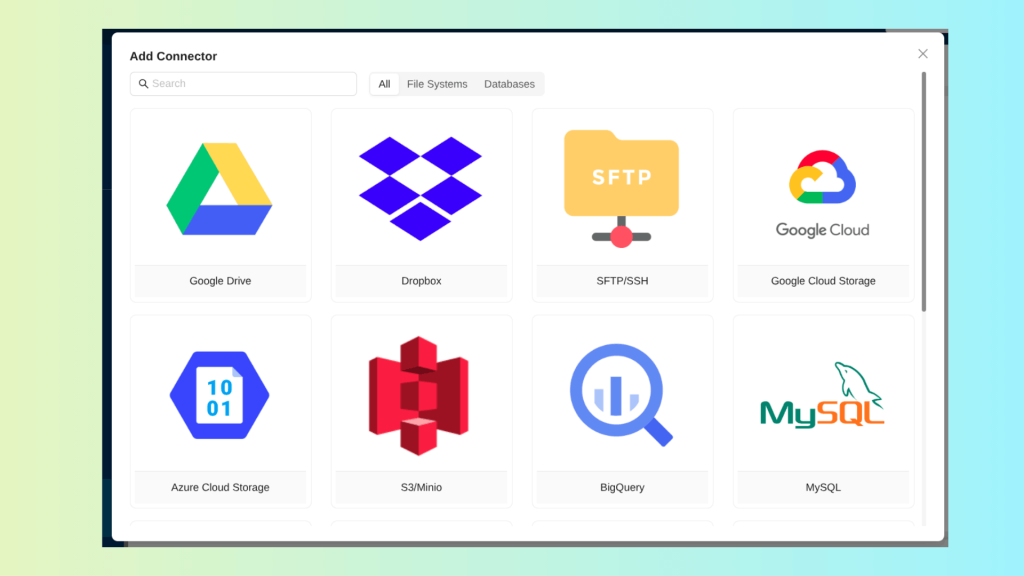
Navigate to Settings → Connectors, or add a connector while building a workflow.
Choose a connector type (e.g., AWS S3, Azure Blob, Google Drive, Salesforce, SFTP, PostgreSQL, etc.).
Provide the authentication details (bucket names, access keys, database URLs, credentials).
Test Connection to validate access.
Save and attach the connector as the Source for your workflow.
When the workflow runs, documents from the connector automatically flow into LLMWhisperer for OCR processing.
Why this matters for document management: Businesses no longer need to manually upload files or export data. A connector-enabled workflow ingests documents continuously and reliably, making LLMWhisperer a scalable backbone for enterprise document automation.
Document Parsing: OCR-Powered Layout & Text Extraction for AI
Once documents enter the system through API or connectors, LLMWhisperer handles the second stage of document management—parsing. This is where raw files (PDFs, scans, images, Excel sheets) are transformed into structured and layout-aware text ready for downstream AI processing.
How parsing works:
LLMWhisperer identifies the document type (scanned, native, Excel, form, table-heavy, handwritten).
It selects the appropriate OCR mode (native, low-cost, high-quality, form, or table).
The engine performs OCR, layout analysis, handwriting extraction, and structure reconstruction.
Output is returned in a clean, consistent format—preserving indentation, columns, tables, checkboxes, and line order.
This parsed output becomes the foundation for deeper intelligence tasks such as:
Classification
Entity extraction
Policy data mapping
Contract clause detection
Claims processing automation
Why this parsing layer is crucial: OCR isn’t just about reading characters. In document management, the structure is as important as the text. LLMWhisperer’s ability to preserve layout (columns, tables, checkboxes, field alignment) ensures that AI/LLM models receive data in a format they can accurately interpret—leading to higher accuracy in automated workflows.
Combined with Unstract’s processing tools, LLMWhisperer becomes a core component of enterprise document automation, enabling organizations to move from raw, unstructured files to validated, searchable, and fully structured data — all while minimizing manual effort.
What is Unstract? The AI/LLM Layer for Document Understanding
Modern enterprises deal with thousands of unstructured documents every day—contracts, invoices, claims, forms, reports, and handwritten submissions. Traditional IDP and RPA tools struggle with long, complex, multi-page documents because they lack semantic understanding.
Unstract solves this problem.
Unstract is an open-source, no-code platform built specifically for automating complex business processes involving unstructured documents—powered by Large Language Models (LLMs) and Human-in-the-Loop (HITL) capabilities. Instead of relying only on template-based OCR, Unstract adds an intelligent interpretation layer that understands meaning, relationships, and context inside documents.
Where OCR (like LLMWhisperer) extracts text and structure, Unstract extracts understanding.
How Unstract Uses LLMs to Extract Meaning from OCR Outputs
Once LLMWhisperer converts PDFs, images, scans, and spreadsheets into clean, layout-preserving text, Unstract takes over:
1. LLMs interpret the extracted text
LLMs analyze the OCR output, detect entities, relationships, classifications, intent, and numerical meaning. Examples:
Identifying coverage limits, deductibles, and premiums in insurance forms
Extracting tenant names, unit numbers, rent, and status in rent rolls
Finding clauses, renewal dates, or penalties in contracts
2. Embeddings & Vector Databases enhance accuracy
Unstract converts documents into vector embeddings, enabling:
Semantic search
Context retrieval (“retrieve the correct section before extraction”)
Multi-page reasoning and cross-referencing
This is critical when similar terms appear in different contexts (e.g., “total premium” vs. “annual premium”).
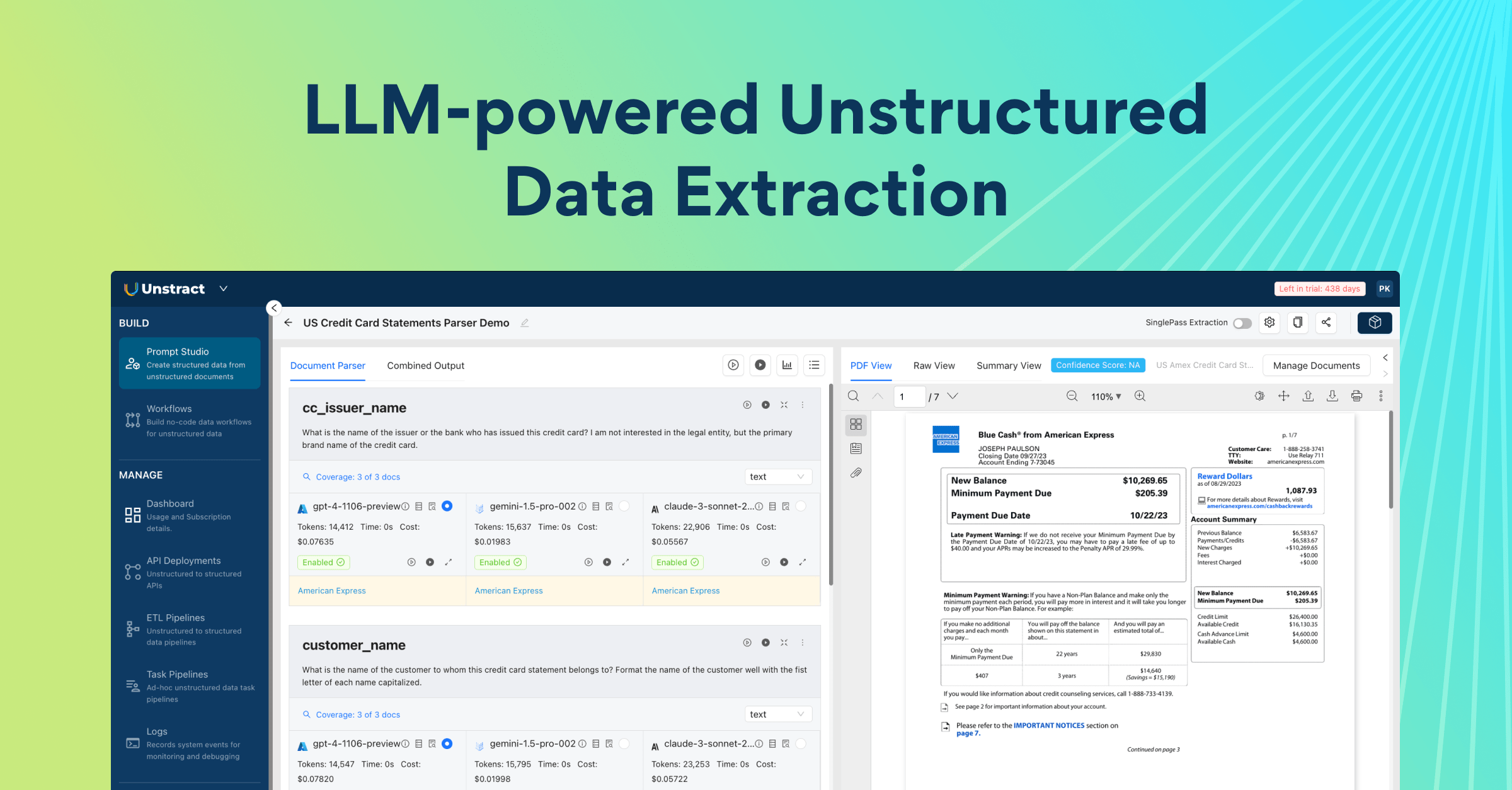
3. Prompt Studio orchestrates structured extraction
Using prompt engineering, users can define extraction rules in plain English. Example: “Extract policyholder info, claim details, deductible, effective dates, and all checkboxes from the document.”
LLMs then return structured JSON output that downstream systems can consume.
4. Human-in-the-loop validation (HITL) for accuracy
For sensitive use cases—insurance claims, property reports, healthcare forms—Unstract allows humans to review low-confidence fields before finalizing.
This creates enterprise-grade reliability.
Core Components: Prompt Studio, Embeddings, Vector DBs, and Workflows
Unstract’s power comes from its modular ecosystem:
1. Prompt Studio — The Brain of Document Understanding
A no-code environment where users design extraction logic using natural language prompts.
Capabilities:
Build custom parsers for any document type
Test prompts across real samples
View field fill-rates and prompt accuracy
Optimize extraction with iterations
Prompt Studio turns a non-technical team into AI automation creators.
2. Embeddings — Semantic Understanding Layer
Embeddings convert each section of the document into vectors that help LLMs:
Retrieve the right context
Understand multi-page documents
Disambiguate similar terms
Improve extraction accuracy
Unstract supports OpenAI embeddings and others.
3. Vector Databases (Vector DBs)
A Vector DB stores embeddings for fast, intelligent retrieval.
Used for:
Chunk-level retrieval before prompting
Knowledge-grounded extractions
Indexing large volumes of documents
Unstract integrates with Postgres, Pinecone, and other vector backends.
4. Workflows — Deployment and Automation Engine
Once a project is ready, Unstract lets teams automate document understanding at scale.
Workflows allow you to:
Connect to document sources (S3, Drive, Blob Storage, etc.)
Run OCR + LLM extraction pipelines end-to-end
Send structured data into databases (Snowflake, BigQuery, Redshift, Postgres, etc.)
Deploy as an API for real-time document processing
Create ETL pipelines for batch automation
Workflows can also launch custom Q&A apps for internal teams, each secured with SSO.
In Summary
Unstract is the intelligence layer that transforms raw OCR output into meaningful, structured information using LLMs. Where LLMWhisperer reads documents, Unstract understands them.
Together, they create a next-generation AI document automation ecosystem capable of handling:
Long, complex documents
Multi-page reports
Financial tables
Insurance forms
Contracts
Handwritten and scanned records
Unstract in Action
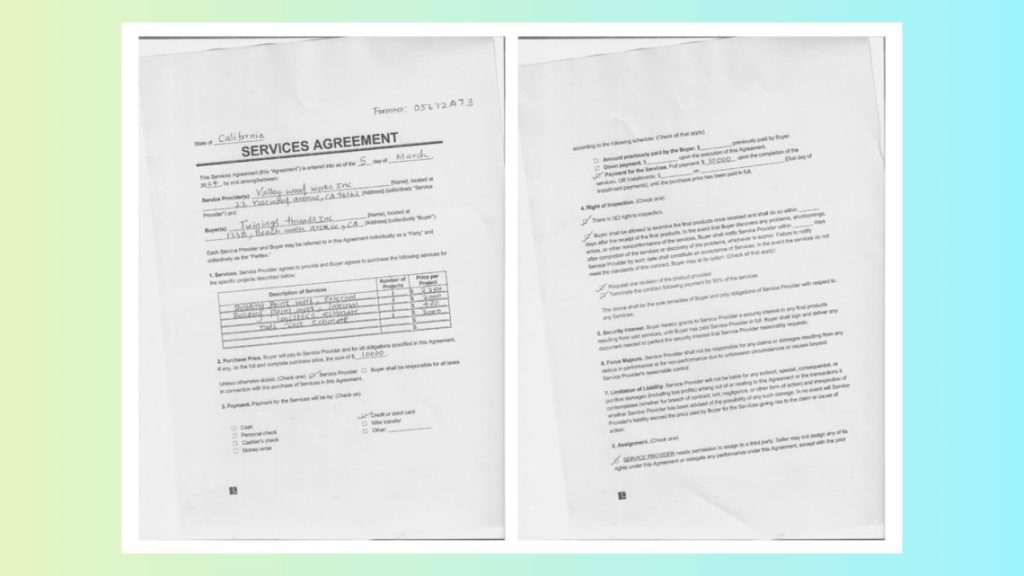
To demonstrate how Unstract turns raw OCR output into structured, machine-ready data, we tested it on one of the most challenging document types: a scanned, handwritten contract form—tilted nearly 30°, filled with multi-column text, handwritten entries, dense legal clauses, and uneven print quality.
This is the kind of document that routinely breaks traditional OCR and RPA systems. Rotation, handwriting, shadows, mixed formatting, and unpredictable spacing lead to broken outputs. But with LLMWhisperer + Unstract, the pipeline remains fully intact: layout preserved, handwriting captured, and the entire structure interpreted accurately.
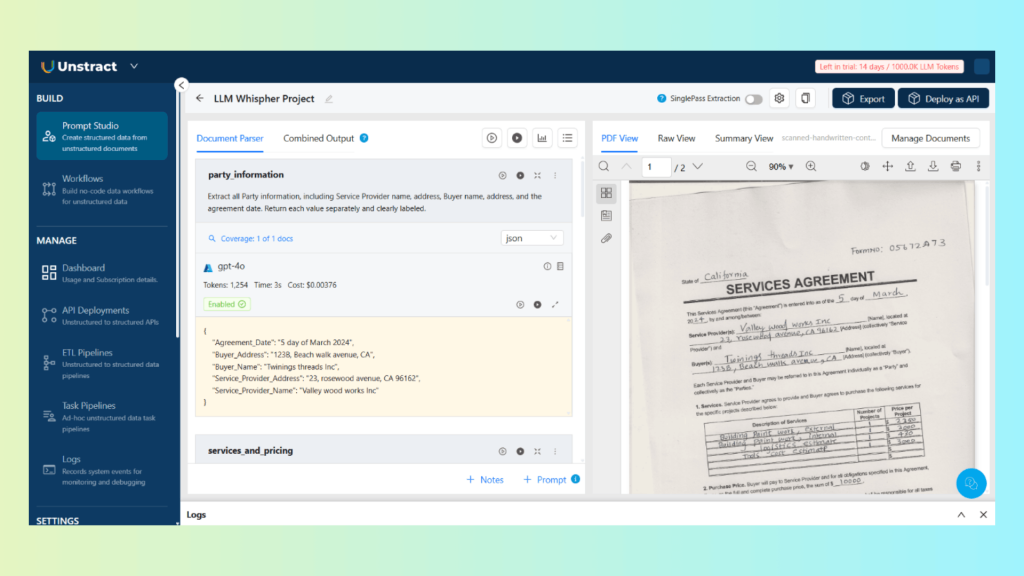
1. Build a Prompt Studio Project
Inside Unstract’s Prompt Studio, we created a lightweight extraction project designed specifically for the scanned contract. No coding, no template design—just natural-language instructions.
Because the OCR output is layout-preserving, Prompt Studio can reason across tilted sections, uneven spacing, and multi-line handwriting with impressive consistency.
After a few iterations inside the testing panel, fill rates stabilized, and the extracted fields matched the source document with high accuracy.
2. Extract Relevant Data Fields from JSON
Once the prompts were ready, Unstract generated clean, structured JSON representing the contract’s contents. All key sections—including handwritten fields—were extracted with:
Correct line order
Preserved relationships (e.g., which signature belongs to which signer)
Intact table/column structures
Proper date and numeric reconstruction
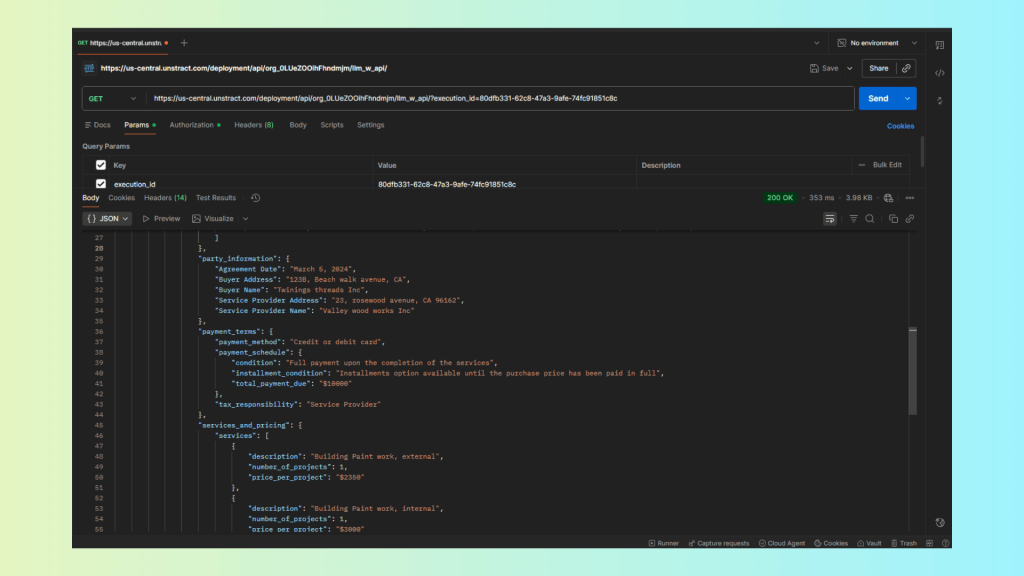
3. Deploy and Test as an API (Postman Example)
After validating the extraction logic in Prompt Studio, we deployed the project as an Unstract API workflow—again, with no custom backend coding.
Deployment Summary:
Source Connector: API (accepts documents via POST)
Destination: API (returns structured JSON)
Selected Tool: The exported “Handwritten Contract Parser”
Mode: Deploy as API
{
  "status": "COMPLETED",
  "message": [
    {
      "file": "scanned-handwritten-contract-form.pdf",
      "file_execution_id": "fb8ce0a8-114e-4e1f-bc55-98f2f346c252",
      "status": "Success",
      "result": {
        "output": {
          "additional_contract_clauses": {
            "AssignmentRestrictions": "SERVICE PROVIDER needs permission to assign to a third party. Seller may not assign any of its rights under this Agreement or delegate any performance under this Agreement, except with the prior permission.",
            "ForceMajeure": "Service Provider shall not be responsible for any claims or damages resulting from any delays in performance or for non-performance due to unforeseen circumstances or causes beyond Service Provider's reasonable control.",
            "LimitationOfLiability": "Service Provider will not be liable for any indirect, special, consequential, or punitive damages (including lost profits) arising out of or relating to this Agreement or the transactions it contemplates (whether for breach of contract, tort, negligence, or other form of action) and irrespective of whether Service Provider has been advised of the possibility of any such damage. In no event will Service Provider's liability exceed the price paid by Buyer for the Services giving rise to the claim or cause of action.",
            "SecurityInterest": "Buyer hereby grants to Service Provider a security interest in any final products resulting from said services, until Buyer has paid Service Provider in full. Buyer shall sign and deliver any document needed to perfect the security interest that Service Provider reasonably requests."
          },
          "inspection_and_remedies": {
            "buyer_remedies": [
              "Request one revision of the product provided.",
              "Terminate the contract following payment for 50% of the services."
            ],
            "inspection_rights": [
              "There is NO right to inspection.",
              "Buyer shall be allowed to examine the final products once received."
            ],
            "notification_timelines": [
              "Buyer shall notify Service Provider within days after completion of the services or discovery of the problems, whichever is sooner."
            ]
          },
          "party_information": {
            "Agreement Date": "March 5, 2024",
            "Buyer Address": "123B, Beach walk avenue, CA",
            "Buyer Name": "Twinings threads Inc",
            "Service Provider Address": "23, rosewood avenue, CA 96162",
            "Service Provider Name": "Valley wood works Inc"
          },
          "payment_terms": {
            "payment_method": "Credit or debit card",
            "payment_schedule": {
              "condition": "Full payment upon the completion of the services",
              "installment_condition": "Installments option available until the purchase price has been paid in full",
              "total_payment_due": "$10000"
            },
            "tax_responsibility": "Service Provider"
          },
          "services_and_pricing": {
            "services": [
              {
                "description": "Building Paint work, external",
                "number_of_projects": 1,
                "price_per_project": "$2350"
              },
              {
                "description": "Building Paint work, internal",
                "number_of_projects": 1,
                "price_per_project": "$3000"
              },
              {
                "description": "logistics estimate",
                "number_of_projects": 1,
                "price_per_project": "$430"
              },
              {
                "description": "Tools cost estimate",
                "number_of_projects": 1,
                "price_per_project": "$3000"
              }
            ],
            "total_purchase_price": "$10000"
          }
        }
      },
      "error": null,
      "metadata": {
        "source_name": "scanned-handwritten-contract-form.pdf",
        "source_hash": "d0b40d6fb160c377870a2792216d79b4624288e48be18802872d12b945e50c3e",
        "organization_id": "org_0LUeZOOihFhndmjm",
        "workflow_id": "390c7096-2783-42e2-b2d6-5854d335160d",
        "execution_id": "80dfb331-62c8-47a3-9afe-74fc91851c8c",
        "file_execution_id": "fb8ce0a8-114e-4e1f-bc55-98f2f346c252",
        "tags": [],
        "workflow_start_time": 1765287522.0249608,
        "total_elapsed_time": 34.934743881225586,
        "tool_metadata": [
          {
            "tool_name": "structure_tool",
            "elapsed_time": 22.159697,
            "output_type": "JSON"
          }
        ]
      }
    }
  ]
}
Unstract Document Ingestion
Document ingestion in Unstract is designed to support real-world enterprise flows where documents arrive from cloud drives, internal file systems, and automated workflow engines. Unstract provides a unified ingestion layer through Connectors and through n8n-based automation, ensuring that documents move from source → extraction → destination with zero manual handling.
1. Ingestion via Unstract Connectors
Unstract supports ingestion from a wide range of data sources using built-in connectors. These connectors allow systems such as cloud storage, file systems, and databases to push documents directly into extraction workflows.
How Connectors Work
Unstract lets you add connectors in two ways:
From the Connectors dashboard (Settings → Connectors)
Directly inside a workflow when configuring the source or destination
Once added, each connector follows a simple process:
Select the connector type (e.g., S3/MinIO, Google Drive, Dropbox, Azure Blob, PostgreSQL, MySQL, etc.)
Configure authentication fields
Test the connection
Save it for use in ETL pipelines, API deployments, or task workflows
These connectors become the entry points for automated ingestion. For example:
A folder in Google Drive can automatically trigger new extraction jobs
A new file landing in Amazon S3 can be processed through a Prompt Studio project
Files stored in on-premise file systems can be consumed using FileSystem connectors
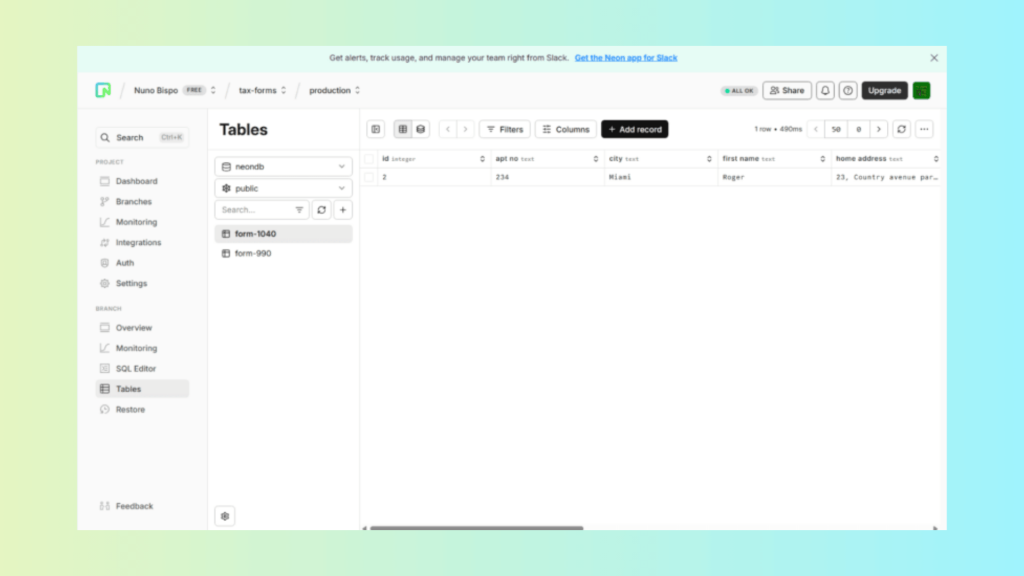
Extracted data can be routed directly into databases like PostgreSQL or Snowflake
Unstract Document Ingestion via n8n Workflow Automation
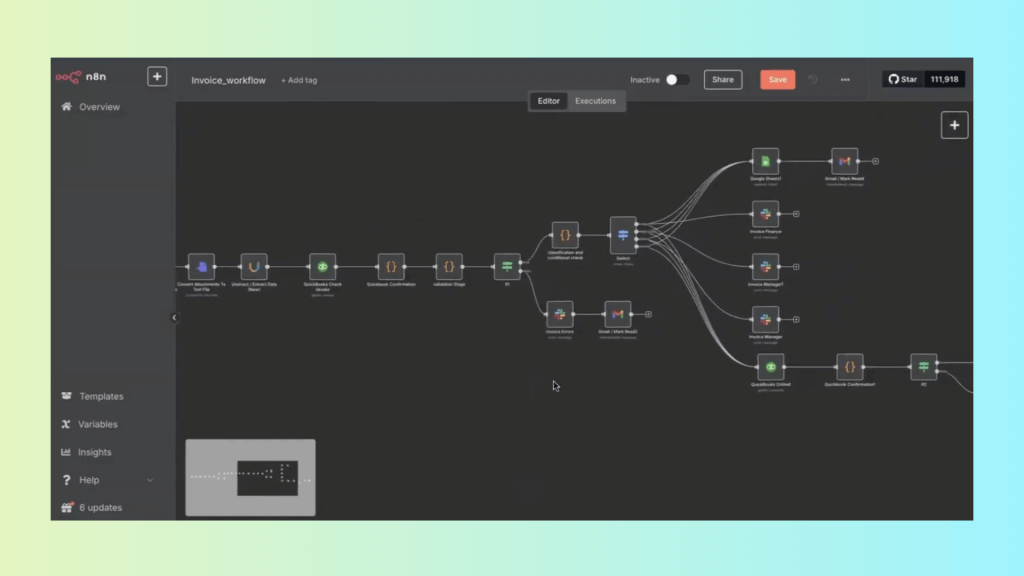
Unstract integrates seamlessly with n8n to create fully automated document ingestion pipelines. In this setup, n8n orchestrates the flow of documents, while Unstract and LLMWhisperer handle OCR, preprocessing, and structured extraction.
Steps in the n8n + Unstract Ingestion Workflow
8n retrieves new documents from configured sources (email inboxes, cloud drives, APIs, or shared folders).
n8n sends the document to LLMWhisperer for OCR and layout-preserving preprocessing.
The OCR output is passed to an Unstract API (built from Prompt Studio) for structured JSON extraction.
n8n routes the extracted JSON to downstream destinations such as Slack, Google Sheets, databases, or accounting systems.
You can watch the full workflow demonstration in the official webinar:
Building agentic document workflows with Unstract + n8n
Unstract API Hub: Document Splitting & Classification
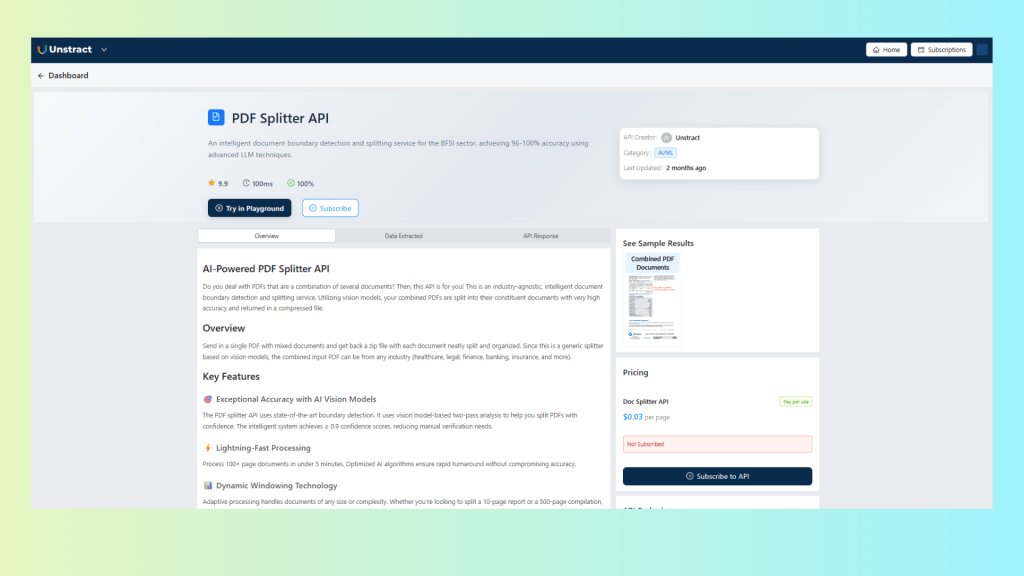
Unstract’s API Hub provides a suite of intelligent, production-ready APIs that solve one of the most difficult challenges in document management: automatically splitting multi-document PDFs and classifying document types without templates, rules, or manual effort. Built using a blend of Vision AI and LLM-driven semantic analysis, these APIs work across every industry and document format.
The Document Splitter API is engineered for real-world, mixed PDFs—loan packages, insurance claim bundles, logistics files, onboarding packets, tax folders, and more. Instead of relying on page numbers or keyword rules, the API uses advanced machine-learning models to detect natural document boundaries based on layout, structure, visual cues, and semantic meaning.
When you submit a multi-document PDF, the API returns:
Individual PDFs, each corresponding to a split document
A ZIP file containing all extracted documents
A detailed JSON boundary report (document type, page ranges, header/footer text, entities, date ranges, etc.)
This approach eliminates the need for manual page selection or template configuration—a critical advantage when document sets vary in order, length, and formatting.
Key Features
High-Accuracy Vision Model Boundary Detection Two-pass AI analysis enables reliable detection of document breaks, achieving confidence scores of 0.9 or higher. Ideal for inconsistent scans, rotated pages, watermarks, and mixed-resolution files.
Fast Processing for Large PDFs Handles 100+ page, multi-document files in minutes. Optimized pipeline ensures consistent performance even when scaling to thousands of files.
Dynamic Windowing Technology Automatically adapts to PDFs of any size or complexity—whether you’re splitting a 10-page insurance packet or a 500-page regulatory submission.
Enterprise-Grade Security & Compliance Supports secure, encrypted processing with compliance across HIPAA, GDPR, SOC 2, and industry-standard privacy requirements.
Industry-Agnostic Operation Works for banking, insurance, healthcare, logistics, education, real estate, BPOs, and government workflows—no custom training required.
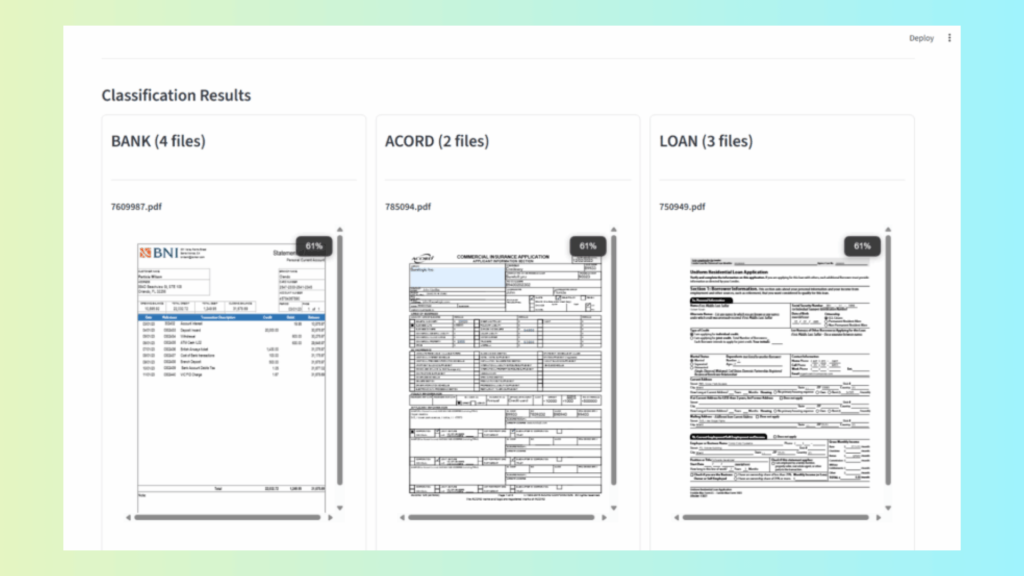
AI Classification API
The API Hub also offers document classification endpoints. These identify the type of each document—such as:
Loss Run Summary
ACORD 125 / 140 / 126
Payslip
KYC Form
Tax Form (e.g., 1040, 990)
Onboarding Documents
Shipping Manifests or Bills of Lading
Classification works even when documents vary by layout, language, orientation, or scan quality. This makes it suitable for automated foldering, indexing, routing, and downstream workflow orchestration.
These classification APIs integrate smoothly with:
Document Management Systems (DMS)
ETL pipelines
RPA and automation tools
Workflow engines like n8n
Ingestion platforms (S3, GDrive, Dropbox)
API Endpoints
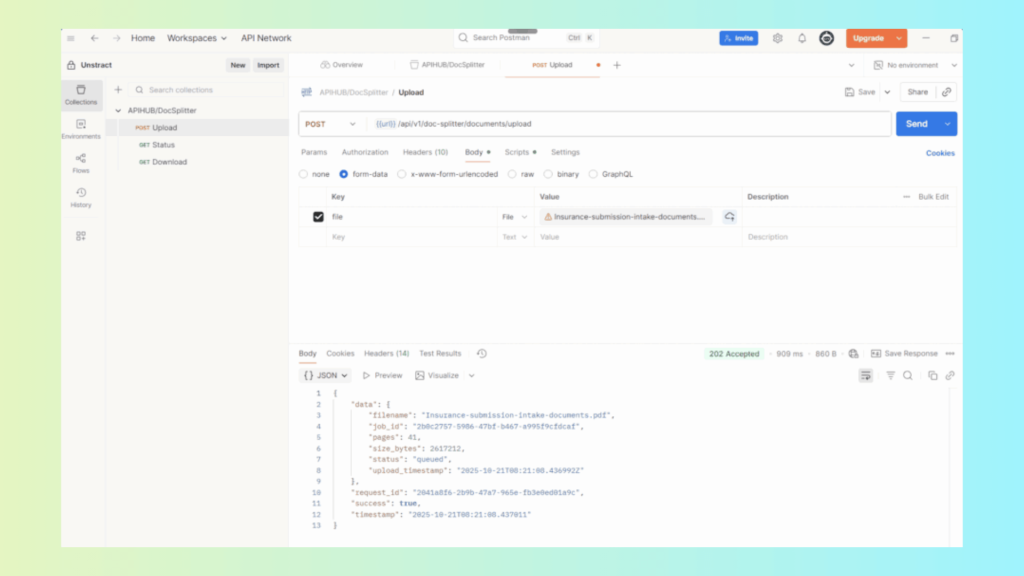
The PDF Splitter API offers three primary endpoints:
POST: /api/v1/doc-splitter/documents/upload Uploads the combined PDF and initiates the splitting job.
GET: /api/v1/doc-splitter/jobs/status Checks the job status using the returned job_id.
GET: /api/v1/doc-splitter/jobs/download Fetches the ZIP file containing separated PDFs and the JSON boundary metadata.
Postman Workflow (High-Level)
Upload Send the mixed PDF via POST → receive a job_id.
Status Polling Query the status endpoint until the job shows as “completed”.
Download Use the same job_id to download the ZIP containing:
Unstract Document Classification for Document Management
Modern document management systems depend heavily on accurate, automated classification—especially when dealing with large volumes of invoices, policies, claims, contracts, statements, onboarding packets, and scanned submissions. Unstract brings a practical, enterprise-ready approach to this challenge by combining Prompt Studio, LLMWhisperer, and API Deployments into a unified classification pipeline.
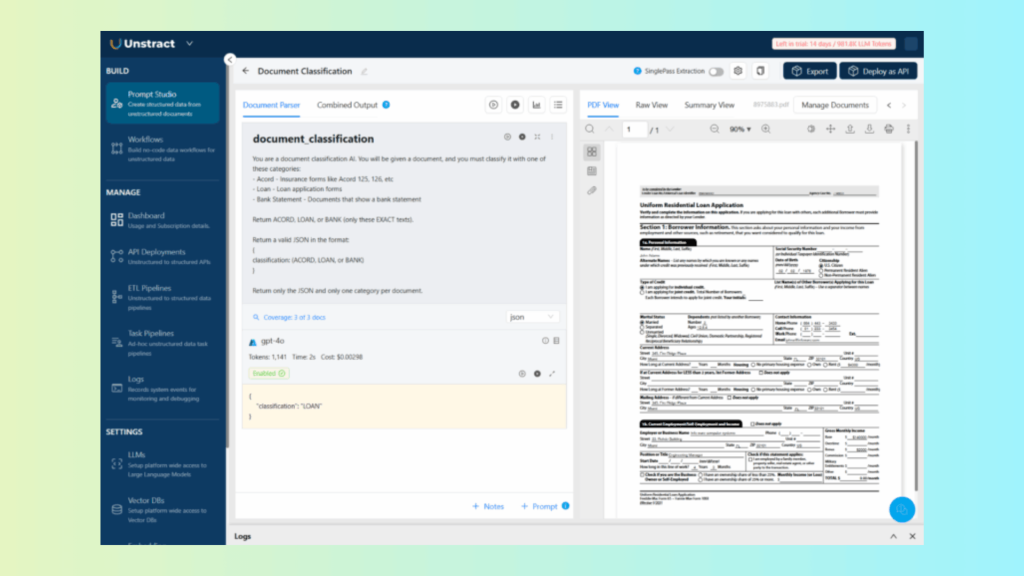
Using Prompt Studio to Classify Documents
Prompt Studio acts as the intelligence layer of Unstract’s classification engine. Instead of building and training a custom machine-learning pipeline, teams simply write natural-language prompts to describe classification rules.
For example, a classification prompt can identify whether a file is:
An invoice
A claims document
An insurance policy
A contract
A bank statement
An ACORD form
This approach allows organizations to classify both broad categories and highly specific subtypes—without building templates or rules.
Write classification prompts that instruct the LLM to determine document type based on content and structure.
Run test executions to view classification accuracy.
Validate results using layout-preserved OCR from LLLMWhisperer (ensuring consistent input for the LLM).
Prompt Studio eliminates the fragility of traditional keyword-based classifiers by grounding classification in semantic understanding.
Exposing Classification Logic as an API
Once the classification prompts are tested and approved, Unstract allows the entire logic to be deployed as an API with a single click.
The deployed API:
Accepts PDFs, scans, photos, and documents of any format
Automatically applies OCR (via LLMWhisperer)
Runs the cleaned text through the classification prompt
Returns structured JSON containing the document type
This makes it effortless to integrate classification into enterprise workflows.
Example JSON Output
{
“document_classification”: {
“classification”: “BANK”
}
}
Where this API can be used
Auto-sorting documents as they arrive in S3, GDrive, Dropbox, or internal file systems
Routing incoming claims to the correct insurance queue
Feeding documents into an ERP, CRM, or DMS for categorization
Classifying bulk historical archives during digital transformation
The API removes manual sorting entirely and enables large-scale automated processing.
Integration with DMS Tools for Automated Sorting & Metadata Tagging
Unstract’s classification API integrates seamlessly with:
Document Management Systems (SharePoint, Alfresco, OpenText)
Workflow engines (n8n, Airflow, Zapier)
Storage systems (S3, GCS, Azure Blob, Dropbox, GDrive)
Enterprise ETL systems and warehouse platforms
A typical automated workflow looks like this:
Documents arrive in a storage bucket.
A workflow automation tool (n8n, Airflow, etc.) retrieves each file.
The file is sent to the Unstract Classification API.
The API returns the document type as structured JSON.
Based on this value, the automation:
Places the document into the correct folder
Adds metadata tags to the DMS
Sends the file to downstream extraction workflows
Routes documents to the correct compliance or business teams
Because LLMWhisperer preprocesses every file (OCR, layout normalization, table\form preservation), even poorly scanned, multi-language, or handwritten documents are classified reliably.
How Unstract + LLMWhisperer Strengthen Document Management
This combined stack supports every stage of a modern document-management lifecycle:
1. Document Capture
Integration with all major cloud storage, data warehouses, inboxes, and n8n workflows ensures documents enter the system seamlessly.
The PDF Splitter API separates large, mixed PDFs into individual documents before classification.
4. Document Classification
Prompt Studio + Unstract APIs deliver high-accuracy categorization at scale.
5. Document Extraction
Unstract’s AI-powered extraction converts classified documents into usable structured data fields.
Unstract provides an end-to-end approach to document classification by combining layout-accurate OCR, LLM-powered reasoning, and API automation. With Prompt Studio defining the classification logic and LLMWhisperer ensuring high-quality OCR inputs, enterprises can automate:
Sorting
Tagging
Routing
Indexing
Metadata management
across thousands of documents with minimal human intervention.
This transforms document management from a manual, error-prone burden into an automated, scalable, and intelligent workflow.
How Unstract + LLMWhisperer Empower Document Management
Modern document management demands far more than storage—it requires intelligent, end-to-end understanding of every document entering the system. Unstract and LLMWhisperer work together to form a unified pipeline that handles all five essential stages: capture, parse, split, classify, and extract. Each stage solves a critical business bottleneck.
1. Capture: Seamless Integration with Storage Systems + n8n Automation
Unstract connects directly to leading cloud storage and enterprise environments:
AWS S3
Google Drive
SharePoint
Azure Blob
Dropbox
On-premise file systems
Combined with the Unstract and LLMWhisperer nodes for n8n, organizations can automate ingestion from email inboxes, CRMs, legacy systems, shared folders, and multi-step workflows—triggering document processing the moment files arrive.
This turns fragmented document intake into a synchronized, reliable entry point for all downstream automation.
2. Parse: OCR + Structural Understanding via LLMWhisperer
LLMWhisperer performs advanced OCR that preserves:
Layout
Tables
Checkboxes
Columns
Multi-language text
Handwritten content
By producing structured, layout-preserving text, it creates a clean foundation for LLM-powered reasoning. This eliminates the brittle outputs of traditional OCR and ensures downstream AI workflows fully understand the document’s context.
3. Split: Intelligent Document Separation
Using Unstract’s AI-powered PDF Splitter API, combined PDFs—loan packets, legal bundles, onboarding packets, insurance claim packages—are automatically separated into their individual documents.
Key advantages:
Detects boundaries using vision + LLM reasoning
No rules, templates, or page heuristics required
Produces split PDFs + boundary metadata (JSON)
Supports high-volume enterprise-grade throughput
This ensures documents are organized before classification and extraction even begin.
4. Classify: AI-Based Categorization at Scale
Unstract’s Prompt Studio allows teams to define custom classification logic using natural language prompts. Once deployed as an API, this logic can classify:
Invoices
Claims
Policies
Bank statements
ACORD forms
Contracts
HR documents
Tax forms
This enables automated routing, smart foldering in DMS systems, and metadata tagging—replacing manual sorting with a resilient AI-driven model.
5. Extract: LLM-Powered Structured Data Extraction
This transforms unstructured content into decision-ready data that can be pushed directly into databases, ERPs, underwriting systems, CRMs, or analytics dashboards.
Together, these five layers create a straight-through automation pipeline for the entire document lifecycle.
OCR for document management: What is next?
The combination of LLMWhisperer + Unstract marks a fundamental shift in how enterprises approach document management and OCR. Instead of stitching together fragmented tools, organizations gain a unified system that:
Reads any document with high accuracy
Understands layout, handwriting, and structure
Splits mixed PDFs automatically
Classifies documents using AI
Extracts meaningful data with LLMs
Integrates seamlessly with existing DMS and automation workflows
This approach delivers the three outcomes modern enterprises care about most:
Scalability: Handles thousands of documents a day without rule maintenance or manual review.
Compliance: Preserves layout, metadata, and audit trails—critical for insurance, banking, healthcare, and legal operations.
Intelligence: Transforms documents from static files into actionable data that moves through automated pipelines.
In a world where businesses are overwhelmed by unstructured documents, LLMWhisperer provides the foundation, and Unstract provides the intelligence—making document management faster, smarter, and ready for the future.
Document Management OCR: FAQs
1. Why is a document management system with OCR essential for modern enterprises? A document management system with OCR transforms scanned PDFs, handwritten forms, and photographed documents into searchable, structured data. This eliminates manual data entry, speeds up retrieval, and ensures compliance through audit trails.
2. How does document management OCR reduce operational costs and improve compliance? Document management system ocr automates extraction of key fields (invoice numbers, dates, amounts, vendor names) from thousands of documents daily. It cuts manual labor costs by up to 40‑50% and provides audit‑ready digital records for regulatory compliance.
3. What types of documents can document management OCR process reliably? Ocr document management with LLMWhisperer handles invoices, contracts, insurance claims, HR files, bank statements, tax forms, air waybills, and property inspection reports. It preserves complex tables, checkboxes, handwritten notes, and multi‑column layouts.
4. How does document management OCR improve searchability and metadata tagging? Document management ocr enables full‑text search across scanned documents and automatically generates metadata tags (document type, vendor name, date ranges). This turns a chaotic folder of PDFs into an organized, queryable knowledge base.
5. Can OCR for document management integrate with existing enterprise systems like SharePoint or ERPs? Yes. Ocr for document management via LLMWhisperer’s API outputs structured JSON that integrates with SharePoint, OpenText, AWS S3, Google Drive, and ERPs like SAP or Oracle. Unstract’s n8n nodes and connectors automate ingestion from cloud storage and email.
Document Management OCR: Related topics to explore
Engineer by trade, creator at heart, I blend Python, ML, and LLMs to push the boundaries of AI—combining deep learning and prompt engineering with a passion for storytelling. As an author of books and articles on tech, I love making complex ideas accessible and unlocking new possibilities at the intersection of code and creativity.