Why “Adaptive” Document Workflows Matter
Document automation has improved significantly, but most systems still struggle in real production environments. Documents are not static, invoice layouts change, new fields appear, and vendors update formats without notice. At the same time, business rules evolve, and requirements vary across clients, regions, and policies. What works for one use case or customer, more often than not, fails for another.
Traditional document extraction relies heavily on static logic. Prompts and rules are tightly coupled to specific layouts and assumptions, and business rules are often hardcoded into the extraction itself. This approach may work initially, but it breaks down at scale. As variations increase, teams end up duplicating prompts, maintaining fragile workflows, and constantly rewriting logic for small changes.
Unstract is shifting this model from hardcoded workflows to adaptive, data-driven pipelines. Extraction logic remains stable, while business context, validation rules, and downstream actions are applied dynamically. This separation allows document workflows to automatically adapt to changing formats, policies, and use cases without constant rework.
In this article, we explore three new advanced Unstract features that enable this adaptability: Post-Processing Webhooks, Custom Data Variables, and Prompt Chaining. Together, they provide developers with fine-grained control over extraction, validation, and workflow orchestration.
Mental Model: How These Features Work Together
To understand how these features fit together, it helps to think of document processing as a pipeline rather than a single extraction step. Each component has a clear responsibility, and together they form an adaptive workflow that can handle change without constant rewrites.
Unstract’s Prompt Studio is responsible for extracting the raw structure from documents. Its job is to identify and pull out fields, values, and relationships; without embedding business rules or assumptions about how the data will be used.
Custom Data provides the runtime business context. It answers questions like why this document is being processed, which rules apply right now, and what thresholds or expectations should be used. This context is injected dynamically, allowing the same prompt to behave differently across clients, regions, or workflows.
Post-Processing Webhooks take the extracted data and make it production-ready. This is where validation, transformation, enrichment, calculations, and system integration happen. Webhooks allow developers to apply deterministic logic and connect extracted data to real systems such as ERPs, databases, or internal services.
Finally, Prompt Chaining connects these steps into multi-stage workflows. Outputs from earlier prompts guide later extraction and validation, enabling conditional logic, cross-document checks, and sequential decision-making; all without reprocessing documents or duplicating prompts.
Conceptually, the flow looks like this:

This flow keeps extraction, context, and workflow logic cleanly separated, making document pipelines easier to scale, adapt, and maintain.
Feature 1: Post-Processing Webhooks
A Post-Processing Webhook is a developer-controlled step that runs immediately after Prompt Studio completes extraction. Instead of consuming raw extracted JSON directly, Prompt Studio sends the output to a webhook endpoint where additional logic can be applied before the data is finalized.
The webhook receives structured JSON from Prompt Studio and executes custom logic such as validation, transformation, enrichment, calculations, or integration with external systems. Based on this logic, it can return a cleaned and enriched payload, or respond with errors and flags indicating that the document requires review.
From an implementation perspective, post-processing webhooks are typically built as lightweight Python services, using frameworks like FastAPI or Flask. This approach keeps the logic deterministic, testable, and easy to evolve, while allowing developers to enforce real business rules outside of the prompt itself.
In practice, webhooks are most commonly used to:
- Validate or clean extracted data
- Transform values into normalized or formatted outputs
- Enrich results with data from external systems or reference sources
For more information, check out the Unstract Post-Processing Webhook Documentation.
Use Case 1 – Purchase Order Validation and Enrichment
Document
For this example, we’ll use the following purchase order document as the input.
What Prompt Studio Extracts
Let’s create a new Prompt Studio project to extract customer information. We’ll begin by extracting the customer details using the following prompt:
| Extract the customer, bill to and deliver to sections. Return each as a record (address and postal code should be separate fields). |
This returns the following result:
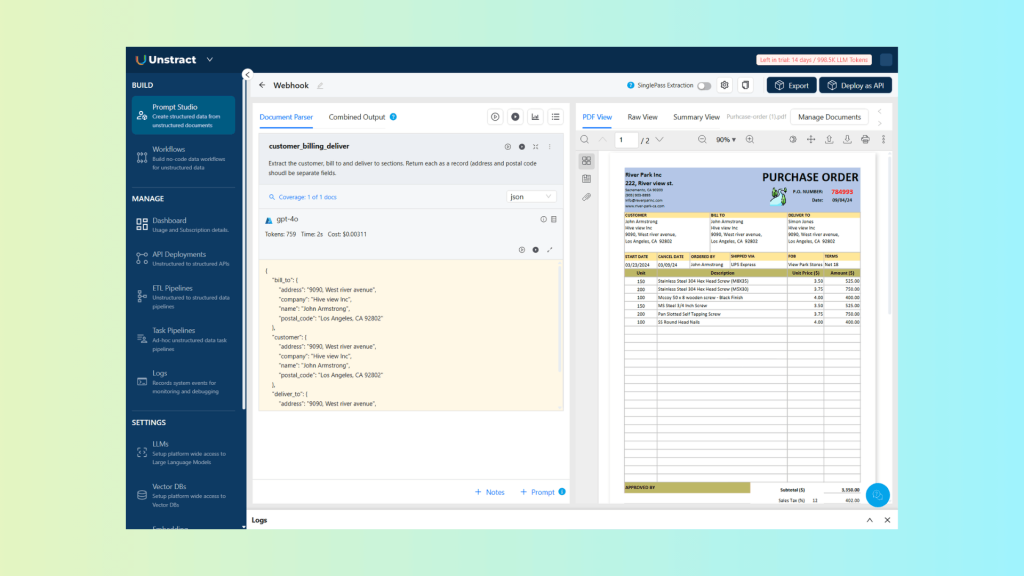
Make sure the return format is set to JSON. You can enable the new webhook feature by clicking the three vertical dots in the top-right corner of the prompt section, then activating it and entering your webhook endpoint:
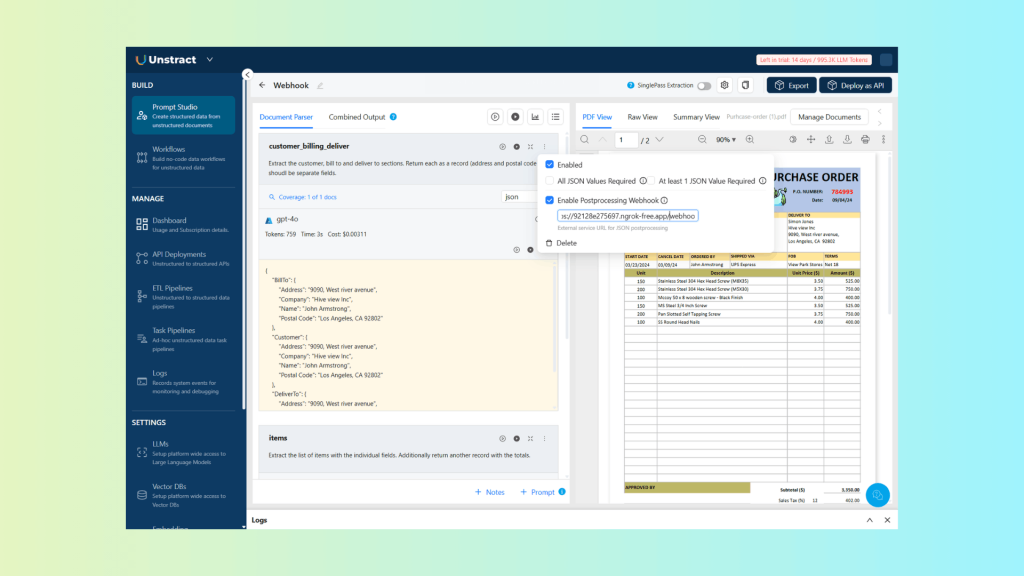
For reference, here is the resulting JSON from the previous prompt execution:
{
    "bill_to": {
        "address": "9090, West river avenue",
        "company": "Hive view Inc",
        "name": "John Armstrong",
        "postal_code": "Los Angeles, CA 92802"
    },
    "customer": {
        "address": "9090, West river avenue",
        "company": "Hive view Inc",
        "name": "John Armstrong",
        "postal_code": "Los Angeles, CA 92802"
    },
    "deliver_to": {
        "address": "9090, West river avenue",
        "company": "Hive view Inc",
        "name": "Simon Jones",
        "postal_code": "Los Angeles, CA 92802"
    }
}
Post-Processing Webhook Actions
Let’s start by looking at validation and cleaning, beginning with the customer data:
def compare_addresses(bill_to: Dict[str, Any], deliver_to: Dict[str, Any]) -> bool:
    """
    Compare billing and delivery addresses.
    Returns True if addresses match, False otherwise.
    """
    bill_address = bill_to.get("address", "").strip().lower()
    bill_postal = bill_to.get("postal_code", "").strip().lower()

    deliver_address = deliver_to.get("address", "").strip().lower()
    deliver_postal = deliver_to.get("postal_code", "").strip().lower()

    addresses_match = (bill_address == deliver_address and bill_postal == deliver_postal)
    logger.info(f"Addresses match: {addresses_match}")

    return addresses_match
This function, compare_addresses, takes two dictionaries representing billing and delivery addresses and checks whether they match. It compares both the address and postal_code fields after stripping whitespace and converting to lowercase.
For the enrichment example, we can use a CSV file containing customer bank information and look up the relevant details to include in the processed data:
def get_customer_billing_info(bill_to: Dict[str, Any]) -> Dict[str, Any]:
    """
    Get customer billing info.
    Returns a dictionary with customer billing info.
    """

    # Read customers billing info from csv file
    with open('customers_billing.csv', 'r') as file:
        reader = csv.reader(file)
        for row in reader:
            # Skip header row
            if row[0] == "contact_name":
                continue
            # Check if company matches
            if row[1].lower().strip() == bill_to.get("company", "").lower().strip():
                return {
                    "contact_name": row[0],
                    "company": row[1],
                    "bank_name": row[2],
                    "bank_account_number": row[3]
                }
    return None
This function, get_customer_billing_info, looks up a customer’s billing information from a CSV file. It reads through customers_billing.csv, finds the row matching the company in the bill_to dictionary, and returns a dictionary containing the customer’s contact name, company, bank name, and bank account number. If no match is found, it returns None.
For reference, a CSV file could be defined like this:
contact_name,company,bank_name,bank_account_number
Alice Johnson,Acme Corp,Bank of America,123456789
Bob Smith,Global Supplies,Citi Bank,987654321
Carol Lee,Tech Solutions,Wells Fargo,456789123
John Financial,Hive view Inc,Bank of America,1234567890
Each row represents a customer, with columns for the contact name, company, bank name, and bank account number.
This allows the webhook to add additional context, such as bank account numbers, bank names, or routing codes, directly into the extracted JSON, making it ready for downstream processing or integration.
Let’s now look at the complete source code for the webhook, implemented as a FastAPI application:
import json
from fastapi import FastAPI, Request, HTTPException
from fastapi.responses import JSONResponse
import uvicorn
import logging
from typing import Dict, Any
import csv

# Configure logging
logging.basicConfig(level=logging.INFO)
logger = logging.getLogger(__name__)


app = FastAPI(title="Unstract PostProcessing Webhook", version="1.0.0")


def compare_addresses(bill_to: Dict[str, Any], deliver_to: Dict[str, Any]) -> bool:
    """
    Compare billing and delivery addresses.
    Returns True if addresses match, False otherwise.
    """
    bill_address = bill_to.get("address", "").strip().lower()
    bill_postal = bill_to.get("postal_code", "").strip().lower()

    deliver_address = deliver_to.get("address", "").strip().lower()
    deliver_postal = deliver_to.get("postal_code", "").strip().lower()

    addresses_match = (bill_address == deliver_address and bill_postal == deliver_postal)
    logger.info(f"Addresses match: {addresses_match}")

    return addresses_match

def get_customer_billing_info(bill_to: Dict[str, Any]) -> Dict[str, Any]:
    """
    Get customer billing info.
    Returns a dictionary with customer billing info.
    """

    # Read customers billing info from csv file
    with open('customers_billing.csv', 'r') as file:
        reader = csv.reader(file)
        for row in reader:
            # Skip header row
            if row[0] == "contact_name":
                continue
            # Check if company matches
            if row[1].lower().strip() == bill_to.get("company", "").lower().strip():
                return {
                    "contact_name": row[0],
                    "company": row[1],
                    "bank_name": row[2],
                    "bank_account_number": row[3]
                }
    return None


@app.post("/webhook/customer")
async def receive_webhook_customer(request: Request):
    """
    Receive webhook POST requests

    This endpoint accepts webhook payloads, compares billing and delivery addresses,
    and returns the structured output with an additional field indicating if addresses match.
    """
    try:
        # Get the raw body as bytes
        body = await request.body()

        # Try to parse as JSON
        try:
            payload = await request.json()
            logger.info(f"Received webhook with JSON payload: {payload}")
        except Exception:
            # If not JSON, log as text
            payload = body.decode('utf-8')
            logger.info(f"Received webhook with text payload: {payload}")
            raise HTTPException(status_code=400, detail="Invalid JSON payload")

        # Extract structured_output from payload
        structured_output = payload.get("structured_output", {})

        # Get bill_to and deliver_to addresses
        bill_to = structured_output.get("bill_to", {})
        deliver_to = structured_output.get("deliver_to", {})

        # Compare addresses and set field for address match
        addresses_match = compare_addresses(bill_to, deliver_to)
        structured_output["billing_delivery_address_match"] = addresses_match

        # Get customer billing info and set field for customer billing info
        customer_billing_info = get_customer_billing_info(bill_to)
        structured_output["customer_billing_info"] = customer_billing_info

        # Prepare response with structured_output with the additional fields
        response_data = {
            "structured_output": structured_output,
            "highlight_data": payload.get("highlight_data", [])
        }

        # Return response
        return JSONResponse(
            status_code=200,
            content=response_data
        )
    except Exception as e:
        logger.error(f"Error processing webhook: {str(e)}")
        raise HTTPException(status_code=500, detail=f"Error processing webhook: {str(e)}")

if __name__ == "__main__":
    uvicorn.run(app, host="0.0.0.0", port=8000)
It includes the helper functions to:
- Compare addresses (compare_addresses) between billing and delivery for validation.
- Enrich customer data (get_customer_billing_info) by looking up bank info from a CSV file.
The endpoint receives extracted customer data, validates addresses, enriches with billing info, and returns the structured output.
Final Output
We’ve reviewed the Prompt Studio prompts, the extraction process, and the webhook processing code with its endpoints.
Now, let’s look at the results produced when the extraction runs and the post-processing webhook is invoked, and how the final, enriched output differs from the raw Prompt Studio response:
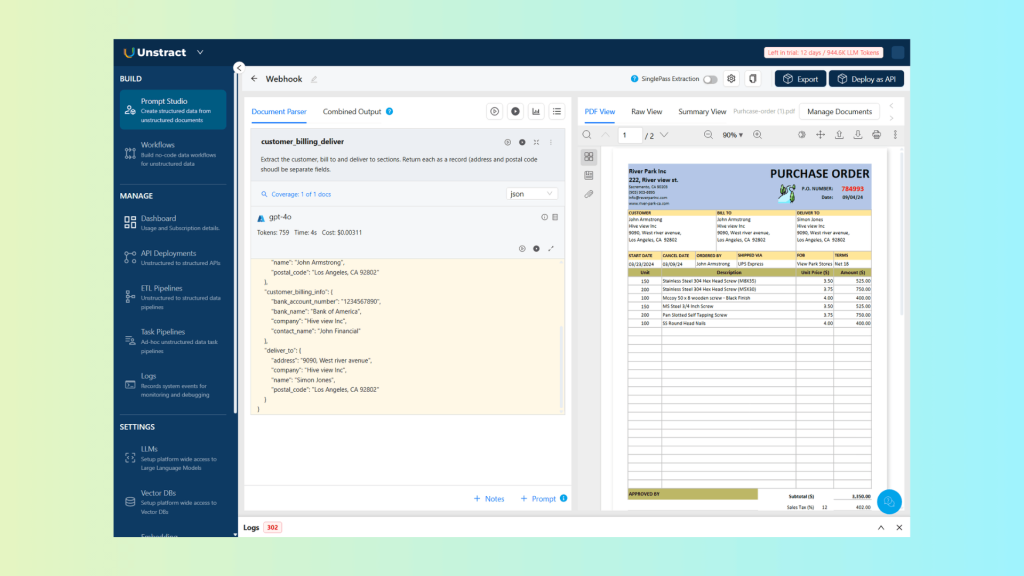
The JSON returned after the post-processing webhook has been applied:
{
    "bill_to": {
        "address": "9090, West river avenue",
        "company": "Hive view Inc",
        "name": "John Armstrong",
        "postal_code": "Los Angeles, CA 92802"
    },
    "billing_delivery_address_match": true,
    "customer": {
        "address": "9090, West river avenue",
        "company": "Hive view Inc",
        "name": "John Armstrong",
        "postal_code": "Los Angeles, CA 92802"
    },
    "customer_billing_info": {
        "bank_account_number": "1234567890",
        "bank_name": "Bank of America",
        "company": "Hive view Inc",
        "contact_name": "John Financial"
    },
    "deliver_to": {
        "address": "9090, West river avenue",
        "company": "Hive view Inc",
        "name": "Simon Jones",
        "postal_code": "Los Angeles, CA 92802"
    }
}
As you can see, the processed output now includes additional fields representing the address match and customer banking information, enhancing the extracted data with validation and enrichment results.
Imagine uploading a messy PDF with multiple documents and instantly getting back clean, perfectly labeled files.
Most PDF splitters work only on predictable layouts, like fixed page ranges or chapters. Real business PDFs are different. A single file might include a loan form, KYC documents, payslips, and tax proofs, all in varying order and length. Traditional tools fail because there’s no consistent structure.
With an intelligent splitter, that same mixed PDF can be automatically separated into individual, clearly labeled documents, no manual rules, no page guessing, no trial and error.
Use Case 2 – Bank Statement Validation and Transform
Document
For this example, we will use a bank statement document:
What Prompt Studio Extracts
Now, let’s define the prompt to extract the bank statement transaction list details:
| Extract the list of items with the individual fields (all lower-case field names) in a record ‘items’. Additionally, return another field with the Purchases and Advances as ‘total’. |
Which produces the following results:
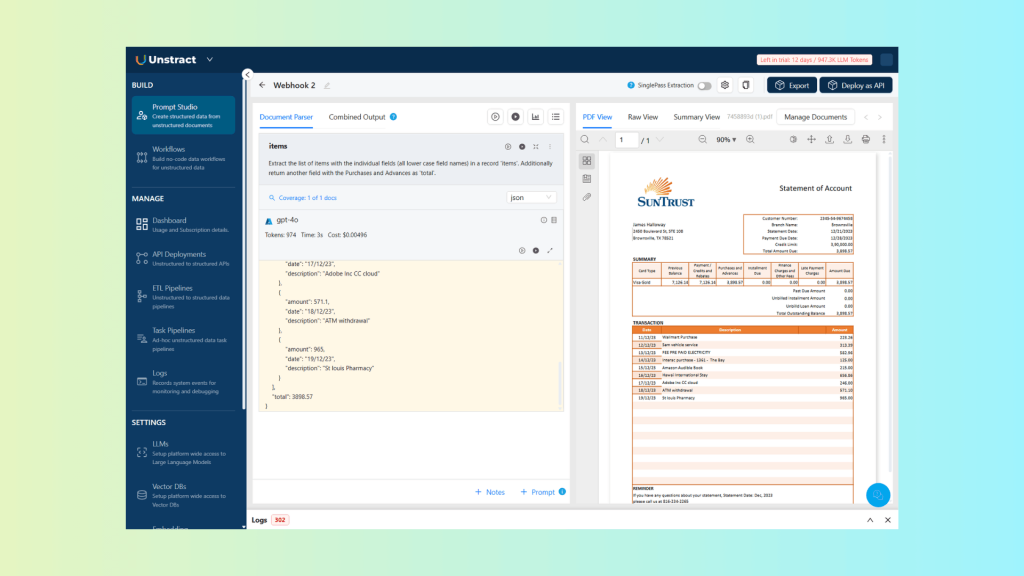
And the corresponding JSON:
{
    "items": [
        {
            "amount": 223.26,
            "date": "11/12/23",
            "description": "Wallmart Purchase"
        },
        {
            "amount": 313.39,
            "date": "12/12/23",
            "description": "Sam vehicle service"
        },
        {
            "amount": 582.96,
            "date": "13/12/23",
            "description": "FEE PRE PAID ELECTRICITY"
        },
        {
            "amount": 125,
            "date": "14/12/23",
            "description": "Interac purchase - 1361 - The Bay"
        },
        {
            "amount": 215,
            "date": "15/12/23",
            "description": "Amazon Audible Book"
        },
        {
            "amount": 656.86,
            "date": "16/12/23",
            "description": "Hawai International Stay"
        },
        {
            "amount": 246,
            "date": "17/12/23",
            "description": "Adobe Inc CC cloud"
        },
        {
            "amount": 571.1,
            "date": "18/12/23",
            "description": "ATM withdrawal"
        },
        {
            "amount": 965,
            "date": "19/12/23",
            "description": "St louis Pharmacy"
        }
    ],
    "total": 3898.57
}
You can enable the webhook for this prompt by following the same process as before. Webhook configuration is defined per prompt.
Post-Processing Webhook Actions
For the individual transactions, we can perform validation by checking that the totals are correct:
def calculate_and_verify_totals(structured_output: Dict[str, Any]) -> Dict[str, Any]:
    """
    Calculate totals from items and verify against provided totals.
    Returns a dictionary with calculated totals and verification result.
    """
    items = structured_output.get("items", [])

    # Calculate line item totals
    calculated_total = 0.0

    for item in items:
        try:
            # Get amount
            amount = item.get("amount", 0)

            # Handle string values that might contain currency symbols or commas
            amount = float(str(amount).replace(",", "").replace("$", "").strip())

            # Calculate line total
            calculated_total += amount
        except (ValueError, TypeError) as e:
            logger.warning(f"Error processing item {item}: {str(e)}")
            continue

    # Round subtotal
    calculated_total = round(calculated_total, 2)
    logger.info(f"Calculated total: {calculated_total}")

    # Get provided subtotal
    provided_total = structured_output.get("total", {})
    logger.info(f"Provided total: {provided_total}")

    # Check if subtotal is correct
    is_total_correct = calculated_total == provided_total
    logger.info(f"Total is correct: {is_total_correct}")

    return {
        "totals_correct": is_total_correct,
        "calculated_total": calculated_total,
        "provided_total": provided_total
    }
This function, calculate_and_verify_totals, computes the subtotal of all transactions and compares it against the provided subtotal. It handles field names, removes currency symbols or commas, and sums each line item’s total.
For transform, here’s an example of formatting the amounts as currency:
def format_currency_items_totals(structured_output: Dict[str, Any]):
    """
    Format currency items.
    Returns a list of formatted items.
    """

    # Define currency
    currency = "USD"

    # Format items
    items = structured_output.get("items", [])
    for item in items:
        item["amount"] = f"{item["amount"]:.2f} {currency}"

    # Format totals
    total = structured_output.get("total", {})
    total = f"{total:.2f} {currency}"

    # Set formatted items and totals in structured_output
    structured_output["items"] = items
    structured_output["total"] = total
    return structured_output
This function, format_currency_items_totals, formats all transaction amounts and total in as currency strings. It converts amount for each item, as well as total, into a consistent currency format (e.g., 12.34 USD).
Combining all the previous code examples, the full source code is:
import json
from fastapi import FastAPI, Request, HTTPException
from fastapi.responses import JSONResponse
import uvicorn
import logging
from typing import Dict, Any
import csv

# Configure logging
logging.basicConfig(level=logging.INFO)
logger = logging.getLogger(__name__)


app = FastAPI(title="Unstract PostProcessing Webhook", version="1.0.0")


def calculate_and_verify_totals(structured_output: Dict[str, Any]) -> Dict[str, Any]:
    """
    Calculate totals from items and verify against provided totals.
    Returns a dictionary with calculated totals and verification result.
    """
    items = structured_output.get("items", [])

    # Calculate line item totals
    calculated_total = 0.0

    for item in items:
        try:
            # Get amount
            amount = item.get("amount", 0)

            # Handle string values that might contain currency symbols or commas
            amount = float(str(amount).replace(",", "").replace("$", "").strip())

            # Calculate line total
            calculated_total += amount
        except (ValueError, TypeError) as e:
            logger.warning(f"Error processing item {item}: {str(e)}")
            continue

    # Round subtotal
    calculated_total = round(calculated_total, 2)
    logger.info(f"Calculated total: {calculated_total}")

    # Get provided subtotal
    provided_total = structured_output.get("total", {})
    logger.info(f"Provided total: {provided_total}")

    # Check if subtotal is correct
    is_total_correct = calculated_total == provided_total
    logger.info(f"Total is correct: {is_total_correct}")

    return {
        "totals_correct": is_total_correct,
        "calculated_total": calculated_total,
        "provided_total": provided_total
    }


def format_currency_items_totals(structured_output: Dict[str, Any]):
    """
    Format currency items.
    Returns a list of formatted items.
    """

    # Define currency
    currency = "USD"

    # Format items
    items = structured_output.get("items", [])
    for item in items:
        item["amount"] = f"{item["amount"]:.2f} {currency}"

    # Format totals
    total = structured_output.get("total", {})
    total = f"{total:.2f} {currency}"

    # Set formatted items and totals in structured_output
    structured_output["items"] = items
    structured_output["total"] = total
    return structured_output


@app.post("/webhook/items")
async def receive_webhook_items(request: Request):
    """
    Receive webhook POST requests for items

    This endpoint accepts webhook payloads, calculates totals from items,
    verifies them against provided totals, and returns the result.
    """
    try:
        # Get the raw body as bytes
        body = await request.body()

        # Try to parse as JSON
        try:
            payload = await request.json()
            logger.info(f"Received webhook with JSON payload: {payload}")
        except Exception:
            # If not JSON, log as text
            payload = body.decode('utf-8')
            logger.info(f"Received webhook with text payload: {payload}")
            raise HTTPException(status_code=400, detail="Invalid JSON payload")

        # Extract structured_output from payload
        structured_output = payload.get("structured_output", {})

        # Calculate and verify totals
        totals_verification = calculate_and_verify_totals(structured_output)
        structured_output["totals_verification"] = {
            "totals_correct": totals_verification["totals_correct"],
            "calculated_total": totals_verification["calculated_total"],
            "provided_total": totals_verification["provided_total"]
        }

        # Format currency items and totals
        formatted_structured_output = format_currency_items_totals(structured_output)

        # Prepare response with the formatted structured_output (also contains the totals verification)
        response_data = {
            "structured_output": formatted_structured_output,
            "highlight_data": payload.get("highlight_data", [])
        }

        # Return response
        return JSONResponse(
            status_code=200,
            content=response_data
        )
    except Exception as e:
        logger.error(f"Error processing webhook: {str(e)}")
        raise HTTPException(status_code=500, detail=f"Error processing webhook: {str(e)}")


if __name__ == "__main__":
    uvicorn.run(app, host="0.0.0.0", port=8000)
It receives structured JSON from Prompt Studio, recalculates the total amount by summing item values, and verifies it against the extracted total to detect inconsistencies.
The service then formats monetary values as currency, enriches the output with a totals_verification section, and returns a clean, production-ready JSON response.
This keeps business logic deterministic, testable, and fully decoupled from the prompt itself.
Final Output
Executing the prompt and invoking the post-processing webhook returns the following result:
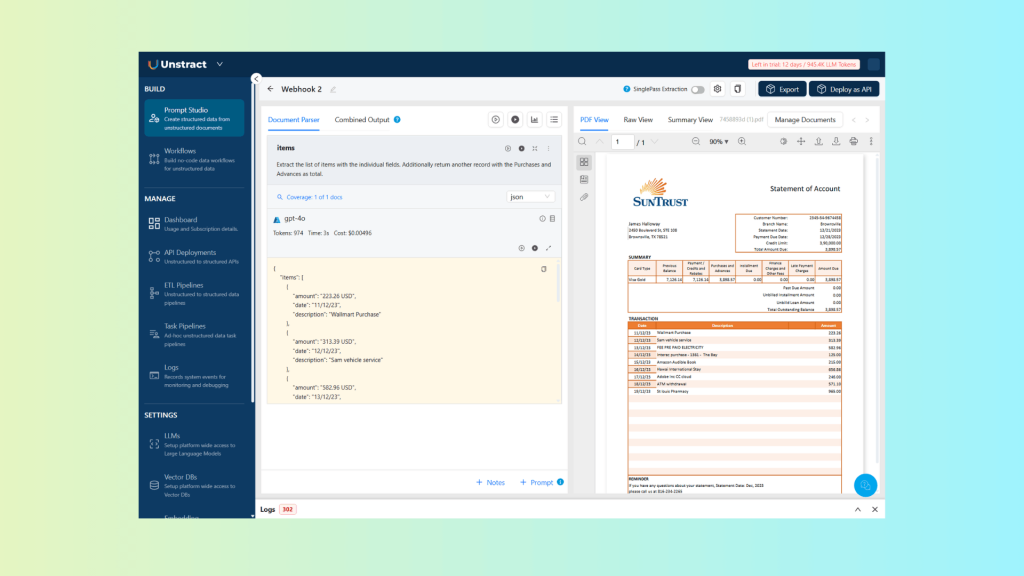
With the corresponding JSON:
{
    "items": [
        {
            "amount": "223.26 USD",
            "date": "11/12/23",
            "description": "Wallmart Purchase"
        },
        {
            "amount": "313.39 USD",
            "date": "12/12/23",
            "description": "Sam vehicle service"
        },
        {
            "amount": "582.96 USD",
            "date": "13/12/23",
            "description": "FEE PRE PAID ELECTRICITY"
        },
        {
            "amount": "125.00 USD",
            "date": "14/12/23",
            "description": "Interac purchase - 1361 - The Bay"
        },
        {
            "amount": "215.00 USD",
            "date": "15/12/23",
            "description": "Amazon Audible Book"
        },
        {
            "amount": "656.86 USD",
            "date": "16/12/23",
            "description": "Hawai International Stay"
        },
        {
            "amount": "246.00 USD",
            "date": "17/12/23",
            "description": "Adobe Inc CC cloud"
        },
        {
            "amount": "571.10 USD",
            "date": "18/12/23",
            "description": "ATM withdrawal"
        },
        {
            "amount": "965.00 USD",
            "date": "19/12/23",
            "description": "St louis Pharmacy"
        }
    ],
    "total": "3898.57 USD",
    "totals_verification": {
        "calculated_total": 3898.57,
        "provided_total": 3898.57,
        "totals_correct": true
    }
}
As you can see, the currency values are properly formatted, and an additional total verification record is added with the calculated amounts and validation result.
This approach allows you not only to validate the extracted data, but also to transform it outside of the prompt itself, keeping prompts clean while enforcing reliable, production-grade logic.
Feature 2: Custom Data Variables
Custom Data allows developers to inject runtime business context into Prompt Studio without modifying the prompt itself, cleanly separating extraction logic from business rules and configuration.
In this model, the prompt defines how to extract information, what fields to look for and how to interpret the document structure, while Custom Data defines what conditions apply right now, such as thresholds, expectations, policies, or workflow intent.
Custom Data is passed at runtime as a simple JSON object, allowing the same prompt to behave differently depending on the client, region, document purpose, or processing scenario, all without duplicating or rewriting prompt logic.
By moving variability into data instead of text, Custom Data eliminates prompt sprawl and enables scalable, multi-tenant document workflows that are easier to maintain and evolve.
A helpful way to reframe Custom Data is to shift the question from “who is this document about?” to “why is this document being processed?”. Rather than capturing personal attributes or static metadata, Custom Data represents the business context that determines how a document should be interpreted in a given workflow.
In practice, it encodes factors such as business intent, risk profile, and the applicable policy or rule set, directly influencing validation, thresholds, comparisons, and decisions, all without altering the underlying extraction logic.
For more information, check out the Unstract Custom Data Documentation.
Use Case 1 – Air Shipment Validation
Document
As a document for the air shipment validation, we will use this airway bill example:
Custom Data
Let’s assume we want to use custom data to validate whether the cargo weight falls within predefined limits for a specific customer account and route. We could define data like this:
{
  "account_number": "HY73221",
  "route": {
    "origin": "New York",
    "destination": "London"
  },
  "thresholds": {
    "minimum": 50,
    "maximum": 80,
"unit": "Kg"
  }
}
Prompt Studio
In Prompt Studio, you can define custom data by following these steps:
- Open your Prompt Studio project
- Click the Settings icon (gear) in the toolbar
- Select Custom Data from the menu
From there, you can add and manage the custom data that will be available to your prompts:
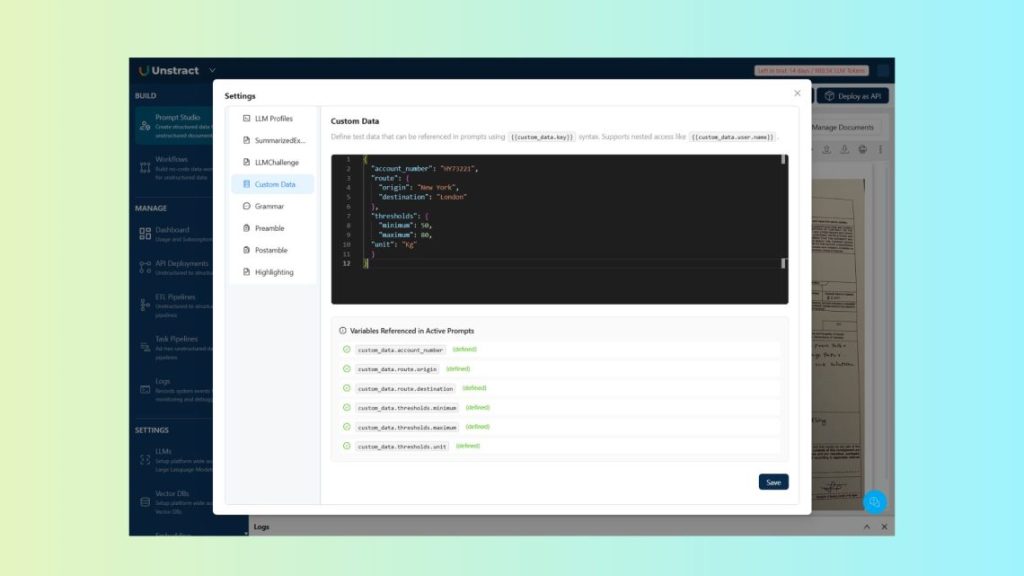
This definition can be used for testing within Prompt Studio. When using the API, you can pass the same information via the custom_data parameter in your request to apply it at runtime.
Let’s consider the following prompt, which leverages Custom Data to process and validate the information in the document:
| Extract the total shipment weight for customer {{custom_data.account_number}} in the route from {{custom_data.route.origin}} to {{custom_data.route.destination}}. The total weight should be between {{custom_data.thresholds.minimum}} and {{custom_data.thresholds.maximum}} of unit {{custom_data.thresholds.unit}}. Return field ‘is_between_thresholds’ with True or False depending on the outcome of the data. |
This generates the following output:
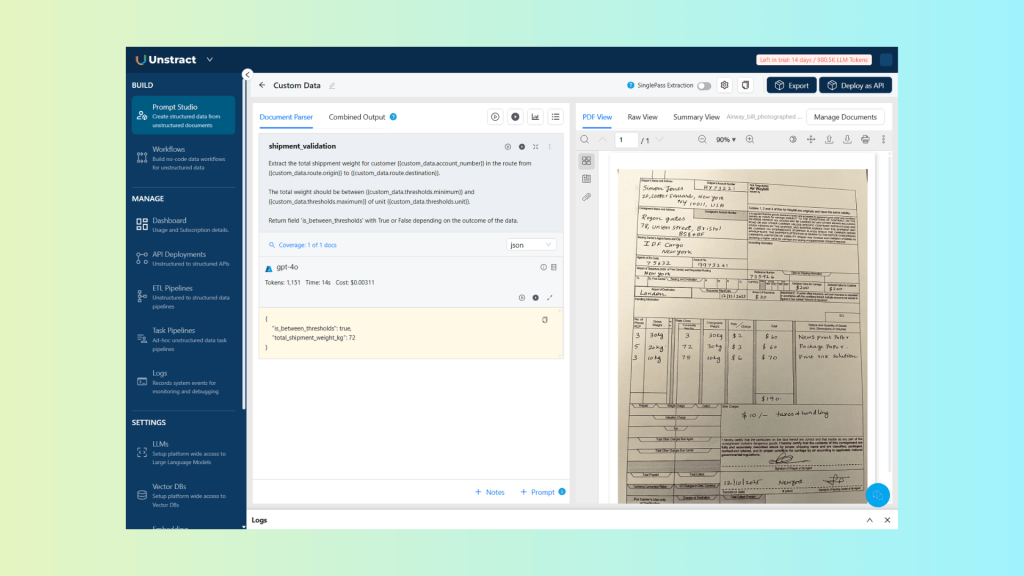
And corresponding JSON:
{
    "is_between_thresholds": true,
    "total_shipment_weight_kg": 72
}
As you can see, by using Custom Data, the validation logic is kept separate from the prompt itself and can be applied dynamically, allowing processing to adapt to specific customers, routes, or any other contextual data without modifying the extraction logic.
Use Case 2 – Medical Document
Document
Let’s look at a second example of using Custom Data, this time with a medical document:
Custom Data
The advantage of using Custom Data is that we can “override” the default reference ranges defined in the report. For example, based on a patient’s history, doctors may expect different thresholds than the standard ranges.
In this case, we can define a custom metric to reflect those expectations:
{
  "metric_check": {
    "name": "Hemoglobin",
    "expected_min": 13.0,
    "expected_max": 17.0,
    "unit": "g/dL"
    }
}
Prompt Studio
As described before, let’s add this Custom Data to the Settings of the Prompt Studio project:

Reminder: when using the API, you can pass the same information via the custom_data parameter in your request to apply it dynamically at runtime.
Let’s define the prompt that uses the custom metric to extract and return a properly formatted output:
| Extract the value and unit for {{custom_data.metric_check.name}} from the lab report. Compare the extracted value against the expected provided range: {{custom_data.metric_check.expected_min}} to {{custom_data.metric_check.expected_max}} of unit{{custom_data.metric_check.unit}}. Record a field name ‘is_expected’ with only one of these possibilities: – below_expected – within_expected – above_expected |
This generates the following output:
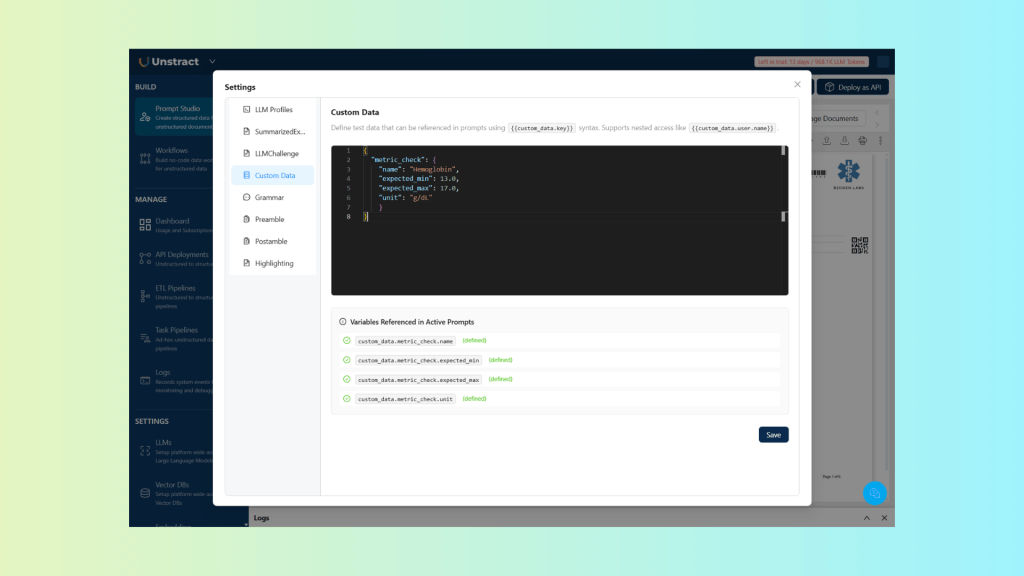
And corresponding JSON:
{
    "Hemoglobin": {
        "unit": "gm/dL",
        "value": 12.4
    },
    "is_expected": "below_expected"
}
As you can see, by using Custom Data, medical professionals can adjust the expected metrics for a report based on a patient’s history, enabling more accurate diagnostics.
This clearly demonstrates the advantages of separating extraction logic from workflow-specific rules using Custom Data.
Feature 3: Prompt Chaining
Prompt Chaining is a technique for building multi-stage document workflows by connecting multiple prompts in sequence. Instead of treating each extraction as an isolated step, prompts are executed one after another, where the output of one prompt becomes the input to the next.
This approach enables workflows that can reason progressively over documents. Earlier extraction results can influence what happens downstream, allowing for conditional logic, cross-document validation, and multi-stage analysis without reprocessing entire documents or duplicating prompts.
By breaking complex logic into smaller, focused steps, Prompt Chaining makes document workflows easier to understand, more reliable, and better suited for real-world scenarios where decisions depend on earlier results.
For more information, check out the Unstract Prompt Chaining Documentation.
Data Flow Patterns
Prompt Chaining supports two primary patterns for passing data between prompts, depending on whether the output needs additional processing before being reused.
Direct Value Passing: In this pattern, the raw output of a prompt is passed directly into the next prompt using the syntax {{prompt_key}}. This is ideal when the extracted value is already in the required format and can be reused as-is, for example, passing a name, identifier, or simple field between prompts.
Processed Value Passing: In cases where the output needs validation, normalization, or enrichment before being reused, Prompt Chaining supports processed value passing. Here, the prompt output is first sent to a post-processing webhook and then injected into the next prompt using the syntax {{[prompt_key] <post_processing_url>}}. This allows developers to apply deterministic logic between prompt stages while keeping the overall workflow modular and flexible.
Use Case 1 – Loan Application + KYC Verification
Document
For this example, we will use a loan application document to illustrate the use of Direct Value Passing:
Prompts
First, we begin by extracting the applicant’s name from the document:
| Extract the applicant’s full name from the loan application. Reply only with the name. |
This prompt was defined with the key applicant_name:
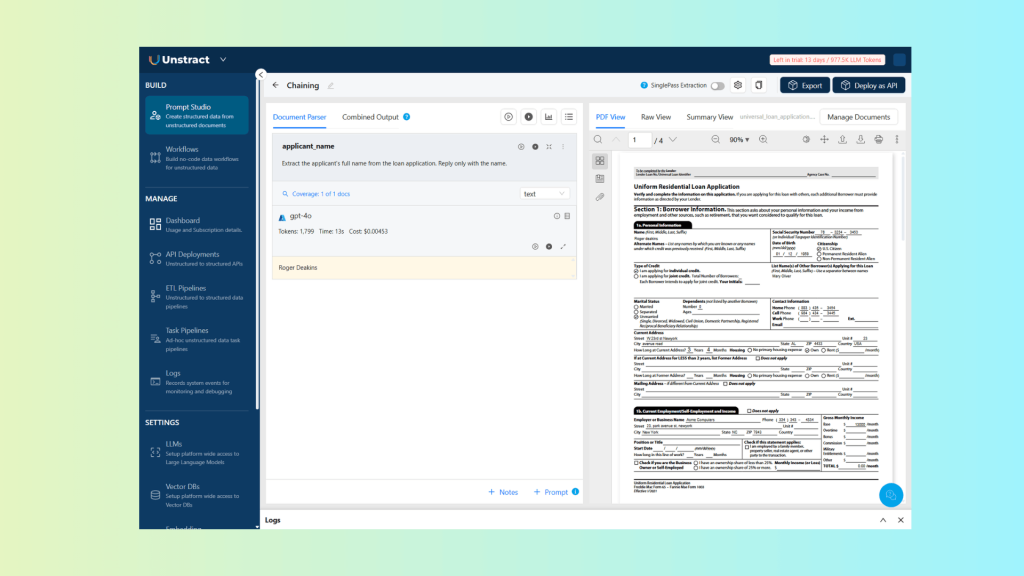
Which returns the following result:
| Roger Deakins |
We can now reuse this extracted value in the second prompt:
| Check if the name “{{applicant_name}}” appears in the driver license documents on page 2 and 3. Reply with a list of records composed by ‘page’ and ‘match_type’ fields. For the ‘match_type’ field return only one of these values: – exact_match – partial_match – no_match |
We define the prompt key as kyc_name_match:

The resulting JSON looks like this:
[
    {
        "match_type": "exact_match",
        "page": 2
    },
    {
        "match_type": "no_match",
        "page": 3
    }
]
As you can see, by reusing the applicant name extracted in the first prompt, we can automatically validate the driver’s license details on pages 2 and 3, ensuring they correctly match the applicant.
This approach requires no manual intervention and is fully reusable across different loan application documents and workflows.
Use Case 2 – Bill Of Lading + Payment Lookup
Document
For this example, we will use a bill of lading document to illustrate the use of Processed Value Passing:
Prompts
Let’s define a prompt to extract the booking number and amount:
| Extract the booking no and cod amount. |
This prompt was defined with the key booking:
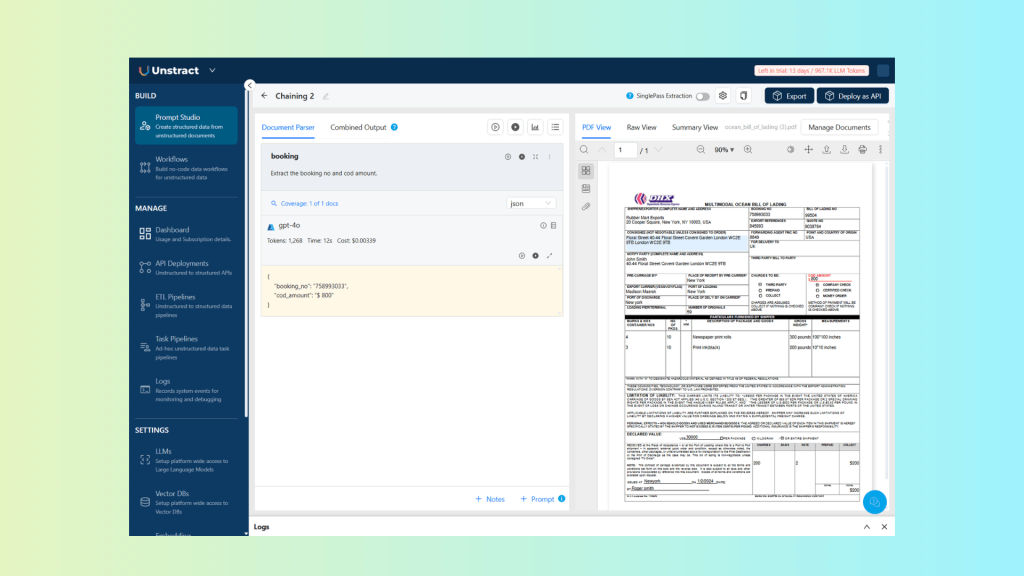
Which returns the following result:
{
    "booking_no": "758993033",
    "cod_amount": "$ 800"
}
We can now reuse this extracted value in the second prompt, using a webhook to process the values:
| print the result {{[booking]https://unstract-webhook.developer-service.blog/webhook/amount_due}} |
We define the prompt key as amount_due:

The resulting JSON looks like this:
{
    "amount_due": 450,
    "amount_paid": 350,
    "booking_number": "758993033",
    "cod_amount": 800,
    "payment_date": "2026-01-16"
}
As shown in this example, prompt chaining with processed value passing allows you to combine the output of earlier prompts with data retrieved from external systems.
The webhook exposes a single endpoint at /webhook/amount_due (source code below), which accepts POST requests containing the shipment billing data. When a webhook payload is received, the processing flow is as follows:
- The webhook extracts the booking_no and cod_amount.
- It looks up the booking number in the bill_lading_payments.csv file to check for existing payment records.
- If a match is found, it retrieves the corresponding amount_paid and payment_date.
- The outstanding balance is then calculated as amount_due = cod_amount – amount_paid.
This pattern provides a high degree of flexibility for validating and enriching extracted data, while keeping prompts generic, reusable, and easy to maintain.
Webhook Source Code
The webhook referenced above is implemented using the following source code:
import json
from fastapi import FastAPI, Request, HTTPException
from fastapi.responses import JSONResponse
import uvicorn
import logging
from typing import Dict, Any
import csv

# Configure logging
logging.basicConfig(level=logging.INFO)
logger = logging.getLogger(__name__)


app = FastAPI(title="Unstract PostProcessing Webhook", version="1.0.0")


@app.post("/webhook/amount_due")
async def receive_webhook_amount_due(request: Request):
    """
    Receive webhook POST requests for amount due

    This endpoint accepts webhook payloads, calculates amount due from totals,
    and returns the result.
    """
    try:
        # Get the raw body as bytes
        body = await request.body()

        # Try to parse as JSON
        try:
            payload = await request.json()
            logger.info(f"Received webhook with JSON payload: {payload}")
        except Exception:
            # If not JSON, log as text
            payload = body.decode('utf-8')
            logger.info(f"Received webhook with text payload: {payload}")
            raise HTTPException(status_code=400, detail="Invalid JSON payload")

        # Convert payload to dictionary
        payload = json.loads(payload)

        # Get booking number and cod amount
        booking_number = payload.get("booking_no", "")
        cod_amount = payload.get("cod_amount", 0)

        # Read bill lading payments from csv file
        amount_paid = 0
        payment_date = ""
        with open('bill_lading_payments.csv', 'r') as file:
            reader = csv.reader(file)
            for row in reader:
                # Skip header row
                if row[0] == "booking_no":
                    continue
                # Check if booking number matches
                if row[0] == booking_number:
                    amount_paid = float(row[1].replace("$", "").replace(",", "").strip())
                    payment_date = row[2]
                    break

        # Calculate amount due
        cod_amount = float(cod_amount.replace("$", "").replace(",", "").strip())
        amount_due = cod_amount - amount_paid
        response_data = {
            "booking_number": booking_number,
            "cod_amount": cod_amount,
            "amount_due": amount_due,
            "amount_paid": amount_paid,
            "payment_date": payment_date
        }

        # Return response
        return JSONResponse(
            status_code=200,
            content=response_data
        )
    except Exception as e:
        logger.error(f"Error processing webhook: {str(e)}")
        raise HTTPException(status_code=500, detail=f"Error processing webhook: {str(e)}")


if __name__ == "__main__":
    uvicorn.run(app, host="0.0.0.0", port=8000)
The results were derived from data stored in a CSV file, which simulates an integration with external systems:
| booking_no,amount_paid,payment_date 1234567890,1000.00,2026-01-19 3253252352,200.00,2026-01-10 4365347654,300.00,2026-01-05 758993033,350.00,2026-01-16 |
Why This Approach Scales in Real Systems
This approach scales because it reduces duplication and cleanly isolates change. Instead of creating new prompts for every variation, teams maintain a smaller set of stable prompts and control behaviour through data and workflow logic.
Key reasons it scales well:
- Fewer prompts: One prompt can serve multiple clients, regions, and use cases by injecting runtime context instead of duplicating logic.
- Smaller, composable logic blocks: Extraction, validation, transformation, and orchestration are separated, making each piece easier to build, test, and maintain.
- Clear separation of concerns: Prompts extract data, Custom Data defines context, webhooks enforce rules, and prompt chains handle flow control.
This design also makes change easy to absorb:
- New clients are onboarded by passing different Custom Data, not by rewriting prompts
- New rules are added through webhook logic or configuration updates
- New document formats can be supported without breaking downstream workflows
The result is a document automation system that remains flexible as complexity grows, instead of becoming harder to manage over time.
Conclusion: From Extraction to Intelligent Workflows
These features move Unstract beyond traditional OCR and basic data extraction. Instead of treating documents as isolated inputs, Unstract enables intelligent workflows where extraction, context, validation, and decision-making work together as a single system.
By combining Prompt Studio, Custom Data, Post-Processing Webhooks, and Prompt Chaining, teams can build production-grade document workflows that are flexible, reliable, and easy to evolve.
Developers retain full control over business logic and integrations, while workflows automatically adapt to new formats, rules, and use cases without introducing unnecessary complexity.
If you’re exploring how to design scalable document automation, the best way to understand these concepts is to try them yourself.
Start with the provided sample documents, experiment with different configurations, and build your own adaptive workflows to see how Unstract behaves in real-world scenarios.